Collada Importer tS7.61

free scripts, plugins, models, textures
User avatar
clintonman
Captain
Posts: 5659
Joined: 21 May 2009, 21:08
Type the number ten into the box: 0
Location: California

Collada Importer tS7.61

Post by clintonman »

I wrote a Collada import plugin/script for truespace 7.61 full and standalone versions. It reads mesh and animation information. It does not read skeleton or materials information. You can find it here:

http://www.clintons3d.com/plugins/trues ... index.html"

You should also know that it does not store information in standard truespace form. All transformations form a chain of nodes to the final item. The image shows the nodes associated with a camera imported from Lightwave.
colladaChain.jpg
This system is used to represent hierarchies, maintain the rotation orders and to allow for those cases where collada assigns more than 3 rotations(xyz) or more than one translation to an object.
Clinton Reese

http://clintons3d.com
User avatar
RAYMAN
Captain
Posts: 2547
Joined: 21 May 2009, 18:56

Re: Collada Importer tS7.61

Post by RAYMAN »

Now thats great ! Thank you I will give it a try !
Peter
v3rd3
Lieutenant Commander
Posts: 1191
Joined: 21 May 2009, 20:04

Re: Collada Importer tS7.61

Post by v3rd3 »

Wow.... downloading...

Thank you Santa Clinton....
User avatar
Tiles
Master Chief Petty Officer
Posts: 401
Joined: 27 May 2009, 08:34

Re: Collada Importer tS7.61

Post by Tiles »

Santa Clinton, haha. Err, thank you Santa Clinton :D
Free Gamegraphics, Freeware Games http://reinerstilesets.de
User avatar
Prodigy
Site Admin
Posts: 957
Joined: 21 May 2009, 14:46
Type the number ten into the box: 0
Location: Uruguay

Re: Collada Importer tS7.61

Post by Prodigy »

HOHOHO!!! :bananaclaus:
๑۩۞۩๑ prodigy ๑۩۞۩๑
Peter
Senior Chief Petty Officer
Posts: 170
Joined: 18 Apr 2010, 15:18
Type the number ten into the box: 0
Location: Texas

Re: Collada Importer tS7.61

Post by Peter »

Hey, clintonman.

Thanks for making this. I tested it with a model exported from MeshLab and it opened OK. Can it import vertex colors as well?
If not, could you add this feature?

-Peter
a day without orange juice is like... a day without orange juice
User avatar
clintonman
Captain
Posts: 5659
Joined: 21 May 2009, 21:08
Type the number ten into the box: 0
Location: California

Re: Collada Importer tS7.61

Post by clintonman »

Peter wrote:Hey, clintonman.

Thanks for making this. I tested it with a model exported from MeshLab and it opened OK. Can it import vertex colors as well?
If not, could you add this feature?

-Peter
I don't believe that is possible. The Importer is a workspace plugin and only modelspace has support for vertex colors. I assume you're talking about color in a vertex that bleads into the polygons of the mesh. If it's only the vertex getting the color it might be possible. If you send a sample I can take a look.
Clinton Reese

http://clintons3d.com
Peter
Senior Chief Petty Officer
Posts: 170
Joined: 18 Apr 2010, 15:18
Type the number ten into the box: 0
Location: Texas

Re: Collada Importer tS7.61

Post by Peter »

I'm now having some trouble creating a good sample,

Forget it for now. Thanks anyway.
a day without orange juice is like... a day without orange juice
User avatar
clintonman
Captain
Posts: 5659
Joined: 21 May 2009, 21:08
Type the number ten into the box: 0
Location: California

Re: Collada Importer tS7.61

Post by clintonman »

yaf_test.jpg
Image is an import of the Yafaray Blender glass scene. The materials and lights are not Yafaray but should be easy to replace and the cube is an imported null that represents the scene node of the collada file.

Update:

My primary goal was to get at least some material transfer from Blender to trueSpace as a basis for testing/learning Yafaray render with scenes created for Blender. I plan to add an option to import as yafaray materials and lights later after I learn more about it. The secondary goal was to improve the buggy little program using techniques used in the fbx importer.

more stable - no need to restart after an import
reads <polygon> tags
material limit increased from 1 to 16 per mesh
uv limit raised from 1 to the truespace maximum of 2
will read a fake skeleton - not a true skeleton but a proof of concept for testing
button highlighting is fixed
new user interface with import scale and filters for lights, cameras, skeletons, meshes and animations
button to empty the scene
reads skeletal meshes(but not the skeletons) - the previous version completely ignored these meshes
works with Blender2.49 in that some material information will transfer

get it here

http://www.clintons3d.com/plugins/trues ... index.html"
Clinton Reese

http://clintons3d.com
froo
Captain
Posts: 2554
Joined: 22 May 2009, 12:13

Re: Collada Importer tS7.61

Post by froo »

Very cool clinton!
User avatar
clintonman
Captain
Posts: 5659
Joined: 21 May 2009, 21:08
Type the number ten into the box: 0
Location: California

Re: Collada Importer tS7.61

Post by clintonman »

Update August 21 2011

The plugin imports skeletons and skinning data.
The imported meshes are model side compatible(there was a bug)
Has buttons for converting the parenting structures to groups. Truespace only handles groups natively.

It does not import skeletal animations yet.
Clinton Reese

http://clintons3d.com
froo
Captain
Posts: 2554
Joined: 22 May 2009, 12:13

Re: Collada Importer tS7.61

Post by froo »

Very cool clinton!
User avatar
clintonman
Captain
Posts: 5659
Joined: 21 May 2009, 21:08
Type the number ten into the box: 0
Location: California

Re: Collada Importer tS7.61

Post by clintonman »

Update: December 16 2012

The collada importer supports skeletal animations and can read dae files from the Autodesk FBX Converter.
Only a few more things to add to make it complete. The latest can be downloaded from the website.
Clinton Reese

http://clintons3d.com
User avatar
BNG
Chief Warrant Officer
Posts: 684
Joined: 16 Oct 2009, 03:26
Type the number ten into the box: 0
Location: Texas

Re: Collada Importer tS7.61

Post by BNG »

clintonman wrote:Update: December 16 2012

The collada importer supports skeletal animations and can read dae files from the Autodesk FBX Converter.
Only a few more things to add to make it complete. The latest can be downloaded from the website.
Very cool. We should be able to import a model and use the modelside to convert stuff to other formats as well. Will it work with Beta 8 too? Leroy.
User avatar
clintonman
Captain
Posts: 5659
Joined: 21 May 2009, 21:08
Type the number ten into the box: 0
Location: California

Re: Collada Importer tS7.61

Post by clintonman »

BNG wrote:
clintonman wrote:Update: December 16 2012

The collada importer supports skeletal animations and can read dae files from the Autodesk FBX Converter.
Only a few more things to add to make it complete. The latest can be downloaded from the website.
Very cool. We should be able to import a model and use the modelside to convert stuff to other formats as well. Will it work with Beta 8 too? Leroy.
Yep, works with both versions of 7.61.
Clinton Reese

http://clintons3d.com
User avatar
clintonman
Captain
Posts: 5659
Joined: 21 May 2009, 21:08
Type the number ten into the box: 0
Location: California

Re: Collada Importer tS7.61

Post by clintonman »

Update:

The material node had a bug in it that made it misbehave when a mesh had more than 9 materials.
Fixed camera animations bug when the hierarchy is cleaned.
Button to cleanup spare material nodes in the imported meshes.
Light color animation imported
Spotlight angle animation
Camera FOV animation.
Clinton Reese

http://clintons3d.com
User avatar
clintonman
Captain
Posts: 5659
Joined: 21 May 2009, 21:08
Type the number ten into the box: 0
Location: California

Re: Collada Importer tS7.61

Post by clintonman »

July 2017 improved material handling

forgot to announce this one from before
July 2013 actor/skeletal mesh improved import
Clinton Reese

http://clintons3d.com
User avatar
clintonman
Captain
Posts: 5659
Joined: 21 May 2009, 21:08
Type the number ten into the box: 0
Location: California

Re: Collada Importer tS7.61

Post by clintonman »

Update September 2020

The importer uses it's own rsx plugin file, Clintons3dDAE.rsx
Installer clears the recent files list

Previous updates
2019 - material changes and crash bug fixed
2018 - persistent install

The collada importer code will be removed from the Clintons3dPlugin.rsx plugin
Clinton Reese

http://clintons3d.com
User avatar
clintonman
Captain
Posts: 5659
Joined: 21 May 2009, 21:08
Type the number ten into the box: 0
Location: California

Re: Collada Importer tS7.61

Post by clintonman »

Update July 2023

status messages during plugin run and script processing so it doesn't look frozen
new installer
New: now imports vertex colors
New: can import into existing scenes without name clashes - and avoid crashes
Updated: can import more than one actor from a file
Updated: can handle rotations better - improved large angle values handling and better Blender compatibility

new plugin version 16838421, Clintons3D Collada

The biggest goals for the update were to add vertex colors and have a worry free import without any problems caused by preexisting scene items.


http://clintons3d.com/plugins/truespace ... mport.html
Clinton Reese

http://clintons3d.com
User avatar
trueBlue
Captain
Posts: 5548
Joined: 06 Jul 2009, 22:50
Type the number ten into the box: 10

Re: Collada Importer tS7.61

Post by trueBlue »

Would like to try this
Can you upload a few dae files to test?

Clear Scene
Removes Vray, PhotoRender, and Layers Info nodes

Also noticed you are saving the SkeletonStart2 as an RsObj
Shouldn't this be saved as a RsSkel?
SkeletonStart2.RsSkel
User avatar
clintonman
Captain
Posts: 5659
Joined: 21 May 2009, 21:08
Type the number ten into the box: 0
Location: California

Re: Collada Importer tS7.61

Post by clintonman »

trueBlue wrote: 29 Jul 2023, 13:18 Would like to try this
Can you upload a few dae files to test?

Clear Scene
Removes Vray, PhotoRender, and Layers Info nodes

Also noticed you are saving the SkeletonStart2 as an RsObj
Shouldn't this be saved as a RsSkel?
SkeletonStart2.RsSkel
I see Vray and PhotoRender. How do I get a Layers Info node?
Clinton Reese

http://clintons3d.com
User avatar
trueBlue
Captain
Posts: 5548
Joined: 06 Jul 2009, 22:50
Type the number ten into the box: 10

Re: Collada Importer tS7.61

Post by trueBlue »

clintonman wrote: 30 Jul 2023, 03:36
trueBlue wrote: 29 Jul 2023, 13:18 Would like to try this
Can you upload a few dae files to test?

Clear Scene
Removes Vray, PhotoRender, and Layers Info nodes

Also noticed you are saving the SkeletonStart2 as an RsObj
Shouldn't this be saved as a RsSkel?
SkeletonStart2.RsSkel
I see Vray and PhotoRender. How do I get a Layers Info node?
In tS7.61 on the Model side
Open a Model scn that has Layers
User avatar
clintonman
Captain
Posts: 5659
Joined: 21 May 2009, 21:08
Type the number ten into the box: 0
Location: California

Re: Collada Importer tS7.61

Post by clintonman »

trueBlue wrote: 30 Jul 2023, 03:51
clintonman wrote: 30 Jul 2023, 03:36
trueBlue wrote: 29 Jul 2023, 13:18 Would like to try this
Can you upload a few dae files to test?

Clear Scene
Removes Vray, PhotoRender, and Layers Info nodes

Also noticed you are saving the SkeletonStart2 as an RsObj
Shouldn't this be saved as a RsSkel?
SkeletonStart2.RsSkel
I see Vray and PhotoRender. How do I get a Layers Info node?
In tS7.61 on the Model side
Open a Model scn that has Layers
Thanks, got it.
Clinton Reese

http://clintons3d.com
User avatar
clintonman
Captain
Posts: 5659
Joined: 21 May 2009, 21:08
Type the number ten into the box: 0
Location: California

Re: Collada Importer tS7.61

Post by clintonman »

ColladaMixamoAndVertColors.jpg
Walk animation downloaded from Mixamo and a vertex color test.


Update July 29 2023

bug fixes and a couple of enhancements


new rsx plugin version 1638422
fixed multi material mesh vertex colors
show vertex colors in the material
fix polygon import where all indices are shared - crash bug
fix crash cause by invalid material
fixed material alpha
fixed shininess
fixed crash caused by mesh uvw mapping, ignore w
ask to remove "Vray, PhotoRender, and Layers Info nodes" when clearing the scene
SkeletonStart2.RsSkel instead of RsObj so it has a nice icon
fixed crash if SkeletonStart2 file is missing
increased limits - 32 skeletons per file and 32 meshes per skeleton, previous limit was 1 mesh per skeleton
Clinton Reese

http://clintons3d.com
User avatar
trueBlue
Captain
Posts: 5548
Joined: 06 Jul 2009, 22:50
Type the number ten into the box: 10

Re: Collada Importer tS7.61

Post by trueBlue »

I downloaded a free Wolf Rigged And Game Ready 3D Model from:
https://free3d.com/3d-models/collada

I created a Wolf_One folder and put the Wolf_One_dae.dae and textures folder in it
I used your Import Collada to Import the above Wolf_One_dae.dae
I used Clean Hierarchy, Process Actors, Actor Animation, and Scene Intergation
I saved the Actor, 1
I created a empty Wolf scene and added the Actor, 1
Wolf scene.png
.
Here is the Wolf.RsScn, Wolf_One_dae.dae, and textures folder
The Skeleton is offset to the Mesh and not Skinned
So, only the Skeleton animates
Did I do the steps correctly?
If so, what would be the next step to get this imported dae working correctly in trueSpace?
I notice the materials has the Name obj, but they are not assigned to the images in the textures folder
Attachments
Wolf_One.zip
(2.81 MiB) Downloaded 125 times
User avatar
clintonman
Captain
Posts: 5659
Joined: 21 May 2009, 21:08
Type the number ten into the box: 0
Location: California

Re: Collada Importer tS7.61

Post by clintonman »

trueBlue wrote: 30 Jul 2023, 15:13 I downloaded a free Wolf Rigged And Game Ready 3D Model from:
https://free3d.com/3d-models/collada

I created a Wolf_One folder and put the Wolf_One_dae.dae and textures folder in it
I used your Import Collada to Import the above Wolf_One_dae.dae
I used Clean Hierarchy, Process Actors, Actor Animation, and Scene Intergation
I saved the Actor, 1
I created a empty Wolf scene and added the Actor, 1
Wolf scene.png
.
Here is the Wolf.RsScn, Wolf_One_dae.dae, and textures folder
The Skeleton is offset to the Mesh and not Skinned
So, only the Skeleton animates
Did I do the steps correctly?
If so, what would be the next step to get this imported dae working correctly in trueSpace?
I notice the materials has the Name obj, but they are not assigned to the images in the textures folder
A lot to learn from this one.
The main issue is that not all the bones are attached to the mesh in the collada file and I have an idea about how to fix the offset.
Maybe have something later today.
Clinton Reese

http://clintons3d.com
User avatar
trueBlue
Captain
Posts: 5548
Joined: 06 Jul 2009, 22:50
Type the number ten into the box: 10

Re: Collada Importer tS7.61

Post by trueBlue »

I forgot to mention, the first time I tried Importing, I used Reverse Transforms as the first post process
ERR Source object: /Scripts/CustomCommands/colladagroup/reverse_transform_order Error: Microsoft JScript runtime error Description: Invalid procedure call or argument Error code: 0x800a0005 - (null) Line: 11, Char: 1 Script text: scene = scene + "/" + Node.SubObject(scene, encapsIndex);
User avatar
clintonman
Captain
Posts: 5659
Joined: 21 May 2009, 21:08
Type the number ten into the box: 0
Location: California

Re: Collada Importer tS7.61

Post by clintonman »

Update July 30

fix mesh not lined up with the skeleton issue

The problem wasn't what I thought. It was hard to find but not too hard to fix. The actor mesh was missing 2 pieces of information. It needs the transform of the mesh and the transform of the mesh at skinning. I've seen 2 different collada files each using one of the 2 transforms. It hasn't been tested with any file that uses both and it's possible such a file doesn't even exist.

I released the changes and doing a full test on trueBlues dog now. Animation processing takes a long time and that file has about 1000 frames...

One more note about the dog, the included textures are not referenced in the collada file, so those materials would have to be setup manually.
Clinton Reese

http://clintons3d.com
User avatar
clintonman
Captain
Posts: 5659
Joined: 21 May 2009, 21:08
Type the number ten into the box: 0
Location: California

Re: Collada Importer tS7.61

Post by clintonman »

DogNoTextures.jpg
DogWithTextures.jpg
Fully skinned dog and with manual texture adjustments.
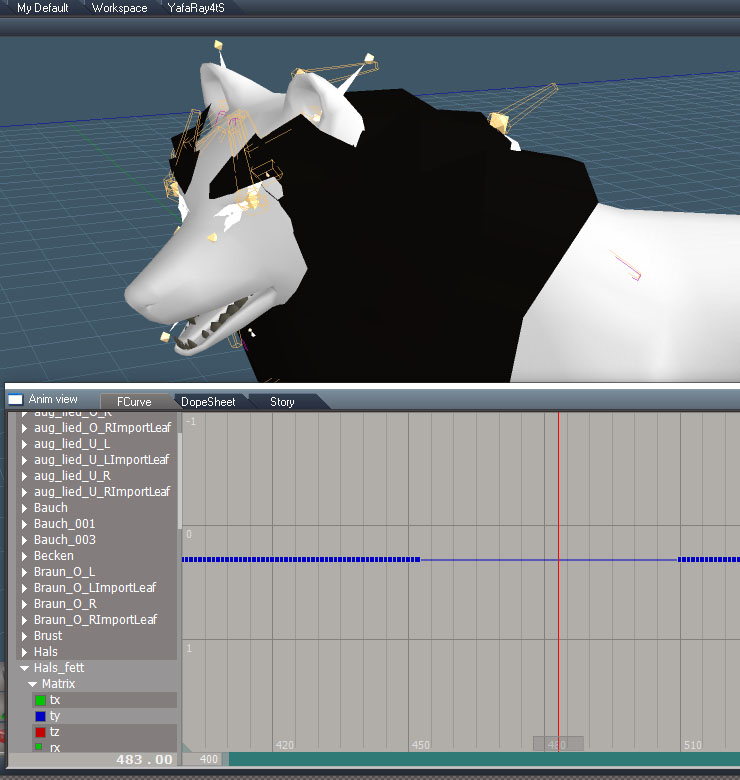
The animation is only OK. Truespace has rotation limits before animation goes off and the values of the dog are pushing those limits. The plugin can compensate for this if the collada file has decomposed matrices.

If you look inside the collda file you can see the Decomposed(scale, rotate, translate) looks something like this:

Code: Select all

<scale sid="scale">1 1 1</scale>
<rotate sid="rotationZ">0 0 1 -38.16324</rotate>
<rotate sid="rotationY">0 1 0 1.11555e-6</rotate>
<rotate sid="rotationX">1 0 0 -1.11422e-6</rotate>
<translate sid="location">-0.02635133 0.06681956 -0.001072281</translate>
and matrix looks like this:

Code: Select all

<matrix sid="transform">0.9915332 -0.08842832 -0.09509131 -0.05837 -0.06898616 0.2616895 -0.9626836 0.05429986 0.1100129 0.9610925 0.2533735 0.01153174 0 0 0 1</matrix>
This skinning is also off, because of the problem mentioned earlier with some bones not bound to the skeleton. tS is adding some skinning of it's own automatically. I think I can compensate for that though, so at least one more fix coming in the future. Maybe something can be done for the matrix rotation limitations too.
Clinton Reese

http://clintons3d.com
User avatar
trueBlue
Captain
Posts: 5548
Joined: 06 Jul 2009, 22:50
Type the number ten into the box: 10

Re: Collada Importer tS7.61

Post by trueBlue »

Cool you did it!
That was quick! :bananathumb:
I noticed that the dae has 3 or 4 animation cycles
I suppose you are not able to add those as tS Clips?
User avatar
clintonman
Captain
Posts: 5659
Joined: 21 May 2009, 21:08
Type the number ten into the box: 0
Location: California

Re: Collada Importer tS7.61

Post by clintonman »

trueBlue wrote: 31 Jul 2023, 00:57 Cool you did it!
That was quick! :bananathumb:
I noticed that the dae has 3 or 4 animation cycles
I suppose you are not able to add those as tS Clips?
Nope, nothing in the dae to indicate clips.
Clinton Reese

http://clintons3d.com
User avatar
trueBlue
Captain
Posts: 5548
Joined: 06 Jul 2009, 22:50
Type the number ten into the box: 10

Re: Collada Importer tS7.61

Post by trueBlue »

clintonman wrote: 31 Jul 2023, 00:03 DogNoTextures.jpgDogWithTextures.jpg

Fully skinned dog and with manual texture adjustments.
The animation is only OK. Truespace has rotation limits before animation goes off and the values of the dog are pushing those limits. The plugin can compensate for this if the collada file has decomposed matrices.

If you look inside the collda file you can see the Decomposed(scale, rotate, translate) looks something like this:

Code: Select all

<scale sid="scale">1 1 1</scale>
<rotate sid="rotationZ">0 0 1 -38.16324</rotate>
<rotate sid="rotationY">0 1 0 1.11555e-6</rotate>
<rotate sid="rotationX">1 0 0 -1.11422e-6</rotate>
<translate sid="location">-0.02635133 0.06681956 -0.001072281</translate>
and matrix looks like this:

Code: Select all

<matrix sid="transform">0.9915332 -0.08842832 -0.09509131 -0.05837 -0.06898616 0.2616895 -0.9626836 0.05429986 0.1100129 0.9610925 0.2533735 0.01153174 0 0 0 1</matrix>
This skinning is also off, because of the problem mentioned earlier with some bones not bound to the skeleton. tS is adding some skinning of it's own automatically. I think I can compensate for that though, so at least one more fix coming in the future. Maybe something can be done for the matrix rotation limitations too.
How did you apply the fur?
User avatar
clintonman
Captain
Posts: 5659
Joined: 21 May 2009, 21:08
Type the number ten into the box: 0
Location: California

Re: Collada Importer tS7.61

Post by clintonman »

trueBlue wrote: 02 Aug 2023, 22:40
clintonman wrote: 31 Jul 2023, 00:03 DogNoTextures.jpgDogWithTextures.jpg

Fully skinned dog and with manual texture adjustments.
The animation is only OK. Truespace has rotation limits before animation goes off and the values of the dog are pushing those limits. The plugin can compensate for this if the collada file has decomposed matrices.

If you look inside the collda file you can see the Decomposed(scale, rotate, translate) looks something like this:

Code: Select all

<scale sid="scale">1 1 1</scale>
<rotate sid="rotationZ">0 0 1 -38.16324</rotate>
<rotate sid="rotationY">0 1 0 1.11555e-6</rotate>
<rotate sid="rotationX">1 0 0 -1.11422e-6</rotate>
<translate sid="location">-0.02635133 0.06681956 -0.001072281</translate>
and matrix looks like this:

Code: Select all

<matrix sid="transform">0.9915332 -0.08842832 -0.09509131 -0.05837 -0.06898616 0.2616895 -0.9626836 0.05429986 0.1100129 0.9610925 0.2533735 0.01153174 0 0 0 1</matrix>
This skinning is also off, because of the problem mentioned earlier with some bones not bound to the skeleton. tS is adding some skinning of it's own automatically. I think I can compensate for that though, so at least one more fix coming in the future. Maybe something can be done for the matrix rotation limitations too.
How did you apply the fur?
WolfFur.jpg
Add a texture alpha shader and add InputFloat and Subtract nodes as shown.
Clinton Reese

http://clintons3d.com
User avatar
trueBlue
Captain
Posts: 5548
Joined: 06 Jul 2009, 22:50
Type the number ten into the box: 10

Re: Collada Importer tS7.61

Post by trueBlue »

Testing Enhanced Collada Export and Collada Importer
Using the Horse from the Characters library
Converted the Horse's Material to D3D and to Scene Material Instancing
Note: Name = horsebody
Note: Vray is loaded so includes LW Material
Selected the Horse and Material
Saved as DAE 'Enhanced'
Tried Copy textures enabled and disabled
Not seeing any textures either way
Note: Dae
<material id="horsebody" name="horsebody">

Collada Importer
Import the Horse.dae
Clean Hierarchy
Process Actors
Error

Code: Select all

ERR   Source object: /Scripts/CustomCommands/colladagroup/mesh_bind_transform Error: Microsoft JScript runtime error Description: Invalid procedure call or argument Error code: 0x800a0005 - (null) Line: 47, Char: 1 Script text:  var scene_transform = Node.Value(colladaEncaps + "/" + geoNode + "_DELETE_ME", "WldMatrix"); 
Attachments
Horse.RsScn
(1.81 MiB) Downloaded 141 times
User avatar
trueBlue
Captain
Posts: 5548
Joined: 06 Jul 2009, 22:50
Type the number ten into the box: 10

Re: Collada Importer tS7.61

Post by trueBlue »

I started over with the Horse.RsScn
Unloaded Vray and removed the Vray node
Converted the material without LW material
I am now able to get the textures in the Enhansed Collada Export
Enhansed Collada Export.png
.
So, it looks like LW materials was the issue
Dae file shows the images but the Collada Importer does not import the images
Still get the error
User avatar
clintonman
Captain
Posts: 5659
Joined: 21 May 2009, 21:08
Type the number ten into the box: 0
Location: California

Re: Collada Importer tS7.61

Post by clintonman »

trueBlue wrote: 04 Aug 2023, 16:54 I started over with the Horse.RsScn
Unloaded Vray and removed the Vray node
Converted the material without LW material
I am now able to get the textures in the Enhansed Collada Export
Enhansed Collada Export.png
.
So, it looks like LW materials was the issue
Dae file shows the images but the Collada Importer does not import the images
Still get the error
Been sick, so slow to answer.
Yep, I had the same findings with the Lightworks material. It was probably created for tS7.5. My solution was to select the material with the "Edit picked material directly" unchecked and then paint the object. That seemed to update the LW so it exports correctly.

I found the source of the error in the rsx plugin. I feel better now so maybe have a fix by the end of the day.
Clinton Reese

http://clintons3d.com
User avatar
trueBlue
Captain
Posts: 5548
Joined: 06 Jul 2009, 22:50
Type the number ten into the box: 10

Re: Collada Importer tS7.61

Post by trueBlue »

Hope you feel better!

Have you seen Euclidean Space?
https://www.euclideanspace.com/maths/al ... /index.htm
stan
Master Chief Petty Officer
Posts: 584
Joined: 21 May 2009, 17:20

Re: Collada Importer tS7.61

Post by stan »

That site is a great source of knowledge trueBlue
User avatar
trueBlue
Captain
Posts: 5548
Joined: 06 Jul 2009, 22:50
Type the number ten into the box: 10

Re: Collada Importer tS7.61

Post by trueBlue »

stan wrote: 07 Aug 2023, 17:57 That site is a great source of knowledge trueBlue
tomasb44.png
tomasb44.png (17.86 KiB) Viewed 1570 times
Nobody will hear you scream in Hilbert Space :mrgreen:
User avatar
trueBlue
Captain
Posts: 5548
Joined: 06 Jul 2009, 22:50
Type the number ten into the box: 10

Re: Collada Importer tS7.61

Post by trueBlue »

Another thing I noticed is when you select the scene [ Space.Select(Space.CurrentScene()) ] before Exporting with the Enhansed Collada Exporter is does not work
You have to select all of the objects manually
It does work with trueSpace's Collada Exporter

Both set Spotlights to show Shadows regardless, if it is checked or not
User avatar
clintonman
Captain
Posts: 5659
Joined: 21 May 2009, 21:08
Type the number ten into the box: 0
Location: California

Re: Collada Importer tS7.61

Post by clintonman »

HorseFix01.jpg
NOT YET RELEASED:

plugin:
fixed error from missing DELETE_ME nodes
which also fixed the problem of the horse mesh not lining up with the skeleton in script
fixed crash bug from invalid material bump or specular map definitions

fixed copy joint locations when bonesbind and boneanim members not in the same order(tS random bind order fix) - horse bones not crazy
Clinton Reese

http://clintons3d.com
User avatar
clintonman
Captain
Posts: 5659
Joined: 21 May 2009, 21:08
Type the number ten into the box: 0
Location: California

Re: Collada Importer tS7.61

Post by clintonman »

ColladaWolfAnim01.jpg

Issues with the wolf are fixed now. So why does that part of the animation looks so bad?
Because that's the way it is. I thought this was caused by rotation limit problems. Further investigation shows that the joints aren't just rotating but also translating. When you translate a joint in tS, the bone can stretch and the skin follows it. I first tried removing all the translations from the imported animation, but that broke the animation in bigger ways. The animation is being read correctly. It's just that the animation was created in a semi-incompatible way.
The only way to fix in this case is to edit the animation curves and remove the translation changes manually.

ColladaWolfAnimFix01.jpg
Before

ColladaWolfAnimFix02.jpg
After


Side note, repaint fix for the tS horse character incompatible lightworks shaders only works for the full version of tS. To repaint in workspace change one of the values first, eg. Shininess change from 3.0 to 3.01
Clinton Reese

http://clintons3d.com
User avatar
clintonman
Captain
Posts: 5659
Joined: 21 May 2009, 21:08
Type the number ten into the box: 0
Location: California

Re: Collada Importer tS7.61

Post by clintonman »

Update August 10

changes:


plugin version 1638424
lights and cameras load from preferences in memory instead of disk
matrix using 1/10 rotations - get around tS rotation limitations - untested, blender set to matrix export does decompose instead
clean hierarchy status bar fixed "Clean Animation..."
added joint translation range to fix wolf crazy jaw sample - it did not fix it, but kept it anyway
if bone is not found in the bind list, remove all skin influences for the bone that were added by tS automatically
fixed the assumption of always having a transform for a skinned mesh - this also solved some mesh line up with skeleton issues
fix material import for invalid specular or bump textures - was an oversite and a crash bug, other texture types already had the checks in place
fix binding for case of not all bones assigned to binding - removed tS automatic skin weights and only use those defined in the collada file
Clinton Reese

http://clintons3d.com
User avatar
trueBlue
Captain
Posts: 5548
Joined: 06 Jul 2009, 22:50
Type the number ten into the box: 10

Re: Collada Importer tS7.61

Post by trueBlue »

Wolf_dae.dae

Code: Select all

ERR   Source object: /Scripts/CustomCommands/colladagroup/transferAnimations Error: Microsoft JScript runtime error Description: 'translationRange' is undefined Error code: 0x800a1391 - (null) Line: 94, Char: 4 Script text:  if(translationRange == 0) { 
Fix
transferAnimations script
function copyAnimation(sourceNode, destNode)
Add
var translationRange = Node.Value(System.ThisOwner(), "translationRange")
Import
Import Scale 10.png
.
Actor Animation
Actor Animation.png
User avatar
clintonman
Captain
Posts: 5659
Joined: 21 May 2009, 21:08
Type the number ten into the box: 0
Location: California

Re: Collada Importer tS7.61

Post by clintonman »

trueBlue wrote: 11 Aug 2023, 13:27 Wolf_dae.dae

Code: Select all

ERR   Source object: /Scripts/CustomCommands/colladagroup/transferAnimations Error: Microsoft JScript runtime error Description: 'translationRange' is undefined Error code: 0x800a1391 - (null) Line: 94, Char: 4 Script text:  if(translationRange == 0) { 
Fix
transferAnimations script
function copyAnimation(sourceNode, destNode)
Add
var translationRange = Node.Value(System.ThisOwner(), "translationRange")
Import
Import Scale 10.png
.
Actor Animation
Actor Animation.png
Error fixed by removing var at top of the code, but now see a new issue. Importing translation animations where their are none. Back into it....
Thanks.

Edit:
Nope, it's not importing translations when there are only rotations. I forgot about the Blender reversed transforms.
Making one more change to the plugin to tell the script that blender was used to create the dae file.
Clinton Reese

http://clintons3d.com
User avatar
trueBlue
Captain
Posts: 5548
Joined: 06 Jul 2009, 22:50
Type the number ten into the box: 10

Re: Collada Importer tS7.61

Post by trueBlue »

I created this Wolf with D3D materials
It does not have any animations
Wolf.png
Using trueSpace's Collada Exporter Original and Enhansed Export
Both export the bitmaps in a Wolf Folder as file_0, file_1, etc...
The Collada Importer does not import the bitmaps using the Original or the Enhansed
Wolf Import.png
Attachments
Wolf.RsObj
(1.56 MiB) Downloaded 147 times
User avatar
clintonman
Captain
Posts: 5659
Joined: 21 May 2009, 21:08
Type the number ten into the box: 0
Location: California

Re: Collada Importer tS7.61

Post by clintonman »

trueBlue wrote: 11 Aug 2023, 16:13 I created this Wolf with D3D materials
It does not have any animations
Wolf.png
Using trueSpace's Collada Exporter Original and Enhansed Export
Both export the bitmaps in a Wolf Folder as file_0, file_1, etc...
The Collada Importer does not import the bitmaps using the Original or the Enhansed
Wolf Import.png
I see it, thanks.
Clinton Reese

http://clintons3d.com
User avatar
clintonman
Captain
Posts: 5659
Joined: 21 May 2009, 21:08
Type the number ten into the box: 0
Location: California

Re: Collada Importer tS7.61

Post by clintonman »

trueBlue wrote: 11 Aug 2023, 16:13 I created this Wolf with D3D materials
It does not have any animations
Wolf.png
Using trueSpace's Collada Exporter Original and Enhansed Export
Both export the bitmaps in a Wolf Folder as file_0, file_1, etc...
The Collada Importer does not import the bitmaps using the Original or the Enhansed
Wolf Import.png
The biggest issue with this wolf is that it only has UV2. Color usually goes into UV1.
Open uv editor, UV 2, and press synchronize to copy from uv2 to uv1. Can also follow the same steps to fix after collada import.

Other issues, the body has 2 materials called "claws" so one is lost during the enhanced changes.
The body has no model shader which will cause an error. This will be fixed in the next enhanced release. Error doesn't show currently because of a second bug, also fixed for the next release.
The color shader is set to use uv2 - usually uv1 is for color.

The attached, only change is uv synchronize run on the body mesh.
Attachments
WolfUVFix.RsObj
(1.5 MiB) Downloaded 141 times
Clinton Reese

http://clintons3d.com
User avatar
trueBlue
Captain
Posts: 5548
Joined: 06 Jul 2009, 22:50
Type the number ten into the box: 10

Re: Collada Importer tS7.61

Post by trueBlue »

I do not know how to tell if uv1 or uv2 is being used or not
It has been a while since converting the materials from the import process so a little vague on what transpired.
If you noticed, it had the FBX material 3 (sp?) from the import process
Maybe that is/was the culpirt?
I also isolated the eyes as sub objects
Not sure how the claws material worked and did not do anything special there
User avatar
clintonman
Captain
Posts: 5659
Joined: 21 May 2009, 21:08
Type the number ten into the box: 0
Location: California

Re: Collada Importer tS7.61

Post by clintonman »

Update August 12 2023

changes:


plugin version 1638425
added "reverse transfoms found" status so it's easier to tell when reverse is needed
animation range fix for Actor Animation - was reading whole scene animation range
fixed error bug in Actor Animation
Clinton Reese

http://clintons3d.com
User avatar
trueBlue
Captain
Posts: 5548
Joined: 06 Jul 2009, 22:50
Type the number ten into the box: 10

Re: Collada Importer tS7.61

Post by trueBlue »

Success except for the missing eyes, fur is reversed, and is more shinny.
Used your WolfUVFix.RsObj with D3D Material Converter - Scene Instancing
Wolf Fixed Fur reversed.png
User avatar
trueBlue
Captain
Posts: 5548
Joined: 06 Jul 2009, 22:50
Type the number ten into the box: 10

Re: Collada Importer tS7.61

Post by trueBlue »

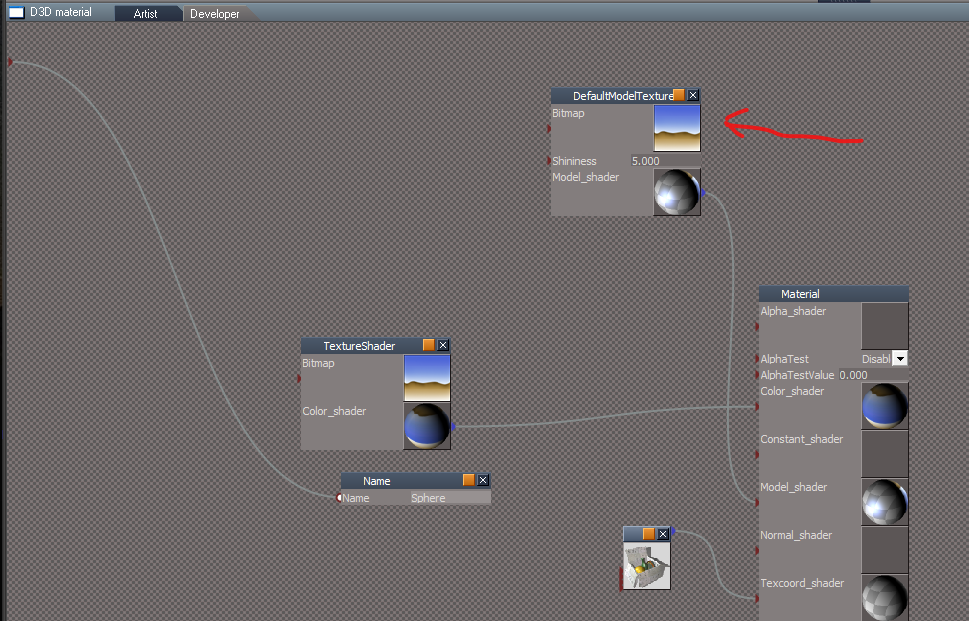
I notice the differences with the DefaultModelShader in the D3D Material Converter and your DefaultModelTextureShader in the Collada Importer
The D3D Material Converter's DefaultModelShader has SpecularColor and the Collada Importer's DefaultModelTextureShader does not
DefaultModelShader.png
DefaultModelShader.png (8.95 KiB) Viewed 2023 times
You have an Input for it but it is not being used
You are using a bitmap that is the same as the Image Texture shader
This increases the size of the object
It is not using compression as well
SPECULARCOLOR.png
DAE has specular color
<specular>
<color>1.0 1.0 1.0 1.0</color>
</specular>
User avatar
trueBlue
Captain
Posts: 5548
Joined: 06 Jul 2009, 22:50
Type the number ten into the box: 10

Re: Collada Importer tS7.61

Post by trueBlue »

Not sure if this is from using your Collada Exporter or Importer
Infinite lights are being converted to Directional lights
Directional.png
Directional.png (10.75 KiB) Viewed 1964 times
Import Collada Scene.png
.
If I replace the Directional lights with the C:\trueSpace761Std\Scripts\preobjects/light03 and light04, it looks better
Infinite lights.png
.
Enable Shadow is not working for the spotlights
IE: They are always enabled
User avatar
trueBlue
Captain
Posts: 5548
Joined: 06 Jul 2009, 22:50
Type the number ten into the box: 10

Re: Collada Importer tS7.61

Post by trueBlue »

Imported the original Wolf dae again
Actor Animation.png
.
I thought you had this fixed in the previous version
User avatar
clintonman
Captain
Posts: 5659
Joined: 21 May 2009, 21:08
Type the number ten into the box: 0
Location: California

Re: Collada Importer tS7.61

Post by clintonman »

trueBlue wrote: 15 Aug 2023, 19:00 Imported the original Wolf dae again
Actor Animation.png
.
I thought you had this fixed in the previous version
I assume you're talking about it facing downward?

If so here it is in Blender and Lightwave.

WolfBlender.jpg
Blender facing down, bad skinning.

WolfLightwave.jpg
Lightwave facing down, no animation.
Clinton Reese

http://clintons3d.com
User avatar
trueBlue
Captain
Posts: 5548
Joined: 06 Jul 2009, 22:50
Type the number ten into the box: 10

Re: Collada Importer tS7.61

Post by trueBlue »

I see, thanks for sharing
User avatar
clintonman
Captain
Posts: 5659
Joined: 21 May 2009, 21:08
Type the number ten into the box: 0
Location: California

Re: Collada Importer tS7.61

Post by clintonman »

trueBlue wrote: 12 Aug 2023, 18:05 I notice the differences with the DefaultModelShader in the D3D Material Converter and your DefaultModelTextureShader in the Collada Importer
The D3D Material Converter's DefaultModelShader has SpecularColor and the Collada Importer's DefaultModelTextureShader does not
DefaultModelShader.png
You have an Input for it but it is not being used
You are using a bitmap that is the same as the Image Texture shader
This increases the size of the object
It is not using compression as well
SPECULARCOLOR.png

DAE has specular color
<specular>
<color>1.0 1.0 1.0 1.0</color>
</specular>
For collada you can only have a color or a texture, not both. So you can't have a specular color and a specular texture.
Clinton Reese

http://clintons3d.com
User avatar
trueBlue
Captain
Posts: 5548
Joined: 06 Jul 2009, 22:50
Type the number ten into the box: 10

Re: Collada Importer tS7.61

Post by trueBlue »

Here is a HLSL Script the gets SpecularColor from an image

Materials - DX9 library
D3D Ultimate Mapped Material
SpecReflectSchlickMap
Schlick - HLSL Script Brick

Code: Select all

void NewFunction(in float3 normal, in float3 lightvec, in float3 eye, in float4 SpecularColor, in float4 DiffuseColor, in float SpecularCoef, in float4 lightcolor, out float4 result)
{
float3 Reflection = normalize(2.0 * normal * dot(normal,lightvec) - lightvec);
float RdotV = max(dot(Reflection, eye),0.0);
float SchlickTerm = RdotV / (SpecularCoef - (SpecularCoef * RdotV) + RdotV);
float4 Diffuse = DiffuseColor * max(0.0f,dot(lightvec, normal));
float4 Specular = SpecularColor * SchlickTerm;
result.xyz = (Diffuse + Specular) * lightcolor;
result.a = DiffuseColor.a;
}
User avatar
trueBlue
Captain
Posts: 5548
Joined: 06 Jul 2009, 22:50
Type the number ten into the box: 10

Re: Collada Importer tS7.61

Post by trueBlue »

Experimenting with the Dino with painted vertices
Dino.png
Collada Enhansed Export
Collada Import is missing the SolidVertexColorShader, FeederGPUVertexShader, and Gooch2Shader 'Model shader'
ImportDinoDAE.png
.
What did I do wrong?
Attachments
Dino.RsObj
(397.78 KiB) Downloaded 140 times
User avatar
clintonman
Captain
Posts: 5659
Joined: 21 May 2009, 21:08
Type the number ten into the box: 0
Location: California

Re: Collada Importer tS7.61

Post by clintonman »

trueBlue wrote: 21 Aug 2023, 15:32 Experimenting with the Dino with painted vertices
Dino.png
Collada Enhansed Export
Collada Import is missing the SolidVertexColorShader, FeederGPUVertexShader, and Gooch2Shader 'Model shader'
ImportDinoDAE.png
.
What did I do wrong?
The Collada file format has no concept of Gooch2Shader model shader. It only knows basic blinn, lambert and phong model shaders.
It has no concept for vertex shaders. There are no vertex shaders in collada.
For color shaders it only understands colors and textures, nothing beyond that.
Clinton Reese

http://clintons3d.com
User avatar
trueBlue
Captain
Posts: 5548
Joined: 06 Jul 2009, 22:50
Type the number ten into the box: 10

Re: Collada Importer tS7.61

Post by trueBlue »

I tried an object with trueSpace's Binn Model Shader

Collada Enhansed Export

Error

Code: Select all

ERR   Source object: /Scripts/CustomCommands/ColladaPostProcessor/RunOptions Error: Microsoft JScript runtime error Description: Invalid procedure call or argument Error code: 0x800a0005 - (null) Line: 605, Char: 7 Script text:  color = Node.Value(textureNode, "SpecularColor");
Status Message is stuck "fix textures"
The CubeBlinn folder did not have the dae file
I used the other trueSpace's dae
It imported but not with the Binn Model Shader

Tried again, this time no error
Attachments
CubeBlinn.RsObj
(120.37 KiB) Downloaded 130 times
User avatar
clintonman
Captain
Posts: 5659
Joined: 21 May 2009, 21:08
Type the number ten into the box: 0
Location: California

Re: Collada Importer tS7.61

Post by clintonman »

trueBlue wrote: 22 Aug 2023, 19:30 I tried an object with trueSpace's Binn Model Shader

Collada Enhansed Export

Error

Code: Select all

ERR   Source object: /Scripts/CustomCommands/ColladaPostProcessor/RunOptions Error: Microsoft JScript runtime error Description: Invalid procedure call or argument Error code: 0x800a0005 - (null) Line: 605, Char: 7 Script text:  color = Node.Value(textureNode, "SpecularColor");
Status Message is stuck "fix textures"
The CubeBlinn folder did not have the dae file
I used the other trueSpace's dae
It imported but not with the Binn Model Shader

Tried again, this time no error
Added a check for SpecularColor connector to avoid the error.
Truespace isn't exporting the blinn model shader. Looks like maybe everything exports as phong. The enhanced export is not fixing it or translating it to blinn.
Attachments
ColladaPostProcessor.RsObj
(272.96 KiB) Downloaded 150 times
Clinton Reese

http://clintons3d.com
User avatar
clintonman
Captain
Posts: 5659
Joined: 21 May 2009, 21:08
Type the number ten into the box: 0
Location: California

Re: Collada Importer tS7.61

Post by clintonman »

Update August 23

No script changes

rsx plugin version 1638426
fixed translation animation bug - no motion in XYZ directions
import collada directional light as a truespace infinite light instead of a truespace directional light
texture model shader checked the bitmap compression option and removed the unused InputColor node

http://clintons3d.com/plugins/truespace ... mport.html
Clinton Reese

http://clintons3d.com
User avatar
trueBlue
Captain
Posts: 5548
Joined: 06 Jul 2009, 22:50
Type the number ten into the box: 10

Re: Collada Importer tS7.61

Post by trueBlue »

Is the run option "NamedAndInstancedOnly" needed?
It looks like you are creating the Name node for materials with or without NamedAndInstancedOnly checked or unchecked
Best results from scene instanced and named materials

The name of the materials can be set by adding a node that has a "Name" input connector and exporting that connector to the D3D material node.
User avatar
clintonman
Captain
Posts: 5659
Joined: 21 May 2009, 21:08
Type the number ten into the box: 0
Location: California

Re: Collada Importer tS7.61

Post by clintonman »

trueBlue wrote: 24 Aug 2023, 15:11 Is the run option "NamedAndInstancedOnly" needed?
It looks like you are creating the Name node for materials with or without NamedAndInstancedOnly checked or unchecked
It's required for full processing of instanced materials that have been named.
Clinton Reese

http://clintons3d.com
User avatar
trueBlue
Captain
Posts: 5548
Joined: 06 Jul 2009, 22:50
Type the number ten into the box: 10

Re: Collada Importer tS7.61

Post by trueBlue »

Maybe I am doing this wrong
Selected Materials, Cube, Cube,1, and Sphere
Saved as Collada Enhanced with NamedAndInstancedOnly checked

The Sphere's DefaultModelTextureShader (Fish) is not being applied even though the image was exported
Missing fish.png
.
Two Cubes and Sphere with Scene Instanced
Cubes material Name = Cubes
Sphere material Name = Sphere
Attachments
Space 3D6bd7.RsScn
(662.41 KiB) Downloaded 150 times
User avatar
clintonman
Captain
Posts: 5659
Joined: 21 May 2009, 21:08
Type the number ten into the box: 0
Location: California

Re: Collada Importer tS7.61

Post by clintonman »

trueBlue wrote: 24 Aug 2023, 16:40 Maybe I am doing this wrong
Selected Materials, Cube, Cube,1, and Sphere
Saved as Collada Enhanced with NamedAndInstancedOnly checked

The Sphere's DefaultModelTextureShader (Fish) is not being applied even though the image was exported
Missing fish.png
.
Two Cubes and Sphere with Scene Instanced
Cubes material Name = Cubes
Sphere material Name = Sphere
DAEinBlender.jpg

Imported to Blender. Looks ok to me.
"The Sphere's DefaultModelTextureShader (Fish) is not being applied", what are you looking at that makes you say that?
Are you using the dae file inside the folder with the images?
Clinton Reese

http://clintons3d.com
User avatar
trueBlue
Captain
Posts: 5548
Joined: 06 Jul 2009, 22:50
Type the number ten into the box: 10

Re: Collada Importer tS7.61

Post by trueBlue »

clintonman wrote: 24 Aug 2023, 17:02
trueBlue wrote: 24 Aug 2023, 16:40 Maybe I am doing this wrong
Selected Materials, Cube, Cube,1, and Sphere
Saved as Collada Enhanced with NamedAndInstancedOnly checked

The Sphere's DefaultModelTextureShader (Fish) is not being applied even though the image was exported
Missing fish.png
.
Two Cubes and Sphere with Scene Instanced
Cubes material Name = Cubes
Sphere material Name = Sphere
DAEinBlender.jpg


Imported to Blender. Looks ok to me.
"The Sphere's DefaultModelTextureShader (Fish) is not being applied", what are you looking at that makes you say that?
Are you using the dae file inside the folder with the images?
1.) Look in Materials/Materials, 1
Missing Fish.png
.
2.) Yes

Imported into trueSpace
Imported into trueSpace.png
User avatar
clintonman
Captain
Posts: 5659
Joined: 21 May 2009, 21:08
Type the number ten into the box: 0
Location: California

Re: Collada Importer tS7.61

Post by clintonman »

Ok, now I understand. It did not import into trueSpace is what you're saying.
Clinton Reese

http://clintons3d.com
User avatar
trueBlue
Captain
Posts: 5548
Joined: 06 Jul 2009, 22:50
Type the number ten into the box: 10

Re: Collada Importer tS7.61

Post by trueBlue »

clintonman wrote: 24 Aug 2023, 17:46 Ok, now I understand. It did not import into trueSpace is what you're saying.
Looks like your FBX Importer does add and apply the DefaultModelTextureShader image
User avatar
clintonman
Captain
Posts: 5659
Joined: 21 May 2009, 21:08
Type the number ten into the box: 0
Location: California

Re: Collada Importer tS7.61

Post by clintonman »

Update August 25 2023

fixed specular map import
fixed bump map import

only the rsx plugin changed
Clinton Reese

http://clintons3d.com

Return to “Repositorium”