Hi there,
I want a texture project on a face with alpha map so that the underlying material could be seen. but I don't know how to do it I check the layer texture but it seems
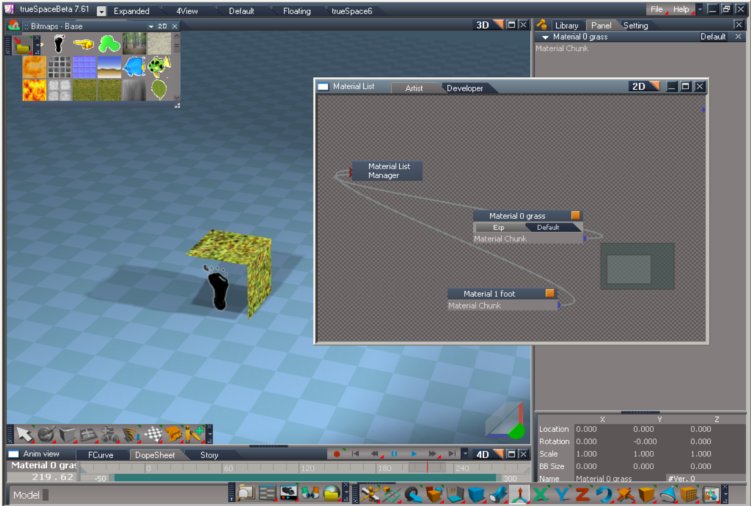
it is only layering not actually projecting a different texture where you want to project it. I attach a file as you can see the face with the foot is with alpha map
but it makes the face transparent it doesn't show the underlying grass material and also i show you the brick i don't know what brick I would put there to accomplish what I want.
Thanks in advance
Question about texturing
-
DarkScythe
- Senior Chief Petty Officer
- Posts: 243
- Joined: 23 Sep 2009, 08:57
Question about texturing
- Attachments
-
-
3dvisuals dude

- Chief Warrant Officer
- Posts: 643
- Joined: 03 Jun 2009, 02:53
- Type the number ten into the box: 0
Re: Question about texturing
check the tools available in the following threads, one may help with this.
http://forums1.caligari.com/truespace/s ... php?t=7251"
http://forums1.caligari.com/truespace/s ... php?t=5233"
http://forums1.caligari.com/truespace/s ... php?t=7251"
http://forums1.caligari.com/truespace/s ... php?t=5233"
-
DarkScythe
- Senior Chief Petty Officer
- Posts: 243
- Joined: 23 Sep 2009, 08:57
Re: Question about texturing
I check the first link I cannot download it I have to register.check the tools available in the following threads, one may help with this.
The second link I already have and it seems that it only mix texture and blend them together, what I want is two different material assign to the object if you look at the image I attach I am trying to put some logo to the object without uv mapping.
I like to try the first one but it seems they have the same function like the second link.
Thanks
-
3dvisuals dude
- Chief Warrant Officer
- Posts: 643
- Joined: 03 Jun 2009, 02:53
- Type the number ten into the box: 0
Re: Question about texturing
DarkScythe wrote:I check the first link I cannot download it I have to register.check the tools available in the following threads, one may help with this.
The second link I already have and it seems that it only mix texture and blend them together, what I want is two different material assign to the object if you look at the image I attach I am trying to put some logo to the object without uv mapping.
I like to try the first one but it seems they have the same function like the second link.
Thanks
OK, first off, I will try and help you solve this, it is a function we all need.
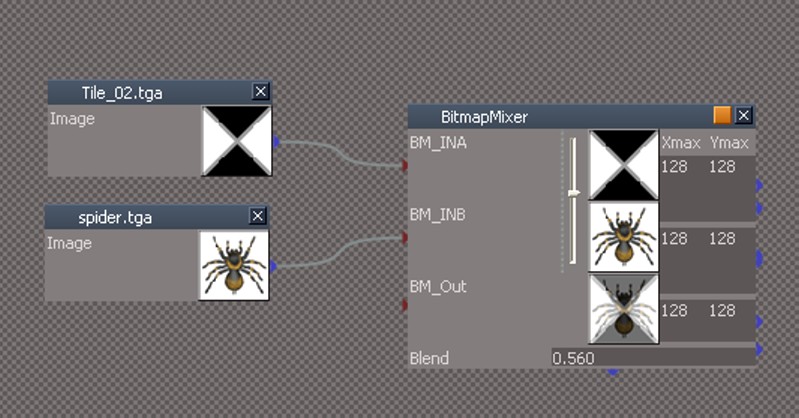
here are the files you were unable to see in that thread without being registered there, the pics and the downloads on both thread pages:
-
3dvisuals dude
- Chief Warrant Officer
- Posts: 643
- Joined: 03 Jun 2009, 02:53
- Type the number ten into the box: 0
Re: Question about texturing


it would help if you could attach two images here, and I will try and accomplish what you are attempting with you.
-
3dvisuals dude
- Chief Warrant Officer
- Posts: 643
- Joined: 03 Jun 2009, 02:53
- Type the number ten into the box: 0
Re: Question about texturing
also please note...
there are different pixel depths I believe with targa transparencies in trueSpace, 24, and 32, but if I recall correctly trueSpace only supports one of the two really, not sure if that tip is relevant to this.
there are different pixel depths I believe with targa transparencies in trueSpace, 24, and 32, but if I recall correctly trueSpace only supports one of the two really, not sure if that tip is relevant to this.
-
Steinie

- Captain
- Posts: 2958
- Joined: 21 May 2009, 17:38
- Type the number ten into the box: 10
Re: Question about texturing
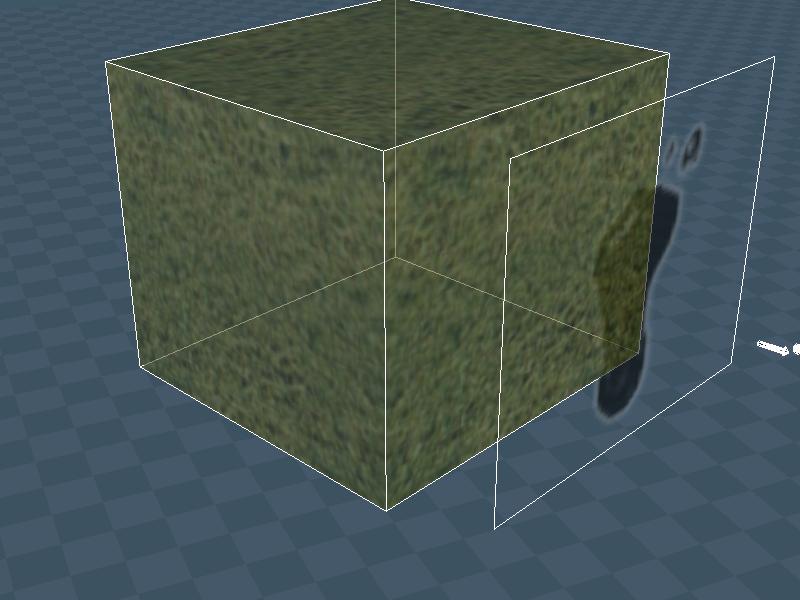
I wouldn't even bother with the bricks and just create a plane on top.
But that is just me.
But that is just me.
- Attachments
-
-
-
3dvisuals dude
- Chief Warrant Officer
- Posts: 643
- Joined: 03 Jun 2009, 02:53
- Type the number ten into the box: 0
Re: Question about texturing
Yeah that is what I would do too! hehehe!
Still, I'm thinking there must be a way to do it with the bricks or D3D materials/shaders, maybe using one of Nokos shaders like the fire shader with different source images. I'm experimenting anyhow, but yes, I agree, it would be a lot easier to just do the texture combining in 2D first then apply the result to the 3D surface.
Still, I'm thinking there must be a way to do it with the bricks or D3D materials/shaders, maybe using one of Nokos shaders like the fire shader with different source images. I'm experimenting anyhow, but yes, I agree, it would be a lot easier to just do the texture combining in 2D first then apply the result to the 3D surface.
-
DarkScythe
- Senior Chief Petty Officer
- Posts: 243
- Joined: 23 Sep 2009, 08:57
Re: Question about texturing
Just try the bitmap mixer,
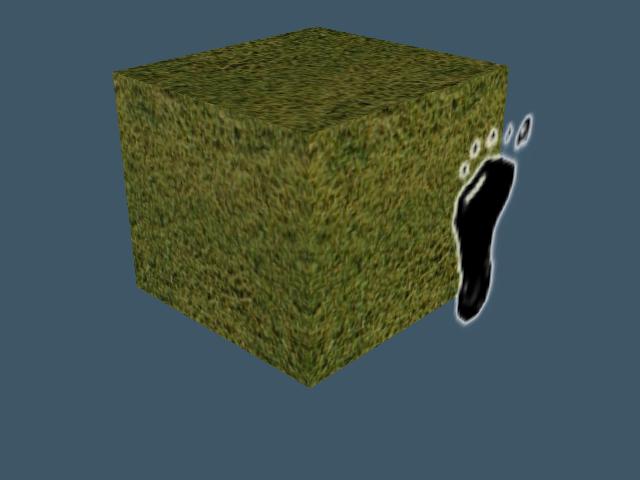
the bitmap mixer blend the texture, the color of the foot also change into greenish
because the bitmap mixer blend it and also you cannot control the position of the foot as you can see in the first image I post I want it to stay in the face.
here is the image with bitmap mixer.
does the modelside can do what I am trying to do maybe I need to switch to modelside then comeback to worspace?
Thanks for the answer if not all possible then I need to uv map.
the bitmap mixer blend the texture, the color of the foot also change into greenish
because the bitmap mixer blend it and also you cannot control the position of the foot as you can see in the first image I post I want it to stay in the face.
here is the image with bitmap mixer.
yeah thats fine but if your distorting the object it will not work, I also try the projector light and it has drawback also.I wouldn't even bother with the bricks and just create a plane on top.
But that is just me.
does the modelside can do what I am trying to do maybe I need to switch to modelside then comeback to worspace?
Thanks for the answer if not all possible then I need to uv map.
- Attachments
-

-
3dvisuals dude
- Chief Warrant Officer
- Posts: 643
- Joined: 03 Jun 2009, 02:53
- Type the number ten into the box: 0
Re: Question about texturing
I'm sure what you are trying to do can be done via bricks on the Workspace side, I just haven't succeeded in it yet tonight, but I am confident that it can be done.
Noko developed a fire shader for instance, which uses one texture as a mask and another as an underlying material accordingly. I will play with this concept some more over tonight and tomorrow and see if I can find a way to do it, it seems like a method we would all find a use for occasionally.
Noko developed a fire shader for instance, which uses one texture as a mask and another as an underlying material accordingly. I will play with this concept some more over tonight and tomorrow and see if I can find a way to do it, it seems like a method we would all find a use for occasionally.
-
trueBlue

- Captain
- Posts: 5548
- Joined: 06 Jul 2009, 22:50
- Type the number ten into the box: 10
Re: Question about texturing
This most likely is not want you wanted, but thought it was kind of interesting, nevertheless.
I Boolean Unioned a Plane to a Cube and kept the History.
Kind of like a poor man's Material Rectangle.
If you select the Plane object you can save it's D3D Material to a library which is an Alpha Shader.
.
Here is another example by Boolean Add, plus Keep Materials
Two Cubes, same size, with different Materials
I Boolean Unioned a Plane to a Cube and kept the History.
Kind of like a poor man's Material Rectangle.
If you select the Plane object you can save it's D3D Material to a library which is an Alpha Shader.

- Capture.PNG (81.47 KiB) Viewed 4940 times
Here is another example by Boolean Add, plus Keep Materials
Two Cubes, same size, with different Materials

- Attachments
-
- Boolean Add.RsObj
- (447.53 KiB) Downloaded 94 times
-
- Material Rectangle.zip
- (73.16 KiB) Downloaded 232 times
-
3dvisuals dude
- Chief Warrant Officer
- Posts: 643
- Joined: 03 Jun 2009, 02:53
- Type the number ten into the box: 0
Re: Question about texturing
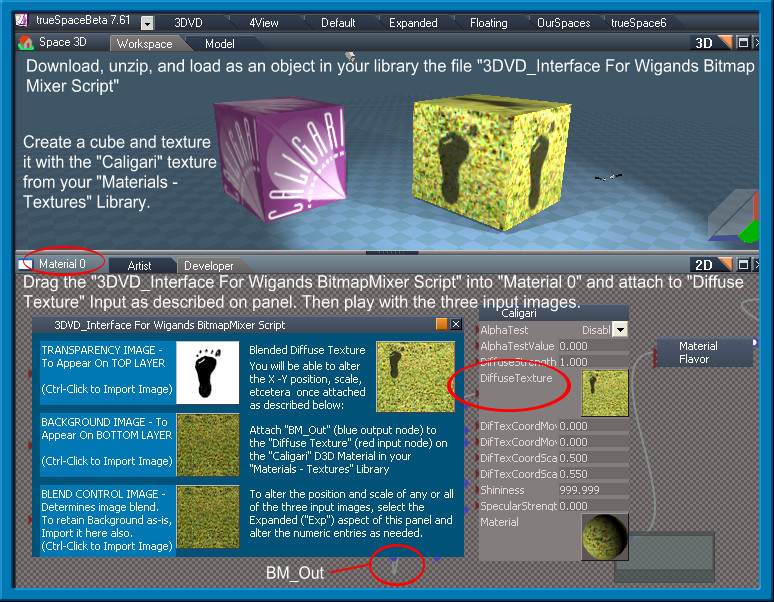
OK, here's my solution, lol
I hacked the interface on Wigand's excellent "BitmapMixer" Script to make this particular task a tad more self-evident to those who have never used it before.
Here are the instruction image (click repeatedly to see full size version) and the file it refers to which you will need to unzip and load into your trueSpace object directory somewhere to complete the tutorial which the image describes:
Enjoy!
I hacked the interface on Wigand's excellent "BitmapMixer" Script to make this particular task a tad more self-evident to those who have never used it before.
Here are the instruction image (click repeatedly to see full size version) and the file it refers to which you will need to unzip and load into your trueSpace object directory somewhere to complete the tutorial which the image describes:
Enjoy!
-
3dvisuals dude
- Chief Warrant Officer
- Posts: 643
- Joined: 03 Jun 2009, 02:53
- Type the number ten into the box: 0
Re: Question about texturing
One more important note:
Be sure and apply a cubic UV Map to the cube before you texture it.
Otherwise the texture will be slanted all over the cube in a wrap. Once a cubic UV Map is applied you will be able to control image placement better.
HTH
Be sure and apply a cubic UV Map to the cube before you texture it.
Otherwise the texture will be slanted all over the cube in a wrap. Once a cubic UV Map is applied you will be able to control image placement better.
HTH
-
3dvisuals dude
- Chief Warrant Officer
- Posts: 643
- Joined: 03 Jun 2009, 02:53
- Type the number ten into the box: 0
Re: Question about texturing
Cool! Thanks!trueBlue wrote:This most likely not want you want but thought it was kind of interesting nevertheless.
I Boolean Unioned a Plane to a Cube and kept the History.
Kind of like a poor man's Material Rectangle.
If you select the Plane object you can save it's D3D Material to a library which is an Alpha Shader.
This will come in handy too, I like this approach as well!

-
DarkScythe
- Senior Chief Petty Officer
- Posts: 243
- Joined: 23 Sep 2009, 08:57
Re: Question about texturing
3dvisuals dude,Steinie and trueBlue
thanks for the suggestion
3dvisuals dude your solution does the job now but if you scale the foot texture so does the underlying material. But your approach is very handy it can act as a substitute operation.
thanks for your time guys really appreciate it.
thanks for the suggestion
3dvisuals dude your solution does the job now but if you scale the foot texture so does the underlying material. But your approach is very handy it can act as a substitute operation.
thanks for your time guys really appreciate it.
-
3dvisuals dude
- Chief Warrant Officer
- Posts: 643
- Joined: 03 Jun 2009, 02:53
- Type the number ten into the box: 0
Re: Question about texturing
Actually, as noted in the last paragraph on that panel, if you select the "Exp" Expanded aspect of the panel by clicking the titlebar of the panel. you will see there are numeric inputs which only effect the scale and position of each input image independently.DarkScythe wrote:3dvisuals dude,Steinie and trueBlue
thanks for the suggestion
3dvisuals dude your solution does the job now but if you scale the foot texture so does the underlying material. But your approach is very handy it can act as a substitute operation.
thanks for your time guys really appreciate it.
The overall scale and position is done via the brick that has the "Diffuse Texture" input, the others on the new panel.
-
DarkScythe
- Senior Chief Petty Officer
- Posts: 243
- Joined: 23 Sep 2009, 08:57
Re: Question about texturing
I did change it but it keeps returning to its default value I change the XA but it returns to default value which is 64 I cannot change all of it it keeps returning to its default value.Actually, as noted in the last paragraph on that panel, if you select the "Exp" Expanded aspect of the panel by clicking the titlebar of the panel. you will see there are numeric inputs which only effect the scale and position of each input image independently
-
3dvisuals dude
- Chief Warrant Officer
- Posts: 643
- Joined: 03 Jun 2009, 02:53
- Type the number ten into the box: 0
Re: Question about texturing
okDarkScythe wrote:I did change it but it keeps returning to its default value I change the XA but it returns to default value which is 64 I cannot change all of it it keeps returning to its default value.Actually, as noted in the last paragraph on that panel, if you select the "Exp" Expanded aspect of the panel by clicking the titlebar of the panel. you will see there are numeric inputs which only effect the scale and position of each input image independently
try disconnecting the diffuse texture node
changing the values
then reconnecting it
-
DarkScythe
- Senior Chief Petty Officer
- Posts: 243
- Joined: 23 Sep 2009, 08:57
Re: Question about texturing
try disconnecting the diffuse texture node
changing the values
then reconnecting it
I tried it and doesn't work also.
-
3dvisuals dude
- Chief Warrant Officer
- Posts: 643
- Joined: 03 Jun 2009, 02:53
- Type the number ten into the box: 0
Re: Question about texturing
ok, lol, try just using the original Wigand version I posted earlier in this thread, that should work, perhaps i fuddled up the scripting somehow with my interface hack!DarkScythe wrote:try disconnecting the diffuse texture node
changing the values
then reconnecting it
I tried it and doesn't work also.
If all else fails, you can also send him a PM message here at this forum