Viperfish Problems

Kenc3
Petty Officer First Class
Posts: 58
Joined: 30 Jun 2009, 22:01
Type the number ten into the box: 0
Location: Philippines

Viperfish Problems

Post by Kenc3 »

I am going through the Viperfish Project and have moved the image of the viperfish from the lower panel to the materials panel.
My problem is that the panel does not update when the material editor updates. It just stays the same and I cannot find a way to change it.
What am I doing wrong? :?
Jack Edwards
Senior Chief Petty Officer
Posts: 181
Joined: 22 May 2009, 04:28

Re: Viperfish Problems

Post by Jack Edwards »

There's a change in the way materials are handled. You have to apply the new material to the object after you make the changes. You can do that with the funnel icon on the Material editor. Make sure you have the object you want to apply the material to selected.

Also you'll want to reset the material after applying it so that the new primitives you create don't have the fish template on them as well. To reset the material simply right click on the material preview ball in the Material Editor.

Let me know if you're still stuck.
No booleans were used in the mangling of this message... :?

YafaRay for trueSpace Project

(Current version: v0.7.0)

trueSpacePlugins.com
Kenc3
Petty Officer First Class
Posts: 58
Joined: 30 Jun 2009, 22:01
Type the number ten into the box: 0
Location: Philippines

Re: Viperfish Problems

Post by Kenc3 »

Now I really messed up.
I had closed Truespace and now reopened it. I cannot find the Material Editor. When I open the panel, I can only get the viperfish there. (It is 4AM here.)
Jack Edwards
Senior Chief Petty Officer
Posts: 181
Joined: 22 May 2009, 04:28

Re: Viperfish Problems

Post by Jack Edwards »

Clicking on the material editor icon or the material inspect icon will bring up the material editor.

If you post a screen shot it might help us get an idea of what you're doing wrong. ;)
No booleans were used in the mangling of this message... :?

YafaRay for trueSpace Project

(Current version: v0.7.0)

trueSpacePlugins.com
Kenc3
Petty Officer First Class
Posts: 58
Joined: 30 Jun 2009, 22:01
Type the number ten into the box: 0
Location: Philippines

Re: Viperfish Problems

Post by Kenc3 »

Disregard the last post. I found it after a sip of coffee. I now have the fish on the panel facing down. I will just flip the panel and it should be okay.
Thank you.


:bananahi:
Jack Edwards
Senior Chief Petty Officer
Posts: 181
Joined: 22 May 2009, 04:28

Re: Viperfish Problems

Post by Jack Edwards »

Great to hear. :)

:bananathumb:
No booleans were used in the mangling of this message... :?

YafaRay for trueSpace Project

(Current version: v0.7.0)

trueSpacePlugins.com
Kenc3
Petty Officer First Class
Posts: 58
Joined: 30 Jun 2009, 22:01
Type the number ten into the box: 0
Location: Philippines

Re: Viperfish Problems

Post by Kenc3 »

I am curious as to how I submit a screenshot of my work in case I run into another challenge. My fish is beginning to look like something now and I am finding more things on my own.
How do I make a screen shot to send? :bananatyping:
User avatar
nigec
Master Chief Petty Officer
Posts: 561
Joined: 21 May 2009, 18:46

Re: Viperfish Problems

Post by nigec »

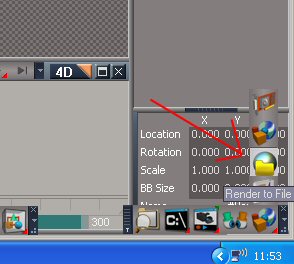
on your keyboard you should have a print screen key, usually near the scroll lock key, then past into your art software
or you can render to file in TS7.61
Attachments
render.jpg
render.jpg (18.47 KiB) Viewed 7061 times
User avatar
First Light
Senior Chief Petty Officer
Posts: 169
Joined: 22 May 2009, 11:17
Type the number ten into the box: 0
Location: Michigan, U.S.

Re: Viperfish Problems

Post by First Light »

Greetings,

There are two ways to use the screen capture facility built into Windows:

PrtScrn -- press the PrtScrn (Print Screen) button on your keyboard to capture an image of the entire desktop.
Alt + PrtScrn -- press the Alt and PrtScrn buttons together to capture an image of only the window with the focus.

In both cases, the captured image is copied into the Windows clipboard. From there you will need to paste it into another program. If nothing else, use the Paint program that comes with Windows. Once you've pasted the captured image into it, you can then save it as a bmp, jpg or tiff file.

Best regards, First Light
Kenc3
Petty Officer First Class
Posts: 58
Joined: 30 Jun 2009, 22:01
Type the number ten into the box: 0
Location: Philippines

Re: Viperfish Problems

Post by Kenc3 »

Thank you.
I am about ready to quit for the night.
I am having problems with my 7.61 Beta. It keeps shutting down on me when I am not ready for it. Haaven't figured out what is going on yet. I also noticed some other strange things going on. Internet Explorer opened 31 copies this afternoon when I turned it on and awhile ago I had 5 calendars on the side of the screen. I am using VISTA 32 Premium Edition. :bananahi:
Shutting down for the night unless I get up later.
Karthogen
Master Chief Petty Officer
Posts: 454
Joined: 03 Jun 2009, 14:12

Re: Viperfish Problems

Post by Karthogen »

Two things, Virsu scan for the 32 version of internet explorer opening, or a Adware remover.

For the shutting down in the middle of working, I found out for my system I was having some problems with shutdowns with more complicated models, and some serious slowdown issues. I figured it may be an issue with overheating the processor. I opened the case and was shocked by all the dust build up around the cooling fan and Heat sink, Sprayed it out with some Compressed air and have not had an issue since.
Kenc3
Petty Officer First Class
Posts: 58
Joined: 30 Jun 2009, 22:01
Type the number ten into the box: 0
Location: Philippines

Re: Viperfish Problems

Post by Kenc3 »

Viperfish problem for the day.
Right after I cut the fish in half and select the end loops, I am supposed to scale the Y value to 0.00. I cannot do this no matter what I try. If I type that value into the section and press enter, I get a jumbled mess. What am I doing wrong this time?? :bananatyping:
User avatar
nigec
Master Chief Petty Officer
Posts: 561
Joined: 21 May 2009, 18:46

Re: Viperfish Problems

Post by nigec »

Try TAB or just click on the text field next to it, you do have to be quick or it goes back to its original value :roll:
Kenc3
Petty Officer First Class
Posts: 58
Joined: 30 Jun 2009, 22:01
Type the number ten into the box: 0
Location: Philippines

Re: Viperfish Problems

Post by Kenc3 »

I decided to try to do it without making the Y go to 0.00. I looked them close and then chose mirror.
I then checked the center around the fish for any gaps in the figure. There were two.
I then went to picking verticies and adjusted the ones that had two dots until they were one dot. This seemed to make the image right.
I checked the Y setting and it was 1.000. Maybe there is something about 7.61 Beta that does this.
I haven't had a problem with it yet. :bananatyping:
Kenc3
Petty Officer First Class
Posts: 58
Joined: 30 Jun 2009, 22:01
Type the number ten into the box: 0
Location: Philippines

Re: Viperfish Problems

Post by Kenc3 »

I noticed when adjusting the vertices around the mouth (Ch 4)it says to go to rectangle select. I have to stay in pick and paint to be able to select them. Is this a change? :bananatyping:
Jack Edwards
Senior Chief Petty Officer
Posts: 181
Joined: 22 May 2009, 04:28

Re: Viperfish Problems

Post by Jack Edwards »

rectangle select uses a drag select method where, you drag the rectangle around the vertices you want to select. What is selected within the rectangle depends on the element type you have active, so make sure that you have vertices as the active element for selection. ;)
No booleans were used in the mangling of this message... :?

YafaRay for trueSpace Project

(Current version: v0.7.0)

trueSpacePlugins.com

Return to “New Users”