Hello everybody,
I'm using an old TrueSpace 4.3 and recently I noticed that in the Material Editor every reflective material reflects a non-existant white background which is a littlebit irritating. I remember vaguely that there must be a special environment texture with a special filename at a special location so that trueSpace will take that automatically for reflected environment in the material editor.
Does someone here know what the filename and location is, or do I remember that completely wrong?
Environment/Reflection is White in MaterialEditor!
-
zzador
- Petty Officer Second Class
- Posts: 29
- Joined: 06 Sep 2019, 08:47
- Type the number ten into the box: 10
Environment/Reflection is White in MaterialEditor!
I've seen things, you people wouldn't believe...
the rise & fall of MS-DOS. The birth of Windows 3.11. Professional 3D Software getting usable in the late 90s and getting unusable again around 2010. Telephones with a dial and so much more...
the rise & fall of MS-DOS. The birth of Windows 3.11. Professional 3D Software getting usable in the late 90s and getting unusable again around 2010. Telephones with a dial and so much more...
-
borgcone

- Chief Petty Officer
- Posts: 134
- Joined: 06 May 2018, 21:09
- Type the number ten into the box: 10
- Location: Japan, or sometimes behind a borg cube
Re: Environment/Reflection is White in MaterialEditor!
I don't have any solution and am not sure at all.
- Isn't any custom shader interfering with reflectance shaders?
- Isn't any file path specified in tS (e.g. menu "File" - "Preference") interfering with reflectance shaders?
- Does the LWORKS.TSR file have an original (i.e. obviously old) updated-date?
- Isn't there any hint in the LWORKS.TSR file?
- Re-installing tS?
I just experimented renaming LWORKS.TSR to others, and realized that the name list of each shaders is out of the file. I don't know where the list is.
You might get additional information if you show some screen shots of the Material Editor.
- Isn't any custom shader interfering with reflectance shaders?
- Isn't any file path specified in tS (e.g. menu "File" - "Preference") interfering with reflectance shaders?
- Does the LWORKS.TSR file have an original (i.e. obviously old) updated-date?
- Isn't there any hint in the LWORKS.TSR file?
- Re-installing tS?
I just experimented renaming LWORKS.TSR to others, and realized that the name list of each shaders is out of the file. I don't know where the list is.
You might get additional information if you show some screen shots of the Material Editor.
borgcone ... or 3DfromNULL at https://biglode.com/ptsxpy
-
spacekdet

- Captain
- Posts: 1810
- Joined: 27 May 2009, 15:00
- Type the number ten into the box: 10
- Location: On the day shift at the Utility Muffin Research Kitchen
Re: Environment/Reflection is White in MaterialEditor!
What does it do if you add a skydome object over the entire scene? The reflective object needs something to reflect...
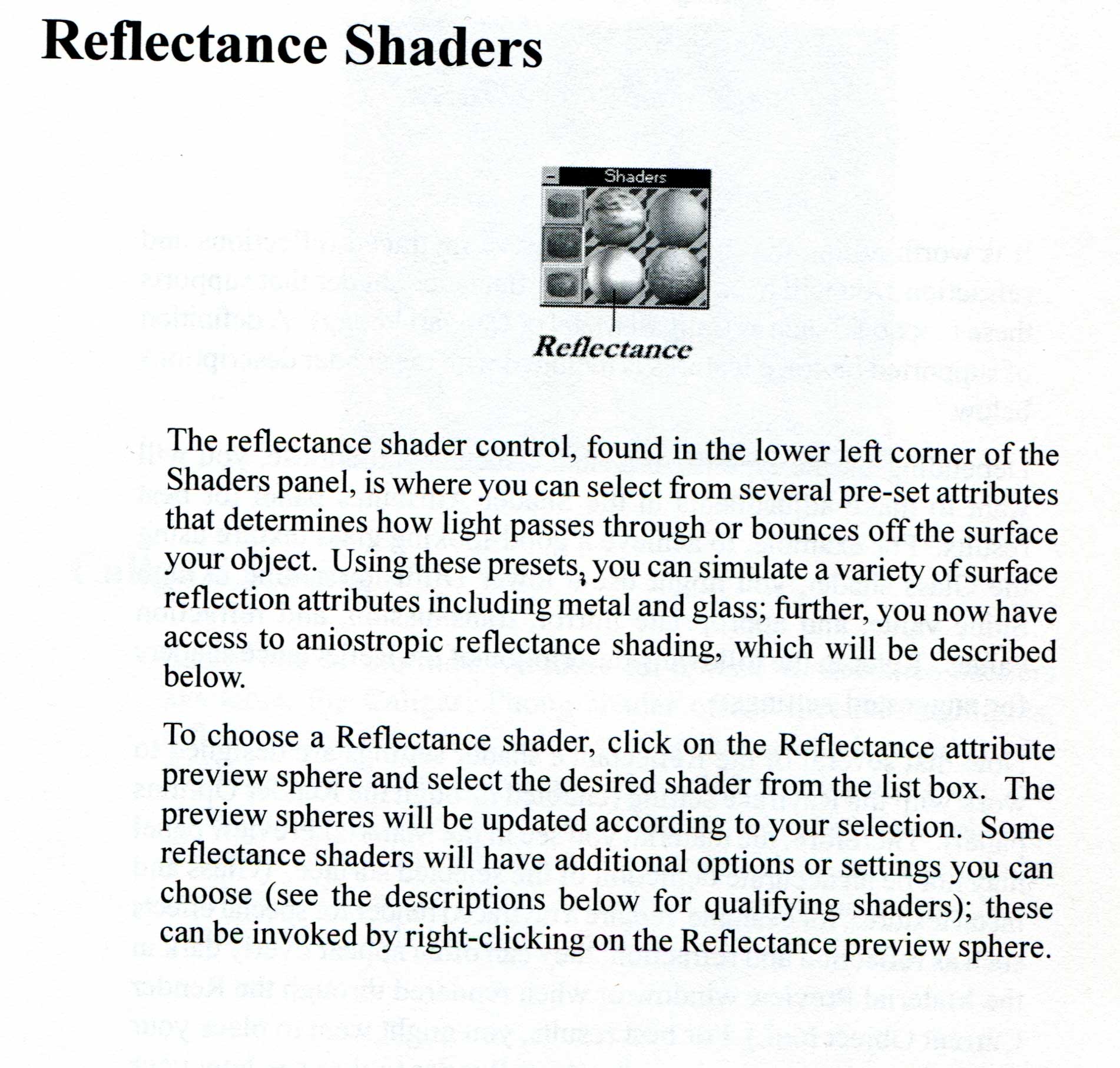
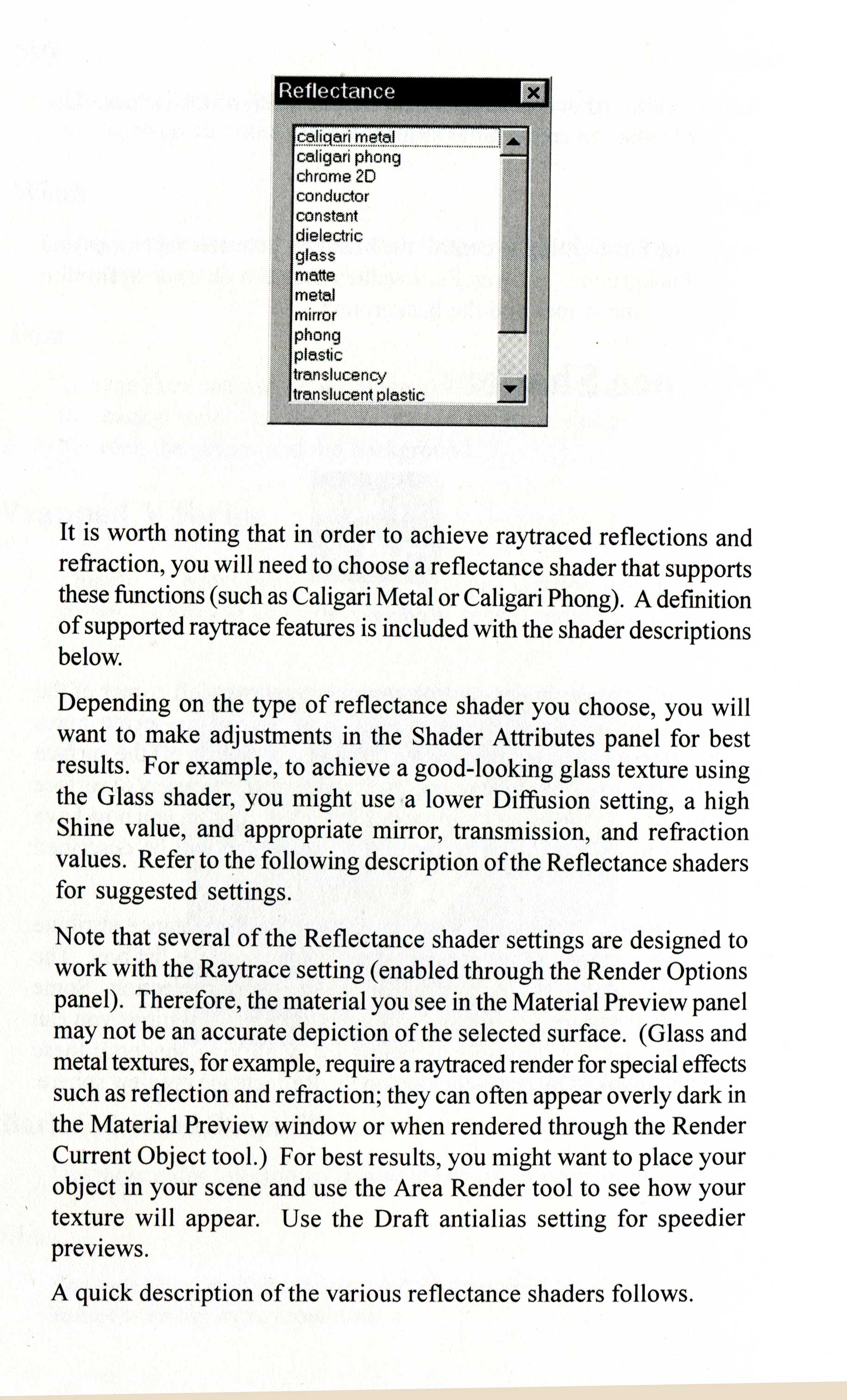
I seem to remember only the ?environment map? shader had an assignable image (maybe-it's been a long time since 4.3!)
Probably accessed via right click on Reflectance preview sphere.
You also need to enable raytracing in the scene and light options and render scene rather than just the object.
Included scans of manual page.
...
I seem to remember only the ?environment map? shader had an assignable image (maybe-it's been a long time since 4.3!)
Probably accessed via right click on Reflectance preview sphere.
You also need to enable raytracing in the scene and light options and render scene rather than just the object.
Included scans of manual page.
-
zzador
- Petty Officer Second Class
- Posts: 29
- Joined: 06 Sep 2019, 08:47
- Type the number ten into the box: 10
Re: Environment/Reflection is White in MaterialEditor!
Oh. Thanks. So it is defacto default that white is reflected by mirror shaders in the material editor. Then my memory has failed me here. Might have gotten confused with the environment shader here. Sorry for the trouble.
I've seen things, you people wouldn't believe...
the rise & fall of MS-DOS. The birth of Windows 3.11. Professional 3D Software getting usable in the late 90s and getting unusable again around 2010. Telephones with a dial and so much more...
the rise & fall of MS-DOS. The birth of Windows 3.11. Professional 3D Software getting usable in the late 90s and getting unusable again around 2010. Telephones with a dial and so much more...
-
spacekdet
- Captain
- Posts: 1810
- Joined: 27 May 2009, 15:00
- Type the number ten into the box: 10
- Location: On the day shift at the Utility Muffin Research Kitchen
Re: Environment/Reflection is White in MaterialEditor!
It may be reflecting background color- is that set to white?
-
bitkar

- Captain
- Posts: 2089
- Joined: 16 Mar 2010, 07:14
- Type the number ten into the box: 0
- Location: Czech Republic
Re: Environment/Reflection is White in MaterialEditor!
ehm... in material editor? why does it bother you? Just set the material to someting that makes sense in light and physics and paint the object. You can use small window to test render or use area render to see how it looks like. I would not be worried by material editor. If there are reflections, there must be something to reflect there. In the scene it will reflect things from the scene.
I dont understand or I dont see the problem
I dont understand or I dont see the problem
Michal aka bitkar
tS freak since tS2 (1998) and forever (tS7.61 modeler)
tS freak since tS2 (1998) and forever (tS7.61 modeler)
-
zzador
- Petty Officer Second Class
- Posts: 29
- Joined: 06 Sep 2019, 08:47
- Type the number ten into the box: 10
Re: Environment/Reflection is White in MaterialEditor!
No, changing the background color in the render settings makes no difference. All raytraced reflections are pure white in the material editor regardless of any settings. Surely Environmentmaps are displayed but who uses Environmentmaps today anyways.spacekdet wrote: 07 Apr 2022, 00:51 It may be reflecting background color- is that set to white?
Im currently working on a custom shader collection for tS4.3 that uses path-tracing to solve the rendering equation (Global Illumination shaders). The shaders are computationally too expensive to test them directly in the scene. Besides that I would'nt have interactive response to parameter-changes done in the material-dialog.bitkar wrote: 07 Apr 2022, 13:35 ehm... in material editor? why does it bother you? Just set the material to someting that makes sense in light and physics and paint the object. You can use small window to test render or use area render to see how it looks like. I would not be worried by material editor. If there are reflections, there must be something to reflect there. In the scene it will reflect things from the scene.
I dont understand or I dont see the problem
So far the shaders are working fine. It just bothered me that for the metal shader with soft-reflections the reflections can't be seen in the material editor preview cause the environment there is just pure white. I thought there might be a way to change that.
Here is an example image of the diffuse shader (Rendered with local light and high sharpness shadowmap):

Last edited by zzador on 07 Apr 2022, 14:24, edited 1 time in total.
I've seen things, you people wouldn't believe...
the rise & fall of MS-DOS. The birth of Windows 3.11. Professional 3D Software getting usable in the late 90s and getting unusable again around 2010. Telephones with a dial and so much more...
the rise & fall of MS-DOS. The birth of Windows 3.11. Professional 3D Software getting usable in the late 90s and getting unusable again around 2010. Telephones with a dial and so much more...
-
spacekdet
- Captain
- Posts: 1810
- Joined: 27 May 2009, 15:00
- Type the number ten into the box: 10
- Location: On the day shift at the Utility Muffin Research Kitchen
Re: Environment/Reflection is White in MaterialEditor!
Oh, I need to read more slowly.bitkar wrote: 07 Apr 2022, 13:35 ehm... in material editor?
Yes, view of material in the material editor doesn't always match what gets rendered.
To the OP: but how does it render? When you render the scene or area do reflections show up?
If so then I wouldn't stress about how the preview sphere in the editor appears.
The reflection attributes of the shader takes the background color or image into account to create reflections, of course along with other objects in the scene. It isn't generated in the preview, only in the render.
-
trueBlue

- Captain
- Posts: 5548
- Joined: 06 Jul 2009, 22:50
- Type the number ten into the box: 10
Re: Environment/Reflection is White in MaterialEditor!
Does tS4.3 have a Post Process Editor?

-
zzador
- Petty Officer Second Class
- Posts: 29
- Joined: 06 Sep 2019, 08:47
- Type the number ten into the box: 10
Re: Environment/Reflection is White in MaterialEditor!
Nice try, trueBlue...nice try.trueBlue wrote: 07 Apr 2022, 18:26 Does tS4.3 have a Post Process Editor?


My heart beats for tS4.3 and there's no way around.
I've seen things, you people wouldn't believe...
the rise & fall of MS-DOS. The birth of Windows 3.11. Professional 3D Software getting usable in the late 90s and getting unusable again around 2010. Telephones with a dial and so much more...
the rise & fall of MS-DOS. The birth of Windows 3.11. Professional 3D Software getting usable in the late 90s and getting unusable again around 2010. Telephones with a dial and so much more...
-
bitkar
- Captain
- Posts: 2089
- Joined: 16 Mar 2010, 07:14
- Type the number ten into the box: 0
- Location: Czech Republic
Re: Environment/Reflection is White in MaterialEditor!
It is still not a problem. You can use the small window to render the preview in scene. Even material editor preview needs to be rendered and use the CPU, so whats the real difference? At least you can really test it if it looks good in real scene and not only in a mat. editor. (I never use the whole screen for test rendering when i work in tS)
It honestly looks pretty good. ... But you said its computationally expensive. If its not fast to render, its got no point almost. If you use tS7.6 with Vray it will be better and it will render way faster, so ... I still dont understand why to do such thing??
I barely remember having some soft reflection shader for some old tS and I remember it was really really slow (on a machine back in the days, dont know how it would be on the current machines)
I think you would do better if you used your time on tS7.6 than this (4.3) stuff of questionable "usefullness". My opinion. No offence. tS7.6 model side, can look like tS4.3 as the UI is customizable. If you arrange the icons and stuff like you are used to and learn the new tools (which bring new features), you would be better of. Having something better that still looks like the old tS.
It honestly looks pretty good. ... But you said its computationally expensive. If its not fast to render, its got no point almost. If you use tS7.6 with Vray it will be better and it will render way faster, so ... I still dont understand why to do such thing??
I barely remember having some soft reflection shader for some old tS and I remember it was really really slow (on a machine back in the days, dont know how it would be on the current machines)
I think you would do better if you used your time on tS7.6 than this (4.3) stuff of questionable "usefullness". My opinion. No offence. tS7.6 model side, can look like tS4.3 as the UI is customizable. If you arrange the icons and stuff like you are used to and learn the new tools (which bring new features), you would be better of. Having something better that still looks like the old tS.
Michal aka bitkar
tS freak since tS2 (1998) and forever (tS7.61 modeler)
tS freak since tS2 (1998) and forever (tS7.61 modeler)
-
trueBlue
- Captain
- Posts: 5548
- Joined: 06 Jul 2009, 22:50
- Type the number ten into the box: 10
Re: Environment/Reflection is White in MaterialEditor!
Try these tS2 Bible model plugins...zzador wrote: 07 Apr 2022, 19:41Nice try, trueBlue...nice try.trueBlue wrote: 07 Apr 2022, 18:26 Does tS4.3 have a Post Process Editor?
Post Process Editor.png
My heart beats for tS4.3 and there's no way around.
The Lens Flare is pretty cool in that you can keyframe it
Exploder is pretty cool too!
- Attachments
-
- Plugins112d.zip
- (479.26 KiB) Downloaded 170 times
-
borgcone
- Chief Petty Officer
- Posts: 134
- Joined: 06 May 2018, 21:09
- Type the number ten into the box: 10
- Location: Japan, or sometimes behind a borg cube
Re: Environment/Reflection is White in MaterialEditor!
Maybe someone should develop another Material Editor for tS4.3. But is it in high demand?zzador wrote: 07 Apr 2022, 14:11 All raytraced reflections are pure white in the material editor regardless of any settings. Environmentmaps ... but who uses Environmentmaps today anyways.
...The shaders are computationally too expensive to test them directly in the scene. Besides that I would'nt have interactive response to parameter-changes done in the material-dialog.
... the reflections can't be seen in the material editor preview cause the environment there is just pure white. I thought there might be a way to change that.
I just re-read your first post in 2019 and the replies to it.zzador wrote: 07 Apr 2022, 19:41 My heart beats for tS4.3 and there's no way around.
trueSpace 3.2 & 4.2 by zzador
It's time to start a new open source project for tS-like 3D tools! Of course, several sub-projects must progress simultaneously: tS4-like, tS2-like, tS7.61-tS6.6-integrated, etc.zzador wrote: 06 Sep 2019, 09:15 I'm new here ... many bugs and after version 6.6 Caligari came up with this "Workspace"<->"Modeller" duality which is/was imho very quirky and unelegant. I personally don't like to work with trueSpace 7.61 ...

borgcone ... or 3DfromNULL at https://biglode.com/ptsxpy
-
Finis

- Captain
- Posts: 5410
- Joined: 21 May 2009, 18:26
- Type the number ten into the box: 0
- Location: America!
Re: Environment/Reflection is White in MaterialEditor!
I prefer dangerous freedom over peaceful servitude. -- Thomas Jefferson/Jean Jacques Rousseau
-
zzador
- Petty Officer Second Class
- Posts: 29
- Joined: 06 Sep 2019, 08:47
- Type the number ten into the box: 10
Re: Environment/Reflection is White in MaterialEditor!
Well I would appreciate to have a starting point and forum only for tS 4.3 but it's not a "must have". For those who always want me to try tS 7.6 I can say I have tried it 3 times now and I usually deinstall it just a couple of minutes later. I don't want to offend people who worked on that project but for me it is an ugly abomination of a 3D software package. I feel overwhelmed by all the buttons and as a tS 1.0 - 4.3 User I just can't get a foot down. There is no underlying logic or concept to understand. It's like in Blender.
There was once a time where producers of 3D Packages wanted to address hobbyists, amateurs & professionals together with their products. Because professionals were always the main money source their opinions drove developement stronger than the opinions of amateurs and hobbyists and nowadays 3D Software packages are only directed at professionals. They are blown up with features over features and all these features must be accessible from the main screen. There is no guided workflow anymore like in the good old 3D Studio R3 or R4 where you got 4 different Editors (2D Shaper, 3D Lofter, 3D Editor and Keyframe). Truespace 1.0 also had no guided workflow but it had a cleaned up interface and some sence of order.
Blender is an incredible Tool....for professionals and just for professionals. As a hobbyist I simply have no time to learn blender and to be honest: It's no fun either. Blender's super complicated, feature-overblown interface is just no fun. And the same goes for tS 7.6 in my opinion.
What I like about tS 4.3 is that it has just the right base features. Ok, there could be real catmul clark subdivision and a loop-cut tool, but that can be impemented by yourself though tSX extensions. I like that I know every feature of tS 4.3 very well and can forecast any behaviour of it. If I have a problem or want to create an effect that not natively supported by tS 4.3 I just write myself an extension or custom shader for that. In that regard you might compare it to cars: tS 7.6 is modern Toyota and Blender is a modern BMW while tS 4.3 is and like an old Shelby GT. Your new Toyotas and BMWs have more features for sure but can you mod & repair them by yourself?
There was once a time where producers of 3D Packages wanted to address hobbyists, amateurs & professionals together with their products. Because professionals were always the main money source their opinions drove developement stronger than the opinions of amateurs and hobbyists and nowadays 3D Software packages are only directed at professionals. They are blown up with features over features and all these features must be accessible from the main screen. There is no guided workflow anymore like in the good old 3D Studio R3 or R4 where you got 4 different Editors (2D Shaper, 3D Lofter, 3D Editor and Keyframe). Truespace 1.0 also had no guided workflow but it had a cleaned up interface and some sence of order.
Blender is an incredible Tool....for professionals and just for professionals. As a hobbyist I simply have no time to learn blender and to be honest: It's no fun either. Blender's super complicated, feature-overblown interface is just no fun. And the same goes for tS 7.6 in my opinion.
What I like about tS 4.3 is that it has just the right base features. Ok, there could be real catmul clark subdivision and a loop-cut tool, but that can be impemented by yourself though tSX extensions. I like that I know every feature of tS 4.3 very well and can forecast any behaviour of it. If I have a problem or want to create an effect that not natively supported by tS 4.3 I just write myself an extension or custom shader for that. In that regard you might compare it to cars: tS 7.6 is modern Toyota and Blender is a modern BMW while tS 4.3 is and like an old Shelby GT. Your new Toyotas and BMWs have more features for sure but can you mod & repair them by yourself?
I've seen things, you people wouldn't believe...
the rise & fall of MS-DOS. The birth of Windows 3.11. Professional 3D Software getting usable in the late 90s and getting unusable again around 2010. Telephones with a dial and so much more...
the rise & fall of MS-DOS. The birth of Windows 3.11. Professional 3D Software getting usable in the late 90s and getting unusable again around 2010. Telephones with a dial and so much more...
-
bitkar
- Captain
- Posts: 2089
- Joined: 16 Mar 2010, 07:14
- Type the number ten into the box: 0
- Location: Czech Republic
Re: Environment/Reflection is White in MaterialEditor!
I understand you dont like the Workspace part of tS7.6 coz its different. But the tS6.6 (or Modeler part) is almost the same as 4.3. You would learn it in a week. Not more. Base is the same. Its the same UI with the same icons and pretty much same principles. Maybe right click was new.... Few new features and icons, maybe 10? This is puzzeling for me. It looks like there is some misunderstanding or something. Iam not forcing you, but i dont really see much difference (still the same old classic trueSpace). With every new trueSpace I was able to work in it rightaway and just sit for a week to learn the new stuff, that was added.
here is a screenshot for you, so I know we talk about the same thing. Its 7.61 modeler side.
here is a screenshot for you, so I know we talk about the same thing. Its 7.61 modeler side.
- Attachments
-

Michal aka bitkar
tS freak since tS2 (1998) and forever (tS7.61 modeler)
tS freak since tS2 (1998) and forever (tS7.61 modeler)
-
trueBlue
- Captain
- Posts: 5548
- Joined: 06 Jul 2009, 22:50
- Type the number ten into the box: 10
Re: Environment/Reflection is White in MaterialEditor!
To clarify, do you mean tS7.6 Model orbitkar wrote: 08 Apr 2022, 20:01 I understand you dont like the Workspace part of tS7.6 coz its different. But the tS6.6 (or Modeler part) is almost the same as 4.3. You would learn it in a week. Not more. Base is the same. Its the same UI with the same icons and pretty much same principles. Maybe right click was new.... Few new features and icons, maybe 10? This is puzzeling for me. It looks like there is some misunderstanding or something. Iam not forcing you, but i dont really see much difference (still the same old classic trueSpace). With every new trueSpace I was able to work in it rightaway and just sit for a week to learn the new stuff, that was added.
here is a screenshot for you, so I know we talk about the same thing. Its 7.61 modeler side.
 tS761Beta8 Model?
-
bitkar
- Captain
- Posts: 2089
- Joined: 16 Mar 2010, 07:14
- Type the number ten into the box: 0
- Location: Czech Republic
Re: Environment/Reflection is White in MaterialEditor!
its the same when it come to the model side UI. I have never seen any difference. And I used both for some time to evaluate which one is better or more stable. But never thougth there is a difference in the model side UI. Its the same old tS legacy thing :)
here it is, i still have both, 7.61 and 7.6
here it is, i still have both, 7.61 and 7.6
- Attachments
-

Michal aka bitkar
tS freak since tS2 (1998) and forever (tS7.61 modeler)
tS freak since tS2 (1998) and forever (tS7.61 modeler)
-
zzador
- Petty Officer Second Class
- Posts: 29
- Joined: 06 Sep 2019, 08:47
- Type the number ten into the box: 10
Re: Environment/Reflection is White in MaterialEditor!
Okay, since you can't stop selling me that ugly tS7.61 child I again installed it and gave it a try:
That's how tS7.61 "greets" me the first time I start it:

As you might see: It isn't even able to go real fullscreen (desktop is visible left & right & below) and the window is fully maximized. This might come from my abnormal laptop resolution (1366 x 768) but then again: tS 4.3 has no problems to go fullscreen. Then what are all these icons and how can I get rid of them? There's nowhere a menu where I can disable the groups like in tS4.3. I can collapse them to an ugly nearly invisible dot of course but that's not good usability imho. How can I get all the icons to automatically align at the bottom border as I'm used to it? Found no way so far.
If there are solutions to all these problems I might give tS 7.61 Modelside Edition a chance again but for now I feel really completely helpless there.
That's how tS7.61 "greets" me the first time I start it:
As you might see: It isn't even able to go real fullscreen (desktop is visible left & right & below) and the window is fully maximized. This might come from my abnormal laptop resolution (1366 x 768) but then again: tS 4.3 has no problems to go fullscreen. Then what are all these icons and how can I get rid of them? There's nowhere a menu where I can disable the groups like in tS4.3. I can collapse them to an ugly nearly invisible dot of course but that's not good usability imho. How can I get all the icons to automatically align at the bottom border as I'm used to it? Found no way so far.
If there are solutions to all these problems I might give tS 7.61 Modelside Edition a chance again but for now I feel really completely helpless there.
The image needed 8minutes on my HP Laptop from 2017. It got 256 Diffuse samples per pixel.bitkar wrote: 07 Apr 2022, 21:29 It honestly looks pretty good. ... But you said its computationally expensive. If its not fast to render, its got no point almost. If you use tS7.6 with Vray it will be better and it will render way faster, so ... I still dont understand why to do such thing??
I've seen things, you people wouldn't believe...
the rise & fall of MS-DOS. The birth of Windows 3.11. Professional 3D Software getting usable in the late 90s and getting unusable again around 2010. Telephones with a dial and so much more...
the rise & fall of MS-DOS. The birth of Windows 3.11. Professional 3D Software getting usable in the late 90s and getting unusable again around 2010. Telephones with a dial and so much more...
-
bitkar
- Captain
- Posts: 2089
- Joined: 16 Mar 2010, 07:14
- Type the number ten into the box: 0
- Location: Czech Republic
Re: Environment/Reflection is White in MaterialEditor!
Ok, i think we found the problem... i would say RTFM (read the fucking manual), but not to be mean, i made a tutorial just for you ;)
Michal aka bitkar
tS freak since tS2 (1998) and forever (tS7.61 modeler)
tS freak since tS2 (1998) and forever (tS7.61 modeler)
-
trueBlue
- Captain
- Posts: 5548
- Joined: 06 Jul 2009, 22:50
- Type the number ten into the box: 10
Re: Environment/Reflection is White in MaterialEditor!
One thing bitkar did not mention, you will need to save your Configuration after rearranging your UI
First of all, you are not using tS761
It looks like you are using the Caligari trueSpace 7.6 MS Legacy Edition V1.2
Here is one of my setups for that version which includes My Configuration and a Workspace Layout called Model
This Model layout is a special layout for users that do not like Workspace
Note: No layout Tabs in the top title bar, No Workspace toolbars at the bottom, and No Stack on the Right
.
Fullscreen...
I am using Win 10 and I have the same problem with the Desktop showing
I also have the Win 10 bottom Taskbar set to Auto Hide, which is important when saving Workspace Layouts
You can right click the tS7.exe and choose Properties/Compatibility
The Troubleshooter presented Windows Vista (Service Pack 2) mode
.
VRay with Global Illumination, which took less then a minute to Render
Note: The Configuration Library, bottom left
.
If you want to try this setup, you can apply this update to the Caligari trueSpace 7.6 MS Legacy Edition V1.2 which includes My_Configuration.tsc and the Model layout...
viewt ... 397#p37397
First of all, you are not using tS761
It looks like you are using the Caligari trueSpace 7.6 MS Legacy Edition V1.2
Here is one of my setups for that version which includes My Configuration and a Workspace Layout called Model
This Model layout is a special layout for users that do not like Workspace
Note: No layout Tabs in the top title bar, No Workspace toolbars at the bottom, and No Stack on the Right

Fullscreen...
I am using Win 10 and I have the same problem with the Desktop showing
I also have the Win 10 bottom Taskbar set to Auto Hide, which is important when saving Workspace Layouts
You can right click the tS7.exe and choose Properties/Compatibility
The Troubleshooter presented Windows Vista (Service Pack 2) mode
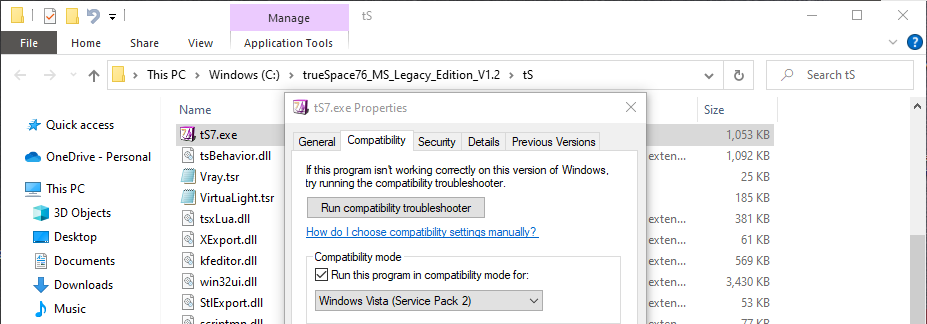
VRay with Global Illumination, which took less then a minute to Render
Note: The Configuration Library, bottom left
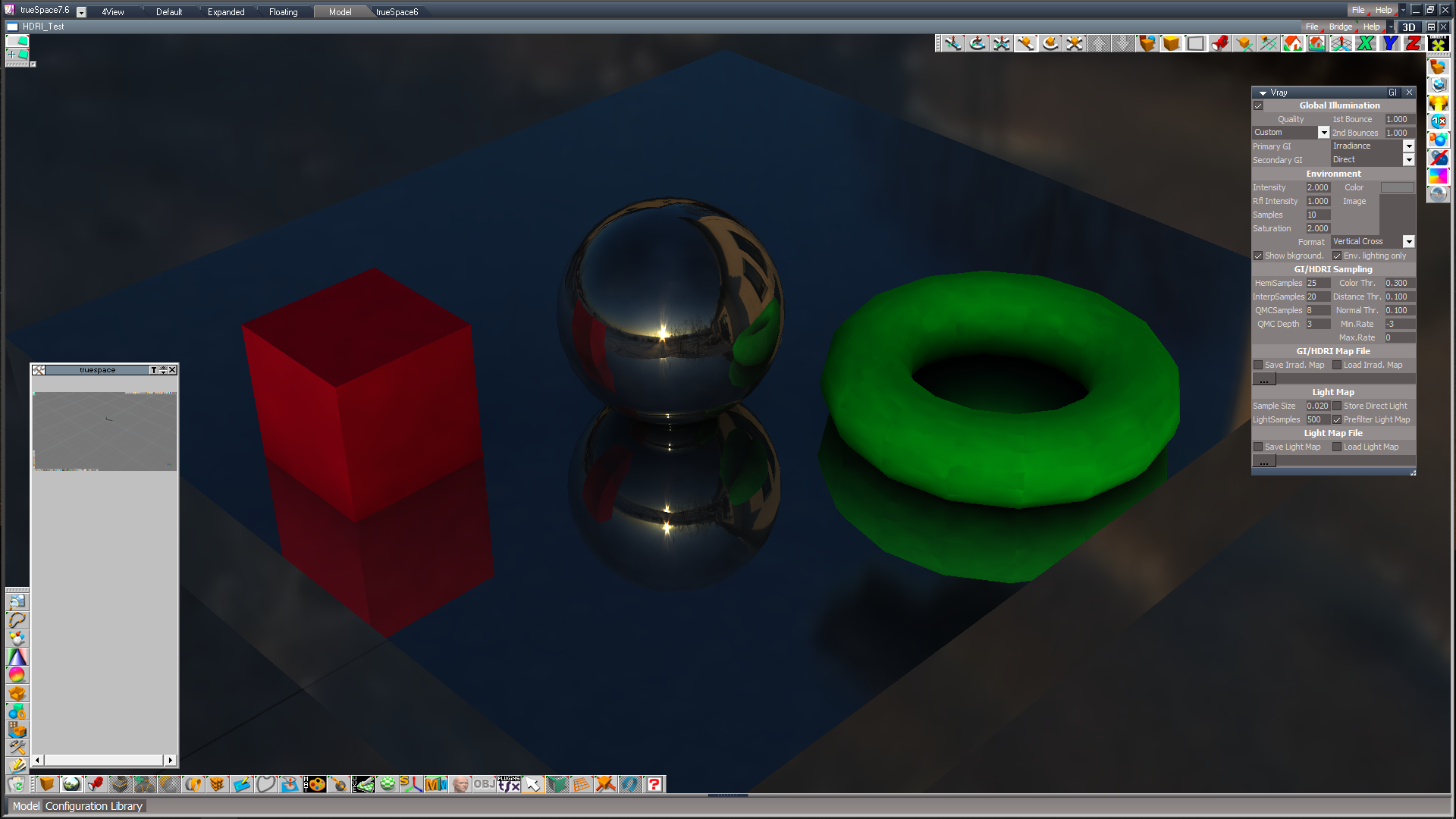
If you want to try this setup, you can apply this update to the Caligari trueSpace 7.6 MS Legacy Edition V1.2 which includes My_Configuration.tsc and the Model layout...
viewt ... 397#p37397
-
zzador
- Petty Officer Second Class
- Posts: 29
- Joined: 06 Sep 2019, 08:47
- Type the number ten into the box: 10
Re: Environment/Reflection is White in MaterialEditor!
Okay, okay, I will give it another try. It seems the new Modelside-Edition is a slight "back-to-the-roots" attempt. 
Yeah, I didn't need to consult the manual once for the older versions. I thought that this would be the grand feature of trueSpace...being usable by beginners without any learning. Seems to have changed. Thanks for the video however. It doesn't run on my laptop here (play button just doesn't work -> first time that this happens) but I will watch it later on my TV in the living room.bitkar wrote: 09 Apr 2022, 12:14 Ok, i think we found the problem... i would say RTFM (read the fucking manual), but not to be mean, i made a tutorial just for you
Oh common...what's this? Photonmapping? The artefacts are horrible! I know VRay can do much better. Rerender it with Brute-Force GI and 256 Samples per pixel and we have a decent comparison.trueBlue wrote: 09 Apr 2022, 12:33 VRay with Global Illumination, which took less then a minute to Render
Note: The Configuration Library, bottom left
I've seen things, you people wouldn't believe...
the rise & fall of MS-DOS. The birth of Windows 3.11. Professional 3D Software getting usable in the late 90s and getting unusable again around 2010. Telephones with a dial and so much more...
the rise & fall of MS-DOS. The birth of Windows 3.11. Professional 3D Software getting usable in the late 90s and getting unusable again around 2010. Telephones with a dial and so much more...
-
borgcone
- Chief Petty Officer
- Posts: 134
- Joined: 06 May 2018, 21:09
- Type the number ten into the box: 10
- Location: Japan, or sometimes behind a borg cube
Re: Environment/Reflection is White in MaterialEditor!
I've also had the same feeling for a long time (10 or 15 years!zzador wrote: 08 Apr 2022, 16:05 ... For those who always want me to try tS 7.6 I can say I have tried it 3 times now and I usually deinstall it just a couple of minutes later. ...
 ) till I recently understand the detail pros/cons of tS6.6 (and other tS versions). I hope you to reach happier stage on tS6.6 in much shorter time.
borgcone ... or 3DfromNULL at https://biglode.com/ptsxpy
-
trueBlue
- Captain
- Posts: 5548
- Joined: 06 Jul 2009, 22:50
- Type the number ten into the box: 10
Re: Environment/Reflection is White in MaterialEditor!
Just a quick and dirty render using the included HDRI Test scn using VRay's default settings with Global Illumination checkedzzador wrote:
Oh common...what's this? Photonmapping? The artefacts are horrible! I know VRay can do much better. Rerender it with Brute-Force GI and 256 Samples per pixel and we have a decent comparison.
Using Lightworks to render the same scn is horrible!
Shows us what you can do!
BTW... your welcome

And...
Workspace's Modeling and Boolean tools is way better than Model, IMHO

-
bitkar
- Captain
- Posts: 2089
- Joined: 16 Mar 2010, 07:14
- Type the number ten into the box: 0
- Location: Czech Republic
Re: Environment/Reflection is White in MaterialEditor!
i will reupload the tutorial on UI later... there was something wrong, it was in a very low quality too, even tho i uploaded 1440p video... stay tuned.
Michal aka bitkar
tS freak since tS2 (1998) and forever (tS7.61 modeler)
tS freak since tS2 (1998) and forever (tS7.61 modeler)
-
bitkar
- Captain
- Posts: 2089
- Joined: 16 Mar 2010, 07:14
- Type the number ten into the box: 0
- Location: Czech Republic
Re: Environment/Reflection is White in MaterialEditor!
Michal aka bitkar
tS freak since tS2 (1998) and forever (tS7.61 modeler)
tS freak since tS2 (1998) and forever (tS7.61 modeler)