I had this idea while watching a spider across the surface of the water. Action is very fast and it must be studied frame by frame. it is necessary to have some realism. When an object strikes the water surface, it penetrates the surface and an air bubble is formed. the bubble is attracted by the speed of the object. then the bubble detaches from the object to break the surface and the object falls gently to the bottom. that's what I studied to play this little animation. when it is perfected I want to create some new effects for my movie BOT. The method is very simple and developed on truespace. Rendered with Lightwork.
in the zip file you have an animation of the impact and a wire frame in slow motion to see the water attracted by the object then move to the surface.
Impact in the water
-
marcel

- Captain
- Posts: 2247
- Joined: 21 May 2009, 19:52
- Type the number ten into the box: 0
- Location: paris - France
Impact in the water
- Attachments
-
- test_ wave.zip
- (2.49 MiB) Downloaded 271 times
-

Design - illustration - Animation
http://www.crea-vision.fr
http://www.crea-vision.fr
-
Finis

- Captain
- Posts: 5410
- Joined: 21 May 2009, 18:26
- Type the number ten into the box: 0
- Location: America!
Re: Impact in the water
Well, how did you do it?
I prefer dangerous freedom over peaceful servitude. -- Thomas Jefferson/Jean Jacques Rousseau
-
LeonRegis

- Captain
- Posts: 1946
- Joined: 18 Aug 2009, 17:36
- Type the number ten into the box: 0
- Location: Brazil/Earth/Orion Arm/Milky Way/4th Dimension/This Universe/Multiverse???/Singularity???
Re: Impact in the water
That's pretty awesome! The main moviment of water is perfect, but I guess that should be some ''splash'', ie, water that is push out of the pool in little drops.
Seems like cloth simulation but I'm curious about.
What about try a fluid sim?
Seems like cloth simulation but I'm curious about.
What about try a fluid sim?
Be the change you want to see in the world. - Mohandas Gandhi
-
marcel
- Captain
- Posts: 2247
- Joined: 21 May 2009, 19:52
- Type the number ten into the box: 0
- Location: paris - France
Re: Impact in the water
i don't need splash for animation. I will do this kind of detail in post process. i create very simple object to have the best control of what i need when i do the animation. also I don't want too many polygones. I use quad and sds for a close up view.
Design - illustration - Animation
http://www.crea-vision.fr
http://www.crea-vision.fr
-
MikomDude

- Captain
- Posts: 1930
- Joined: 04 Oct 2010, 11:12
- Type the number ten into the box: 0
- Location: The Hague, Netherlands
Re: Impact in the water
I suppose you've got a pretty good computer to render these animations.
-
RAYMAN

- Captain
- Posts: 2547
- Joined: 21 May 2009, 18:56
Re: Impact in the water
The water looks more like this on the water after the impact with an object.
This can be done by rotosplining the shape and loading it together with a smoothed out version as a morph target.
Smoothing out can be done manually or with any other tool like the smoothbrush in Zbrush....or in Silo.....
Its a littlem trickier though with the spike like in the picture.....
This can be done by rotosplining the shape and loading it together with a smoothed out version as a morph target.
Smoothing out can be done manually or with any other tool like the smoothbrush in Zbrush....or in Silo.....
Its a littlem trickier though with the spike like in the picture.....
- Attachments
-

-
marcel
- Captain
- Posts: 2247
- Joined: 21 May 2009, 19:52
- Type the number ten into the box: 0
- Location: paris - France
Re: Impact in the water
@ MikomDude: i have an old computer. But i use method very simple with just some vertex. if you use a complex method to do that for only an impact, what about for the whole scene? it is why i can do hd animation without problem. I am not hollywood with his possibility. 
Last edited by marcel on 10 Oct 2010, 18:35, edited 1 time in total.
Design - illustration - Animation
http://www.crea-vision.fr
http://www.crea-vision.fr
-
RAYMAN
- Captain
- Posts: 2547
- Joined: 21 May 2009, 18:56
Re: Impact in the water
here is a gif animation of that drop... textures are´nt right but its just a quickie to underline what I
said before...
Peter
said before...
Peter
- Attachments
-
Last edited by RAYMAN on 10 Oct 2010, 18:39, edited 2 times in total.
-
marcel
- Captain
- Posts: 2247
- Joined: 21 May 2009, 19:52
- Type the number ten into the box: 0
- Location: paris - France
Re: Impact in the water
@ Rayman: interesting but it is not what i need. Your drop is created with a small impact. In fact my impact in the movie will be bigger than the sample i did. With a bigger impact it is a a kind of crown created when the air bubble explode at the surface. That is what i will do. Maybe in post process. i need also to reduce the speed if the impact is very important.
If you like special effect, here is the link of a programmer very good (many video sample):
http://physbam.stanford.edu/~fedkiw/
If you like special effect, here is the link of a programmer very good (many video sample):
http://physbam.stanford.edu/~fedkiw/
Design - illustration - Animation
http://www.crea-vision.fr
http://www.crea-vision.fr
-
RAYMAN
- Captain
- Posts: 2547
- Joined: 21 May 2009, 18:56
Re: Impact in the water
Its the same technique you can use you just have to model the crown with a sculpture program set that as the end and flatten that out and set that as the morph target...... ..youcan then cycle from flat surface to splash and back... you can even mke a different splash a sidestep....marcel wrote:@ Rayman: i know that but it is not what i need. Your drop is created with a small impact. In fact my impact in the movie will be bigger than the sample i did. With a bigger impact it is a a kind of crown created when the air bubble explode at the surface. That is what i will do. Maybe in post process. i need also to reduce the speed if the impact is very important. if you like special effect, here is the link of a programmer very good (many video sample):
http://physbam.stanford.edu/~fedkiw/
The rotospluine that I made here was just the quickest possible example withoutm spending much time sculpting but I can show you how a bigger splash can look like...
Peter
-
marcel
- Captain
- Posts: 2247
- Joined: 21 May 2009, 19:52
- Type the number ten into the box: 0
- Location: paris - France
Re: Impact in the water
yes a morph for the crown over the wave, then many drop around the crown in post process seem a good method for what i need. some time different way together in the same animation are the solution.
Design - illustration - Animation
http://www.crea-vision.fr
http://www.crea-vision.fr
-
RAYMAN
- Captain
- Posts: 2547
- Joined: 21 May 2009, 18:56
Re: Impact in the water
Exactly this would be the end morph and the flat sea or liquid would be the other.. the only restiction is that you cant change the structure and polygon count but its very possible to do that without changing it..... you can even model some stages between the both targets and use them as secondary targets..marcel wrote:yes a morph for the crown over the wave, then many drop around the crown in post process seem a good method for what i need. some time different way together in the same animation are the solution.
Peter
- Attachments
-

-
nigec

- Master Chief Petty Officer
- Posts: 561
- Joined: 21 May 2009, 18:46
Re: Impact in the water
Thought I'd have a try, its done in blender which I honestly don't know what I'm doing half the time, this was dumb luck lol:
- Attachments
-

-
marcel
- Captain
- Posts: 2247
- Joined: 21 May 2009, 19:52
- Type the number ten into the box: 0
- Location: paris - France
Re: Impact in the water
thank nigec. that give me the idea to try animated metaball.
-wave for the surface
-morph crown for the impact
-drop in post process
-metaball for under water air bubble.
i can do all that together in the same scene with a better control of the whole. I will try taht later.
Thank for the helps.
-wave for the surface
-morph crown for the impact
-drop in post process
-metaball for under water air bubble.
i can do all that together in the same scene with a better control of the whole. I will try taht later.
Thank for the helps.
Design - illustration - Animation
http://www.crea-vision.fr
http://www.crea-vision.fr
-
Finis
- Captain
- Posts: 5410
- Joined: 21 May 2009, 18:26
- Type the number ten into the box: 0
- Location: America!
Re: Impact in the water
Everyone is talking about morphs lately. I'd better learn about them. Sounds like a powerful tool.
Nigec: how about a short animation of that?
Marcel: Not the same as your possible use of metaballs but I tried to use a ba-zillion metaballs and the physics simulation to simulate water. Of course, it would have taken a hundred thousand years for the physics to finish.
Nigec: how about a short animation of that?
Marcel: Not the same as your possible use of metaballs but I tried to use a ba-zillion metaballs and the physics simulation to simulate water. Of course, it would have taken a hundred thousand years for the physics to finish.
I prefer dangerous freedom over peaceful servitude. -- Thomas Jefferson/Jean Jacques Rousseau
-
rjeff

- Master Chief Petty Officer
- Posts: 462
- Joined: 21 May 2009, 18:26
Re: Impact in the water
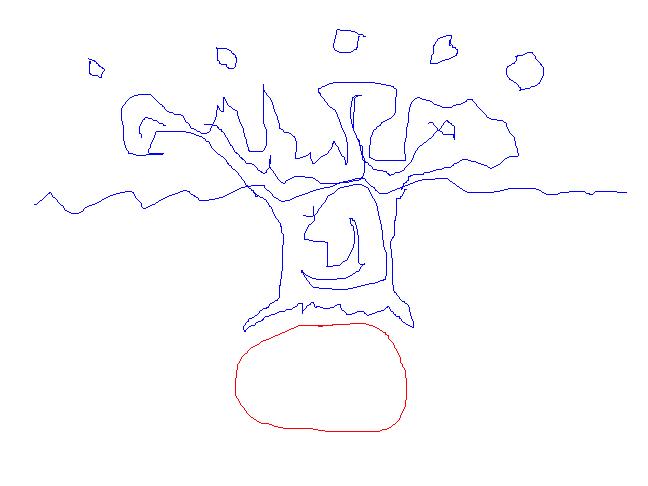
Now...this was tough. The render times were awful, but I think Windows paint makes a realistic water effect
- Attachments
-
-
MikomDude
- Captain
- Posts: 1930
- Joined: 04 Oct 2010, 11:12
- Type the number ten into the box: 0
- Location: The Hague, Netherlands
Re: Impact in the water
Haha, yes, must have taken some time. I suppose you haven't tried Tux-Paint, now there is a challenge.rjeff wrote:Now...this was tough. The render times were awful, but I think Windows paint makes a realistic water effect
-
marcel
- Captain
- Posts: 2247
- Joined: 21 May 2009, 19:52
- Type the number ten into the box: 0
- Location: paris - France
Re: Impact in the water
@rjeff: really awesome!  rough drawing can be a good tool to understand what we do.
@finis: metaball only for the air bubble. air bubble in water feels to vibrate and deform. with some keyframe i think it is possible to do the effect.
rough drawing can be a good tool to understand what we do.@finis: metaball only for the air bubble. air bubble in water feels to vibrate and deform. with some keyframe i think it is possible to do the effect.
Design - illustration - Animation
http://www.crea-vision.fr
http://www.crea-vision.fr
-
nigec
- Master Chief Petty Officer
- Posts: 561
- Joined: 21 May 2009, 18:46
Re: Impact in the water
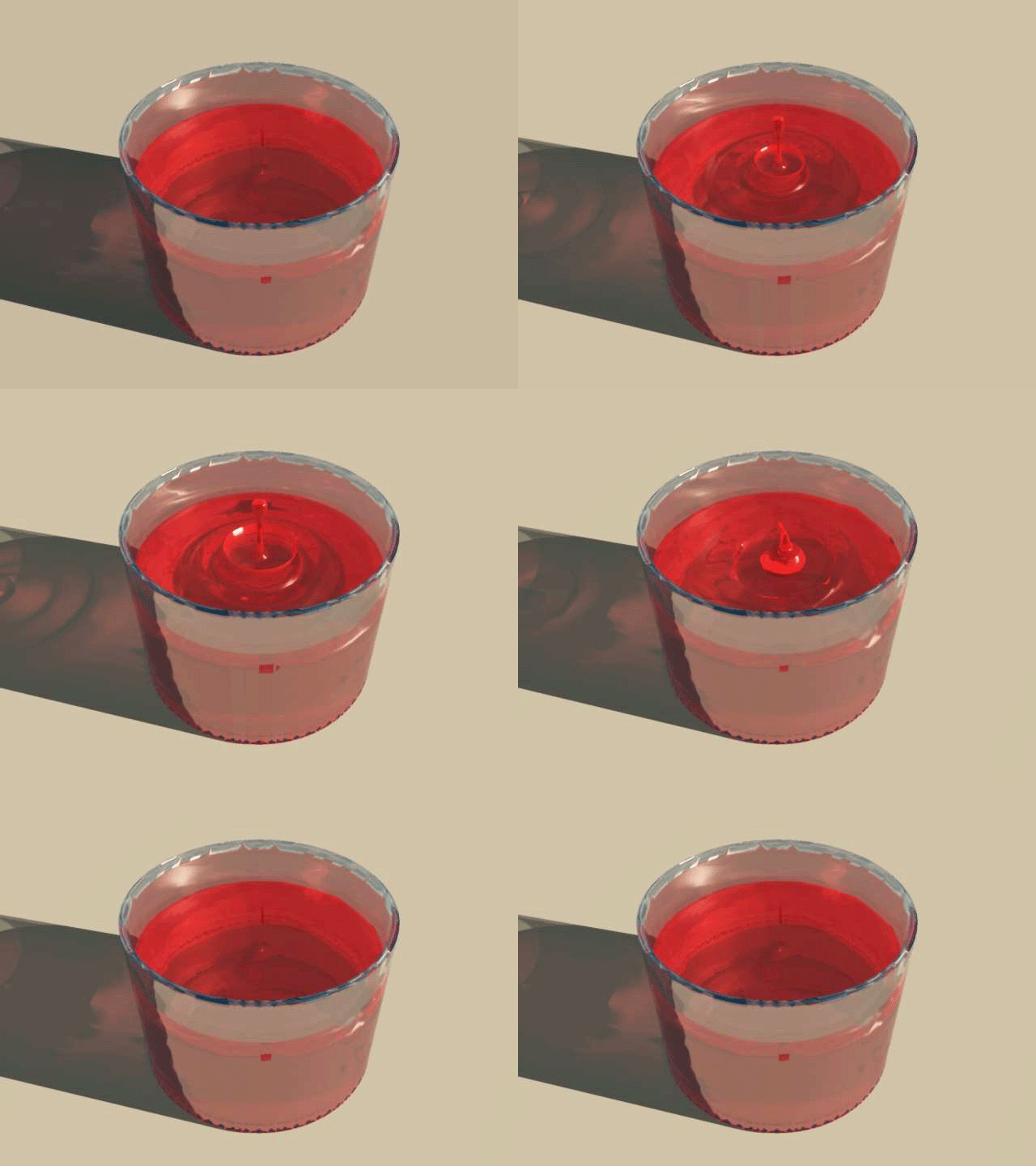
Finis, you can see a quick (all be it horrible) animation here:
http://nigecstudios.co.uk/ts/splash/splash.html"
I used the unbias Thea renderer and 20 passes a frame wasn't long enough.. then we had a power cut so its a few frames short
if anyone wants to play with the blender file I've attached it, you would need to add Blender textures for glass and water and rebake the fluid sim animation, I think my settings will migrate
http://nigecstudios.co.uk/ts/splash/splash.html"
I used the unbias Thea renderer and 20 passes a frame wasn't long enough.. then we had a power cut so its a few frames short
if anyone wants to play with the blender file I've attached it, you would need to add Blender textures for glass and water and rebake the fluid sim animation, I think my settings will migrate
- Attachments
-
- splash.zip
- (465.52 KiB) Downloaded 256 times
-
marcel
- Captain
- Posts: 2247
- Joined: 21 May 2009, 19:52
- Type the number ten into the box: 0
- Location: paris - France
Re: Impact in the water
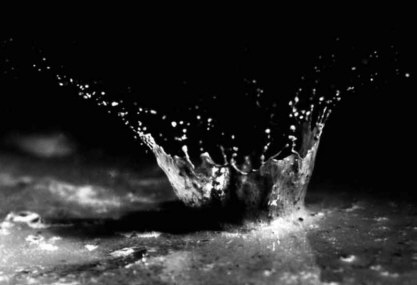
good try. caustic enhance the render. the crown is more that i want. in fact more the impact is small more the crown look thick (look at the photo). I would like to control the size and the thickness of the crown to define the scale of the scene. the other problem is i need to put the animation inside my truespace scene (model side).
- Attachments
-
-

Design - illustration - Animation
http://www.crea-vision.fr
http://www.crea-vision.fr
-
Finis
- Captain
- Posts: 5410
- Joined: 21 May 2009, 18:26
- Type the number ten into the box: 0
- Location: America!
Re: Impact in the water
Thanks Nigec. That's the Blender fluid sim?
See how observant Marcel is? He noticed the thickness of splash crown. That's one way to have the Artist's Eye. An artist sees the art in things but also sees them as they are. He notices the things others do not.
See how observant Marcel is? He noticed the thickness of splash crown. That's one way to have the Artist's Eye. An artist sees the art in things but also sees them as they are. He notices the things others do not.
I prefer dangerous freedom over peaceful servitude. -- Thomas Jefferson/Jean Jacques Rousseau
-
marcel
- Captain
- Posts: 2247
- Joined: 21 May 2009, 19:52
- Type the number ten into the box: 0
- Location: paris - France
Re: Impact in the water
when an artist is also a good programmer, he create very good soft. as i show at the start of the topic, don't forget to see his work here:
http://physbam.stanford.edu/~fedkiw/
http://physbam.stanford.edu/~fedkiw/
Design - illustration - Animation
http://www.crea-vision.fr
http://www.crea-vision.fr
-
MikomDude
- Captain
- Posts: 1930
- Joined: 04 Oct 2010, 11:12
- Type the number ten into the box: 0
- Location: The Hague, Netherlands
Re: Impact in the water
Wow, that guys is amazing. I'm impressed with how real those animations look. That's some pretty cool stuff
-
nigec
- Master Chief Petty Officer
- Posts: 561
- Joined: 21 May 2009, 18:46
Re: Impact in the water
yes it's Blender's fluid sim, There's a lot more settings that could of been messed with, my water is a bit to thick, you can't really see in the shots but the water doesn't go into the corners, it needed baking at a higher setting, more sub division and setting to the true world scale.. I'm trying to get a bullet passing through water ball but failing dismally with that one lol
-
bitkar

- Captain
- Posts: 2089
- Joined: 16 Mar 2010, 07:14
- Type the number ten into the box: 0
- Location: Czech Republic
Re: Impact in the water
marcel: so you made simple plane, animated vertexes and used sds? or what? everything that manualy made without any plugin?
metaballs are great for fluid things, but very very slow! I tryied them. It was very slow for the phys. sim. Maybe manual animation would be faster to perform, but still quite not comfortable and slow.
btw: that programmer made a very very very very very awesome work, very "jawdroping"! thanks.
metaballs are great for fluid things, but very very slow! I tryied them. It was very slow for the phys. sim. Maybe manual animation would be faster to perform, but still quite not comfortable and slow.
btw: that programmer made a very very very very very awesome work, very "jawdroping"! thanks.
Michal aka bitkar
tS freak since tS2 (1998) and forever (tS7.61 modeler)
tS freak since tS2 (1998) and forever (tS7.61 modeler)