A new engine
-
compPanda
- Senior Chief Petty Officer
- Posts: 275
- Joined: 21 May 2009, 21:15
- Type the number ten into the box: 0
A new engine
Ok. I am going to trying a new train inspired project.
I hope you guys will push me to actually finish this one - promise?
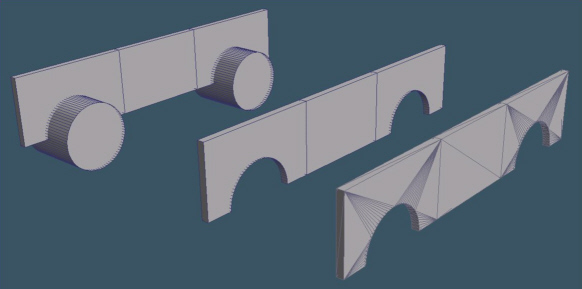
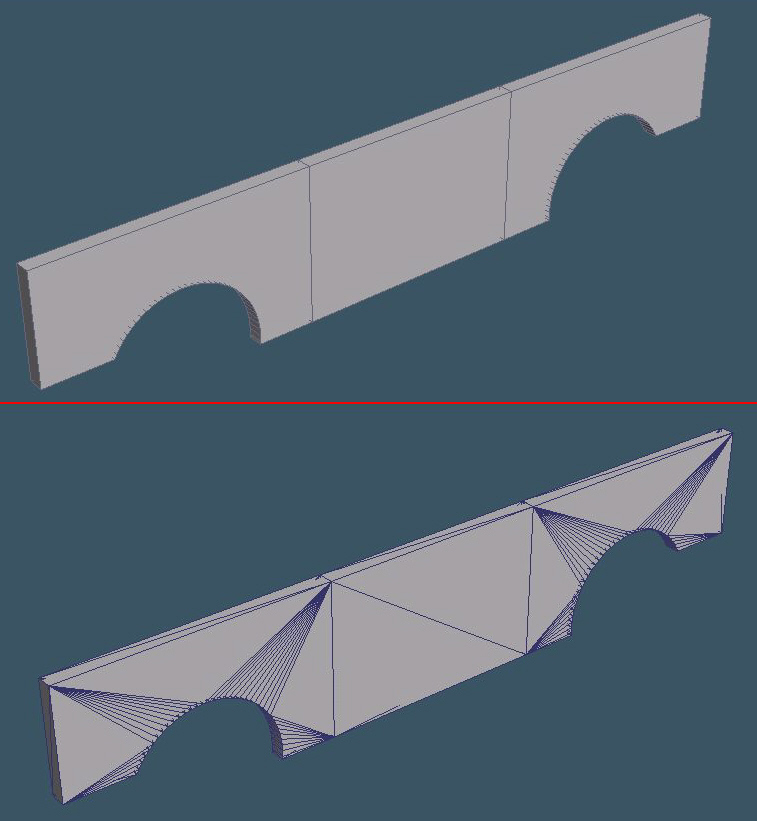
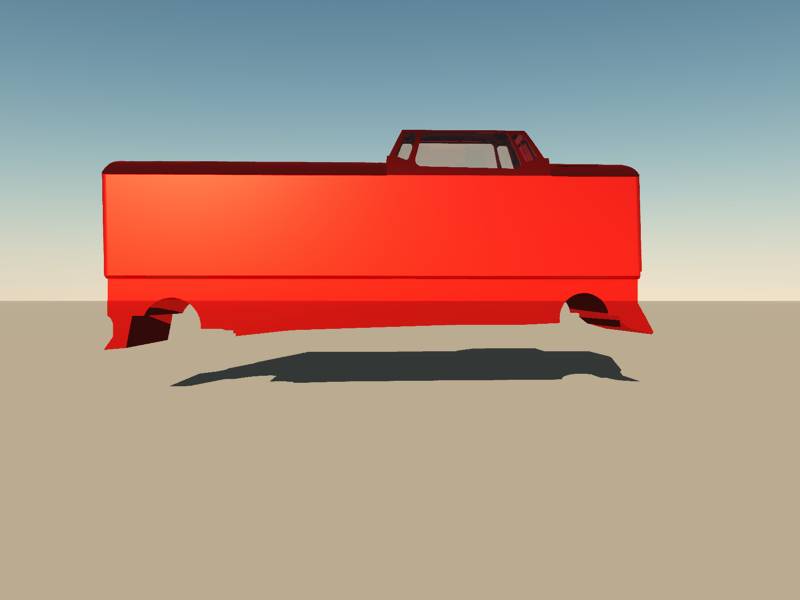
I also have an issue with holes as usual - I have a need to make a cut in a simple cube.
When I did, I saw some strange render issues when I used DirectX shading.
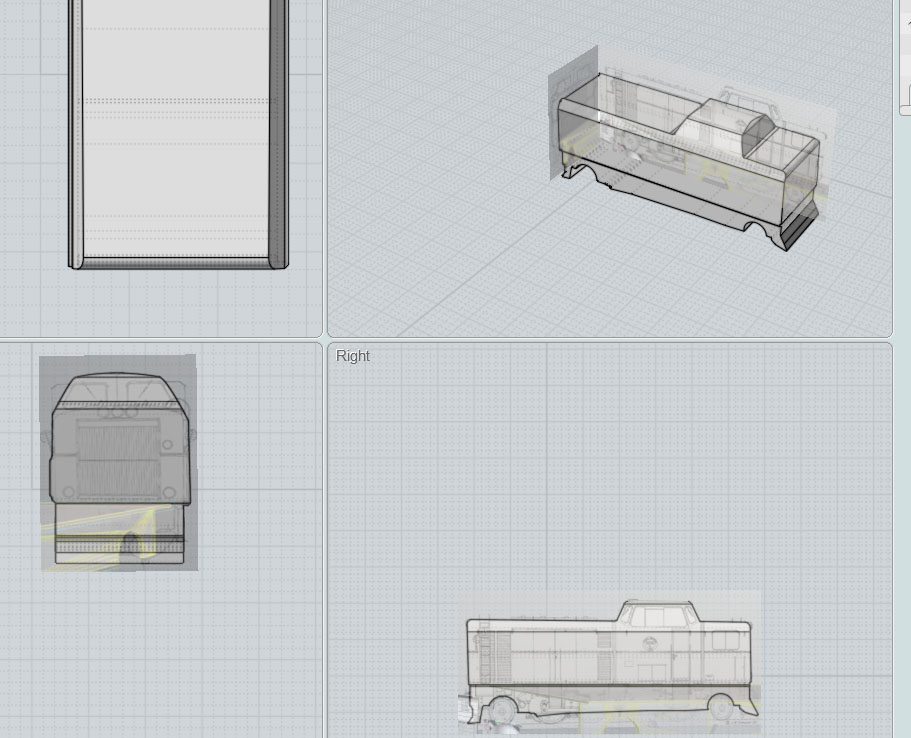
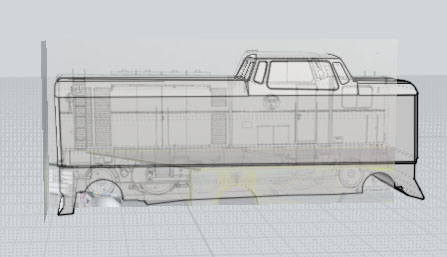
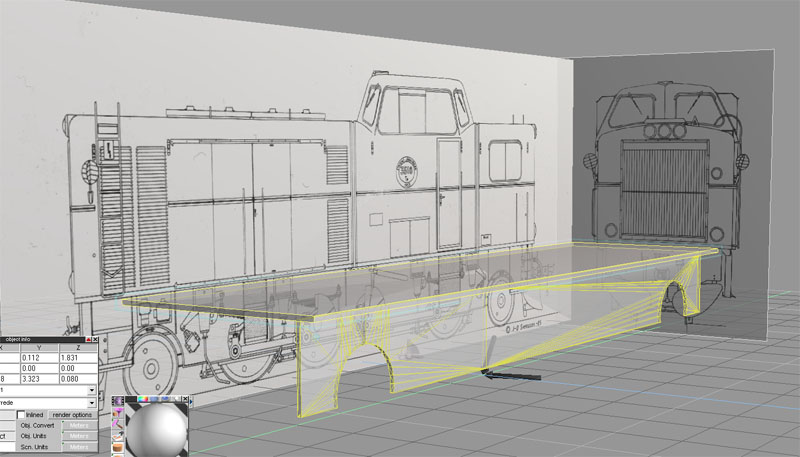
So I triangulated the object and now I think it looks strange... is it correct? For the technical interested, the drawing is for a Swedish Railways class Tp diesel hydraulic engine for 891 mm track (narrow gauge).
I hope you guys will push me to actually finish this one - promise?
I also have an issue with holes as usual - I have a need to make a cut in a simple cube.
When I did, I saw some strange render issues when I used DirectX shading.
So I triangulated the object and now I think it looks strange... is it correct? For the technical interested, the drawing is for a Swedish Railways class Tp diesel hydraulic engine for 891 mm track (narrow gauge).
-
Prodigy
- Site Admin
- Posts: 957
- Joined: 21 May 2009, 14:46
- Type the number ten into the box: 0
- Location: Uruguay
Re: A new engine
CHOOO CHOOO!!!! go Spyfrog GO!!
nice project
๑۩۞۩๑ prodigy ๑۩۞۩๑
-
marcel
- Captain
- Posts: 2247
- Joined: 21 May 2009, 19:52
- Type the number ten into the box: 0
- Location: paris - France
Re: A new engine
Another train! I remember the last train was an interesting wip on califorum.
One suggestion: delete this curious object and do something clean.
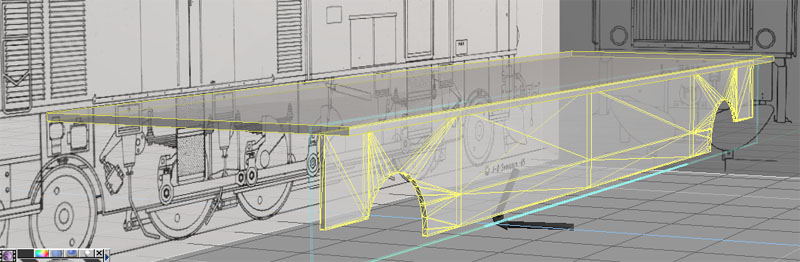
You don't need to triangulate this object (no real closed holes). you can also avoid long triangles (bad for render) with another construction as i show below. With this way, the triangles are good. Remember: no more one hole throught a polygon to avoid problem of triangles later. Before do the booleen operation, make sure 'delete edges" and "trianguate first" are disabled.
PS: this is my thousandth post.
One suggestion: delete this curious object and do something clean.
You don't need to triangulate this object (no real closed holes). you can also avoid long triangles (bad for render) with another construction as i show below. With this way, the triangles are good. Remember: no more one hole throught a polygon to avoid problem of triangles later. Before do the booleen operation, make sure 'delete edges" and "trianguate first" are disabled.
PS: this is my thousandth post.
Design - illustration - Animation
http://www.crea-vision.fr
-
compPanda
- Senior Chief Petty Officer
- Posts: 275
- Joined: 21 May 2009, 21:15
- Type the number ten into the box: 0
Re: A new engine
Thank you for you help Marcel. As we all know, I have some kind of issue with holes...marcel wrote:Another train! I remember the last train was an interesting wip on califorum.
One suggestion: delete this curious object and do something clean.![]()
You don't need to triangulate this object (no real closed holes). you can also avoid long triangles (bad for render) with another construction as i show below. With this way, the triangles are good. Remember: no more one hole throught a polygon to avoid problem of triangles later. Before do the booleen operation, make sure 'delete edges" and "trianguate first" are disabled.
PS: this is my thousandth post.
So is this first example correct or the second?
First - no triangulation: Or should I triangulate the object? When I triangulate it doesn't looks like yours - have you made your triangulation manual or did you use the "triangulate object" like I did here in this example:
-
marcel
- Captain
- Posts: 2247
- Joined: 21 May 2009, 19:52
- Type the number ten into the box: 0
- Location: paris - France
Re: A new engine
Both are correct. Triangulation is not necessary because it is allway difficult to edit the model later. Just use it if you export to another software or if you have a problem of render. You can also do a more simple model (no need the horizontal line at the middle and the vertical line near the holes. No manual triangulation; just click on the triangulation icon (but do a copy of the model before, no undo possible).
Design - illustration - Animation
http://www.crea-vision.fr
-
compPanda
- Senior Chief Petty Officer
- Posts: 275
- Joined: 21 May 2009, 21:15
- Type the number ten into the box: 0
Re: A new engine
Thank you for your explanation Marcel, I think I will continue with the un-triangulated one then.marcel wrote:Both are correct. Triangulation is not necessary because it is allway difficult to edit the model later. Just use it if you export to another software or if you have a problem of render. You can also do a more simple model (no need the horizontal line at the middle and the vertical line near the holes. No manual triangulation; just click on the triangulation icon (but do a copy of the model before, no undo possible).
Btw, I don't see any big difference with a boolean cut if I uncheck the "Delete edges" or check it. I keept it unchecked as you recommended when I made my cut but I don't see the difference. What is the difference?
-
marcel
- Captain
- Posts: 2247
- Joined: 21 May 2009, 19:52
- Type the number ten into the box: 0
- Location: paris - France
Re: A new engine
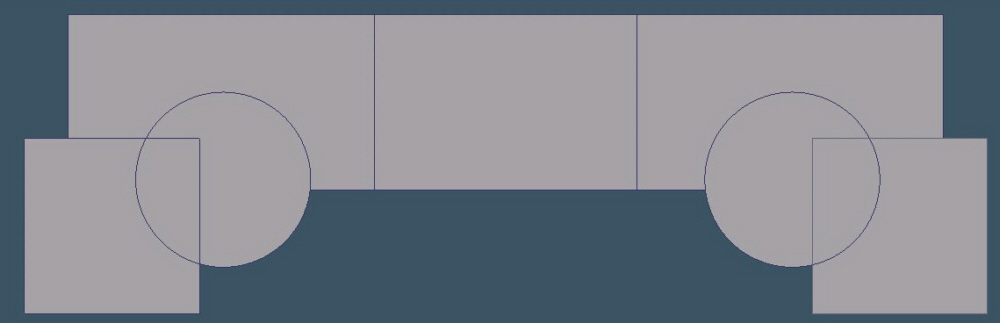
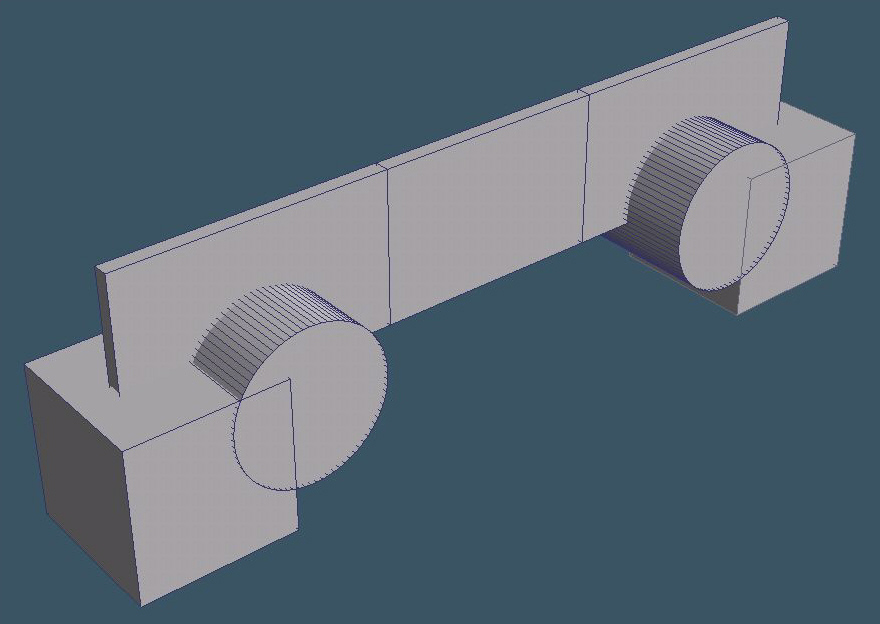
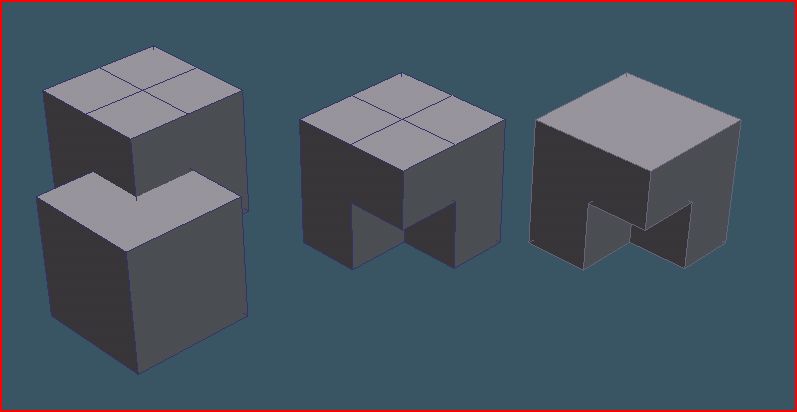
Check "delete edges" erase edges that are on the same plan and without junction with another egde of a different plan (result at the right).spyfrog wrote:Thank you for your explanation Marcel, I think I will continue with the un-triangulated one then.
Btw, I don't see any big difference with a boolean cut if I uncheck the "Delete edges" or check it. I keept it unchecked as you recommended when I made my cut but I don't see the difference. What is the difference?
disable "delete edges" keep all the edge at the top of the object (result at the left).
It have no effet with your model because the egde have a junction with edge of another plan. But it is important to know that for another model to cut later.
Last edited by marcel on 27 Apr 2010, 21:15, edited 1 time in total.
Design - illustration - Animation
http://www.crea-vision.fr
-
compPanda
- Senior Chief Petty Officer
- Posts: 275
- Joined: 21 May 2009, 21:15
- Type the number ten into the box: 0
Re: A new engine
Ah, I see it now. Thank you, that is very good to knowmarcel wrote:Check "delete edges" erase edges that are on the same plan (result at the right).spyfrog wrote:Thank you for your explanation Marcel, I think I will continue with the un-triangulated one then.
Btw, I don't see any big difference with a boolean cut if I uncheck the "Delete edges" or check it. I keept it unchecked as you recommended when I made my cut but I don't see the difference. What is the difference?
disable "delete edges" keep all the edge at the top of the object (result at the left).
-
marcel
- Captain
- Posts: 2247
- Joined: 21 May 2009, 19:52
- Type the number ten into the box: 0
- Location: paris - France
Re: A new engine
I changed my last post with more infos about that. But you reply before i post it. 
Design - illustration - Animation
http://www.crea-vision.fr
-
RAYMAN
- Captain
- Posts: 2547
- Joined: 21 May 2009, 18:56
Re: A new engine
Spyfrog if you ever turn around some pants pockets and by any means find 200 quid somewhere
try to get moi8Rhino or any other nurbs modeler is probably to expensive...). I know its not very stylish to answer some problems with that suggestion but in your case
it does make sense. You are not the box modeling typ modeler your the boolean operation oriented.
I made this rough sketch in 10 minutes all with only trimming and boolean operations........
With polygon modeler one normaly has a much different workflow a reason why I only use polygon modeling for characters
and organic shapes. the holes problem has not changed with poly modelers in the meantime !
try to get moi8Rhino or any other nurbs modeler is probably to expensive...). I know its not very stylish to answer some problems with that suggestion but in your case
it does make sense. You are not the box modeling typ modeler your the boolean operation oriented.
I made this rough sketch in 10 minutes all with only trimming and boolean operations........
With polygon modeler one normaly has a much different workflow a reason why I only use polygon modeling for characters
and organic shapes. the holes problem has not changed with poly modelers in the meantime !
Last edited by RAYMAN on 28 Apr 2010, 00:15, edited 1 time in total.
-
compPanda
- Senior Chief Petty Officer
- Posts: 275
- Joined: 21 May 2009, 21:15
- Type the number ten into the box: 0
Re: A new engine
Ok. I will look into that. Thank you for the suggestion.RAYMAN wrote:Heres the render the surface is absolutely smooth basically class A.....
-
RAYMAN
- Captain
- Posts: 2547
- Joined: 21 May 2009, 18:56
Re: A new engine
Its pretty easy to try it out because there are 2 typs of trials one is save disabled and runs forever and a second one that you can save with for 30 days period.spyfrog wrote:Ok. I will look into that. Thank you for the suggestion.RAYMAN wrote:Heres the render the surface is absolutely smooth basically class A.....
If you need any help getting started and with links to tutorials just PM me.
But its pretty basic and easy ..
The majority of all goods that we are acustomed of using of every day are designed using nurbs systems of some kind rather then polygon.
but those are high end programs like Solid Thinking ...
The one i suggested is just the most affordable.
Peter
-
Steinie
- Captain
- Posts: 2958
- Joined: 21 May 2009, 17:38
- Type the number ten into the box: 10
Re: A new engine
If you are a Student or Teacher you can buy MOI for $99.95 Educational Price.
The liscense does not expire but you cannot use it for Business like any other Educational Software.
Very nice piece of software that works great with trueSpace.
http://www.studica.com/MOI3D/"
The liscense does not expire but you cannot use it for Business like any other Educational Software.
Very nice piece of software that works great with trueSpace.
http://www.studica.com/MOI3D/"