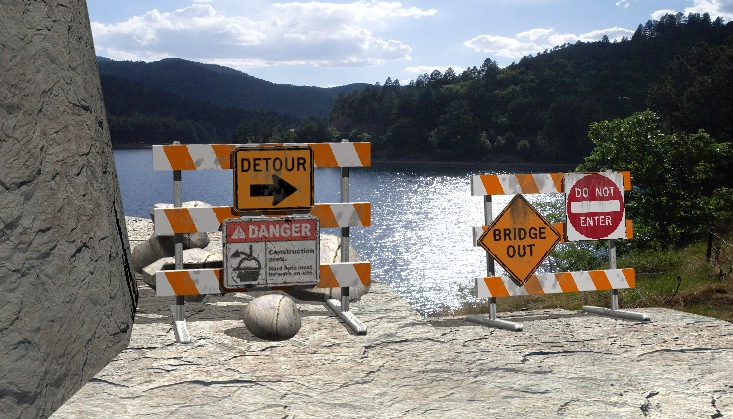
Well, I couldn't resist. I can do little in Hexagon yet so this is TS 7.6 model side.
It will probably be a night scene but it worked well by luck with the lake (where some of my town's water comes from). The road is supposed to be a mountain road with a steep drop to the right of the side, descending, road. Rocks from Bryce.
U3DA Challenge - Sep 2012 - Finis
-
Finis

- Captain
- Posts: 5410
- Joined: 21 May 2009, 18:26
- Type the number ten into the box: 0
- Location: America!
U3DA Challenge - Sep 2012 - Finis
- Attachments
-
I prefer dangerous freedom over peaceful servitude. -- Thomas Jefferson/Jean Jacques Rousseau
-
Finis
- Captain
- Posts: 5410
- Joined: 21 May 2009, 18:26
- Type the number ten into the box: 0
- Location: America!
Re: U3DA Challenge - Sep 2012 - Finis
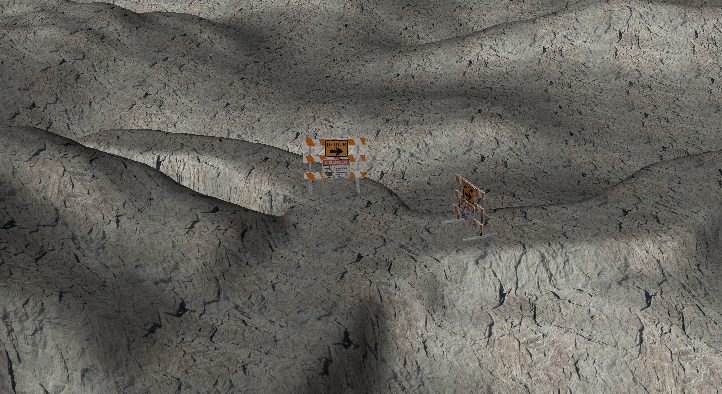
I made a terrain in Bryce and tried to draw a road on it with the terrain brush. About 100,000 polygons. The brush seems good for making hills etc. but not so good for making roads. There are also no numerical controls for the brush that I have found. I did get this usable one except the far edge of the road is invisible in a near ground view. The far edge seems to just blend smoothly rather than drop off.
The brush sets the terrain polys to a certain height. That makes a level road but I wish it could flatten the terrain while following its altitude.
I'll try Bryce again with a greatly elevated road and then edit it in TS to close to the terrain. Probably I'll just improve the previous hand made terrain.
Edit: I just accidentally exported a Bryce terrain with 2 million polygons and it loaded into TS 7.6 model side! No render though. It took all my ram and stopped rendering.
The brush sets the terrain polys to a certain height. That makes a level road but I wish it could flatten the terrain while following its altitude.
I'll try Bryce again with a greatly elevated road and then edit it in TS to close to the terrain. Probably I'll just improve the previous hand made terrain.
Edit: I just accidentally exported a Bryce terrain with 2 million polygons and it loaded into TS 7.6 model side! No render though. It took all my ram and stopped rendering.
- Attachments
-
-

I prefer dangerous freedom over peaceful servitude. -- Thomas Jefferson/Jean Jacques Rousseau
-
Finis
- Captain
- Posts: 5410
- Joined: 21 May 2009, 18:26
- Type the number ten into the box: 0
- Location: America!
Re: U3DA Challenge - Sep 2012 - Finis
I got a road done in Bryce. Brought it into TS 7.6 model side. I painted the road with polygon paint and it worked! 80,000 polys. Usually I get crashes with complex many-poly meshes (many-many?). Now to light and texture.
Tip: With polygon paint or replace material for textures use scanline rendering. Raycast gets more crashes when applying textures like that.
Tip: With polygon paint or replace material for textures use scanline rendering. Raycast gets more crashes when applying textures like that.
- Attachments
-
-


I prefer dangerous freedom over peaceful servitude. -- Thomas Jefferson/Jean Jacques Rousseau
-
Steinie

- Captain
- Posts: 2958
- Joined: 21 May 2009, 17:38
- Type the number ten into the box: 10
Re: U3DA Challenge - Sep 2012 - Finis
This looks a lot better Finis. I like the new textures you have done.
The cliff texture shows UV stretching on the left and is vertical instead of horizontal.
The cliff texture shows UV stretching on the left and is vertical instead of horizontal.
-
Finis
- Captain
- Posts: 5410
- Joined: 21 May 2009, 18:26
- Type the number ten into the box: 0
- Location: America!
Re: U3DA Challenge - Sep 2012 - Finis
Thanks Steinie. Still working on the textures and lighting. Here it is with a plant simulating a Spanish dagger yuca and a tree. Tree from Bryce. Plant from Plant Studio. Polygon reduction made the terrain more manageable. With the plants it is over 400,000 polygons. If I knew Bryce texturing and rendering then I import the barricades and use Bryce for the plants, terrain, and render.
It will be a night scene with the the headlights of a car lighting the signs. Originally, I wanted the feel of a narrow mountain dirt road blocked by a rock fall and a closed bridge so you can only back up with perilous curves and slopes. Without depth perception the drop off beyond the road was not apparent so I'll go with night instead.
The main intersection here was blocked for construction for a long time causing traffic problems. That gave me the idea of showing inconveniences associated with labor.
It will be a night scene with the the headlights of a car lighting the signs. Originally, I wanted the feel of a narrow mountain dirt road blocked by a rock fall and a closed bridge so you can only back up with perilous curves and slopes. Without depth perception the drop off beyond the road was not apparent so I'll go with night instead.
The main intersection here was blocked for construction for a long time causing traffic problems. That gave me the idea of showing inconveniences associated with labor.
- Attachments
-
-


I prefer dangerous freedom over peaceful servitude. -- Thomas Jefferson/Jean Jacques Rousseau
-
jamesmc
- Captain
- Posts: 1776
- Joined: 08 Jul 2009, 15:35
Re: U3DA Challenge - Sep 2012 - Finis
Looking splendiferous!
Walk by faith, not by sight.
-
Finis
- Captain
- Posts: 5410
- Joined: 21 May 2009, 18:26
- Type the number ten into the box: 0
- Location: America!
Re: U3DA Challenge - Sep 2012 - Finis
Thanks James!
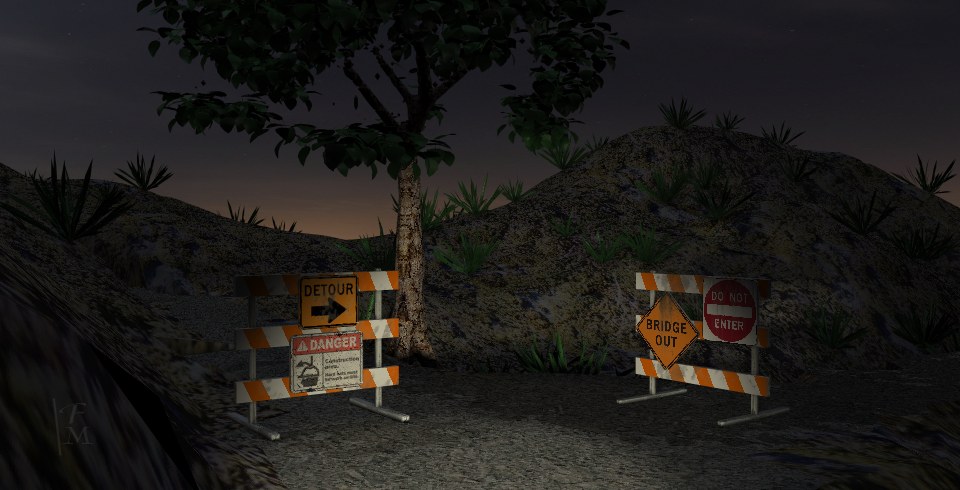
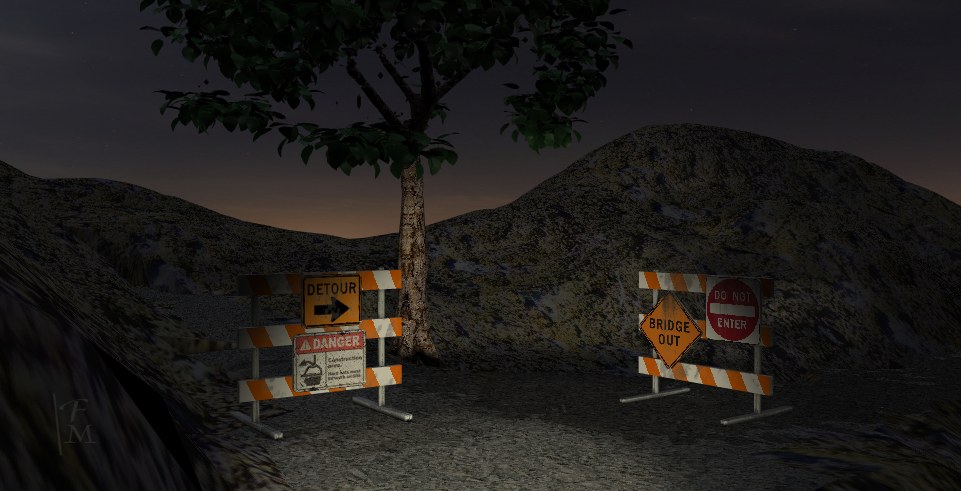
Here is night lighting. There is a little GE light to fill everything, an infinite light for the moon, an three spotlights for the headlights. There are three because with two the land in front of the car is not lit brightly enough so another one above adds light there.
I'll change the textures so that the road contrasts with the hills and looks rougher and fix the cliff to the left. Then lighting adjustment. A little contrast and brightness in post process gives it a more dramatic look.
Which is better, with small plants or not?
Here is night lighting. There is a little GE light to fill everything, an infinite light for the moon, an three spotlights for the headlights. There are three because with two the land in front of the car is not lit brightly enough so another one above adds light there.
I'll change the textures so that the road contrasts with the hills and looks rougher and fix the cliff to the left. Then lighting adjustment. A little contrast and brightness in post process gives it a more dramatic look.
Which is better, with small plants or not?
- Attachments
-
-
I prefer dangerous freedom over peaceful servitude. -- Thomas Jefferson/Jean Jacques Rousseau
-
jamesmc
- Captain
- Posts: 1776
- Joined: 08 Jul 2009, 15:35
Re: U3DA Challenge - Sep 2012 - Finis
oO - Me likey the night scene very much. Love that look of occluded spaces, makes the mind imagine what is really there.
If then scene is still in Bryce you can do a transition state by time of day. Perhaps a slide show thing with blended transitions in between.
If then scene is still in Bryce you can do a transition state by time of day. Perhaps a slide show thing with blended transitions in between.
Walk by faith, not by sight.
-
Steinie
- Captain
- Posts: 2958
- Joined: 21 May 2009, 17:38
- Type the number ten into the box: 10
Re: U3DA Challenge - Sep 2012 - Finis
I like the one with plants but fewer of them. Having the distant ones being silhouette.
The scene is looking better and better.
The scene is looking better and better.
-
Finis
- Captain
- Posts: 5410
- Joined: 21 May 2009, 18:26
- Type the number ten into the box: 0
- Location: America!
Re: U3DA Challenge - Sep 2012 - Finis
Thanks.
James, it's in TS 7.6. Would be in Bryce if I knew more about it. Learning it. "makes the mind imagine what is really there." Yep, and you can't get there from here because the roads are blocked.
Steinie, with plants then.
Here is one with lighting adjusted, fewer plants, and some texture changes. There is some odd geometry that I can't texture by polygon and point edit to fix it crashes TS. So there is a polygon here and there that is not textured right but the darkness covers most of them.
James, it's in TS 7.6. Would be in Bryce if I knew more about it. Learning it. "makes the mind imagine what is really there." Yep, and you can't get there from here because the roads are blocked.
Steinie, with plants then.
Here is one with lighting adjusted, fewer plants, and some texture changes. There is some odd geometry that I can't texture by polygon and point edit to fix it crashes TS. So there is a polygon here and there that is not textured right but the darkness covers most of them.
- Attachments
-

I prefer dangerous freedom over peaceful servitude. -- Thomas Jefferson/Jean Jacques Rousseau
-
Steinie
- Captain
- Posts: 2958
- Joined: 21 May 2009, 17:38
- Type the number ten into the box: 10
Re: U3DA Challenge - Sep 2012 - Finis
A few more plants....I think you went a little too far with elimination. Now I only see three and they are only on the top of the mound/hill.
This render is much more grainy then the last.
This render is much more grainy then the last.
-
Finis
- Captain
- Posts: 5410
- Joined: 21 May 2009, 18:26
- Type the number ten into the box: 0
- Location: America!
Re: U3DA Challenge - Sep 2012 - Finis
Medium resolution render to save time.
I had the car's spot lights arranged to give the two beams on the ground effect and light the ground right but lost it in a crash. I want it darker outside of the headlights. That way there is contrast for viewers with screens turned way up and silhouettes for those with less brightness. Lighting a night scene is hard.
Plants in the dark areas aren't visible. I'll see what I can do. Maybe add another tree or different plant. The horizon is not far so another tree would give a sense of scale.
I'll try reducing the terrain polygons in Hexagon and see if the geometry is editable in TS. If so then I'll trim off unseen parts. Otherwise I'll use the full resolution terrain object and try to trim it.
cgtextures has moved their panoramic skies to another site and they cost money now. There are usable free samples there though.
I had the car's spot lights arranged to give the two beams on the ground effect and light the ground right but lost it in a crash. I want it darker outside of the headlights. That way there is contrast for viewers with screens turned way up and silhouettes for those with less brightness. Lighting a night scene is hard.
Plants in the dark areas aren't visible. I'll see what I can do. Maybe add another tree or different plant. The horizon is not far so another tree would give a sense of scale.
I'll try reducing the terrain polygons in Hexagon and see if the geometry is editable in TS. If so then I'll trim off unseen parts. Otherwise I'll use the full resolution terrain object and try to trim it.
cgtextures has moved their panoramic skies to another site and they cost money now. There are usable free samples there though.
I prefer dangerous freedom over peaceful servitude. -- Thomas Jefferson/Jean Jacques Rousseau
-
Finis
- Captain
- Posts: 5410
- Joined: 21 May 2009, 18:26
- Type the number ten into the box: 0
- Location: America!
Re: U3DA Challenge - Sep 2012 - Finis
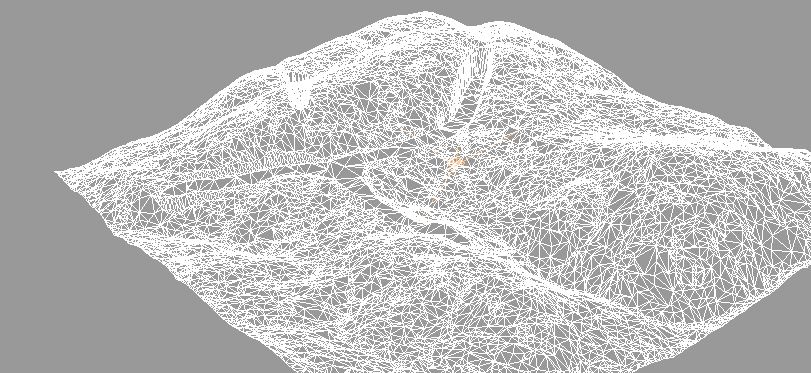
Hexagon did a good polygon reduction which can be edited and textured in TS. Its polygon reduction made the mesh simple where complexity was not needed and detailed where it was. Original 80.000 polygons. Reduced 20,000 polygons.
I retextured the land.
I retextured the land.
- Attachments
-
-

I prefer dangerous freedom over peaceful servitude. -- Thomas Jefferson/Jean Jacques Rousseau
-
spacekdet

- Captain
- Posts: 1810
- Joined: 27 May 2009, 15:00
- Type the number ten into the box: 10
- Location: On the day shift at the Utility Muffin Research Kitchen
Re: U3DA Challenge - Sep 2012 - Finis
For more darkness beyond the lights you might try depth cue, fog or volumetrics.
Attenuation and medium density are the parameters to fiddle with.
PS. Mostly attenuation, once this is set density doesn't seem to have much affect.
Set the color to something dark.
There's a 'full Moon' preset in the light library, maybe start with that.
Fun Fact: drag and drop it into the scene from the Library to add it to the existing scene lights.
Double-clicking to load it will delete existing lights and replace it with selected preset.
Attenuation and medium density are the parameters to fiddle with.
PS. Mostly attenuation, once this is set density doesn't seem to have much affect.
Set the color to something dark.
There's a 'full Moon' preset in the light library, maybe start with that.
Fun Fact: drag and drop it into the scene from the Library to add it to the existing scene lights.
Double-clicking to load it will delete existing lights and replace it with selected preset.
-
Finis
- Captain
- Posts: 5410
- Joined: 21 May 2009, 18:26
- Type the number ten into the box: 0
- Location: America!
Re: U3DA Challenge - Sep 2012 - Finis
Thanks Spacekdet. Atmospheric effects and depth cue would hide the sky dome or desaturate its color. Atmospherics are slow too. It would give it darkness and depth. Might try one with the full moon preset. Neat fun fact.
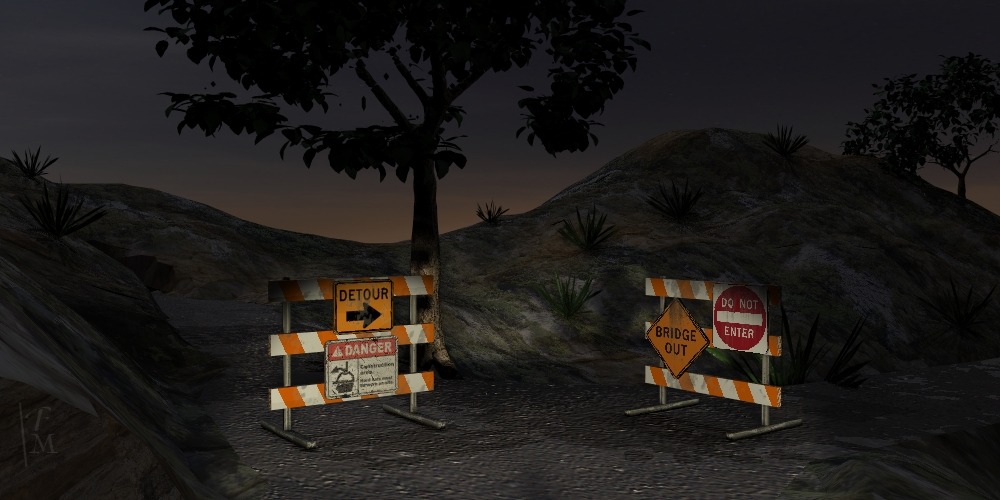
200,000 polys now. 24 minutes render time for the full res image here. The road texture needs something. It looks too smooth and uniform. Tracks of course but that needs UV work I don't have time for.
Here is one with new road and land textures from cgtextures. The lighting is a little brighter. Although I want it darker this one shows some of the land which gives scale and depth. It has another tree from Bryce.
Dark scenes have a problem. People have their screens set to different brightnesses. On a very dark screen this might just be a mostly black rectangle. On a bright one it won't look like a night scene at all. Contrast is one solution. In this scene that would be the head lights and very dark all around. Even with the black looking gray on a bright screen it still gives the impression of darkness.
I decided on lighting that will be fairly dark on my screen and a twilight look on a bright one.
Spot light problem: I set up two as headlights and made them narrow beams. When I load the scene again the lights are wide beam again. It wasn't a crash but a bug.
Fewer plants than the earlier one but more visible in this light.
200,000 polys now. 24 minutes render time for the full res image here. The road texture needs something. It looks too smooth and uniform. Tracks of course but that needs UV work I don't have time for.
Here is one with new road and land textures from cgtextures. The lighting is a little brighter. Although I want it darker this one shows some of the land which gives scale and depth. It has another tree from Bryce.
Dark scenes have a problem. People have their screens set to different brightnesses. On a very dark screen this might just be a mostly black rectangle. On a bright one it won't look like a night scene at all. Contrast is one solution. In this scene that would be the head lights and very dark all around. Even with the black looking gray on a bright screen it still gives the impression of darkness.
I decided on lighting that will be fairly dark on my screen and a twilight look on a bright one.
Spot light problem: I set up two as headlights and made them narrow beams. When I load the scene again the lights are wide beam again. It wasn't a crash but a bug.
Fewer plants than the earlier one but more visible in this light.
- Attachments
-
I prefer dangerous freedom over peaceful servitude. -- Thomas Jefferson/Jean Jacques Rousseau
-
spacekdet
- Captain
- Posts: 1810
- Joined: 27 May 2009, 15:00
- Type the number ten into the box: 10
- Location: On the day shift at the Utility Muffin Research Kitchen
Re: U3DA Challenge - Sep 2012 - Finis
Projector light as a workaround to the spotlight bug?
Seemed to work ok in this test.
First I had to whip up a quick image in my 2D graphics editor for use as a projector map.
Also had to boost the intensity of the projector light above what the slider allows.
Easy enough: right click the slider and an input panel pops up where you can input a numerical value higher than the the default maximum of '2'.
You can dial in the falloff here too to fit the scene.
Also shows volumetric settings.
Seemed to work ok in this test.
First I had to whip up a quick image in my 2D graphics editor for use as a projector map.
Also had to boost the intensity of the projector light above what the slider allows.
Easy enough: right click the slider and an input panel pops up where you can input a numerical value higher than the the default maximum of '2'.
You can dial in the falloff here too to fit the scene.
Also shows volumetric settings.
-
Finis
- Captain
- Posts: 5410
- Joined: 21 May 2009, 18:26
- Type the number ten into the box: 0
- Location: America!
Re: U3DA Challenge - Sep 2012 - Finis
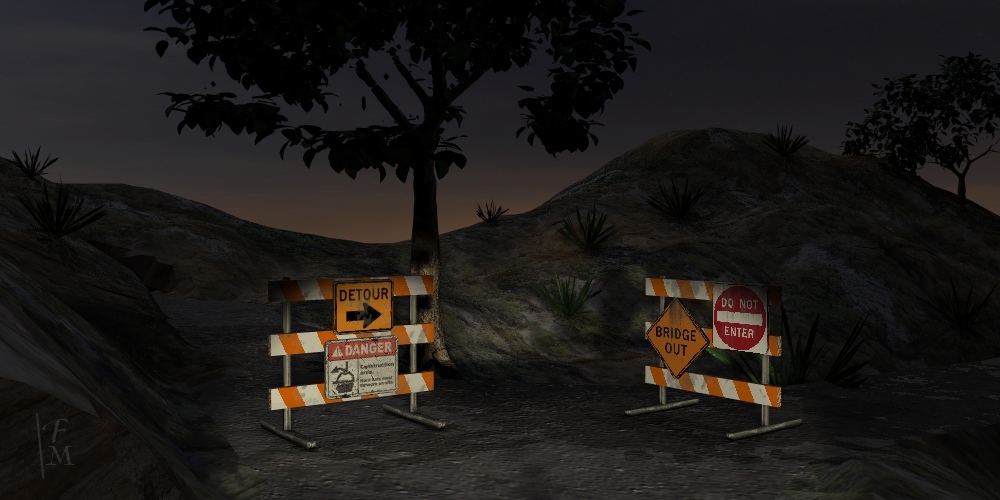
That projector light is a great idea Spacekdet! Here is the latest. Some lighting and texture adjustments.
- Attachments
-
I prefer dangerous freedom over peaceful servitude. -- Thomas Jefferson/Jean Jacques Rousseau
-
jamesmc
- Captain
- Posts: 1776
- Joined: 08 Jul 2009, 15:35
Re: U3DA Challenge - Sep 2012 - Finis
Finis wrote:That projector light is a great idea Spacekdet! Here is the latest. Some lighting and texture adjustments.
Oooo!
I like this one the best. Gives the impression there may be a town or at least civilization behind the hills.
Walk by faith, not by sight.
-
pugman 1
- Captain
- Posts: 1555
- Joined: 21 May 2009, 19:26
- Type the number ten into the box: 0
- Location: Germany
Re: U3DA Challenge - Sep 2012 - Finis
Man you did a good job with this one
-
Finis
- Captain
- Posts: 5410
- Joined: 21 May 2009, 18:26
- Type the number ten into the box: 0
- Location: America!
Re: U3DA Challenge - Sep 2012 - Finis
I'd experiment with Spacekdet's projector light idea but things are happening with the magazine business plus lawns so too much work. I'll make a wire frame soon and enter the latest in the challenge.
I prefer dangerous freedom over peaceful servitude. -- Thomas Jefferson/Jean Jacques Rousseau
-
Finis
- Captain
- Posts: 5410
- Joined: 21 May 2009, 18:26
- Type the number ten into the box: 0
- Location: America!
Re: U3DA Challenge - Sep 2012 - Finis
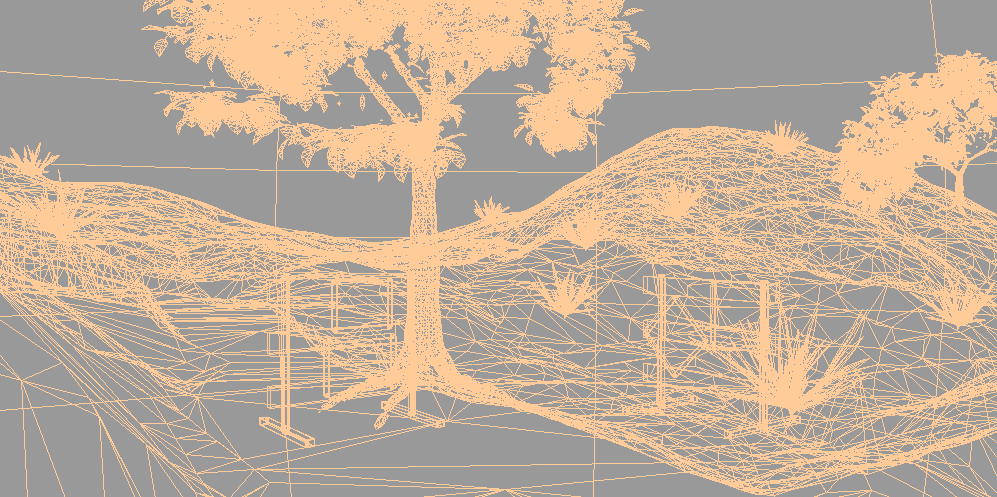
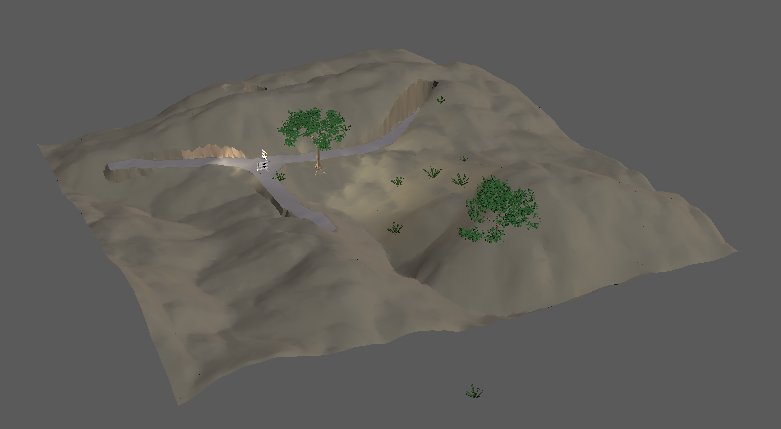
Here is the wire frame. Also the whole scene which shows the flattened sphere sky dome and moon light. Then the land with solid colors.
Flattening a sky dome like this gives an image more depth. More clouds are visible and the perspective effect is enhanced.
Flattening a sky dome like this gives an image more depth. More clouds are visible and the perspective effect is enhanced.
- Attachments
-
-

- Construction_Zone1000x500wire2.gif (5.91 KiB) Viewed 1484 times
-
I prefer dangerous freedom over peaceful servitude. -- Thomas Jefferson/Jean Jacques Rousseau
-
Finis
- Captain
- Posts: 5410
- Joined: 21 May 2009, 18:26
- Type the number ten into the box: 0
- Location: America!
Re: U3DA Challenge - Sep 2012 - Finis
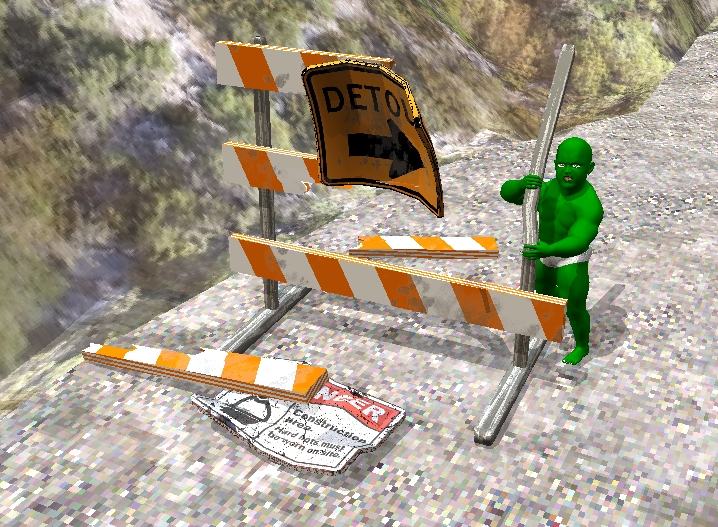
Baby Hulk no detour!
- Attachments
-

I prefer dangerous freedom over peaceful servitude. -- Thomas Jefferson/Jean Jacques Rousseau