I know there were a few folks here that have been waiting for BMesh support in Blender. I just checked the blender.org website and saw that 2.63, released April 27, offers BMesh support:
http://www.blender.org/development/rele ... ender-263/"
Blender 2.63 offers BMesh support
-
froo
- Captain
- Posts: 2554
- Joined: 22 May 2009, 12:13
Blender 2.63 offers BMesh support
-
Draise

- Captain
- Posts: 3200
- Joined: 21 Sep 2009, 19:33
- Type the number ten into the box: 0
- Location: Bogota, Colombia
Re: Blender 2.63 offers BMesh support
Looks good! Also improvements to the cycles engine! Can't wait till it's OpenCL ready!
-
Peter
- Senior Chief Petty Officer
- Posts: 170
- Joined: 18 Apr 2010, 15:18
- Type the number ten into the box: 0
- Location: Texas
Re: Blender 2.63 offers BMesh support
Yeah!
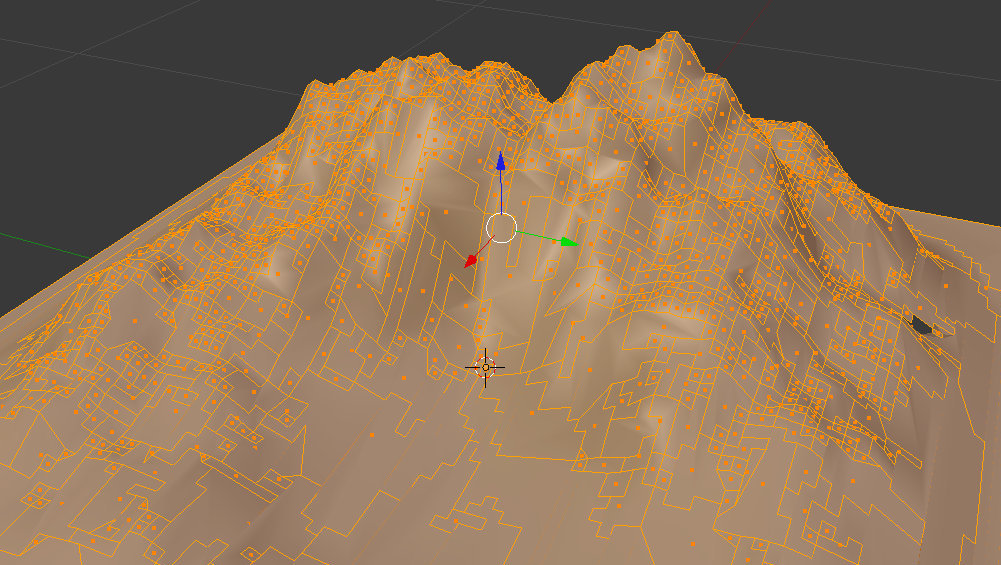
Try limited dissolve on an ant landscape.
I never saw results like that before. Low poly landscape, anyone?
Those random polygons could be extruded into boulders that hug the terrain.
I'm experimenting with this idea using the remesh modifier to also add roundness & chips.
Try limited dissolve on an ant landscape.
I never saw results like that before. Low poly landscape, anyone?
Those random polygons could be extruded into boulders that hug the terrain.
I'm experimenting with this idea using the remesh modifier to also add roundness & chips.
- Attachments
-
-

a day without orange juice is like... a day without orange juice
-
Finis

- Captain
- Posts: 5410
- Joined: 21 May 2009, 18:26
- Type the number ten into the box: 0
- Location: America!
Re: Blender 2.63 offers BMesh support
Blender is now on my list to get and learn. Worth the effort.
I prefer dangerous freedom over peaceful servitude. -- Thomas Jefferson/Jean Jacques Rousseau
-
pugman 1
- Captain
- Posts: 1555
- Joined: 21 May 2009, 19:26
- Type the number ten into the box: 0
- Location: Germany
Re: Blender 2.63 offers BMesh support
Well worth it finis ,i get on better with it than modo
-
Tiles

- Master Chief Petty Officer
- Posts: 401
- Joined: 27 May 2009, 08:34
Re: Blender 2.63 offers BMesh support
Blender is definitely worth learning it. It`s not trueSpace, tS still beats Blender in most areas when it comes to pure polygon modeling. But it already offers some neat tricks that you can`t do with tS anymore. And Blender is getting closer and closer 
For low poly results you should try the Decimate modifier. Gives some really neat results. But produces also some wicked geometry here and there, which you may need to correct manually. And it can take eons to reduce a mesh. A 250k mesh took me around half an hour when i remember right. And you may need to repeat this step. A hail to the second system
I think Remesh was the second modifier that can reduce the size of your mesh.
And finally there is a free retopo tool for Blender now, called Bsurfaces. A light version is already in the plugins section. The full version turned GPL before a few days, and can be found here: http://www.bsurfaces.info/"
For low poly results you should try the Decimate modifier. Gives some really neat results. But produces also some wicked geometry here and there, which you may need to correct manually. And it can take eons to reduce a mesh. A 250k mesh took me around half an hour when i remember right. And you may need to repeat this step. A hail to the second system
I think Remesh was the second modifier that can reduce the size of your mesh.
And finally there is a free retopo tool for Blender now, called Bsurfaces. A light version is already in the plugins section. The full version turned GPL before a few days, and can be found here: http://www.bsurfaces.info/"
Free Gamegraphics, Freeware Games http://reinerstilesets.de
-
Draise
- Captain
- Posts: 3200
- Joined: 21 Sep 2009, 19:33
- Type the number ten into the box: 0
- Location: Bogota, Colombia
Re: Blender 2.63 offers BMesh support
The Bspline tool is AMAZING! Just that has got me sold on Blender, not to mention Cycles! Very cool. For a free tool, wayyyyy worth it it seems!
-
froo
- Captain
- Posts: 2554
- Joined: 22 May 2009, 12:13
Re: Blender 2.63 offers BMesh support
Hey Tiles!
I've been wondering... for polygon modelling, what does tS have, that blender does not have?
And, what tricks does Blender offer, that we cannot do with tS anymore?
Thanks!
Froo
BTW just noticed this badass lightning addon for blender:
http://funkboxing.com/wordpress/?p=301"
I've been wondering... for polygon modelling, what does tS have, that blender does not have?
And, what tricks does Blender offer, that we cannot do with tS anymore?
Thanks!
Froo
BTW just noticed this badass lightning addon for blender:
http://funkboxing.com/wordpress/?p=301"
-
Tiles
- Master Chief Petty Officer
- Posts: 401
- Joined: 27 May 2009, 08:34
Re: Blender 2.63 offers BMesh support
Hmm, looking at it again, with Bmesh the gap becomes very small now for the modeling part. And i find myself more and more in Blender to do my work. Before BMesh it was nearly impossible to reconnect an edgeloop without to rebuild the whole affected topology. Blender always triangulated in the way when you wanted to change anything at the edgeloops by deleting an edge. That was the main issue i always had, i always got trapped by the missing NGon support at one point, and needed to switch to tS to finish the modeling then anyways. This is history with the new knife tool and NGon support.
When it comes to modeling, i was really surprised how good the curve stuff works in Blender, once you have found out how it works. That one was one of the things i have always battled with in tS.
The rest of the tools that exists in tS, well, some of them works better in tS, like mirror modeler (i find that one very nasty in Blender) or all the boolean operations (Blender booelan IS evil. And you don`t have Create cut edge for example), some of them works worse in tS, like the loop tools. Curious enough i cannot find anything important that tS has and Blender has not. Blender is simply more complete. More than three years of missing development at tS simply starts to make a difference. And tS 7 wasn`t even close to finish anyways as we all know. There are some small things that i really miss in Blender, like the Opaque + Wireframe mode, Blender just has Opaque here, and you need to activate a wireview in the objects properties, which is a reduced version of the wireframe, and doesn`t show all edges because of performance reasons as i was told. Point edit snapping is also one of those tools that i miss in Blender. There you can snap in other ways though. And the Blender material system is really cruel to use.
What you don`t have in tS is for example:
- A working state of the art bones system
- Sculpting
- Texture baking
- State of the art UV mapping and unwrapping
- With Cycles a State of the art render engine
- Retopology (BSurfaces went finally free before a few days, and the light version was available from the plugins tab since a pretty while too)
- Useful features like texture painting
- and most important: development and bug fixes
Tools and functionality is of course not everything. Blender 2.5 and its new UI has changed a lot. But the workflow in Blender is sometimes still a bit nasty. The handling is not so user friendly as in tS. You still need to get used to the UI. Even when Blender doesn`t require to learn dozens of hotkeys anymore to work with. I still feel more comfortable to polygon model my meshes in tS. The handling *feels* better here, i am faster in tS, still
When it comes to modeling, i was really surprised how good the curve stuff works in Blender, once you have found out how it works. That one was one of the things i have always battled with in tS.
The rest of the tools that exists in tS, well, some of them works better in tS, like mirror modeler (i find that one very nasty in Blender) or all the boolean operations (Blender booelan IS evil. And you don`t have Create cut edge for example), some of them works worse in tS, like the loop tools. Curious enough i cannot find anything important that tS has and Blender has not. Blender is simply more complete. More than three years of missing development at tS simply starts to make a difference. And tS 7 wasn`t even close to finish anyways as we all know. There are some small things that i really miss in Blender, like the Opaque + Wireframe mode, Blender just has Opaque here, and you need to activate a wireview in the objects properties, which is a reduced version of the wireframe, and doesn`t show all edges because of performance reasons as i was told. Point edit snapping is also one of those tools that i miss in Blender. There you can snap in other ways though. And the Blender material system is really cruel to use.
What you don`t have in tS is for example:
- A working state of the art bones system
- Sculpting
- Texture baking
- State of the art UV mapping and unwrapping
- With Cycles a State of the art render engine
- Retopology (BSurfaces went finally free before a few days, and the light version was available from the plugins tab since a pretty while too)
- Useful features like texture painting
- and most important: development and bug fixes
Tools and functionality is of course not everything. Blender 2.5 and its new UI has changed a lot. But the workflow in Blender is sometimes still a bit nasty. The handling is not so user friendly as in tS. You still need to get used to the UI. Even when Blender doesn`t require to learn dozens of hotkeys anymore to work with. I still feel more comfortable to polygon model my meshes in tS. The handling *feels* better here, i am faster in tS, still
Free Gamegraphics, Freeware Games http://reinerstilesets.de
-
froo
- Captain
- Posts: 2554
- Joined: 22 May 2009, 12:13
Re: Blender 2.63 offers BMesh support
Thank you for the info Tiles! 
-
Draise
- Captain
- Posts: 3200
- Joined: 21 Sep 2009, 19:33
- Type the number ten into the box: 0
- Location: Bogota, Colombia
Re: Blender 2.63 offers BMesh support
Thanks for this feedback on Blender vs. TS! Loving it. =)
-
Finis
- Captain
- Posts: 5410
- Joined: 21 May 2009, 18:26
- Type the number ten into the box: 0
- Location: America!
Re: Blender 2.63 offers BMesh support
Thanks for the information.
What are the main renderers used with Blender?
Cycles, Blender built-in, Yafaray, ... what others? What are they best for (games, small images, HD, animation, art, cartoon). What resolutions and poly counts can they handle? How do they interface with Blender?
What are the main renderers used with Blender?
Cycles, Blender built-in, Yafaray, ... what others? What are they best for (games, small images, HD, animation, art, cartoon). What resolutions and poly counts can they handle? How do they interface with Blender?
I prefer dangerous freedom over peaceful servitude. -- Thomas Jefferson/Jean Jacques Rousseau
-
Tiles
- Master Chief Petty Officer
- Posts: 401
- Joined: 27 May 2009, 08:34
Re: Blender 2.63 offers BMesh support
Don`t ask me about rendering, i do game needs mainly, sorry. I render one image per year, if even
I know about the internal Blender renderer. That one is a really old and weak solution that always gave me washy and unsatisfying results when i tried it. I know about Cycles. That one definitely beats VRay4TS from what i know and have seen. What`s a bit disturbing is that you need to work with nodes to setup the materials from what i know. But i haven`t tried it yet. So i cannot say how comfortable or uncomfortable it really is.
Those two rendereres are more or less integrated with Blender. Then there are the external renderers. Yafaray, Lux, and Aqsis gets mentioned at the Blender page:
http://www.blender.org/download/get-ble ... renderers/"
How the integration is done, and how to deal with the renderers can surely be found in tutorials. Blender users loves to write tutorials. Here is for example a quick search result video for Lux renderer:
http://www.youtube.com/watch?v=ul_FtRWwkhs"
I know about the internal Blender renderer. That one is a really old and weak solution that always gave me washy and unsatisfying results when i tried it. I know about Cycles. That one definitely beats VRay4TS from what i know and have seen. What`s a bit disturbing is that you need to work with nodes to setup the materials from what i know. But i haven`t tried it yet. So i cannot say how comfortable or uncomfortable it really is.
Those two rendereres are more or less integrated with Blender. Then there are the external renderers. Yafaray, Lux, and Aqsis gets mentioned at the Blender page:
http://www.blender.org/download/get-ble ... renderers/"
How the integration is done, and how to deal with the renderers can surely be found in tutorials. Blender users loves to write tutorials. Here is for example a quick search result video for Lux renderer:
http://www.youtube.com/watch?v=ul_FtRWwkhs"
Free Gamegraphics, Freeware Games http://reinerstilesets.de
-
Finis
- Captain
- Posts: 5410
- Joined: 21 May 2009, 18:26
- Type the number ten into the box: 0
- Location: America!
Re: Blender 2.63 offers BMesh support
Thanks Tiles. So Cycles is good for VRay like realism and high resolution images?
Anyone else know about Blender friendly renderers?
Anyone else know about Blender friendly renderers?
I prefer dangerous freedom over peaceful servitude. -- Thomas Jefferson/Jean Jacques Rousseau
-
Tiles
- Master Chief Petty Officer
- Posts: 401
- Joined: 27 May 2009, 08:34
Re: Blender 2.63 offers BMesh support
Yes, it goes in the right direction. I`ve already seen some amazing images done with Cycles. But Vray is a biased renderer, while Cycles is a unbiased one
Cycles is a GPU renderer by the way.
Cycles is a GPU renderer by the way.
Free Gamegraphics, Freeware Games http://reinerstilesets.de
-
RAYMAN

- Captain
- Posts: 2547
- Joined: 21 May 2009, 18:56
Re: Blender 2.63 offers BMesh support
Thea is a blender friendly renderer.. its both biased and non biased... the only one that you can use in both ways...Finis wrote:Thanks Tiles. So Cycles is good for VRay like realism and high resolution images?
Anyone else know about Blender friendly renderers?
Peter
-
Tiles
- Master Chief Petty Officer
- Posts: 401
- Joined: 27 May 2009, 08:34
Re: Blender 2.63 offers BMesh support
Hm, when we go the commercial route then we have to mention Vray too. There is a VRay plugin for Blender afaik
Free Gamegraphics, Freeware Games http://reinerstilesets.de
-
RAYMAN
- Captain
- Posts: 2547
- Joined: 21 May 2009, 18:56
Re: Blender 2.63 offers BMesh support
If your completing the line of comercialy available renderers you should also mention that Vray costs 1000 $ when your running it legalyTiles wrote:Hm, when we go the commercial route then we have to mention Vray too. There is a VRay plugin for Blender afaik
and its only biased version and Maxwell which is unbiased is pretty much over 1000 $ .
thea is only 330 euro which is less then half for both biased and unbiased....
Kerkythea is the free one that is both biased and non biased and is very Blender friendly ... and you get it for nothing..
Peter