Pool Ball Practice

Musikman
Chief Petty Officer
Posts: 104
Joined: 21 May 2009, 18:31
Type the number ten into the box: 0
Location: USA

Pool Ball Practice

Post by Musikman »

Hi,

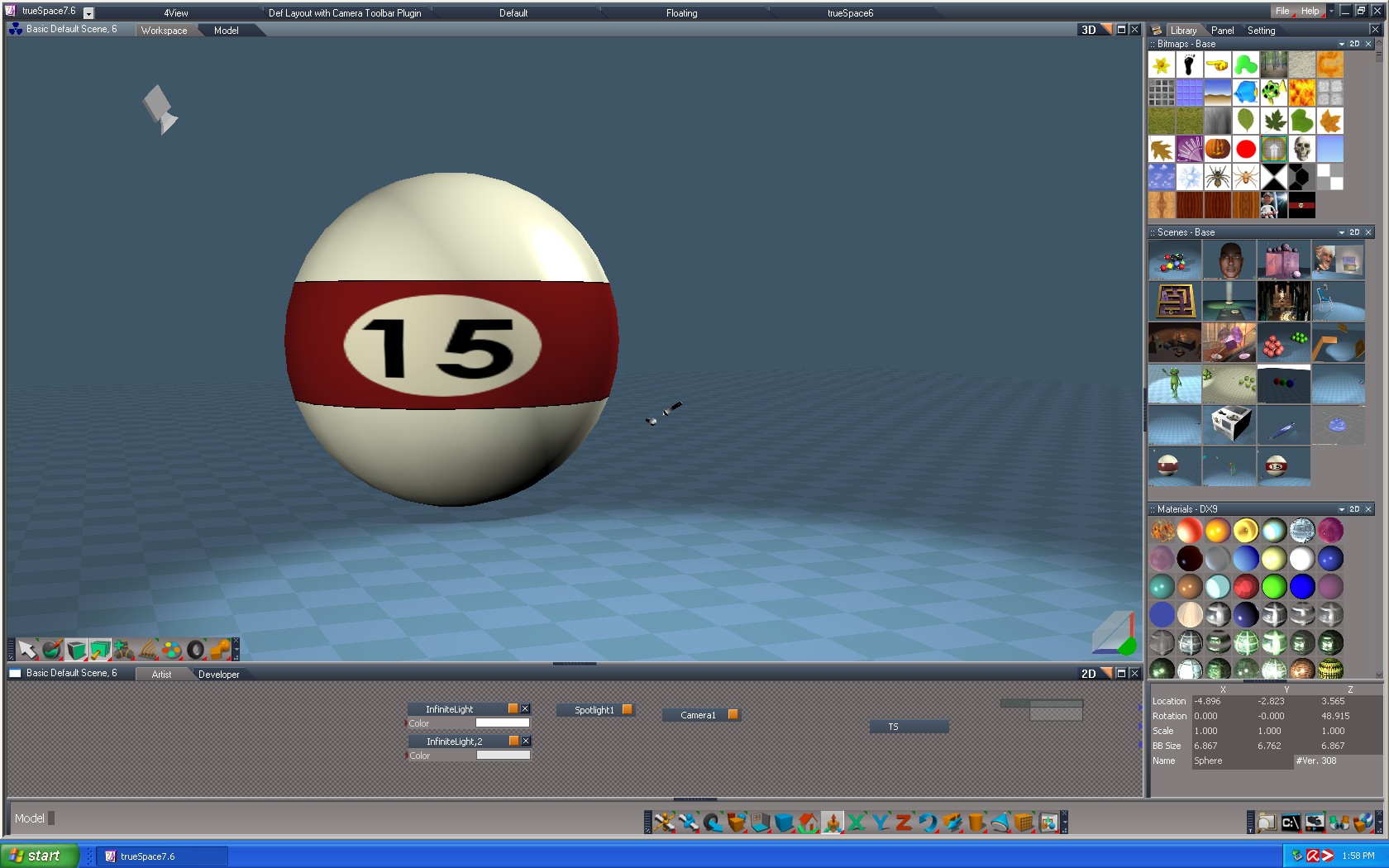
Just practicing my bank shot here... ;) Trying to make a #15 pool ball.

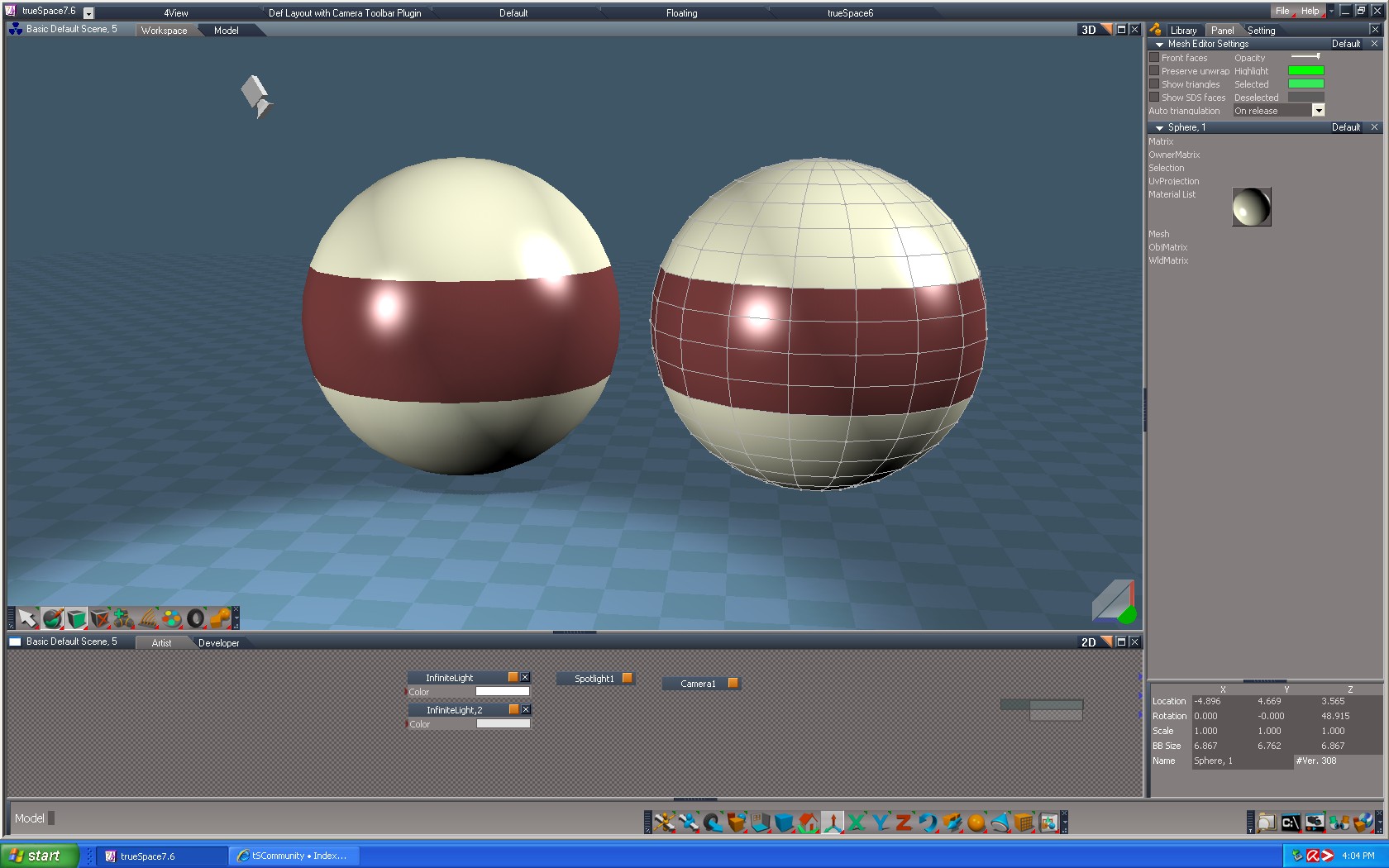
I drew a sphere, used D3D Solid material, in PE mode I selected faces & colored accordingly. The next part I could use some suggestions about. What method would be the easiest....I have to somehow make a circle in the maroon stripe, fill it with the same off white color as the rest of the ball, then insert a black number 15 inside the small circle. Hey, you've seen a 15 ball before, I'm sure you know what it looks like! :lol:

Editing the mesh doesn't seem the right path to me, it doesn't look like I'll be able to point edit a circle within the stripe, so I thought maybe I need to add another object, or just somehow use the UV editor tools to paint with? I also don't know where the text tool is in ws side to add #15. Any suggestions to start me in the right direction? Thanks! :) (Pay no attention to the lighting, it's terrible right now, will fix that later)


Musikman

[img]MM%20Pool%20Ball.jpg[/img]
Attachments
MM Pool Ball.jpg
Image
User avatar
nigec
Master Chief Petty Officer
Posts: 561
Joined: 21 May 2009, 18:46

Re: Pool Ball Practice

Post by nigec »

uv map would be the easy way, one of the early tuts in the pdf was slicing a sphere for mapping, but I think it could of been for model side
Musikman
Chief Petty Officer
Posts: 104
Joined: 21 May 2009, 18:31
Type the number ten into the box: 0
Location: USA

Re: Pool Ball Practice

Post by Musikman »

Thanks Nigec, I'll have to check the manual for more detail on how that is done. I haven't found that tutorial yet, but I'm sure I will soon. I began searching around for info on how to paint in uv editor, but tried it out a bit and just haven't got the hang of it yet, still experimenting with it. Also, I'm not sure if painting is the best way to get the number 15 on the ball. Still reading in the manual right now, just wanted to thank you for the suggestion. ;)
Image
Jack Edwards
Senior Chief Petty Officer
Posts: 181
Joined: 22 May 2009, 04:28

Re: Pool Ball Practice

Post by Jack Edwards »

The sphere should already have a UV map, so you could export that as a bmp and then use it as a template to paint your texture in a paint program.
No booleans were used in the mangling of this message... :?

YafaRay for trueSpace Project

(Current version: v0.7.0)

trueSpacePlugins.com
Musikman
Chief Petty Officer
Posts: 104
Joined: 21 May 2009, 18:31
Type the number ten into the box: 0
Location: USA

Re: Pool Ball Practice

Post by Musikman »

Hi Jack,

Thanks for replying, I was hoping you'd show up! :worship: Didn't realize that could be done!

EDIT: When I open the uv editor I see just a mesh, no color, (guessing because so far I've only used solid D3D material?)
I clicked "next" in the uve pref panel until just the center stripe mesh showed. Then selected export texture to file icon in uve, saved it as bmp, then opened it in gimp.
I now have the mesh of the center stripe in gimp, is this right or wrong so far? Never tried this before! :roll:

[img]
PoolBall15.jpg
PoolBall15.jpg (9.24 KiB) Viewed 6982 times
[/img]
Image
Jack Edwards
Senior Chief Petty Officer
Posts: 181
Joined: 22 May 2009, 04:28

Re: Pool Ball Practice

Post by Jack Edwards »

Problem is that your mesh is divided up into 2 materials, so it only exported the UVs for the selected material. You probably want to paint it all one material then export the bmp.

The grid you see is how the polygons of the sphere are distributed over the UV space. If you select one of the polygons it's corresponding polygon will also highlight in the UVE.

One you have your "UV grid" exported, open it up in your paint program and set it to multiply blend mode so that it will show on top of the layers underneath. Then create a new blank layer underneath it to paint your texture on using the UVs as a guide. When you are done, hide the UV layer and export the newly painted texture.

Back in trueSpace place a texture material on the cue ball. Load your newly painted texture into the texture material and you'll see it on the ball. :)
Musikman
Chief Petty Officer
Posts: 104
Joined: 21 May 2009, 18:31
Type the number ten into the box: 0
Location: USA

Re: Pool Ball Practice

Post by Musikman »

Ok, I think I understand Jack, first I have to get rid of the stripe and make the ball one color before exporting the uv grid, so then I can export the grid of the "whole" ball to gimp & using that grid take care of all the coloring in gimp? Guess I was thinking I just needed to do the small circle with #15 in gimp, not color the whole ball. Just have to check the gimp manual about the multiply blend mode & later hiding the grid so just the texture exports, I have a rough idea how to do that, will give it a try! Thanks! :)
Image
Jack Edwards
Senior Chief Petty Officer
Posts: 181
Joined: 22 May 2009, 04:28

Re: Pool Ball Practice

Post by Jack Edwards »

You could do just the stripe and number circle as a texture. ;) It's really up to how you want to do it.

An interesting tip that you may find useful when you want crisp color changes on your model is to split the UVs. Where there's a discontinuity in the UVs you will have an abrupt change in color if you have different colors in your texture on opposite sides of the seam.

Also doing it the way you have it now with different materials will give you a crisp edge. So there are advantages to the way you are currently doing it as well.
No booleans were used in the mangling of this message... :?

YafaRay for trueSpace Project

(Current version: v0.7.0)

trueSpacePlugins.com
Musikman
Chief Petty Officer
Posts: 104
Joined: 21 May 2009, 18:31
Type the number ten into the box: 0
Location: USA

Re: Pool Ball Practice

Post by Musikman »

Ok, success with the part I thought would be difficult, at least the ball now has a number! ;) I painted the stripe & number texture in gimp, using the uv map as a template. Then saved as bmp and finally applied it to the ball in TS. (I selected the faces of the mesh for the stripe, then selected "paint faces with texture"),

Only thing is the circle in the middle and the number 15 were proportionally correct in my gimp image, but they look a bit "stretched" when applied to the ball. I noticed the UV Grid in the post above is shifted to the left, I'm wondering if when I exported it maybe a piece got cut off and now the texture I made to the grid's measurements is too short to reach around the whole ball, therefore stretching the circle & number? Is there a way to correct this now, or do I have to back up a step and do it over? Thanks!

Musikman
Attachments
MM Pool Ball Stripe.jpg
Image
Musikman
Chief Petty Officer
Posts: 104
Joined: 21 May 2009, 18:31
Type the number ten into the box: 0
Location: USA

Re: Pool Ball Practice

Post by Musikman »

Maybe this UV map screenshot will help, also a view behind the ball which I didn't notice until now!....wonder how that happened?? Must have been how the UV mesh was originally exported to bmp file? As in the original uv mesh screenshot (posted earlier), you can see that for some reason it was off center when I exported to file.
I tried opening the uv editor again and select the stripe's entire grid (shown in black below) and moved it over to the right so it was within the blue borderlines, then applied the texture again, but that didn't change the length of it, still doesn't reach around. Any suggestions?
Thanks everyone for all the assistance, much appreciated! ;)

Musikman
Image
Jack Edwards
Senior Chief Petty Officer
Posts: 181
Joined: 22 May 2009, 04:28

Re: Pool Ball Practice

Post by Jack Edwards »

The problem is that the faces on your UV map are flat, but in 3D they are curved. This is the classic problem with mapping a 2D image to a 3D object. ;) Also just because the UV map is square doesn't mean that it's in a 1:1 texture pixel to polygon pixel relation ship. If I remember correctly the default sphere mapping is the same as the cylinder mapping in that it's a 2:1 ratio because the distance around the object horizontally is twice that of the height.... actually it would be 2*PI*r right? ;) So assuming a sphere, the width at the horizon would be PI * height. So actually it would be 3.14:1 lol. If you re-project the mapping there is an option to maintain aspect ratio. Though you'll still have stretching the further you get from the horizon of the ball if you use sphere mapping. Unfortunately there aren't any distortion free ways to map a sphere.

To better understand how UV mapping works, you may want to play with a cube and move the UV points around to see how it changes how the texture is mapped.

Also helpful is to use a UV guide like the bitmap in the library with the grid and the arrow on it. That will help you see how your texture is mapping to the object.
No booleans were used in the mangling of this message... :?

YafaRay for trueSpace Project

(Current version: v0.7.0)

trueSpacePlugins.com
Musikman
Chief Petty Officer
Posts: 104
Joined: 21 May 2009, 18:31
Type the number ten into the box: 0
Location: USA

Re: Pool Ball Practice

Post by Musikman »

Though you'll still have stretching the further you get from the horizon of the ball if you use sphere mapping. Unfortunately there aren't any distortion free ways to map a sphere.
Thanks for the info Jack, those ratio numbers are a bit mind boggling, :) but I do get the basic idea of what you're saying.
The further north or south that you get from the middle, or let's call it the "equator", there will be stretching.
I can see how that is unavoidable, however, does the same apply east to west, such as the screenshot of the back of the ball illustrates. The ends of the red stripe don't meet around the back of the ball, leaving that small space. I guess it would have to equally apply in that direction as well. Don't know if I'm just thinking out of the box here, but curious. I thought if I somehow was able to lengthen the stripe in gimp, maybe it would solve both issues, the small circle stretching, and the ends of the stripe not meeting. It would have to be a trial & error I guess though, and I don't know if it would export correctly.

What is still a mystery to me is why the original UV map/grid of the stripe is not centered inside the blue borderline in the uve screen, it's been shifted left from the beginning.
To better understand how UV mapping works, you may want to play with a cube and move the UV points around to see how it changes how the texture is mapped.
Also helpful is to use a UV guide like the bitmap in the library with the grid and the arrow on it. That will help you see how your texture is mapping to the object.
I'll try a couple of things and see what happens, if making the stripe longer doesn't work I'll try moving the texture around with the uv. Thanks again! :)

Musikman
Image
Jack Edwards
Senior Chief Petty Officer
Posts: 181
Joined: 22 May 2009, 04:28

Re: Pool Ball Practice

Post by Jack Edwards »

Could be because the edges of the sphere weren't aligned with the axis of the projection used. You can select the UVs and move and scale them to fit your texture, btw.
No booleans were used in the mangling of this message... :?

YafaRay for trueSpace Project

(Current version: v0.7.0)

trueSpacePlugins.com
Musikman
Chief Petty Officer
Posts: 104
Joined: 21 May 2009, 18:31
Type the number ten into the box: 0
Location: USA

Re: Pool Ball Practice

Post by Musikman »

I thought they automatically lined up when a projection is applied. I did try to select the uv's in the editor (if that's what you're referring to) and moved them over so the texture for the stripe fit inside the borders of the uv grid. Didn't seem to change anything though.....more experimenting tomorrow! ;)

Thanks Jack, the help is always appreciated & I am learning alot already just from this simple project! :)

Musikman
Image
Musikman
Chief Petty Officer
Posts: 104
Joined: 21 May 2009, 18:31
Type the number ten into the box: 0
Location: USA

Re: Pool Ball Practice

Post by Musikman »

Proportion fixed, now on to texturing the green cloth plane, and maybe adding a solid color ball and some lighting!

According to an anonymous tip, complete with instructions (from Breech Block ;) ), the size of the "canvass" in paint program needed to be changed to twice the width, leaving the height the same. I extended the stripe width to fill the new canvass width in the paint program and that worked! Props & much thanks to Jack, Breech Block, and everyone else here who have been a great help & patient with me while I continue to learn. :bananathumb: I learn something new every time I log into this forum, this community rocks! :bananaguitar: :bananacool2: :bananadrum:

Best Regards,

Musikman
Attachments
New 15 Pool Ball.jpg
New 15 Stripe.jpg
Image
Jack Edwards
Senior Chief Petty Officer
Posts: 181
Joined: 22 May 2009, 04:28

Re: Pool Ball Practice

Post by Jack Edwards »

Good work! :)

Learning UVs is the most important part of learning 3D if you want to produce professional looking images and models.
No booleans were used in the mangling of this message... :?

YafaRay for trueSpace Project

(Current version: v0.7.0)

trueSpacePlugins.com
Musikman
Chief Petty Officer
Posts: 104
Joined: 21 May 2009, 18:31
Type the number ten into the box: 0
Location: USA

Re: Pool Ball Practice

Post by Musikman »

Thanks Jack! I was wondering if you (or anyone else) can suggest a solution. I made four different pool balls (see attached) in one scene. Once I created the fourth one, I right clicked in scene library and saved it as a scene, but now TS has slowed down to a crawl. If I try any simple movement, for example clicking on one of the objects, or right clicking to enter Point Edit mode, there is a delay of 30 seconds or so, it's just crawling. When I load the scene I have with only one pool ball TS get its speed back and runs normally.

I usually save my work as scenes, should I be saving each ball as an object instead?

Are there any settings I can change, or files I can get rid of to make TS run faster in general?

Thanks!

Musikman
Attachments
4 Pool Balls.jpg
Last edited by Musikman on 10 Jun 2009, 17:59, edited 2 times in total.
Image
chamaeleon
Seaman
Posts: 8
Joined: 10 Jun 2009, 13:44

Re: Pool Ball Practice

Post by chamaeleon »

The reason it looks stretched is due to the fact that for this particular object shape, if you pick imaginary center lines in the uv map horizontally and vertically, the horizontal line need to stretch around 360 degrees, while the vertical only need to go 180. So your texture or UV map need to take this into account, by either distorting your texture, or pulling the UV points in such a way that you get the proper look.
chamaeleon
Seaman
Posts: 8
Joined: 10 Jun 2009, 13:44

Re: Pool Ball Practice

Post by chamaeleon »

chamaeleon wrote:The reason it looks stretched is due to the fact that for this particular object shape, if you pick imaginary center lines in the uv map horizontally and vertically, the horizontal line need to stretch around 360 degrees, while the vertical only need to go 180. So your texture or UV map need to take this into account, by either distorting your texture, or pulling the UV points in such a way that you get the proper look.
This message brought to you by the Redundant Department of Redundancy Department.

Missed that there was a second page of replies.
Jack Edwards
Senior Chief Petty Officer
Posts: 181
Joined: 22 May 2009, 04:28

Re: Pool Ball Practice

Post by Jack Edwards »

Might be an issue with your video card running out of ram? :? What DX shaders are you using?
No booleans were used in the mangling of this message... :?

YafaRay for trueSpace Project

(Current version: v0.7.0)

trueSpacePlugins.com
Musikman
Chief Petty Officer
Posts: 104
Joined: 21 May 2009, 18:31
Type the number ten into the box: 0
Location: USA

Re: Pool Ball Practice

Post by Musikman »

I used Solid D3D Material (DX9) default library. Then for the high balls used a gimp bmp file for just the stripe, for the low balls same D3D, then added gimp bmp to cover the whole ball with. My video card has 512 MB, shouldn't that be enough? Maybe the resolution setting for TS should be set lower?
Maybe the way I saved the textures in gimp? Not sure on this one!
Image
Jack Edwards
Senior Chief Petty Officer
Posts: 181
Joined: 22 May 2009, 04:28

Re: Pool Ball Practice

Post by Jack Edwards »

512MB should be plenty. For the bmp ones you're using the Texture material from the library right?

How large are the bitmaps? What's your total polycount?

Also number and depth of groups matters.

To be having performance issues with 4 pool balls is definitely a WTF!? :shock:
No booleans were used in the mangling of this message... :?

YafaRay for trueSpace Project

(Current version: v0.7.0)

trueSpacePlugins.com
Musikman
Chief Petty Officer
Posts: 104
Joined: 21 May 2009, 18:31
Type the number ten into the box: 0
Location: USA

Re: Pool Ball Practice

Post by Musikman »

Yes, using the material from the DX9 Library (D3D Solid Material)

The first two balls I only made a stripe bmp to apply, but the next two solid balls I exported the uv grid of the whole ball to gimp and used the gimp colors to fill the whole map + circle & number. I'm thinking of trying to just change the color of the Solid D3D material and creating just the small white circle w/number as a bmp for the solid color balls. Maybe that will cut down on the size of the bmp files, don't know. I checked and they are all 2MB in size, regardless of just stripe or solid, so that probably wouldn't work.
How large are the bitmaps? What's your total polycount?Also number and depth of groups matters.


Holding the mouse over the 4 ball scene thumbnail in the scene library shows this: (Scene: Vertices=1,305,512 Faces=1,305,602 ...seems awful high, when I checked a different saved scene that includes only one ball and one plane and the count for that is only Vertices=5,190 Faces=5211....so, multiply that by 4 (balls) shouldn't come out to over a million! If that's how it's calculated, don't know much on that!)

Couple of things to note: I think I hit the SDS button once or twice for the first and second balls to try to smooth them out, then copied those objects to make the 3rd & 4th balls, that would maybe cause the count to increase?

Instead of creating a new sphere for each ball, I used copy object to copy first ball I made, then applied the different bmps for each.

Not sure if those are the numbers you were asking for? Where to look for depth of groups?


Definitely WTF!
Image
Greenthunder
Petty Officer Third Class
Posts: 10
Joined: 21 May 2009, 21:01

Re: Pool Ball Practice

Post by Greenthunder »

Yes 1.3 mil definitely sounds like something is messed up with that scene. Check the LE to see if you inadvertently added/copied more objects than you thought.

And yes, SDS would cause the count on each object to increase. To see this, start with a fresh scene, add a sphere. Note '#Ver' in lower right of stack, then add a layer of SDS and check vertice count. Add another layer and notice how it increases.

HTH

Jeff
Jack Edwards
Senior Chief Petty Officer
Posts: 181
Joined: 22 May 2009, 04:28

Re: Pool Ball Practice

Post by Jack Edwards »

Yup, it's the poly count that's the problem. Once you get over 1 Million, trueSpace starts to have problems.
No booleans were used in the mangling of this message... :?

YafaRay for trueSpace Project

(Current version: v0.7.0)

trueSpacePlugins.com
Musikman
Chief Petty Officer
Posts: 104
Joined: 21 May 2009, 18:31
Type the number ten into the box: 0
Location: USA

Re: Pool Ball Practice

Post by Musikman »

Thanks for the replies Jeff, Jack....

Yeah, Jack, when you told me to check the count and I saw how much more I had in that scene compared to others I thought it kinda strange. Think I'm just going to start over & be careful to watch the count as you said Jeff.

The SDS must have been the culprit, especially if I copied the object that had the heavy dose of SDS and used the copy to create the rest of the objects. It must have multiplied the problem.

I really don't even want to open the scene to check the LE because it slows TS down so much it's a pain in the A. I'm sure there are probably more copies there than necessary. Must have had a nervous twitch in my finger when I was clicking the sds button! :lol:
Image
Jack Edwards
Senior Chief Petty Officer
Posts: 181
Joined: 22 May 2009, 04:28

Re: Pool Ball Practice

Post by Jack Edwards »

You can clear the SDS using the Reset SDS tool. But note that if you edit a mesh with a Workspace SDS modifier on it Model side, it will convert the SDS mesh to a polygon mesh and you won't be able to go back to the original control cage mesh.
No booleans were used in the mangling of this message... :?

YafaRay for trueSpace Project

(Current version: v0.7.0)

trueSpacePlugins.com
Musikman
Chief Petty Officer
Posts: 104
Joined: 21 May 2009, 18:31
Type the number ten into the box: 0
Location: USA

Re: Pool Ball Practice

Post by Musikman »

Thanks Jack, I'll have to keep that in mind next time. Probably won't try loading that scene again & just start over. Most of the texturing work is done so it should go more quickly this time around. ;) I may possibly post for some suggestions again here once I begin to create a texture that simulates the green cloth of a pool table, and will eventually have to tackle the lighting, we'll see how it goes. Thanks again!


Musikman
Image
Musikman
Chief Petty Officer
Posts: 104
Joined: 21 May 2009, 18:31
Type the number ten into the box: 0
Location: USA

Re: Pool Ball Practice

Post by Musikman »

Hello again,

I have a test scene set up with a plane (set back) of a cityscape. Plane in question is in foreground, trying to get it to look like a flat sheet of glass for use as a large window. I used the Alpha Bacteria Dx9 material but I don't want all those small squares (looks like lots of small windows) & I want the entire plane to be one large window. Can I get rid of the small squares or is a different material needed? I couldn't find any other glass shaders except the "Glass Shader" D3D material included with TS that kept crashing the program when I used it. (See "TS Crashes-Glass Shader" in New User area of this forum for more info on that)

Thanks for the help!

Musikman
Image
Jack Edwards
Senior Chief Petty Officer
Posts: 181
Joined: 22 May 2009, 04:28

Re: Pool Ball Practice

Post by Jack Edwards »

You're fine, you just need to clear the color texture or replace it with something more to your liking. ;)

If you click the material inspect tool then click on the plane you that will bring up the material in the material editor so you can change the bitmaps used for the textures.
No booleans were used in the mangling of this message... :?

YafaRay for trueSpace Project

(Current version: v0.7.0)

trueSpacePlugins.com
Musikman
Chief Petty Officer
Posts: 104
Joined: 21 May 2009, 18:31
Type the number ten into the box: 0
Location: USA

Re: Pool Ball Practice

Post by Musikman »

Hi Jack, thanks, here's what I've got showing in the ME:

Diffuse Map(thumbnail), Normal Map(thumbnail), and Specular Color (set to white).

I tried replacing the Diffuse & Normal maps using the plain "sky" bmp from library (for both textures), that got rid of the small squares, but now has a blueish tint. Changing specular color doesn't do anything & I want to make the glass look transparent, no color tint. Any suggestions? I'm going to keep messing with it in the meantime. thanks again, much appreciate the push in the right direction! ;)

Musikman
Image
Jack Edwards
Senior Chief Petty Officer
Posts: 181
Joined: 22 May 2009, 04:28

Re: Pool Ball Practice

Post by Jack Edwards »

To get rid of the color tint you can use a plain gray or white bitmap for the diffuse color. ;)

To get rid of the bumps, replace the normal map with a bitmap of color (128, 128, 255)
No booleans were used in the mangling of this message... :?

YafaRay for trueSpace Project

(Current version: v0.7.0)

trueSpacePlugins.com
Musikman
Chief Petty Officer
Posts: 104
Joined: 21 May 2009, 18:31
Type the number ten into the box: 0
Location: USA

Re: Pool Ball Practice

Post by Musikman »

Thanks Jack, that definitely helped a bit. ;)

I created a plain light grey bmp in gimp & applied it to both Diffuse and Normal. Looks much better but still kinda greyish, not very reflective like glass though. Tried changing the alpha strength to lower number for more transparency, and changed shininess but didn't seem to enhance enough to simulate a "glossy" pane of glass effect, looks more like a matted surface. Guess I'll have to experiment with the settings, or maybe lighting......

Didn't know what your numbers are referring to though (128,128,255)
Image
Jack Edwards
Senior Chief Petty Officer
Posts: 181
Joined: 22 May 2009, 04:28

Re: Pool Ball Practice

Post by Jack Edwards »

A normal map contain vectors. Gray isn't what you want for a normal vector since that would be a 45 degree offset up and to the right depending on the UV orientation. What you want is a vector that points straight up in Z. (Because Z in tangent space points directly out from the surface.) The (r, g, b) in a normal map = (x, y, z). So you'd want an rgb value of (0, 0, 255) or (0.0, 0.0, 1.0) except for the that the normal map format stores the values as n * 2 - 1. So that a value range of -1 to +1 can be stored.

That's why you need the color (128, 128, 255). Where Red = 128, Green = 128, Blue = 255).

Hope that is clearer. 8-)
No booleans were used in the mangling of this message... :?

YafaRay for trueSpace Project

(Current version: v0.7.0)

trueSpacePlugins.com
Musikman
Chief Petty Officer
Posts: 104
Joined: 21 May 2009, 18:31
Type the number ten into the box: 0
Location: USA

Re: Pool Ball Practice

Post by Musikman »

Hi Jack, wow! Thanks for the details,...I think! ;) :) I do appreciate it, & count all your advice as valuable, whether I understand it or not at the time, eventually things will fall into place! (Unfortunately I'm a bit confused at this moment in time :?)

From what I can gather from your forumula, this has something to do with how I'm creating and saving the .bmp file in gimp. So, the RGB values you've mentioned (128,128,255) should somehow be set in gimp prior to saving the bmp file? Really all I did in gimp was paint bucket fill a light grey into the background canvass and save it as a bmp file without changing/converting any other settings.
To get rid of the color tint you can use a plain gray or white bitmap for the diffuse color.
So far I've used that grey bitmap to replace the "diffuse texture map", so hopefully that part is ok to leave as is?

Is the Normal Map the only thing left to deal with, or are they both wrong and both need to be replaced? Thanks for the help! :)

Best Regards,
Musikman
Image
Musikman
Chief Petty Officer
Posts: 104
Joined: 21 May 2009, 18:31
Type the number ten into the box: 0
Location: USA

Re: Pool Ball Practice

Post by Musikman »

Ok, did a bit of research in the gimp manual. This seems a little better, just don't know if I actually did it right or got lucky! ;)

In gimp I first colored the canvass any solid color, then went to Tools/Color Tools/Levels. I set Input levels, Red (both black & white points)to 128, Green (both B & W points) to 128 and Blue (both B & W points) to 255.

Not sure I should have done this part, but, I then also set Output/All Channels (both B & W points) to the same settings for each color...R=128, G=128, B=255

Saved as bmp & applied over the Normal Map in Alpha Bacteria. Not real glossy looking glass, but definitely better than it was, just not sure if that was the correct way to do it?
Image
Jack Edwards
Senior Chief Petty Officer
Posts: 181
Joined: 22 May 2009, 04:28

Re: Pool Ball Practice

Post by Jack Edwards »

Lol I think you're over thinking it. Wouldn't it be easier to set the color in the color selector then paint it using the paint bucket tool? ;)
No booleans were used in the mangling of this message... :?

YafaRay for trueSpace Project

(Current version: v0.7.0)

trueSpacePlugins.com
Musikman
Chief Petty Officer
Posts: 104
Joined: 21 May 2009, 18:31
Type the number ten into the box: 0
Location: USA

Re: Pool Ball Practice

Post by Musikman »

Guess I did it backwards! :roll:

Just have to figure out which adjustments in TS will give the glass a little more gloss, or reflection. Probably has something to do with the lighting.

Thanks! Appreciate the help!

Musikman
Image
Jack Edwards
Senior Chief Petty Officer
Posts: 181
Joined: 22 May 2009, 04:28

Re: Pool Ball Practice

Post by Jack Edwards »

Yup in DX, specular and reflections are all fakes. Depending on the lighting model, Specular is calculated using the angle of the surface normal to the angle of the vector formed between the light and the surface, and/or the angle of the view to the surface. So moving the light and/or view around around will give you more "sheen".

For more realistic glass, you need to use an external render engine like YafaRay and give it something to reflect. ;)

Also keep in mind that the Alpha bacteria shader is designed to fake the fresnel effect, so the more straight on that you look at the "glass" the more transparent it is.
No booleans were used in the mangling of this message... :?

YafaRay for trueSpace Project

(Current version: v0.7.0)

trueSpacePlugins.com
Musikman
Chief Petty Officer
Posts: 104
Joined: 21 May 2009, 18:31
Type the number ten into the box: 0
Location: USA

Re: Pool Ball Practice

Post by Musikman »

Thanks Jack, good to know that about the lighting/angle. ;) I'm just glad to finally have transparancy! :)

Once I get to modeling a pool table or surface, maybe adjusting the angle of both the glass and the table so it's not straight on will help with shadows & reflections. Never tried this before, so this is new territory for me, I'll try my best to keep the questions to a minimum!

I'm going to go to the site to check out Yafaray. Don't really know much about it, I'll try the link at the bottom of your post.

Best Regards,

Musikman
Image
Jack Edwards
Senior Chief Petty Officer
Posts: 181
Joined: 22 May 2009, 04:28

Re: Pool Ball Practice

Post by Jack Edwards »

No reflections in DX, you can cheat though. There's a render to texture object that lets you place what a camera sees on a texture. ;)

YafaRay gives you real reflections, but you'll have to use the materials provided in the YafaRay4tS download. Let me know if you need any help with it. :)
No booleans were used in the mangling of this message... :?

YafaRay for trueSpace Project

(Current version: v0.7.0)

trueSpacePlugins.com
Musikman
Chief Petty Officer
Posts: 104
Joined: 21 May 2009, 18:31
Type the number ten into the box: 0
Location: USA

Re: Pool Ball Practice

Post by Musikman »

There's a render to texture object that lets you place what a camera sees on a texture.
Without further explanation I can only assume what the concept is, do you mean for example, if I want to place a ghosted/screened image of the pool table (captured by the camera) onto the pane of glass to simulate a real reflection of the table? Am I even close? :mrgreen:

Went to the yafaray website and saw a notice for windows version, said it needs something else installed first in order to install yafaray, then install yafarayTS.
How quick/difficult is yafaray to begin to use? I would like to get a good render engine for ws side but if it's going to be a huge learning curve I'll wait until I really need it.

What I keep hearing/reading alot is that Lightworks is great for alot of stuff, but it's modelside and you can't take lights with you over the bridge.
Image
Jack Edwards
Senior Chief Petty Officer
Posts: 181
Joined: 22 May 2009, 04:28

Re: Pool Ball Practice

Post by Jack Edwards »

Yeah, that's basically how it works, the camera grabs it's image and that is placed onto a texture. So you'd place the RTT Camera to look out from the glass.


YafaRay install is fairly straight forward at this point.

Install Yafaray from YafaRay.org. (You don't need anything else, that's for Blender users)
Install YafaRay4tS.
Open the YafaRay4tS Setup library from the Library Browser inside tS.
Double click on the Install YafaRay4tS toolbars scene.

That's it! ;)

I've got detailed help at the project website:
http://www.yafaray4ts.org/help/help.html"
No booleans were used in the mangling of this message... :?

YafaRay for trueSpace Project

(Current version: v0.7.0)

trueSpacePlugins.com
Musikman
Chief Petty Officer
Posts: 104
Joined: 21 May 2009, 18:31
Type the number ten into the box: 0
Location: USA

Re: Pool Ball Practice

Post by Musikman »

Yafary sounds like a snap to install, maybe I should give it a try once I get the rest of the objects modeled and in place.
the camera grabs it's image and that is placed onto a texture. So you'd place the RTT Camera to look out from the glass.
RTT? Haven't worked with cameras much at all yet, so I wouldn't know the specific steps to take to get it done, but sounds like a pretty cool idea, I'd like to try it out!

Another tip to add to my arsenal, thanks again, much appreciated! ;)
Image
Jack Edwards
Senior Chief Petty Officer
Posts: 181
Joined: 22 May 2009, 04:28

Re: Pool Ball Practice

Post by Jack Edwards »

RTT = render to texture. I forget which library the object is in though. Hopefully one of the others can point it out.
No booleans were used in the mangling of this message... :?

YafaRay for trueSpace Project

(Current version: v0.7.0)

trueSpacePlugins.com

Return to “Work in Progress”