Render issue
-
rjeff

- Master Chief Petty Officer
- Posts: 462
- Joined: 21 May 2009, 18:26
Render issue
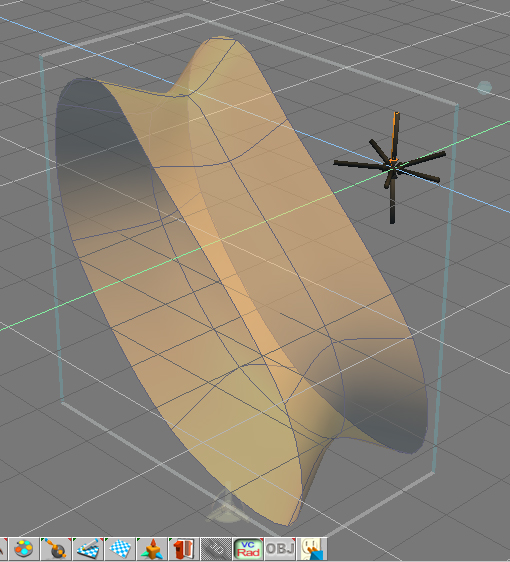
Ok now quite sure why this is doing this, but please examine the images below.
- Attachments
-
-

-
stan
- Master Chief Petty Officer
- Posts: 584
- Joined: 21 May 2009, 17:20
Re: Render issue
could it be a backside switch on render options?
-
rjeff
- Master Chief Petty Officer
- Posts: 462
- Joined: 21 May 2009, 18:26
Re: Render issue
Well I have no idea what that is. So I have no clue.
-
spacekdet

- Captain
- Posts: 1810
- Joined: 27 May 2009, 15:00
- Type the number ten into the box: 10
- Location: On the day shift at the Utility Muffin Research Kitchen
Re: Render issue
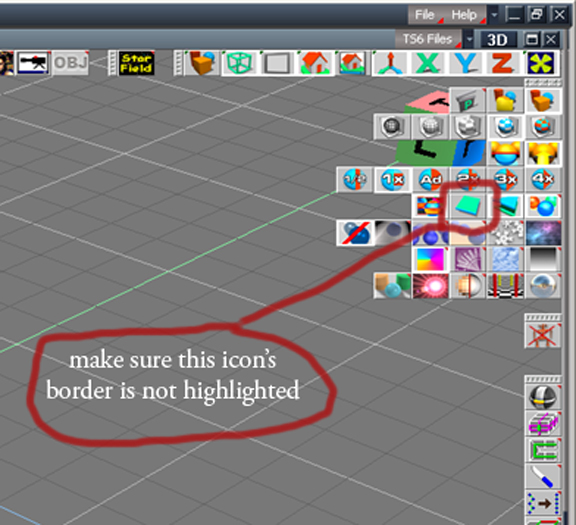
It's a render option that tells the engine whether or not you want both inside and outside faces of an object to render.
I don't have tS on this machine so I can't screencap exactly where this option is, nor can I remember exactly where it is.
You're also constructing the object using NURBS, which are by default single sided.
I don't have tS on this machine so I can't screencap exactly where this option is, nor can I remember exactly where it is.
You're also constructing the object using NURBS, which are by default single sided.
-
clintonman

- Captain
- Posts: 5659
- Joined: 21 May 2009, 21:08
- Type the number ten into the box: 0
- Location: California
Re: Render issue

- singelSided.jpg (18.06 KiB) Viewed 4096 times
-
ranger0101

- Master Chief Petty Officer
- Posts: 363
- Joined: 22 May 2009, 13:15
- Type the number ten into the box: 0
- Location: Orrville Ohio U.S.A.
Re: Render issue
Dang C-Man...  You beat me to it..
Therefore I'm posting it any way
Cheers!!!
-Tim-
You beat me to it..Therefore I'm posting it any way
Cheers!!!
-Tim-
- Attachments
-
In order to Create Art... You must first learn to See...
My Website http://www.theartoftimkoons.yolasite.com
My Website http://www.theartoftimkoons.yolasite.com
-
rjeff
- Master Chief Petty Officer
- Posts: 462
- Joined: 21 May 2009, 18:26
Re: Render issue
Thanks guys. I am still learning.