Workspace Dimensions
-
clintonman
- Captain
- Posts: 5659
- Joined: 21 May 2009, 21:08
- Type the number ten into the box: 0
- Location: California
Workspace Dimensions
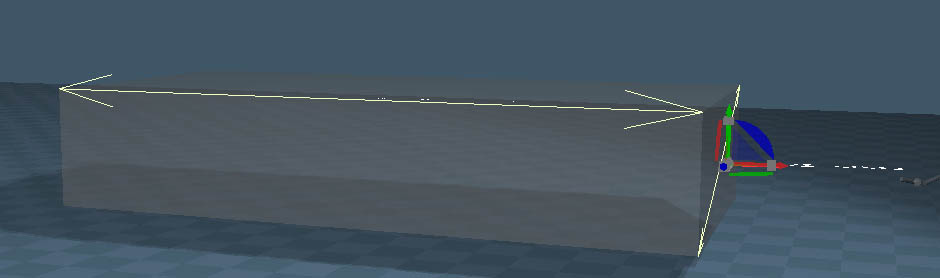
I've been doing some experiments to try to get dimensions into workspace. First success shown above.
The white dimension in the picture is really a capture of the marker mesh that is used to create the distance feedback. It shows 17.3855. The log view shows the length of one side of the first triangle in the captured mesh 17.38548 etc.
Each of the lines in the dimension is really a 2 point polygon or a triangle with one edge of zero length so it looks like a line. The zero length edge uses the same point twice. I didn't even know that was possible in trueSpace. Each part of the numbers also use the same 2 point polygon structure.
So far the way to get the measurement is while creating a plane or using edge draw in point edit mode with distance feedback and point edit snapping. While running either tool I have a script setup through a button shortcut to capture the marker mesh that contains the dimension mesh. Then just read the points on the first triangle of the mesh to calculate the distance value.
During plane creation and after capture script is run.
The white dimension in the picture is really a capture of the marker mesh that is used to create the distance feedback. It shows 17.3855. The log view shows the length of one side of the first triangle in the captured mesh 17.38548 etc.
Each of the lines in the dimension is really a 2 point polygon or a triangle with one edge of zero length so it looks like a line. The zero length edge uses the same point twice. I didn't even know that was possible in trueSpace. Each part of the numbers also use the same 2 point polygon structure.
So far the way to get the measurement is while creating a plane or using edge draw in point edit mode with distance feedback and point edit snapping. While running either tool I have a script setup through a button shortcut to capture the marker mesh that contains the dimension mesh. Then just read the points on the first triangle of the mesh to calculate the distance value.
During plane creation and after capture script is run.
-
clintonman
- Captain
- Posts: 5659
- Joined: 21 May 2009, 21:08
- Type the number ten into the box: 0
- Location: California
Re: Workspace Dimensions
A new approach.
There were problems capturing the markers. It works, just not very well. The new way is to use the point selection widgets to define the end points and then move a plane mesh that looks like arrows into place. The text is a tS text object. Both the arrows and the number text are invisible parented to the object, so they move and scale with the object.
The things I want to add are:
different units - inches, mm, ft...
button to update dimension value when scaling the object or maybe some automatic adjustment
scale object based on change dimension value
dimension between 2 objects - scene dimensions
button to delete a dimension
maybe some color controls
There were problems capturing the markers. It works, just not very well. The new way is to use the point selection widgets to define the end points and then move a plane mesh that looks like arrows into place. The text is a tS text object. Both the arrows and the number text are invisible parented to the object, so they move and scale with the object.
The things I want to add are:
different units - inches, mm, ft...
button to update dimension value when scaling the object or maybe some automatic adjustment
scale object based on change dimension value
dimension between 2 objects - scene dimensions
button to delete a dimension
maybe some color controls
-
clintonman
- Captain
- Posts: 5659
- Joined: 21 May 2009, 21:08
- Type the number ten into the box: 0
- Location: California
Re: Workspace Dimensions
Added units control "m, cm, mm, in, ft and ft in", might add ' and " for ft and in
Added delete button to remove the selected dimension
Might skip all the scaling dimensions stuff until I can use the tool and see if it's worth the trouble.
Next up is dimensions between objects and making it more user friendly.
Added delete button to remove the selected dimension
Might skip all the scaling dimensions stuff until I can use the tool and see if it's worth the trouble.
Next up is dimensions between objects and making it more user friendly.
-
clintonman
- Captain
- Posts: 5659
- Joined: 21 May 2009, 21:08
- Type the number ten into the box: 0
- Location: California
Re: Workspace Dimensions
Did the scaling stuff after all. Choose the dimension and change it's value to uniformly scale the object or only in the direction of the dimension if it points in an axis direction.
3 things on the TODO list
- rounding/precision values like 600.003 should be something like 600
- scene dimensions between objects
- make it not awkward to use
-
clintonman
- Captain
- Posts: 5659
- Joined: 21 May 2009, 21:08
- Type the number ten into the box: 0
- Location: California
Re: Workspace Dimensions
Added dimensions between objects
Added a control for precision - the number of decimal places in the number
Added Color control for the arrow and the text
Started making it less awkward to use.
The dimensions are anchored to the object vertices, so if any geometry is added or removed the dimensions may need to be recreated.
Next is continue making it less awkward, add a select previous button to match the select next button and organize the controls and settings into separate panels.
Added a control for precision - the number of decimal places in the number
Added Color control for the arrow and the text
Started making it less awkward to use.
The dimensions are anchored to the object vertices, so if any geometry is added or removed the dimensions may need to be recreated.
Next is continue making it less awkward, add a select previous button to match the select next button and organize the controls and settings into separate panels.
-
trueBlue
- Captain
- Posts: 5548
- Joined: 06 Jul 2009, 22:50
- Type the number ten into the box: 10
Re: Workspace Dimensions
Looking good!
Are these dimensions, widgets?
How do you add a Start & End dimension?
PE mode?
Does it support Snapping?
Are these dimensions, widgets?
How do you add a Start & End dimension?
PE mode?
Does it support Snapping?
-
clintonman
- Captain
- Posts: 5659
- Joined: 21 May 2009, 21:08
- Type the number ten into the box: 0
- Location: California
Re: Workspace Dimensions
The dimensions are text and mesh objects in the scene. The start and end points are defined by using the GetPointsWidget so it's from one point or collection of points to another. No snapping support.trueBlue wrote: 04 Oct 2022, 06:21 Looking good!
Are these dimensions, widgets?
How do you add a Start & End dimension?
PE mode?
Does it support Snapping?
-
clintonman
- Captain
- Posts: 5659
- Joined: 21 May 2009, 21:08
- Type the number ten into the box: 0
- Location: California
Re: Workspace Dimensions
I was reviewing my notes and remembered that I had angle dimension planned. This is the start. As of now it only works for angles that face in the Z direction. I have an idea on how to fix it (fingers crossed).
-
clintonman
- Captain
- Posts: 5659
- Joined: 21 May 2009, 21:08
- Type the number ten into the box: 0
- Location: California
Re: Workspace Dimensions
Cylinder was rotated in x, y and z axes.
It worked! Angle dimensions can be applied at any orientation. That's the last mathematical piece of the puzzle to finish this thing up.
-
the_ant
- Chief Petty Officer
- Posts: 155
- Joined: 02 Jun 2009, 09:26
- Type the number ten into the box: 0
- Location: Perugia - Italy
Re: Workspace Dimensions
-
clintonman
- Captain
- Posts: 5659
- Joined: 21 May 2009, 21:08
- Type the number ten into the box: 0
- Location: California
Re: Workspace Dimensions
I almost have it to a workable state.
The todo list is pretty short.
organize the UI
refine the usage and clean the code
scene name changes will break it, need to take scene name change into account
when deleting the last dimension for an object need to remove all the dimension nodes
all dimensioned items must have unique names - maybe try to find way around it
The todo list is pretty short.
organize the UI
refine the usage and clean the code
scene name changes will break it, need to take scene name change into account
when deleting the last dimension for an object need to remove all the dimension nodes
all dimensioned items must have unique names - maybe try to find way around it
-
trueBlue
- Captain
- Posts: 5548
- Joined: 06 Jul 2009, 22:50
- Type the number ten into the box: 10
Re: Workspace Dimensions
Looking forward to using your Dimensionsclintonman wrote: 12 Oct 2022, 05:31 I almost have it to a workable state.
The todo list is pretty short.
organize the UI
refine the usage and clean the code
scene name changes will break it, need to take scene name change into account
when deleting the last dimension for an object need to remove all the dimension nodes
all dimensioned items must have unique names - maybe try to find way around it
Sounds like Flatten History maybe an issue too
If you add an exported Dimensions attribute, may be helpful in the future
-
clintonman
- Captain
- Posts: 5659
- Joined: 21 May 2009, 21:08
- Type the number ten into the box: 0
- Location: California
Re: Workspace Dimensions
Yep, it will lose its dimension data if you flatten history.trueBlue wrote: 12 Oct 2022, 18:17Looking forward to using your Dimensionsclintonman wrote: 12 Oct 2022, 05:31 I almost have it to a workable state.
The todo list is pretty short.
organize the UI
refine the usage and clean the code
scene name changes will break it, need to take scene name change into account
when deleting the last dimension for an object need to remove all the dimension nodes
all dimensioned items must have unique names - maybe try to find way around it
Sounds like Flatten History maybe an issue too
If you add an exported Dimensions attribute, may be helpful in the future
-
clintonman
- Captain
- Posts: 5659
- Joined: 21 May 2009, 21:08
- Type the number ten into the box: 0
- Location: California
Re: Workspace Dimensions
Setback.
Further testing shows I was just lucky the angle dimension was working. So I'm scrapping the angles and starting them over from scratch.
On a positive note scene name changes won't break it anymore, put a workaround in for the unique names limitation, deleting the last dimension will clean up unneeded nodes, can recover from renaming a scene object(single object not scene dimension)
TODO:
start over with the angle dimensions
add some options for text alignment - 1) no align, 2) align with dimension, 3)face the user
clean the ui
more testing
Further testing shows I was just lucky the angle dimension was working. So I'm scrapping the angles and starting them over from scratch.
On a positive note scene name changes won't break it anymore, put a workaround in for the unique names limitation, deleting the last dimension will clean up unneeded nodes, can recover from renaming a scene object(single object not scene dimension)
TODO:
start over with the angle dimensions
add some options for text alignment - 1) no align, 2) align with dimension, 3)face the user
clean the ui
more testing
-
clintonman
- Captain
- Posts: 5659
- Joined: 21 May 2009, 21:08
- Type the number ten into the box: 0
- Location: California
Re: Workspace Dimensions
Angle dimensions are fixed.
Now one last thing is the dimension text alignment. I got the 3 options basically working. It's all positioned correctly but it can be upside down, rotated backwards or forwards ...
Text has no alignment and they all face in the same default direction for text
Look at the user
Align with the dimension
The plan is to make the text easily editable and manually correct them when they go too wrong. Also to correct for case of text disappearing into the mesh objects.
Now one last thing is the dimension text alignment. I got the 3 options basically working. It's all positioned correctly but it can be upside down, rotated backwards or forwards ...
Text has no alignment and they all face in the same default direction for text
Look at the user
Align with the dimension
The plan is to make the text easily editable and manually correct them when they go too wrong. Also to correct for case of text disappearing into the mesh objects.
-
clintonman
- Captain
- Posts: 5659
- Joined: 21 May 2009, 21:08
- Type the number ten into the box: 0
- Location: California
Re: Workspace Dimensions
It's all working now!
Any poorly aligned text, like the text on the left in the image, will need to be manually transformed.
TODO:
organize and make not ugly
find good default values for colors and text
If there are no show stopping bugs I hope to release it tomorrow.
Any poorly aligned text, like the text on the left in the image, will need to be manually transformed.
TODO:
organize and make not ugly
find good default values for colors and text
If there are no show stopping bugs I hope to release it tomorrow.
-
the_ant
- Chief Petty Officer
- Posts: 155
- Joined: 02 Jun 2009, 09:26
- Type the number ten into the box: 0
- Location: Perugia - Italy
Re: Workspace Dimensions
Wow...impressive...it seems like Autocad dimensions config panel...can't wait use it...

-
clintonman
- Captain
- Posts: 5659
- Joined: 21 May 2009, 21:08
- Type the number ten into the box: 0
- Location: California
Re: Workspace Dimensions
Thanks, but it won't be anywhere near CAD level of performance. It should be useful though... I hope.the_ant wrote: 16 Oct 2022, 06:04 Wow...impressive...it seems like Autocad dimensions config panel...can't wait use it...![]()
![]()
-
trueBlue
- Captain
- Posts: 5548
- Joined: 06 Jul 2009, 22:50
- Type the number ten into the box: 10
Re: Workspace Dimensions
Yay, you released it!
Nice work Clinton!
I like the way you are doing Distance between objects with the 2D Encapsulated Dim nodes and MeasureNode
Not complaining, but I wish the Object Dimensions were done that way too
Nice work Clinton!
I like the way you are doing Distance between objects with the 2D Encapsulated Dim nodes and MeasureNode
Not complaining, but I wish the Object Dimensions were done that way too
-
clintonman
- Captain
- Posts: 5659
- Joined: 21 May 2009, 21:08
- Type the number ten into the box: 0
- Location: California
Re: Workspace Dimensions
Glad you like it.trueBlue wrote: 21 Oct 2022, 18:40 Yay, you released it!
Nice work Clinton!![]()
I like the way you are doing Distance between objects with the 2D Encapsulated Dim nodes and MeasureNode
Not complaining, but I wish the Object Dimensions were done that way too![]()
It's not possible to add the dimensions to the inside of mesh objects because they would not be visible.
-
trueBlue
- Captain
- Posts: 5548
- Joined: 06 Jul 2009, 22:50
- Type the number ten into the box: 10
Re: Workspace Dimensions
Found a couple of errors
ERR Source object: ScaleByChange
Line: 42, Char: 1 Script text: var parent = Node.LinkedInputNode(firstSel, "OwnerMatrix", 0);
ERR Source object: ScaleByChangeOne
Line: 48, Char: 1 Script text: var parent = Node.LinkedInputNode(firstSel, "OwnerMatrix", 0);
Both scripts do not have Default values
ERR Source object: ScaleByChange
Line: 42, Char: 1 Script text: var parent = Node.LinkedInputNode(firstSel, "OwnerMatrix", 0);
ERR Source object: ScaleByChangeOne
Line: 48, Char: 1 Script text: var parent = Node.LinkedInputNode(firstSel, "OwnerMatrix", 0);
Both scripts do not have Default values
-
clintonman
- Captain
- Posts: 5659
- Joined: 21 May 2009, 21:08
- Type the number ten into the box: 0
- Location: California
Re: Workspace Dimensions
trueBlue wrote: 21 Oct 2022, 21:11 Found a couple of errors
ERR Source object: ScaleByChange
Line: 42, Char: 1 Script text: var parent = Node.LinkedInputNode(firstSel, "OwnerMatrix", 0);
ERR Source object: ScaleByChangeOne
Line: 48, Char: 1 Script text: var parent = Node.LinkedInputNode(firstSel, "OwnerMatrix", 0);
Both scripts do not have Default values
What is the error? What default value is needed? How to reproduce the error?
-
trueBlue
- Captain
- Posts: 5548
- Joined: 06 Jul 2009, 22:50
- Type the number ten into the box: 10
Re: Workspace Dimensions
Not sure what happened, it is working now without errorsclintonman wrote: 21 Oct 2022, 21:46trueBlue wrote: 21 Oct 2022, 21:11 Found a couple of errors
ERR Source object: ScaleByChange
Line: 42, Char: 1 Script text: var parent = Node.LinkedInputNode(firstSel, "OwnerMatrix", 0);
ERR Source object: ScaleByChangeOne
Line: 48, Char: 1 Script text: var parent = Node.LinkedInputNode(firstSel, "OwnerMatrix", 0);
Both scripts do not have Default values![]()
What is the error? What default value is needed? How to reproduce the error?
Off subject
After using the Default settings for a while, View & Lying, I think it is better to use Dimension & Standing
Using View & Lying in Perspective, is not as consistent
The Text angles can be crazy!
-
clintonman
- Captain
- Posts: 5659
- Joined: 21 May 2009, 21:08
- Type the number ten into the box: 0
- Location: California
Re: Workspace Dimensions
Cannot see standing + view at all, text not facing me.trueBlue wrote: 21 Oct 2022, 22:32Not sure what happened, it is working now without errorsclintonman wrote: 21 Oct 2022, 21:46trueBlue wrote: 21 Oct 2022, 21:11 Found a couple of errors
ERR Source object: ScaleByChange
Line: 42, Char: 1 Script text: var parent = Node.LinkedInputNode(firstSel, "OwnerMatrix", 0);
ERR Source object: ScaleByChangeOne
Line: 48, Char: 1 Script text: var parent = Node.LinkedInputNode(firstSel, "OwnerMatrix", 0);
Both scripts do not have Default values![]()
What is the error? What default value is needed? How to reproduce the error?
Off subject
After using the Default settings for a while, View & Lying, I think it is better to use Dimension & Standing
Using View & Lying in Perspective, is not as consistent
The Text angles can be crazy!
View or standing makes no difference. They are equally consistent or inconsistent depending only on where the view is looking. It's the reason the text is selected after a dimension is created. In my testing if it was standing it would mostly be facing away from my eye. Standing would not be in improvement from my perspective.
How did you get standing plus view to even work?
-
trueBlue
- Captain
- Posts: 5548
- Joined: 06 Jul 2009, 22:50
- Type the number ten into the box: 10
Re: Workspace Dimensions
I see. I did not try Standing & Viewclintonman wrote: 21 Oct 2022, 22:55StandingIsWorse.jpgtrueBlue wrote: 21 Oct 2022, 22:32Not sure what happened, it is working now without errorsclintonman wrote: 21 Oct 2022, 21:46
![]()
What is the error? What default value is needed? How to reproduce the error?
Off subject
After using the Default settings for a while, View & Lying, I think it is better to use Dimension & Standing
Using View & Lying in Perspective, is not as consistent
The Text angles can be crazy!
Cannot see standing + view at all, text not facing me.
View or standing makes no difference. They are equally consistent or inconsistent depending only on where the view is looking. It's the reason the text is selected after a dimension is created. In my testing if it was standing it would mostly be facing away from my eye. Standing would not be in improvement from my perspective.
How did you get standing plus view to even work?
If you select Normalize Rotation, after, it works
Would it be possible to add Normalize Rotation when using Standing & View?
I have been testing Dimension & Standing and it seems to be more consistent with Ortho Views too
-
clintonman
- Captain
- Posts: 5659
- Joined: 21 May 2009, 21:08
- Type the number ten into the box: 0
- Location: California
Re: Workspace Dimensions
Ah, I misunderstood what you were saying.trueBlue wrote: 22 Oct 2022, 00:26I see. I did not try Standing & Viewclintonman wrote: 21 Oct 2022, 22:55StandingIsWorse.jpgtrueBlue wrote: 21 Oct 2022, 22:32
Not sure what happened, it is working now without errors
Off subject
After using the Default settings for a while, View & Lying, I think it is better to use Dimension & Standing
Using View & Lying in Perspective, is not as consistent
The Text angles can be crazy!
Cannot see standing + view at all, text not facing me.
View or standing makes no difference. They are equally consistent or inconsistent depending only on where the view is looking. It's the reason the text is selected after a dimension is created. In my testing if it was standing it would mostly be facing away from my eye. Standing would not be in improvement from my perspective.
How did you get standing plus view to even work?
If you select Normalize Rotation, after, it works
Would it be possible to add Normalize Rotation when using Standing & View?
I have been testing Dimension & Standing and it seems to be more consistent with Ortho Views too
Dimension & Standing, I'm not seeing consistent improvement. Vertical dimension not good, If looking down or ortho top view is not good, angle on horizontal plane not good. ortho front/back/sides depends on the view, so good and bad. 3d eye down low looks good. normalize rotation improves some and makes others worse. When I say "good" and "bad" I mean most of the time, neither is 100% better in all cases.
Like I said before it all depends on where you are looking from, but you do make a good case for having it as an option. Standing up is better if the eye point isn't too high and lying is more consistent with a top down plan view. I won't bother with the normalize though, since it randomly makes things better or worse. The only case that was almost 100% bad was when I misread and thought you were talking about View and Standing.
-
trueBlue
- Captain
- Posts: 5548
- Joined: 06 Jul 2009, 22:50
- Type the number ten into the box: 10
Re: Workspace Dimensions
Thanks, I see what you meanclintonman wrote: 22 Oct 2022, 01:36Ah, I misunderstood what you were saying.trueBlue wrote: 22 Oct 2022, 00:26I see. I did not try Standing & Viewclintonman wrote: 21 Oct 2022, 22:55
StandingIsWorse.jpg
Cannot see standing + view at all, text not facing me.
View or standing makes no difference. They are equally consistent or inconsistent depending only on where the view is looking. It's the reason the text is selected after a dimension is created. In my testing if it was standing it would mostly be facing away from my eye. Standing would not be in improvement from my perspective.
How did you get standing plus view to even work?
If you select Normalize Rotation, after, it works
Would it be possible to add Normalize Rotation when using Standing & View?
I have been testing Dimension & Standing and it seems to be more consistent with Ortho Views too
Dimension & Standing, I'm not seeing consistent improvement. Vertical dimension not good, If looking down or ortho top view is not good, angle on horizontal plane not good. ortho front/back/sides depends on the view, so good and bad. 3d eye down low looks good. normalize rotation improves some and makes others worse. When I say "good" and "bad" I mean most of the time, neither is 100% better in all cases.
Like I said before it all depends on where you are looking from, but you do make a good case for having it as an option. Standing up is better if the eye point isn't too high and lying is more consistent with a top down plan view. I won't bother with the normalize though, since it randomly makes things better or worse. The only case that was almost 100% bad was when I misread and thought you were talking about View and Standing.
I am just exploring and testing different scenarios
Was thinking of a way to run Normalize Rotation with a button from your panel or toolbar button, not necessarily incorporated in your code
I think those errors with those scripts, that I reported, needs a check for proper selection
I remember I had the Object selected
Maybe those scripts did not like the value I had, like 3.14
-
clintonman
- Captain
- Posts: 5659
- Joined: 21 May 2009, 21:08
- Type the number ten into the box: 0
- Location: California
Re: Workspace Dimensions
My testing indicated normalize rotation will randomly make it better or make it worse. That would be a bad description for the button, "Normalize - do you feel lucky?"trueBlue wrote: 22 Oct 2022, 02:09Thanks, I see what you meanclintonman wrote: 22 Oct 2022, 01:36Ah, I misunderstood what you were saying.trueBlue wrote: 22 Oct 2022, 00:26
I see. I did not try Standing & View
If you select Normalize Rotation, after, it works
Would it be possible to add Normalize Rotation when using Standing & View?
I have been testing Dimension & Standing and it seems to be more consistent with Ortho Views too
Dimension & Standing, I'm not seeing consistent improvement. Vertical dimension not good, If looking down or ortho top view is not good, angle on horizontal plane not good. ortho front/back/sides depends on the view, so good and bad. 3d eye down low looks good. normalize rotation improves some and makes others worse. When I say "good" and "bad" I mean most of the time, neither is 100% better in all cases.
Like I said before it all depends on where you are looking from, but you do make a good case for having it as an option. Standing up is better if the eye point isn't too high and lying is more consistent with a top down plan view. I won't bother with the normalize though, since it randomly makes things better or worse. The only case that was almost 100% bad was when I misread and thought you were talking about View and Standing.
I am just exploring and testing different scenarios
Was thinking of a way to run Normalize Rotation with a button from your panel or toolbar button, not necessarily incorporated in your code
I think those errors with those scripts, that I reported, needs a check for proper selection
I remember I had the Object selected
Maybe those scripts did not like the value I had, like 3.14
-
clintonman
- Captain
- Posts: 5659
- Joined: 21 May 2009, 21:08
- Type the number ten into the box: 0
- Location: California
Re: Workspace Dimensions
Here's a copy of the changes including all the changes you made.
remove button highlight from all 6 GetDimPoints nodes
remove status message checkbox from 3 nodes inside GetDimPoints
de-export the DimLinear, DimAngle and DimText ORA exported panel
remove all connectors except Matrix conns from DimLinear, DimAngle and DimText - DimText kept Material List conn, hard to see color on selected item in the 3d view
utility toggletextgraphic - choose first text explicitly if not a valid dimension
note line 344 added (...) before || to fix the logic for the case where there is no valid dimension to default toggle to
added text orient setting/control - Lying, Standing
creating a new dimension in view mode will always have Lying orientation
Generally, if your view point is high, use the Lying orientation and if it is lower use the Standing orientation
remove button highlight from all 6 GetDimPoints nodes
remove status message checkbox from 3 nodes inside GetDimPoints
de-export the DimLinear, DimAngle and DimText ORA exported panel
remove all connectors except Matrix conns from DimLinear, DimAngle and DimText - DimText kept Material List conn, hard to see color on selected item in the 3d view
utility toggletextgraphic - choose first text explicitly if not a valid dimension
note line 344 added (...) before || to fix the logic for the case where there is no valid dimension to default toggle to
Code: Select all
//select first
if(firstSel == (scene && Node.Exists(sceneMeasureGroup)) || Node.Exists(objectMeasureGroup)) {creating a new dimension in view mode will always have Lying orientation
Generally, if your view point is high, use the Lying orientation and if it is lower use the Standing orientation
- Attachments
-
- Dimensions.RsObj
- (463.15 KiB) Downloaded 146 times
-
trueBlue
- Captain
- Posts: 5548
- Joined: 06 Jul 2009, 22:50
- Type the number ten into the box: 10
Re: Workspace Dimensions
Thanks!clintonman wrote: 22 Oct 2022, 04:27 Here's a copy of the changes including all the changes you made.
remove button highlight from all 6 GetDimPoints nodes
remove status message checkbox from 3 nodes inside GetDimPoints
de-export the DimLinear, DimAngle and DimText ORA exported panel
remove all connectors except Matrix conns from DimLinear, DimAngle and DimText - DimText kept Material List conn, hard to see color on selected item in the 3d view
utility toggletextgraphic - choose first text explicitly if not a valid dimension
note line 344 added (...) before || to fix the logic for the case where there is no valid dimension to default toggle toadded text orient setting/control - Lying, StandingCode: Select all
//select first if(firstSel == (scene && Node.Exists(sceneMeasureGroup)) || Node.Exists(objectMeasureGroup)) {
creating a new dimension in view mode will always have Lying orientation
Generally, if your view point is high, use the Lying orientation and if it is lower use the Standing orientation
Not sure if this was present in the previous version
Notice a double line in an Angel .
Also, a ghost widget appears when creating Angles
Also, notice a Parenting status message now that you removed the "status message checkbox from 3 nodes inside GetDimPoints"
-
clintonman
- Captain
- Posts: 5659
- Joined: 21 May 2009, 21:08
- Type the number ten into the box: 0
- Location: California
Re: Workspace Dimensions
Do you mean the angle arms when you say double lines?trueBlue wrote: 22 Oct 2022, 15:26Thanks!clintonman wrote: 22 Oct 2022, 04:27 Here's a copy of the changes including all the changes you made.
remove button highlight from all 6 GetDimPoints nodes
remove status message checkbox from 3 nodes inside GetDimPoints
de-export the DimLinear, DimAngle and DimText ORA exported panel
remove all connectors except Matrix conns from DimLinear, DimAngle and DimText - DimText kept Material List conn, hard to see color on selected item in the 3d view
utility toggletextgraphic - choose first text explicitly if not a valid dimension
note line 344 added (...) before || to fix the logic for the case where there is no valid dimension to default toggle toadded text orient setting/control - Lying, StandingCode: Select all
//select first if(firstSel == (scene && Node.Exists(sceneMeasureGroup)) || Node.Exists(objectMeasureGroup)) {
creating a new dimension in view mode will always have Lying orientation
Generally, if your view point is high, use the Lying orientation and if it is lower use the Standing orientation
Not sure if this was present in the previous version
Notice a double line in an Angel
Angle.png
.
Also, a ghost widget appears when creating Angles
Also, notice a Parenting status message now that you removed the "status message checkbox from 3 nodes inside GetDimPoints"
I don't see any ghost widget when creating angles. Can you show a screenshot?
I loaded the old version with status checkboxes and the parenting message still shows. Maybe you just didn't notice it before.
-
trueBlue
- Captain
- Posts: 5548
- Joined: 06 Jul 2009, 22:50
- Type the number ten into the box: 10
Re: Workspace Dimensions
You can see the double lines in the Angle picclintonman wrote: 22 Oct 2022, 15:35Do you mean the angle arms when you say double lines?trueBlue wrote: 22 Oct 2022, 15:26Thanks!clintonman wrote: 22 Oct 2022, 04:27 Here's a copy of the changes including all the changes you made.
remove button highlight from all 6 GetDimPoints nodes
remove status message checkbox from 3 nodes inside GetDimPoints
de-export the DimLinear, DimAngle and DimText ORA exported panel
remove all connectors except Matrix conns from DimLinear, DimAngle and DimText - DimText kept Material List conn, hard to see color on selected item in the 3d view
utility toggletextgraphic - choose first text explicitly if not a valid dimension
note line 344 added (...) before || to fix the logic for the case where there is no valid dimension to default toggle toadded text orient setting/control - Lying, StandingCode: Select all
//select first if(firstSel == (scene && Node.Exists(sceneMeasureGroup)) || Node.Exists(objectMeasureGroup)) {
creating a new dimension in view mode will always have Lying orientation
Generally, if your view point is high, use the Lying orientation and if it is lower use the Standing orientation
Not sure if this was present in the previous version
Notice a double line in an Angel
Angle.png
.
Also, a ghost widget appears when creating Angles
Also, notice a Parenting status message now that you removed the "status message checkbox from 3 nodes inside GetDimPoints"
I don't see any ghost widget when creating angles. Can you show a screenshot?
I loaded the old version with status checkboxes and the parenting message still shows. Maybe you just didn't notice it before.
Two lines from the top left to bottom right
Yesterday, I was testing, setting the Cone's Matrix to see if I could get a normal location, rotation, and scale
It was hard to tell if the results made any difference
The ghost widget happens to fast to get a screenshot
-
clintonman
- Captain
- Posts: 5659
- Joined: 21 May 2009, 21:08
- Type the number ten into the box: 0
- Location: California
Re: Workspace Dimensions
I don't see it in the picture, don't see it here either. Can't fix if can't see it.trueBlue wrote: 22 Oct 2022, 15:48 ...
You can see the double lines in the Angle pic
Two lines from the top left to bottom right
...
-
trueBlue
- Captain
- Posts: 5548
- Joined: 06 Jul 2009, 22:50
- Type the number ten into the box: 10
Re: Workspace Dimensions
Never mind, I point edited the angle to confirm it is a single line
-
clintonman
- Captain
- Posts: 5659
- Joined: 21 May 2009, 21:08
- Type the number ten into the box: 0
- Location: California
Re: Workspace Dimensions
OKtrueBlue wrote: 22 Oct 2022, 16:00 Never mind, I point edited the angle to confirm it is a single line
A trick you ca do is press the Edit Graphic button and ctrl-rmb scale to lengthen and shorten the arms of the angle.
-
trueBlue
- Captain
- Posts: 5548
- Joined: 06 Jul 2009, 22:50
- Type the number ten into the box: 10
Re: Workspace Dimensions
Edit Graphic & Toggle Text | Graphic give errors when used when nothing is selected
-
clintonman
- Captain
- Posts: 5659
- Joined: 21 May 2009, 21:08
- Type the number ten into the box: 0
- Location: California
Re: Workspace Dimensions
Probably a lot more than just that will give errors if nothing is selectedtrueBlue wrote: 22 Oct 2022, 17:20 Edit Graphic & Toggle Text | Graphic give errors when used when nothing is selected
Edit:
edit graphic, all the set buttons,most of the select buttons, set units also same problem/error
-
clintonman
- Captain
- Posts: 5659
- Joined: 21 May 2009, 21:08
- Type the number ten into the box: 0
- Location: California
Re: Workspace Dimensions
Added a check for nothing selected.
- Attachments
-
- Dimensions0540.RsObj
- (463.89 KiB) Downloaded 147 times
-
trueBlue
- Captain
- Posts: 5548
- Joined: 06 Jul 2009, 22:50
- Type the number ten into the box: 10
Re: Workspace Dimensions
Were all of the changes done in the Utility Function Set?
I went through the Utility Function Set and added a check for nothing selected in most if not all of the functions
Also noticed that a lot of the items did not have a var
As an example:
I went through the Utility Function Set and added a check for nothing selected in most if not all of the functions
Also noticed that a lot of the items did not have a var
As an example:
Code: Select all
var scene = Space.CurrentScene();
var firstSel = Node.FirstSelected();
if(!firstSel) return
var firstSelSN = Node.ShortName(firstSel);
var firstSelOwner = Node.Owner(firstSel);
var firstSelOOwner = Node.Owner(firstSelOwner);-
clintonman
- Captain
- Posts: 5659
- Joined: 21 May 2009, 21:08
- Type the number ten into the box: 0
- Location: California
Re: Workspace Dimensions
There may have been one other place, but I forget.trueBlue wrote: 22 Oct 2022, 17:55 Were all of the changes done in the Utility Function Set?
I went through the Utility Function Set and added a check for nothing selected in most if not all of the functions
Also noticed that a lot of the items did not have a var
As an example:Code: Select all
var scene = Space.CurrentScene(); var firstSel = Node.FirstSelected(); if(!firstSel) return var firstSelSN = Node.ShortName(firstSel); var firstSelOwner = Node.Owner(firstSel); var firstSelOOwner = Node.Owner(firstSelOwner);
-
trueBlue
- Captain
- Posts: 5548
- Joined: 06 Jul 2009, 22:50
- Type the number ten into the box: 10
Re: Workspace Dimensions
Yep, the Dimensions Function Set
-
trueBlue
- Captain
- Posts: 5548
- Joined: 06 Jul 2009, 22:50
- Type the number ten into the box: 10
Re: Workspace Dimensions
Why is one dimension 10.000 m and the other is 14.142 m?
Cylinder's scale is 10.000
What is trueSpace's Unit of Scale?
Cylinder's scale is 10.000
What is trueSpace's Unit of Scale?
- Attachments
-
- Dim.RsScn
- (1.44 MiB) Downloaded 144 times
-
clintonman
- Captain
- Posts: 5659
- Joined: 21 May 2009, 21:08
- Type the number ten into the box: 0
- Location: California
Re: Workspace Dimensions
The dimension data is all messed up. It has 5 angles and one of the linear dimensions shares the same name as one of the angle dimensions.trueBlue wrote: 22 Oct 2022, 20:07 Why is one dimension 10.000 m and the other is 14.142 m?
Cylinder's scale is 10.000
What is trueSpace's Unit of Scale?
Dimensions.png
Meters.
-
trueBlue
- Captain
- Posts: 5548
- Joined: 06 Jul 2009, 22:50
- Type the number ten into the box: 10
Re: Workspace Dimensions
Thank you!clintonman wrote: 22 Oct 2022, 20:21The dimension data is all messed up. It has 5 angles and one of the linear dimensions shares the same name as one of the angle dimensions.trueBlue wrote: 22 Oct 2022, 20:07 Why is one dimension 10.000 m and the other is 14.142 m?
Cylinder's scale is 10.000
What is trueSpace's Unit of Scale?
Dimensions.png
Meters.
I read the data
Must delete the MeasureNode before starting over
This can be a big issue!
-
clintonman
- Captain
- Posts: 5659
- Joined: 21 May 2009, 21:08
- Type the number ten into the box: 0
- Location: California
Re: Workspace Dimensions
Are you able to reproduce the problem?trueBlue wrote: 22 Oct 2022, 20:59Thank you!clintonman wrote: 22 Oct 2022, 20:21The dimension data is all messed up. It has 5 angles and one of the linear dimensions shares the same name as one of the angle dimensions.trueBlue wrote: 22 Oct 2022, 20:07 Why is one dimension 10.000 m and the other is 14.142 m?
Cylinder's scale is 10.000
What is trueSpace's Unit of Scale?
Dimensions.png
Meters.
I read the data
Must delete the MeasureNode before starting over
This can be a big issue!
Dimensions.png
-
trueBlue
- Captain
- Posts: 5548
- Joined: 06 Jul 2009, 22:50
- Type the number ten into the box: 10
Re: Workspace Dimensions
I most likely deleted a couple of dimensions using the panel and did not delete the MeasureNodeclintonman wrote: 22 Oct 2022, 21:00Are you able to reproduce the problem?trueBlue wrote: 22 Oct 2022, 20:59Thank you!clintonman wrote: 22 Oct 2022, 20:21
The dimension data is all messed up. It has 5 angles and one of the linear dimensions shares the same name as one of the angle dimensions.
Meters.
I read the data
Must delete the MeasureNode before starting over
This can be a big issue!
Dimensions.png
It was unknown to me that there could be existing data before adding new dimensions
-
clintonman
- Captain
- Posts: 5659
- Joined: 21 May 2009, 21:08
- Type the number ten into the box: 0
- Location: California
Re: Workspace Dimensions
When you delete the last dimension using the panel the measure node is also deleted automatically.trueBlue wrote: 22 Oct 2022, 21:24I most likely deleted a couple of dimensions using the panel and did not delete the MeasureNodeclintonman wrote: 22 Oct 2022, 21:00Are you able to reproduce the problem?trueBlue wrote: 22 Oct 2022, 20:59
Thank you!
I read the data
Must delete the MeasureNode before starting over
This can be a big issue!
Dimensions.png
It was unknown to me that there could be existing data before adding new dimensions
-
trueBlue
- Captain
- Posts: 5548
- Joined: 06 Jul 2009, 22:50
- Type the number ten into the box: 10
-
trueBlue
- Captain
- Posts: 5548
- Joined: 06 Jul 2009, 22:50
- Type the number ten into the box: 10
Re: Workspace Dimensions
GetDimPoints/start
if(Node.SubObjectCount("/D3DView")==0) return;
Should this be moved to the beginning of the script, before resetting the PickSelect/data?
Should this also have: params.SetTerminationFlag(); ?
Widgets.ReplaceWidget('{5C9008D4-B6B3-4359-9E63-18D2FC228A6E}','/Widgets/Tools/PickVertexWidget2','Default','','');
This causes the Ghost Widget appearing
Also happens when using your Snapping tools
if(Node.SubObjectCount("/D3DView")==0) return;
Should this be moved to the beginning of the script, before resetting the PickSelect/data?
Should this also have: params.SetTerminationFlag(); ?
Widgets.ReplaceWidget('{5C9008D4-B6B3-4359-9E63-18D2FC228A6E}','/Widgets/Tools/PickVertexWidget2','Default','','');
This causes the Ghost Widget appearing
Also happens when using your Snapping tools
-
clintonman
- Captain
- Posts: 5659
- Joined: 21 May 2009, 21:08
- Type the number ten into the box: 0
- Location: California
Re: Workspace Dimensions
Returning early is always better, so sure move it to the top.trueBlue wrote: 23 Oct 2022, 16:32 GetDimPoints/start
if(Node.SubObjectCount("/D3DView")==0) return;
Should this be moved to the beginning of the script, before resetting the PickSelect/data?
Should this also have: params.SetTerminationFlag(); ?
Widgets.ReplaceWidget('{5C9008D4-B6B3-4359-9E63-18D2FC228A6E}','/Widgets/Tools/PickVertexWidget2','Default','','');
This causes the Ghost Widget appearing
Also happens when using your Snapping tools
No params.SetTerminationFlag(); is needed for the start node
Guess we'll just have to live with ghost widgets.
-
trueBlue
- Captain
- Posts: 5548
- Joined: 06 Jul 2009, 22:50
- Type the number ten into the box: 10
Re: Workspace Dimensions
I know this is unorthodox
Why would a user not have a 3D View open when using this tool, or switch the 3D View to the Link Editor in the middle of using this tool
Nevertheless, to test this scenario...
Start this process by adding a Dimension, select first Point(s)
Widget is active and Point(s) are selected
Switch the 3D View to the LE and back to the 3D View
Point(s) are selected, Status message is showing, and the Widget's cursor is gone but you can still pick with the Mouse (What?!)
So, I am proposing a little more than just a return
Why would a user not have a 3D View open when using this tool, or switch the 3D View to the Link Editor in the middle of using this tool
Nevertheless, to test this scenario...
Start this process by adding a Dimension, select first Point(s)
Widget is active and Point(s) are selected
Switch the 3D View to the LE and back to the 3D View
Point(s) are selected, Status message is showing, and the Widget's cursor is gone but you can still pick with the Mouse (What?!)
So, I am proposing a little more than just a return
Code: Select all
var util = System.CreateDO("Clintons3D Package/Utility functions");
var dataNode = "Scripts/CustomCommands/PickSelect/data";
if(Node.SubObjectCount("/D3DView")==0) {
params.SetTerminationFlag()
util.Delete("/Widgets/Active Widgets Layer2/Markers");
util.ClearStatusMessage(0)
return
}
-
clintonman
- Captain
- Posts: 5659
- Joined: 21 May 2009, 21:08
- Type the number ten into the box: 0
- Location: California
Re: Workspace Dimensions
You could do that, then maybe you want to do something for all the built in tools too: add primitives, point editing, build skeleton, paint face ... None of them have safeguards against switching 3D to 2D and back.trueBlue wrote: 23 Oct 2022, 18:09 I know this is unorthodox
Why would a user not have a 3D View open when using this tool, or switch the 3D View to the Link Editor in the middle of using this tool
Nevertheless, to test this scenario...
Start this process by adding a Dimension, select first Point(s)
Widget is active and Point(s) are selected
Switch the 3D View to the LE and back to the 3D View
Point(s) are selected, Status message is showing, and the Widget's cursor is gone but you can still pick with the Mouse (What?!)
So, I am proposing a little more than just a returnCode: Select all
var util = System.CreateDO("Clintons3D Package/Utility functions"); var dataNode = "Scripts/CustomCommands/PickSelect/data"; if(Node.SubObjectCount("/D3DView")==0) { params.SetTerminationFlag() util.Delete("/Widgets/Active Widgets Layer2/Markers"); util.ClearStatusMessage(0) return }
-
trueBlue
- Captain
- Posts: 5548
- Joined: 06 Jul 2009, 22:50
- Type the number ten into the box: 10
Re: Workspace Dimensions
Ah, your right as usual
So, what is the point of having:
if(Node.SubObjectCount("/D3DView")==0) return;
or what would you suggest?
Another question...
Can you explain the selection of Point or Points?
I understand that you can select Mutiple Points for the First, Second, and Third
Ideally, shouldn't the Third Point be one point?
So, what is the point of having:
if(Node.SubObjectCount("/D3DView")==0) return;
or what would you suggest?
Another question...
Can you explain the selection of Point or Points?
I understand that you can select Mutiple Points for the First, Second, and Third
Ideally, shouldn't the Third Point be one point?
-
clintonman
- Captain
- Posts: 5659
- Joined: 21 May 2009, 21:08
- Type the number ten into the box: 0
- Location: California
Re: Workspace Dimensions
In my view there was never much point to having the 3d view check.trueBlue wrote: 23 Oct 2022, 18:46 Ah, your right as usual
So, what is the point of having:
if(Node.SubObjectCount("/D3DView")==0) return;
or what would you suggest?
Another question...
Can you explain the selection of Point or Points?
I understand that you can select Mutiple Points for the First, Second, and Third
Ideally, shouldn't the Third Point be one point?
angle formed from the middle of 3 edges.
If the third was required to be a single point then you couldn't use the middle. Same thing if you want to use the middle of a face.
-
trueBlue
- Captain
- Posts: 5548
- Joined: 06 Jul 2009, 22:50
- Type the number ten into the box: 10
Re: Workspace Dimensions
Thanks!
One more...
With nothing selected, Press the Owner button
One more...
With nothing selected, Press the Owner button
-
clintonman
- Captain
- Posts: 5659
- Joined: 21 May 2009, 21:08
- Type the number ten into the box: 0
- Location: California
Re: Workspace Dimensions
I haven't downloaded your changes yet. Here I get the message "Selection is required", util fs, selectownertrueBlue wrote: 23 Oct 2022, 20:05 Thanks!
One more...
With nothing selected, Press the Owner button
Code: Select all
if(Node.SelectedCount() == 0) {
System.Alert("Selection is required")
return;
}-
trueBlue
- Captain
- Posts: 5548
- Joined: 06 Jul 2009, 22:50
- Type the number ten into the box: 10
Re: Workspace Dimensions
Long story short, I had two instances of Rosetta openclintonman wrote: 23 Oct 2022, 20:10I haven't downloaded your changes yet. Here I get the message "Selection is required", util fs, selectownertrueBlue wrote: 23 Oct 2022, 20:05 Thanks!
One more...
With nothing selected, Press the Owner button
Code: Select all
if(Node.SelectedCount() == 0) { System.Alert("Selection is required") return; }
One that had a Context Restored and the other that did not
I had no selection set up with no Alerts
I downloaded your latest Dimensions, and I am now in sync with yours
-
clintonman
- Captain
- Posts: 5659
- Joined: 21 May 2009, 21:08
- Type the number ten into the box: 0
- Location: California
Re: Workspace Dimensions
OK, so I just need to worry about the button. I can't find the post where you said the button image was unclear.trueBlue wrote: 24 Oct 2022, 16:16Long story short, I had two instances of Rosetta openclintonman wrote: 23 Oct 2022, 20:10I haven't downloaded your changes yet. Here I get the message "Selection is required", util fs, selectownertrueBlue wrote: 23 Oct 2022, 20:05 Thanks!
One more...
With nothing selected, Press the Owner button
Code: Select all
if(Node.SelectedCount() == 0) { System.Alert("Selection is required") return; }
One that had a Context Restored and the other that did not
I had no selection set up with no Alerts
I downloaded your latest Dimensions, and I am now in sync with yours
-
trueBlue
- Captain
- Posts: 5548
- Joined: 06 Jul 2009, 22:50
- Type the number ten into the box: 10
Re: Workspace Dimensions
I deleted the post due to updatesclintonman wrote: 24 Oct 2022, 20:47OK, so I just need to worry about the button. I can't find the post where you said the button image was unclear.trueBlue wrote: 24 Oct 2022, 16:16Long story short, I had two instances of Rosetta openclintonman wrote: 23 Oct 2022, 20:10
I haven't downloaded your changes yet. Here I get the message "Selection is required", util fs, selectowner
Code: Select all
if(Node.SelectedCount() == 0) { System.Alert("Selection is required") return; }
One that had a Context Restored and the other that did not
I had no selection set up with no Alerts
I downloaded your latest Dimensions, and I am now in sync with yours
Here is the button image
-
trueBlue
- Captain
- Posts: 5548
- Joined: 06 Jul 2009, 22:50
- Type the number ten into the box: 10
Re: Workspace Dimensions
LOL...
YafaRay Dimensions I forget, does YafaRay4tS have a transparent material?
-
clintonman
- Captain
- Posts: 5659
- Joined: 21 May 2009, 21:08
- Type the number ten into the box: 0
- Location: California
Re: Workspace Dimensions
It has a glass material and some have transparency parameters.trueBlue wrote: 27 Oct 2022, 16:51 LOL...
YafaRay Dimensions
YafaRay Dimensions.png
I forget, does YafaRay4tS have a transparent material?
-
trueBlue
- Captain
- Posts: 5548
- Joined: 06 Jul 2009, 22:50
- Type the number ten into the box: 10
Re: Workspace Dimensions
Probably, would not work as a Linear material
Off subject, this is being rendered from a C:\Rosetta installation patched with the UU9
YafaRay4tS works right out of the box
No additional setup Initially, the iOpti Viewer isn't working, it shows the Display on first run
Off subject, this is being rendered from a C:\Rosetta installation patched with the UU9
YafaRay4tS works right out of the box
No additional setup Initially, the iOpti Viewer isn't working, it shows the Display on first run