FBX Import-Export
-
clintonman
- Captain
- Posts: 5659
- Joined: 21 May 2009, 21:08
- Type the number ten into the box: 0
- Location: California
FBX Import-Export
I decided to start a new thread since the new version adds some import capabilities to the plugin.
FBX Import and Export plugin for truespace 7.61 It will read and write FBX, OBJ,3DS and DXF format files.
http://www.clintons3d.com/plugins/trues ... index.html"
Still beta quality. Here is a list of what it will not do:
It will not:
Export polygons
Import more than 1 uv set
Import animation
Import rotations properly(this is the reason for no animation yet).
Import cameras or lights.
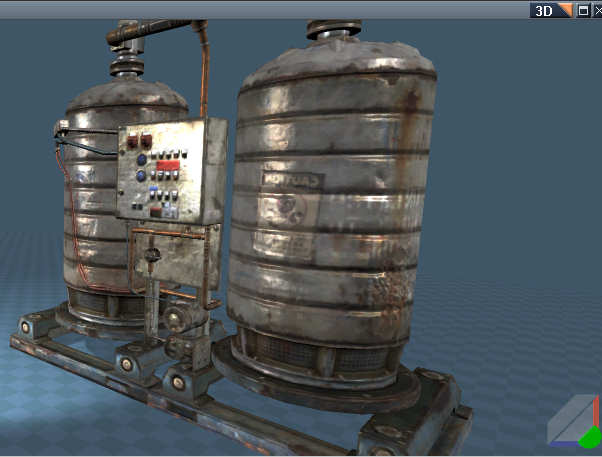
Material import is variable. Different programs write differently to the various formats and sometimes things are missed. I did an fbx export from max with diffuse, specular and normal maps and everything imported perfectly, but the same file exported in obj format only saw the diffuse map. The image above was exported from UDK in obj format and the plugin only loaded the diffuse map. The normal and specular nodes were added manually in the LE window.
http://www.clintons3d.com/plugins/trues ... index.html"
Still beta quality. Here is a list of what it will not do:
It will not:
Export polygons
Import more than 1 uv set
Import animation
Import rotations properly(this is the reason for no animation yet).
Import cameras or lights.
Material import is variable. Different programs write differently to the various formats and sometimes things are missed. I did an fbx export from max with diffuse, specular and normal maps and everything imported perfectly, but the same file exported in obj format only saw the diffuse map. The image above was exported from UDK in obj format and the plugin only loaded the diffuse map. The normal and specular nodes were added manually in the LE window.
-
tylerzambori
- Senior Chief Petty Officer
- Posts: 170
- Joined: 06 Aug 2009, 23:02
Re: FBX Import-Export
clintonman wrote:I decided to start a new thread since the new version adds some import capabilities to the plugin. FBX Import and Export plugin for truespace 7.61 It will read and write FBX, OBJ,3DS and DXF format files.
http://www.clintons3d.com/plugins/trues ... index.html"
Still beta quality. Here is a list of what it will not do:
It will not:
Export polygons
Import more than 1 uv set
Import animation
Import rotations properly(this is the reason for no animation yet).
Import cameras or lights.
Material import is variable. Different programs write differently to the various formats and sometimes things are missed. I did an fbx export from max with diffuse, specular and normal maps and everything imported perfectly, but the same file exported in obj format only saw the diffuse map. The image above was exported from UDK in obj format and the plugin only loaded the diffuse map. The normal and specular nodes were added manually in the LE window.
wow, fast progress!
-
clintonman
- Captain
- Posts: 5659
- Joined: 21 May 2009, 21:08
- Type the number ten into the box: 0
- Location: California
Re: FBX Import-Export
Update:
Image is an imported collada file generated from Spore.
Version 0.97
Fixed some crash bugs and added the beginnings of skeletal mesh import, lights and cameras.
The skeletal mesh will be skinned to the skeleton, but the proper weights aren't imported yet.
Camera and light import is very limited.
Still no animation import.
http://www.clintons3d.com/plugins/trues ... index.html"
Image is an imported collada file generated from Spore.
Version 0.97
Fixed some crash bugs and added the beginnings of skeletal mesh import, lights and cameras.
The skeletal mesh will be skinned to the skeleton, but the proper weights aren't imported yet.
Camera and light import is very limited.
Still no animation import.
http://www.clintons3d.com/plugins/trues ... index.html"
-
clintonman
- Captain
- Posts: 5659
- Joined: 21 May 2009, 21:08
- Type the number ten into the box: 0
- Location: California
Re: FBX Import-Export
Small update:
The exporter will now create smoothing groups. These are needed for proper import to the UDK. It's a way of controlling the smoothness of a mesh without using vertex normals. The UDK reads the vertex normals for static meshes, but ignores them on skeletal meshes and only reads smoothing group data. Here is a direct link to the updated rsx plugin file:
http://www.clintons3d.com/plugins/downl ... ginFBX.rsx"
The full zip archive hasn't been updated yet.
The exporter will now create smoothing groups. These are needed for proper import to the UDK. It's a way of controlling the smoothness of a mesh without using vertex normals. The UDK reads the vertex normals for static meshes, but ignores them on skeletal meshes and only reads smoothing group data. Here is a direct link to the updated rsx plugin file:
http://www.clintons3d.com/plugins/downl ... ginFBX.rsx"
The full zip archive hasn't been updated yet.
-
froo
- Captain
- Posts: 2554
- Joined: 22 May 2009, 12:13
Re: FBX Import-Export
Hey clinton, have you figured out a way to 'group by material' yet? Not sure of the exact term;
not quite awake. But the OBJ package does not support that either. Would be nice to do that though.
-
clintonman
- Captain
- Posts: 5659
- Joined: 21 May 2009, 21:08
- Type the number ten into the box: 0
- Location: California
Re: FBX Import-Export
Sorry, but I don't understand what you mean.froo wrote:Hey clinton, have you figured out a way to 'group by material' yet? Not sure of the exact term;
not quite awake. But the OBJ package does not support that either. Would be nice to do that though.
-
froo
- Captain
- Posts: 2554
- Joined: 22 May 2009, 12:13
Re: FBX Import-Export
np; I mean, group triangles by material. I believe, that would be good for 'Material Instancing': Steinie mentioned he had an issue with the obj package: if he has several objects that use the same material, then he ends up with multiple copies of the material. It would be good to avoid that.
Thanks!
Jason
Thanks!
Jason
-
clintonman
- Captain
- Posts: 5659
- Joined: 21 May 2009, 21:08
- Type the number ten into the box: 0
- Location: California
Re: FBX Import-Export
Nope, haven't got that far or thought about it.froo wrote:np; I mean, group triangles by material. I believe, that would be good for 'Material Instancing': Steinie mentioned he had an issue with the obj package: if he has several objects that use the same material, then he ends up with multiple copies of the material. It would be good to avoid that.
Thanks!
Jason
-
clintonman
- Captain
- Posts: 5659
- Joined: 21 May 2009, 21:08
- Type the number ten into the box: 0
- Location: California
Re: FBX Import-Export
I've been watching the Unity videos over at 3dbuzz and I understand it much better now. I've started updating the fbx exporter. So far I have the exported orientations matching the unity imported orientations. That's to say that truespace is a z up world, unity is y up and the plugin takes that into account now. Solid object animation all works now, but I found some kind of bug or something with truespace/fbx that limits the Y rotations to +-90 degrees. Beyond that range I get unpredictable results. X and Z can do rotations with the full range without any problems. I'll have a new release after the skeletal animation has been adjusted.
-
trueBlue
- Captain
- Posts: 5548
- Joined: 06 Jul 2009, 22:50
- Type the number ten into the box: 10
Re: FBX Import-Export
Sorry if I am off bases here but maybe this will help?
http://www.ogre3d.org/tikiwiki/Quaterni ... =Tutorials"
-
clintonman
- Captain
- Posts: 5659
- Joined: 21 May 2009, 21:08
- Type the number ten into the box: 0
- Location: California
Re: FBX Import-Export
Maybe I'll look into that in the future. I tried using quaternions earlier in this project but it didn't work out, despite the fact that quats are used in both the Unreal and Doom3 file formats. BTW what coordinate system does workspace use. It seems to be a combination of left and right handed to me. The direction of the axes seems to say left handed but then the rotation values seem opposite to that.trueBlue wrote:Sorry if I am off bases here but maybe this will help?
http://www.ogre3d.org/tikiwiki/Quaterni ... =Tutorials"
-
clintonman
- Captain
- Posts: 5659
- Joined: 21 May 2009, 21:08
- Type the number ten into the box: 0
- Location: California
Re: FBX Import-Export
New version 0.975:
Now officially includes the automatic smoothing group export. The code converts vertex normals to smoothing group data.
Unity mode checkbox to maintain orientations. No more sideways/laying down imports to other applications.
Updated installer takes care of the FBX Material List file and the SkeletonStart file copy to their respective libraries.
When exporting Y rotations greater than 90 degrees or less than -90 degrees won't work well.
The Unity mode should probably be checked for all exports since testing so far seems to indicate that it works better for all exports.
http://www.clintons3d.com/plugins/trues ... index.html"
Now officially includes the automatic smoothing group export. The code converts vertex normals to smoothing group data.
Unity mode checkbox to maintain orientations. No more sideways/laying down imports to other applications.
Updated installer takes care of the FBX Material List file and the SkeletonStart file copy to their respective libraries.
When exporting Y rotations greater than 90 degrees or less than -90 degrees won't work well.
The Unity mode should probably be checked for all exports since testing so far seems to indicate that it works better for all exports.
http://www.clintons3d.com/plugins/trues ... index.html"
-
trueBlue
- Captain
- Posts: 5548
- Joined: 06 Jul 2009, 22:50
- Type the number ten into the box: 10
Re: FBX Import-Export
Maybe it is neither Left nor Right.
http://msdn.microsoft.com/en-us/library ... 53(v=vs.85" ).aspx
Although left-handed and right-handed coordinates are the most common systems, there is a variety of other coordinate systems used in 3D software. For example, it is not unusual for 3D modeling applications to use a coordinate system in which the y-axis points toward or away from the viewer, and the z-axis points up
This link suggest that the Left Hand Coordinate system's Positive rotation is clockwise about the axis of rotation.
http://www.evl.uic.edu/ralph/508S98/coordinates.html"
Is this problem related to the Pitch glitch? I think Johny used Degrees to Radicans to overcome this issue in his Fighting game. Again just guessing here and not sure really.
http://msdn.microsoft.com/en-us/library ... 53(v=vs.85" ).aspx
Although left-handed and right-handed coordinates are the most common systems, there is a variety of other coordinate systems used in 3D software. For example, it is not unusual for 3D modeling applications to use a coordinate system in which the y-axis points toward or away from the viewer, and the z-axis points up
This link suggest that the Left Hand Coordinate system's Positive rotation is clockwise about the axis of rotation.
http://www.evl.uic.edu/ralph/508S98/coordinates.html"
Is this problem related to the Pitch glitch? I think Johny used Degrees to Radicans to overcome this issue in his Fighting game. Again just guessing here and not sure really.
-
clintonman
- Captain
- Posts: 5659
- Joined: 21 May 2009, 21:08
- Type the number ten into the box: 0
- Location: California
Re: FBX Import-Export
That's the thing. The truespace axis look left handed but rotations are counterclockwise. The problem isn't a radian vs degree thing. I think it might have something to do with animation. I need to test a non-animated object with a high Y rotation to see what happens.trueBlue wrote:Maybe it is neither Left nor Right.
http://msdn.microsoft.com/en-us/library ... 53(v=vs.85" ).aspx
Although left-handed and right-handed coordinates are the most common systems, there is a variety of other coordinate systems used in 3D software. For example, it is not unusual for 3D modeling applications to use a coordinate system in which the y-axis points toward or away from the viewer, and the z-axis points up
This link suggest that the Left Hand Coordinate system's Positive rotation is clockwise about the axis of rotation.
http://www.evl.uic.edu/ralph/508S98/coordinates.html"
Is this problem related to the Pitch glitch? I think Johny used Degrees to Radicans to overcome this issue in his Fighting game. Again just guessing here and not sure really.
Edit: Did the test and the values from truespace are being written to the fbx file the way I expected. Looks like some mysterious FBX issue. I also manually typed in the rotations from truespace into unity and the rotations matched up visually.
-
clintonman
- Captain
- Posts: 5659
- Joined: 21 May 2009, 21:08
- Type the number ten into the box: 0
- Location: California
Re: FBX Import-Export
UPDATE: version 0.99 is out. It's all about animation and skinning.
Animation Import
Skinning Import
FBX file without a mesh, skeleton only
Auto normals option
Choose the animation take to import
http://www.clintons3d.com/plugins/trues ... index.html"
One big change to watch out for is that the plugin imports in the form of parent-child relationships instead of nested groups. This is shown as one node linking to the next from WldMatrix to OwnerMatrix. This relationship will not export to other formats, but was necessary to get the animation to import. This only has an effect in non-skeletal meshes that are built on a hierarchy. A script to convert to the truespace grouping standard is pending. Until then the parenting/unparenting script might help in these cases. I haven't actually tried it myself yet. It can be found here:
http://www.clintons3d.com/plugins/trues ... index.html"
Animation Import
Skinning Import
FBX file without a mesh, skeleton only
Auto normals option
Choose the animation take to import
http://www.clintons3d.com/plugins/trues ... index.html"
One big change to watch out for is that the plugin imports in the form of parent-child relationships instead of nested groups. This is shown as one node linking to the next from WldMatrix to OwnerMatrix. This relationship will not export to other formats, but was necessary to get the animation to import. This only has an effect in non-skeletal meshes that are built on a hierarchy. A script to convert to the truespace grouping standard is pending. Until then the parenting/unparenting script might help in these cases. I haven't actually tried it myself yet. It can be found here:
http://www.clintons3d.com/plugins/trues ... index.html"
-
clintonman
- Captain
- Posts: 5659
- Joined: 21 May 2009, 21:08
- Type the number ten into the box: 0
- Location: California
Re: FBX Import-Export
Update: August 22 2011 version:
The import and export options have been separated into left and right click on the button
A panel button for converting parenting to groups, the standard native truespace hierarchy system.
import mode - uses presets depending on the source of the fbx file
Import modes for Blender FBX, Blender Collada, UDK FBX and generic for the original are in there now. Using these modes the camera and light orientations are customized for each source. I still need to test and add some other options to this drop down list.
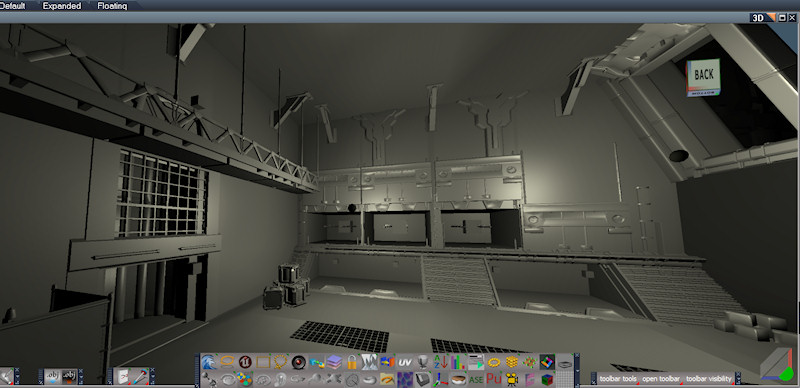
While testing with UDK's FBX export I found that tS froze if there are too many scene elements. I developed a partitioning scheme, but it's not well documented at this time. It involves loading a portion of the scene at a time and boolean merging meshes to get the count down. This is a shot from a UDK import. The scene had something like 700 elements in it, way too many for truespace. UDK doesn't export textures with the map so everything imports as gray.
The import and export options have been separated into left and right click on the button
A panel button for converting parenting to groups, the standard native truespace hierarchy system.
import mode - uses presets depending on the source of the fbx file
Import modes for Blender FBX, Blender Collada, UDK FBX and generic for the original are in there now. Using these modes the camera and light orientations are customized for each source. I still need to test and add some other options to this drop down list.
While testing with UDK's FBX export I found that tS froze if there are too many scene elements. I developed a partitioning scheme, but it's not well documented at this time. It involves loading a portion of the scene at a time and boolean merging meshes to get the count down. This is a shot from a UDK import. The scene had something like 700 elements in it, way too many for truespace. UDK doesn't export textures with the map so everything imports as gray.
-
clintonman
- Captain
- Posts: 5659
- Joined: 21 May 2009, 21:08
- Type the number ten into the box: 0
- Location: California
Re: FBX Import-Export
September 5 Update:
Not too much this time.
Added option to export texture paths as relative or absolute
Fixed a UV error
added a Daz mode for import, I think this ended up being identical to udk mode
fixed a bug in the imported material counts - this was caused by some code back in May when I was trying to fix some incompatible materials problems.
Not too much this time.
Added option to export texture paths as relative or absolute
Fixed a UV error
added a Daz mode for import, I think this ended up being identical to udk mode
fixed a bug in the imported material counts - this was caused by some code back in May when I was trying to fix some incompatible materials problems.
-
clintonman
- Captain
- Posts: 5659
- Joined: 21 May 2009, 21:08
- Type the number ten into the box: 0
- Location: California
Re: FBX Import-Export
November 25 update:
Option to export triangles or polygons
New option for polygon triangulation import. Simple is the old reliable way, but doesn't import concave polygons and the not so simple way will import concave polys but doesn't seem to work with skeletal meshes and it's less stable. When it works it works great when it doesn't it crashes.
Fixed imported material shininess being to powerful.
Option to remove the floating normalmap material node if a diffuse texture was not imported.
Started light and camera import based on import mode.
Started import modes to control rotations, cameras and light attributes based on the source of the file.
Started export modes to control export behavior.
Option to import lights - scenes imported from udk can have too many lights
Option to export triangles or polygons
New option for polygon triangulation import. Simple is the old reliable way, but doesn't import concave polygons and the not so simple way will import concave polys but doesn't seem to work with skeletal meshes and it's less stable. When it works it works great when it doesn't it crashes.
Fixed imported material shininess being to powerful.
Option to remove the floating normalmap material node if a diffuse texture was not imported.
Started light and camera import based on import mode.
Started import modes to control rotations, cameras and light attributes based on the source of the file.
Started export modes to control export behavior.
Option to import lights - scenes imported from udk can have too many lights
-
v3rd3
- Lieutenant Commander
- Posts: 1191
- Joined: 21 May 2009, 20:04
Re: FBX Import-Export
thank you sir
-
froo
- Captain
- Posts: 2554
- Joined: 22 May 2009, 12:13
Re: FBX Import-Export
Ah cool clinton.
Good on you, for polygon and triangle export.
And all the rest, too.
Good on you, for polygon and triangle export.
And all the rest, too.
-
froo
- Captain
- Posts: 2554
- Joined: 22 May 2009, 12:13
Re: FBX Import-Export
BTW Clinton. Is there an option in there to quadrify a mesh? I know tS has a quadrify tool, but was just wondering if it is available in the FBX package.
-
clintonman
- Captain
- Posts: 5659
- Joined: 21 May 2009, 21:08
- Type the number ten into the box: 0
- Location: California
Re: FBX Import-Export
No, not as far as I can tell. It only has functions for triangulating meshes and nurbs surfaces. Nothing for going the other way.froo wrote:BTW Clinton. Is there an option in there to quadrify a mesh? I know tS has a quadrify tool, but was just wondering if it is available in the FBX package.
When you say quadrify do you mean convert from triangles to quads, from ngons to quads or both? Blender has a function for converting tris to quads, so that code might be useful.
-
froo
- Captain
- Posts: 2554
- Joined: 22 May 2009, 12:13
Re: FBX Import-Export
I meant, both.
Sounds like for trueSpace it's best to use LUUV for OBJ import.
Good to know that blender can convert triangles to quads.
Hm that code may be worth a look then.
Sounds like for trueSpace it's best to use LUUV for OBJ import.
Good to know that blender can convert triangles to quads.
Hm that code may be worth a look then.
-
Steinie
- Captain
- Posts: 2958
- Joined: 21 May 2009, 17:38
- Type the number ten into the box: 10
Re: FBX Import-Export
Has the FBX exporter been tested with MachStudio Pro yet? This could be BIG!
We could get a whole new group of users with trueSpace (free) and MachStudio Pro (free). The quality of MachStudio is probably where trueSpace was headed in future versions.
Two programs worth over $5000 being given away...wow!
We could get a whole new group of users with trueSpace (free) and MachStudio Pro (free). The quality of MachStudio is probably where trueSpace was headed in future versions.
Two programs worth over $5000 being given away...wow!
-
clintonman
- Captain
- Posts: 5659
- Joined: 21 May 2009, 21:08
- Type the number ten into the box: 0
- Location: California
Re: FBX Import-Export
March 18 update:
The rsx file from November was bad and has been fixed now
The export of normals and uv's in polygon mode have been fixed
The rsx file going bad was a strange one. The release version was crashing, but the debug version was ok. I ended up changing the fbx library to the visual studio 2005 version and that fixed the release, but the debug still needs to use the vs 2008 fbx library. Weird.
http://www.clintons3d.com/plugins/trues ... index.html"
The rsx file from November was bad and has been fixed now
The export of normals and uv's in polygon mode have been fixed
The rsx file going bad was a strange one. The release version was crashing, but the debug version was ok. I ended up changing the fbx library to the visual studio 2005 version and that fixed the release, but the debug still needs to use the vs 2008 fbx library. Weird.
http://www.clintons3d.com/plugins/trues ... index.html"


