Vertex Color Tools
-
clintonman
- Captain
- Posts: 5659
- Joined: 21 May 2009, 21:08
- Type the number ten into the box: 0
- Location: California
Vertex Color Tools
This should be animated...
Click the image to see the animation.
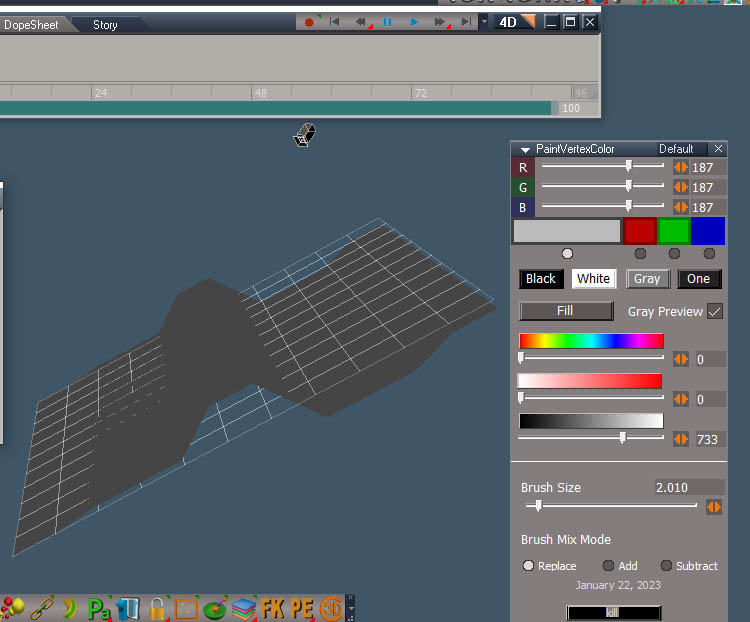
I've been working on some vertex color painting tools. Above is a test of using them in an animated material. The wire frame shows the true geometry and the deform is from the material vertex shader. No vertex colors are shown. Just the values are used to deform the mesh.
The result above is chunky because of the low fidelity mesh and also because the brush has a flat profile. So a brush profile input will need to be added so it can paint with smooth transitions.
Click the image to see the animation.
I've been working on some vertex color painting tools. Above is a test of using them in an animated material. The wire frame shows the true geometry and the deform is from the material vertex shader. No vertex colors are shown. Just the values are used to deform the mesh.
The result above is chunky because of the low fidelity mesh and also because the brush has a flat profile. So a brush profile input will need to be added so it can paint with smooth transitions.
-
clintonman
- Captain
- Posts: 5659
- Joined: 21 May 2009, 21:08
- Type the number ten into the box: 0
- Location: California
Re: Vertex Color Tools
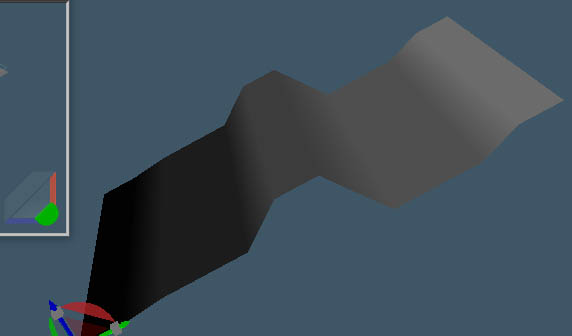
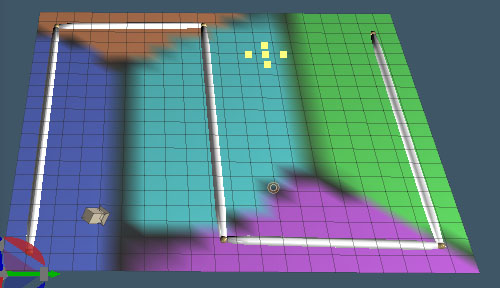
Here's a picture with the vertex colors showing. The plane was painted with progressively lighter colors from left to right. The lighter colors drive the animation to move more.
Also of note in the original post image is that the normals of the plane don't change. Even when deformed it displays as if it was a flat plane. There is no practical way to get the normals to deform with the mesh using the older directx material system. I think that ability came out with directx 10 or 11, geometry shaders.
-
trueBlue
- Captain
- Posts: 5548
- Joined: 06 Jul 2009, 22:50
- Type the number ten into the box: 10
Re: Vertex Color Tools
I have no idea how you are animating this or what is required.
With regards to Normal Maps, take a look at the Water shader in the Materials - DX9 library.
Example Scene
viewtopic.php?p=8598#p8598
With regards to Normal Maps, take a look at the Water shader in the Materials - DX9 library.
Example Scene
viewtopic.php?p=8598#p8598
-
clintonman
- Captain
- Posts: 5659
- Joined: 21 May 2009, 21:08
- Type the number ten into the box: 0
- Location: California
Re: Vertex Color Tools
The normalmaps live on top of the geometry normals. The vertex shader is missing the geometry normal changes.trueBlue wrote: 27 Jan 2023, 17:43 I have no idea how you are animating this or what is required.
With regards to Normal Maps, take a look at the Water shader in the Materials - DX9 library.
Example Scene
viewtopic.php?p=8598#p8598
-
clintonman
- Captain
- Posts: 5659
- Joined: 21 May 2009, 21:08
- Type the number ten into the box: 0
- Location: California
Re: Vertex Color Tools
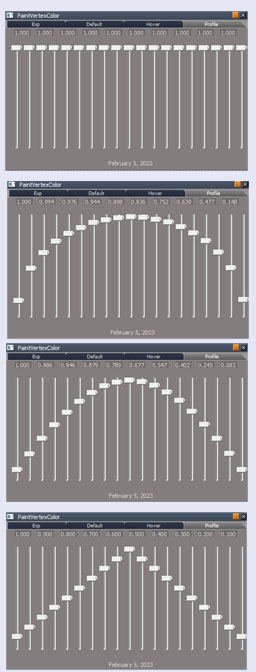
I was able to add a profile "curve" for the vertex paint brush. The sliders from left to right define the strength of the brush from center to the outside radius. This works pretty well.
While testing the add brush mode I got this crazy pattern. It should be a smooth color. I was racking my brain and I think I finally figured out why. The add mode will add to the existing color, but I think it is adding color and then adding to the added color. I need to store the original colors in a separate location and use that as the basis for adding, then update all colors at once.
-
trueBlue
- Captain
- Posts: 5548
- Joined: 06 Jul 2009, 22:50
- Type the number ten into the box: 10
Re: Vertex Color Tools
The plane I posted in the other thread was first painted red to all of the vertices, then I added 3 or 4 colors on top of that
-
clintonman
- Captain
- Posts: 5659
- Joined: 21 May 2009, 21:08
- Type the number ten into the box: 0
- Location: California
Re: Vertex Color Tools
Splotchy paint and other design flaws are fixed and made the profile editor more intuitive.
-
trueBlue
- Captain
- Posts: 5548
- Joined: 06 Jul 2009, 22:50
- Type the number ten into the box: 10
-
clintonman
- Captain
- Posts: 5659
- Joined: 21 May 2009, 21:08
- Type the number ten into the box: 0
- Location: California
Re: Vertex Color Tools
click to see the animation
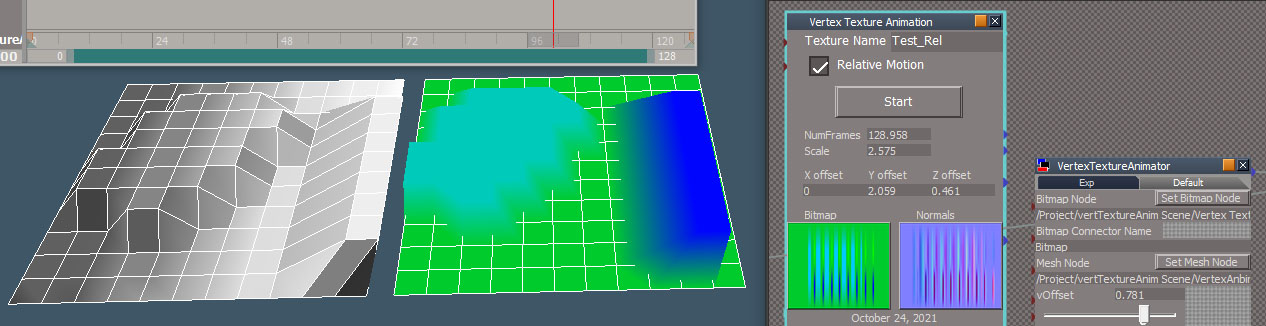
Animation test of vertex displacements driven by vertex colors. The original morph animation is on the left and the vertex color driven animation is on the right. The vertex colors are setup to drive the displacement and color. Normally it would just drive the vertex positions.
The bitmap to drive the animation is created with the Vertex Texture Animation tool. It reads the vertex positions of the morph animation and creates 2 textures from it. The green texture is the animated vertex positions and the purple is the animated geometry normals. The normals aren't used because of a trueSpace limitation. That is the reason the vertex color animation has a smooth surface. The textures and mesh can be exported from tS to be used in a game engine. The texture uses uv set #2 with special uv's it sets up in the mesh.
Far right is the script that drives the animation. Outside of trueSpace the animation would be driven purely by a vertex shader.
This is the vertex shader. The number values shown came from the Vertex Texture Animation tool, a scale and offsets for x, y, z. No X is shown because the offset was 0.
Not shown is the color shader that just uses the vertex colors.
Animation test of vertex displacements driven by vertex colors. The original morph animation is on the left and the vertex color driven animation is on the right. The vertex colors are setup to drive the displacement and color. Normally it would just drive the vertex positions.
The bitmap to drive the animation is created with the Vertex Texture Animation tool. It reads the vertex positions of the morph animation and creates 2 textures from it. The green texture is the animated vertex positions and the purple is the animated geometry normals. The normals aren't used because of a trueSpace limitation. That is the reason the vertex color animation has a smooth surface. The textures and mesh can be exported from tS to be used in a game engine. The texture uses uv set #2 with special uv's it sets up in the mesh.
Far right is the script that drives the animation. Outside of trueSpace the animation would be driven purely by a vertex shader.
This is the vertex shader. The number values shown came from the Vertex Texture Animation tool, a scale and offsets for x, y, z. No X is shown because the offset was 0.
Not shown is the color shader that just uses the vertex colors.
-
Saul
- Senior Chief Petty Officer
- Posts: 308
- Joined: 22 May 2009, 16:50
Re: Vertex Color Tools
Nice! is this something that could be used instead of animated phyS cloth?
-
clintonman
- Captain
- Posts: 5659
- Joined: 21 May 2009, 21:08
- Type the number ten into the box: 0
- Location: California
Re: Vertex Color Tools
Maybe, if the animation motion isn't too big, a cloth animation could be transferred to a vertex color animation. I say not too big because the color is limited to 255 steps in x,y and z. A big motion would give jagged motion. The only problem is the normals would be off giving it strange lighting.Saul wrote: 29 Jan 2023, 16:16 Nice! is this something that could be used instead of animated phyS cloth?
I have a tool that will translate tS cloth to workspace morph or modelspace vertex animation. You can check it out here:
http://clintons3d.com/plugins/truespace ... morph.html
-
clintonman
- Captain
- Posts: 5659
- Joined: 21 May 2009, 21:08
- Type the number ten into the box: 0
- Location: California
Re: Vertex Color Tools
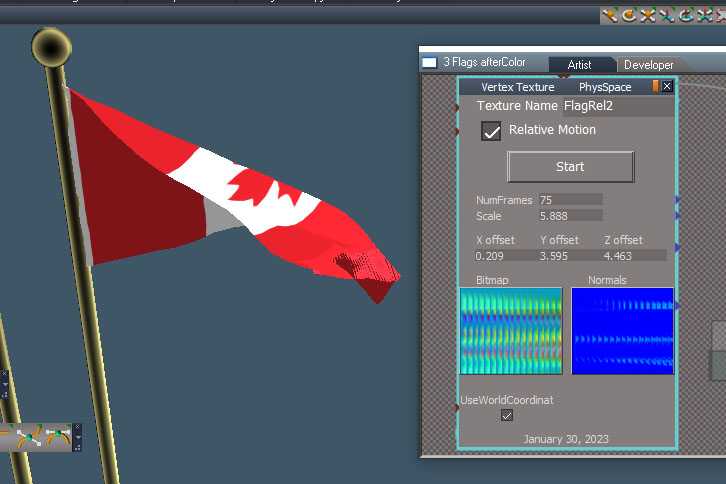
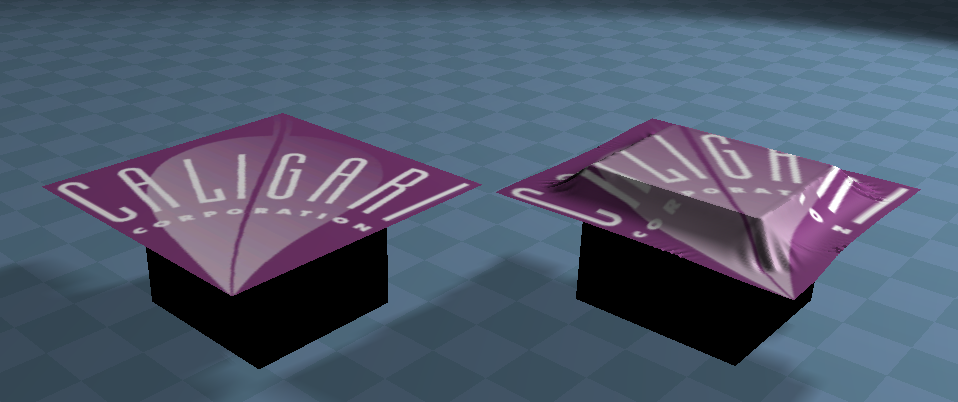
Just a screenshot, no animation this time.
The old cloth to morph script has some issues, so I'm re-writing it and adding a cloth to vertex color function.
The image shows the flag animated with the bitmap image shown next to it. The image is 289 wide by 75 high. That's from 289 vertices in the mesh and 75 frames of animation.
The tool needs some refining as it is super awkward to run it. The morph to vertex color and cloth to vertex color are both working. The last is to redo the cloth to model space vertex animation.
The old cloth to morph script has some issues, so I'm re-writing it and adding a cloth to vertex color function.
The image shows the flag animated with the bitmap image shown next to it. The image is 289 wide by 75 high. That's from 289 vertices in the mesh and 75 frames of animation.
The tool needs some refining as it is super awkward to run it. The morph to vertex color and cloth to vertex color are both working. The last is to redo the cloth to model space vertex animation.
-
trueBlue
- Captain
- Posts: 5548
- Joined: 06 Jul 2009, 22:50
- Type the number ten into the box: 10
Re: Vertex Color Tools
Will you be able to use Render to File with your Vertex Color Tools?
-
clintonman
- Captain
- Posts: 5659
- Joined: 21 May 2009, 21:08
- Type the number ten into the box: 0
- Location: California
Re: Vertex Color Tools
Yes, that's how I got the earlier animation renders.trueBlue wrote: 31 Jan 2023, 14:56![]()
Will you be able to use Render to File with your Vertex Color Tools?
-
trueBlue
- Captain
- Posts: 5548
- Joined: 06 Jul 2009, 22:50
- Type the number ten into the box: 10
Re: Vertex Color Tools
Have you tried this on Merged Geometry?
From the Help file:
One using your animated Vertex Color Tool and the other one using a similar DX Material
From the Help file:
Maybe two Planes Merged together at the same location, rotation, and scaleMerge Geometry
You would use Merge Geometry in place of Boolean Union where it is important to preserve the separate faces
and geometry for the objects you are joining, where you need to manipulate the objects separately at times, but
you do want to treat them as one object for using tools such as Morphs or for processing using scripts (so that
Encapsulate in 3D is not a solution), and when having the edges cut into the surface is not important.
One using your animated Vertex Color Tool and the other one using a similar DX Material
-
clintonman
- Captain
- Posts: 5659
- Joined: 21 May 2009, 21:08
- Type the number ten into the box: 0
- Location: California
Re: Vertex Color Tools
I don't see how that would work. The portion of the mesh with vertex colors would move and the part without would not.trueBlue wrote: 31 Jan 2023, 16:27 Have you tried this on Merged Geometry?
From the Help file:Maybe two Planes Merged together at the same location, rotation, and scaleMerge Geometry
You would use Merge Geometry in place of Boolean Union where it is important to preserve the separate faces
and geometry for the objects you are joining, where you need to manipulate the objects separately at times, but
you do want to treat them as one object for using tools such as Morphs or for processing using scripts (so that
Encapsulate in 3D is not a solution), and when having the edges cut into the surface is not important.
One using your animated Vertex Color Tool and the other one using a similar DX Material
-
trueBlue
- Captain
- Posts: 5548
- Joined: 06 Jul 2009, 22:50
- Type the number ten into the box: 10
Re: Vertex Color Tools
Yes, should have tried it first, it is different from what I thought it might be according to the Help file.clintonman wrote: 02 Feb 2023, 02:17I don't see how that would work. The portion of the mesh with vertex colors would move and the part without would not.trueBlue wrote: 31 Jan 2023, 16:27 Have you tried this on Merged Geometry?
From the Help file:Maybe two Planes Merged together at the same location, rotation, and scaleMerge Geometry
You would use Merge Geometry in place of Boolean Union where it is important to preserve the separate faces
and geometry for the objects you are joining, where you need to manipulate the objects separately at times, but
you do want to treat them as one object for using tools such as Morphs or for processing using scripts (so that
Encapsulate in 3D is not a solution), and when having the edges cut into the surface is not important.
One using your animated Vertex Color Tool and the other one using a similar DX Material
-
clintonman
- Captain
- Posts: 5659
- Joined: 21 May 2009, 21:08
- Type the number ten into the box: 0
- Location: California
Re: Vertex Color Tools
Vertex Paint Tool:
Fixed the color inputs
Added some preset profile curves shown above.
Modified the fill button for point edit mode. If there is a pe selection it will be painted. This also will take smooth weight selections into account getting darker with less weight.
This is almost done. I just want to add a UV to vertex color function and a bone weight to random vertex color.
Now that I think of it maybe now would be a good time to share what I have so far. This is a pre-release so there is a chance it may not work for you. If you're feeling adventurous, give it a go.
The newest Clintons3dPlugin, v1638437 is required, http://clintons3d.com/plugins/truespace ... index.html
Place the PaintVertexColorWidget into the "/Widgets/Tools"
Place PaintVertexColor into "/Scripts/CustomCommands'
Ctrl Drag the PaintVertexColor panel out of the stack, press the Start button and start painting some mesh. It won't work with primitives so flatten or use point edit first.
When in add or subtract modes use very dark colors.
Alt and drag a little bit to fill the mesh
Ctrl and drag to add to the color
Shift and drag to subtract from the color
rmb click to exit the tool
The fill button does not work while the widget is active
The tool doesn't clean up after itself and will leave remnants behind if you rmb exit while hovering over the mesh.
Fixed the color inputs
Added some preset profile curves shown above.
Modified the fill button for point edit mode. If there is a pe selection it will be painted. This also will take smooth weight selections into account getting darker with less weight.
This is almost done. I just want to add a UV to vertex color function and a bone weight to random vertex color.
Now that I think of it maybe now would be a good time to share what I have so far. This is a pre-release so there is a chance it may not work for you. If you're feeling adventurous, give it a go.
The newest Clintons3dPlugin, v1638437 is required, http://clintons3d.com/plugins/truespace ... index.html
Place the PaintVertexColorWidget into the "/Widgets/Tools"
Place PaintVertexColor into "/Scripts/CustomCommands'
Ctrl Drag the PaintVertexColor panel out of the stack, press the Start button and start painting some mesh. It won't work with primitives so flatten or use point edit first.
When in add or subtract modes use very dark colors.
Alt and drag a little bit to fill the mesh
Ctrl and drag to add to the color
Shift and drag to subtract from the color
rmb click to exit the tool
The fill button does not work while the widget is active
The tool doesn't clean up after itself and will leave remnants behind if you rmb exit while hovering over the mesh.
- Attachments
-
- PaintVertexColorWidget.RsObj
- (34.76 KiB) Downloaded 157 times
-
- PaintVertexColor.RsObj
- (160.81 KiB) Downloaded 142 times
-
clintonman
- Captain
- Posts: 5659
- Joined: 21 May 2009, 21:08
- Type the number ten into the box: 0
- Location: California
Re: Vertex Color Tools
Vertex colors from bone weights with a random color for each bone.
This one is maybe not so useful. Who knows... It needs one change, to blend the colors where they come together. As it is now the next bone just overwrites the previous bone colors instead of adding them.
-
clintonman
- Captain
- Posts: 5659
- Joined: 21 May 2009, 21:08
- Type the number ten into the box: 0
- Location: California
Re: Vertex Color Tools
Last of the fills are prototype d. Left side shows the bone weights to vertex colors with the blending fixed and better color value separation. Red plane shows a red color assigned to the texture U coordinate value of the mesh, green shows the V coord value and the U and V are combined together on the red/green/yellow plane.
Also made some bug fixes to the rsx plugin.
Only a few more things left to do before releasing it.
-
clintonman
- Captain
- Posts: 5659
- Joined: 21 May 2009, 21:08
- Type the number ten into the box: 0
- Location: California
Re: Vertex Color Tools
I'm almost done updating the cloth conversion script. The morphs are easier to use now and the last details of vertex color animation are done. The one thing that looks iffy at the moment is the normals bitmap. It's not usable inside trueSpace, but I'd like to know it's working for export purposes and I want to make one last attempt at using them inside tS via tricks. Besides the normals I also want to streamline the workflow a little bit. One thing hasn't changed, the modelspace vertex animation is the same as the original script. No improvements of enhancements there.
I'm attaching the wip beta script below. Place the script in the CustomCommands
I've been testing on the sample scene from the documentation,
C:\trueSpace761\tS\PDFMan\resources\chapter10\3_Flags
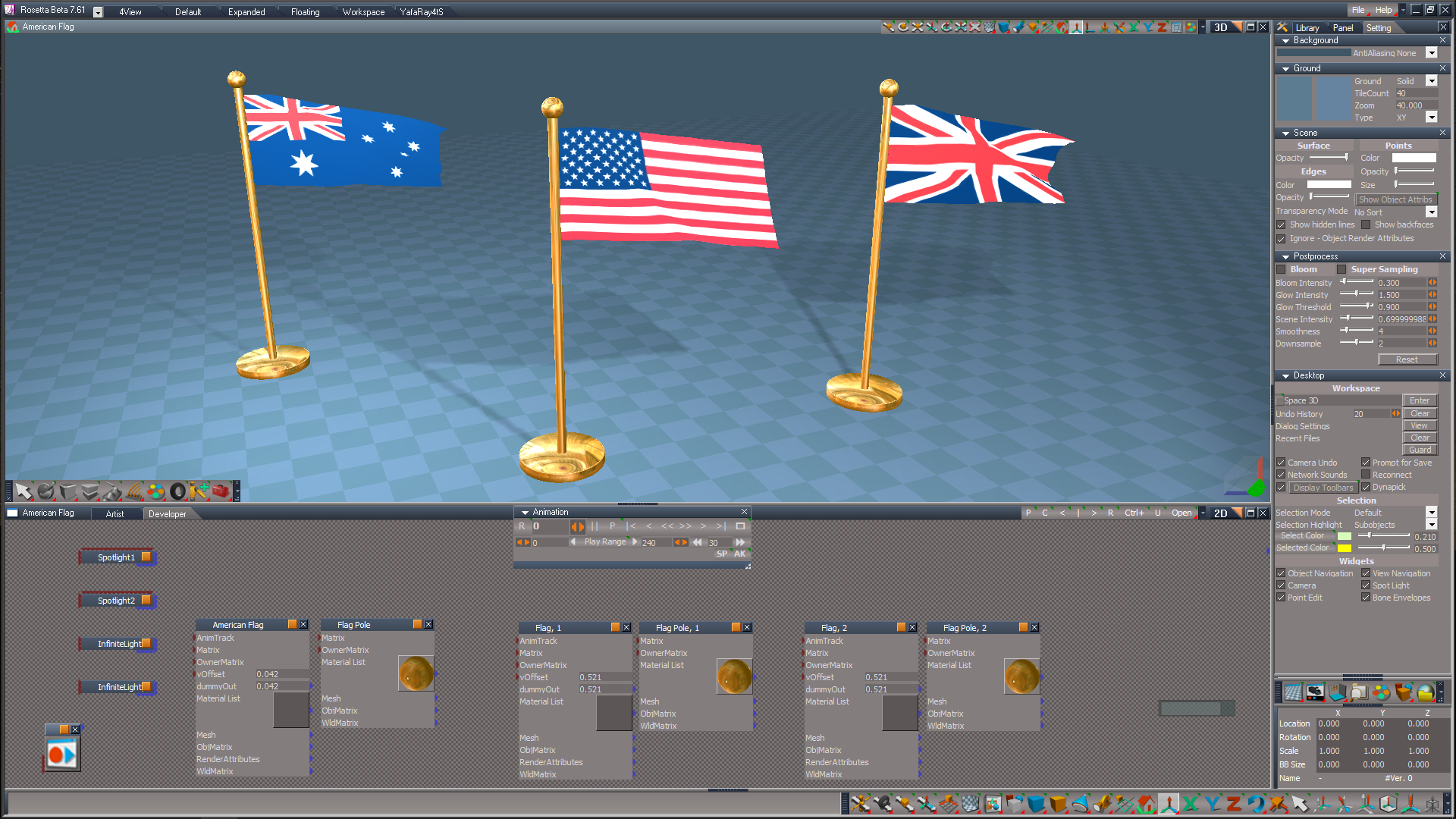
I use the convert dx material tool to convert D3D Compiled to D3D Shader based material needed for this tool.
The conversion is not needed for the morph part of the tool.
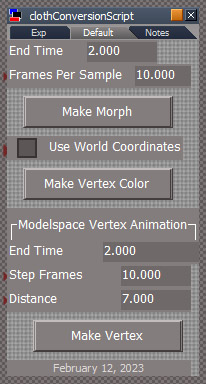
Morph: select one of the flags and press the Make Morph button.
Vertex Color:
convert the flag material to nodes,
select the flag and press the Make Vertex Color button,
answer yes for any construction history dialogs that may appear.
after complete, reset the connector on the vertex shader.
Select something other than the selected node and reselect it. This will show another panel(VTA panel), press the button on the panel to lock it in place in the stack view. This is needed for animation and rendering to work.
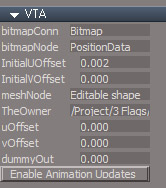
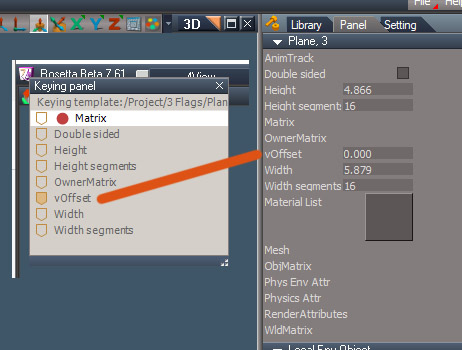
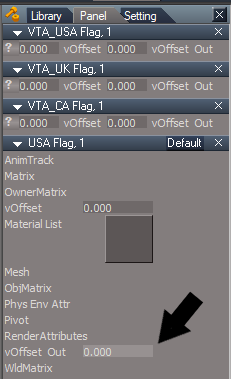
vOffset is exported from the VTA so change it's value on the flag model (Plane, 3 in the image) not the VTA panel
Finally, use the keying panel and tools to set a keyframe at 0 with vOffset 0, and a later key with vOffset of 1
I'm attaching the wip beta script below. Place the script in the CustomCommands
I've been testing on the sample scene from the documentation,
C:\trueSpace761\tS\PDFMan\resources\chapter10\3_Flags
I use the convert dx material tool to convert D3D Compiled to D3D Shader based material needed for this tool.
The conversion is not needed for the morph part of the tool.
Morph: select one of the flags and press the Make Morph button.
Vertex Color:
convert the flag material to nodes,
select the flag and press the Make Vertex Color button,
answer yes for any construction history dialogs that may appear.
after complete, reset the connector on the vertex shader.
Select something other than the selected node and reselect it. This will show another panel(VTA panel), press the button on the panel to lock it in place in the stack view. This is needed for animation and rendering to work.
vOffset is exported from the VTA so change it's value on the flag model (Plane, 3 in the image) not the VTA panel
Finally, use the keying panel and tools to set a keyframe at 0 with vOffset 0, and a later key with vOffset of 1
- Attachments
-
- clothConversionScript.RsObj
- (293.96 KiB) Downloaded 148 times
-
trueBlue
- Captain
- Posts: 5548
- Joined: 06 Jul 2009, 22:50
- Type the number ten into the box: 10
Re: Vertex Color Tools
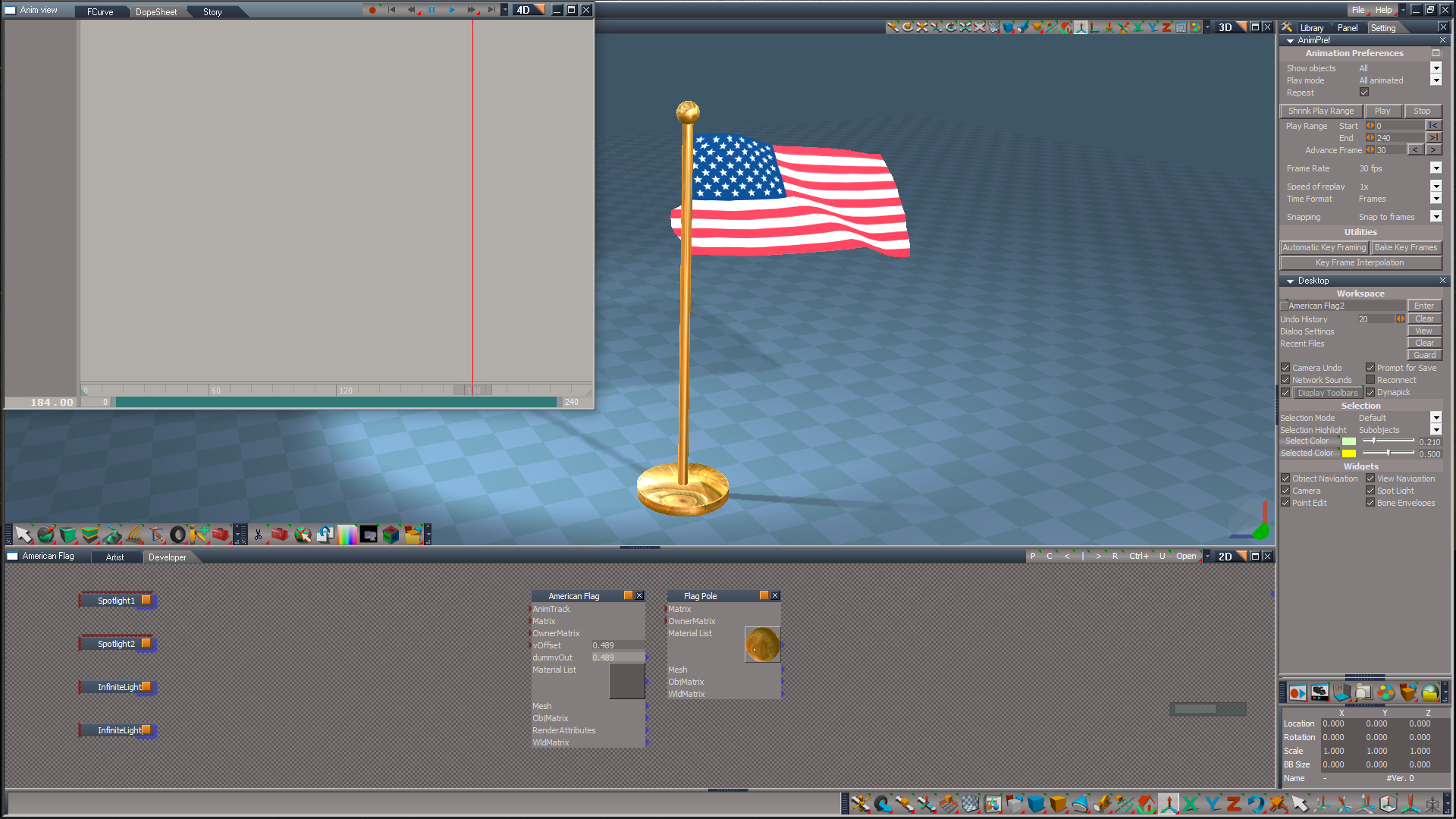
I was able to create an Animation of the American Flag.
Later, I lost the ability to Play the animation.
Does the animated object need to be selected for the animation to Play?
Later, I lost the ability to Play the animation.
Does the animated object need to be selected for the animation to Play?
-
clintonman
- Captain
- Posts: 5659
- Joined: 21 May 2009, 21:08
- Type the number ten into the box: 0
- Location: California
Re: Vertex Color Tools
The VTA node needs to be visible in the stack Panel view, which happens when you select animated object. You can make it permanent in the stack by ctrl drag out and back in to the stack.trueBlue wrote: 13 Feb 2023, 19:11 I was able to create an Animation of the American Flag.![]()
Later, I lost the ability to Play the animation.
Does the animated object need to be selected for the animation to Play?
-
trueBlue
- Captain
- Posts: 5548
- Joined: 06 Jul 2009, 22:50
- Type the number ten into the box: 10
Re: Vertex Color Tools
I see.
As an experiment, I exported all of the VTA's attributes.
And removed the VTA's Default - Export aspect.
This works without having the VTA panel in the Stack. .
Still needs to be selected though.
Note: Need to experiment with which connectors have to be exported, may just be the dummyOut.
Edit: Yep, just the vOffset and dummyOut need to be exported.
As an experiment, I exported all of the VTA's attributes.
And removed the VTA's Default - Export aspect.
This works without having the VTA panel in the Stack. .
Still needs to be selected though.
Note: Need to experiment with which connectors have to be exported, may just be the dummyOut.
Edit: Yep, just the vOffset and dummyOut need to be exported.
-
clintonman
- Captain
- Posts: 5659
- Joined: 21 May 2009, 21:08
- Type the number ten into the box: 0
- Location: California
Re: Vertex Color Tools
Does it still work if the LE is closed?trueBlue wrote: 13 Feb 2023, 19:59 I see.
As an experiment, I exported all of the VTA's attributes.
And removed the VTA's Default - Export aspect.
This works without having the VTA panel in the Stack.
VTA connectors.png
.
Still needs to be selected though.
Note: Need to experiment with which connectors have to be exported, may just be the dummyOut.
Edit: Yep, just the vOffset and dummyOut need to be exported.
-
trueBlue
- Captain
- Posts: 5548
- Joined: 06 Jul 2009, 22:50
- Type the number ten into the box: 10
-
trueBlue
- Captain
- Posts: 5548
- Joined: 06 Jul 2009, 22:50
- Type the number ten into the box: 10
Re: Vertex Color Tools
I reloaded the scene, and the animation would not play.
So, the Stack/Panel needs to be open or Ctrl + Drag the (Selected) animated object out to a floating panel.
I wonder if the VTA could use an Advance Handler like OnPostLoad(), to overcome this issue?
So, the Stack/Panel needs to be open or Ctrl + Drag the (Selected) animated object out to a floating panel.
I wonder if the VTA could use an Advance Handler like OnPostLoad(), to overcome this issue?
-
clintonman
- Captain
- Posts: 5659
- Joined: 21 May 2009, 21:08
- Type the number ten into the box: 0
- Location: California
Re: Vertex Color Tools
Quoting myself above. If you drag the VTA out and back in to the panel you don't need an open le, don't need to select the animated item, dont need a floating item and you can have several vertex animated objects active at one time.clintonman wrote: 13 Feb 2023, 19:19The VTA node needs to be visible in the stack Panel view, which happens when you select animated object. You can make it permanent in the stack by ctrl drag out and back in to the stack.trueBlue wrote: 13 Feb 2023, 19:11 I was able to create an Animation of the American Flag.![]()
Later, I lost the ability to Play the animation.
Does the animated object need to be selected for the animation to Play?
Forgot to mention that the stack Panel view has to be visible.
-
trueBlue
- Captain
- Posts: 5548
- Joined: 06 Jul 2009, 22:50
- Type the number ten into the box: 10
Re: Vertex Color Tools
Okay.clintonman wrote: 13 Feb 2023, 21:22Quoting myself above. If you drag the VTA out and back in to the panel you don't need an open le, don't need to select the animated item, dont need a floating item and you can have several vertex animated objects active at one time.clintonman wrote: 13 Feb 2023, 19:19The VTA node needs to be visible in the stack Panel view, which happens when you select animated object. You can make it permanent in the stack by ctrl drag out and back in to the stack.trueBlue wrote: 13 Feb 2023, 19:11 I was able to create an Animation of the American Flag.![]()
Later, I lost the ability to Play the animation.
Does the animated object need to be selected for the animation to Play?
Another discovery...
Have a floating Animation Editor along with the Link Editor open.
Works without selection, any panel showing in Panels, and does not matter which aspect is showing in the Stack.
Now you can actually see the dummyOut values update while Playing the animation.
Why is tS so weird?
-
trueBlue
- Captain
- Posts: 5548
- Joined: 06 Jul 2009, 22:50
- Type the number ten into the box: 10
Re: Vertex Color Tools
Here is a zip file:
3 Flags.RsScn - Original scene modified per your instructions on your website for Making a Vertex Color animation.
3Flags.ctx - Context saved with the 3 Flags.RsScn loaded and the clothConversionScript opened in a floating panel.
American Flag.RsScn - A scene that was created with your previous version in this thread.
Note: The American Flag; VLA's dummyOut connector was exported out.
Load this scene and press the Animation panel's P 'Play' button.
Demonstrates an alternate way that does not need the VLA panel showing in the Stack/Panels.
However, the animation will not Play if the Link Editor is in 4D mode, but you can open a floating Animation Editor.
3 Flags.RsScn - Original scene modified per your instructions on your website for Making a Vertex Color animation.
3Flags.ctx - Context saved with the 3 Flags.RsScn loaded and the clothConversionScript opened in a floating panel.
American Flag.RsScn - A scene that was created with your previous version in this thread.
Note: The American Flag; VLA's dummyOut connector was exported out.
Load this scene and press the Animation panel's P 'Play' button.
Demonstrates an alternate way that does not need the VLA panel showing in the Stack/Panels.
However, the animation will not Play if the Link Editor is in 4D mode, but you can open a floating Animation Editor.
-
clintonman
- Captain
- Posts: 5659
- Joined: 21 May 2009, 21:08
- Type the number ten into the box: 0
- Location: California
Re: Vertex Color Tools
Loaded your ctx, selected the USA flag and pressed the Vertex Colors. The physics ran and it seemed to run all the way through. Then the bar graph status started over, got stuck at 0 and then tS crashed. So yeah, something different in your tS... Now I got something to look at. I need to try on a different machine though, this one doesn't have the latest UU9 rosetta.trueBlue wrote: 14 Feb 2023, 19:56 Here is a zip file:
3 Flags.RsScn - Original scene modified per your instructions on your website for Making a Vertex Color animation.
3Flags.ctx - Context saved with the 3 Flags.RsScn loaded and the clothConversionScript opened in a floating panel.
American Flag.RsScn - A scene that was created with your previous version in this thread.
Note: The American Flag; VLA's dummyOut connector was exported out.
Load this scene and press the Animation panel's P 'Play' button.
Demonstrates an alternate way that does not need the VLA panel showing in the Stack/Panels
Screenshot (67).png
-
trueBlue
- Captain
- Posts: 5548
- Joined: 06 Jul 2009, 22:50
- Type the number ten into the box: 10
Re: Vertex Color Tools
I can still run your previous version in this thread without issues, although I had to fix a couple of errors.clintonman wrote: 14 Feb 2023, 20:23Loaded your ctx, selected the USA flag and pressed the Vertex Colors. The physics ran and it seemed to run all the way through. Then the bar graph status started over, got stuck at 0 and then tS crashed. So yeah, something different in your tS... Now I got something to look at. I need to try on a different machine though, this one doesn't have the latest UU9 rosetta.trueBlue wrote: 14 Feb 2023, 19:56 Here is a zip file:
3 Flags.RsScn - Original scene modified per your instructions on your website for Making a Vertex Color animation.
3Flags.ctx - Context saved with the 3 Flags.RsScn loaded and the clothConversionScript opened in a floating panel.
American Flag.RsScn - A scene that was created with your previous version in this thread.
Note: The American Flag; VLA's dummyOut connector was exported out.
Load this scene and press the Animation panel's P 'Play' button.
Demonstrates an alternate way that does not need the VLA panel showing in the Stack/Panels
Screenshot (67).png
-
clintonman
- Captain
- Posts: 5659
- Joined: 21 May 2009, 21:08
- Type the number ten into the box: 0
- Location: California
Re: Vertex Color Tools
PreUpdate sample code changes:
Will not run if the simulation time is less than the cloth tool end time
Will not run if no mesh, matrix or cloth
Esc to abort will clear the status line
VTA node use trueBlue fix for errors that devs would see
Copy animation from the original source when vertex color conversion is run
Option to delete the original source node
deeper search for VTA nodes and unique WinID values for their frames
Will not run if the simulation time is less than the cloth tool end time
Will not run if no mesh, matrix or cloth
Esc to abort will clear the status line
VTA node use trueBlue fix for errors that devs would see
Copy animation from the original source when vertex color conversion is run
Option to delete the original source node
deeper search for VTA nodes and unique WinID values for their frames
- Attachments
-
- clothConversionScript2418.RsObj
- (350.92 KiB) Downloaded 145 times
-
trueBlue
- Captain
- Posts: 5548
- Joined: 06 Jul 2009, 22:50
- Type the number ten into the box: 10
Re: Vertex Color Tools
Great updates!clintonman wrote: 15 Feb 2023, 03:16 PreUpdate sample code changes:
Will not run if the simulation time is less than the cloth tool end time
Will not run if no mesh, matrix or cloth
Esc to abort will clear the status line
VTA node use trueBlue fix for errors that devs would see
Copy animation from the original source when vertex color conversion is run
Option to delete the original source node
deeper search for VTA nodes and unique WinID values for their frames
Thank you!
Ran several tests runs with the Vertex Color animation and it works flawlessly.
Will test tomorrow more thoroughly in different scenarios.
Wondering what might happen if a user did not answer Yes to the tS Construction History dialog.
Seems that might be better if it ran silently and then Restore the user's Dialog settings.
Maybe replace the Alert with a Status Message with instructions about Resetting the Vertex_shader.
The Shader button could Clear the Status Message.
2 less Alerts.
-
clintonman
- Captain
- Posts: 5659
- Joined: 21 May 2009, 21:08
- Type the number ten into the box: 0
- Location: California
Re: Vertex Color Tools
The flag mesh was imported to Godot as a collada file.
First Godot test using a shader that matches the vertex shader in trueSpace. The next step is to have it read the normals image to get proper lighting/shading.
-
clintonman
- Captain
- Posts: 5659
- Joined: 21 May 2009, 21:08
- Type the number ten into the box: 0
- Location: California
Re: Vertex Color Tools
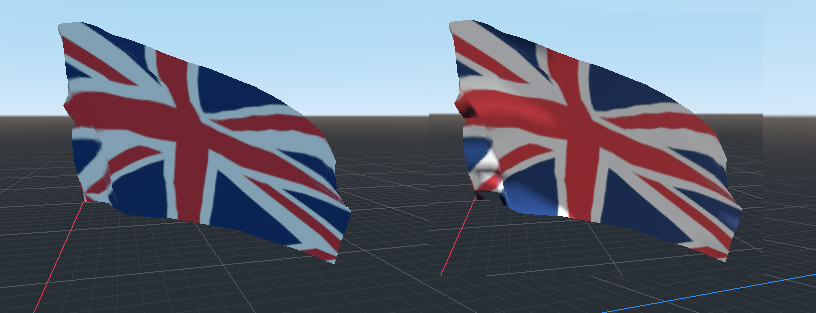
Godot shader is complete with normals now. On the left is without the normals animation texture and the right includes it. This is the one piece of the puzzle that trueSpace can't do and the reason that cloth to morphs is a better option for use inside of tS.
-
trueBlue
- Captain
- Posts: 5548
- Joined: 06 Jul 2009, 22:50
- Type the number ten into the box: 10
Re: Vertex Color Tools
You Godot!
Glad you got what you wanted.
I see what you mean about your new Morph Animation use in Workspace.
Much easier to use and it works Great!
Glad you got what you wanted.
I see what you mean about your new Morph Animation use in Workspace.
Much easier to use and it works Great!
-
clintonman
- Captain
- Posts: 5659
- Joined: 21 May 2009, 21:08
- Type the number ten into the box: 0
- Location: California
Re: Vertex Color Tools
More changes and improvements.
Removed flatten command since that should be a user choice. Construction history alert doesn't show anymore.
Automatic convert to editable shape when cloth is applied to primitives. No conversion dialog.
Vertex color animation node automatically opens in the panel view. No need to drag it in anymore.
Put time limit on the vertex color alert and added a status display, also with a time limit.
Added an "Open All VTAs" button to the VTA nodes. Activate all the vertex color animations in the scene without needing to select them all and no need to open the cloth panel to press the same button.
Removed flatten command since that should be a user choice. Construction history alert doesn't show anymore.
Automatic convert to editable shape when cloth is applied to primitives. No conversion dialog.
Vertex color animation node automatically opens in the panel view. No need to drag it in anymore.
Put time limit on the vertex color alert and added a status display, also with a time limit.
Added an "Open All VTAs" button to the VTA nodes. Activate all the vertex color animations in the scene without needing to select them all and no need to open the cloth panel to press the same button.
-
clintonman
- Captain
- Posts: 5659
- Joined: 21 May 2009, 21:08
- Type the number ten into the box: 0
- Location: California
Re: Vertex Color Tools
Ran into some issues, here is the attachment.
There was a bug in the rsx plugin. The status message timeout value was being ignored.
Here is the updated plugin v1638440:
http://clintons3d.com/plugins/downloads ... Plugin.rsx
There was a bug in the rsx plugin. The status message timeout value was being ignored.
Here is the updated plugin v1638440:
http://clintons3d.com/plugins/downloads ... Plugin.rsx
- Attachments
-
- clothConversionScript35f1.RsObj
- (353.16 KiB) Downloaded 160 times
-
trueBlue
- Captain
- Posts: 5548
- Joined: 06 Jul 2009, 22:50
- Type the number ten into the box: 10
Re: Vertex Color Tools
@Clinton
Can you try this modified version?
Toolbar commands:
LMB = Activity.Run("Scripts/CustomCommands/clothConversionScript/OpenPanel")
RMB = Activity.Run("Scripts/CustomCommands/clothConversionScript/cloth2vertexcolor/OpenAllVTAPanels")
Main differences are the VTA panel's Default aspect is not Exported Out.
This makes one less panel per object that is shown.
The dummyOut connector was changed to vOffset_Out and is exported out to the Morphed object in the Vertex Texture Animation script.
The VTA panel's UI are reduced in vertical size.
Can you try this modified version?
Toolbar commands:
LMB = Activity.Run("Scripts/CustomCommands/clothConversionScript/OpenPanel")
RMB = Activity.Run("Scripts/CustomCommands/clothConversionScript/cloth2vertexcolor/OpenAllVTAPanels")
Main differences are the VTA panel's Default aspect is not Exported Out.
This makes one less panel per object that is shown.
The dummyOut connector was changed to vOffset_Out and is exported out to the Morphed object in the Vertex Texture Animation script.
The VTA panel's UI are reduced in vertical size.
-
trueBlue
- Captain
- Posts: 5548
- Joined: 06 Jul 2009, 22:50
- Type the number ten into the box: 10
Re: Vertex Color Tools
The Vertex Color Animation process has 42 Undo entries in the Command History.
Most of which could be Undone!
Looks like a good candidate for RsApp.ClearHistory() at the end of the process.
What do you think?
The Morph Animation process has a ton more!
Most of which could be Undone!
Looks like a good candidate for RsApp.ClearHistory() at the end of the process.
What do you think?
The Morph Animation process has a ton more!
-
clintonman
- Captain
- Posts: 5659
- Joined: 21 May 2009, 21:08
- Type the number ten into the box: 0
- Location: California
Re: Vertex Color Tools
Changes based on your stuff.
the sample didn't have my latest changes so internally still based on my nodes
not open tool as floating panel
using your separate panels, renamed "Vertex" tab to "Color"
added your export image checkbox
didn't export the VTA connector and continue to export the panel - because of the convenience of the Activate All VTMs button
changed conn name to vOffsetOut, without an underscore
no help button on vta - the wording needs work
no clear history
added checks that the end time is not zero
changed input fields to update on change behavior
morph uses fewer undos and nothing that is undone puts tS in an unstable state so no clear history is needed
vertex colors fewer undos - also removed the bitmap connectors from the script node, but might put them back since it may be possible to remove 2 more undos via a plugin copy command
if testing shows tS is unstable or crashing because of undos then the clear history would be a good idea.
the sample didn't have my latest changes so internally still based on my nodes
not open tool as floating panel
using your separate panels, renamed "Vertex" tab to "Color"
added your export image checkbox
didn't export the VTA connector and continue to export the panel - because of the convenience of the Activate All VTMs button
changed conn name to vOffsetOut, without an underscore
no help button on vta - the wording needs work
no clear history
added checks that the end time is not zero
changed input fields to update on change behavior
morph uses fewer undos and nothing that is undone puts tS in an unstable state so no clear history is needed
vertex colors fewer undos - also removed the bitmap connectors from the script node, but might put them back since it may be possible to remove 2 more undos via a plugin copy command
if testing shows tS is unstable or crashing because of undos then the clear history would be a good idea.
- Attachments
-
- clothConversionScript03b9.RsObj
- (580.84 KiB) Downloaded 124 times
-
trueBlue
- Captain
- Posts: 5548
- Joined: 06 Jul 2009, 22:50
- Type the number ten into the box: 10
Re: Vertex Color Tools
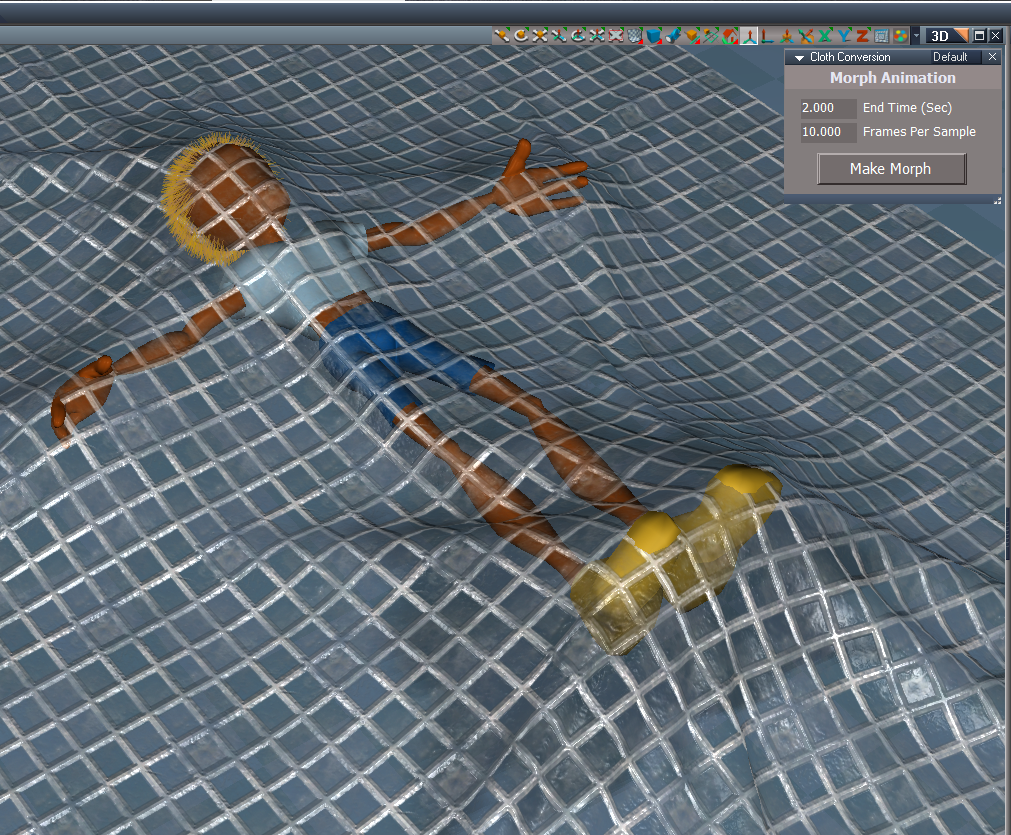
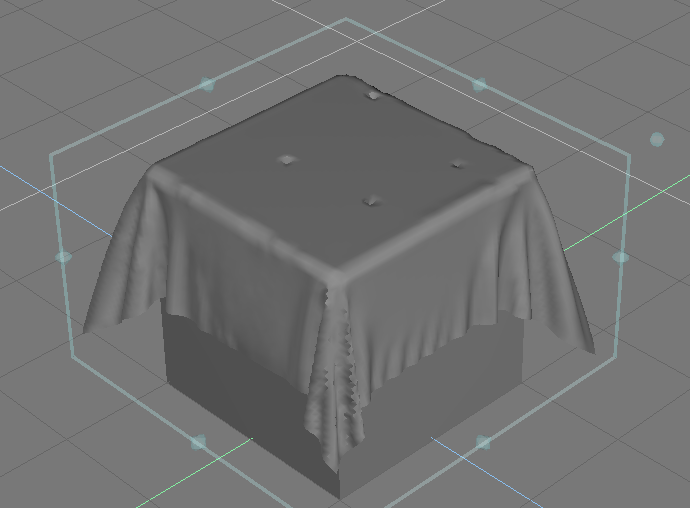
Simple Cloth plane on top of a Cube
Morph Animation
Are you going to allow these scripts to run on Camera and Lights?
I tried on a Camera and Light, all though possible, if you answer No to any of the tS Dialogs, you will get an error and a copy of it.
Vertex Color Animation
Notice a lag in this version unlike the previous version.
I put a trace at the beginning and end in the Vertex Texture Animation script. .
Why do you have an Alert with a timeout and a Status Message?
Alert is too fast to actually read it.
Model Vertex Animation The right side Model Conversion cloth is missing the starting frames which should be flat like the left side cloth.
It looked like the copied meshes were there, just not included in the Model Animation after running the py script, which matched the Step Frames @ 10
Morph Animation
Code: Select all
Source object: /Scripts/CustomCommands/clothConversionScript/cloth2morph2/set keyframes Error: Microsoft JScript runtime error Description: 'clothFS' is undefined Error code: 0x800a1391 - (null) Line: 46, Char: 1 Script text: MeshModifiers.SmoothNormals(clothFS.TargetNode); I tried on a Camera and Light, all though possible, if you answer No to any of the tS Dialogs, you will get an error and a copy of it.
Vertex Color Animation
Notice a lag in this version unlike the previous version.
I put a trace at the beginning and end in the Vertex Texture Animation script. .
Why do you have an Alert with a timeout and a Status Message?
Alert is too fast to actually read it.
Model Vertex Animation The right side Model Conversion cloth is missing the starting frames which should be flat like the left side cloth.
It looked like the copied meshes were there, just not included in the Model Animation after running the py script, which matched the Step Frames @ 10
-
clintonman
- Captain
- Posts: 5659
- Joined: 21 May 2009, 21:08
- Type the number ten into the box: 0
- Location: California
Re: Vertex Color Tools
fixed morphs error
removed alert at end and combined it with delete original dialog
removed vertex color alert to press shader button, only status line now
fix scene instanced materials vertex color animation
could not get rid of 2 undos for vertex color as planned
added trueblue cam and light checks
scene instanced will change the original material, no way around it added question/warning
multi material cloth fixed - requires extra steps at the end
model vertex animation - no changes yet, something weird going on, getting keyframes in modelspace and might be bad tS install(super slow)
removed alert at end and combined it with delete original dialog
removed vertex color alert to press shader button, only status line now
fix scene instanced materials vertex color animation
could not get rid of 2 undos for vertex color as planned
added trueblue cam and light checks
scene instanced will change the original material, no way around it added question/warning
multi material cloth fixed - requires extra steps at the end
model vertex animation - no changes yet, something weird going on, getting keyframes in modelspace and might be bad tS install(super slow)
- Attachments
-
- clothConversionScriptca38.RsObj
- (588.17 KiB) Downloaded 151 times
-
trueBlue
- Captain
- Posts: 5548
- Joined: 06 Jul 2009, 22:50
- Type the number ten into the box: 10
Re: Vertex Color Tools
Vertex Color Animation still lags with the Vertex Texture Animation script.
Could it be the change to not include the Bitmap(s)?
Sharing this scene because I found it interesting.
The source Plane was painted with your Paint Vertices tool.
The Plane, 1 was converted using your Vertex Color Animation scripts and is currently Invisible.
Run through the animation to see the differences from the source Plane.
Morph Animation did not have any differences.
Could it be the change to not include the Bitmap(s)?
Sharing this scene because I found it interesting.
The source Plane was painted with your Paint Vertices tool.
The Plane, 1 was converted using your Vertex Color Animation scripts and is currently Invisible.
Run through the animation to see the differences from the source Plane.
Morph Animation did not have any differences.
- Attachments
-
- Cloth.RsScn
- (3.64 MiB) Downloaded 92 times
-
trueBlue
- Captain
- Posts: 5548
- Joined: 06 Jul 2009, 22:50
- Type the number ten into the box: 10
Re: Vertex Color Tools
Model Vertex Animation
I found a workaround for the missing starting meshes missing after running the Python file.
I set the timeIncrement = 1
Also added print("targetMesh has been processed") to the end of the script so I could tell when the process was fininshed.
Observations:
Deleting the left-over nodes in Model is not a good idea!
I used Model's Material Editor to Paint a new material on the targetMesh.
Switched to Workspace and Deleted the left-over nodes.
Using different Bridge settings might be helpful too.
Turn it ON.
Open Model
Turn it OFF.
Run the py script.
Paint.
Turn ON.
Open Workspace.
I found a workaround for the missing starting meshes missing after running the Python file.
I set the timeIncrement = 1
Also added print("targetMesh has been processed") to the end of the script so I could tell when the process was fininshed.
Code: Select all
import sys
sys.path.append('PythonScripts')
import trueSpace
doc = trueSpace.GetActiveDocument()
doc.ClearOutTxt()
timeIncrement = 1
doc.ActiveTime = 0
target = doc.Object("targetMesh")
tsource = doc.Object("transformNode")
posn = tsource.Position
rot = tsource.Rotation
target.Position = posn
target.Rotation = rot
target.SetFrame()
verts = target.NbrVertices
count = 1
source = doc.Object("targetMesh," + str(count))
tsource = doc.Object("transformNode," + str(count))
doc.ActiveTime = timeIncrement
while source:
for v in range(0,verts):
vertex = source.GetVertex(v)
x = vertex[0]
y = vertex[1]
z = vertex[2]
target.SetVertex(v,x,y,z)
target.AnimateVertex(v)
posn = tsource.Position
rot = tsource.Rotation
target.Position = posn
target.Rotation = rot
target.SetFrame()
count=count+1
source = doc.Object("targetMesh," + str(count))
tsource = doc.Object("transformNode," + str(count))
doc.ActiveTime = count * timeIncrement;
doc.Draw()
trueSpace.Stop()
print("targetMesh has been processed")
Deleting the left-over nodes in Model is not a good idea!
I used Model's Material Editor to Paint a new material on the targetMesh.
Switched to Workspace and Deleted the left-over nodes.
Using different Bridge settings might be helpful too.
Turn it ON.
Open Model
Turn it OFF.
Run the py script.
Paint.
Turn ON.
Open Workspace.
-
clintonman
- Captain
- Posts: 5659
- Joined: 21 May 2009, 21:08
- Type the number ten into the box: 0
- Location: California
Re: Vertex Color Tools
Modelspace vertex animation update:
Changed the model vertex to include 1 extra copy so the first frame matches the cloth start state.
Tips:
Dont have the model Scene Editor open during the run. It makes it very slow.
After running the python script remove it from the scene.
Think python makes tS a little unstable, so recommend exiting tS soon after a run.
Don't run python, exit to workspace and try to go back into modelspace. I got plenty of crashes with that sequence.
Currently in UU9 just opening a python script and looking at it is enough to make workspace run slowly. Can get the speed back by loading an old layout from unmodified trueSpace. The layouts included in UU9 will retain the slowness.
I don't see any lag in the vertex color processing. Does this prevent it from working?
Changed the model vertex to include 1 extra copy so the first frame matches the cloth start state.
Tips:
Dont have the model Scene Editor open during the run. It makes it very slow.
After running the python script remove it from the scene.
Think python makes tS a little unstable, so recommend exiting tS soon after a run.
Don't run python, exit to workspace and try to go back into modelspace. I got plenty of crashes with that sequence.
Currently in UU9 just opening a python script and looking at it is enough to make workspace run slowly. Can get the speed back by loading an old layout from unmodified trueSpace. The layouts included in UU9 will retain the slowness.
I don't see any lag in the vertex color processing. Does this prevent it from working?
- Attachments
-
- clothConversionScriptbea9.RsObj
- (595 KiB) Downloaded 125 times
-
trueBlue
- Captain
- Posts: 5548
- Joined: 06 Jul 2009, 22:50
- Type the number ten into the box: 10
Re: Vertex Color Tools
I highly doubt that this anything to do with the UU9 Layouts which are in fact UU8 Layouts that are probably even older the that.
The Model's Script Editor, Scene Editor and Facial Animator all do not work very well and make Workspace unstable.
There is no synchronization with Workspace in Model.
Even switching layouts, a lot, can have an effect on Workspace.
Have you tried using the trueSpace6 layout?
Reset the Context
Turn off the Bridge
Delete all objects in the Scene
Switch to the trueSpace6 layout
Close tS from the Model's File menu
Open tS and try using any of the above tools in Model only!
The Model's Script Editor, Scene Editor and Facial Animator all do not work very well and make Workspace unstable.
There is no synchronization with Workspace in Model.
Even switching layouts, a lot, can have an effect on Workspace.
Have you tried using the trueSpace6 layout?
Reset the Context
Turn off the Bridge
Delete all objects in the Scene
Switch to the trueSpace6 layout
Close tS from the Model's File menu
Open tS and try using any of the above tools in Model only!
-
clintonman
- Captain
- Posts: 5659
- Joined: 21 May 2009, 21:08
- Type the number ten into the box: 0
- Location: California
Re: Vertex Color Tools
I forgot to post the updated python file. Part of the fix was to prevent tS renaming the objects when switching to modelspace.clintonman wrote: 22 Feb 2023, 03:27 Modelspace vertex animation update:
Changed the model vertex to include 1 extra copy so the first frame matches the cloth start state.
...
The name pattern "nodename comma space number" was changed to "nodename comma number" to make modelspace happy.
Code: Select all
import sys
sys.path.append('PythonScripts')
import trueSpace
doc = trueSpace.GetActiveDocument()
doc.ClearOutTxt()
timeIncrement = 10
doc.ActiveTime = 0
target = doc.Object("targetMesh")
tsource = doc.Object("transformNode")
posn = tsource.Position
rot = tsource.Rotation
target.Position = posn
target.Rotation = rot
target.SetFrame()
verts = target.NbrVertices
count = 1
source = doc.Object("targetMesh," + str(count))
tsource = doc.Object("transformNode," + str(count))
#doc.ActiveTime = timeIncrement
doc.ActiveTime = 0
target.SetFrame()
while source:
for v in range(0,verts):
vertex = source.GetVertex(v)
x = vertex[0]
y = vertex[1]
z = vertex[2]
target.SetVertex(v,x,y,z)
target.AnimateVertex(v)
posn = tsource.Position
rot = tsource.Rotation
target.Position = posn
target.Rotation = rot
target.SetFrame()
count=count+1
source = doc.Object("targetMesh," + str(count))
tsource = doc.Object("transformNode," + str(count))
doc.ActiveTime = count * timeIncrement;
doc.Draw()
trueSpace.Stop()-
clintonman
- Captain
- Posts: 5659
- Joined: 21 May 2009, 21:08
- Type the number ten into the box: 0
- Location: California
Re: Vertex Color Tools
I think I found the problem with the the UU layouts. The slowdown occurs when the Scene View is open. Several UU layouts have the Scene View open permanently, meaning there is no way to close it.
Steps:
Default Layout
Open LE window for convenient selecting - selections are fast
Switch to Model
Open the Python Editor
Selections are now super slow
Run the attached script to close the Scene View
Selections are fast again
Can restart tS to get speed with the Scene View open
I think the combination or python scripts and scene view is unstable and the scene view should be closed when running python scripts.
Steps:
Default Layout
Open LE window for convenient selecting - selections are fast
Switch to Model
Open the Python Editor
Selections are now super slow
Run the attached script to close the Scene View
Selections are fast again
Can restart tS to get speed with the Scene View open
I think the combination or python scripts and scene view is unstable and the scene view should be closed when running python scripts.
- Attachments
-
- CloseSceneViewNode.RsObj
- (6.13 KiB) Downloaded 92 times
-
trueBlue
- Captain
- Posts: 5548
- Joined: 06 Jul 2009, 22:50
- Type the number ten into the box: 10
Re: Vertex Color Tools
Rosetta UU9
Simple Cloth Plane; 100x100 elements with an Editable shape, on top of a Cube.
Morph Animation current version.
Make Morph
Would you like to delete the original source cloth object?
Yes
Crash
Vertex Color Animation current version.
Make Vertex Color
Would you like to delete the original source cloth object?
Yes
Crash
Takes over 2 minutes to process before getting the question.
Model Vertex Animation current version.
Make Vertex
Model's AutoKey does not make any difference for me if it is Checked or Unchecked.
What does matter is the Step Frames and the python timeIncrement must equal 0
Using Cloth Fixations will show in Model as bumps in the Cloth
Simple Cloth Plane; 100x100 elements with an Editable shape, on top of a Cube.
Morph Animation current version.
Make Morph
Would you like to delete the original source cloth object?
Yes
Crash
Vertex Color Animation current version.
Make Vertex Color
Would you like to delete the original source cloth object?
Yes
Crash
Takes over 2 minutes to process before getting the question.
Model Vertex Animation current version.
Make Vertex
Model's AutoKey does not make any difference for me if it is Checked or Unchecked.
What does matter is the Step Frames and the python timeIncrement must equal 0
Using Cloth Fixations will show in Model as bumps in the Cloth
-
clintonman
- Captain
- Posts: 5659
- Joined: 21 May 2009, 21:08
- Type the number ten into the box: 0
- Location: California
Re: Vertex Color Tools
That's pretty wild. No idea why it crashed but both crashes are fixed now.trueBlue wrote: 22 Feb 2023, 17:18 Rosetta UU9
Simple Cloth Plane; 100x100 elements with an Editable shape, on top of a Cube.
Morph Animation current version.
Make Morph
Would you like to delete the original source cloth object?
Yes
Crash
Vertex Color Animation current version.
Make Vertex Color
Would you like to delete the original source cloth object?
Yes
Crash
Takes over 2 minutes to process before getting the question.
Model Vertex Animation current version.
Make Vertex
Model's AutoKey does not make any difference for me if it is Checked or Unchecked.
What does matter is the Step Frames and the python timeIncrement must equal 0
Using Cloth Fixations will show in Model as bumps in the Cloth
Thanks for the steps, now I can see the pause. I'm surprised it could handle a mesh with that much geometry. 100x100 mesh makes animation images 10201 pixels wide. There's probably a limit that needs to be set, maybe something like 16384 vertex count.
I agree about autokey. I think what I was seeing was the python script running when modelspace was opened. Now I empty the python script before switching back to workspace. If autokey was the reason I would have gotten keys on every frame not the expected keys(every 10 frames for my testing)
-
clintonman
- Captain
- Posts: 5659
- Joined: 21 May 2009, 21:08
- Type the number ten into the box: 0
- Location: California
Re: Vertex Color Tools
Fixed crash when deleting the original in morph and vertex color runs
Added status line feedback to the vertex color run
I tested vertex color as high as 16512 vertices, 127x128 and it still worked, so I won't be setting any limits at this time. Though it does look like the cloth tool crashes if it's too big, somewhere between 175x175 and 180x180.
Added status line feedback to the vertex color run
I tested vertex color as high as 16512 vertices, 127x128 and it still worked, so I won't be setting any limits at this time. Though it does look like the cloth tool crashes if it's too big, somewhere between 175x175 and 180x180.
- Attachments
-
- clothConversionScript41b0.RsObj
- (315.04 KiB) Downloaded 139 times
-
trueBlue
- Captain
- Posts: 5548
- Joined: 06 Jul 2009, 22:50
- Type the number ten into the box: 10
Re: Vertex Color Tools
Super happy you found the culprit for Model's Script Editor!clintonman wrote: 22 Feb 2023, 17:18 I think I found the problem with the the UU layouts. The slowdown occurs when the Scene View is open. Several UU layouts have the Scene View open permanently, meaning there is no way to close it.
Steps:
Default Layout
Open LE window for convenient selecting - selections are fast
Switch to Model
Open the Python Editor
Selections are now super slow
Run the attached script to close the Scene View
Selections are fast again
Can restart tS to get speed with the Scene View open
I think the combination or python scripts and scene view is unstable and the scene view should be closed when running python scripts.
Can not wait to see if this resolves the issue with the D3D Renderer.
Does not fix Model's Scene Editor though!
BTW... you can Ctrl Drag the Scene View's title bar out from its Docked position.
-
clintonman
- Captain
- Posts: 5659
- Joined: 21 May 2009, 21:08
- Type the number ten into the box: 0
- Location: California
Re: Vertex Color Tools
There is no title bar to drag or close it.trueBlue wrote: 22 Feb 2023, 18:32Super happy you found the culprit for Model's Script Editor!clintonman wrote: 22 Feb 2023, 17:18 I think I found the problem with the the UU layouts. The slowdown occurs when the Scene View is open. Several UU layouts have the Scene View open permanently, meaning there is no way to close it.
Steps:
Default Layout
Open LE window for convenient selecting - selections are fast
Switch to Model
Open the Python Editor
Selections are now super slow
Run the attached script to close the Scene View
Selections are fast again
Can restart tS to get speed with the Scene View open
I think the combination or python scripts and scene view is unstable and the scene view should be closed when running python scripts.
Can not wait to see if this resolves the issue with the D3D Renderer.
Does not fix Model's Scene Editor though!
BTW... you can Ctrl Drag the Scene View's title bar out from its Docked position.
-
trueBlue
- Captain
- Posts: 5548
- Joined: 06 Jul 2009, 22:50
- Type the number ten into the box: 10
Re: Vertex Color Tools
Yes there is.clintonman wrote: 22 Feb 2023, 18:38UUNoTitleBar.jpgtrueBlue wrote: 22 Feb 2023, 18:32Super happy you found the culprit for Model's Script Editor!clintonman wrote: 22 Feb 2023, 17:18 I think I found the problem with the the UU layouts. The slowdown occurs when the Scene View is open. Several UU layouts have the Scene View open permanently, meaning there is no way to close it.
Steps:
Default Layout
Open LE window for convenient selecting - selections are fast
Switch to Model
Open the Python Editor
Selections are now super slow
Run the attached script to close the Scene View
Selections are fast again
Can restart tS to get speed with the Scene View open
I think the combination or python scripts and scene view is unstable and the scene view should be closed when running python scripts.
Can not wait to see if this resolves the issue with the D3D Renderer.
Does not fix Model's Scene Editor though!
BTW... you can Ctrl Drag the Scene View's title bar out from its Docked position.
There is no title bar to drag or close it.
The horizontal blue gray area
-
clintonman
- Captain
- Posts: 5659
- Joined: 21 May 2009, 21:08
- Type the number ten into the box: 0
- Location: California
Re: Vertex Color Tools
Vertical, and well hidden. Didn't even know it was a title bar.trueBlue wrote: 22 Feb 2023, 18:40Yes there is.clintonman wrote: 22 Feb 2023, 18:38UUNoTitleBar.jpgtrueBlue wrote: 22 Feb 2023, 18:32
Super happy you found the culprit for Model's Script Editor!
Can not wait to see if this resolves the issue with the D3D Renderer.
Does not fix Model's Scene Editor though!
BTW... you can Ctrl Drag the Scene View's title bar out from its Docked position.
There is no title bar to drag or close it.
The horizontal blue gray area
-
trueBlue
- Captain
- Posts: 5548
- Joined: 06 Jul 2009, 22:50
- Type the number ten into the box: 10
Re: Vertex Color Tools
Just like my daughter, always correcting my bad grammar!clintonman wrote: 22 Feb 2023, 18:43Vertical, and well hidden. Didn't even know it was a title bar.trueBlue wrote: 22 Feb 2023, 18:40Yes there is.clintonman wrote: 22 Feb 2023, 18:38
UUNoTitleBar.jpg
There is no title bar to drag or close it.
The horizontal blue gray area
-
trueBlue
- Captain
- Posts: 5548
- Joined: 06 Jul 2009, 22:50
- Type the number ten into the box: 10
Re: Vertex Color Tools
Looking good so far
I set my Command History to 200
You can completely undo the Morph Animation and Model Vertex
Do not think that this is going to be good for various reasons.
Mind you, this was only a 2 second animation.
One being if a User only has the default 20 Undoes set, and they use Undo a few times or all twenty could screw up the whole process.
The Vertex Color process freezes the Command History entries, so there is no Undoes.
Not a big deal, I guess, as soon as you select something, the frozen entries disappear.
I set my Command History to 200
You can completely undo the Morph Animation and Model Vertex
Do not think that this is going to be good for various reasons.
Mind you, this was only a 2 second animation.
One being if a User only has the default 20 Undoes set, and they use Undo a few times or all twenty could screw up the whole process.
The Vertex Color process freezes the Command History entries, so there is no Undoes.
Not a big deal, I guess, as soon as you select something, the frozen entries disappear.
-
clintonman
- Captain
- Posts: 5659
- Joined: 21 May 2009, 21:08
- Type the number ten into the box: 0
- Location: California
Re: Vertex Color Tools
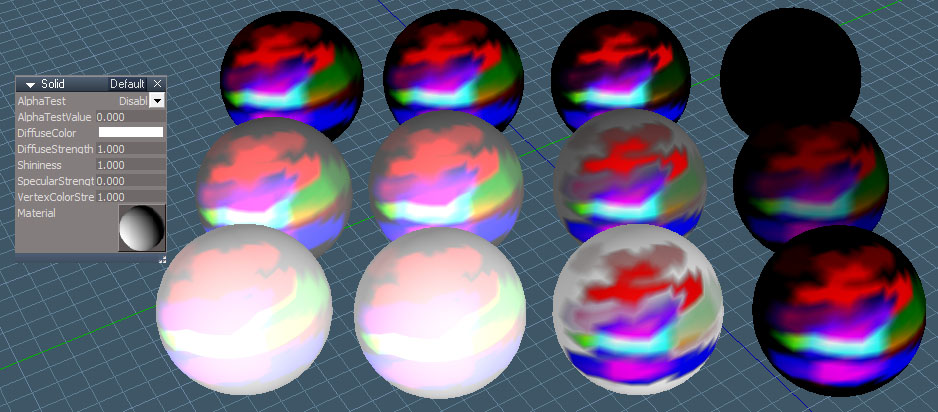
Vertex Materials
from left to right: Solid base material, VertexColorAdd, VertexColorInterpolate, original first material
front to back: white, gray, black
The VertexColorAdd compound material, second from the left matches the appearance of the Solid base material by adding the vertex color to the material color
The VertexColorInterpolate material, 3rd, places the color of the vertices on top of the material color and mixes based on the intensity of the vertex color
The original material worked well if the material color was white. As shown it sort of falls apart if the vertex color is black. Earlier tests I think had white as the base vertex color, here it is black and completely covers up the white and gray of the spheres.
Both materials have a strength control like the Solid base material.
front to back: white, gray, black
The VertexColorAdd compound material, second from the left matches the appearance of the Solid base material by adding the vertex color to the material color
The VertexColorInterpolate material, 3rd, places the color of the vertices on top of the material color and mixes based on the intensity of the vertex color
The original material worked well if the material color was white. As shown it sort of falls apart if the vertex color is black. Earlier tests I think had white as the base vertex color, here it is black and completely covers up the white and gray of the spheres.
Both materials have a strength control like the Solid base material.
- Attachments
-
- VertexColorInterpolate.RsMat
- (54.73 KiB) Downloaded 108 times
-
- VertexColorAdd.RsMat
- (51.26 KiB) Downloaded 108 times
-
clintonman
- Captain
- Posts: 5659
- Joined: 21 May 2009, 21:08
- Type the number ten into the box: 0
- Location: California
Re: Vertex Color Tools
An update will be coming soon.
I discovered a serious bug in the vertex color animation process. It would work great, but only in 1 "direction". For instance if morphed vertices start at medium height then move down then up above the original height, the movement for the vertex color animation would stop on the way up. It would only move up to the original height.
This one took a long time to even figure out what was going wrong. Bad math.
The fix is to make a copy of the original mesh and rearrange its vertices and using that as the starting point for the vertex color animation. Making it so from it's perspective it is only moving in "1 direction".
I discovered a serious bug in the vertex color animation process. It would work great, but only in 1 "direction". For instance if morphed vertices start at medium height then move down then up above the original height, the movement for the vertex color animation would stop on the way up. It would only move up to the original height.
This one took a long time to even figure out what was going wrong. Bad math.
The fix is to make a copy of the original mesh and rearrange its vertices and using that as the starting point for the vertex color animation. Making it so from it's perspective it is only moving in "1 direction".
-
clintonman
- Captain
- Posts: 5659
- Joined: 21 May 2009, 21:08
- Type the number ten into the box: 0
- Location: California
Re: Vertex Color Tools
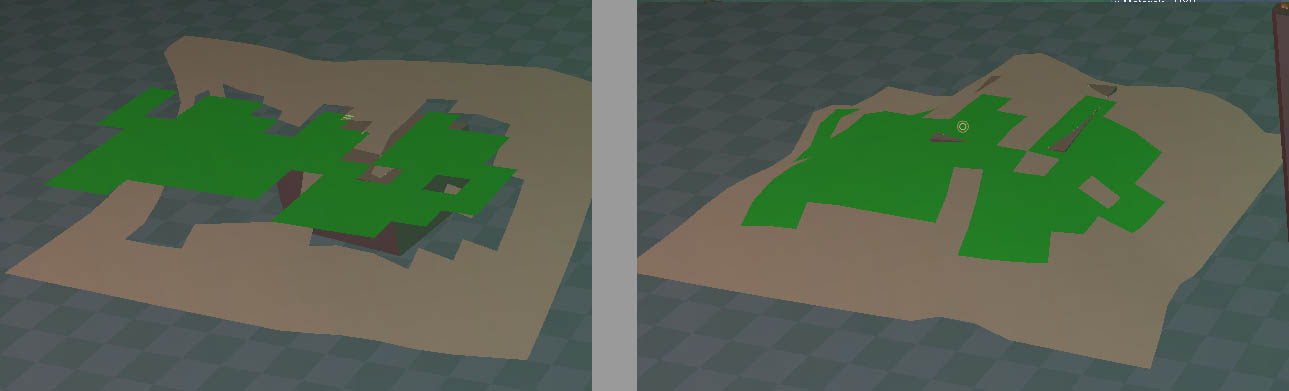
Allright, got it working.
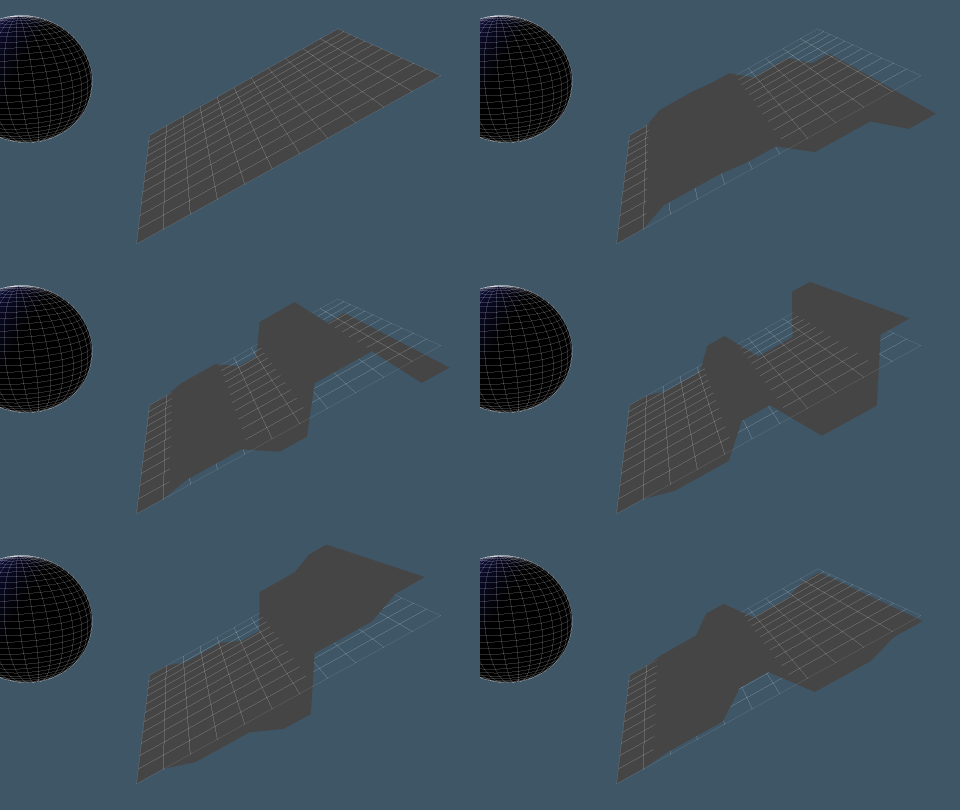
New Version on the left and Current Version on the right.
This shows how the current version results looks like the cloth is hitting an invisible ceiling instead of extending to it's full height.
The update will be published within the next few days.
-
clintonman
- Captain
- Posts: 5659
- Joined: 21 May 2009, 21:08
- Type the number ten into the box: 0
- Location: California
Re: Vertex Color Tools
Cloth Conversion Scripts Dev Update
I found and fixed some problems with the vertex shaders and everything is working properly now.
New option will export exr format files via an rsx plugin update. This is a kind of replacement for saving hdr format files, which have some limitations/bug.
The cloth to modelspace will have an option to save to a cob file instead of running a python script to add the animation to modelspace. So it's a one step process instead of 2. Unless you count loading the cob file.
The cloth conversion script TODO list is short:
1. keep number of undos down - have to redo this for one section of code and check any others that need the low undo code style
2. I have a basic working cloth animation to modelspace cob script - needs some more work
3. Test the VAT textures outside of tS
I found and fixed some problems with the vertex shaders and everything is working properly now.
New option will export exr format files via an rsx plugin update. This is a kind of replacement for saving hdr format files, which have some limitations/bug.
The cloth to modelspace will have an option to save to a cob file instead of running a python script to add the animation to modelspace. So it's a one step process instead of 2. Unless you count loading the cob file.
The cloth conversion script TODO list is short:
1. keep number of undos down - have to redo this for one section of code and check any others that need the low undo code style
2. I have a basic working cloth animation to modelspace cob script - needs some more work
3. Test the VAT textures outside of tS
-
clintonman
- Captain
- Posts: 5659
- Joined: 21 May 2009, 21:08
- Type the number ten into the box: 0
- Location: California
Re: Vertex Color Tools
Got sidetracked by other things...
I decided to make a full cob exporter for workspace, so I could use the same code in the cloth to model vertex animation. While working on this I found a bug in a bitmap texture fix script that I needed to test the cob exporter. So that is fixed now and I can move forward with the cob exporter and when that's done I can finish up the cloth conversion updates.