opening a scn or cob file in ts 7.61

Technical questions, etc..
User avatar
Rhino169
Senior Chief Petty Officer
Posts: 201
Joined: 29 Nov 2009, 03:15

opening a scn or cob file in ts 7.61

Post by Rhino169 »

I must be losing it, because I have done this before.

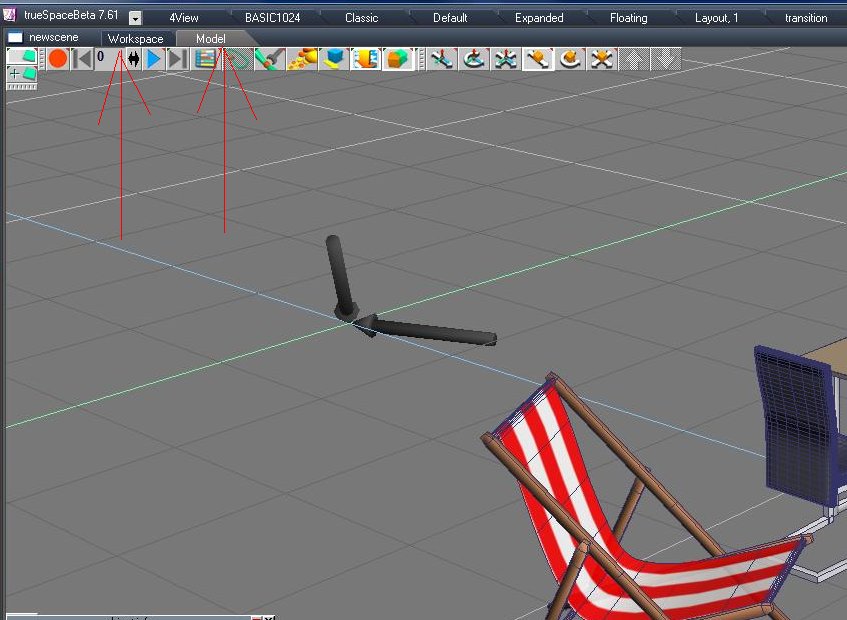
I am opening or inserting a scn or cob file in ts7.61 in the truespace6 mode or tab at top.

Then when I click the default tab, the object disappears.

Or it is there on model side but disappears when I click workspace side.

What is the proper way to see your older .scn or .cob files in ts7.61 so I can save them as rsObj and rsScn files?

I have the full version and the bridge is on

Thanks from bewildered.. :oops:
User avatar
FHembree
Master Chief Petty Officer
Posts: 337
Joined: 21 Feb 2011, 17:43
Type the number ten into the box: 9

Re: opening a scn or cob file in ts 7.61

Post by FHembree »

You can only open .scn files or insert objects from the model space. Once scene is open on modelside just click on the workspace tab.
Not sure what you mean by default tab?
:)
Attachments
Image1.jpg
User avatar
BNG
Chief Warrant Officer
Posts: 684
Joined: 16 Oct 2009, 03:26
Type the number ten into the box: 0
Location: Texas

Re: opening a scn or cob file in ts 7.61

Post by BNG »

If I'm not mistaken you should be to save the SCN as a RSSCN file? Not sure thought as I mostly just use TS 6.6 rather then the TS 7.6x side.
User avatar
Rhino169
Senior Chief Petty Officer
Posts: 201
Joined: 29 Nov 2009, 03:15

Re: opening a scn or cob file in ts 7.61

Post by Rhino169 »

FHembree,

I see the .cob file fine in model side, but when I click workspace, it disappears.

Also, when I have the .cob file open in model side and click the DEFAULT layout, it disappears.

:shock: :?
User avatar
spacekdet
Captain
Posts: 1810
Joined: 27 May 2009, 15:00
Type the number ten into the box: 10
Location: On the day shift at the Utility Muffin Research Kitchen

Re: opening a scn or cob file in ts 7.61

Post by spacekdet »

Something is not quite right in the bridge settings, I'd guess.
Mess around in there.
User avatar
FHembree
Master Chief Petty Officer
Posts: 337
Joined: 21 Feb 2011, 17:43
Type the number ten into the box: 9

Re: opening a scn or cob file in ts 7.61

Post by FHembree »

Rhino169 wrote:FHembree,

I see the .cob file fine in model side, but when I click workspace, it disappears.

Also, when I have the .cob file open in model side and click the DEFAULT layout, it disappears.

:shock: :?
When weird things like that happens I just do a re-install over the existing installation. Re-install does not erase anything. :)
User avatar
Steinie
Captain
Posts: 2958
Joined: 21 May 2009, 17:38
Type the number ten into the box: 10

Re: opening a scn or cob file in ts 7.61

Post by Steinie »

Sometimes it takes awhile for the conversion to workSpace.
I have also encountered objects brought over the Bridge but not centered in the scene or too small to see. Does the info panel show objects in workSpace?
User avatar
Rhino169
Senior Chief Petty Officer
Posts: 201
Joined: 29 Nov 2009, 03:15

Re: opening a scn or cob file in ts 7.61

Post by Rhino169 »

When I have the bridge "on" or "off" and then jump from model to workspace the object vanishes, when I go back it reappears.

When I have the bridge on "auto" when I jump from model to workspace the object vanishes, when I go back it is gone.

I do not see anything in the info box that leads me to believe it is hiding somewhere. I zoomed way in and way out and rotated around and do not see anything.

The only oddity I get is an error when leading the .cob file saying it can't find Shaderlab2.1. Not sure if that is an issue. I just say no and the object loads fine.
User avatar
clintonman
Captain
Posts: 5659
Joined: 21 May 2009, 21:08
Type the number ten into the box: 0
Location: California

Re: opening a scn or cob file in ts 7.61

Post by clintonman »

In that case I bet Shaderlab is the problem. Try painting with a different material before switching to workspace.
Clinton Reese

http://clintons3d.com
User avatar
Rhino169
Senior Chief Petty Officer
Posts: 201
Joined: 29 Nov 2009, 03:15

Re: opening a scn or cob file in ts 7.61

Post by Rhino169 »

Is there a quick way to find the object that I painted with shaderlab? :?:


I was able to locate the 5 objects I had in my model and that was the problem!


I was going to say it didn't work at first, but I had left the bridge off from my previous testing. Once back to "auto", the model was there in both workspace and model space.

Thanks Clintonman :superbanana:

Return to “TechForum”