Mesh Origin Script

free scripts, plugins, models, textures
User avatar
clintonman
Captain
Posts: 5659
Joined: 21 May 2009, 21:08
Type the number ten into the box: 0
Location: California

Mesh Origin Script

Post by clintonman »

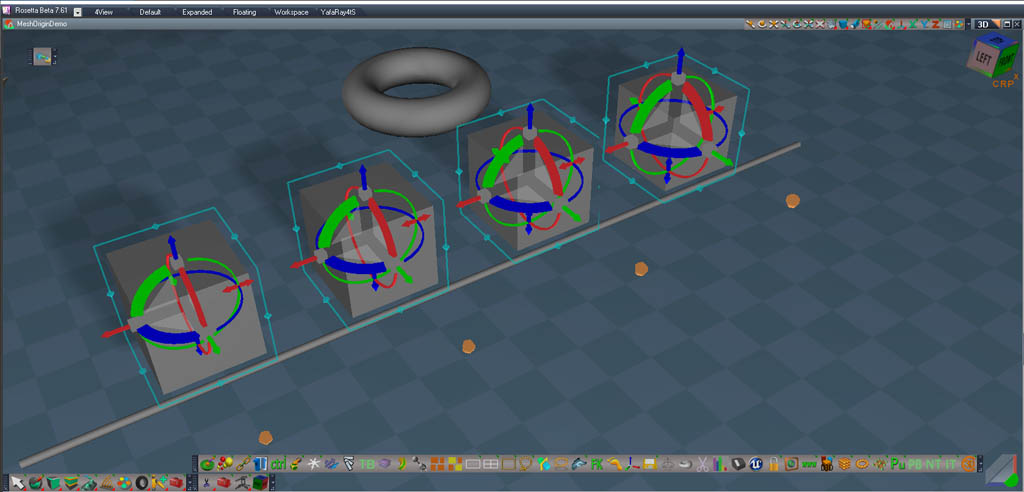
BeforeOrigin.jpg
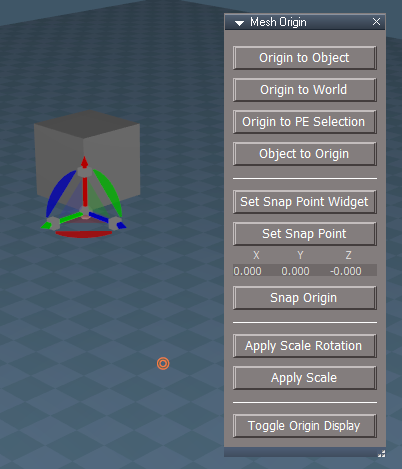
Image shows 4 identical boxes that have been point edited to move the origin away from the center of the mesh vertices.
The vertices were moved back in the negative Y direction leaving the origin/center behind.
The widget shows the origin as an orange dot.

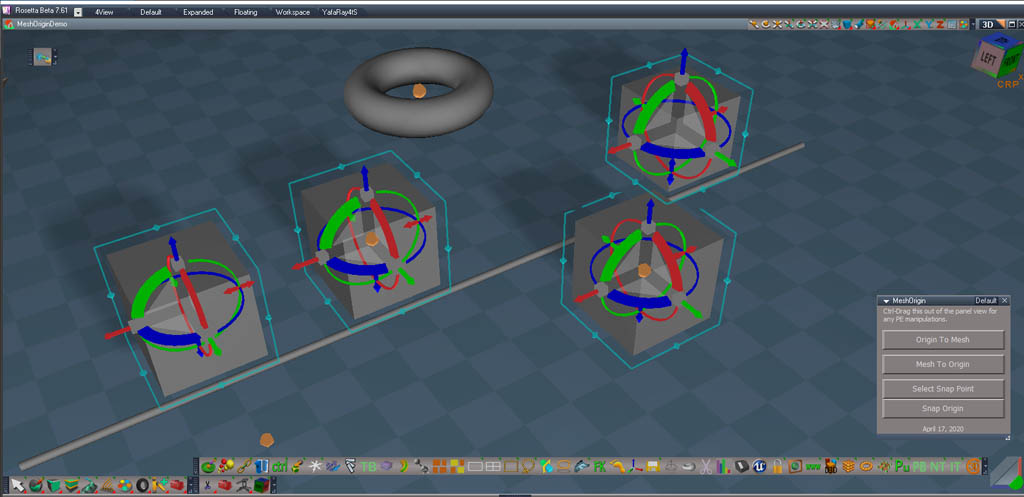
AfterOrigin.jpg
After the script is run. From left to right:
Box#1 no action taken
Box#2 Origin To Mesh
Box#3 Mesh To Origin
Box#4 Select Snap Point was run on the Torus and then Snap Origin was run on the box

The origin can only be seen with modified object navigation widgets.

http://clintons3d.com/plugins/truespace ... rigin.html
Clinton Reese

http://clintons3d.com
User avatar
clintonman
Captain
Posts: 5659
Joined: 21 May 2009, 21:08
Type the number ten into the box: 0
Location: California

Re: Mesh Origin Script

Post by clintonman »

July 15, 2020 Update

added multiple selection for Origin to Mesh, Mesh to Origin and Snap Origin
added point display for select snap point
fixed bug in select snap point when using point edit selections
installer clears the recent files lists
Clinton Reese

http://clintons3d.com
User avatar
clintonman
Captain
Posts: 5659
Joined: 21 May 2009, 21:08
Type the number ten into the box: 0
Location: California

Re: Mesh Origin Script

Post by clintonman »

July 16 2020

Fixed bad selection bug that has come up in several recent scripts where multi-selection was added.
If nothing selected would give bad result.
Clinton Reese

http://clintons3d.com
User avatar
clintonman
Captain
Posts: 5659
Joined: 21 May 2009, 21:08
Type the number ten into the box: 0
Location: California

Re: Mesh Origin Script

Post by clintonman »

January 2021

Update to work with NURBS, can use point selection widget and adds selection validation for the tS selection bug.

Also added a related installer for the pick select widgets and script.
Clinton Reese

http://clintons3d.com
User avatar
clintonman
Captain
Posts: 5659
Joined: 21 May 2009, 21:08
Type the number ten into the box: 0
Location: California

Re: Mesh Origin Script

Post by clintonman »

June 2021

added a point edit mode origin move
made code undo friendly so no need to clear history

The point edit mode Origin To Selection was added because I needed it to maintain the mesh rotation and scale(and shear) when moving the origin.
Clinton Reese

http://clintons3d.com
User avatar
clintonman
Captain
Posts: 5659
Joined: 21 May 2009, 21:08
Type the number ten into the box: 0
Location: California

Re: Mesh Origin Script

Post by clintonman »

June 26 2021

After the last release I realized that a limitation could be fixed using some of the math from the new Origin To Selection script. This release removes that limitation. The old version did not preserve orientation and scale when using Snap Origin.

Using the similar math 3 new functions were added to "Apply" the translation, rotation and scale. These Apply functions are similar to the Freeze Transform script but they don't use the axis/pivot and their effect on the origin is not the same.
Clinton Reese

http://clintons3d.com
User avatar
clintonman
Captain
Posts: 5659
Joined: 21 May 2009, 21:08
Type the number ten into the box: 0
Location: California

Re: Mesh Origin Script

Post by clintonman »

August 30 Update

added the UU show/hide origin button to the panel
requires installation of the origin widgets - http://clintons3d.com/plugins/truespace ... iginwidget

The new test updates of the Unofficial Updates has these widgets included. "Hide | Show Origin". I labelled the button "Toggle Origin Display" because I couldn't remember the name in the UU panel.
Attached here is a more general version of the show/hide script that will continue to work if more widgets are added or removed.
Attachments
ToggleOriginDisplay.RsObj
(7.4 KiB) Downloaded 224 times
Clinton Reese

http://clintons3d.com
User avatar
clintonman
Captain
Posts: 5659
Joined: 21 May 2009, 21:08
Type the number ten into the box: 0
Location: California

Re: Mesh Origin Script

Post by clintonman »

April 24, 2022 Update

Now works with simple group objects.
Does not work with groups within groups.
Clinton Reese

http://clintons3d.com
User avatar
clintonman
Captain
Posts: 5659
Joined: 21 May 2009, 21:08
Type the number ten into the box: 0
Location: California

Re: Mesh Origin Script

Post by clintonman »

April 25 :oops:

Oops,

actually uploaded the updated install files from yesterday.
Clinton Reese

http://clintons3d.com
User avatar
trueBlue
Captain
Posts: 5548
Joined: 06 Jul 2009, 22:50
Type the number ten into the box: 10

Re: Mesh Origin Script

Post by trueBlue »

:idea:
Origin to Axis
Axis to Origin

Are these possible with your Mesh Origin scripts?
I am finding that the Axis moves when using these scripts
I do a see value transforming the object from the Origin or Axis though
Pivot moves and is offset from the Origin.png
User avatar
clintonman
Captain
Posts: 5659
Joined: 21 May 2009, 21:08
Type the number ten into the box: 0
Location: California

Re: Mesh Origin Script

Post by clintonman »

trueBlue wrote: 24 Oct 2023, 16:49 :idea:
Origin to Axis
Axis to Origin

Are these possible with your Mesh Origin scripts?
I am finding that the Axis moves when using these scripts
I do a see value transforming the object from the Origin or Axis though

Pivot moves and is offset from the Origin.png
I did some tests and it looks feasible. Get back to you later.
Clinton Reese

http://clintons3d.com
User avatar
trueBlue
Captain
Posts: 5548
Joined: 06 Jul 2009, 22:50
Type the number ten into the box: 10

Re: Mesh Origin Script

Post by trueBlue »

clintonman wrote: 24 Oct 2023, 18:04
trueBlue wrote: 24 Oct 2023, 16:49 :idea:
Origin to Axis
Axis to Origin

Are these possible with your Mesh Origin scripts?
I am finding that the Axis moves when using these scripts
I do a see value transforming the object from the Origin or Axis though

Pivot moves and is offset from the Origin.png
I did some tests and it looks feasible. Get back to you later.
Thanks!
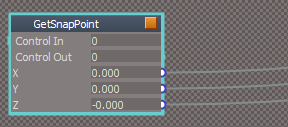
Personally, I would like to see the Origin's X Y Z values
The Status message does not seem very valuable, except for a quick peak
If there is an Error, these values would change to no values
GetSnapPoint script

Code: Select all

	//if not in point edit mode  and no world matrix found then return
	if(!selPointsF && !selMatrixF) {
		globalFS.Error("Not a valid selection.  Must be object or vertices.");
		params.ConValue("X") = ""
		params.ConValue("Y") = ""
		params.ConValue("Z") = ""
		return;
	}
Get Snap Point.png
Get Snap Point.png (7.23 KiB) Viewed 1851 times
.
Mesh Origin X Y Z panel.png
User avatar
clintonman
Captain
Posts: 5659
Joined: 21 May 2009, 21:08
Type the number ten into the box: 0
Location: California

Re: Mesh Origin Script

Post by clintonman »

From what I can tell to move the origin to the pivot run the Flatten Axis
MeshModifiers.FlattenAxes('');

to move the pivot to the origin

Code: Select all

	var pivotMatrix = System.CreateDO('Math Package/Matrix Float Data');
	var firstSel = Node.FirstSelected();
	pivotMatrix.LoadIdentity();
	Node.Value(firstSel + "/Pivot", "Matrix") = pivotMatrix;
or reset the Pivot node Matrix connector
Clinton Reese

http://clintons3d.com
User avatar
clintonman
Captain
Posts: 5659
Joined: 21 May 2009, 21:08
Type the number ten into the box: 0
Location: California

Re: Mesh Origin Script

Post by clintonman »

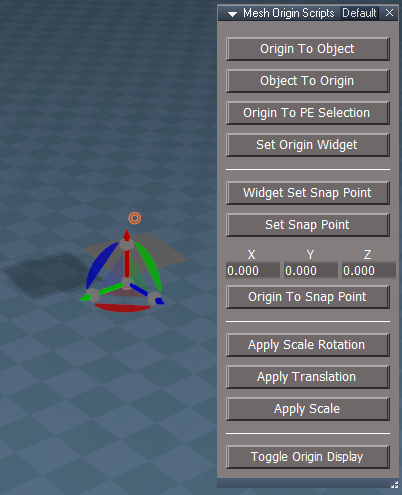
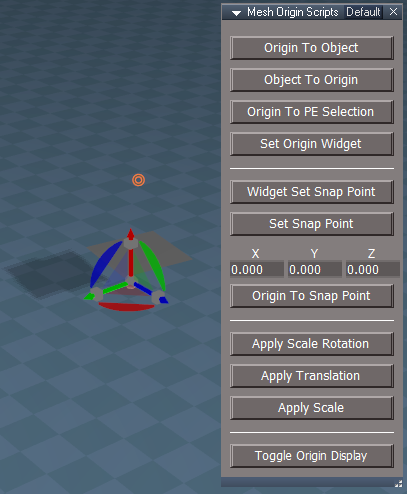
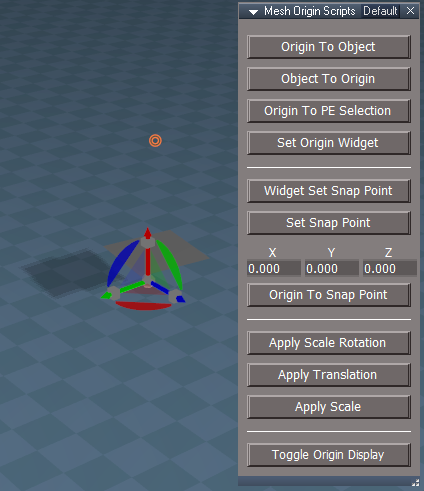
Preview of upcoming changes

This test version is the website version updated to be up to date with the Unofficial Updates version
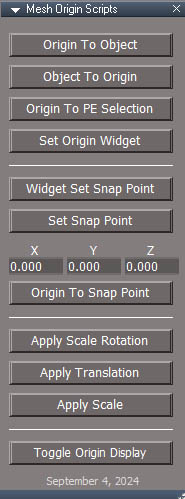
MeshOriginPanel.jpg


From the UU version:

add code to end snapping button highlighting when switching from snapping tools to the origin tools
XYZ number display
fix check for group to a check for a 3dgroup
check for and avoid Dimensions, MeshSimplifier and other things...

changes:

works with Shape node, not just Editable shape node - change was needed for upcoming PolyCombine script
new check to not run on parent object (WldMatrix connected to the OwnerMatrix of another object)
fix minor bug, example:
- create plane or any other primitive
- 2d encaps it and select the plane
- origin to world, convert yes, origin does not update because the 2d encaps gets selected when converting the primitive
XYZ number display are input values, not just for display, values don't clear but reset to 0,0,0 under certain conditions - widget cancel or snap origin error
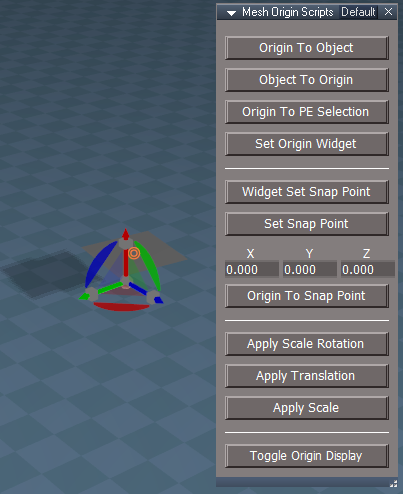
new button "Set Origin Widget" - selects and sets the origin in a single step, replaces the PickOriginWidget ctrl+rmb action
upcoming installer will remove the "PickOriginWidget" from a tS UU since it is not used anymore
rename button "Set Snap Point Widget" to "Widget Set Snap Point"
rename button "Snap Origin" to "Origin to Snap Point" - UU calls it "Origin to Set Point"
"Convert to Editable Mesh" node is replaced with FlattenNode command
all functions run the same validity checks - checking for Dimensions etc.
UU runs "Convert to Editable Mesh" automatically, this version will ask to Flatten if needed, but only asks once for a selection set. So if you have 5 things selected it will ask about the first one and use the same answer for all the others. It will always ask to flatten each MeshSimplifer/NormalMapper object.
UU has "Origin to Axis" this version does not
UU has "Origin to World" this version calls it "Apply Translation"

todo:

test for simple 3d groups not working, if run on complex group it won't work properly - need check for 3D group inside a 3d group and give error
finish testing

Can test by replacing the MeshOrigin inside "/Scripts/CustomCommands"
Reset Default Context when done testing or delete MeshOrigin and use the Script Manager to "Reload Base Scripts" which will reload the original before testing.
Attachments
MeshOrigin8f38.RsObj
(138.21 KiB) Downloaded 38 times
Clinton Reese

http://clintons3d.com
User avatar
clintonman
Captain
Posts: 5659
Joined: 21 May 2009, 21:08
Type the number ten into the box: 0
Location: California

Re: Mesh Origin Script

Post by clintonman »

Preview 2

fixed undefined global function set error

fixed "Set Origin Widget" using previous snap point instead of current snap point

fixed to only operate on single level 3d groups, 3d groups within other 3d groups does not work properly

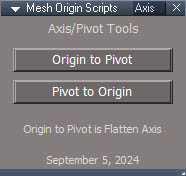
MeshOriginPanelAxisAspect.jpg
MeshOriginPanelAxisAspect.jpg (35.72 KiB) Viewed 1224 times

new panel aspect for pivot/axis tools - Origin To Pivot and or Pivot To Origin, Origin To Pivot is nothing more than Flatten Axis command, these tools change the pivot which in turn has an effect on the origin, the actual internally defined origin does not change but pivot effects make it look like it's changed. These are pivot/axis tools not real origin tools


I think the final version will be published tonight or early tomorrow.
Attachments
MeshOrigina2ea.RsObj
(140.09 KiB) Downloaded 38 times
Clinton Reese

http://clintons3d.com
User avatar
clintonman
Captain
Posts: 5659
Joined: 21 May 2009, 21:08
Type the number ten into the box: 0
Location: California

Re: Mesh Origin Script

Post by clintonman »

"I think the final version will be published tonight or early tomorrow"

I just knew that was going to jinx it by saying that.

I found and fixed one minor bug while testing and discovered a new issue. The Dialog settings don't work the same in the Full Beta and Rosetta versions of trueSpace. Using script to set the values works great in Rosetta but not so much in the full version.
So the release will be delayed until I can find a solution or not. Almost there...
Clinton Reese

http://clintons3d.com
User avatar
trueBlue
Captain
Posts: 5548
Joined: 06 Jul 2009, 22:50
Type the number ten into the box: 10

Re: Mesh Origin Script

Post by trueBlue »

Dialog settings don't work the same in the Full Beta and Rosetta versions of trueSpace
What are the differences?
User avatar
clintonman
Captain
Posts: 5659
Joined: 21 May 2009, 21:08
Type the number ten into the box: 0
Location: California

Re: Mesh Origin Script

Post by clintonman »

trueBlue wrote: 06 Sep 2024, 02:06
Dialog settings don't work the same in the Full Beta and Rosetta versions of trueSpace
What are the differences?
I was just about to PM you.

This will 1) disable the tS dialog that asks if it's ok to flatten, 2) runs the FlattenNodes and 3) re-enables the tS dialog
This works for Rosetta, but it will not disable the dialog for the full tS version.

Code: Select all

Node.Value("/Preferences/Dialog settings", "Flatten objects") = false;
MeshModifiers.FlattenNodes(firstsel);
Node.Value("/Preferences/Dialog settings", "Flatten objects") = true;
This is the workaround I just found. Does the same thing except if toggles the dialog option twice after setting it to false.
Setting to true at the end works without the extra toggle steps, so it's only a problem when setting to false.

Code: Select all

Node.Value("/Preferences/Dialog settings", "Flatten objects") = false;
RsTool.ToggleValue("/Preferences/Dialog settings/Flatten objects");
MeshModifiers.FlattenNodes(firstsel);
Node.Value("/Preferences/Dialog settings", "Flatten objects") = true;
There was just one other bug, so it looks like it will release on time after all.
Clinton Reese

http://clintons3d.com
User avatar
clintonman
Captain
Posts: 5659
Joined: 21 May 2009, 21:08
Type the number ten into the box: 0
Location: California

Re: Mesh Origin Script

Post by clintonman »

Preview 3 (final preview?)

fixed snapping ran even when the widget was cancelled

fixed full tS version constantly asking for permission via the official built in tS dialog to flatten when run on primitives, now only asks the custom dialog question one time
before it would ask the custom dialog question and then the tS dialog right after
Attachments
MeshOrigin2ab7.RsObj
(140.13 KiB) Downloaded 39 times
Clinton Reese

http://clintons3d.com
User avatar
trueBlue
Captain
Posts: 5548
Joined: 06 Jul 2009, 22:50
Type the number ten into the box: 10

Re: Mesh Origin Script

Post by trueBlue »

Origin To Snap Point oddity
Press - Origin To Object
Origin to Object.png
Press - Origin To Snap Point
Press Origin To Snap Point.png
Press - Origin To Snap Point again
Press Origin To Snap Point second time.png
Press - Origin To Snap Point again
Press Origin To Snap Point third time.png
Depending on where to Origin is and what the current X, Y, Z values are, using Origin To Snap Point, moves the Origin to unpredictable locations
Sometimes way off the screen
User avatar
clintonman
Captain
Posts: 5659
Joined: 21 May 2009, 21:08
Type the number ten into the box: 0
Location: California

Re: Mesh Origin Script

Post by clintonman »

"Origin To Snap Point oddity"

Followed the steps, not seeing it.
Maybe you can share a scene or add any missing steps. If you made changes to the code or buttons share that too.
Clinton Reese

http://clintons3d.com
User avatar
trueBlue
Captain
Posts: 5548
Joined: 06 Jul 2009, 22:50
Type the number ten into the box: 10

Re: Mesh Origin Script

Post by trueBlue »

The scene is nothing unusual, just primitive cube and planes
No code change except what was suggested
Origin To Snap Point is unchanged

Simply pressing the Origin To Snap Point panel button moves the Origin
User avatar
clintonman
Captain
Posts: 5659
Joined: 21 May 2009, 21:08
Type the number ten into the box: 0
Location: California

Re: Mesh Origin Script

Post by clintonman »

trueBlue wrote: 06 Sep 2024, 19:15 The scene is nothing unusual, just primitive cube and planes
No code change except what was suggested
Origin To Snap Point is unchanged

Simply pressing the Origin To Snap Point panel button moves the Origin
I found a set of steps that shows the problem:

origin to object
set snap point
move the object
origin to snap point
Clinton Reese

http://clintons3d.com
User avatar
trueBlue
Captain
Posts: 5548
Joined: 06 Jul 2009, 22:50
Type the number ten into the box: 10

Re: Mesh Origin Script

Post by trueBlue »

I just Reset to Default Context
Created a Cube
Opened the Mesh Origin Scripts
Did your steps
Origin did not move, so that did not produce the issue

Next
Use the Set Origin Widget or Widget Set Snap Point
Press the Origin To Snap Point several times
Origin moves to a different location each time
User avatar
clintonman
Captain
Posts: 5659
Joined: 21 May 2009, 21:08
Type the number ten into the box: 0
Location: California

Re: Mesh Origin Script

Post by clintonman »

clintonman wrote: 06 Sep 2024, 03:05
trueBlue wrote: 06 Sep 2024, 02:06
Dialog settings don't work the same in the Full Beta and Rosetta versions of trueSpace
What are the differences?
I was just about to PM you.

This will 1) disable the tS dialog that asks if it's ok to flatten, 2) runs the FlattenNodes and 3) re-enables the tS dialog
This works for Rosetta, but it will not disable the dialog for the full tS version.

Code: Select all

Node.Value("/Preferences/Dialog settings", "Flatten objects") = false;
MeshModifiers.FlattenNodes(firstsel);
Node.Value("/Preferences/Dialog settings", "Flatten objects") = true;
This is the workaround I just found. Does the same thing except if toggles the dialog option twice after setting it to false.
Setting to true at the end works without the extra toggle steps, so it's only a problem when setting to false.

Code: Select all

Node.Value("/Preferences/Dialog settings", "Flatten objects") = false;
RsTool.ToggleValue("/Preferences/Dialog settings/Flatten objects");
MeshModifiers.FlattenNodes(firstsel);
Node.Value("/Preferences/Dialog settings", "Flatten objects") = true;
There was just one other bug, so it looks like it will release on time after all.
Quoting myself.

Still issue with the flatten dialog.
I found that the tS flatten dialog question has to be answered "yes" plus the checkbox has to be checked before script will control whether or not the tS dialog will show.
Clinton Reese

http://clintons3d.com
User avatar
clintonman
Captain
Posts: 5659
Joined: 21 May 2009, 21:08
Type the number ten into the box: 0
Location: California

Re: Mesh Origin Script

Post by clintonman »

trueBlue wrote: 07 Sep 2024, 00:20 I just Reset to Default Context
Created a Cube
Opened the Mesh Origin Scripts
Did your steps
Origin did not move, so that did not produce the issue

Next
Use the Set Origin Widget or Widget Set Snap Point
Press the Origin To Snap Point several times
Origin moves to a different location each time
Too bad.

In any case here's the latest that fixes the issue I found.
It also includes:
Origin to PE Selection and Set Snap Point while in PE mode will both restore the pe selection mode
fix Set Origin Widget so only run on renderable objects or simple 3d groups.
Attachments
MeshOrigin0c12.RsObj
(142.3 KiB) Downloaded 54 times
Clinton Reese

http://clintons3d.com
User avatar
trueBlue
Captain
Posts: 5548
Joined: 06 Jul 2009, 22:50
Type the number ten into the box: 10

Re: Mesh Origin Script

Post by trueBlue »

Just to be clear, I am using UU 10 Standalone to test your latest version
Edit: Crossed post
Latest version looks like you fixed the Origin To Snap Point oddity
I will test the Mesh Origin Scripts more thoroughly tomorrow
Thanks!
User avatar
clintonman
Captain
Posts: 5659
Joined: 21 May 2009, 21:08
Type the number ten into the box: 0
Location: California

Re: Mesh Origin Script

Post by clintonman »

Update Sept 7 2024
Edit: Second Update Sept 7 to fix bug

Previews are done
the main purpose of this update was to bring the website version up to par with the Unofficial Updates version and to add support for Shape nodes

full change list from previous website version

works with Shape nodes, not just Editable shape nodes
flatten nodes questions instead of conversion to editable meshes
added pivot tools aspect
snap location inputs/display
bug restore pe selection mode
new widget tool sets origin on exit - new button "Set Origin Widget"
3d groups only allow simple 3d groups
new check to not run on parent objects - WldMatrix connected to the OwnerMatrix of another object
fix bug change group test to 3dgroup test
added checks for actors, mesh simplifier, dimensions, nurbs


http://clintons3d.com/plugins/truespace ... rigin.html
Clinton Reese

http://clintons3d.com

Return to “Repositorium”