forever a newbie...

User avatar
carlpatti
Chief Petty Officer
Posts: 130
Joined: 01 Aug 2009, 21:10

forever a newbie...

Post by carlpatti »

hi to all, :bananahi:

i try my best to wait with my problems and questions until i have checked the caligari forum and this forum and the manual for helpful information. today i am not getting anywhere with that plan. i am too impatient...

i am trying to complete the organics course - i have almost finished a few times before but gave up with my own model and just watched the final chapters. this time i do not want to give up!

this may be a common problem of many new users. no matter how careful i am, at some point when i model with the mirror modeler, i start finding gaps and overlaps along the midsection. my model seems to be completely off its correct axis, too. i don't think i ever changed the axis. :?

i am not too sure how to fix the gaps and overlaps. i could use some help if there are techniques for this. i was thinking :idea: about something like selecting the midline edge loops and making sure they all shared the same X axis location. i don't know if that would fix the problem.
i would love to understand what i am doing wrong and how to avoid this happening again.

it drives me nutty :x when i get stuck like this. i was so happy this morning using the poly-draw tool, feeling like i could model anything i could possibly imagine! :bananatyping: i am usually patient and methodical when problems arise but it is so hard to be that way right now. i have had a taste of 3D bliss while modeling and i just want to keep it going - i can envision wonderful 3D landscapes populated by dozens of silly looking beings - i have work to do!!! whoops, i mean, i have fun to do!!! i have worlds to create! :lol: :lol: :lol: :lol:

thanks in advance, any and all advice is very much appreciated, :worship:
patti
User avatar
trueBlue
Captain
Posts: 5548
Joined: 06 Jul 2009, 22:50
Type the number ten into the box: 10

Re: forever a newbie...

Post by trueBlue »

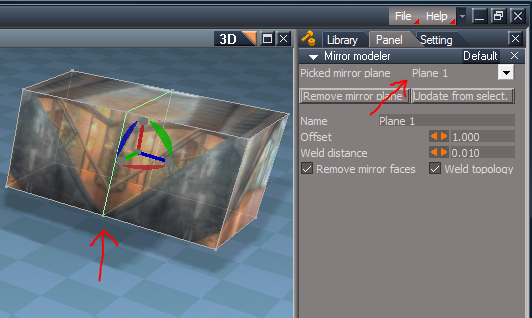
I think you have to scale your Mirror plane in all 3 axes just a tad.
User avatar
carlpatti
Chief Petty Officer
Posts: 130
Joined: 01 Aug 2009, 21:10

Re: forever a newbie...

Post by carlpatti »

thanks trueBlue for the speedy reply.

what do you mean by mirror plane???

patti :D
User avatar
trueBlue
Captain
Posts: 5548
Joined: 06 Jul 2009, 22:50
Type the number ten into the box: 10

Re: forever a newbie...

Post by trueBlue »

The Plane that the Mirror Modeler's using to mirror from.
Attachments
Capture.png
User avatar
carlpatti
Chief Petty Officer
Posts: 130
Joined: 01 Aug 2009, 21:10

Re: forever a newbie...

Post by carlpatti »

hi,
yeah, i see what you mean but, maybe because i have this mirror plane so messed up - i can't really select it... edge loop select just veers off into completely different directions.

i just had a thought... dopey maybe? could i just go back to turn off mirror or cut the model in half again and start over with the mirror? would that work or would i just compound the problem?

and why does the mirror get out of control anyway? how can i fix the model so it doesn't have gaps and overlaps when i mirror model? is there something that you can think of that i do wrong? how do you control the mirror modeling to prevent gaps and overlaps?

questions....questions..... i am out of control... sorry if i am being thick headed...

patti
User avatar
LeonRegis
Captain
Posts: 1946
Joined: 18 Aug 2009, 17:36
Type the number ten into the box: 0
Location: Brazil/Earth/Orion Arm/Milky Way/4th Dimension/This Universe/Multiverse???/Singularity???

Re: forever a newbie...

Post by LeonRegis »

Hey don't give up and ask the much is possible ;)
I can't help you with that, since I'm newbie too... However I think that if you post an image things gets easier to the folks help you.

HTH
Be the change you want to see in the world. - Mohandas Gandhi
User avatar
carlpatti
Chief Petty Officer
Posts: 130
Joined: 01 Aug 2009, 21:10

Re: forever a newbie...

Post by carlpatti »

as always, thanks trueBlue! maybe the attached .jpgs will help enlighten... :)
and thanks leonregis,
you are always so kind and so helpful to everyone - :worship: your idea to add pics is a fantastic one... here goes...

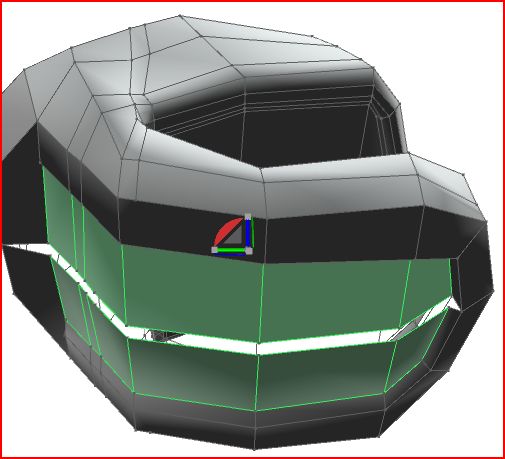
the first .jpg (whoops - the 2nd!) shows what brought the problem to my attention - the organics tutorial step where the underside of the mouth/chin is highlighted and indented... when i did this step, a gap appeared in my geometry... along the mirror line...

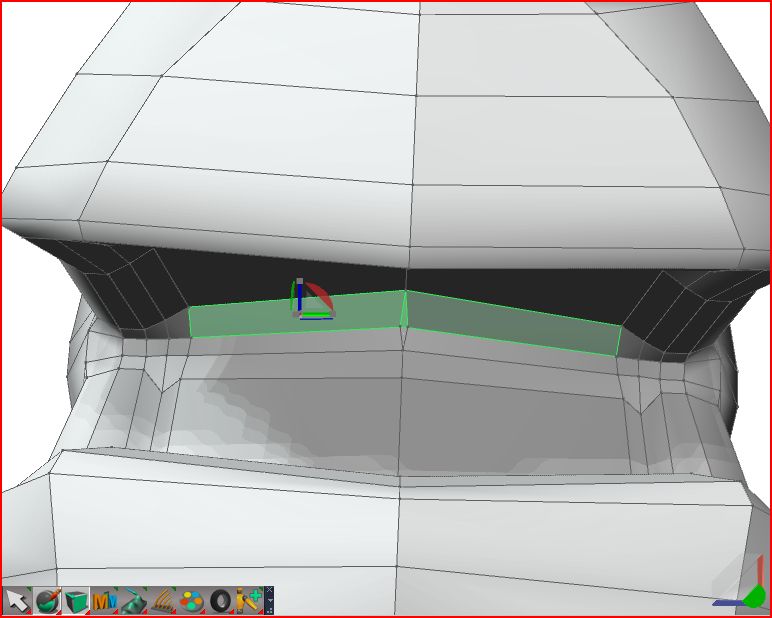
the second .jpg ( nope - the 1st .jpg - i am even learning about attachments...) shows the edge loop going crazy at the mirror line looking inside the mouth towards the back of the throat... it also shows the axis is slightly off even though i do not know how the axis was changed...

once again, any help, anyone? :?: :?:
maybe not tonight, enjoy your Haloween!!! :superbanana:
happy haunting! :bananadevil: :bananadevil: :bananadevil:
patti
gapappearsbackmouth.jpg
Attachments
gapfirstappears.jpg
User avatar
carlpatti
Chief Petty Officer
Posts: 130
Joined: 01 Aug 2009, 21:10

Re: forever a newbie...

Post by carlpatti »

hi again, :bananahi:

here is one more .jpg file to help enlighten anyone who might help me...

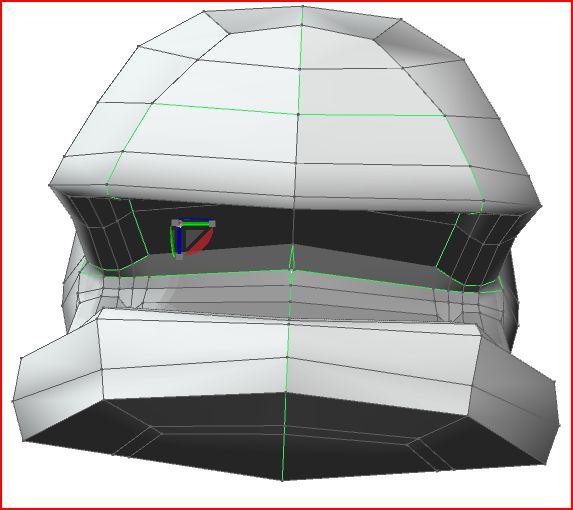
the .jpg show what happens when i try to select the mirror plane - it is now all over the place - not a straight loop as it should be...

help!

thanks, :?
patti
Attachments
mirrorplaneedgeloop.jpg
User avatar
trueBlue
Captain
Posts: 5548
Joined: 06 Jul 2009, 22:50
Type the number ten into the box: 10

Re: forever a newbie...

Post by trueBlue »

Sorry for the delay I had to go Trick ot Treating. <wink>
I would select the Remove Mirror Plane button to make it easy to select the Mirror Plane.
But after seeing you pics I think the best way to fix it would be to enter into Point Editing with the Point Editing Snapping enabled and start snapping each vertice back together.
User avatar
3dvisuals dude
Chief Warrant Officer
Posts: 643
Joined: 03 Jun 2009, 02:53
Type the number ten into the box: 0

Re: forever a newbie...

Post by 3dvisuals dude »

there is an axis tool on modelside, it is a bit of a pain to get used to using it but the results can be a huge timesaver when model axes start doing bizarre things. basically, after you locate the show axes icon (which in itself can be a journey, lol) you then go to yet another toolbar and select the "move" or "rotate" icon and additionally right-click them to click on the related constraints to be used when moving or rotating... like so...

1) click the model to select it

2) locate and click the Show Axes icon

3) then on another toolbar, click the move icon, then also right-click it, a small panel opens, choose "Object Coordinates" icon, then the direction icon you wish to use (x y z4) leftpress and drag your cursor on the screen, notice that you are now moving the faintly visible Axes widget according to your icon selections.

then you use the screen widget in the lower right, rotate around and position yourself repeatedly each time selecting the rotate or move icon approapriate to where and how you wish to move the axes, and eventually, you wind up moving the axes to exacly the orientation and position you need for mirroring amd modeling.

Needless to say, in an ideal world, this would be automatic, but once you get the hang of doing this FIRST and saving a model you intend to do mirroring functions on, you will save yourself a world of time in the end. :D

Hope that helps!
Image "Advantage is had from whatever is there, but usefulness arises from whatever is not." - Lao Tzu (Tao Te Ching - 500 BC) Image
User avatar
carlpatti
Chief Petty Officer
Posts: 130
Joined: 01 Aug 2009, 21:10

Re: forever a newbie...

Post by carlpatti »

hi all! :bananahi:

i am ACTIVELY working on my model now - i love the input from you trueBlue and leonregis and 3Dvisuals dude - i am trying all the suggestions and will get back with my results soon...

by the way - 3Dvisuals dude, i am modeling in Rosetta - no model side for me - :cry: i just started using it a few days ago. your solution might have worked but i will NEVER know! thanks anyway...

see ya soon,
patti
User avatar
carlpatti
Chief Petty Officer
Posts: 130
Joined: 01 Aug 2009, 21:10

Re: forever a newbie...

Post by carlpatti »

hi all! :bananamouse: :superbanana:

well, i finally fixed the model... i do NOT know how i did it unfortunately... :?

it took most of today to fix the axis. :bananatyping: :geek:
i just played around with all the axis tools and coordinate systems and even the camera and object navigation tools. whatever i did, it finally clicked and the axis was straightened. i wish i knew what i did to make it straighten the axis! just pure luck, i guess.

once the axis was corrected, the gap and overlap problem with the mirror was easy to solve. i used Jack Edward's organics tutorial technique of scaling the mirror plane edge loop (Z plane?) until it was corrected. a great technique!!!!

so i think that's it for now... problem solved - with a little help from my friends!

Thanks so much! :bananahi:
good night,
patti :D :D
User avatar
LeonRegis
Captain
Posts: 1946
Joined: 18 Aug 2009, 17:36
Type the number ten into the box: 0
Location: Brazil/Earth/Orion Arm/Milky Way/4th Dimension/This Universe/Multiverse???/Singularity???

Re: forever a newbie...

Post by LeonRegis »

Good to hear Patty! :superbanana:
This is one problem that you overcome from several that will come so don't give up!
Remember that every time that it happens you put one more brick at your house/wall/building then you always need to learn (put more bricks) until it become an Empire State Building/Great Wall of China/Taj Mahal, you still on the foundation so there's a lot to learn yet, I'm slightly above but you can even excel me! :bananatyping:

Ask for help when needed!!! ;)

Cya
Be the change you want to see in the world. - Mohandas Gandhi

Return to “New Users”