Hi I have used TS 4 in the past then recently found out about the free TS 7.6. I managed to do some steps and put a ball above it and it did drop and bounce. Next to these objects I made a several bowling pins (just tall cylinders) and rolled a ball at them. However, the ball went through them rather than knocking them over!
How come one ball bounces off the steps while the other ball goes through the pins? I didn't do anything to set collisions for the bouncing ball and the steps!
Could you show me where to get collisions working for the pins? I'd be grateful for pictures showing the icons clicked etc to get things going.
Thanks
activating collision for an object
-
Jeri3d
- Petty Officer Second Class
- Posts: 25
- Joined: 16 Feb 2010, 08:59
activating collision for an object
-
froo
- Captain
- Posts: 2554
- Joined: 22 May 2009, 12:13
Re: activating collision for an object
Hey Jeri.
In this case, you'll need to assign physics properties
to the ball and pins. Not really sure what happened with the ball
and stairs.
froo
In this case, you'll need to assign physics properties
to the ball and pins. Not really sure what happened with the ball
and stairs.
froo
-
Jeri3d
- Petty Officer Second Class
- Posts: 25
- Joined: 16 Feb 2010, 08:59
Re: activating collision for an object
Hi Could you tell what to do in case I have missed something. I think I would have tried assigning physic attributes to the pins?
-
Jeri3d
- Petty Officer Second Class
- Posts: 25
- Joined: 16 Feb 2010, 08:59
Re: activating collision for an object
Just discovered something  . Checking the difference btw the two balls, apart from size, I did have the Local Env Object active for the small sphere. As soon as I turned that off the small bowling ball knocked pins over on impact. Before it was passing through the pins, after which the pins fell. I am not sure what I did to enable the pins to fall as they weren't doing that when I started this thread.
. Checking the difference btw the two balls, apart from size, I did have the Local Env Object active for the small sphere. As soon as I turned that off the small bowling ball knocked pins over on impact. Before it was passing through the pins, after which the pins fell. I am not sure what I did to enable the pins to fall as they weren't doing that when I started this thread.-
froo
- Captain
- Posts: 2554
- Joined: 22 May 2009, 12:13
Re: activating collision for an object
well that's good.
In truespace, an object can be Either a local environment, Or a 'regular' physics object.
When the object is a local environment, any objects within the boundary of that local
environment object can be affected by the environmental forces you configure.
In truespace, an object can be Either a local environment, Or a 'regular' physics object.
When the object is a local environment, any objects within the boundary of that local
environment object can be affected by the environmental forces you configure.
-
Finis

- Captain
- Posts: 5410
- Joined: 21 May 2009, 18:26
- Type the number ten into the box: 0
- Location: America!
Re: activating collision for an object
TS 7.6 model side. You've found the problem already but here's what that helps me.
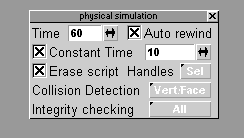
Use the physics simulation panel (right click on the start simulation button to get this panel):
- Set collision detection and integrity checking to Vert/Face and All. This helps things not to go through each other.
- Set Constant time on. This can speed it up a lot. If it doesn't work well increase the simulation steps. If it still doesn't work well uncheck constant time and be patient.
Things go through each other:
- See panel noted above.
- Give all colliding objects physics properties.
- Use more polygons on the colliding objects.
Other:
- The physics simulation is ok for simple things but don't expect too much from it.
- It might take a long time so be patient (one of my Splodyne Explodiatory Explodolator movies took 7 hours for physics on a 2.8GHz dual core).
- High poly count models and complex scenes with many objects will make it very slow.
Use the physics simulation panel (right click on the start simulation button to get this panel):
- Set collision detection and integrity checking to Vert/Face and All. This helps things not to go through each other.
- Set Constant time on. This can speed it up a lot. If it doesn't work well increase the simulation steps. If it still doesn't work well uncheck constant time and be patient.
Things go through each other:
- See panel noted above.
- Give all colliding objects physics properties.
- Use more polygons on the colliding objects.
Other:
- The physics simulation is ok for simple things but don't expect too much from it.
- It might take a long time so be patient (one of my Splodyne Explodiatory Explodolator movies took 7 hours for physics on a 2.8GHz dual core).
- High poly count models and complex scenes with many objects will make it very slow.
- Attachments
-
- BowlingMovie.zip
- (60.85 KiB) Downloaded 293 times
-
- Image1.gif (2.28 KiB) Viewed 4494 times
I prefer dangerous freedom over peaceful servitude. -- Thomas Jefferson/Jean Jacques Rousseau