resetting the UV editor

Share with others..
leevviiJ
Petty Officer First Class
Posts: 52
Joined: 05 Sep 2009, 05:11

resetting the UV editor

Post by leevviiJ »

im texturing a human figure at present, and i was wondering, is resetting the UVeditor possible?

i have made a mess of the face textmap in the UV editor, can i "start again", getting rid of the current map and making it refresh back to default mesh placements?

Also, there are multiple [older] textmaps inside the UVed, some duplicates, that can be deleted, ....but how do i do this? any ideas?
I selected 1 point, and multple hidden points appear ......WTF??
Attachments
stuffed up geometry in the UV editor. Somehow the lips have become joined to the forehead
User avatar
Steinie
Captain
Posts: 2958
Joined: 21 May 2009, 17:38
Type the number ten into the box: 10

Re: resetting the UV editor

Post by Steinie »

Easy as 123
Just reapply a UVmap.
Karthogen
Master Chief Petty Officer
Posts: 454
Joined: 03 Jun 2009, 14:12

Re: resetting the UV editor

Post by Karthogen »

There definately is a way, I did it by accident once, and lost a lot of work.

Did you try switching the wrapping to like shrink wrap and then back?
leevviiJ
Petty Officer First Class
Posts: 52
Joined: 05 Sep 2009, 05:11

Re: resetting the UV editor

Post by leevviiJ »

thanks folks,

Steinie, ...some things i have tried, .....resetting the texture to default [medium grey - via the right-click option in the texture window, on both modeller and workspace side], then reloading the image and "paint over existing faces" option.
resetting the texture to default [medium grey - via the right-click option in the texture window, on both modeller and workspace side], then reloading the image and "paint over existing faces" option.
TextureEditor.jpg (11.16 KiB) Viewed 5191 times
using the UVeditor preferences to try to delete the background image, via the clear button. incidentally, Should the image thumbnail be displayed in here? mine never does.
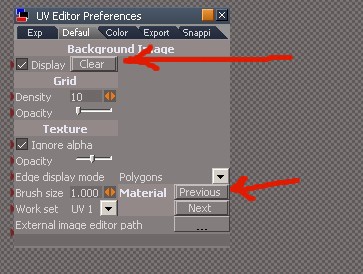
UVeditorPREFS.jpg (34.74 KiB) Viewed 5191 times
is this what you mean?

Is the LE the answer perhaps, delete the textures manually from inside the LE?

i love the curly ones TS throws up at ya, ...keeps ya on ya toes.
leevviiJ
Petty Officer First Class
Posts: 52
Joined: 05 Sep 2009, 05:11

Re: resetting the UV editor

Post by leevviiJ »

Karthogen wrote:There definately is a way, I did it by accident once, and lost a lot of work.

Did you try switching the wrapping to like shrink wrap and then back?
not as yet, but its next on the list, thanks. :worship:
User avatar
Steinie
Captain
Posts: 2958
Joined: 21 May 2009, 17:38
Type the number ten into the box: 10

Re: resetting the UV editor

Post by Steinie »

Undo doesn't work until you exit UVMapping. If you mess up just exit
UVMapping then undo back to where you started to apply the map.

Your asking about your UVMapping and not how to reapply materials right?
leevviiJ
Petty Officer First Class
Posts: 52
Joined: 05 Sep 2009, 05:11

Re: resetting the UV editor

Post by leevviiJ »

Your asking about your UVMapping and not how to reapply materials right?
Yes, i want to clear UVmapping meshes or reset them back to their unmanipulated [unmoved] state

Return to “Links, Tips, and Hints”