What would be extremely useful is a tSx that's just an onscreen calculator. Wouldn't have to directly interact with tS, just float there and be a simple 4 function calc.
'Course it would be neat if it had the ability to read in any of the size/position/rotation fields from the object properties panel and write back to them. Perhaps just have a checkbox to link/unlink data and it'll read/write to whichever field the cursor is in.
I'm always using a pocket calc with tS because Windows' calculator doesn't have a way to keep it always on top.
Calculator plugin
-
Galane
- Chief Petty Officer
- Posts: 111
- Joined: 30 Aug 2009, 10:45
Calculator plugin
-
Emmanuel

- Chief Warrant Officer
- Posts: 670
- Joined: 14 Jun 2009, 06:47
Re: Calculator plugin
You can already do calculation in the Object Info panel.
I often use it to do some quick calculation even if it is not relative to an object (you can bring a null object and use it as reference object during calculation, then delete it).
I often use it to do some quick calculation even if it is not relative to an object (you can bring a null object and use it as reference object during calculation, then delete it).
-
trueBlue

- Captain
- Posts: 5548
- Joined: 06 Jul 2009, 22:50
- Type the number ten into the box: 10
Re: Calculator plugin
AppendixB_Settings
Properties Panel
Values may also be entered as formulas involving addition, subtraction, multiplication, and division functions. Parentheses may be employed within formulas. As an example: 43+67-5 or 43*(8+7).
Properties Panel
Values may also be entered as formulas involving addition, subtraction, multiplication, and division functions. Parentheses may be employed within formulas. As an example: 43+67-5 or 43*(8+7).
-
Draise

- Captain
- Posts: 3200
- Joined: 21 Sep 2009, 19:33
- Type the number ten into the box: 0
- Location: Bogota, Colombia
Re: Calculator plugin
You can technically make a script to do this LE in workspace side also right? Make it a floating window?
-
Galane
- Chief Petty Officer
- Posts: 111
- Joined: 30 Aug 2009, 10:45
Re: Calculator plugin
Why are you mentioning tS 7? This is the 6.6 forum.
A very annoying "feature" of 6.6 and earlier versions is it has a periodic refresh of the object properties panel. If you're typing in one of the fields when the refresh comes around, it wipes out what you were doing and replaces it with the previous value. A calculator that replaces the value in the selected field then sends an enter keystroke would avoid that.
Could get fancier and put rotation buttons, with a slider or direct entry box to select the location. Perhaps "jog" buttons to move an object a preselected distance in X, Y or Z - all to work around that irritating refresh cycle in the properties panel. Can't sit and think a bit, you have to type or copy and paste then click another field or hit enter *right then* or tS will wipe away what you're doing.
I'd settle for a simple 4-function calculator that reads and writes whichever field in the properties panel the cursor is in. Anything more would be gilding the lilly.
A very annoying "feature" of 6.6 and earlier versions is it has a periodic refresh of the object properties panel. If you're typing in one of the fields when the refresh comes around, it wipes out what you were doing and replaces it with the previous value. A calculator that replaces the value in the selected field then sends an enter keystroke would avoid that.
Could get fancier and put rotation buttons, with a slider or direct entry box to select the location. Perhaps "jog" buttons to move an object a preselected distance in X, Y or Z - all to work around that irritating refresh cycle in the properties panel. Can't sit and think a bit, you have to type or copy and paste then click another field or hit enter *right then* or tS will wipe away what you're doing.
I'd settle for a simple 4-function calculator that reads and writes whichever field in the properties panel the cursor is in. Anything more would be gilding the lilly.
-
stan
- Master Chief Petty Officer
- Posts: 584
- Joined: 21 May 2009, 17:20
Re: Calculator plugin
That is not a feature but a bug..you can avoid it by moving your cursor away from object panel once you have selected. Or turning off tooltips, in modelside you must go to the icon finder, give tooltips a hot key to turn them on/off.
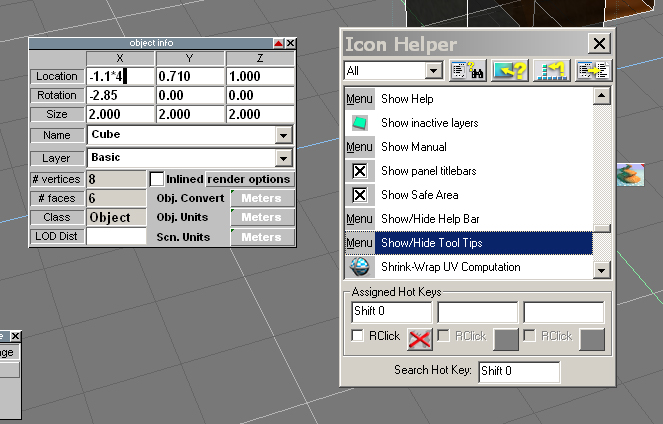
That sounds like my object panel tsx or distance tsx. there are links at Emmanuel's plugin site."Perhaps "jog" buttons to move an object a preselected distance in X, Y or Z "
-
Fenerit

- Senior Chief Petty Officer
- Posts: 173
- Joined: 21 Nov 2011, 19:19
- Type the number ten into the box: 9
Re: Calculator plugin
Hi! This is how I've figured out the discussion:
- check to get object's values; all resulting output will be send to the object;
- uncheck to calculate without to send output to object;
- undo to restore the previous object's values (there is only one undo operation);
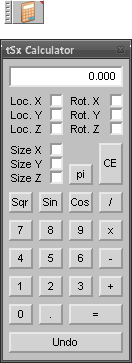
- tSxCalculator_1.0.png (6.69 KiB) Viewed 6242 times
- uncheck to calculate without to send output to object;
- undo to restore the previous object's values (there is only one undo operation);
-
Emmanuel
- Chief Warrant Officer
- Posts: 670
- Joined: 14 Jun 2009, 06:47
Re: Calculator plugin
Thank you Fenerit.
One bug found :
In tS7.6, if I clic the plugin's undo button after an operation, the object get lost and the perspective view goes wrong (to reset the view, I have to switch to 4 views mode and switch back to 1 view mode).
One bug found :
In tS7.6, if I clic the plugin's undo button after an operation, the object get lost and the perspective view goes wrong (to reset the view, I have to switch to 4 views mode and switch back to 1 view mode).
-
Fenerit
- Senior Chief Petty Officer
- Posts: 173
- Joined: 21 Nov 2011, 19:19
- Type the number ten into the box: 9
Re: Calculator plugin
Be sure of the plugin's path: is the plugin following the path: "..\tsx\tSxCalculator"?
In case affirmative I'll limit the use up to tS 6.6 only (which is the enviroment with I deal basically on).
In case affirmative I'll limit the use up to tS 6.6 only (which is the enviroment with I deal basically on).
-
BNG

- Chief Warrant Officer
- Posts: 684
- Joined: 16 Oct 2009, 03:26
- Type the number ten into the box: 0
- Location: Texas
Re: Calculator plugin
Nice, thanks.
Casual Truespace 3D modeling hobbyist. My Truespace blog and simple 3d Modeling Tutorials for Casual Model Makers.
-
Fenerit
- Senior Chief Petty Officer
- Posts: 173
- Joined: 21 Nov 2011, 19:19
- Type the number ten into the box: 9
Re: Calculator plugin
This should fix the bug for tS 7.6. Mind the path.
-
Rhino169

- Senior Chief Petty Officer
- Posts: 201
- Joined: 29 Nov 2009, 03:15
Re: Calculator plugin
Thanks Fenerit!! 
I look forward to using this...instead of my handy dandy calculator!
I look forward to using this...instead of my handy dandy calculator!
-
Fenerit
- Senior Chief Petty Officer
- Posts: 173
- Joined: 21 Nov 2011, 19:19
- Type the number ten into the box: 9
Re: Calculator plugin
Thanks. I was thought to add a "measurements' listbox", either for tuning up purposes in the case one is close to set its final values and/or as undos' collection as well.Rhino169 wrote:Thanks Fenerit!!
I look forward to using this...instead of my handy dandy calculator!
-
Fenerit
- Senior Chief Petty Officer
- Posts: 173
- Joined: 21 Nov 2011, 19:19
- Type the number ten into the box: 9
Re: Calculator plugin
Version 1.2
redesign, M+ send to list, M- remove, double click on listbox's values to apply. Added switch between deg/rad.
Remove all previous files before unpack.

- tSxCalculator_1.2.png (7.34 KiB) Viewed 4679 times
Remove all previous files before unpack.
-
Rhino169
- Senior Chief Petty Officer
- Posts: 201
- Joined: 29 Nov 2009, 03:15
Re: Calculator plugin
Now this is becoming very useful! Love the send result to x,y,z feature!
Not sure what else I would add at this point.
Will give a try and let you know.
THANKS!

Not sure what else I would add at this point.
Will give a try and let you know.
THANKS!
-
Fenerit
- Senior Chief Petty Officer
- Posts: 173
- Joined: 21 Nov 2011, 19:19
- Type the number ten into the box: 9
Re: Calculator plugin
tSx Calculator 1.3
Maybe this is more rationale around the mouse's movements...
- Added MR to resume list values without double click on it; useful whether one do not wish to move the object;
- fix a bug with deleted objects;
Maybe this is more rationale around the mouse's movements...
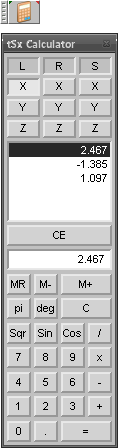
- tSxCalculator_1.3.png (7.35 KiB) Viewed 4630 times
- fix a bug with deleted objects;
-
Fenerit
- Senior Chief Petty Officer
- Posts: 173
- Joined: 21 Nov 2011, 19:19
- Type the number ten into the box: 9
Re: Calculator plugin
tSx Calculator 1.3.1
- fix a bug with the decimal button.
- fix a bug with the decimal button.