How do you make Looping Cycle Script?

Technical questions, etc..
User avatar
trueBlue
Captain
Posts: 5548
Joined: 06 Jul 2009, 22:50
Type the number ten into the box: 10

How do you make Looping Cycle Script?

Post by trueBlue »

How do you make a script that runs different mutiple Node.Value('', '') changes within one script and cycles to each one, creating a loop?
Each block of commands rotates Workspace's Perspective view.

Code: Select all

function Execute(params)
{
if(Node.SubObjectCount("/D3DView")==0) return;
D3DView.SwitchEyeCameraType('{2C152F81-45A2-4035-8896-9E49D60C8A7A}', '0')
D3DView.SwitchEyeCameraType('', '0')
Node.Value("/D3DView/EyeCamera_{2C152F81-45A2-4035-8896-9E49D60C8A7A}", "pitch") = -36.363
Node.Value("/D3DView/EyeCamera_{2C152F81-45A2-4035-8896-9E49D60C8A7A}", "roll") = -123.579
Node.Value("/D3DView/EyeCamera_{2C152F81-45A2-4035-8896-9E49D60C8A7A}", "tx") = -18.833
Node.Value("/D3DView/EyeCamera_{2C152F81-45A2-4035-8896-9E49D60C8A7A}", "ty") = 21.31
Node.Value("/D3DView/EyeCamera_{2C152F81-45A2-4035-8896-9E49D60C8A7A}", "tz") = 14.147
Node.Value("/D3DView/EyeCamera_{2C152F81-45A2-4035-8896-9E49D60C8A7A}", "yaw") = 21.485
}
//Next
Node.Value("/D3DView/EyeCamera_{2C152F81-45A2-4035-8896-9E49D60C8A7A}", "pitch") = 36.363
Node.Value("/D3DView/EyeCamera_{2C152F81-45A2-4035-8896-9E49D60C8A7A}", "roll") = -123.579
Node.Value("/D3DView/EyeCamera_{2C152F81-45A2-4035-8896-9E49D60C8A7A}", "tx") = 18.833
Node.Value("/D3DView/EyeCamera_{2C152F81-45A2-4035-8896-9E49D60C8A7A}", "ty") = 21.31
Node.Value("/D3DView/EyeCamera_{2C152F81-45A2-4035-8896-9E49D60C8A7A}", "tz") = 14.147
Node.Value("/D3DView/EyeCamera_{2C152F81-45A2-4035-8896-9E49D60C8A7A}", "yaw") = -21.485
//Next
Node.Value("/D3DView/EyeCamera_{2C152F81-45A2-4035-8896-9E49D60C8A7A}", "pitch") = 36.363
Node.Value("/D3DView/EyeCamera_{2C152F81-45A2-4035-8896-9E49D60C8A7A}", "roll") = 123.579
Node.Value("/D3DView/EyeCamera_{2C152F81-45A2-4035-8896-9E49D60C8A7A}", "tx") = 18.833
Node.Value("/D3DView/EyeCamera_{2C152F81-45A2-4035-8896-9E49D60C8A7A}", "ty") = -21.31
Node.Value("/D3DView/EyeCamera_{2C152F81-45A2-4035-8896-9E49D60C8A7A}", "tz") = 14.147
Node.Value("/D3DView/EyeCamera_{2C152F81-45A2-4035-8896-9E49D60C8A7A}", "yaw") = -158.95
//Next
Node.Value("/D3DView/EyeCamera_{2C152F81-45A2-4035-8896-9E49D60C8A7A}", "pitch") = -36.363
Node.Value("/D3DView/EyeCamera_{2C152F81-45A2-4035-8896-9E49D60C8A7A}", "roll") = 123.579
Node.Value("/D3DView/EyeCamera_{2C152F81-45A2-4035-8896-9E49D60C8A7A}", "tx") = -18.833
Node.Value("/D3DView/EyeCamera_{2C152F81-45A2-4035-8896-9E49D60C8A7A}", "ty") = -21.31
Node.Value("/D3DView/EyeCamera_{2C152F81-45A2-4035-8896-9E49D60C8A7A}", "tz") = 14.147
Node.Value("/D3DView/EyeCamera_{2C152F81-45A2-4035-8896-9E49D60C8A7A}", "yaw") = 158.95

// Next Loop back to the start
//???
Would like to be able to run this script by way of a Button command or from Activity.Run('') command
So each time this the button is pressed the script cycles through each sets of changes and loops back to the beginning.
User avatar
clintonman
Captain
Posts: 5659
Joined: 21 May 2009, 21:08
Type the number ten into the box: 0
Location: California

Re: How do you make Looping Cycle Script?

Post by clintonman »

Set global value an add to it on each run
% modulus give remainder of division, % 4 makes it loop back to 0, 3/4 => 0r3, 4/4 => 1r0, 5/4 => 1r1 ...

Code: Select all

var cycle = 0;
function Execute(params)
{
if(Node.SubObjectCount("/D3DView")==0) return;
D3DView.SwitchEyeCameraType('{2C152F81-45A2-4035-8896-9E49D60C8A7A}', '0')
D3DView.SwitchEyeCameraType('', '0')
if(cycle==0) {
Node.Value("/D3DView/EyeCamera_{2C152F81-45A2-4035-8896-9E49D60C8A7A}", "pitch") = -36.363
Node.Value("/D3DView/EyeCamera_{2C152F81-45A2-4035-8896-9E49D60C8A7A}", "roll") = -123.579
Node.Value("/D3DView/EyeCamera_{2C152F81-45A2-4035-8896-9E49D60C8A7A}", "tx") = -18.833
Node.Value("/D3DView/EyeCamera_{2C152F81-45A2-4035-8896-9E49D60C8A7A}", "ty") = 21.31
Node.Value("/D3DView/EyeCamera_{2C152F81-45A2-4035-8896-9E49D60C8A7A}", "tz") = 14.147
Node.Value("/D3DView/EyeCamera_{2C152F81-45A2-4035-8896-9E49D60C8A7A}", "yaw") = 21.485
}
//Next
if(cycle==1) {
Node.Value("/D3DView/EyeCamera_{2C152F81-45A2-4035-8896-9E49D60C8A7A}", "pitch") = 36.363
Node.Value("/D3DView/EyeCamera_{2C152F81-45A2-4035-8896-9E49D60C8A7A}", "roll") = -123.579
Node.Value("/D3DView/EyeCamera_{2C152F81-45A2-4035-8896-9E49D60C8A7A}", "tx") = 18.833
Node.Value("/D3DView/EyeCamera_{2C152F81-45A2-4035-8896-9E49D60C8A7A}", "ty") = 21.31
Node.Value("/D3DView/EyeCamera_{2C152F81-45A2-4035-8896-9E49D60C8A7A}", "tz") = 14.147
Node.Value("/D3DView/EyeCamera_{2C152F81-45A2-4035-8896-9E49D60C8A7A}", "yaw") = -21.485
}
//Next
if(cycle==2) {
Node.Value("/D3DView/EyeCamera_{2C152F81-45A2-4035-8896-9E49D60C8A7A}", "pitch") = 36.363
Node.Value("/D3DView/EyeCamera_{2C152F81-45A2-4035-8896-9E49D60C8A7A}", "roll") = 123.579
Node.Value("/D3DView/EyeCamera_{2C152F81-45A2-4035-8896-9E49D60C8A7A}", "tx") = 18.833
Node.Value("/D3DView/EyeCamera_{2C152F81-45A2-4035-8896-9E49D60C8A7A}", "ty") = -21.31
Node.Value("/D3DView/EyeCamera_{2C152F81-45A2-4035-8896-9E49D60C8A7A}", "tz") = 14.147
Node.Value("/D3DView/EyeCamera_{2C152F81-45A2-4035-8896-9E49D60C8A7A}", "yaw") = -158.95
}
//Next
if(cycle==3) {
Node.Value("/D3DView/EyeCamera_{2C152F81-45A2-4035-8896-9E49D60C8A7A}", "pitch") = -36.363
Node.Value("/D3DView/EyeCamera_{2C152F81-45A2-4035-8896-9E49D60C8A7A}", "roll") = 123.579
Node.Value("/D3DView/EyeCamera_{2C152F81-45A2-4035-8896-9E49D60C8A7A}", "tx") = -18.833
Node.Value("/D3DView/EyeCamera_{2C152F81-45A2-4035-8896-9E49D60C8A7A}", "ty") = -21.31
Node.Value("/D3DView/EyeCamera_{2C152F81-45A2-4035-8896-9E49D60C8A7A}", "tz") = 14.147
Node.Value("/D3DView/EyeCamera_{2C152F81-45A2-4035-8896-9E49D60C8A7A}", "yaw") = 158.95
}
cycle++;
// Next Loop back to the start
cycle = cycle % 4;
Clinton Reese

http://clintons3d.com
User avatar
trueBlue
Captain
Posts: 5548
Joined: 06 Jul 2009, 22:50
Type the number ten into the box: 10

Re: How do you make Looping Cycle Script?

Post by trueBlue »

Brilliant! :worship:
Thank YOU ever so much! :D
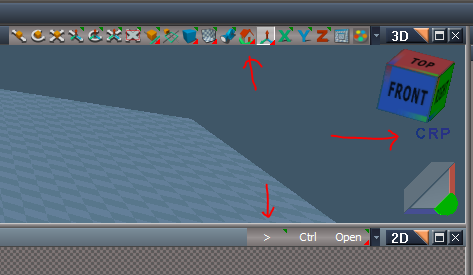
Now where should I put it?
Ideas:
Capture.PNG
1.) RMB command in the Perspective icon.
2.) RMB command in the Isometric icon.
3.) Button on the Link Editor Navigation bar.
4.) Your View Cube?
I would not know how to add it to your View Cube but was thinking add another primitive text >
Rotate Perspective View / Rotate Isometric View
BTW... in the Update version, the C R P does not show in the Ortho views.
Also noticed an error this morning in the Rosetta.log
UserInterface.OpenToolPanelViewEx2("" , "" ,"/Widgets/Active Widgets Layer2/CubeWidget/Cube View Widget", 3,1,0); - 31 ms 0x00000000 [RsSysCore.cpp(700)]
10:18:38.479 INFO D3DView.SwitchEyeCameraType('{2C152F81-45A2-4035-8896-9E49D60C8A7A}', '6') - 47 ms 0x00000000 [RsSysCore.cpp(700)]
10:18:45.934 WARN Error: Unspecified script error Line: 1, Char: 79 Script text: RsTool.ResetView('');;} 0x80020101 [RsScript.cpp(188)]
Attachments
Rotate Perspective View.RsObj
(9.36 KiB) Downloaded 216 times
Rotate Isometric View.RsObj
(9.27 KiB) Downloaded 218 times
User avatar
clintonman
Captain
Posts: 5659
Joined: 21 May 2009, 21:08
Type the number ten into the box: 0
Location: California

Re: How do you make Looping Cycle Script?

Post by clintonman »

I don't think it makes sense to put a 3D control in the link editor(2D).
Clinton Reese

http://clintons3d.com

Return to “TechForum”