TS 7.6 Model Side.
I'm using physics to drop several objects into a believable pile. That works fine to make a nice pile.
When I save the scene the objects jump back to their original positions. They are in the original positions on reloading the scene too. Playing the animation fixes that.
Here's the bizarre part. I ran the physics and then removed all animation from the scene and all physics attributes from the objects. I saved the non-animated non-physics objects and the scene. On reloading either the objects are in their original positions again! Then physics/animation is undone even though it doesn't exist to undo!
How can I use physics to drop the objects and then completely de-physics and de-animate the objects and save the object (cob file) and scene with the final positions only?
After I remove the physics and animation from the objects there should be no memory that they ever happened.
Bizarre Physics/Reload Problem
-
Finis

- Captain
- Posts: 5410
- Joined: 21 May 2009, 18:26
- Type the number ten into the box: 0
- Location: America!
Bizarre Physics/Reload Problem
I prefer dangerous freedom over peaceful servitude. -- Thomas Jefferson/Jean Jacques Rousseau
-
marcel

- Captain
- Posts: 2247
- Joined: 21 May 2009, 19:52
- Type the number ten into the box: 0
- Location: paris - France
Re: Bizarre Physics/Reload Problem
After the simulation, erase the physical atributes and advance to the end of the animation. Open the scene editor. Delete all the keys frames (position 0 too) but keep the last. Move the last keyframe to position 0. You can also cut a part of the animation to keep only what you want.
Design - illustration - Animation
http://www.crea-vision.fr
http://www.crea-vision.fr
-
Finis
- Captain
- Posts: 5410
- Joined: 21 May 2009, 18:26
- Type the number ten into the box: 0
- Location: America!
Re: Bizarre Physics/Reload Problem
Thanks Marcel. That doesn't get it to act right -- to forget that the animation/physics ever happened.
Now it seems the physics is essentially useless. I had the objects grouped (Pile items grouped. That and the container grouped.) and they behaved reasonably but ungrouped they never stop bouncing and spinning enough to look settled or piled regardless of settings. If the physics system requires a magical grouping to be found for each set of items then it is useless.
I gave the container physics properties so it could be sticky with adhesion. It had a mass one-half-million times greater that any of the few falling objects and yet it moves as soon as it is touched -- no inertia in a physics simulation? Useless.
The only way the container will remain still is to remove the physics properties but the default seems to be ultra flubber where anything that touches it bounces away at warp nine million.
I'd do better to pile them by hand since this is nothing but trouble. I'll see what I can do with my magic group and your suggestion or just run the animation before rendering.
Now it seems the physics is essentially useless. I had the objects grouped (Pile items grouped. That and the container grouped.) and they behaved reasonably but ungrouped they never stop bouncing and spinning enough to look settled or piled regardless of settings. If the physics system requires a magical grouping to be found for each set of items then it is useless.
I gave the container physics properties so it could be sticky with adhesion. It had a mass one-half-million times greater that any of the few falling objects and yet it moves as soon as it is touched -- no inertia in a physics simulation? Useless.
The only way the container will remain still is to remove the physics properties but the default seems to be ultra flubber where anything that touches it bounces away at warp nine million.
I'd do better to pile them by hand since this is nothing but trouble. I'll see what I can do with my magic group and your suggestion or just run the animation before rendering.
I prefer dangerous freedom over peaceful servitude. -- Thomas Jefferson/Jean Jacques Rousseau
-
marcel
- Captain
- Posts: 2247
- Joined: 21 May 2009, 19:52
- Type the number ten into the box: 0
- Location: paris - France
Re: Bizarre Physics/Reload Problem
I am not sure to understand because my bad english but I confirm it is possible to save objects or scene without animation and physicals attributes at the end position or any position of the simulation. The news objets without animation are exactly the same that animation do during the simulation. I hope you can find the solution because it is useful for many thing.
Design - illustration - Animation
http://www.crea-vision.fr
http://www.crea-vision.fr
-
Finis
- Captain
- Posts: 5410
- Joined: 21 May 2009, 18:26
- Type the number ten into the box: 0
- Location: America!
Re: Bizarre Physics/Reload Problem
"After the simulation, erase the physical atributes and advance to the end of the animation. Open the scene editor. Delete all the keys frames (position 0 too) but keep the last. Move the last keyframe to position 0."
Did that. Same results. The objects with physics jump to the original positions on saving the scene and they are at the original positions when the scene is reloaded. I didn't have groups this time.
I tried it in TS5. Same.
If I don't delete the animation then at least I can play it to get the objects into place.
Options:
1. Use other software. No money so can't. (When is Blender's new interface due and is it ok?)
2. Save the scene/objects with animation and run the animation to place the objects before render. (Probably what I'll do.)
3. Do the project without piles.
4. Manually build the piles. (Suggestions? What about magnetic tool, snap tools, particles, etc.?)
I am disappointed that there is no way to save the finished product of a physics run.
A note about just how bizarre this is. Before saving the scene the physics attributes were deleted and the only key frames that existed in the animation were one per object at the final position at frame zero. So there should be no knowledge at all, of any kind, anywhere in TS of the original positions of the objects. Zero, none. Yet it stores that somewhere because they return to the original position. Playing the one frame animation leaves them at the original positions even though the only key frames that exist are for the final positions.
Did that. Same results. The objects with physics jump to the original positions on saving the scene and they are at the original positions when the scene is reloaded. I didn't have groups this time.
I tried it in TS5. Same.
If I don't delete the animation then at least I can play it to get the objects into place.
Options:
1. Use other software. No money so can't. (When is Blender's new interface due and is it ok?)
2. Save the scene/objects with animation and run the animation to place the objects before render. (Probably what I'll do.)
3. Do the project without piles.
4. Manually build the piles. (Suggestions? What about magnetic tool, snap tools, particles, etc.?)
I am disappointed that there is no way to save the finished product of a physics run.
A note about just how bizarre this is. Before saving the scene the physics attributes were deleted and the only key frames that existed in the animation were one per object at the final position at frame zero. So there should be no knowledge at all, of any kind, anywhere in TS of the original positions of the objects. Zero, none. Yet it stores that somewhere because they return to the original position. Playing the one frame animation leaves them at the original positions even though the only key frames that exist are for the final positions.
Last edited by Finis on 15 Nov 2009, 21:27, edited 3 times in total.
I prefer dangerous freedom over peaceful servitude. -- Thomas Jefferson/Jean Jacques Rousseau
-
LeonRegis

- Captain
- Posts: 1946
- Joined: 18 Aug 2009, 17:36
- Type the number ten into the box: 0
- Location: Brazil/Earth/Orion Arm/Milky Way/4th Dimension/This Universe/Multiverse???/Singularity???
Re: Bizarre Physics/Reload Problem
Try to make a subtract boolean operation (that don't cut anything) and see if it stays ok...
Be the change you want to see in the world. - Mohandas Gandhi
-
Finis
- Captain
- Posts: 5410
- Joined: 21 May 2009, 18:26
- Type the number ten into the box: 0
- Location: America!
Re: Bizarre Physics/Reload Problem
"Try to make a subtract boolean operation (that don't cut anything) and see if it stays ok..."
Tried it. It added some edges to some parts otherwise the same. Original positions even though TS shouldn't even know what the original positions were.
I'm one of the fools who paid for the TS5 to TS7.5 upgrade. Roman, how about a refund?
Tried it. It added some edges to some parts otherwise the same. Original positions even though TS shouldn't even know what the original positions were.
I'm one of the fools who paid for the TS5 to TS7.5 upgrade. Roman, how about a refund?
Last edited by Finis on 15 Nov 2009, 21:30, edited 1 time in total.
I prefer dangerous freedom over peaceful servitude. -- Thomas Jefferson/Jean Jacques Rousseau
-
LeonRegis
- Captain
- Posts: 1946
- Joined: 18 Aug 2009, 17:36
- Type the number ten into the box: 0
- Location: Brazil/Earth/Orion Arm/Milky Way/4th Dimension/This Universe/Multiverse???/Singularity???
Re: Bizarre Physics/Reload Problem
Oh god, TS is possessed! 
Flatten History? I know that it is on workspace, but may work...
Flatten History? I know that it is on workspace, but may work...
Be the change you want to see in the world. - Mohandas Gandhi
-
Finis
- Captain
- Posts: 5410
- Joined: 21 May 2009, 18:26
- Type the number ten into the box: 0
- Location: America!
Re: Bizarre Physics/Reload Problem
I have the bridge off but it is worth a try. Here is the flatten history control or icon? Probably not it since TS5 did this too.
I prefer dangerous freedom over peaceful servitude. -- Thomas Jefferson/Jean Jacques Rousseau
-
marcel
- Captain
- Posts: 2247
- Joined: 21 May 2009, 19:52
- Type the number ten into the box: 0
- Location: paris - France
Re: Bizarre Physics/Reload Problem
If you send to me the scene I can see where is your problem and resolv it.
d e l o r d@orange.fr without space
d e l o r d@orange.fr without space
Last edited by marcel on 15 Nov 2009, 21:34, edited 1 time in total.
Design - illustration - Animation
http://www.crea-vision.fr
http://www.crea-vision.fr
-
LeonRegis
- Captain
- Posts: 1946
- Joined: 18 Aug 2009, 17:36
- Type the number ten into the box: 0
- Location: Brazil/Earth/Orion Arm/Milky Way/4th Dimension/This Universe/Multiverse???/Singularity???
Re: Bizarre Physics/Reload Problem
Sorry 
Here:
Here:
- Attachments
-

Be the change you want to see in the world. - Mohandas Gandhi
-
trueBlue

- Captain
- Posts: 5548
- Joined: 06 Jul 2009, 22:50
- Type the number ten into the box: 10
Re: Bizarre Physics/Reload Problem
It is really easy to do this in Workspace.
Check the Continue attribute.
Flatten the History of your objects.
Check the Continue attribute.
Flatten the History of your objects.
- Attachments
-

-
Finis
- Captain
- Posts: 5410
- Joined: 21 May 2009, 18:26
- Type the number ten into the box: 0
- Location: America!
Re: Bizarre Physics/Reload Problem
Here is the scene. The physics just takes a minute or two. I run it to frame 17.
- Attachments
-
- RustyStuffScene.zip
- (157.65 KiB) Downloaded 251 times
I prefer dangerous freedom over peaceful servitude. -- Thomas Jefferson/Jean Jacques Rousseau
-
Finis
- Captain
- Posts: 5410
- Joined: 21 May 2009, 18:26
- Type the number ten into the box: 0
- Location: America!
Re: Bizarre Physics/Reload Problem
Thanks Trueblue. I'll click the flatten history thing.
It should be really easy on model side and the physics results are acceptable in this case The problem is something like flatten history not happening. It has a secret memory of the original positions that so far can't be cleared. Time to work around it.
Although I've heard that the physics in Workspace is better, and the super fast DX realtime would be great for cartoon movies, I have no intention of using the unfinished workspace side and certainly not of letting the bridge destroy everything that crosses it. If workspace was finished enough then I might do some projects entirely in it but I'll wait and spend my time learning some other software ... if I can ever get any.
Looks like I'll just save with everything and play the animation to get the objects into place. It shouldn't be that way but it will get the job done.
If there is solution to this I'd like to know. A non-magical solution ... not well if you rotate it 44.3 degrees clockwise and scratch your elbow on Tuesday then it will save correctly but no one knows why.
It should be really easy on model side and the physics results are acceptable in this case The problem is something like flatten history not happening. It has a secret memory of the original positions that so far can't be cleared. Time to work around it.
Although I've heard that the physics in Workspace is better, and the super fast DX realtime would be great for cartoon movies, I have no intention of using the unfinished workspace side and certainly not of letting the bridge destroy everything that crosses it. If workspace was finished enough then I might do some projects entirely in it but I'll wait and spend my time learning some other software ... if I can ever get any.
Looks like I'll just save with everything and play the animation to get the objects into place. It shouldn't be that way but it will get the job done.
If there is solution to this I'd like to know. A non-magical solution ... not well if you rotate it 44.3 degrees clockwise and scratch your elbow on Tuesday then it will save correctly but no one knows why.
Last edited by Finis on 15 Nov 2009, 22:25, edited 2 times in total.
I prefer dangerous freedom over peaceful servitude. -- Thomas Jefferson/Jean Jacques Rousseau
-
Finis
- Captain
- Posts: 5410
- Joined: 21 May 2009, 18:26
- Type the number ten into the box: 0
- Location: America!
Re: Bizarre Physics/Reload Problem
I did the flatten history. I also checked workspace since I didn't have the bridge off (thought it was) this morning and turned it off then. Workspace had copies of some of the objects. Deleted them. Same behavior.
I can't spend so much time on this so I'll use the play-the-animation method as a work around. Tired of fighting these things anyway.
If you all want to find a solution or what I'm doing wrong then I would like to know what it is.
Egg nog, yes, that will make it all better ...
I can't spend so much time on this so I'll use the play-the-animation method as a work around. Tired of fighting these things anyway.
If you all want to find a solution or what I'm doing wrong then I would like to know what it is.
Egg nog, yes, that will make it all better ...
I prefer dangerous freedom over peaceful servitude. -- Thomas Jefferson/Jean Jacques Rousseau
-
marcel
- Captain
- Posts: 2247
- Joined: 21 May 2009, 19:52
- Type the number ten into the box: 0
- Location: paris - France
Re: Bizarre Physics/Reload Problem
No secret memory of the original positions in model side. you can choose your frame and create an object for a still image in one minute. maybe that need a tutorial to avoid the use of the bridge.
Here is the object without anim. I hope it is the good frame.
Here is the object without anim. I hope it is the good frame.
- Attachments
-
- frame.zip
- (147.27 KiB) Downloaded 262 times
Design - illustration - Animation
http://www.crea-vision.fr
http://www.crea-vision.fr
-
trueBlue
- Captain
- Posts: 5548
- Joined: 06 Jul 2009, 22:50
- Type the number ten into the box: 10
Re: Bizarre Physics/Reload Problem
I sure would like to learn how you did that Marcel where has you save an frame as an object.
I tried and gave up and then had some fun in Workspace. So much easier. I most likely should not have added more nails but you can delete some easy enough, however adding a material was even a bigger mistake as that made this object much bigger. Hope you show us how it turns out Finis.
I tried and gave up and then had some fun in Workspace. So much easier. I most likely should not have added more nails but you can delete some easy enough, however adding a material was even a bigger mistake as that made this object much bigger. Hope you show us how it turns out Finis.
- Attachments
-
- RustyStuffScene3ece.zip
- (1.01 MiB) Downloaded 243 times
-

- Capture.PNG (90.23 KiB) Viewed 4711 times
-
Finis
- Captain
- Posts: 5410
- Joined: 21 May 2009, 18:26
- Type the number ten into the box: 0
- Location: America!
Re: Bizarre Physics/Reload Problem
Thanks Marcel. The cob you made could be loaded, viewed, and saved without changing. How did you do that? I followed the method you posted on my scene, as noted before, and the objects went back to their original positions.
I appreciate you giving me the "stabilized" objects but I can't send them to you every time I use physics. Knowing how you did this is what would help. Of course, you did what you previously told me to do. The question now is why doesn't it work for me? Either I'm not doing your procedure correctly* or there is something set up differently for me than for you.
Thanks for yours too Trueblue. Good to know the problem appeared for someone else. Same though ... can't give them to you every time I want to use physics. I was going to use more nails but time and symbolism required fewer. I know that workspace has some good usable features. To me that's flowers in a mine field so I don't use it. Like model side, if you already know workspace it's worth using but I'll put the time on learning other software that will be around for a while whenever I can.
This is for my Robots MMC project "Shine".
Two simplified tests follow.
Test 1 demonstrates the existence of a secret memory of the original positions (a bug or a very poor program design) and shows the nature of the problem.
Test 2 shows me trying to follow your procedure so my mistake, if any, can be detected.
* A procedure like that should not be needed. When the key frames are removed all memory of any other positions except the current should be forgotten.
I appreciate you giving me the "stabilized" objects but I can't send them to you every time I use physics. Knowing how you did this is what would help. Of course, you did what you previously told me to do. The question now is why doesn't it work for me? Either I'm not doing your procedure correctly* or there is something set up differently for me than for you.
Thanks for yours too Trueblue. Good to know the problem appeared for someone else. Same though ... can't give them to you every time I want to use physics. I was going to use more nails but time and symbolism required fewer. I know that workspace has some good usable features. To me that's flowers in a mine field so I don't use it. Like model side, if you already know workspace it's worth using but I'll put the time on learning other software that will be around for a while whenever I can.
This is for my Robots MMC project "Shine".
Two simplified tests follow.
Test 1 demonstrates the existence of a secret memory of the original positions (a bug or a very poor program design) and shows the nature of the problem.
Test 2 shows me trying to follow your procedure so my mistake, if any, can be detected.
* A procedure like that should not be needed. When the key frames are removed all memory of any other positions except the current should be forgotten.
Last edited by Finis on 16 Nov 2009, 00:49, edited 4 times in total.
I prefer dangerous freedom over peaceful servitude. -- Thomas Jefferson/Jean Jacques Rousseau
-
Finis
- Captain
- Posts: 5410
- Joined: 21 May 2009, 18:26
- Type the number ten into the box: 0
- Location: America!
Re: Bizarre Physics/Reload Problem
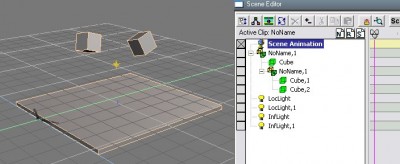
TEST 1
Condition 1
New scene. Started fresh for a simple test. Bridge is off.
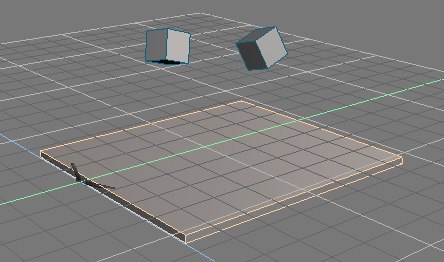
The cubes (cube1, cube2) have "rags" physical properties. The floor (cube) has no physics properties.
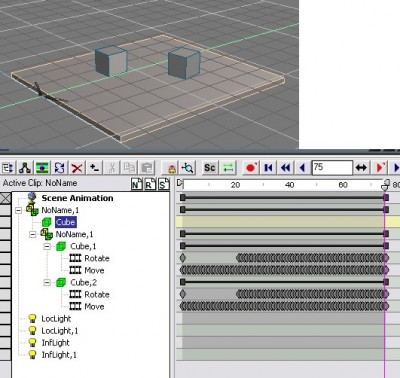
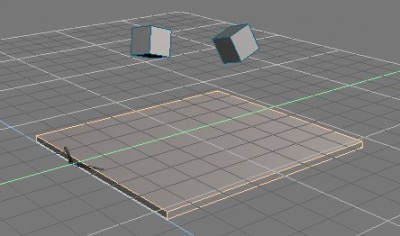
Condition 2
After running the physics simulation the objects have these positions and key frames exist.
Condition 3
After saving the scene the objects go back to the original positions. Scene Editor looks same as in Condition 2.
Condition 4
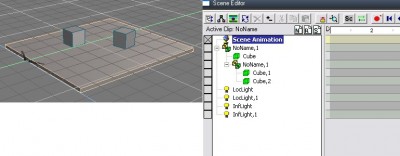
Played animation. Objects animate and stop at final positions.
Deleted physics attributes. At this point no objects have physics.
Deleted all animation. (Select Scene Animation, right click, Delete All Animation, Cascade). At this point no keyframes exist.
There should now be now knowledge of the original positions. Only knowledge of the final positions should exist.
Condition 5
Saved scene. Items did not jump back to the original positions on save. Looks same as condition 4.
Condition 6
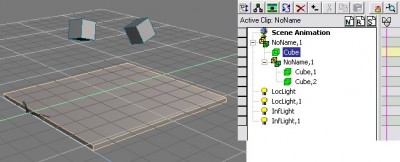
Clicked new scene to clear. Loaded scene. Blocks are back at their original positions!
Clicking physics start simulation or the play icons did nothing. So, not only did the system remember the original positions but it forgot the final ones. Maybe the problem is with the file save.
(continued ...)
Condition 1
New scene. Started fresh for a simple test. Bridge is off.
The cubes (cube1, cube2) have "rags" physical properties. The floor (cube) has no physics properties.
Condition 2
After running the physics simulation the objects have these positions and key frames exist.
Condition 3
After saving the scene the objects go back to the original positions. Scene Editor looks same as in Condition 2.
Condition 4
Played animation. Objects animate and stop at final positions.
Deleted physics attributes. At this point no objects have physics.
Deleted all animation. (Select Scene Animation, right click, Delete All Animation, Cascade). At this point no keyframes exist.
There should now be now knowledge of the original positions. Only knowledge of the final positions should exist.
Condition 5
Saved scene. Items did not jump back to the original positions on save. Looks same as condition 4.
Condition 6
Clicked new scene to clear. Loaded scene. Blocks are back at their original positions!
Clicking physics start simulation or the play icons did nothing. So, not only did the system remember the original positions but it forgot the final ones. Maybe the problem is with the file save.
(continued ...)
- Attachments
-
- Condition 1
-
- Condition 2
-
- Condition 3

Last edited by Finis on 16 Nov 2009, 00:41, edited 1 time in total.
I prefer dangerous freedom over peaceful servitude. -- Thomas Jefferson/Jean Jacques Rousseau
-
Finis
- Captain
- Posts: 5410
- Joined: 21 May 2009, 18:26
- Type the number ten into the box: 0
- Location: America!
Re: Bizarre Physics/Reload Problem
TEST 1 continued.
There is no picture for Condition 5 since it looks like Condition 4.
There is no picture for Condition 5 since it looks like Condition 4.
- Attachments
-
- Condition 4
-
- Condition 6

I prefer dangerous freedom over peaceful servitude. -- Thomas Jefferson/Jean Jacques Rousseau
-
Finis
- Captain
- Posts: 5410
- Joined: 21 May 2009, 18:26
- Type the number ten into the box: 0
- Location: America!
Re: Bizarre Physics/Reload Problem
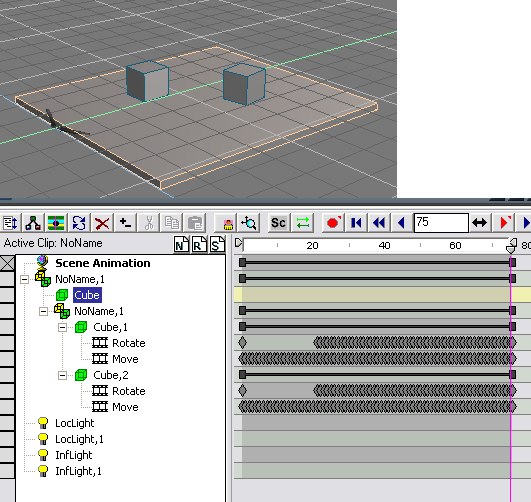
TEST 2, Marcel's method.
Success! So far. I'll try again with the real scene.
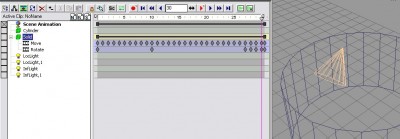
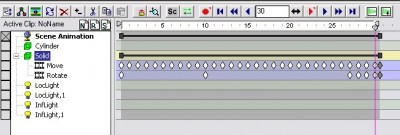
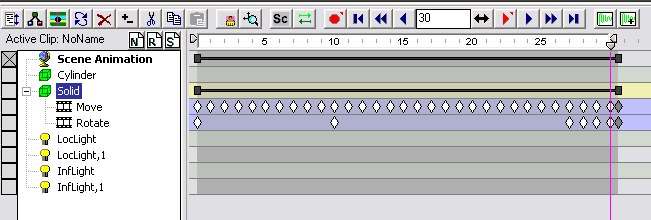
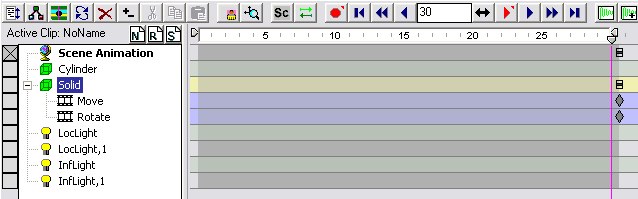
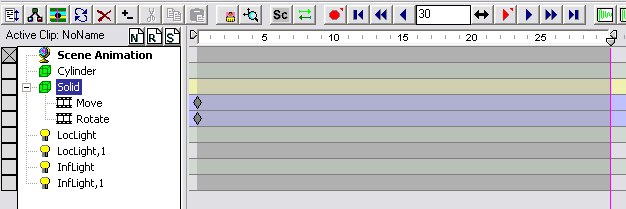
I tried Marcel's method on a simple test scene but I did one thing differently. I clicked and dragged the diamonds in the scene editor to move the keyframes to frame zero. Before I had used the main animation bar (the black bar with black squares next to Scene Animation) to move them all to zero.
Here's an illustration:
part 1: After simulation. Erased physical attributes. Before erasing keyframes.
part 2: Highlighted keyframes to delete.
part 3: Deleted keyframes with the red X button.
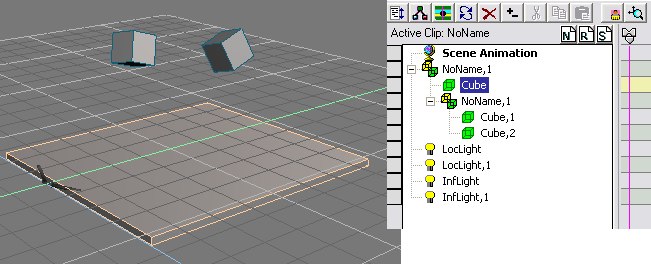
part 4: Click/dragged each diamond to frame zero.
This is pretty close to a "magic" solution since there is no reason to have to do this and no explanation for why other methods of moving the keyframes to zero didn't work.
I should use the workspace physics since that would probably be easier to learn and use that doing all this. There are plenty of mines on model side too. But I don't use physics often. Maybe I'll give in and try workspace next time I need physics.
Success! So far. I'll try again with the real scene.
I tried Marcel's method on a simple test scene but I did one thing differently. I clicked and dragged the diamonds in the scene editor to move the keyframes to frame zero. Before I had used the main animation bar (the black bar with black squares next to Scene Animation) to move them all to zero.
Here's an illustration:
part 1: After simulation. Erased physical attributes. Before erasing keyframes.
part 2: Highlighted keyframes to delete.
part 3: Deleted keyframes with the red X button.
part 4: Click/dragged each diamond to frame zero.
This is pretty close to a "magic" solution since there is no reason to have to do this and no explanation for why other methods of moving the keyframes to zero didn't work.
I should use the workspace physics since that would probably be easier to learn and use that doing all this. There are plenty of mines on model side too. But I don't use physics often. Maybe I'll give in and try workspace next time I need physics.
- Attachments
-
- part 1
-
- part 2
-

- Part 3

Last edited by Finis on 16 Nov 2009, 01:58, edited 4 times in total.
I prefer dangerous freedom over peaceful servitude. -- Thomas Jefferson/Jean Jacques Rousseau
-
Finis
- Captain
- Posts: 5410
- Joined: 21 May 2009, 18:26
- Type the number ten into the box: 0
- Location: America!
Re: Bizarre Physics/Reload Problem
part 4
- Attachments
-
I prefer dangerous freedom over peaceful servitude. -- Thomas Jefferson/Jean Jacques Rousseau
-
marcel
- Captain
- Posts: 2247
- Joined: 21 May 2009, 19:52
- Type the number ten into the box: 0
- Location: paris - France
Re: Bizarre Physics/Reload Problem
The bad way is in test1 is when you delete all animation. this function reset all object to the first position. It is logical. The bug is TS don't refresh the scene on the screen to the initial position and you think all is ok but when you save the scene the initial position is saved. It lack a function like "delete all animation and keep the current frame". It is why we must select manually all the keys and move the last to the position 0.
I do not need to do a tutorial. Your test2 is good. I hope this will be useful for your next scenes.
I do not need to do a tutorial. Your test2 is good. I hope this will be useful for your next scenes.
Design - illustration - Animation
http://www.crea-vision.fr
http://www.crea-vision.fr
-
Benji
- Senior Chief Petty Officer
- Posts: 280
- Joined: 22 May 2009, 01:23
Re: Bizarre Physics/Reload Problem
That's pretty nice to know, well done all. 
I have to say that physics in workspace is excellent, you could probably justify using it around purely for that reason.
I have to say that physics in workspace is excellent, you could probably justify using it around purely for that reason.
-
Finis
- Captain
- Posts: 5410
- Joined: 21 May 2009, 18:26
- Type the number ten into the box: 0
- Location: America!
Re: Bizarre Physics/Reload Problem
Marcel, your thinking on why deleting all animation goes to the first frame is good. That is a reasonable behavior for TS if it displayed it correctly.
I think it is equally reasonable if delete all animation left it at the current frame but that's not what happens. That's the equivalent of a video editor's "still picture from one frame" function.
Being lazy: I'll probably just run the animation before rendering to get the correct frame.
Being lazy: I'll try saving/reloading the object in other formats like obj. I'll also try using deform object or such that like to remove animation (probably goes to first frame like deleting animation).
Benji, Maybe I'll try out the workspace physics. "Don't stubborn yourself out of opportunities" and "give the devil his due" apply here. Like workspace or not if the physics is good then it's good. I've been wanting to try out my Splododyne Explodiatory Explodolator on a better physics system too.
I think it is equally reasonable if delete all animation left it at the current frame but that's not what happens. That's the equivalent of a video editor's "still picture from one frame" function.
Being lazy: I'll probably just run the animation before rendering to get the correct frame.
Being lazy: I'll try saving/reloading the object in other formats like obj. I'll also try using deform object or such that like to remove animation (probably goes to first frame like deleting animation).
Benji, Maybe I'll try out the workspace physics. "Don't stubborn yourself out of opportunities" and "give the devil his due" apply here. Like workspace or not if the physics is good then it's good. I've been wanting to try out my Splododyne Explodiatory Explodolator on a better physics system too.
I prefer dangerous freedom over peaceful servitude. -- Thomas Jefferson/Jean Jacques Rousseau
-
danperk
Re: Bizarre Physics/Reload Problem
Looks like you have this worked out. There is a very easy method to do this:
1. Run you Physics then advance to the frame you want to freeze.
2. Load the Mesh Collapse tsx that is in the tsx folder and click the icon.
3. Click the Decompose into Objects icon.
Done
1. Run you Physics then advance to the frame you want to freeze.
2. Load the Mesh Collapse tsx that is in the tsx folder and click the icon.
3. Click the Decompose into Objects icon.
Done
-
marcel
- Captain
- Posts: 2247
- Joined: 21 May 2009, 19:52
- Type the number ten into the box: 0
- Location: paris - France
Re: Bizarre Physics/Reload Problem
Welcome Danperk.
We can have a lot of method to do the same thing. The method that I explain to Finis can be used for many thing, not only to save a frame from an animation. If you want something more simple, you can also use the scene editor and click on the reverse button, then the last frame you need is displayed each time when you reload the scene and no need to play the anim to do the still image as finis need. In this way keep the anim is not a problem.
We can have a lot of method to do the same thing. The method that I explain to Finis can be used for many thing, not only to save a frame from an animation. If you want something more simple, you can also use the scene editor and click on the reverse button, then the last frame you need is displayed each time when you reload the scene and no need to play the anim to do the still image as finis need. In this way keep the anim is not a problem.
Design - illustration - Animation
http://www.crea-vision.fr
http://www.crea-vision.fr
-
Finis
- Captain
- Posts: 5410
- Joined: 21 May 2009, 18:26
- Type the number ten into the box: 0
- Location: America!
Re: Bizarre Physics/Reload Problem
"We can have a lot of method to do the same thing."
Yes. We can be creative in how we do things as well as what we do.
Yes. We can be creative in how we do things as well as what we do.
I prefer dangerous freedom over peaceful servitude. -- Thomas Jefferson/Jean Jacques Rousseau
-
danperk
Re: Bizarre Physics/Reload Problem
Thanks for the welcome Marcel.....
-
Finis
- Captain
- Posts: 5410
- Joined: 21 May 2009, 18:26
- Type the number ten into the box: 0
- Location: America!
Re: Bizarre Physics/Reload Problem
Thanks for the MeshCollapse method Danperk. That should be easy.
I prefer dangerous freedom over peaceful servitude. -- Thomas Jefferson/Jean Jacques Rousseau
-
Finis
- Captain
- Posts: 5410
- Joined: 21 May 2009, 18:26
- Type the number ten into the box: 0
- Location: America!
Re: Bizarre Physics/Reload Problem
Alright, I tried the physics in workspace. The items fall and pile nicely and quickly. How do I get the animation to model side?
I clicked "Save Anim" in the Physics Engine LE block but no keyframes are saved. At least not where model side can see them.
I clicked "Save Anim" in the Physics Engine LE block but no keyframes are saved. At least not where model side can see them.
I prefer dangerous freedom over peaceful servitude. -- Thomas Jefferson/Jean Jacques Rousseau
-
Finis
- Captain
- Posts: 5410
- Joined: 21 May 2009, 18:26
- Type the number ten into the box: 0
- Location: America!
Re: Bizarre Physics/Reload Problem
I think I've got it now.
I see that the workspace physics still likes to let objects move through other objects.
I see that the workspace physics still likes to let objects move through other objects.
I prefer dangerous freedom over peaceful servitude. -- Thomas Jefferson/Jean Jacques Rousseau