Is there a way to tell my jscript which version of TS i am using. I want to use this to determine which views I can assign a camera.
I would like my jscrip to determine the folder the scene.RSSCN file is in.
Version of Truespace
-
Shell1850
- Chief Petty Officer
- Posts: 135
- Joined: 21 May 2009, 21:44
Version of Truespace
-
froo
- Captain
- Posts: 2554
- Joined: 22 May 2009, 12:13
Re: Version of Truespace
I checked the docs; there appears to be no way, with the SDK, to do that.
Maybe someone else has the answer.
Maybe someone else has the answer.
-
Shell1850
- Chief Petty Officer
- Posts: 135
- Joined: 21 May 2009, 21:44
Re: Version of Truespace
Thanks.
-
trueBlue

- Captain
- Posts: 5548
- Joined: 06 Jul 2009, 22:50
- Type the number ten into the box: 10
Re: Version of Truespace
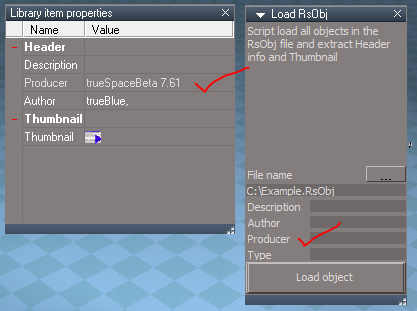
Check out the Load RsObj script in the tS761 Objects - Tutorial Objects.
Producer is the tS version it was created/saved in.
From what your saying it sounds like you do not really need the tS version in order to do what you want.
The views are path dependent inside tS Workspace. In tS761 there is a new command that helps find the WinID.
System.GetMainDir() will get the tS folder where a user installed tS76 and above.
Here is a tS761 script that may help:
Producer is the tS version it was created/saved in.
The views are path dependent inside tS Workspace. In tS761 there is a new command that helps find the WinID.
System.GetMainDir() will get the tS folder where a user installed tS76 and above.
Here is a tS761 script that may help: