hi im trying to draw a metal frame made out of 2" metal box section , i want it to be 8'x4'x2" high .
i can draw a flat box the copy and shrink then boolean substract , is there a way to sweep a cross section into frame , or any other ways ,, I AM A NEWBIE
thanks for any help version 7.61
how do i make a frame
-
automike
- Petty Officer Second Class
- Posts: 22
- Joined: 11 Nov 2009, 19:06
how do i make a frame
-
DarkScythe
- Senior Chief Petty Officer
- Posts: 243
- Joined: 23 Sep 2009, 08:57
Re: how do i make a frame
which side are you working on the workspaceside or modelside,
I can't picture what you mean, can you post a screenshot or images so that we can get a clear picture of it.
BTW welcome to the forum
DS
I can't picture what you mean, can you post a screenshot or images so that we can get a clear picture of it.
BTW welcome to the forum
DS
-
spacekdet

- Captain
- Posts: 1810
- Joined: 27 May 2009, 15:00
- Type the number ten into the box: 10
- Location: On the day shift at the Utility Muffin Research Kitchen
Re: how do i make a frame
Model side:
After boolean subtracting the smaller copy, right click the object.
This puts you into Point Edit mode.
A new toolbar with point editing tools will pop up.
Now select the top face, then click the Sweep icon.
Right click drag to adjust height.
To input exact numerical values, open the Object Info panel by right clicking the Object Tool.
It looks like a cursor pointer.
Type in the size values and press enter.
You could also start with a cube rather than a plane and skip the sweep operation.
Just scale the cube that you use to boolean subtract thicker than the frame cube and it will cut a neat hole right through.
After boolean subtracting the smaller copy, right click the object.
This puts you into Point Edit mode.
A new toolbar with point editing tools will pop up.
Now select the top face, then click the Sweep icon.
Right click drag to adjust height.
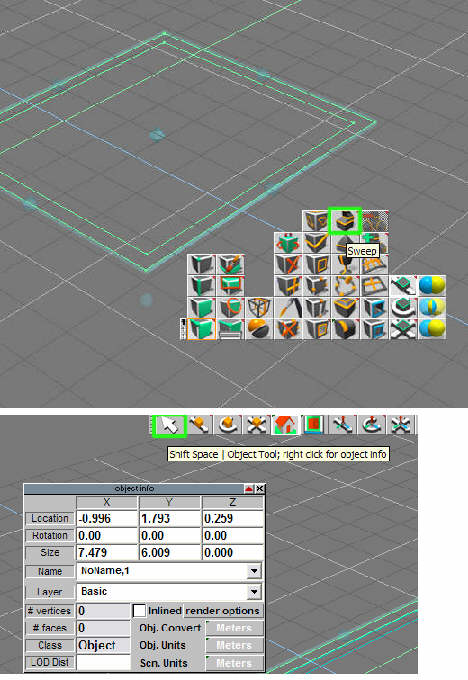
It looks like a cursor pointer.
Type in the size values and press enter.
You could also start with a cube rather than a plane and skip the sweep operation.
Just scale the cube that you use to boolean subtract thicker than the frame cube and it will cut a neat hole right through.
-
automike
- Petty Officer Second Class
- Posts: 22
- Joined: 11 Nov 2009, 19:06
Re: how do i make a frame
thanks for replies ill do a screenshot later as i am at work
thanks to all , it took me ages to find you ive been trying to register in calligri forum i guess its closed , this site looks better
regards mike
thanks to all , it took me ages to find you ive been trying to register in calligri forum i guess its closed , this site looks better
regards mike
-
v3rd3
- Lieutenant Commander
- Posts: 1191
- Joined: 21 May 2009, 20:04
Re: how do i make a frame
well Mike... we are what's left of the Caligari forums so we are glad you found us and hope we can help you with TS.