WIN7 64

Technical questions, etc..
fahembree
Chief Petty Officer
Posts: 108
Joined: 22 May 2009, 02:28

WIN7 64

Post by fahembree »

I have been upgraded to win7 where I work and I experienced the problem that has
been discussed about truespace not updating the screen. Guess what, win 7 does not update when you create new folders until you hit the refresh button (F5). Its not just a truspace problem but a windows 7 bug. :shock:

Im glad that I been upgraded as I know now to stay away from win 7 until there have been some service updates from windows.

Over all I would say I don't like win7!!.
User avatar
marcel
Captain
Posts: 2247
Joined: 21 May 2009, 19:52
Type the number ten into the box: 0
Location: paris - France

Re: WIN7 64

Post by marcel »

I have not win 7 but it seem this problem can be solved. you can find that on forum like that:
http://social.answers.microsoft.com/For ... c1ce3d1ebf
Try different solution. It depend of your hardware/software/setting to find the good one for you.
The problem is not new! More than one year! But that is Microsoft: It expects the user find the solution before taking action.
Design - illustration - Animation
http://www.crea-vision.fr
fahembree
Chief Petty Officer
Posts: 108
Joined: 22 May 2009, 02:28

Re: WIN7 64

Post by fahembree »

Some thoughts on win7
a.New folders do not always show up till you refresh
b. New text documents do not show up till you refresh
c. The important headeadings in window panels such as NAME, DATE, TYPE, SIZE & etc are treated as unimportant headings because the are very faint with small text and the new bar above with Orgainze, open, Print, Burn & New folder
are emphized as the import heading. The important items are now lost.
d. Window panels do not show the full path of the folder you are in so if you are trying to copy from one window panel
to another there is no way to know which window panel is drive "X" and which is Drive"Y". And then aftering coping you will
need to hit F5 to refresh to see id the copy happened.
e. Font menus within the same program now are not consistant sizes anymore, for some it seems you need a magnifying glass to read some and other3 are 3 to 4 times larger.

In general I will wait until windows adds a desktop addin that improves it up to the level that existed in xp. I agree with what I have read, that if you like xp you will hate win7. If you like vista (which I know nothing about) you will probably like win7. Right now if they were giving away free copies I would pass.


e. One more item to add: I created desktop theme and and wanted to save it with the same name and instead of overwriting the old one it created a new one with the same name. So I tried to rename it and there is no rename option :shock: So now I have 2 different desktops with the same names.
Last edited by fahembree on 10 Nov 2010, 15:20, edited 3 times in total.
pugman 1
Captain
Posts: 1555
Joined: 21 May 2009, 19:26
Type the number ten into the box: 0
Location: Germany

Re: WIN7 64

Post by pugman 1 »

I had win 7 ,it is slower than vista.
ts is not good with win 7 but run perfect on vista.
i said before win 7 is a cut down version of vista.
i have vista ultimate 64bit every thing runs just fine .
:bananatyping:
fahembree
Chief Petty Officer
Posts: 108
Joined: 22 May 2009, 02:28

Re: WIN7 64

Post by fahembree »

One more complaint.
I right clicked on the time in the lower right corner where you can set the time/date to see the popup calender so I could see what date it was a week or 2 age ago and opps, there is no calender any more. This was a real convinent item in xp and now its gone. I guess it was replaced by one of those so called gagets.
jamesmc
Captain
Posts: 1776
Joined: 08 Jul 2009, 15:35

Re: WIN7 64

Post by jamesmc »

fahembree wrote:One more complaint.
I right clicked on the time in the lower right corner where you can set the time/date to see the popup calender so I could see what date it was a week or 2 age ago and opps, there is no calender any more. This was a real convinent item in xp and now its gone. I guess it was replaced by one of those so called gagets.
I have this on Win 7 64 bit, is this what you have? For me, it's left click to see the calendar.

Image
Walk by faith, not by sight.
User avatar
marcel
Captain
Posts: 2247
Joined: 21 May 2009, 19:52
Type the number ten into the box: 0
Location: paris - France

Re: WIN7 64

Post by marcel »

8:14:27 ? curious. on my computer i have 12:47:00. Maybe because i have vista...
Design - illustration - Animation
http://www.crea-vision.fr
fahembree
Chief Petty Officer
Posts: 108
Joined: 22 May 2009, 02:28

Re: WIN7 64

Post by fahembree »

jamesmc wrote:
fahembree wrote:One more complaint.
I right clicked on the time in the lower right corner where you can set the time/date to see the popup calender so I could see what date it was a week or 2 age ago and opps, there is no calender any more. This was a real convinent item in xp and now its gone. I guess it was replaced by one of those so called gagets.
I have this on Win 7 64 bit, is this what you have? For me, it's left click to see the calendar.

Image
Thanks, you are right.

Strange how just changing a mouse click from right to left can confuse one.
I know now that I need to try all buttons, left, right and center to see
if they do anything.

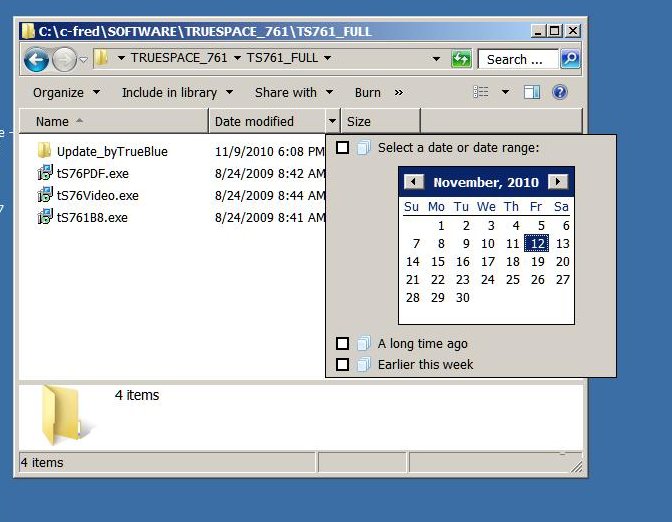
I was using the drop down tab on the date modified. See image.
Attachments
date-time-LR.jpg

Return to “TechForum”