Hi all
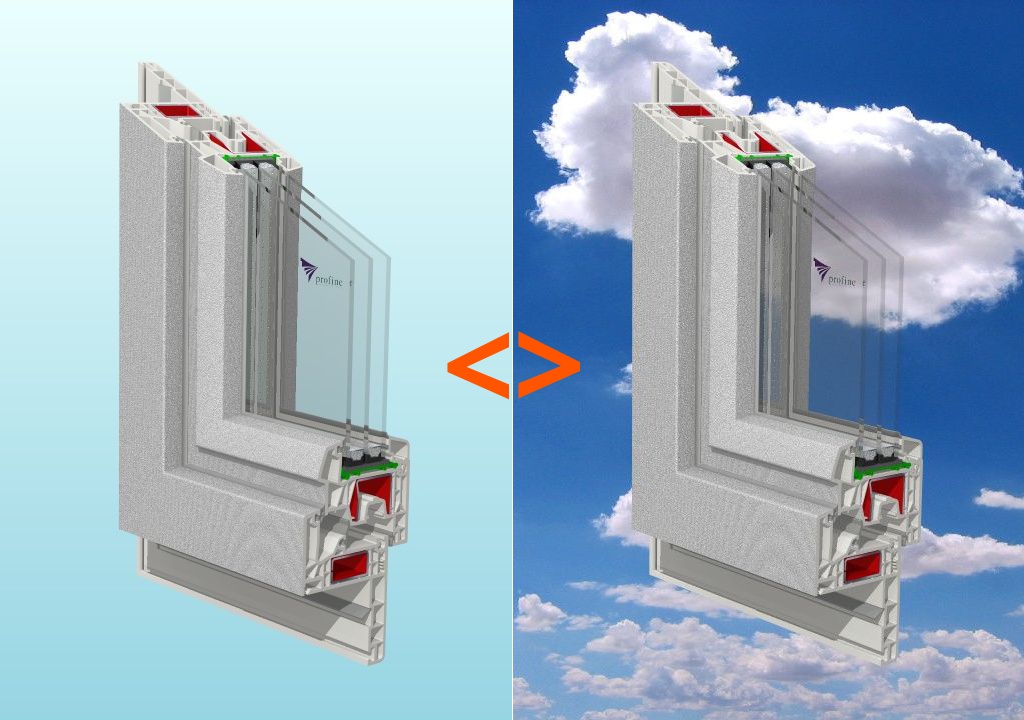
Is it possible to change background in post processing without re-render scenes with glasses on it?
Change backgrounds in post processing
-
the_ant

- Chief Petty Officer
- Posts: 155
- Joined: 02 Jun 2009, 09:26
- Type the number ten into the box: 0
- Location: Perugia - Italy
Change backgrounds in post processing
- Attachments
-
-
Draise

- Captain
- Posts: 3200
- Joined: 21 Sep 2009, 19:33
- Type the number ten into the box: 0
- Location: Bogota, Colombia
Re: Change backgrounds in post processing
Yeah. Render your background with alpha. Or with a solid 255 blue or green or red. In blender, fusion or natron you can use a keyer/matte node that can take that color, shifts it to alpha then you can put any background in behind.
-
the_ant
- Chief Petty Officer
- Posts: 155
- Joined: 02 Jun 2009, 09:26
- Type the number ten into the box: 0
- Location: Perugia - Italy
Re: Change backgrounds in post processing
Hi Draise ...Thanks a lot for your answer... 
...but i want to do that in tS 761b8 mSide..is it possible? and is there in the web any tutorial about this?
...but i want to do that in tS 761b8 mSide..is it possible? and is there in the web any tutorial about this?
-
bitkar

- Captain
- Posts: 2089
- Joined: 16 Mar 2010, 07:14
- Type the number ten into the box: 0
- Location: Czech Republic
Re: Change backgrounds in post processing
in modelside it iis possible with lightworks renderer - just render it as PSD file and check the mask option. It should make a photoshop file with mask. You can now add a background layer to have background.
Michal aka bitkar
tS freak since tS2 (1998) and forever (tS7.61 modeler)
tS freak since tS2 (1998) and forever (tS7.61 modeler)
-
clintonman

- Captain
- Posts: 5659
- Joined: 21 May 2009, 21:08
- Type the number ten into the box: 0
- Location: California
Re: Change backgrounds in post processing
Two tutorials that use the render to photoshop feature of truespace:
3d for illustrators:
http://clintons3d.com/tutorials/truespa ... rs.asp.htm"
multipass rendering:
http://clintons3d.com/tutorials/truespa ... ss.asp.htm"
list of downloadable courses
vi ... =19&t=4960"
some more links:
http://kabrite.com/truespace/?page_id=16"
3d for illustrators:
http://clintons3d.com/tutorials/truespa ... rs.asp.htm"
multipass rendering:
http://clintons3d.com/tutorials/truespa ... ss.asp.htm"
list of downloadable courses
vi ... =19&t=4960"
some more links:
http://kabrite.com/truespace/?page_id=16"
-
the_ant
- Chief Petty Officer
- Posts: 155
- Joined: 02 Jun 2009, 09:26
- Type the number ten into the box: 0
- Location: Perugia - Italy
Re: Change backgrounds in post processing
O.M.G. you're all so fast with solutions....
-
the_ant
- Chief Petty Officer
- Posts: 155
- Joined: 02 Jun 2009, 09:26
- Type the number ten into the box: 0
- Location: Perugia - Italy
Re: Change backgrounds in post processing
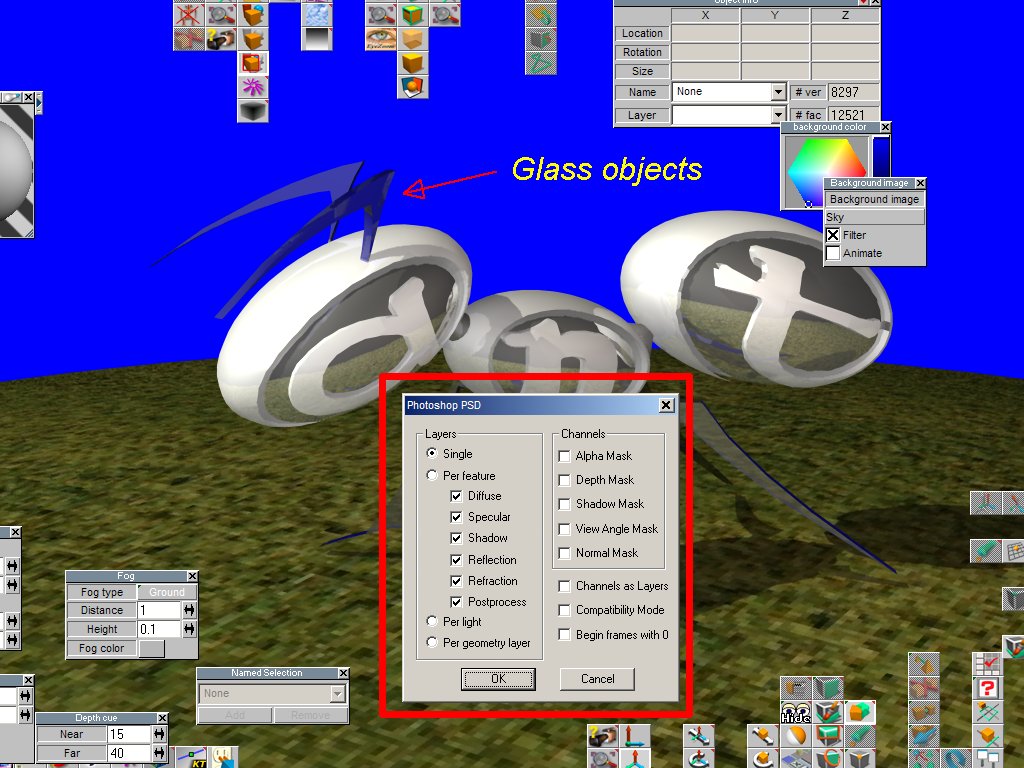
Cuold someone help me about PSD options?
Masks and Layers options are so numerous...
PS. I couldn't use PhShop but i got a great collection of free software like Gimp and so on...
Sorry to bother you...but i'm "little" confused at my first time PSD multilayer file rendering

Masks and Layers options are so numerous...
PS. I couldn't use PhShop but i got a great collection of free software like Gimp and so on...
Sorry to bother you...but i'm "little" confused at my first time PSD multilayer file rendering
- Attachments
-
-
Draise
- Captain
- Posts: 3200
- Joined: 21 Sep 2009, 19:33
- Type the number ten into the box: 0
- Location: Bogota, Colombia
Re: Change backgrounds in post processing
Single with Alpha Mask checked would do it I think.
-
clintonman
- Captain
- Posts: 5659
- Joined: 21 May 2009, 21:08
- Type the number ten into the box: 0
- Location: California
Re: Change backgrounds in post processing
In that case try rendering as 32 bit png or tga files. I think that's the most direct answer to your original question.
-
Draise
- Captain
- Posts: 3200
- Joined: 21 Sep 2009, 19:33
- Type the number ten into the box: 0
- Location: Bogota, Colombia
Re: Change backgrounds in post processing
I like PNG's, compresses better than TGA's. But Single with Mask to a PNG would yeah, work great.
Krita (free) opens PSD's with no issue preserving layers. So yo ucan render out into PSD's too.
Krita (free) opens PSD's with no issue preserving layers. So yo ucan render out into PSD's too.
-
bitkar
- Captain
- Posts: 2089
- Joined: 16 Mar 2010, 07:14
- Type the number ten into the box: 0
- Location: Czech Republic
Re: Change backgrounds in post processing
sooo many options... clinton is right... just render it as 32 bit PNG, its maybe easier, then load it into PS and add your background.
Michal aka bitkar
tS freak since tS2 (1998) and forever (tS7.61 modeler)
tS freak since tS2 (1998) and forever (tS7.61 modeler)
-
the_ant
- Chief Petty Officer
- Posts: 155
- Joined: 02 Jun 2009, 09:26
- Type the number ten into the box: 0
- Location: Perugia - Italy
Re: Change backgrounds in post processing
Thank you all!!!!
i'll post the result of your help as soon as possible!!!!

i'll post the result of your help as soon as possible!!!!
-
the_ant
- Chief Petty Officer
- Posts: 155
- Joined: 02 Jun 2009, 09:26
- Type the number ten into the box: 0
- Location: Perugia - Italy
Re: Change backgrounds in post processing
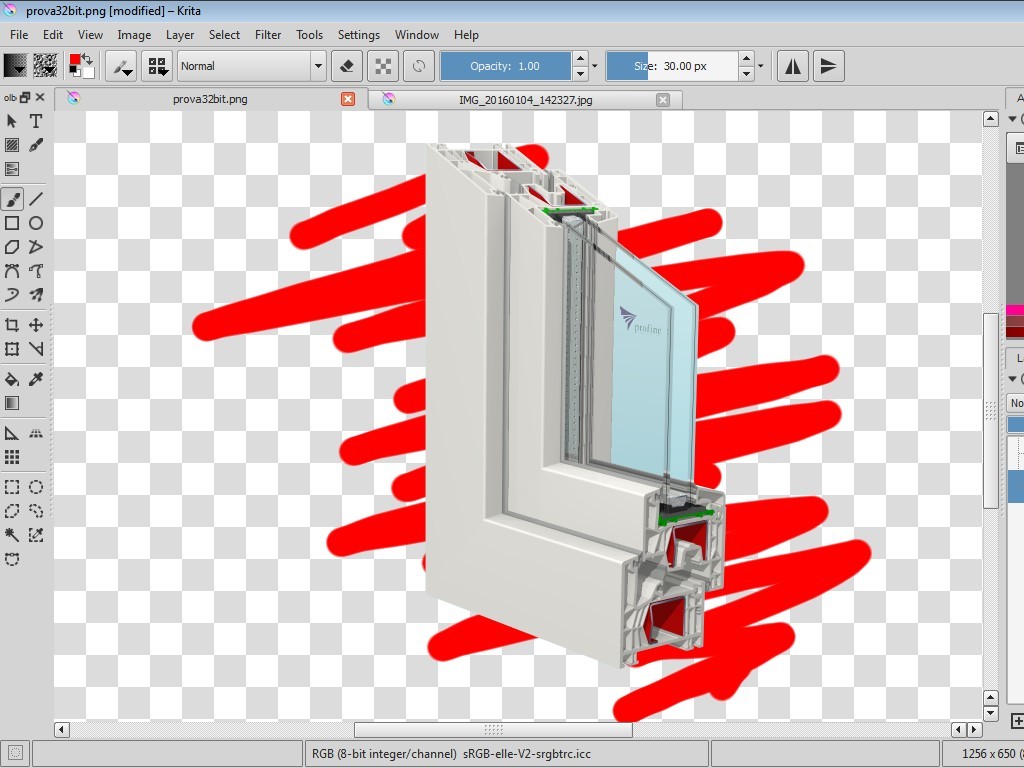
i tried 32bit .png solution...but it seems to be wrong way...(see transparency of glasses)
- Attachments
-
-
clintonman
- Captain
- Posts: 5659
- Joined: 21 May 2009, 21:08
- Type the number ten into the box: 0
- Location: California
Re: Change backgrounds in post processing
Check that you have raycast and raytracing enabled. You need both for transparency.
-
bitkar
- Captain
- Posts: 2089
- Joined: 16 Mar 2010, 07:14
- Type the number ten into the box: 0
- Location: Czech Republic
Re: Change backgrounds in post processing
and it works only for Lightworks, not Vray I think (not sure). If this wouldnt work maybe try to render to PSD and use the transparency channel.
Michal aka bitkar
tS freak since tS2 (1998) and forever (tS7.61 modeler)
tS freak since tS2 (1998) and forever (tS7.61 modeler)
-
the_ant
- Chief Petty Officer
- Posts: 155
- Joined: 02 Jun 2009, 09:26
- Type the number ten into the box: 0
- Location: Perugia - Italy
Re: Change backgrounds in post processing
Hi all,
i must probably surrender to do this, (due to my learn limits too?)
i tried with your hints about... but always had wrong results.
Both raytracing and raycast "on" and "32bit png" fails to render a changeble background in post-pro
rear transparent objects like glass.
Same results with alpha set "on" in psd files.
Probably i need a tSp step by step tutorial but unobtainable on the web (actually).
Anyway ...thank you all to play attention about my questions and for your very quick answering.
You're all so special ...like this mighty forum!
Love so much tSp..its resources and its beautiful interface!
See you soon from Italy!
i must probably surrender to do this, (due to my learn limits too?)
i tried with your hints about... but always had wrong results.
Both raytracing and raycast "on" and "32bit png" fails to render a changeble background in post-pro
rear transparent objects like glass.
Same results with alpha set "on" in psd files.
Probably i need a tSp step by step tutorial but unobtainable on the web (actually).
Anyway ...thank you all to play attention about my questions and for your very quick answering.
You're all so special ...like this mighty forum!
Love so much tSp..its resources and its beautiful interface!
See you soon from Italy!
-
Draise
- Captain
- Posts: 3200
- Joined: 21 Sep 2009, 19:33
- Type the number ten into the box: 0
- Location: Bogota, Colombia
Re: Change backgrounds in post processing
I gave it a shot myself. Yeah, you are right, in the PNG and PSD the alpha mask data does not account for the transparency of a shader.
And you cannot set the background color or image to anything with an alpha channel.
You can only put in a solid color.
Which means it's compllicated:
Use a color channel to drive a greyscale alpha mask in the post processed image. I do not know how to do this in photoshop or any layered system - but with nodes it's prettty easy.. but you'd need to be comfortable with postprocessing with a node based compositing system.
Sorry about the "not so simple" system.
Let me know if you need me to show you how to do it in Blender, Natron or Fusion 7 or something (all free node based compositing software).
And you cannot set the background color or image to anything with an alpha channel.
You can only put in a solid color.
Which means it's compllicated:
Use a color channel to drive a greyscale alpha mask in the post processed image. I do not know how to do this in photoshop or any layered system - but with nodes it's prettty easy.. but you'd need to be comfortable with postprocessing with a node based compositing system.
Sorry about the "not so simple" system.
Let me know if you need me to show you how to do it in Blender, Natron or Fusion 7 or something (all free node based compositing software).
-
the_ant
- Chief Petty Officer
- Posts: 155
- Joined: 02 Jun 2009, 09:26
- Type the number ten into the box: 0
- Location: Perugia - Italy
Re: Change backgrounds in post processing
Thank you Draise
Have some hints in Blander could be fine (it will be a future challange in 3d software for me)..
..but i'm impressed/beloved (and don't want to leave) the capability of tSp to import "layered-3d-dxf (ascii r12)" files from Autocad-like programs (i'm an intellicad CMS 6.6 owner) i use for modelling (extrude-sweep-bool_opt) 2d polylines or regions.
So if you want ... i'll stay tuned in for yours "lectio magistralis"
P.S. I'm little weak in render Ambient Occlusion with Lightworks tSp 761 sp8 modelside...have you some hints about?
Thank you very very much..
Have some hints in Blander could be fine (it will be a future challange in 3d software for me)..
..but i'm impressed/beloved (and don't want to leave) the capability of tSp to import "layered-3d-dxf (ascii r12)" files from Autocad-like programs (i'm an intellicad CMS 6.6 owner) i use for modelling (extrude-sweep-bool_opt) 2d polylines or regions.
So if you want ... i'll stay tuned in for yours "lectio magistralis"
P.S. I'm little weak in render Ambient Occlusion with Lightworks tSp 761 sp8 modelside...have you some hints about?
Thank you very very much..
-
cthulhu
- Seaman
- Posts: 7
- Joined: 07 Sep 2015, 08:48
- Type the number ten into the box: 10
Re: Change backgrounds in post processing
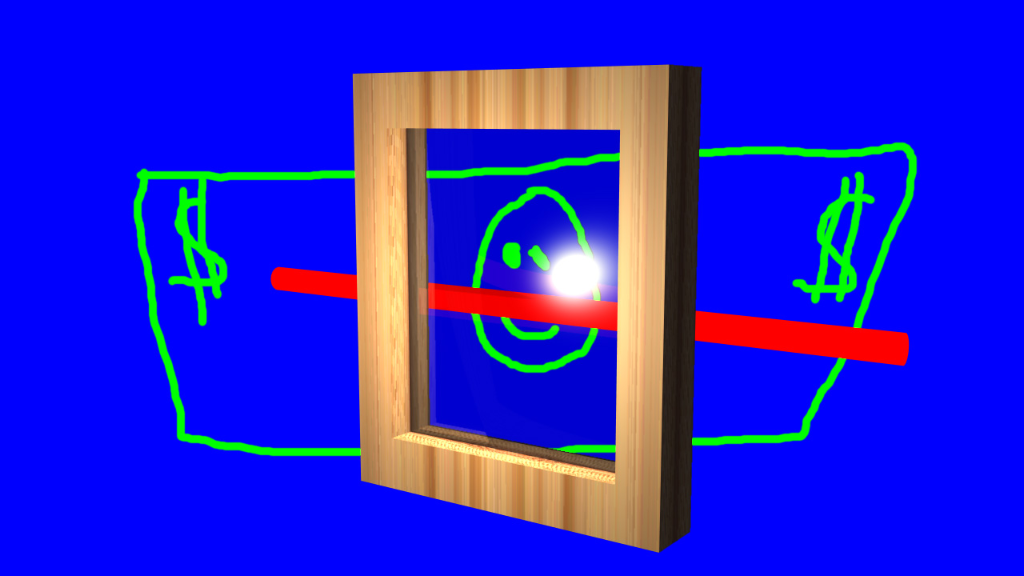
Attached is an example scene and output: Photoshop PSD (made in Paint Shop Pro) and TGA (32-bit uncompressed from trueSpace 7.5).
The shader for the glass is dual layer. Layer 1 has full transparency and layer 2 has glass with overdriven values for specular, mirror, etc. so that it shows up over the transparent layer.
Rendering to 32-bit uncompressed TGA, you can then load in a paint program, create a new layer, set the layer blending mode to Light, load a selection from the alpha channel, invert the selection, then paint/fill in the "background" with whatever.
Examples images:
The shader for the glass is dual layer. Layer 1 has full transparency and layer 2 has glass with overdriven values for specular, mirror, etc. so that it shows up over the transparent layer.
Rendering to 32-bit uncompressed TGA, you can then load in a paint program, create a new layer, set the layer blending mode to Light, load a selection from the alpha channel, invert the selection, then paint/fill in the "background" with whatever.
Examples images:

-
the_ant
- Chief Petty Officer
- Posts: 155
- Joined: 02 Jun 2009, 09:26
- Type the number ten into the box: 0
- Location: Perugia - Italy
Re: Change backgrounds in post processing
O.M.G. ..Amazing "cthulhu"
Thaaaaaaanks so much!!!
Immediately downloaded to explore your material...
so i'll apply your hints in my future scenes with glasses!!
Thaaaaaaanks so much!!!
Immediately downloaded to explore your material...
so i'll apply your hints in my future scenes with glasses!!
-
the_ant
- Chief Petty Officer
- Posts: 155
- Joined: 02 Jun 2009, 09:26
- Type the number ten into the box: 0
- Location: Perugia - Italy
Re: Change backgrounds in post processing


- Attachments
-
