This is a very good site on using some of those applications out there....(best site for Vue tutorials)
These 4 files show my workflow pretty well if i am doing animation and not stills.
Note that you can alternativly use Daz studio too and all the plugs like animate plus or animeeple.
You can setup your files and any characters so that they animate in Poser and Daz (setup room )
Vue is not just only a landscape software !
http://www.geekatplay.com/tutorials/area51/klank1/"
http://www.geekatplay.com/tutorials/area51/klank2/"
http://www.geekatplay.com/flvplayer/pla ... edazstudio"
http://www.geekatplay.com/tutorials/echocity/"
Workflow.......
-
RAYMAN

- Captain
- Posts: 2547
- Joined: 21 May 2009, 18:56
Workflow.......
-
RAYMAN
- Captain
- Posts: 2547
- Joined: 21 May 2009, 18:56
Re: Workflow.......
How does Truespace 7.61 fit into that workflow ?
Well a) it exports to Collada and you can import physical simulations into Vue just like
you would do with Daz studio...
b) you can export sequences with Froos exporter and even import the steerable shark into underwater scenes.....
But it would be cool to have full Collada also with morphs same as Daz studio 3
Why does it work with daz and not Truespace ?
Its easier to move animations out of truespace and use instancing the moving athmosphere into Truespace the other way round !
You can even import fluid simulations from Blender with obj sequences and a plug...
If you´d start to make plugins to do all that for Ts Workspace you´d start to make everything from dynamic hair to volumetric lighting for workspace
and layered material and and and a very long list...(i dont think it will happen)
Well a) it exports to Collada and you can import physical simulations into Vue just like
you would do with Daz studio...
b) you can export sequences with Froos exporter and even import the steerable shark into underwater scenes.....
But it would be cool to have full Collada also with morphs same as Daz studio 3
Why does it work with daz and not Truespace ?
Its easier to move animations out of truespace and use instancing the moving athmosphere into Truespace the other way round !
You can even import fluid simulations from Blender with obj sequences and a plug...
If you´d start to make plugins to do all that for Ts Workspace you´d start to make everything from dynamic hair to volumetric lighting for workspace
and layered material and and and a very long list...(i dont think it will happen)
-
Karthogen
- Master Chief Petty Officer
- Posts: 454
- Joined: 03 Jun 2009, 14:12
Re: Workflow.......
Can the TS model be exported to DAx through collada? give the morph, and poses then pulled to vue?
-
RAYMAN
- Captain
- Posts: 2547
- Joined: 21 May 2009, 18:56
Re: Workflow.......
You can go to Daz studio via the settup tool.
So yes you can model in Truespace or any package.
You can also use Poser to do that.
You model a character In Truespace import it into the setup room and doublle click on another character
with a simlar body and transfer the full bones rig and adjust it to the body that you made.
You then group your bones to the surface and voila you got a character that works both in Poser and Daz studio.
Here is a very short step by step with the setup tool !
http://forum.daz3d.com/viewtopic.php?t=98085"
Up to date I have never seen a detailed character with toes and fingers that was made in Ts on the forums
so setting up characters in general isnt that easy.
I would suggest if you dont do a comic character and go for a realistic body use the uni meshes and character setups that
are there and adjust it through morph tagets !!!
Programs like 3d Coat for painting let you make a NON poser look pretty easily....
You can do facial animation very easily and things like lip synch.
Facial animator is on the other side of the bridge and only works with one character ....
Lots of things to consider...
So yes you can model in Truespace or any package.
You can also use Poser to do that.
You model a character In Truespace import it into the setup room and doublle click on another character
with a simlar body and transfer the full bones rig and adjust it to the body that you made.
You then group your bones to the surface and voila you got a character that works both in Poser and Daz studio.
Here is a very short step by step with the setup tool !
http://forum.daz3d.com/viewtopic.php?t=98085"
Up to date I have never seen a detailed character with toes and fingers that was made in Ts on the forums
so setting up characters in general isnt that easy.
I would suggest if you dont do a comic character and go for a realistic body use the uni meshes and character setups that
are there and adjust it through morph tagets !!!
Programs like 3d Coat for painting let you make a NON poser look pretty easily....
You can do facial animation very easily and things like lip synch.
Facial animator is on the other side of the bridge and only works with one character ....
Lots of things to consider...
-
RAYMAN
- Captain
- Posts: 2547
- Joined: 21 May 2009, 18:56
Re: Workflow.......
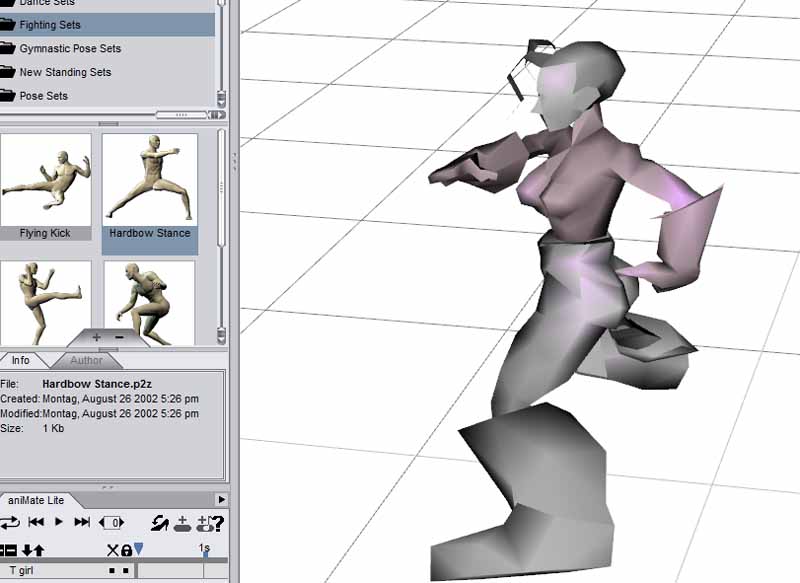
Here is Tankgirl with no textures inside Daz Studio 3 but with a Poser 5 pose...
So you can mix Truespace and Daz-Poser workflow
So you can mix Truespace and Daz-Poser workflow
- Attachments
-
-
RAYMAN
- Captain
- Posts: 2547
- Joined: 21 May 2009, 18:56
Re: Workflow.......
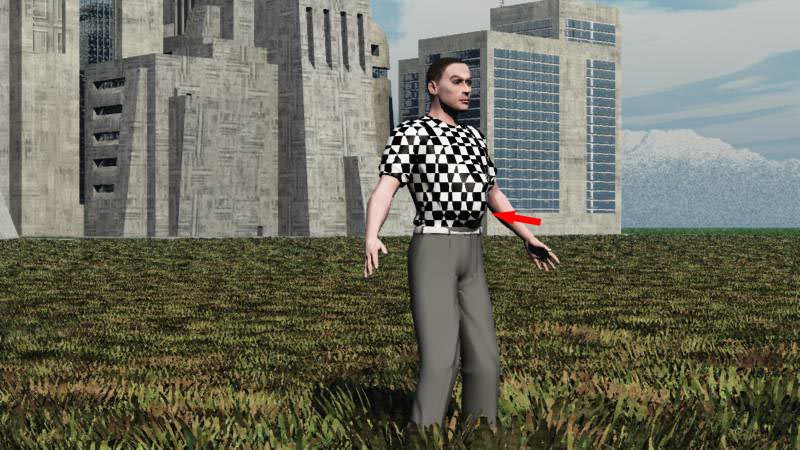
I made this render for Fostman to show that you can use Poser or Daz base figures as primitives
and export parts for parts and model your morph targets and load them one by one back and make completly new figures step by step....
You can use truespace or any other modelern including zbrush.
Only one limitation you cant change the polycount order and polycount !!!!
if you need more detail use the basic mesh and ad the detail with a map (displacement)
If you want a different topology you can make your own primitive and set that up.
Same thing aplys for it you can morph it as you wish !
As an exmaple here I simply made a morph for the belly.
The sky is basicaly the limit !
and export parts for parts and model your morph targets and load them one by one back and make completly new figures step by step....
You can use truespace or any other modelern including zbrush.
Only one limitation you cant change the polycount order and polycount !!!!
if you need more detail use the basic mesh and ad the detail with a map (displacement)
If you want a different topology you can make your own primitive and set that up.
Same thing aplys for it you can morph it as you wish !
As an exmaple here I simply made a morph for the belly.
The sky is basicaly the limit !
- Attachments
-
-
RAYMAN
- Captain
- Posts: 2547
- Joined: 21 May 2009, 18:56
Re: Workflow.......
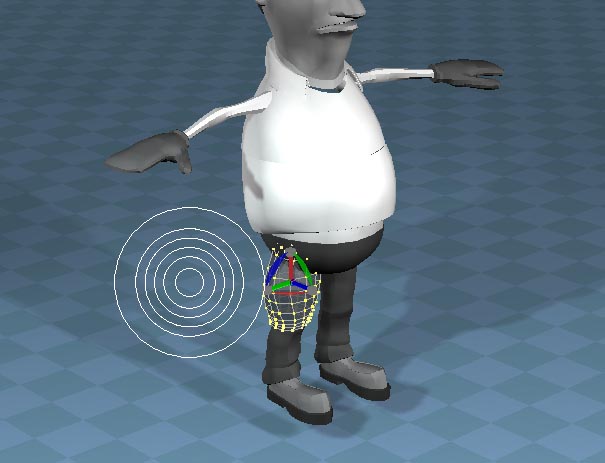
Use the sorftselection tools they work best for this technique...
- Attachments
-
-
RAYMAN
- Captain
- Posts: 2547
- Joined: 21 May 2009, 18:56
Re: Workflow.......
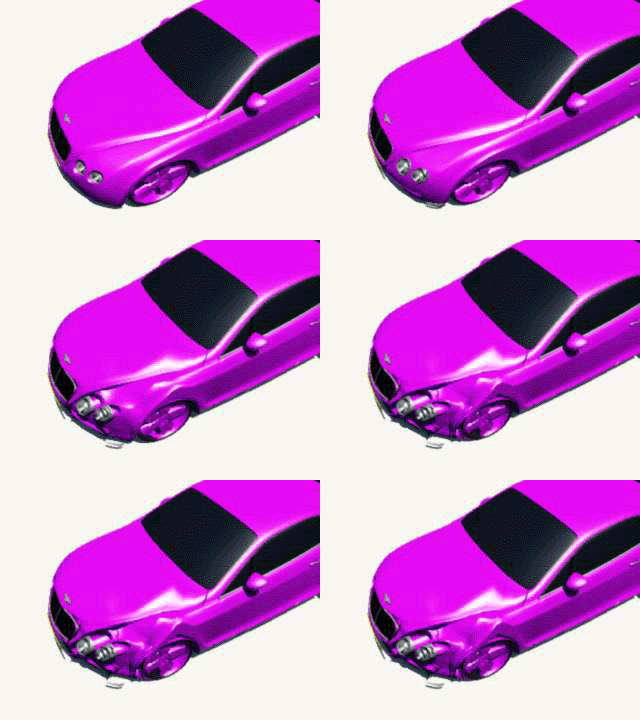
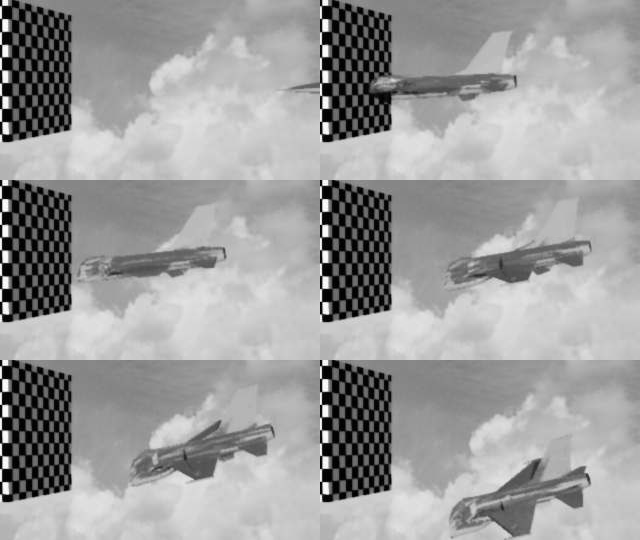
morphing that way can be used on anything including the Bentleys model from the Truespace library.......
You just use soft selection tool !
This animation was done with the Poser morph
your are not limited to people !
was rendered with Vue....
You just use soft selection tool !
This animation was done with the Poser morph
your are not limited to people !
was rendered with Vue....
- Attachments
-
- Bentleycrash.gif (122.93 KiB) Viewed 6022 times
-
RAYMAN
- Captain
- Posts: 2547
- Joined: 21 May 2009, 18:56
Re: Workflow.......
another animation with workflow using poser-morph and Vue import
- Attachments
-
- f16-crashsim.gif (205.8 KiB) Viewed 6001 times
-
3dvisuals dude

- Chief Warrant Officer
- Posts: 643
- Joined: 03 Jun 2009, 02:53
- Type the number ten into the box: 0
Re: Workflow.......
You know Peter..... I had been resisting Daz products for years now, but with your general use of Studio 3 in your pipeline I caved in and installed it, lol.
I have Poser 4 and Vue 4, so I am familiar with the routine on using it, although there are some nice features in Studio 3 that I am just getting aquainted with.
As a tribute to you getting me involved with it, I made you a picture just now with Vue 4 and a model whipped up in Studio 3. I forgot what it was like to make 3D scenes without modeling them from scratch! Hahahahaha!!!
(Click for full size image)
I have Poser 4 and Vue 4, so I am familiar with the routine on using it, although there are some nice features in Studio 3 that I am just getting aquainted with.
As a tribute to you getting me involved with it, I made you a picture just now with Vue 4 and a model whipped up in Studio 3. I forgot what it was like to make 3D scenes without modeling them from scratch! Hahahahaha!!!
(Click for full size image)

-
RAYMAN
- Captain
- Posts: 2547
- Joined: 21 May 2009, 18:56
Re: Workflow.......
Great pic Mark !
The idea behind the thread is that you can also create by yourself !
Its theworkflow of getting animations into full enviroments incuding athmosphere.
Peter
The idea behind the thread is that you can also create by yourself !
Its theworkflow of getting animations into full enviroments incuding athmosphere.
Peter
-
3dvisuals dude
- Chief Warrant Officer
- Posts: 643
- Joined: 03 Jun 2009, 02:53
- Type the number ten into the box: 0
Re: Workflow.......
The boxed Vue d'Esprit4 package i got was on ebay unfortunately... turns out it was already Registered, so I can't upgrade it to Infinite. As such, I cannot save or export objects in any format other than Vue 4 Proprietary Format, importing is no problem but not being able to export is a severe handicap for me in Vue4.RAYMAN wrote:Great pic Mark !
The idea behind the thread is that you can also create by yourself !
Its theworkflow of getting animations into full enviroments incuding athmosphere.
Peter
Sorry I got off topic there, yes I do like this thread and your workflow is very informative and helpful, thanks!

-
tylerzambori
- Senior Chief Petty Officer
- Posts: 170
- Joined: 06 Aug 2009, 23:02
Re: Workflow.......
I've been reading some old threads by JHowell about using Daz Studio
and Truespace together. This animate plus plugin looks very interesting.
I think this could be a really good combination!
I like the way you can buy the plugins (er, modules?) as you
see the need to. Finally, simplicity + power, we hope.
Did you see those water shaders?
and Truespace together. This animate plus plugin looks very interesting.
I think this could be a really good combination!
I like the way you can buy the plugins (er, modules?) as you
see the need to. Finally, simplicity + power, we hope.
Did you see those water shaders?
Last edited by tylerzambori on 10 Sep 2009, 05:27, edited 1 time in total.
-
tylerzambori
- Senior Chief Petty Officer
- Posts: 170
- Joined: 06 Aug 2009, 23:02
Re: Workflow.......
Is that a nun with big boobs, or maybe an ancient celtic Goddess3dvisuals dude wrote:You know Peter..... I had been resisting Daz products for years now, but with your general use of Studio 3 in your pipeline I caved in and installed it, lol.
I have Poser 4 and Vue 4, so I am familiar with the routine on using it, although there are some nice features in Studio 3 that I am just getting aquainted with.
As a tribute to you getting me involved with it, I made you a picture just now with Vue 4 and a model whipped up in Studio 3. I forgot what it was like to make 3D scenes without modeling them from scratch! Hahahahaha!!!
(Click for full size image)
rendered in a stone mosaic?
It is really very nice.
-
Fostman2
- Petty Officer Third Class
- Posts: 10
- Joined: 10 Sep 2009, 07:59
Re: Workflow.......
Back again and moved from Ts forum, giving DAZ a try. It looks good. Some things to see if DAZ is right for me. I don't need detailed answers; only if things are possible or not.
1- The new Daz v3 can import dae files. So I don't need Collada for this anymore? Although the skeleton doesn't look right. The imported skeleton is put outside the character as coloured crosses. But I could redo the skeleton in Daz.
2- Can Daz handle multiple arms (6)? It looks like Daz is designed for humanly shapes and not for the weird stuff.
3- Can I sync music and movement in Daz? This is very important to me.
Leo
1- The new Daz v3 can import dae files. So I don't need Collada for this anymore? Although the skeleton doesn't look right. The imported skeleton is put outside the character as coloured crosses. But I could redo the skeleton in Daz.
2- Can Daz handle multiple arms (6)? It looks like Daz is designed for humanly shapes and not for the weird stuff.
3- Can I sync music and movement in Daz? This is very important to me.
Leo
-
RAYMAN
- Captain
- Posts: 2547
- Joined: 21 May 2009, 18:56
Re: Workflow.......
Daz is created for anything from fish (using morphs for bodymovements) to multipeds.
To setup skeletons in Daz you need the setup tool ( costs a few dollars and is a special now) which isnt included or you setup the character in posers setup room
which also works. that can have hundreds of feet but it will be a problem of your patience rather then the program.
Daz works with music but only with wav files. But there are tons of converters to wav.
under the menu audio you can ad the audio file to your animation and when you scrub in the timeline you can
hear the audio file scrub. when you record a motion with the puppeteer panel you can animate a figure in realtime with the music playing.
you can also do automatic lypsincing like singing.
I have seen a few music videos made at the daz forum.
If you ad the plugin animate plus you can even tweak the audio timeline and the animation bricks which is pretty advanced for what it costs
but you can do quite well with only the free studio.
I suggested the Vue program as a host for the animations as this can set up scenes as large as with no other software at that price.
Please look at and read the whole thread and also look at the siggraph video from the 50% Vue studio thread.
To setup skeletons in Daz you need the setup tool ( costs a few dollars and is a special now) which isnt included or you setup the character in posers setup room
which also works. that can have hundreds of feet but it will be a problem of your patience rather then the program.
Daz works with music but only with wav files. But there are tons of converters to wav.
under the menu audio you can ad the audio file to your animation and when you scrub in the timeline you can
hear the audio file scrub. when you record a motion with the puppeteer panel you can animate a figure in realtime with the music playing.
you can also do automatic lypsincing like singing.
I have seen a few music videos made at the daz forum.
If you ad the plugin animate plus you can even tweak the audio timeline and the animation bricks which is pretty advanced for what it costs
but you can do quite well with only the free studio.
I suggested the Vue program as a host for the animations as this can set up scenes as large as with no other software at that price.
Please look at and read the whole thread and also look at the siggraph video from the 50% Vue studio thread.
- Attachments
-

-
Fostman2
- Petty Officer Third Class
- Posts: 10
- Joined: 10 Sep 2009, 07:59
Re: Workflow.......
Found the setup plugin. Will buy it.
Wav files are perfect. And I can convert it to anything. With music I am more familiar.
Scrubbing the timeline with music plus animation is exactly what I need.
Also can use the Puppeteer. Exact sync is very hard, but can fine tune afterwards.
And the lipsync looks perfect.
Not sure about Vue, but decide for the 15th. Probably I don't need it.
It looks like Daz is the missing part for I want. Thanks.
Wav files are perfect. And I can convert it to anything. With music I am more familiar.
Scrubbing the timeline with music plus animation is exactly what I need.
Also can use the Puppeteer. Exact sync is very hard, but can fine tune afterwards.
And the lipsync looks perfect.
Not sure about Vue, but decide for the 15th. Probably I don't need it.
It looks like Daz is the missing part for I want. Thanks.
-
RAYMAN
- Captain
- Posts: 2547
- Joined: 21 May 2009, 18:56
Re: Workflow.......
I made this with both the free Daz and the free vue7 PLE version that you can test and it shows how ou can rig
any kind of object with lots of arms with sound by using the pupeeteer and transfer it to the other application .
It works...
any kind of object with lots of arms with sound by using the pupeeteer and transfer it to the other application .
It works...
- Attachments
-
- heli supersm.zip
- (4.03 MiB) Downloaded 218 times
-
Fostman2
- Petty Officer Third Class
- Posts: 10
- Joined: 10 Sep 2009, 07:59
Re: Workflow.......
Alright, you convinced me. But not for Vue. It is probably good, but I stop spending money. And I don't want a logo in my finished work.
-
RAYMAN
- Captain
- Posts: 2547
- Joined: 21 May 2009, 18:56
Re: Workflow.......
Fostman this is a free version of it to test as i pointed out you can use it to evaluate your needs and if you like or dislike to use
it. The logo is in there because otherwise noone would buy it just use the free version.
I rather test thing and see if they fit rather then buy the cat in the sack
it. The logo is in there because otherwise noone would buy it just use the free version.
I rather test thing and see if they fit rather then buy the cat in the sack
-
RAYMAN
- Captain
- Posts: 2547
- Joined: 21 May 2009, 18:56
Re: Workflow.......
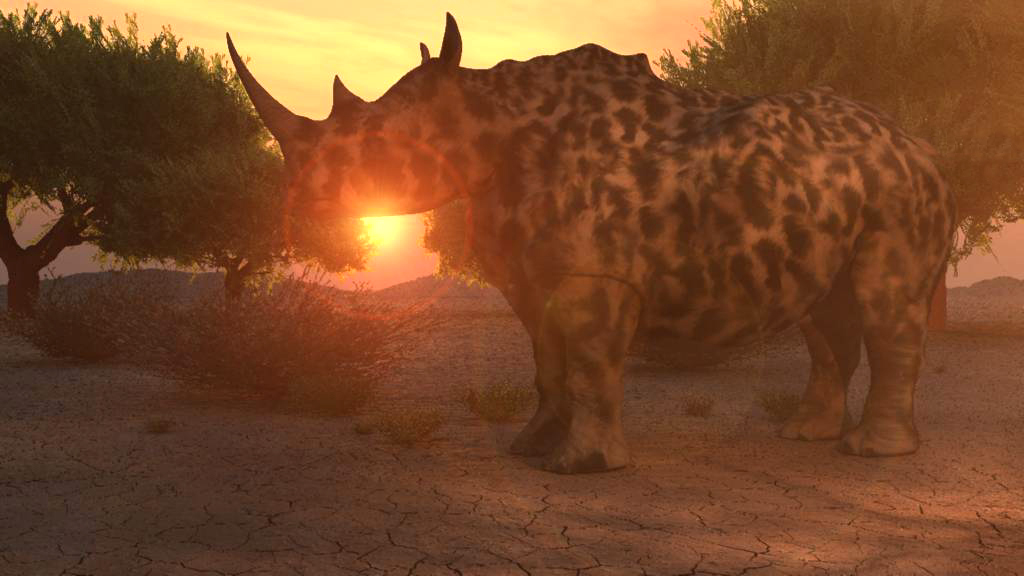
Here is a render with athmosphere and volumetric light..
- Attachments
-
-
Fostman2
- Petty Officer Third Class
- Posts: 10
- Joined: 10 Sep 2009, 07:59
Re: Workflow.......
I believe it is good, but there is no way I am going to buy. I spent too much on animation already. And I am in the weird corner. I don't need realistic looking trees, etc.
Leo
Leo
-
RAYMAN
- Captain
- Posts: 2547
- Joined: 21 May 2009, 18:56
Re: Workflow.......
Fostman i am glad if i can help you but i started this thread before you asked a question on the other forum.
This is for all those people who are limited with the size of the scenes and the lack of volumetric effects
in workspace something we wont get anymore because there is no more development and lack of interest
from the few coders that we got.....
Some people still want to use Truespace for the majority of what they are doing and dont want to jump ship.
So they can continue modeling in Truespace and texture in Truespace and even use the physics engine in Truespace.
This thread is also about getting trueparticles and other animations out of model side....
What the people buy or not is up to them its just my experiences and my way of still using Truespace......
This is for all those people who are limited with the size of the scenes and the lack of volumetric effects
in workspace something we wont get anymore because there is no more development and lack of interest
from the few coders that we got.....
Some people still want to use Truespace for the majority of what they are doing and dont want to jump ship.
So they can continue modeling in Truespace and texture in Truespace and even use the physics engine in Truespace.
This thread is also about getting trueparticles and other animations out of model side....
What the people buy or not is up to them its just my experiences and my way of still using Truespace......
-
Fostman2
- Petty Officer Third Class
- Posts: 10
- Joined: 10 Sep 2009, 07:59
Re: Workflow.......
I am not very experienced with 3d. Never done this before and skipping programs because I ran into problems or found something better/easier. tS looked good, but confused me in the beginning with workspace/model view. Because I was new at tS, I started with the new Workspace, but found out, it was very limited. Now I have to move to Daz and have to learn again. Although it looks easier. But my progress starts to anoy me. Doing this for a year now and would like to finish something. I transfered my tS characters to Daz, but skeleton goes wrong and have to redo this in Daz. So wasted time again on skeleton, paint weight, etc in tS. I have to start all over in Daz with this. Skeleton setup in Daz with the setup tool is not easy. In the future I only use tS Workspace for creating characters without skeleton and move this to Daz. I know almost nothing about lighting, rendering and cameras because I have never came that far. Animation is no fun for me anymore, but I have to continue.
-
RAYMAN
- Captain
- Posts: 2547
- Joined: 21 May 2009, 18:56
Re: Workflow.......
Exactly thats the point workspace is very limited and thats why I use my workflow and use the tools that i use.
Animation is actually pretty easy in Daz 3d but setup of characters from scratch isnt. In no program!
But you only do that once with a base mesh of the character that you make. If you dont have to setup
a character from scratch avoid it like I said in the posts above and use characters that are available and morph them into the shape that you are after
see Marcels thread in the work in progress section (head made with sds).
You can do a lot with morphing ! You said you have Poser and some expertience with it you can use your Poser models in Daz.
you can even make morphs with poser and use them inside Daz.
Vue is just the platform whereinside i host my scenes. Because it can take a very big meshload ...
Animation is actually pretty easy in Daz 3d but setup of characters from scratch isnt. In no program!
But you only do that once with a base mesh of the character that you make. If you dont have to setup
a character from scratch avoid it like I said in the posts above and use characters that are available and morph them into the shape that you are after
see Marcels thread in the work in progress section (head made with sds).
You can do a lot with morphing ! You said you have Poser and some expertience with it you can use your Poser models in Daz.
you can even make morphs with poser and use them inside Daz.
Vue is just the platform whereinside i host my scenes. Because it can take a very big meshload ...
-
RAYMAN
- Captain
- Posts: 2547
- Joined: 21 May 2009, 18:56
Re: Workflow.......
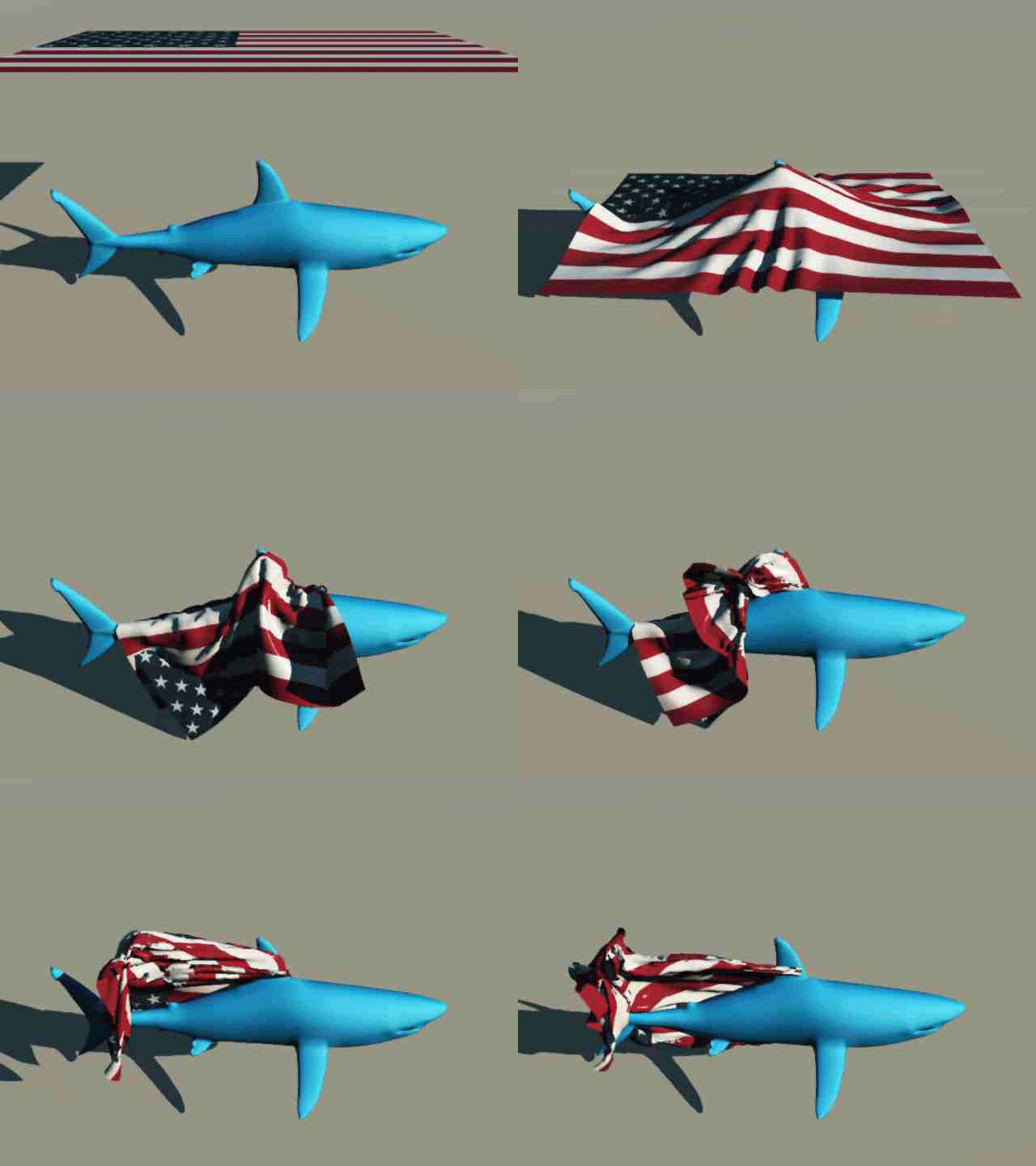
Here is a Poser cloth simulation inside Vue with a local wind from in front of the shark....
(click on the picture its an animated gif)
(click on the picture its an animated gif)
- Attachments
-
-
RAYMAN
- Captain
- Posts: 2547
- Joined: 21 May 2009, 18:56
Re: Workflow.......
Here is dynamic hair...
- Attachments
-
- dynamic hair.zip
- (324.69 KiB) Downloaded 209 times
-
RAYMAN
- Captain
- Posts: 2547
- Joined: 21 May 2009, 18:56
Re: Workflow.......
Ok here is how I import ies lights into Vue...
you make a spotlight in Kerkytheor any other application that supports ies lights and render the falloff on a materialplane.
You take that render and use it as a map with flat setting inside the gel chanel of a spotlight.....
you make a spotlight in Kerkytheor any other application that supports ies lights and render the falloff on a materialplane.
You take that render and use it as a map with flat setting inside the gel chanel of a spotlight.....
- Attachments
-

- iesrender.jpg (10.25 KiB) Viewed 4173 times