Slider control, how do I assign it to an axis
-
MikomDude

- Captain
- Posts: 1930
- Joined: 04 Oct 2010, 11:12
- Type the number ten into the box: 0
- Location: The Hague, Netherlands
Slider control, how do I assign it to an axis
I'm just playing around a bit with trueSpace and the link editor and I wanted to know if there was any easy way to assign a slider to the axis rotation for an object?
-
Draise

- Captain
- Posts: 3200
- Joined: 21 Sep 2009, 19:33
- Type the number ten into the box: 0
- Location: Bogota, Colombia
Re: Slider control, how do I assign it to an axis
Yes, I would like to know also!
Is there a node or a set of scripts that will enhance the "matrix" and control the object's matrix, thus opening the possibility of sliders and the such?
I found an Matrix Properties node online somewhere. But It only can recieve input from the matrix, it doesn't have any control outputs.
It would be good to have a similar tool that affects the matrix of an object, either owner matrix or even just the object matrix.
Is there a node or a set of scripts that will enhance the "matrix" and control the object's matrix, thus opening the possibility of sliders and the such?
I found an Matrix Properties node online somewhere. But It only can recieve input from the matrix, it doesn't have any control outputs.
It would be good to have a similar tool that affects the matrix of an object, either owner matrix or even just the object matrix.
-
trueBlue

- Captain
- Posts: 5548
- Joined: 06 Jul 2009, 22:50
- Type the number ten into the box: 10
Re: Slider control, how do I assign it to an axis
Right click the object's Matrix, select Expand.
Right click the ExpandInMatrix to enter the Panel Editor.
Select Attr, Roll, and Slider.
Right click the Slider and set the slider's properties.
Right click the ExpandInMatrix, select Replace.
Additionally you could try:
viewtopic.php?p=13934#p13934"
Right click the ExpandInMatrix to enter the Panel Editor.
Select Attr, Roll, and Slider.
Right click the Slider and set the slider's properties.
Right click the ExpandInMatrix, select Replace.
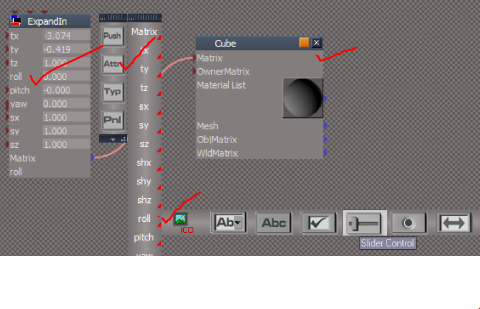
viewtopic.php?p=13934#p13934"
-
Draise
- Captain
- Posts: 3200
- Joined: 21 Sep 2009, 19:33
- Type the number ten into the box: 0
- Location: Bogota, Colombia
Re: Slider control, how do I assign it to an axis
Awesome awesome! Worked like a charm! Just needed to change the slider properties to adjust everything to 180 degrees positive and negative! 
THanks again trueblue, you saved the day, yet again!
THanks again trueblue, you saved the day, yet again!
-
MikomDude
- Captain
- Posts: 1930
- Joined: 04 Oct 2010, 11:12
- Type the number ten into the box: 0
- Location: The Hague, Netherlands
Re: Slider control, how do I assign it to an axis
Wow that's great!! It does work perfectly. I wonder though, how can make the slider appear every time I select the object so I won't have to go to the link editor every time.
And I also kinda want to know how I can control multiple objects with the same slider.
And I also kinda want to know how I can control multiple objects with the same slider.
-
trueBlue
- Captain
- Posts: 5548
- Joined: 06 Jul 2009, 22:50
- Type the number ten into the box: 10
Re: Slider control, how do I assign it to an axis
If you want your custom panel to show in the Stack when selected you can Export it in tS761.
First you have to 3D Encapsulate both panels.
Select your custom panel, object and then 3D Encapsulate them.
Inside your 3D Encapsulation, Right click your custom panel's icon twice and select Export.
Here is a video showning the whole process:
First you have to 3D Encapsulate both panels.
Select your custom panel, object and then 3D Encapsulate them.
Inside your 3D Encapsulation, Right click your custom panel's icon twice and select Export.
Here is a video showning the whole process:
- Attachments
-
- PanelEditingExport.zip
- (4.99 MiB) Downloaded 167 times