Hi together, today I have a question about Motion Studio.
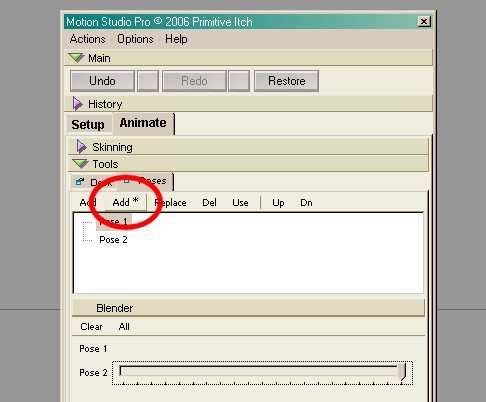
In the Pose Mixer the Button ADD* should store the pose for my skeleton INCLUDING all attached sub skeletons. Can anybody explain me how i have to use this? For me it makes no difference if i use ADD or ADD* - the result is the same. Well, anyone could now ask - where is your problem if the ADD buttons does the same. Answer - they don't store the position of my subskeletons.
The problem with this is, i had in mind that i can store the default pose and then positioning my "root" skeleton, my subskeletons etc. and then add this as a new pose (like i normaly do it with one skeleton). After that i estimated that, if i drag the slider, all subskeletons will move into the pose. But nothing happens, just the root bone moves, the subskeletons stay in her default position.
Maybe i'm to stupid to understand this and the Help File and other tut's doesn't explain this feature.
Motion Studio Pose Mixer Question
-
DesignDevil

- Master Chief Petty Officer
- Posts: 500
- Joined: 22 May 2009, 08:52
- Type the number ten into the box: 0
- Location: Neuruppin, Germany, Earth.
Motion Studio Pose Mixer Question
- Attachments
-
I still use TrueSpace 6.6
Link: My Youtube Channel
Link: www.DesignDevil.de - Plugins, Tutorials and more about TrueSpace 6.6
Link: My Youtube Channel
Link: www.DesignDevil.de - Plugins, Tutorials and more about TrueSpace 6.6
-
RAYMAN

- Captain
- Posts: 2547
- Joined: 21 May 2009, 18:56
Re: Motion Studio Pose Mixer Question
Add * is for adding 'Batch Poses' that save not only the pose for your selected skeleton but also all sub skeletons attached to that skeleton.
I have that from this tutorial...
http://www.frankladner.com/mostu/12.htm"
I have that from this tutorial...
http://www.frankladner.com/mostu/12.htm"
-
DesignDevil
- Master Chief Petty Officer
- Posts: 500
- Joined: 22 May 2009, 08:52
- Type the number ten into the box: 0
- Location: Neuruppin, Germany, Earth.
Re: Motion Studio Pose Mixer Question
I know, that is what is in the MoStu Help was also written, but have you tried it?
I can't figure out how this should work because it doesn't work for me - or i'm to stupid - in this case explain it, please.
I can't figure out how this should work because it doesn't work for me - or i'm to stupid - in this case explain it, please.
I still use TrueSpace 6.6
Link: My Youtube Channel
Link: www.DesignDevil.de - Plugins, Tutorials and more about TrueSpace 6.6
Link: My Youtube Channel
Link: www.DesignDevil.de - Plugins, Tutorials and more about TrueSpace 6.6
-
RAYMAN
- Captain
- Posts: 2547
- Joined: 21 May 2009, 18:56
Re: Motion Studio Pose Mixer Question
didnt use that function yet..... I´m using Poser and Daz studio at the moment most of the time
because of functions like puppeteer and because of morphing and facial animations like lipsynching...and because of the bricks aproach from animate + and animeeple....(blending and warping mocap files)
But I found that for you so i thought i´d pass on the information..
Peter
because of functions like puppeteer and because of morphing and facial animations like lipsynching...and because of the bricks aproach from animate + and animeeple....(blending and warping mocap files)
But I found that for you so i thought i´d pass on the information..
Peter
-
Benji
- Senior Chief Petty Officer
- Posts: 280
- Joined: 22 May 2009, 01:23
Re: Motion Studio Pose Mixer Question
I think Tiles mentioned in the other forum that Motion Studio has some issues in 7.6+. Maybe this is one of them....?
-
DesignDevil
- Master Chief Petty Officer
- Posts: 500
- Joined: 22 May 2009, 08:52
- Type the number ten into the box: 0
- Location: Neuruppin, Germany, Earth.
Re: Motion Studio Pose Mixer Question
could be, but i still use tS6.6 (see signature) 
I still use TrueSpace 6.6
Link: My Youtube Channel
Link: www.DesignDevil.de - Plugins, Tutorials and more about TrueSpace 6.6
Link: My Youtube Channel
Link: www.DesignDevil.de - Plugins, Tutorials and more about TrueSpace 6.6
-
Benji
- Senior Chief Petty Officer
- Posts: 280
- Joined: 22 May 2009, 01:23
Re: Motion Studio Pose Mixer Question
Then my work here is done........ 

I should know the answer to this, but I really can't remember having this problem, sorry.
I should know the answer to this, but I really can't remember having this problem, sorry.