My TS 6.6 have become unstable

Legacy tS 6.6
compPanda
Senior Chief Petty Officer
Posts: 275
Joined: 21 May 2009, 21:15
Type the number ten into the box: 0

My TS 6.6 have become unstable

Post by compPanda »

Truespace might never have been known for its stability but during the last months my TS 6.6 install have become increasingly instable.

I also have a trouble with a plugin, the hide object, that refuses to work if I opens a file within TS - I have to open the file, close Truespace and then restart it - then it works...
Can this plugin be the source of my problems with stability?
How do I uninstall a plugin from Truespace? I only manage to load them... ;-)

If you don't think it is the plugin, do you have any other suggestions to what I can do? Do I need to reinstall Truespace or do I need to reinstall entire Windows to solve my problems?
Or is it some new Windows patch that have made TS unstable?
v3rd3
Lieutenant Commander
Posts: 1191
Joined: 21 May 2009, 20:04

Re: My TS 6.6 have become unstable

Post by v3rd3 »

Can you give us more information about your PC ....

Windows version
Direct X version
RAM installed
Disk drive info:
- total disk size
- disk space available
- paging file size
User avatar
spacekdet
Captain
Posts: 1810
Joined: 27 May 2009, 15:00
Type the number ten into the box: 10
Location: On the day shift at the Utility Muffin Research Kitchen

Re: My TS 6.6 have become unstable

Post by spacekdet »

Don't load too many tsx.

It could indeed be a buggy tsx causing the instability.

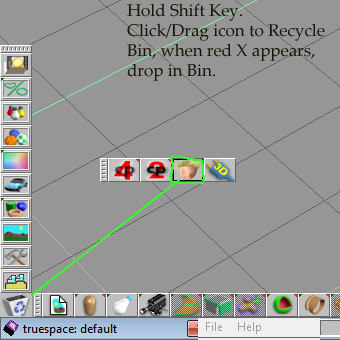
To uninstall, Hold Shift key and then click/drag the tsx icon (NOT the blue plugin icon you use to load them) to the tS Trashcan icon in the lower left corner.

When you see a little red X appear, drop it in the Trashcan.

That's it, it's uninstalled.

You can use tS built in 'invisible' toggle or use layers to make things visible/invisible so you may not need that plugin at all.

Run with as few as you can is a good rule of thumb.
uninstall_tsx_minitut.jpg
uninstall_tsx_minitut.jpg (37.24 KiB) Viewed 5795 times
compPanda
Senior Chief Petty Officer
Posts: 275
Joined: 21 May 2009, 21:15
Type the number ten into the box: 0

Re: My TS 6.6 have become unstable

Post by compPanda »

v3rd3 wrote:Can you give us more information about your PC ....

Windows version
Direct X version
RAM installed
Disk drive info:
- total disk size
- disk space available
- paging file size
Hi, I needed to come home from work to be able to answer these questions.... =)

Windows version:
Windows XP 64 bit
DirectX - 9.0c
RAM - 8 Gb
Disk:
100 Gb
~25 Gb available
paging file - 8 gb (2 gb used)


Thank you for your help, both you and spacedekt. I will try to uninstall the plugin. But how do I toogle a separate object visible/hidden in Ts? I know about layers but the hide object plugin is more practical when you model.
v3rd3
Lieutenant Commander
Posts: 1191
Joined: 21 May 2009, 20:04

Re: My TS 6.6 have become unstable

Post by v3rd3 »

One potential problem is the 64 bit XP. Truespace is a 32 bit application... so are the plug-ins.... some will fail simply because they are not compatible with 64 bit operating environment.

To hide objects open up the scene editor ... select the object you want to hide in the list ... right click on it and then check or uncheck the visible item on the menu list.
compPanda
Senior Chief Petty Officer
Posts: 275
Joined: 21 May 2009, 21:15
Type the number ten into the box: 0

Re: My TS 6.6 have become unstable

Post by compPanda »

v3rd3 wrote:One potential problem is the 64 bit XP. Truespace is a 32 bit application... so are the plug-ins.... some will fail simply because they are not compatible with 64 bit operating environment.

To hide objects open up the scene editor ... select the object you want to hide in the list ... right click on it and then check or uncheck the visible item on the menu list.
Thank you for your help, I will try that.
When it comes to problem being the 64 bit OS - it have been working perfectly before on the same OS. So there is obviously something that have changed that made TS unstable - not the OS in itself.
I will see if it works better without this plug-in.
v3rd3
Lieutenant Commander
Posts: 1191
Joined: 21 May 2009, 20:04

Re: My TS 6.6 have become unstable

Post by v3rd3 »

Sorry, my impression was that the plugin was a new thing you were using.
User avatar
spacekdet
Captain
Posts: 1810
Joined: 27 May 2009, 15:00
Type the number ten into the box: 10
Location: On the day shift at the Utility Muffin Research Kitchen

Re: My TS 6.6 have become unstable

Post by spacekdet »

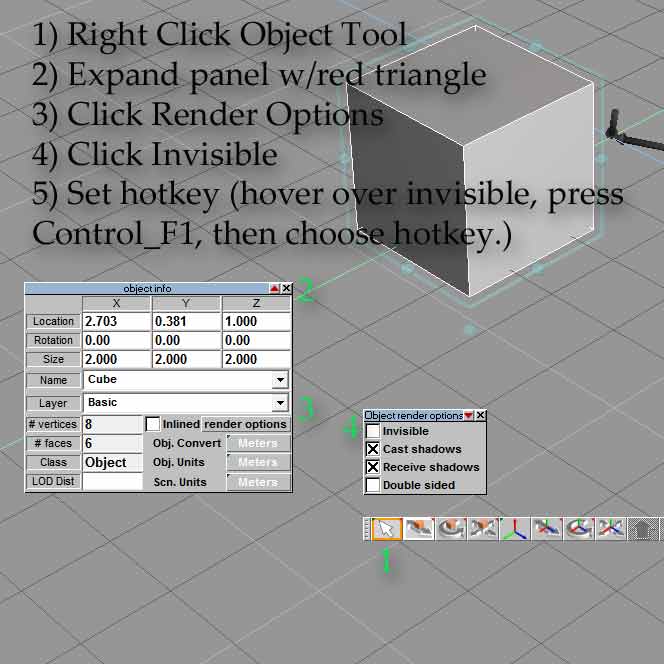
To toggle invisibility in tS 6.6:

Select your object.
Right Click Object Tool to open Object Info Panel.
Expand panel by clicking the red triangle.
Click Render Options box.
This opens Object Render Options panel.
Hover your mouse cursor over the invisible check box and then press Control/F1 keys.
This brings up the hotkey panel- input your desired hotkey for instance, Control I.
Now hitting hotkey will cycle between visible/ invisible.

Click File/Save/Hotkeys.

Another tool that comes in handy is the Unhide All. It's in the same flyout as the object tool.
This is also a good one to hotkey as it will reveal all hidden objects with one click.
invi_minitut.jpg
User avatar
nigec
Master Chief Petty Officer
Posts: 561
Joined: 21 May 2009, 18:46

Re: My TS 6.6 have become unstable

Post by nigec »

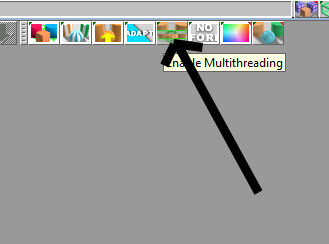
You could try turning off multi threading.. which is something I have to do other wise TS crashes when rendering or when material windows refresh
Image1.jpg
Image1.jpg (11.78 KiB) Viewed 5737 times
If you get dispaly problems, like the work area freezes try using wireframe instead of direct X or if you use a Nvidia card try setting Anti Alias down to 2 in the Nvidia control panel
compPanda
Senior Chief Petty Officer
Posts: 275
Joined: 21 May 2009, 21:15
Type the number ten into the box: 0

Re: My TS 6.6 have become unstable

Post by compPanda »

I removed the hide object extension and now Ts seams to be more stable again.
Thank you all for your help.
User avatar
BNG
Chief Warrant Officer
Posts: 684
Joined: 16 Oct 2009, 03:26
Type the number ten into the box: 0
Location: Texas

Re: My TS 6.6 have become unstable

Post by BNG »

compPanda wrote:I removed the hide object extension and now Ts seams to be more stable again.
Thank you all for your help.
Very cool. TSX's written for previous versions of TS don't always work properly. I had one for TS 3.2 that would load under TS 6, but it never ran right stabley, but once I removed it TS 6 began to run normally again.