Hey fellas!
I've migrated some video/animation/design tools to a secondary machine. Got pretty much everthing set up as with my older computer, but I'm having an issue with MotionStudio. NOOOOOO!!!!
LOL!
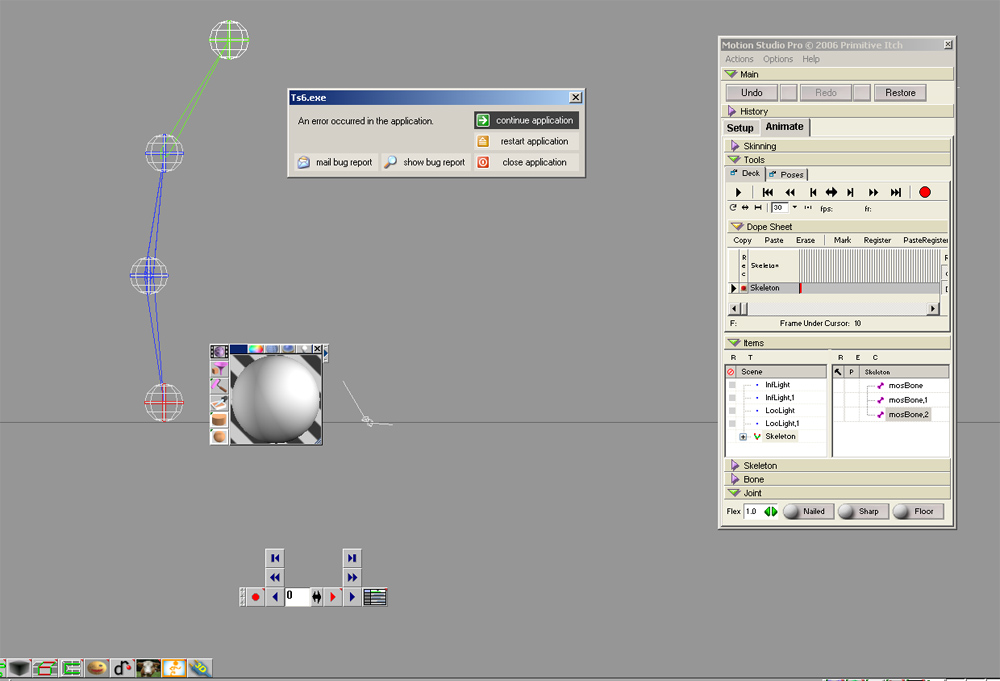
I've attached a screengrab. I've actually seen this before, but can't remember what the remedy was.
It's strange... I can set up a skeleton and save it... but when I click the animate tab, I get that error (I can hit Continue, but the skeleton doesn't move properly... ie. the joints float around). THEN I can close out, come back in, and go into the Animate tab and manipulate just fine. BUT, when I record a keyframe, I get the same error.
DesignDevil... have you ran into this? Anyone else have this issue?
By the way, this is a Windows XP machine.
MotionStudio Problem
-
frank
- Senior Chief Petty Officer
- Posts: 161
- Joined: 28 May 2009, 13:25
MotionStudio Problem
- Attachments
-
-
DesignDevil

- Master Chief Petty Officer
- Posts: 500
- Joined: 22 May 2009, 08:52
- Type the number ten into the box: 0
- Location: Neuruppin, Germany, Earth.
Re: MotionStudio Problem
Hmm ... no idea - i never got this.
You just save the skeleton as object or the whole scene? As first, you really selected the skeleton (auto drill down off).
You just save the skeleton as object or the whole scene? As first, you really selected the skeleton (auto drill down off).
I still use TrueSpace 6.6
Link: My Youtube Channel
Link: www.DesignDevil.de - Plugins, Tutorials and more about TrueSpace 6.6
Link: My Youtube Channel
Link: www.DesignDevil.de - Plugins, Tutorials and more about TrueSpace 6.6
-
frank
- Senior Chief Petty Officer
- Posts: 161
- Joined: 28 May 2009, 13:25
Re: MotionStudio Problem
Correct... saved as scene. Basically using it the same as I always have, but something's apparently different on this second machine.
Hrm.... I'll keep playing with it.
Thanks , DD!
Hrm.... I'll keep playing with it.
Thanks , DD!