Simon requested a section for us to post our Dribble bugs so that
he can easily find them. We hope that they can be addressed someday.
Thanks
"Dribble" Owners please post your bugs here
-
Steinie

- Captain
- Posts: 2958
- Joined: 21 May 2009, 17:38
- Type the number ten into the box: 10
"Dribble" Owners please post your bugs here
-
DesignDevil

- Master Chief Petty Officer
- Posts: 500
- Joined: 22 May 2009, 08:52
- Type the number ten into the box: 0
- Location: Neuruppin, Germany, Earth.
Re: "Dribble" Owners please post your bugs here
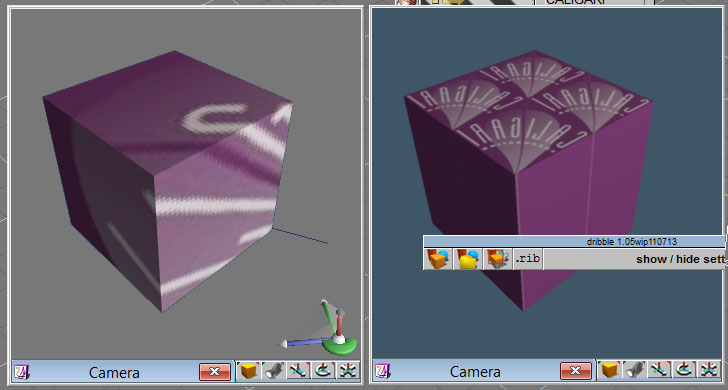
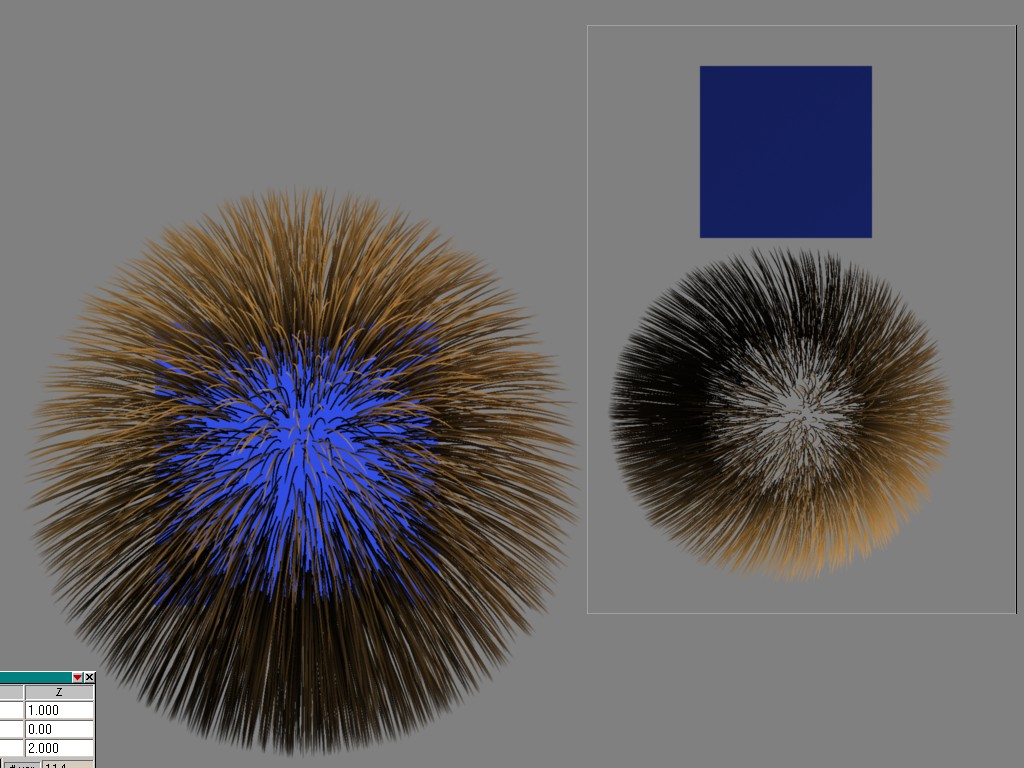
I don't know if this is a bug or if this was a intention. In my eye's it is a bug. The sphere in the attached image has fur, the cube is behind them. As you can see the sphere himself is transparent. The workaround for that would be to create 2 objects, one with fur and one with the texture but for a furred character which should be animated is this no solution so i post this here as a bug or "to do" for the future.
- Attachments
-
I still use TrueSpace 6.6
Link: My Youtube Channel
Link: www.DesignDevil.de - Plugins, Tutorials and more about TrueSpace 6.6
Link: My Youtube Channel
Link: www.DesignDevil.de - Plugins, Tutorials and more about TrueSpace 6.6
-
DesignDevil
- Master Chief Petty Officer
- Posts: 500
- Joined: 22 May 2009, 08:52
- Type the number ten into the box: 0
- Location: Neuruppin, Germany, Earth.
Re: "Dribble" Owners please post your bugs here
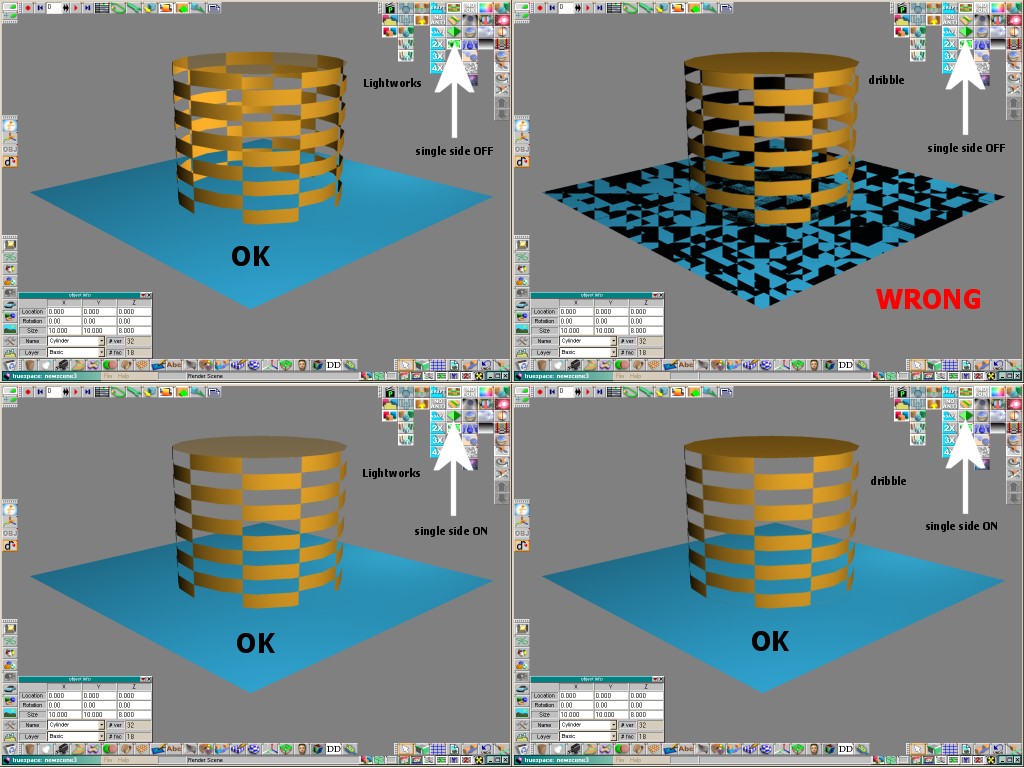
Single Side / Transparency / Fragmentation Issue:
In the attached image you see the problem. To render a plane without the odd fragments i have to switch "single side" rendering on. BUT, than i can't render transparent objekts correctly. Result: BUG
In the attached image you see the problem. To render a plane without the odd fragments i have to switch "single side" rendering on. BUT, than i can't render transparent objekts correctly. Result: BUG
- Attachments
-
I still use TrueSpace 6.6
Link: My Youtube Channel
Link: www.DesignDevil.de - Plugins, Tutorials and more about TrueSpace 6.6
Link: My Youtube Channel
Link: www.DesignDevil.de - Plugins, Tutorials and more about TrueSpace 6.6
-
DesignDevil
- Master Chief Petty Officer
- Posts: 500
- Joined: 22 May 2009, 08:52
- Type the number ten into the box: 0
- Location: Neuruppin, Germany, Earth.
Re: "Dribble" Owners please post your bugs here
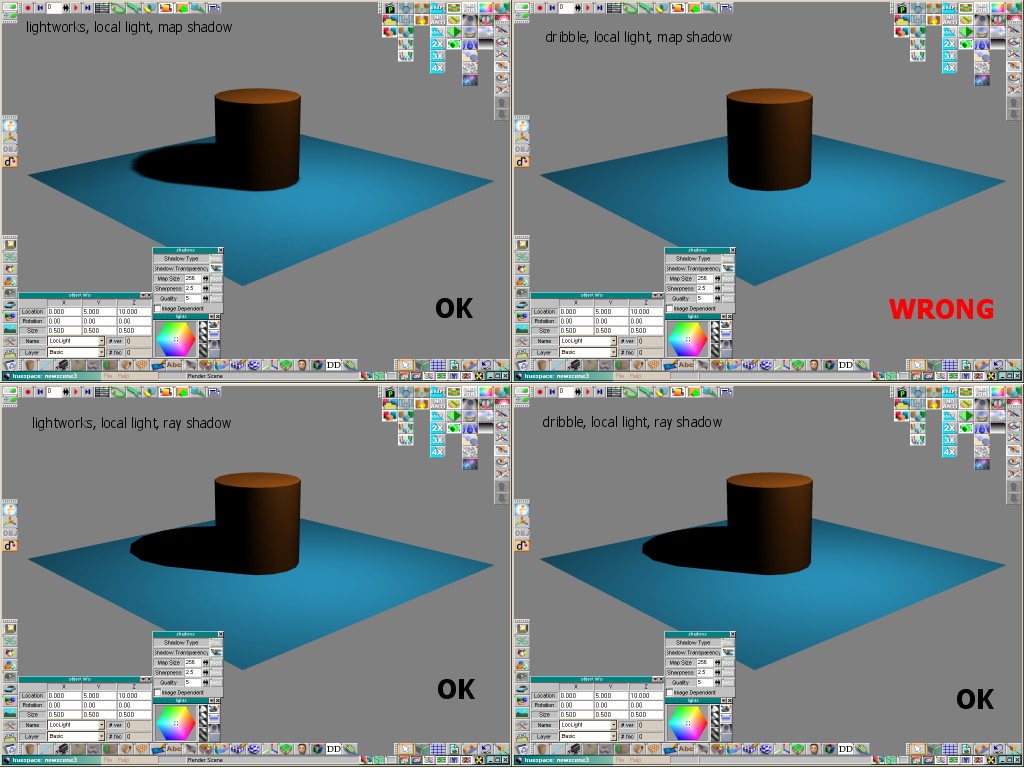
No Shadows Issue. This bug is happen if you use LOCAL or INFINITE lights with Mapped Shadows in your scene.
- Attachments
-
I still use TrueSpace 6.6
Link: My Youtube Channel
Link: www.DesignDevil.de - Plugins, Tutorials and more about TrueSpace 6.6
Link: My Youtube Channel
Link: www.DesignDevil.de - Plugins, Tutorials and more about TrueSpace 6.6
-
DesignDevil
- Master Chief Petty Officer
- Posts: 500
- Joined: 22 May 2009, 08:52
- Type the number ten into the box: 0
- Location: Neuruppin, Germany, Earth.
Re: "Dribble" Owners please post your bugs here
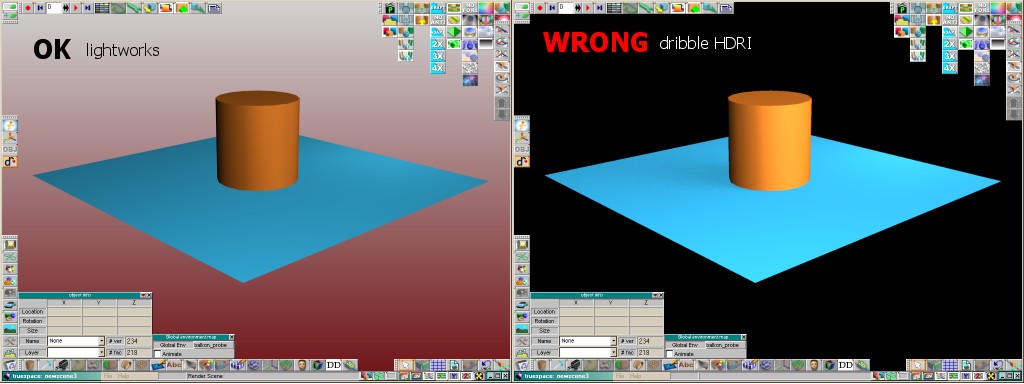
HDRI - where is my background issue. In this case i used a HDRI image for the lightning. (for this testscene i added also other lights for the lightworks render engine). As you can see, with dribble + HDRI i lost my background. This happens independed if you use a color, gradient or image as background.
EDIT: Environment texture -> show in background is OFF !!!
EDIT: Environment texture -> show in background is OFF !!!
- Attachments
-
I still use TrueSpace 6.6
Link: My Youtube Channel
Link: www.DesignDevil.de - Plugins, Tutorials and more about TrueSpace 6.6
Link: My Youtube Channel
Link: www.DesignDevil.de - Plugins, Tutorials and more about TrueSpace 6.6
-
nigec

- Master Chief Petty Officer
- Posts: 561
- Joined: 21 May 2009, 18:46
Re: "Dribble" Owners please post your bugs here
the HDRI..
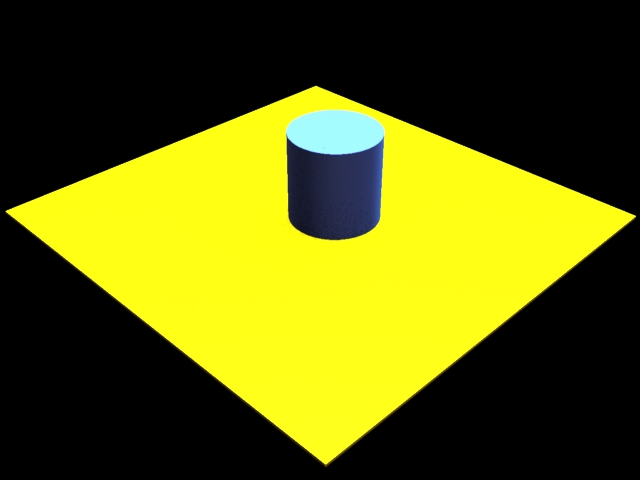
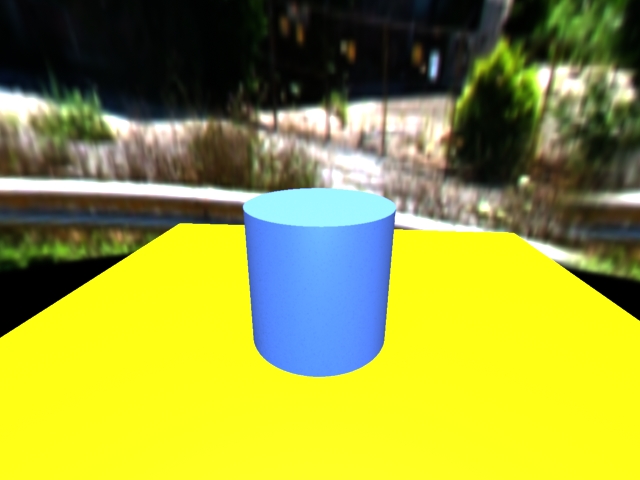
it depends what view you use, if you use the perspective camera it is just black, but if you use a proper camera, the background shows
it depends what view you use, if you use the perspective camera it is just black, but if you use a proper camera, the background shows
- Attachments
-
-
-
DesignDevil
- Master Chief Petty Officer
- Posts: 500
- Joined: 22 May 2009, 08:52
- Type the number ten into the box: 0
- Location: Neuruppin, Germany, Earth.
Re: "Dribble" Owners please post your bugs here
What the hack...ok, good to know. But i think it is a bug - not a feature - or  ?
?
?I still use TrueSpace 6.6
Link: My Youtube Channel
Link: www.DesignDevil.de - Plugins, Tutorials and more about TrueSpace 6.6
Link: My Youtube Channel
Link: www.DesignDevil.de - Plugins, Tutorials and more about TrueSpace 6.6
-
clintonman

- Captain
- Posts: 5659
- Joined: 21 May 2009, 21:08
- Type the number ten into the box: 0
- Location: California
Re: "Dribble" Owners please post your bugs here
OK, I can build Dribble now. No guarantees, but if you post a bug with a sample scene file I can take a look at it. I'm very new to Dribble and Renderman, so don't be afraid to include too many details.
-
Emmanuel

- Chief Warrant Officer
- Posts: 670
- Joined: 14 Jun 2009, 06:47
Re: "Dribble" Owners please post your bugs here
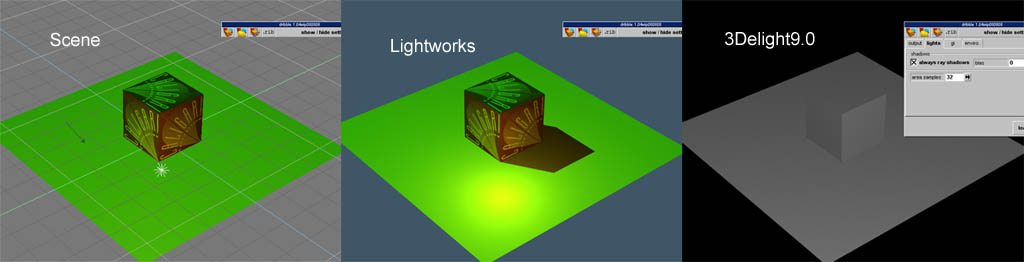
Here is a test with a fresh install of 3Delight9.0 and Dribble, with dribble1.04wip080808.tsx, and Clinton's shaders copied in Dribble's folder.
Dribble renders the scene with no textures, no lights, no bump/hair/shaders.
It only takes into account the color of an object if it is painted with a plain color shader (ex: cube painted in red will render red with Dribble)
I tried both 3Delight 64 and 32 bits versions (my system is running XP Pro 64) and the result is the same.
Note that older versions of Dribble don't render better.
[edit] After I replaced the original shaders with Clinton's, all worked fine !
Dribble renders the scene with no textures, no lights, no bump/hair/shaders.
It only takes into account the color of an object if it is painted with a plain color shader (ex: cube painted in red will render red with Dribble)
I tried both 3Delight 64 and 32 bits versions (my system is running XP Pro 64) and the result is the same.
Note that older versions of Dribble don't render better.
[edit] After I replaced the original shaders with Clinton's, all worked fine !
- Attachments
-
Last edited by Emmanuel on 12 Jun 2010, 13:38, edited 1 time in total.
-
Tiles

- Master Chief Petty Officer
- Posts: 401
- Joined: 27 May 2009, 08:34
Re: "Dribble" Owners please post your bugs here
Confirmed , unfortunately. Dribble 9.0 renders no textures. Just greyscale.
This was my first install of Dribble. First i thougth i did something wrong. Thanks Emmanuel, you saved me some work
Just curious, where are the Clinton`s shaders located?
This was my first install of Dribble. First i thougth i did something wrong. Thanks Emmanuel, you saved me some work
Just curious, where are the Clinton`s shaders located?
Free Gamegraphics, Freeware Games http://reinerstilesets.de
-
Emmanuel
- Chief Warrant Officer
- Posts: 670
- Joined: 14 Jun 2009, 06:47
Re: "Dribble" Owners please post your bugs here
Shaders must be copied in the folder C:\Program Files\3Delight\shadersTiles wrote: Just curious, where are the Clinton`s shaders located?
In my case, I also copied them in C:\Program Files(86)\3Delight\shaders
It seems 3Delight renders faster when I run the 64 bits licence, although the 32 bits licence works also on XP Pro64 thanks to its compatibility mode.
-
Steinie
- Captain
- Posts: 2958
- Joined: 21 May 2009, 17:38
- Type the number ten into the box: 10
Re: "Dribble" Owners please post your bugs here
http://www.clintons3d.com/w/index.php?title=More_links"Tiles wrote: Just curious, where are the Clinton`s shaders located?
-
Tiles
- Master Chief Petty Officer
- Posts: 401
- Joined: 27 May 2009, 08:34
Re: "Dribble" Owners please post your bugs here
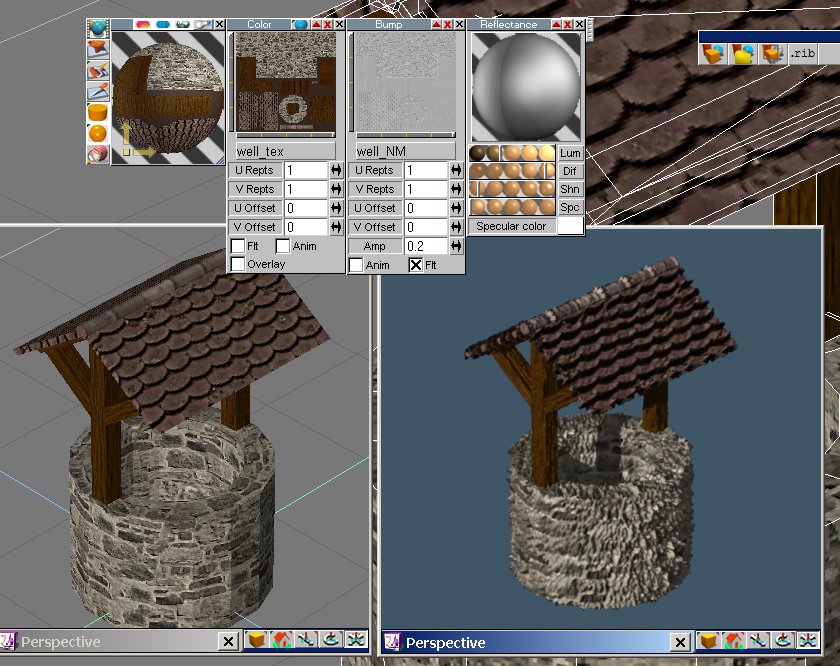
Ah, that`s the missing bit. I haven`t known about the necessary shaders. I`ve downloaded them, and replaced them in the 3Delight folder. And now it renders with textures. Thanks guys
Mh, shows another little quirk though. The normalmapping is a bit strong. And i have already reduced it from 1.0 to 0.2. But that`s a minor thing since i can reduce it even further. Looks ok with 0.02
Mh, shows another little quirk though. The normalmapping is a bit strong. And i have already reduced it from 1.0 to 0.2. But that`s a minor thing since i can reduce it even further. Looks ok with 0.02
- Attachments
-
Free Gamegraphics, Freeware Games http://reinerstilesets.de
-
clintonman
- Captain
- Posts: 5659
- Joined: 21 May 2009, 21:08
- Type the number ten into the box: 0
- Location: California
Re: "Dribble" Owners please post your bugs here
If you can post a sample scene I can track that down and adjust it.Tiles wrote:...
Mh, shows another little quirk though. The normalmapping is a bit strong. And i have already reduced it from 1.0 to 0.2. But that`s a minor thing since i can reduce it even further. Looks ok with 0.02
-
Tiles
- Master Chief Petty Officer
- Posts: 401
- Joined: 27 May 2009, 08:34
Re: "Dribble" Owners please post your bugs here
Sure. Here we go. But as told, there is surely more important stuff to fix
- Attachments
-
- samplescene well.rar
- (2 MiB) Downloaded 433 times
Free Gamegraphics, Freeware Games http://reinerstilesets.de
-
Emmanuel
- Chief Warrant Officer
- Posts: 670
- Joined: 14 Jun 2009, 06:47
Re: "Dribble" Owners please post your bugs here
Was 3Delight's hair capable of shadow casting in previous versions ? I think it was (although perhaps I'm wrong) ; however I don't see that feature in 9.0
Does hair cast shadows for you ?
Does hair cast shadows for you ?
-
Benji
- Senior Chief Petty Officer
- Posts: 280
- Joined: 22 May 2009, 01:23
Re: "Dribble" Owners please post your bugs here
Yeah, that's always been there. I agree that it would be nice if "1" gave an "average" result.Mh, shows another little quirk though. The normalmapping is a bit strong. And i have already reduced it from 1.0 to 0.2. But that`s a minor thing since i can reduce it even further. Looks ok with 0.02
The hair in my setup self-shadows, but doesn't cast them on my PC with an area light or with a spot light. It doesn't seem to work whether you use raytrace shadows or mapped.
[edit] Just tried a spotlight with a map shadow, and it worked. Must have had "always ray shadows box" checked in the last test.
-
clintonman
- Captain
- Posts: 5659
- Joined: 21 May 2009, 21:08
- Type the number ten into the box: 0
- Location: California
Re: "Dribble" Owners please post your bugs here
OK, I fiddled with the bumpmap shader script. Just copy it over the existing one. All I did was scale it down by 50. The reason it was so crazy is because truespace exports as a meter scale. So if you create a default box the size is 2x2x2. The renderman displacement map is more or less at the same scale, so you end up with nothing but displacement for small objects.Tiles wrote:Sure. Here we go. But as told, there is surely more important stuff to fix
- Attachments
-
- tSbumpmap.zip
- (1.07 KiB) Downloaded 423 times
-
Tiles
- Master Chief Petty Officer
- Posts: 401
- Joined: 27 May 2009, 08:34
Re: "Dribble" Owners please post your bugs here
Thanks Clintonman
Free Gamegraphics, Freeware Games http://reinerstilesets.de
-
Emmanuel
- Chief Warrant Officer
- Posts: 670
- Joined: 14 Jun 2009, 06:47
Re: "Dribble" Owners please post your bugs here
Thank you!
-
Tiles
- Master Chief Petty Officer
- Posts: 401
- Joined: 27 May 2009, 08:34
Re: "Dribble" Owners please post your bugs here
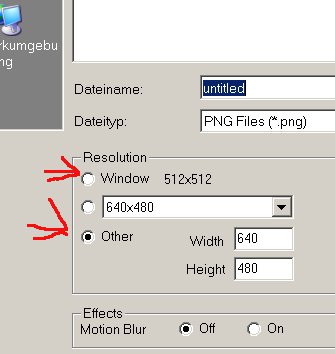
Found another little thing, when you render to file you always need to change the settings for the size again. Like in this shot. I choose 512x512, and everytime i call the render to file again the setting snaps back to 640x480. The normal tS render to file dialogue keeps the values though
- Attachments
-
- setting.jpg (18.37 KiB) Viewed 8788 times
Free Gamegraphics, Freeware Games http://reinerstilesets.de
-
Wigand
- Senior Chief Petty Officer
- Posts: 204
- Joined: 21 May 2009, 17:38
Re: "Dribble" Owners please post your bugs here
I tried to install Dribbel but in the moment I load the TSX I get the message, that a mudule can not be found.
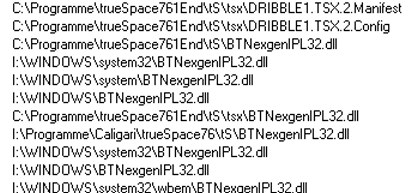
I looked with Procmon.exe what module this can be and it tells me what you can see in the attached picture.
Then I looked for this dll and put one from the internet into the desired folder. Now I get the message that
a procedure cannot be found.
I looked with Procmon.exe what module this can be and it tells me what you can see in the attached picture.
Then I looked for this dll and put one from the internet into the desired folder. Now I get the message that
a procedure cannot be found.
- Attachments
-
-
Benji
- Senior Chief Petty Officer
- Posts: 280
- Joined: 22 May 2009, 01:23
Re: "Dribble" Owners please post your bugs here
Thanks for displacement fix, it works perfectly.
@Wigand - I'm not sure what's going on there. You have installed 3delight first and started the licserver?
@Wigand - I'm not sure what's going on there. You have installed 3delight first and started the licserver?
-
Wigand
- Senior Chief Petty Officer
- Posts: 204
- Joined: 21 May 2009, 17:38
Re: "Dribble" Owners please post your bugs here
Yes, as a background server
-
clintonman
- Captain
- Posts: 5659
- Joined: 21 May 2009, 21:08
- Type the number ten into the box: 0
- Location: California
Re: "Dribble" Owners please post your bugs here
Did you install from the installer inside the zip archive or did you manually copy the tsx? If you manually copied remove it and try the installer. The installer won't install if 3Delight is not already installed on your system.Wigand wrote:I tried to install Dribbel but in the moment I load the TSX I get the message, that a mudule can not be found.
I looked with Procmon.exe what module this can be and it tells me what you can see in the attached picture.
Then I looked for this dll and put one from the internet into the desired folder. Now I get the message that
a procedure cannot be found.
-
Tiles
- Master Chief Petty Officer
- Posts: 401
- Joined: 27 May 2009, 08:34
Re: "Dribble" Owners please post your bugs here
My guess is that tS 7.6 is not installed outside the program files directory as required. I´ve noticed that when i had a look at Wigands error message. There you can read C:\Programme\trueSpace 7.61 ...
Installing trueSpace in the Program Files directory can cause trouble because Caligari never made tS 7.61 Windows Rights compatible. And Windows takes care about everything installed in the Program Files directory, rightshasslewise. It blocks for example writing to an Ini that is in a Program Files directory. Solution is to install trueSpace directly at C:\, which is the default installation directory anyways
Installing trueSpace in the Program Files directory can cause trouble because Caligari never made tS 7.61 Windows Rights compatible. And Windows takes care about everything installed in the Program Files directory, rightshasslewise. It blocks for example writing to an Ini that is in a Program Files directory. Solution is to install trueSpace directly at C:\, which is the default installation directory anyways
There is an installer for your newest version?and try the installer
Free Gamegraphics, Freeware Games http://reinerstilesets.de
-
clintonman
- Captain
- Posts: 5659
- Joined: 21 May 2009, 21:08
- Type the number ten into the box: 0
- Location: California
Re: "Dribble" Owners please post your bugs here
There is an installer for your newest version?[/quote]and try the installer
No installer, just a replacement tsx. The only change I made to the plugin was because the gui was cut off(maybe it was a win 7 thing) and the other changes I made were to the shaders.
-
Tiles
- Master Chief Petty Officer
- Posts: 401
- Joined: 27 May 2009, 08:34
Re: "Dribble" Owners please post your bugs here
Ah, okay. Thanks for clearing
Free Gamegraphics, Freeware Games http://reinerstilesets.de
-
Wigand
- Senior Chief Petty Officer
- Posts: 204
- Joined: 21 May 2009, 17:38
Re: "Dribble" Owners please post your bugs here
I installed TS again ( without uninstalling the other versions, I always had different versions in different places)Tiles wrote:My guess is that tS 7.6 is not installed outside the program files directory as required. I´ve noticed that when i had a look at Wigands error message. There you can read C:\Programme\trueSpace 7.61 ...
Installing trueSpace in the Program Files directory can cause trouble because Caligari never made tS 7.61 Windows Rights compatible. And Windows takes care about everything installed in the Program Files directory, rightshasslewise. It blocks for example writing to an Ini that is in a Program Files directory. Solution is to install trueSpace directly at C:\, which is the default installation directory anyways
in
C:\trueSpace761\
but without success.
-
Tiles
- Master Chief Petty Officer
- Posts: 401
- Joined: 27 May 2009, 08:34
Re: "Dribble" Owners please post your bugs here
I think we have it. The original Dribble installer installs a BTNexgenIPL32.dll into the trueSpace761\tS directory. This dll is missing when we use Clintons just tsx version. And that`s where this error comes from. The BTNexgenIPL32.dll cannot be found because it is not there.
The installer also installs some other stuff into the dribble folder. Like the manual, and a default.drb plus a workingdata folder. And drbSimpleFur.tss and drbSimpleSSS.tss into the trueSpace761\tS\Shaders\Material directory.
Just curious, since the whole stuff is open source now(I hope the manual is open souce too), shall i build an installer that installs all current needed stuff to run dribble? Or shall we wait a bit with that until you are a bit further with your development?
The installer also installs some other stuff into the dribble folder. Like the manual, and a default.drb plus a workingdata folder. And drbSimpleFur.tss and drbSimpleSSS.tss into the trueSpace761\tS\Shaders\Material directory.
Just curious, since the whole stuff is open source now(I hope the manual is open souce too), shall i build an installer that installs all current needed stuff to run dribble? Or shall we wait a bit with that until you are a bit further with your development?
Free Gamegraphics, Freeware Games http://reinerstilesets.de
-
Emmanuel
- Chief Warrant Officer
- Posts: 670
- Joined: 14 Jun 2009, 06:47
Re: "Dribble" Owners please post your bugs here
I am installing dribble for the first time on my new Windows 8.1 system, and when I select the tsx to add it into tS interface, I get an error message.
Well, there is an error but no message to help...
If I try older tS versions (tS6.6 or 6.5), I get a message (in French, the language of my OS) saying that it can't find the specified module.
I followed Clinton's procedure :
Install 3Delight (both versions X86 and x64), Dribble1.04, then copy Dribble1.05 and the new shaders to Dribble's folders.
What package could be missing ?
Well, there is an error but no message to help...
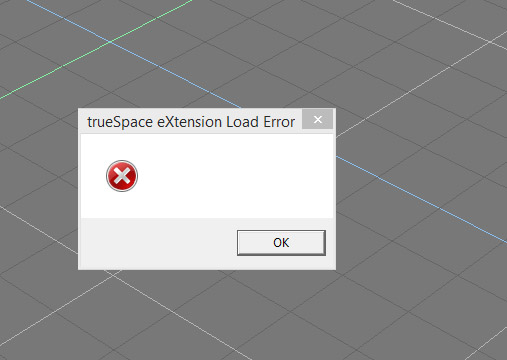
I followed Clinton's procedure :
Install 3Delight (both versions X86 and x64), Dribble1.04, then copy Dribble1.05 and the new shaders to Dribble's folders.
What package could be missing ?
-
Emmanuel
- Chief Warrant Officer
- Posts: 670
- Joined: 14 Jun 2009, 06:47
Re: "Dribble" Owners please post your bugs here
I removed all 3Delight installations and re-installed the x86 version only (that's the 10.0.4)
After a reboot, I could install Dribble into tS's interface
But the happines doesn't last long
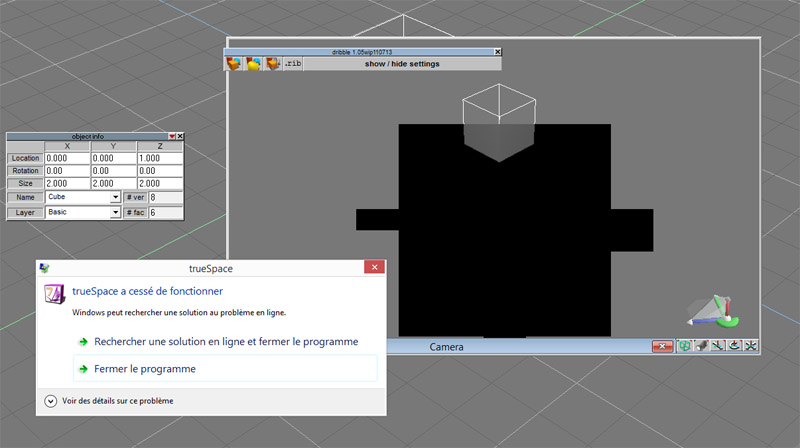
I get a crash as render starts :
After a reboot, I could install Dribble into tS's interface
But the happines doesn't last long
I get a crash as render starts :
-
Emmanuel
- Chief Warrant Officer
- Posts: 670
- Joined: 14 Jun 2009, 06:47
Re: "Dribble" Owners please post your bugs here
Okay, I've launched Dribble's installer once again over the previous install and now it works !
COOL.
It seems the x64 version of 3delight generates some issues. Doing a fresh install with the x86 version is the best solution in Windwos 8.1 (x64).
COOL.
It seems the x64 version of 3delight generates some issues. Doing a fresh install with the x86 version is the best solution in Windwos 8.1 (x64).
-
clintonman
- Captain
- Posts: 5659
- Joined: 21 May 2009, 21:08
- Type the number ten into the box: 0
- Location: California
Re: "Dribble" Owners please post your bugs here
Getting it to work in 64bit windows is weird. I got it to work by
clear the scene
preferences set renderer engine to Lightworks.tsr
display options
Txt res to 1024x1024
LW 1024x1024
Txt res for Workspace 1024x1024
install the plugin and immedietly exit trueSpace
clear the scene
preferences set renderer engine to Lightworks.tsr
display options
Txt res to 1024x1024
LW 1024x1024
Txt res for Workspace 1024x1024
install the plugin and immedietly exit trueSpace
-
Emmanuel
- Chief Warrant Officer
- Posts: 670
- Joined: 14 Jun 2009, 06:47
Re: "Dribble" Owners please post your bugs here
Thanks for this procedure Clinton. I will try it.
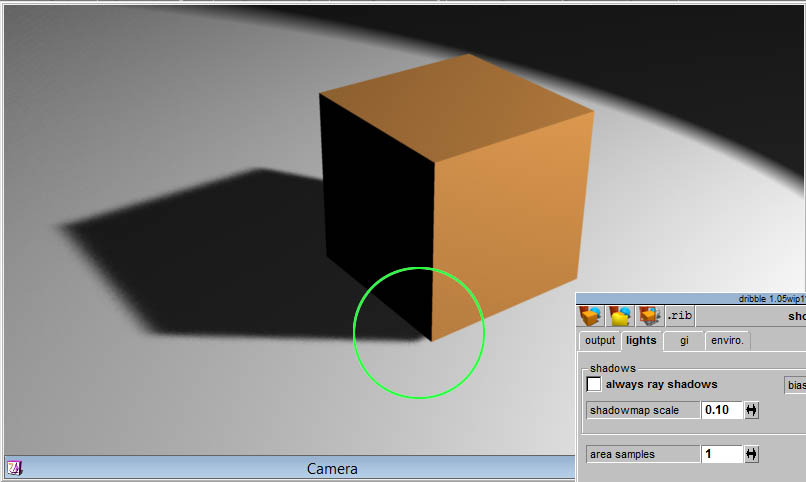
Doing some experiment with shadows, I am looking for a setting that would increase the acuracy of the shadows in "map" mode. In "ray" mode, there is no problem of course.
In this example, the cube is on the ground, but the shadow casting doesn't start at the edge. As a result it looks like the cube is few centimeters above the ground.
I think I tried every settings both in trueSpace's light settings and in Dribble's option panel ; and didn't found how to get a better shadow. Does anyone has a trick for that ?
Doing some experiment with shadows, I am looking for a setting that would increase the acuracy of the shadows in "map" mode. In "ray" mode, there is no problem of course.
In this example, the cube is on the ground, but the shadow casting doesn't start at the edge. As a result it looks like the cube is few centimeters above the ground.
I think I tried every settings both in trueSpace's light settings and in Dribble's option panel ; and didn't found how to get a better shadow. Does anyone has a trick for that ?

-
spacekdet

- Captain
- Posts: 1810
- Joined: 27 May 2009, 15:00
- Type the number ten into the box: 10
- Location: On the day shift at the Utility Muffin Research Kitchen
Re: "Dribble" Owners please post your bugs here
It's a long shot, but have you tried subdividing the base plane a few times?
-
Emmanuel
- Chief Warrant Officer
- Posts: 670
- Joined: 14 Jun 2009, 06:47
Re: "Dribble" Owners please post your bugs here
Yes, it doesn't work better.spacekdet wrote:It's a long shot, but have you tried subdividing the base plane a few times?
I also tried to boolean the 2 objects, triangulate, etc. Same issue.
This accuracy problem is common in Workspace but we can tweak settings to adjust real-time shadow casting. With Dribble, I haven't found any control over it yet...
-
clintonman
- Captain
- Posts: 5659
- Joined: 21 May 2009, 21:08
- Type the number ten into the box: 0
- Location: California
Re: "Dribble" Owners please post your bugs here
Looks like you found a bug. I did a test and the bias from the lights panel isn't going through. I'll report back here when I have time to fix it.
-
clintonman
- Captain
- Posts: 5659
- Joined: 21 May 2009, 21:08
- Type the number ten into the box: 0
- Location: California
Re: "Dribble" Owners please post your bugs here
Here's a tsx file you can try. The default value for shadow bias in 3Delight is 0.225
Just unzip the tsx file, add it to the dribble folder inside the tsx folder and load it in with the plugin button.
You may need to use the cache override to refresh any old shadowmap files.
Just unzip the tsx file, add it to the dribble folder inside the tsx folder and load it in with the plugin button.
You may need to use the cache override to refresh any old shadowmap files.
- Attachments
-
- dribble1.05wip062514_ts6or7.zip
- (231.12 KiB) Downloaded 392 times
-
Emmanuel
- Chief Warrant Officer
- Posts: 670
- Joined: 14 Jun 2009, 06:47
Re: "Dribble" Owners please post your bugs here
Thank you Clinton.clintonman wrote:Here's a tsx file you can try.
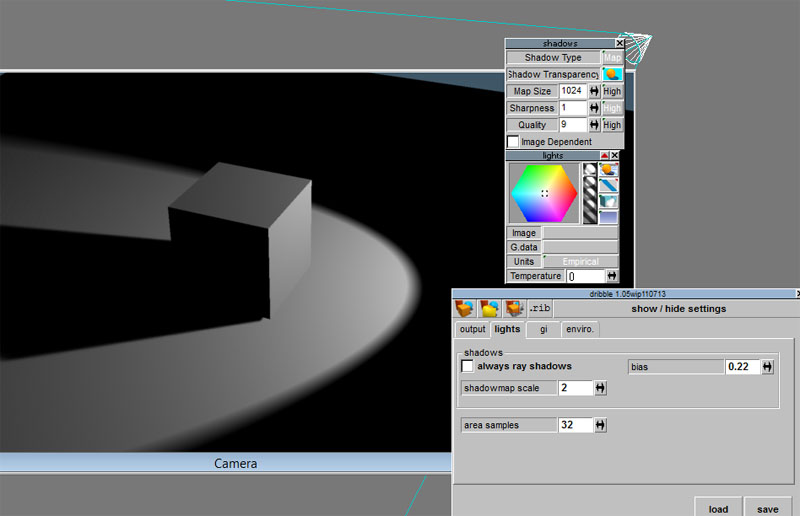
No improvments for me though. What version of 3delight are you using ?
-
clintonman
- Captain
- Posts: 5659
- Joined: 21 May 2009, 21:08
- Type the number ten into the box: 0
- Location: California
Re: "Dribble" Owners please post your bugs here
The default value of .225 is from the 3delight manual so it will give the same disconnected shadow result. Somewhere around .1 works better.
my 3delight version is 11.0.24
I did a quick test scaling everything by 10 and now I think 3delight may be expecting bigger objects. Maybe centimeter scale instead of tS meter scale.
I'll let you know how it works out.
Edit: I just noticed from your screenshot that you are not using the tsx I uploaded here. The official tsx hasn't been updated yet and doesn't use the bias setting.
Another Edit: Ignore the previous edit, the title bar hasn't been updated yet.
my 3delight version is 11.0.24
I did a quick test scaling everything by 10 and now I think 3delight may be expecting bigger objects. Maybe centimeter scale instead of tS meter scale.
I'll let you know how it works out.
Edit: I just noticed from your screenshot that you are not using the tsx I uploaded here. The official tsx hasn't been updated yet and doesn't use the bias setting.
Another Edit: Ignore the previous edit, the title bar hasn't been updated yet.
-
Emmanuel
- Chief Warrant Officer
- Posts: 670
- Joined: 14 Jun 2009, 06:47
Re: "Dribble" Owners please post your bugs here
That's right.clintonman wrote: I did a quick test scaling everything by 10 and now I think 3delight may be expecting bigger objects. Maybe centimeter scale instead of tS meter scale.
I'll let you know how it works out.
Scaling by 10 produces the best result :
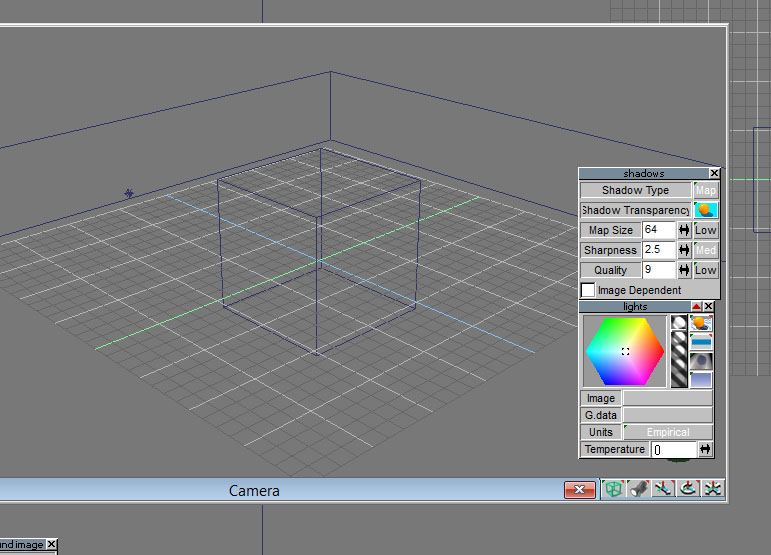
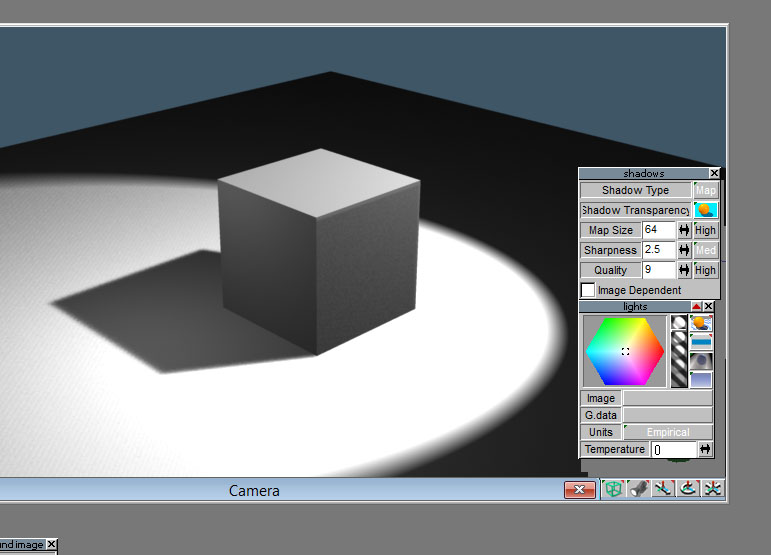
Here is what I found :
Color : YES
Intensity : YES
Falloff modes : YES
Image (for projector light) : YES
Shadow Transparency : NO
Map size : NO
Sharpeness : YES
Quality : NO
I belive Quality is controled for all lights at once through Dribble's panel, via the Shading Rate option. Am I right ?
But what about Map size ? Changing Shadowmap Scale in Dribble's panel doesn't seems to make any change in the render.
Once mastered, I will grab all the tricks we have found to make a help file for Dribble. 3delight has a great potential as it is a rather fast render engine (faster that Lightworks in some cases) but it is important to understand how it works to make the best use of it.
-
clintonman
- Captain
- Posts: 5659
- Joined: 21 May 2009, 21:08
- Type the number ten into the box: 0
- Location: California
Re: "Dribble" Owners please post your bugs here
Dribble is set to save time by not always recalculating the shadows. If you don't see a change it's because dribble is using old information. Use the cache override to force it to update the information. This is true for shadow map size and probable other things too. Check out the dribble docs - "C:/trueSpace761/tS/tsx/dribble/docs/quickstart.html"
-
Emmanuel
- Chief Warrant Officer
- Posts: 670
- Joined: 14 Jun 2009, 06:47
Re: "Dribble" Owners please post your bugs here
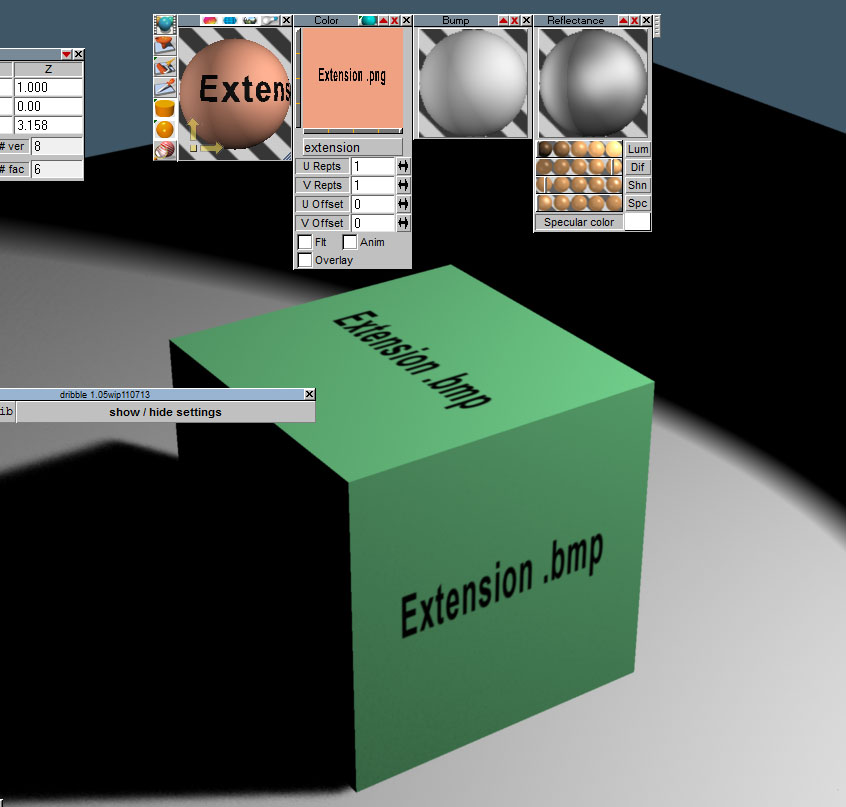
I just found that if you've got, in the same folder, several files in different formats but sharing the same name (like extension.bmp, extension.png and extension.jpg), Dribble will render the .bmp one, even if you painted the object with the .jpg or the .png !
- Attachments
-
- extension_texture.zip
- (29.9 KiB) Downloaded 367 times
-
Emmanuel
- Chief Warrant Officer
- Posts: 670
- Joined: 14 Jun 2009, 06:47
Re: "Dribble" Owners please post your bugs here
In the Material Editor, if you set Faceted rather than AutoFacet or Smooth, then the UV projection looks broken. Editing the UV doesn't help : 3delight behaves like if there was no UV information and seems to apply a default UV projection.