Problems Converting Offline Scenes

User avatar
3dvisuals dude
Chief Warrant Officer
Posts: 643
Joined: 03 Jun 2009, 02:53
Type the number ten into the box: 0

Problems Converting Offline Scenes

Post by 3dvisuals dude »

I am getting extremely frustrated here.

Jason, Stan, and trueBlue all have scenes or scene objects which they have created and posted here for use with truePlay to get rid of the damn wire highlight bug that autoruns when you open truePlay offline.

My problem here is that so far I have been completely unable to transfer any of those methods successfully to a NEW offline scene for truePlay.

I have tried several dozens of variations one at a time none of which was successful.

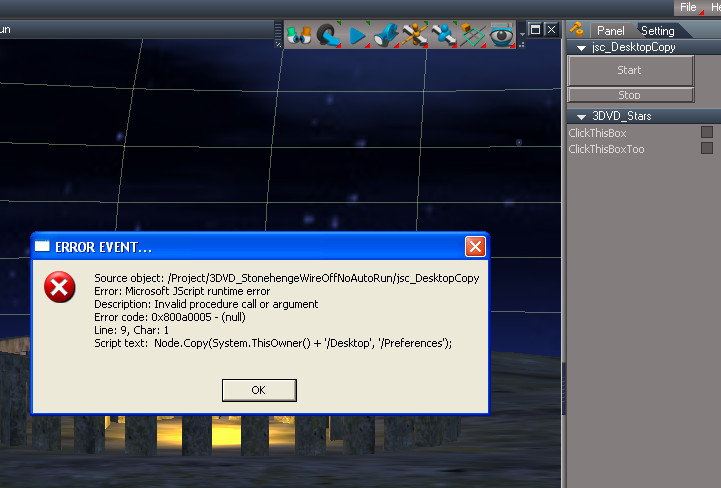
here is a screencapture of the Alert Popup I ALWAYS get now when in trueplay now if I am loading any scene where I transferred one of your guys three methods to a scene I created then opened in truePlay.

Please help me right away, I have many many scenes I am creating for offline use for this community and I am getting NOWHERE with this now, I am getting EXTREMELY frustrated that this is not a simple and easy process, if it is hard for me it will probably be impossible for newbies at this. I have been at this now for hours and am very angry. :evil:
OfflineScriptErrorInTrueplay.jpg
Image "Advantage is had from whatever is there, but usefulness arises from whatever is not." - Lao Tzu (Tao Te Ching - 500 BC) Image
User avatar
trueBlue
Captain
Posts: 5548
Joined: 06 Jul 2009, 22:50
Type the number ten into the box: 10

Re: Problems Converting Offline Scenes

Post by trueBlue »

Do you have the Desktop panel at the scene level?
User avatar
3dvisuals dude
Chief Warrant Officer
Posts: 643
Joined: 03 Jun 2009, 02:53
Type the number ten into the box: 0

Re: Problems Converting Offline Scenes

Post by 3dvisuals dude »

trueBlue wrote:Do you have the Desktop panel at the scene level?
yes, i tried at least 30 variations with it at the scene level, tested each one at a time, none worked in truePlay, the trigger fires up this popup on approach, stans autorun fires it up on entry, and your show panel with no autorun fires it up on pressing "Start." I also tried additional versions where I exported it up from inside Jason's original trigger but nothing works, everything brings up the same popup on execution regardless of method. I am baffled and upset.

Maybe a simple step by step tutorial on how to simply add any of these methods to a new scene would do it, cause placing the scripted objects in a library, harvesting them from one of the working scenes you guys created which work fine offline, doesn't work when placing those harvested methods in a new scene and testing it offline with truePlay... same error dialog every single time.

PS: Thanks for helping, I do appreciate it a lot.
Image "Advantage is had from whatever is there, but usefulness arises from whatever is not." - Lao Tzu (Tao Te Ching - 500 BC) Image
User avatar
3dvisuals dude
Chief Warrant Officer
Posts: 643
Joined: 03 Jun 2009, 02:53
Type the number ten into the box: 0

Re: Problems Converting Offline Scenes

Post by 3dvisuals dude »

Gonna re-install truePlay, maybe somehow all this script tweaking ruined the default truePlay setup. Will let you know if that works in a minute.
Image "Advantage is had from whatever is there, but usefulness arises from whatever is not." - Lao Tzu (Tao Te Ching - 500 BC) Image
User avatar
3dvisuals dude
Chief Warrant Officer
Posts: 643
Joined: 03 Jun 2009, 02:53
Type the number ten into the box: 0

Re: Problems Converting Offline Scenes

Post by 3dvisuals dude »

Nope...

Re-Installed truePlay, same popup on execution of the transferred methods.

Grrrr :evil:
Image "Advantage is had from whatever is there, but usefulness arises from whatever is not." - Lao Tzu (Tao Te Ching - 500 BC) Image
User avatar
3dvisuals dude
Chief Warrant Officer
Posts: 643
Joined: 03 Jun 2009, 02:53
Type the number ten into the box: 0

Re: Problems Converting Offline Scenes

Post by 3dvisuals dude »

Strange thing about this is that all three methods work fine online and offline in the scenes you three guys created, the problem is in transferring those existing scene objects successfully to a new scene, then they all fail.
Image "Advantage is had from whatever is there, but usefulness arises from whatever is not." - Lao Tzu (Tao Te Ching - 500 BC) Image
User avatar
3dvisuals dude
Chief Warrant Officer
Posts: 643
Joined: 03 Jun 2009, 02:53
Type the number ten into the box: 0

Re: Problems Converting Offline Scenes

Post by 3dvisuals dude »

One additional factor, but I doubt this is related, the scenes I am trying to transfer these methods to each have two existing "show automatically" stack panels, not that I think that matters, but thought I would say that.
Image "Advantage is had from whatever is there, but usefulness arises from whatever is not." - Lao Tzu (Tao Te Ching - 500 BC) Image
User avatar
3dvisuals dude
Chief Warrant Officer
Posts: 643
Joined: 03 Jun 2009, 02:53
Type the number ten into the box: 0

Re: Problems Converting Offline Scenes

Post by 3dvisuals dude »

Also, I *did* try dragging these objects different ways, testing each, first into the LE and second into the Scene view window. Didn't matter, same result.
Image "Advantage is had from whatever is there, but usefulness arises from whatever is not." - Lao Tzu (Tao Te Ching - 500 BC) Image
froo
Captain
Posts: 2554
Joined: 22 May 2009, 12:13

Re: Problems Converting Offline Scenes

Post by froo »

let me try...
froo
Captain
Posts: 2554
Joined: 22 May 2009, 12:13

Re: Problems Converting Offline Scenes

Post by froo »

ok. For Online scenes (not Offline) this is what I do:

1. from trueSpace, login to a shared space and drop tB's panel
2. exit space, and close tS
3. start truePlay and login to the space. Click the panel button and select Yes.

that works.

Now let me try offline scenes.
User avatar
3dvisuals dude
Chief Warrant Officer
Posts: 643
Joined: 03 Jun 2009, 02:53
Type the number ten into the box: 0

Re: Problems Converting Offline Scenes

Post by 3dvisuals dude »

OK and thanks

here is the scene file I am attempting to transfer the methods to:

(just so we are all on the same page)
3DVD_StarHenge1.zip
(1.47 MiB) Downloaded 29 times
Image "Advantage is had from whatever is there, but usefulness arises from whatever is not." - Lao Tzu (Tao Te Ching - 500 BC) Image
User avatar
3dvisuals dude
Chief Warrant Officer
Posts: 643
Joined: 03 Jun 2009, 02:53
Type the number ten into the box: 0

Re: Problems Converting Offline Scenes

Post by 3dvisuals dude »

froo wrote:ok. For Online scenes (not Offline) this is what I do:

1. from trueSpace, login to a shared space and drop tB's panel
2. exit space, and close tS
3. start truePlay and login to the space. Click the panel button and select Yes.

that works.

Now let me try offline scenes.
OK, I usually open trueBlue's Start Panel or Stan's "WireOff" or your Trigger first then go online, that works too.

the online scenes and offline scened you guys made are fine, work great.

Only problem is transferring any of them to a NEW scene offline, saving that and then attempting to access that scene in truePlay and executing the transferred method.
Image "Advantage is had from whatever is there, but usefulness arises from whatever is not." - Lao Tzu (Tao Te Ching - 500 BC) Image
User avatar
trueBlue
Captain
Posts: 5548
Joined: 06 Jul 2009, 22:50
Type the number ten into the box: 10

Re: Problems Converting Offline Scenes

Post by trueBlue »

I dunno Mark, I retested my script truePlay2 Desktop.RsObj and the default truePlay2 scene that I created and they both work as expected. In the future I would think replacing the default scene that truePlay2 uses on start up would be the best for new users.
User avatar
3dvisuals dude
Chief Warrant Officer
Posts: 643
Joined: 03 Jun 2009, 02:53
Type the number ten into the box: 0

Re: Problems Converting Offline Scenes

Post by 3dvisuals dude »

trueBlue wrote:I dunno Mark, I retested my script truePlay2 Desktop.RsObj and the default truePlay2 scene that I created and they both work as expected. In the future I would think replacing the default scene that truePlay2 uses on start up would be the best for new users.
Strange. I agree. I just reinstalled truePlay and that didn't change a thing though too.

The problem lies then (I assume) in the transferring method itself, some way in which you transfer the methods differently than I do.

I Ctrl-Drag each from the scened you guys made (which work fine) to the Stack as objects, then open the scene I wish to add them to, and then (I have used and tested both ctrl-drag and simple drag to both LE and scene view) pop them in the scene, save the file, test the file, and get the same popup no matter what.
Image "Advantage is had from whatever is there, but usefulness arises from whatever is not." - Lao Tzu (Tao Te Ching - 500 BC) Image
froo
Captain
Posts: 2554
Joined: 22 May 2009, 12:13

Re: Problems Converting Offline Scenes

Post by froo »

that also works for offline scenes.

EDIT:
System.ThisOwner() + /Desktop

is part of the error. It sounds like the Desktop node does not exist in the same area as the jscript node which executes the command. I'll take a look.
User avatar
3dvisuals dude
Chief Warrant Officer
Posts: 643
Joined: 03 Jun 2009, 02:53
Type the number ten into the box: 0

Re: Problems Converting Offline Scenes

Post by 3dvisuals dude »

froo wrote:that also works for offline scenes.
what does?
Image "Advantage is had from whatever is there, but usefulness arises from whatever is not." - Lao Tzu (Tao Te Ching - 500 BC) Image
User avatar
3dvisuals dude
Chief Warrant Officer
Posts: 643
Joined: 03 Jun 2009, 02:53
Type the number ten into the box: 0

Re: Problems Converting Offline Scenes

Post by 3dvisuals dude »

tell you what guys...

i uploaded the actual new scene here a couple posts back.

try NOT creating a new desktop object but transferring the method to that scene from a library object stack as i did, then save and test in truePlay executing the script.

see if you get the popup in that particular scene, maybe it has to do with the scene file, which by the way was originally created in 7.51 but was resaved in 7.61 for this zipfile.
Image "Advantage is had from whatever is there, but usefulness arises from whatever is not." - Lao Tzu (Tao Te Ching - 500 BC) Image
User avatar
3dvisuals dude
Chief Warrant Officer
Posts: 643
Joined: 03 Jun 2009, 02:53
Type the number ten into the box: 0

Re: Problems Converting Offline Scenes

Post by 3dvisuals dude »

froo wrote:that also works for offline scenes.

EDIT:
System.ThisOwner() + /Desktop

is part of the error. It sounds like the Desktop node does not exist in the same area as the jscript node which executes the command. I'll take a look.
Ok thanks, i dunno why it all workd perfectly in a scene you created it in (both online and offline) but transferring the scripted object fails in new scenes, very frustrating and odd.
Image "Advantage is had from whatever is there, but usefulness arises from whatever is not." - Lao Tzu (Tao Te Ching - 500 BC) Image
User avatar
3dvisuals dude
Chief Warrant Officer
Posts: 643
Joined: 03 Jun 2009, 02:53
Type the number ten into the box: 0

Re: Problems Converting Offline Scenes

Post by 3dvisuals dude »

Would it help if I post one of the versions in which it fails?
Image "Advantage is had from whatever is there, but usefulness arises from whatever is not." - Lao Tzu (Tao Te Ching - 500 BC) Image
froo
Captain
Posts: 2554
Joined: 22 May 2009, 12:13

Re: Problems Converting Offline Scenes

Post by froo »

cross posting is all. The steps I performed worked fine for offline scenes.
The steps are outlined in a prior post.

ok. I downloaded the starhenge scene, and loaded the truePlay2 Desktop node. You press Start to fix truePlay, and am attaching the node.

So this is what I do:

1. load scene into truespace 7.61
2. load the trueplay desktop node into the scene
3. save the scene
4. exit truespace
5. start trueplay
6. load the scene
7. press the Start button to eliminate wire highlight

the node contains:
script
desktop node

the script:
Node.Delete('/Preferences/Desktop');
Node.Copy(System.ThisOwner() + '/Desktop', '/Preferences');

if you do not have the Desktop node there, you will get an error.

But follow steps 1-7 and see if it works. It Should.
Attachments
truePlay2 Desktop5cb3.zip
(10.4 KiB) Downloaded 23 times
User avatar
3dvisuals dude
Chief Warrant Officer
Posts: 643
Joined: 03 Jun 2009, 02:53
Type the number ten into the box: 0

Re: Problems Converting Offline Scenes

Post by 3dvisuals dude »

Thanks, downloaded and testing now, will reply in a minute after test.
froo wrote:cross posting is all. The steps I performed worked fine for offline scenes.
The steps are outlined in a prior post.

ok. I downloaded the starhenge scene, and loaded the truePlay2 Desktop node. You press Start to fix truePlay, and am attaching the node.

So this is what I do:

1. load scene into truespace 7.61
2. load the trueplay desktop node into the scene
3. save the scene
4. exit truespace
5. start trueplay
6. load the scene
7. press the Start button to eliminate wire highlight

the node contains:
script
desktop node

the script:
Node.Delete('/Preferences/Desktop');
Node.Copy(System.ThisOwner() + '/Desktop', '/Preferences');

if you do not have the Desktop node there, you will get an error.

But follow steps 1-7 and see if it works. It Should.
Image "Advantage is had from whatever is there, but usefulness arises from whatever is not." - Lao Tzu (Tao Te Ching - 500 BC) Image
User avatar
3dvisuals dude
Chief Warrant Officer
Posts: 643
Joined: 03 Jun 2009, 02:53
Type the number ten into the box: 0

Re: Problems Converting Offline Scenes

Post by 3dvisuals dude »

OK Jason thank you!

I did all seven steps and it works perfectly THANK YOU !!! :superbanana: :bananacheers:

Now... lol... tell me why it does!!! hahaha! :oops:
Image "Advantage is had from whatever is there, but usefulness arises from whatever is not." - Lao Tzu (Tao Te Ching - 500 BC) Image
froo
Captain
Posts: 2554
Joined: 22 May 2009, 12:13

Re: Problems Converting Offline Scenes

Post by froo »

ok; let me try saving the encapsulated object (dekstop + script) to a library, and load from there; see if that works or not.
User avatar
3dvisuals dude
Chief Warrant Officer
Posts: 643
Joined: 03 Jun 2009, 02:53
Type the number ten into the box: 0

Re: Problems Converting Offline Scenes

Post by 3dvisuals dude »

froo wrote:ok; let me try saving the encapsulated object (dekstop + script) to a library, and load from there; see if that works or not.
yeah I am thinking the same thing... there is some manner in which it was saved to stack and placed in a new scene from stack that is the source of the issue I'll bet. Thanks, will be good to isolate the issue and be aware of it, whether it is a stack/library bug or a user transfer error in methodology.
Image "Advantage is had from whatever is there, but usefulness arises from whatever is not." - Lao Tzu (Tao Te Ching - 500 BC) Image
User avatar
3dvisuals dude
Chief Warrant Officer
Posts: 643
Joined: 03 Jun 2009, 02:53
Type the number ten into the box: 0

Re: Problems Converting Offline Scenes

Post by 3dvisuals dude »

OK...

I am off for a bit here to finish this scene, make the yellow light invisible, increase the FP Speed, etc. When I have this scene ready in a bit here I will upload it here in this forum section for everyone.

Thanks for the help guys, I was ripping out what little hair I have left there, lol. :oops:
Image "Advantage is had from whatever is there, but usefulness arises from whatever is not." - Lao Tzu (Tao Te Ching - 500 BC) Image
froo
Captain
Posts: 2554
Joined: 22 May 2009, 12:13

Re: Problems Converting Offline Scenes

Post by froo »

well I think the node you were using, did not have the Desktop node contained inside it.
If that node does not exist, the Copy command fails.

I also tried adding the node to the library stack, in the Base Objects library. Then dragged from the library, into the LE, Space level of the scene. Then saved, and loaded into truePlay.
that worked good too.

Glad it's working!

:bananacool2:
User avatar
Steinie
Captain
Posts: 2958
Joined: 21 May 2009, 17:38
Type the number ten into the box: 10

Re: Problems Converting Offline Scenes

Post by Steinie »

We call that "User Error"... :roll: :lol:
froo
Captain
Posts: 2554
Joined: 22 May 2009, 12:13

Re: Problems Converting Offline Scenes

Post by froo »

now, stan's approach is good too since it is automatic for truePlay; and no panel is required.
The script just executes.
User avatar
trueBlue
Captain
Posts: 5548
Joined: 06 Jul 2009, 22:50
Type the number ten into the box: 10

Re: Problems Converting Offline Scenes

Post by trueBlue »

Hey Mark I hacked your scene. See if you like this version a little better.
1.) Uses one Custom Timer Event. Originaly you had two Timers which I think would cause problems in Shared Space.
2.) The panel that opens in the Stack/Panels has On/Off button that Activates/Deactivates the Timer Event. More importantly is uses Take Control.
3.) Expanded all of your Object's Matriices so that a user would NOT be able to move them.
4.) More importantly I saved your scene as a RsRcd. This lowered the file size by 3 MB.
Attachments
Star Henge.zip
(1.38 MiB) Downloaded 29 times
Last edited by trueBlue on 11 Oct 2009, 15:11, edited 1 time in total.
User avatar
3dvisuals dude
Chief Warrant Officer
Posts: 643
Joined: 03 Jun 2009, 02:53
Type the number ten into the box: 0

Re: Problems Converting Offline Scenes

Post by 3dvisuals dude »

froo wrote:well I think the node you were using, did not have the Desktop node contained inside it.
If that node does not exist, the Copy command fails.

I also tried adding the node to the library stack, in the Base Objects library. Then dragged from the library, into the LE, Space level of the scene. Then saved, and loaded into truePlay.
that worked good too.

Glad it's working!

:bananacool2:
Thanks yes it is working!

As for the node not having desktop inside it, I didn't modify the nodes until all else failed. I simply dragged the nodes which you/trueBlue/Stan created and none of them worked when dragged to that scene. SO I have no idea what happened, the solution works but the originals should have too since they worked fine inside the scenes you three created. I dunno, too tired now to bother with it, but somewhere in that transfer there was some problem that recurred on every single attempt.

Thanks man, the solution is fine and repeatable! That's what counts! :bananacheers:
Image "Advantage is had from whatever is there, but usefulness arises from whatever is not." - Lao Tzu (Tao Te Ching - 500 BC) Image
User avatar
3dvisuals dude
Chief Warrant Officer
Posts: 643
Joined: 03 Jun 2009, 02:53
Type the number ten into the box: 0

Re: Problems Converting Offline Scenes

Post by 3dvisuals dude »

Steinie wrote:We call that "User Error"... :roll: :lol:
No doubt, lol :oops:
Image "Advantage is had from whatever is there, but usefulness arises from whatever is not." - Lao Tzu (Tao Te Ching - 500 BC) Image
User avatar
3dvisuals dude
Chief Warrant Officer
Posts: 643
Joined: 03 Jun 2009, 02:53
Type the number ten into the box: 0

Re: Problems Converting Offline Scenes

Post by 3dvisuals dude »

froo wrote:now, stan's approach is good too since it is automatic for truePlay; and no panel is required.
The script just executes.
I will try that again later too, but that as well as the other versions I had already tried unsuccessfully to transfer. without transferring all of them worked fine as is.
Image "Advantage is had from whatever is there, but usefulness arises from whatever is not." - Lao Tzu (Tao Te Ching - 500 BC) Image
User avatar
3dvisuals dude
Chief Warrant Officer
Posts: 643
Joined: 03 Jun 2009, 02:53
Type the number ten into the box: 0

Re: Problems Converting Offline Scenes

Post by 3dvisuals dude »

trueBlue wrote:Hey Mark I hacked your scene. See if you like this version a little better.
1.) Uses one Custom Timer Event. Originaly you had two Timers which I think would cause problems in Shared Space.
2.) The panel that opens in the Stack/Panels has On/Off button that Activates/Deactivates the Timer Event. More importantly is uses Take Control.
3.) Expanded all of your Object's Matriices so that a user would NOT be able to move them.
4.) More importantly I saved your scene as a RsRcd. This lowered the file size by 3 MB.
thanks, i appreciate you showing me the methods on that and especially the file reduction, awesome!

As you were creating that though I was also creating Version 2, lol, with several modifications, so I will make a third version later which utilizes your methods as well! Thanks tB ! :superbanana:
Image "Advantage is had from whatever is there, but usefulness arises from whatever is not." - Lao Tzu (Tao Te Ching - 500 BC) Image
User avatar
3dvisuals dude
Chief Warrant Officer
Posts: 643
Joined: 03 Jun 2009, 02:53
Type the number ten into the box: 0

Re: Problems Converting Offline Scenes

Post by 3dvisuals dude »

Here is my Version 2, but I am gonna have to make a third and final next, that will be this week sometime when I can allocate the time for it!

Enjoy.... this version is nice but larger than trueBlue's last version, so this is for offline use only I guess.

This version has the following modifications:

1) All light objects have been made invisible so as not to wreck the look of the scene

2) I re-did the Autoshow Stack Panel for the Star FX Controls

3) I added a new FP Properties control with faster speed and higher jump, it is compatible with 7.61.

4) I reworded the button text in Froos latest Desktop Panel so newbies wouldn't be afraid to click it, lol. It used to just say "Replace" well, you'll see! :mrgreen:

5) I changed the colors on the orbiting Planets, looks awesome now from below them in that night scene.

This version is usable now, works fine offline, but is larger than the version I will create thiis coming week based on trueBlue's last improvement (which was created at the same time this scene was!) :D

Enjoy folks... this scene really kicks avatar cone now! :mrgreen:
3DVD_Star_Henge_V2.zip
(1.47 MiB) Downloaded 21 times
Image "Advantage is had from whatever is there, but usefulness arises from whatever is not." - Lao Tzu (Tao Te Ching - 500 BC) Image
User avatar
3dvisuals dude
Chief Warrant Officer
Posts: 643
Joined: 03 Jun 2009, 02:53
Type the number ten into the box: 0

Re: Problems Converting Offline Scenes

Post by 3dvisuals dude »

I appreciate what you did for me a lot tB thanks.

There appears to be a corruption of this zipfile though, I tried downloading and unzipping twice with different filenames and it gives me an alert that there are no files to extract.

Just a head's up and thank you!
trueBlue wrote:Hey Mark I hacked your scene. See if you like this version a little better.
1.) Uses one Custom Timer Event. Originaly you had two Timers which I think would cause problems in Shared Space.
2.) The panel that opens in the Stack/Panels has On/Off button that Activates/Deactivates the Timer Event. More importantly is uses Take Control.
3.) Expanded all of your Object's Matriices so that a user would NOT be able to move them.
4.) More importantly I saved your scene as a RsRcd. This lowered the file size by 3 MB.
Image "Advantage is had from whatever is there, but usefulness arises from whatever is not." - Lao Tzu (Tao Te Ching - 500 BC) Image
User avatar
trueBlue
Captain
Posts: 5548
Joined: 06 Jul 2009, 22:50
Type the number ten into the box: 10

Re: Problems Converting Offline Scenes

Post by trueBlue »

Hummm...seems to download and work as expected here Mark.
User avatar
3dvisuals dude
Chief Warrant Officer
Posts: 643
Joined: 03 Jun 2009, 02:53
Type the number ten into the box: 0

Re: Problems Converting Offline Scenes

Post by 3dvisuals dude »

trueBlue wrote:Hummm...seems to download and work as expected here Mark.
OK, lol, this is just one of those star-crossed days when everything I do seems to be "user error," lol.

I just downloaded it this time without changing the filename on the zip as I saved it. It extracted fine as you said.

Last time I had changed the filename as I went to save it (since I have so many versions of that scene in same folder) and gave it a name I would recognize as a version, which was "trueblueshackedStarHenge.zip"

When I saved it as such, it saved corrupted as a zip. After successfully saving it just now and extracting it just fine, I went and tried another download and did the name change on saving as I did earlier... same result, changing the filename on saving corrupts the zip. User error strikes again. :oops:

I picked a fine day to quit heroin, lol!

Thanks tB! Will check it out here shortly and I appreciate all that work and help! :D
Image "Advantage is had from whatever is there, but usefulness arises from whatever is not." - Lao Tzu (Tao Te Ching - 500 BC) Image
User avatar
trueBlue
Captain
Posts: 5548
Joined: 06 Jul 2009, 22:50
Type the number ten into the box: 10

Re: Problems Converting Offline Scenes

Post by trueBlue »

No problem and your welcome. Here is your Oracle World I've been playing around with. Added waves to the pool. There is some artifacts that popup and I am not sure how to fix it.
Attachments
Oracle World.zip
(2.65 MiB) Downloaded 28 times
froo
Captain
Posts: 2554
Joined: 22 May 2009, 12:13

Re: Problems Converting Offline Scenes

Post by froo »

speaking of timers, I found an item in the server doc which may
help with animated objects in OurSpace.

The item is:

SyncRate

Sync rate - Number of times per second when changes of the Shared Space are checked. Use lower values for spaces that are not so important for real-time and use higher values for spaces you want to synchronize more precisely

So that may help with, for example, animated fans, so they don't look so clunky and stuttery when they rotate.
User avatar
3dvisuals dude
Chief Warrant Officer
Posts: 643
Joined: 03 Jun 2009, 02:53
Type the number ten into the box: 0

Re: Problems Converting Offline Scenes

Post by 3dvisuals dude »

trueBlue wrote:No problem and your welcome. Here is your Oracle World I've been playing around with. Added waves to the pool. There is some artifacts that popup and I am not sure how to fix it.
Awesome thabnks tB! :bananacheers:

yeah I know on the artifacts, that was one of those models I whipped up a half hour before it was to be used in a shared space meeting back in 2007, lol, I didn't notice the artifacts until it was already online, then just forgot, lol. It was done when the object was booleaned, needs a cleaner boolean is all I guess. no, will get to it, priority # 843, lol! :D

I appreciate the help on all this, and thanks for reminding me about recording files to save filesizem I had completely forgotten that!
Image "Advantage is had from whatever is there, but usefulness arises from whatever is not." - Lao Tzu (Tao Te Ching - 500 BC) Image
User avatar
3dvisuals dude
Chief Warrant Officer
Posts: 643
Joined: 03 Jun 2009, 02:53
Type the number ten into the box: 0

Re: Problems Converting Offline Scenes

Post by 3dvisuals dude »

froo wrote:speaking of timers, I found an item in the server doc which may
help with animated objects in OurSpace.

The item is:

SyncRate

Sync rate - Number of times per second when changes of the Shared Space are checked. Use lower values for spaces that are not so important for real-time and use higher values for spaces you want to synchronize more precisely

So that may help with, for example, animated fans, so they don't look so clunky and stuttery when they rotate.

Awesome Froo, we have lots of uses for that, including avatar to vehicle collision pause so the collision engine has toime to catch the avatar before an vehicle animation passes through it. awesome! :bananacheers:
Image "Advantage is had from whatever is there, but usefulness arises from whatever is not." - Lao Tzu (Tao Te Ching - 500 BC) Image
User avatar
trueBlue
Captain
Posts: 5548
Joined: 06 Jul 2009, 22:50
Type the number ten into the box: 10

Re: Problems Converting Offline Scenes

Post by trueBlue »

Hey Mark,
Just to clarify I replaced your square mesh for the water in the pool with a circle mesh. This is where I am seeing the artifacts. But it is kind of cool really, but may not be wanted.
User avatar
3dvisuals dude
Chief Warrant Officer
Posts: 643
Joined: 03 Jun 2009, 02:53
Type the number ten into the box: 0

Re: Problems Converting Offline Scenes

Post by 3dvisuals dude »

trueBlue wrote:Hey Mark,
Just to clarify I replaced your square mesh for the water in the pool with a circle mesh. This is where I am seeing the artifacts. But it is kind of cool really, but may not be wanted.
Oh ok, I will check that out too and thanks! :D
Image "Advantage is had from whatever is there, but usefulness arises from whatever is not." - Lao Tzu (Tao Te Ching - 500 BC) Image

Return to “Our Shared Space Community”