Hi all!
I have been having some fun in the FrooSpace among others today. I learnt a little on how to host one, so here will be a server hosted by me! The connection will have a decent 4mb download and 0.7 mg upload. I will make some permissions to create a cool scenery with a toned down AO lighting and plants to have a nice collaborative modelling experience. But till then! Enjoy some beautiful grey cubes...
//190.24.111.140/1109
Draises Spaces
-
Draise

- Captain
- Posts: 3200
- Joined: 21 Sep 2009, 19:33
- Type the number ten into the box: 0
- Location: Bogota, Colombia
-
Draise
- Captain
- Posts: 3200
- Joined: 21 Sep 2009, 19:33
- Type the number ten into the box: 0
- Location: Bogota, Colombia
Re: Draises Spaces
Currently offline till morrow morning! Till Then!
-
Draise
- Captain
- Posts: 3200
- Joined: 21 Sep 2009, 19:33
- Type the number ten into the box: 0
- Location: Bogota, Colombia
Re: Draises Spaces
Back online!
-
froo
- Captain
- Posts: 2554
- Joined: 22 May 2009, 12:13
Re: Draises Spaces
Cool Draise! I'll login in a sec to check it out!
-
stan
- Master Chief Petty Officer
- Posts: 584
- Joined: 21 May 2009, 17:20
Re: Draises Spaces
there is still no data transfer this morning..no grey cubes nada...
-
froo
- Captain
- Posts: 2554
- Joined: 22 May 2009, 12:13
Re: Draises Spaces
copy that
-
Draise
- Captain
- Posts: 3200
- Joined: 21 Sep 2009, 19:33
- Type the number ten into the box: 0
- Location: Bogota, Colombia
Re: Draises Spaces
Hmm... weird. I can log onto my own server from the local host fine along with data transfer...... Let me try again. And I keep missing the people who login! Crapola..
-
froo
- Captain
- Posts: 2554
- Joined: 22 May 2009, 12:13
Re: Draises Spaces
Folks you gotta check out the lighting in here! Draise is the Light Master! 
-
Draise
- Captain
- Posts: 3200
- Joined: 21 Sep 2009, 19:33
- Type the number ten into the box: 0
- Location: Bogota, Colombia
Re: Draises Spaces
Woah cool to see so many here at one time! Awesome. My server just crashed and I have restarted the scene. But I lost changes in the crash. I need to startup an autobackup script..
-
MikomDude

- Captain
- Posts: 1930
- Joined: 04 Oct 2010, 11:12
- Type the number ten into the box: 0
- Location: The Hague, Netherlands
Re: Draises Spaces
Yes, I lost connection a while back. I'll see if I can come back later todayDraise wrote:My server just crashed and I have restarted the scene.
Nice work on the lighting btw!
-
Draise
- Captain
- Posts: 3200
- Joined: 21 Sep 2009, 19:33
- Type the number ten into the box: 0
- Location: Bogota, Colombia
Re: Draises Spaces
Updated the scene with a pedastool platform and some nice plants. The AO rig still stands. Fell free to enjoy the space!

-
Cayenne
- Chief Petty Officer
- Posts: 119
- Joined: 03 Jun 2009, 20:05
- Type the number ten into the box: 0
- Location: U.K.
Re: Draises Spaces
Draise wrote:Woah cool to see so many here at one time! Awesome. My server just crashed and I have restarted the scene. But I lost changes in the crash. I need to startup an autobackup script..
in the server management panel there is a back-up interval period that can be set, however sometimes it is better to shut down the server and make a back-up of the context manually when you make any major changes to the scene/project.
as far as I recall there is some sort of pause in the auto-back-up that waits/checks till there are no changes happening to minimize any problems, then it will stop changes happening in the ctx during the back-up process (can be percieved by logged in clents as a short delay/lag while back -up is in progress).
one issue with the auto back-up is that if there is some corruption for whatever reason then it will be saved into the ctx (and it is possible that the ctx will not load and then the scene will be lost., which is why its good to save and zip incremental back-ups into a folder , or have a script that can write incremental back-ups into a library that is created in the server itself.( server libraries are a good way to collect and store objects and scenes, they are also useful for running scripts to load objects into the scene as well , its not so much an issue with running/managing a server local to yourself , but if the server was running remotely eg; on a host site then it saves a lot of upload time when loading from internal libraries on the server itself.)
server libraries were a work in progress and all functions weren't fully implemented , however they are working reasonably well and should work ok in most circumstances, they behave in a similar manner to regular tS libraries.
regards
Paul
-
Draise
- Captain
- Posts: 3200
- Joined: 21 Sep 2009, 19:33
- Type the number ten into the box: 0
- Location: Bogota, Colombia
Re: Draises Spaces
Thanks paul. I will try find a way to autosave the CTNX in certain intervals, and a date, maybe in sequential way (instead of overwriting the backup). Your ideas are great. I do usually save scenes on intervals often, as TS crashes/freezes a lot. I do that with any 3D software, cause there are toooooooooo many elements that can corrupt any moment. Even with Autodesk software.. Always backup, backup, backup!
SPACE UPDATE
I am having trouble making my scene editable. It's good for looking at, but it isn't editable. I have the scene within the project node in the server... but it looks like it's a nested scene within a scene. Thus I can't create, or sometimes edit, objects. I will have to fix this tonight.
SPACE UPDATE
I am having trouble making my scene editable. It's good for looking at, but it isn't editable. I have the scene within the project node in the server... but it looks like it's a nested scene within a scene. Thus I can't create, or sometimes edit, objects. I will have to fix this tonight.
-
froo
- Captain
- Posts: 2554
- Joined: 22 May 2009, 12:13
Re: Draises Spaces
Draise,
The irony here is, at one point in time, we were trying to make scenes and objects just like that: Un-Editable, to protect accidental deletions and modifications. So, if you understand why it is not editable now, please document that! I think there is a checkbox on the space node somewhere that does that; I could be wrong.
The irony here is, at one point in time, we were trying to make scenes and objects just like that: Un-Editable, to protect accidental deletions and modifications. So, if you understand why it is not editable now, please document that! I think there is a checkbox on the space node somewhere that does that; I could be wrong.
-
Cayenne
- Chief Petty Officer
- Posts: 119
- Joined: 03 Jun 2009, 20:05
- Type the number ten into the box: 0
- Location: U.K.
Re: Draises Spaces
@froo , when we were developing the server app , you had to explicitly set/mark objects and spaces to be uneditable (by default objects should be editable) by managing the permissions through using flags (check boxes on a per object basis,, will have to dig into my memory and also find some commands to use . it might be that Draise needs to be logged in as admin to perform changes , using xls file and giving himself permission , will do a test in the morning to check if its the case,. must go to bed soon a its 1.20 am here,
@Draise , I have a few days off work , if the ctx isnt too big zipped or rarred then you could upload it here with a password , send me the pw in pm.
I can take a look at it and see if it is ok.(will have to dig out my notes though)
@Draise , I have a few days off work , if the ctx isnt too big zipped or rarred then you could upload it here with a password , send me the pw in pm.
I can take a look at it and see if it is ok.(will have to dig out my notes though)
-
Draise
- Captain
- Posts: 3200
- Joined: 21 Sep 2009, 19:33
- Type the number ten into the box: 0
- Location: Bogota, Colombia
Re: Draises Spaces
I have uploaded clintons unselectable script to the server, and now some of the objects you can't select = can't edit. But just get rid of the script and things are normal again... Or just make them selectable again in the LE by unticking the obj....froo wrote:Draise,
The irony here is, at one point in time, we were trying to make scenes and objects just like that: Un-Editable, to protect accidental deletions and modifications. So, if you understand why it is not editable now, please document that! I think there is a checkbox on the space node somewhere that does that; I could be wrong.
I had a look at the permissions from the XLS file in the scripts folder.. but I can't change or add anything to the XLS file without.. I think corrupting it, using OpenOffice and Office 2010....
A good theory is grouping everything in with the lock script, then making another script that prevents deleting/modifying that group unless you write the password or something into the script. (Or lock the group, delete the lock tick from the node, and viola! but you could still delete it..)
! | Issue Update: My issue has something to do with PE or something with the selection property. I have only really tested it on my //localhost/ server, but when I edit a new object, great, but then when i deselect the object, I can't enter PE mode as the selection node export connection erases itself every time I try again (select PE, erase, exit PE mode immediately). |
Simple temporary fix is PE editing on the server, but then that doesn't really fix the problem as we go back to square one of of the problem above... I assume cause i'm in the local host.
It's late at the moment, so I'm gonna go to bed. But I'll give you my CTX and.. thansk for your help!Cayenne wrote: @Draise , I have a few days off work , if the ctx isnt too big zipped or rarred then you could upload it here with a password , send me the pw in pm.
I can take a look at it and see if it is ok.(will have to dig out my notes though)

-
Cayenne
- Chief Petty Officer
- Posts: 119
- Joined: 03 Jun 2009, 20:05
- Type the number ten into the box: 0
- Location: U.K.
Re: Draises Spaces
in office 2010 , try to save the xls as an Excel 97 - 2003 xls, I think that option should be there, and it should work ok , best to edit the file when tServe isnt active /running.
open office seems to corrupt the sheet , same as most other "compatible with xls apps ", I think they strip some of the MS headers out of the file, and tS is looking for them and it fails to read it , however I didnt try to see if its just the seperators being used in the field between the privs column.
open office seems to corrupt the sheet , same as most other "compatible with xls apps ", I think they strip some of the MS headers out of the file, and tS is looking for them and it fails to read it , however I didnt try to see if its just the seperators being used in the field between the privs column.
-
MikomDude
- Captain
- Posts: 1930
- Joined: 04 Oct 2010, 11:12
- Type the number ten into the box: 0
- Location: The Hague, Netherlands
Re: Draises Spaces
I'll just leave this here:
- Attachments
-

-
Draise
- Captain
- Posts: 3200
- Joined: 21 Sep 2009, 19:33
- Type the number ten into the box: 0
- Location: Bogota, Colombia
Re: Draises Spaces
He he he!MikomDude wrote:I'll just leave this here:

Funny. But it looks like it didn't reflect on the server...
PE means = Point Edit.
I'm finding that I can once things are synced up ok. Takes a little syncing for everything to work ok. My unselectability script isn't working on the client side...

! | EDIT:Server back up! |
-
Draise
- Captain
- Posts: 3200
- Joined: 21 Sep 2009, 19:33
- Type the number ten into the box: 0
- Location: Bogota, Colombia
Re: Draises Spaces
Looks like I was there having fun with SteveBe but then I crashed trying to edit something not synced..
-
Draise
- Captain
- Posts: 3200
- Joined: 21 Sep 2009, 19:33
- Type the number ten into the box: 0
- Location: Bogota, Colombia
Re: Draises Spaces
MY GOD! Figured my dilemma out!
Found the manager panel and this little tick box beside the VT. Turned that off and.... all good! Also I found that the Conflict Solver option caused me to..... deselect the PE mode automatically, thus making me frustrated. I am not sure which of the two does the issue, but it solved my problems.. I don't have update problems now.
Found the manager panel and this little tick box beside the VT. Turned that off and.... all good! Also I found that the Conflict Solver option caused me to..... deselect the PE mode automatically, thus making me frustrated. I am not sure which of the two does the issue, but it solved my problems.. I don't have update problems now.
-
froo
- Captain
- Posts: 2554
- Joined: 22 May 2009, 12:13
Re: Draises Spaces
Congratz Draise!
Can you please post a before and after screenshot of each of those nodes?
I did not have a chance to look at my settings before powering off the machine a couple days ago.
Haven't been home long enough to investigate.
Great job!
Can you please post a before and after screenshot of each of those nodes?
I did not have a chance to look at my settings before powering off the machine a couple days ago.
Haven't been home long enough to investigate.
Great job!
-
Draise
- Captain
- Posts: 3200
- Joined: 21 Sep 2009, 19:33
- Type the number ten into the box: 0
- Location: Bogota, Colombia
Re: Draises Spaces
Sure thing! Morrow!froo wrote: Can you please post a before and after screenshot of each of those nodes?
! | Server Down to let my machine rest for the night Will be back up in the morning |

-
Draise
- Captain
- Posts: 3200
- Joined: 21 Sep 2009, 19:33
- Type the number ten into the box: 0
- Location: Bogota, Colombia
Re: Draises Spaces
! | Server Update - Back Online. |
-
DarkScythe
- Senior Chief Petty Officer
- Posts: 243
- Joined: 23 Sep 2009, 08:57
Re: Draises Spaces
how do I join using trueplay any tutorial...
-
stan
- Master Chief Petty Officer
- Posts: 584
- Joined: 21 May 2009, 17:20
Re: Draises Spaces
use this //190.24.111.140/1109 or //190.24.111.140/1110
in the address box of chat window which is opened with the first icon on left in tp toolbar.
give your self a user name don'tthink password is nessaryfor now.
press login
providing Draise has his server on
in the address box of chat window which is opened with the first icon on left in tp toolbar.
give your self a user name don'tthink password is nessaryfor now.
press login
providing Draise has his server on
-
Draise
- Captain
- Posts: 3200
- Joined: 21 Sep 2009, 19:33
- Type the number ten into the box: 0
- Location: Bogota, Colombia
Re: Draises Spaces
I think the server is down.. I can't log in... Is it down for you guys too?
EDIT
That explained why I couldn't log in. I need to setup a remote client..
EDIT
! | SERVER DOWN Came home to find my computer crashed or there was a power out. I may host my servers at work instead.. |
-
Draise
- Captain
- Posts: 3200
- Joined: 21 Sep 2009, 19:33
- Type the number ten into the box: 0
- Location: Bogota, Colombia
Re: Draises Spaces
! | Server Up! |
-
Draise
- Captain
- Posts: 3200
- Joined: 21 Sep 2009, 19:33
- Type the number ten into the box: 0
- Location: Bogota, Colombia
Re: Draises Spaces
Experiments with Darkscythe has proven that:
truePlay downloads the scene rapidly.
TS 7.61 beta 8 Rosetta (WS side only) downloads very slowly
TS 7.61 beta 8 (WS and MS) loads normally - for me
The scene has a nice new addition thanks to Pugman, an interesting scifi bike. It's a heavy model, but it's now part of the showcase.
Current Scene size : 7.6mg (Expect a wait)
Make sure your internet is a fast one!
truePlay downloads the scene rapidly.
TS 7.61 beta 8 Rosetta (WS side only) downloads very slowly
TS 7.61 beta 8 (WS and MS) loads normally - for me
The scene has a nice new addition thanks to Pugman, an interesting scifi bike. It's a heavy model, but it's now part of the showcase.
Current Scene size : 7.6mg (Expect a wait)
Make sure your internet is a fast one!
-
froo
- Captain
- Posts: 2554
- Joined: 22 May 2009, 12:13
Re: Draises Spaces
Cool! 
-
Draise
- Captain
- Posts: 3200
- Joined: 21 Sep 2009, 19:33
- Type the number ten into the box: 0
- Location: Bogota, Colombia
Re: Draises Spaces
Update!
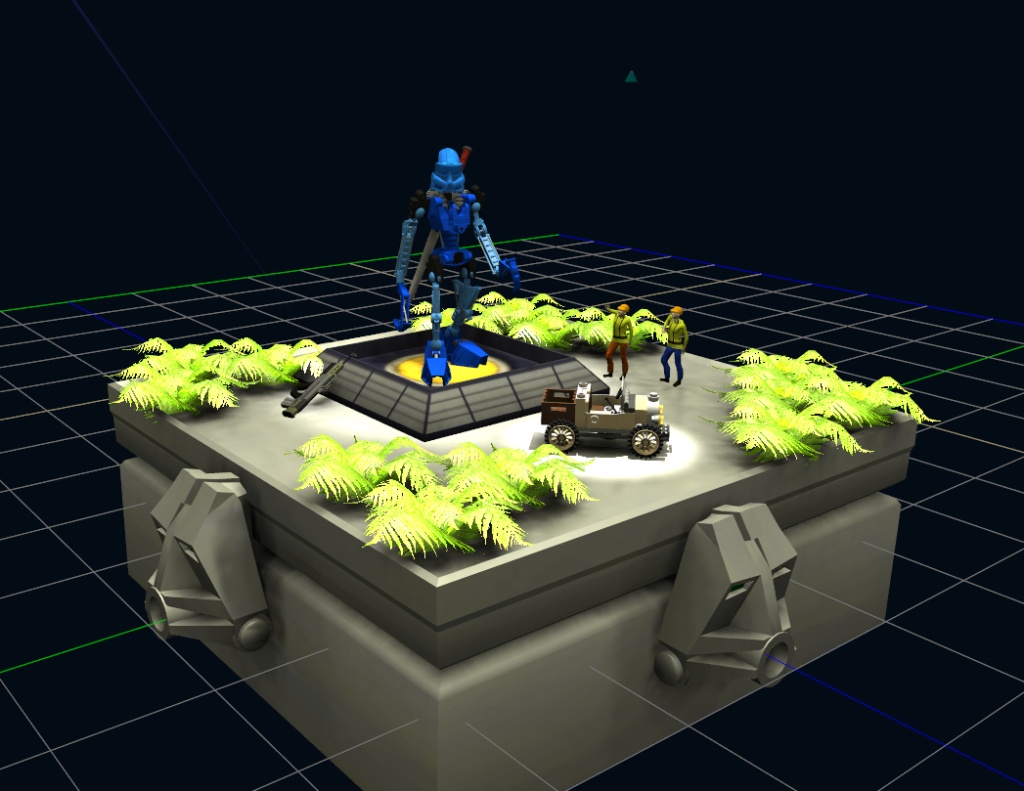
We are showcasing MikomDude's Bionicle! Very high polycount, so the scene is at 9mb, but enjoy!

We are showcasing MikomDude's Bionicle! Very high polycount, so the scene is at 9mb, but enjoy!
-
MikomDude
- Captain
- Posts: 1930
- Joined: 04 Oct 2010, 11:12
- Type the number ten into the box: 0
- Location: The Hague, Netherlands
Re: Draises Spaces
Had some fun with Draise in his space today. Here is what the current scene should look like.
Draise may have removed some models though, the scene was getting pretty stuffed with polygons.
-
Cayenne
- Chief Petty Officer
- Posts: 119
- Joined: 03 Jun 2009, 20:05
- Type the number ten into the box: 0
- Location: U.K.
Re: Draises Spaces
looks awesome ,will try to visit it,, you can always generate a cache id for objects that you don't want to change , this would mean that after initial download of object to client subsequent logins will check the local cache and if object is there then it will load it from cache and not bother to download it again.(you will need to remove cache id , if you want to make changes to object and have them reflected on downloads) .
sometimes the cache checking can show as a few seconds of checking which could be concieved as a delay in scene loading , but it will speed up entering spaces on subsequent logins.
sometimes the cache checking can show as a few seconds of checking which could be concieved as a delay in scene loading , but it will speed up entering spaces on subsequent logins.
-
Draise
- Captain
- Posts: 3200
- Joined: 21 Sep 2009, 19:33
- Type the number ten into the box: 0
- Location: Bogota, Colombia
Re: Draises Spaces
How do you cache the object? Can you share the process in a tutorial fashion or with some instructions?? You've certainly perked my interests!
-
Draise
- Captain
- Posts: 3200
- Joined: 21 Sep 2009, 19:33
- Type the number ten into the box: 0
- Location: Bogota, Colombia
Re: Draises Spaces
! | Server Back Up! |

We had a crazy night lastnight and it looks like some of the aspects either were deleted or changed.. and I THINK i know who was to blame!

I will have to look into how to lock objects.
! | WARNING: Gali is a heavy model and will take time to download. The AO light rig requires a decent video card of at least 512 MG - 1gig of video ram. |
I'll make another low quality space soon!
-
Cayenne
- Chief Petty Officer
- Posts: 119
- Joined: 03 Jun 2009, 20:05
- Type the number ten into the box: 0
- Location: U.K.
Re: Draises Spaces
ok,, the manual I worked on has some bits not quite upto date , but it shows the command to generate cache.
basically you need to open up a tS either server or tS command window and put :
Net.GenerateCacheIIDAttr('');
then press enter.
this command will generate a cache id for the object that is selected in the LE.
there is also a new method you may find easier .
Hold alt key whilst opening up a scene view.
browse down into the scene node .
when scene view is opened with alt key it offers some extra "hidden commands" these pop-up commands show when r-click over an object in the scene tree and apply the command to the object.
the refresh part wasn't implemented and will only show the objects cache id when the scene view window is closed and re-opened with the alt key again.
this was a start of some extra tools to manage the severs scenes but a lot of the new things werent added to the build when we had to stop development.
edit:
I just checked Manual and the newer method is in there as well.
I also just checked if hyperlinks could launch an instatnce of tS and take you to a server , it appeared to work .
I have a machine set up here but not sure if my router is seen from outside as i recently had to reset my router to default.
the below is a hyperlink that should launch tS and take you to my server. be careful to make sure you dont lose a scene already opened in tS
[url]caligari.truespace://78.151.164.55/1109[/url]
basically you need to open up a tS either server or tS command window and put :
Net.GenerateCacheIIDAttr('');
then press enter.
this command will generate a cache id for the object that is selected in the LE.
there is also a new method you may find easier .
Hold alt key whilst opening up a scene view.
browse down into the scene node .
when scene view is opened with alt key it offers some extra "hidden commands" these pop-up commands show when r-click over an object in the scene tree and apply the command to the object.
the refresh part wasn't implemented and will only show the objects cache id when the scene view window is closed and re-opened with the alt key again.
this was a start of some extra tools to manage the severs scenes but a lot of the new things werent added to the build when we had to stop development.
edit:
I just checked Manual and the newer method is in there as well.
I also just checked if hyperlinks could launch an instatnce of tS and take you to a server , it appeared to work .
I have a machine set up here but not sure if my router is seen from outside as i recently had to reset my router to default.
the below is a hyperlink that should launch tS and take you to my server. be careful to make sure you dont lose a scene already opened in tS
[url]caligari.truespace://78.151.164.55/1109[/url]
-
MikomDude
- Captain
- Posts: 1930
- Joined: 04 Oct 2010, 11:12
- Type the number ten into the box: 0
- Location: The Hague, Netherlands
Re: Draises Spaces
Draise and I are now working on a little Star Wars Landspeeder, feel free to join us! 
- Attachments
-

-
Draise
- Captain
- Posts: 3200
- Joined: 21 Sep 2009, 19:33
- Type the number ten into the box: 0
- Location: Bogota, Colombia
Re: Draises Spaces
! | SERVER DOWN |
-
Draise
- Captain
- Posts: 3200
- Joined: 21 Sep 2009, 19:33
- Type the number ten into the box: 0
- Location: Bogota, Colombia
Re: Draises Spaces
! | Server Up! |
Today there will be some new spaces and plans drawn out. I'll try figure out ways to link them! Have a great one!
-
Draise
- Captain
- Posts: 3200
- Joined: 21 Sep 2009, 19:33
- Type the number ten into the box: 0
- Location: Bogota, Colombia
Re: Draises Spaces
! | Server Down! |
Going to sleep. I will be waking morrow to work on the servers and the U3DA website morrow.. being a national holiday. I can do that! Yay.. but the server will be down, to rise morrow with a portal site and gateways to other sites. Have a good one!
-
MikomDude
- Captain
- Posts: 1930
- Joined: 04 Oct 2010, 11:12
- Type the number ten into the box: 0
- Location: The Hague, Netherlands
Re: Draises Spaces
Looking forward to it.
-
froo
- Captain
- Posts: 2554
- Joined: 22 May 2009, 12:13
Re: Draises Spaces
Draise,
check out this page.
3d visuals dude posted a sg1.zip (stargate1 . zip ) file, and trueblue posted an updated teleporter script.
I believe these can be used to jump to other scenes on your server, as well as others.
viewtopic.php?t=778&p=6690&hilit=teleport#p6690"
check out this page.
3d visuals dude posted a sg1.zip (stargate1 . zip ) file, and trueblue posted an updated teleporter script.
I believe these can be used to jump to other scenes on your server, as well as others.
viewtopic.php?t=778&p=6690&hilit=teleport#p6690"
-
Steinie

- Captain
- Posts: 2958
- Joined: 21 May 2009, 17:38
- Type the number ten into the box: 10
Re: Draises Spaces
Also something to study or use:
vi ... 91&start=0"
vi ... 91&start=0"
-
Draise
- Captain
- Posts: 3200
- Joined: 21 Sep 2009, 19:33
- Type the number ten into the box: 0
- Location: Bogota, Colombia
Re: Draises Spaces
This is looking good! Would be awesome to make a doorway portal to other spaces instead of using the widget bar. But I am thinking to just mod the widget toolbar to other spaces into doors and it should work out.
-
Draise
- Captain
- Posts: 3200
- Joined: 21 Sep 2009, 19:33
- Type the number ten into the box: 0
- Location: Bogota, Colombia
Re: Draises Spaces
Not much progress today.. but I got some ideas for what I'm going to do. Also started up my new Main Portal. Will be online morrow. Here's a hint, lot's of lowpoly plants everywhere! I'll be caching once it's done + portal links to the areas below:
Main Portal - A low quality mystical portal that when you click or walk up to the doors, they whisk you away. I think that if you click on the doors they will take you to the portals and I don't know how to make a trigger nor script for space jumping. They will have rough descriptions of the new portal areas it leads to.

Like the book "A Magician's Nephew" by C.S. Lewis.
Alkathosk Project Portal - A place to see, build and help make the Alkathosk project become real. There will be spaces with links to webcontent, storyboards, animatics, concept art, tasks,, modeling, scenery, shader development, etc.
Low Portal - Another portal area that leads to low quality portals friendlier for slower systems. May contain a model area, a meet area, and a competition area. These may be links to your spaces, or just simple scenes with tutorials, showcases, examples.
High Portal - And another portal area that leads to high quality portals with high scene sizes, polycounts and light setups. May contain shading concepts, lighting concepts, high poly model showcases, among others. Just high quality experiments of mine, or of yours.
Gallery - A space or portal with art I like from the trueSpace community in a interesting gallery setup I have thought up.
Things I may possibly need:
-Another server - if you have fast internet and a server you'd like to put to use, let me know! I got plans!
-A way to jump spaces using avatar triggers... I had a look at some threads, but they are mostly for just teleporting within the same space.
-And scripts that open up your browser with links - does that exist yet?
Main Portal - A low quality mystical portal that when you click or walk up to the doors, they whisk you away. I think that if you click on the doors they will take you to the portals and I don't know how to make a trigger nor script for space jumping. They will have rough descriptions of the new portal areas it leads to.
Like the book "A Magician's Nephew" by C.S. Lewis.
Alkathosk Project Portal - A place to see, build and help make the Alkathosk project become real. There will be spaces with links to webcontent, storyboards, animatics, concept art, tasks,, modeling, scenery, shader development, etc.
Low Portal - Another portal area that leads to low quality portals friendlier for slower systems. May contain a model area, a meet area, and a competition area. These may be links to your spaces, or just simple scenes with tutorials, showcases, examples.
High Portal - And another portal area that leads to high quality portals with high scene sizes, polycounts and light setups. May contain shading concepts, lighting concepts, high poly model showcases, among others. Just high quality experiments of mine, or of yours.
Gallery - A space or portal with art I like from the trueSpace community in a interesting gallery setup I have thought up.
Things I may possibly need:
-Another server - if you have fast internet and a server you'd like to put to use, let me know! I got plans!
-A way to jump spaces using avatar triggers... I had a look at some threads, but they are mostly for just teleporting within the same space.
-And scripts that open up your browser with links - does that exist yet?
-
Cayenne
- Chief Petty Officer
- Posts: 119
- Joined: 03 Jun 2009, 20:05
- Type the number ten into the box: 0
- Location: U.K.
Re: Draises Spaces
Hi Draise , a lot of those things did exist , its just a case of digging them out from the bowels of my archives.
to start with , here is a picture frame that will allow for loading and embedding an image to the frame, allow text to be added to some more planes as a description, also has a button that contains a web link that will open a browser when clicked, I changed it to open this page.
the size limit was just as a guide for caligari servers and for other users to keep the spaces down a minimum for downloads to clients machines when logging in.
to change the web url , in the LE , enter the picture frame object, enter the start object, enter the ctrl object, you will see openweb object script, enter this , and in here you can see how to change the web url.
the show frame object is a script to show the frames panel in the library tabs - panel.
I will see if I can find an object that jumps to other spaces when a avatar approaches it , .
regards
Paul
to start with , here is a picture frame that will allow for loading and embedding an image to the frame, allow text to be added to some more planes as a description, also has a button that contains a web link that will open a browser when clicked, I changed it to open this page.
the size limit was just as a guide for caligari servers and for other users to keep the spaces down a minimum for downloads to clients machines when logging in.
to change the web url , in the LE , enter the picture frame object, enter the start object, enter the ctrl object, you will see openweb object script, enter this , and in here you can see how to change the web url.
the show frame object is a script to show the frames panel in the library tabs - panel.
I will see if I can find an object that jumps to other spaces when a avatar approaches it , .
regards
Paul
- Attachments
-
- Gallery jul 16.zip
- (88.55 KiB) Downloaded 8 times
-
Draise
- Captain
- Posts: 3200
- Joined: 21 Sep 2009, 19:33
- Type the number ten into the box: 0
- Location: Bogota, Colombia
Re: Draises Spaces
Thanks Paul, your help has been great! I will be looking at these script later on today. Perfect!
But for now, gotta go to work!
Edit
Try not to delete anything! And nothing is cached and I'm still working on scene size, so warning! I need a faster internet upload speed...
But for now, gotta go to work!
Edit
! | SERVER UP! |
-
froo
- Captain
- Posts: 2554
- Joined: 22 May 2009, 12:13
Re: Draises Spaces
Hi Draise and all.
I'll take a look at that script to see if I can get it working. I checked my folders today (quickly) but did not find a sample space-jumper teleporter. I will look deeper though.
I'll take a look at that script to see if I can get it working. I checked my folders today (quickly) but did not find a sample space-jumper teleporter. I will look deeper though.
-
Draise
- Captain
- Posts: 3200
- Joined: 21 Sep 2009, 19:33
- Type the number ten into the box: 0
- Location: Bogota, Colombia
Re: Draises Spaces
Thanks for all the help with the donations! the teleporter, sound trigger, space jumper and picture frame! I will use them to great extents!
I have updated the scene.

Only need to make the jump scripts to the other spaces. It is HARD trying to keep the size down. I down sized and quality changed the textures, and there is no lighting, lighting will come later, but I'll keep it simple. I also have to make triggers and signs.
But slowly but surely! Enjoy!
I have updated the scene.
Only need to make the jump scripts to the other spaces. It is HARD trying to keep the size down. I down sized and quality changed the textures, and there is no lighting, lighting will come later, but I'll keep it simple. I also have to make triggers and signs.
But slowly but surely! Enjoy!
-
Draise
- Captain
- Posts: 3200
- Joined: 21 Sep 2009, 19:33
- Type the number ten into the box: 0
- Location: Bogota, Colombia
Re: Draises Spaces
Scene is now under 7 MB.

Textures are set, no lighting. One door is up. I am yet to figure out a walk through portal, or just to make a click on portal.
Textures are set, no lighting. One door is up. I am yet to figure out a walk through portal, or just to make a click on portal.
-
trueBlue

- Captain
- Posts: 5548
- Joined: 06 Jul 2009, 22:50
- Type the number ten into the box: 10
Re: Draises Spaces
Triggers are easy, you will find them in tS7 library. Those examples use spheres as objects. The Activate attribute is where you supply your command. IE: Activity.Run(script that opens door). The Deactivate atribute is where supply your command. IE: Activity.Run(script that closes the door). You can use Distant (supply the distance unit) or Use (the P key). Avatar walks up selects the P key to open the door. Or Avatar walks up to door and the door opens automatically with the Distant set.
They can be fun too! First example I saw was from a Caligari Developer. He made a bridge and when an Avatar walked over it, triggered a Distant script that collasped the Bridge walkway with tS Physics. Avatar fell down into Stakes. Ouch!
They can be fun too! First example I saw was from a Caligari Developer. He made a bridge and when an Avatar walked over it, triggered a Distant script that collasped the Bridge walkway with tS Physics. Avatar fell down into Stakes. Ouch!
-
froo
- Captain
- Posts: 2554
- Joined: 22 May 2009, 12:13
Re: Draises Spaces
Yeah very cool trueblue!
And I finally just remembered; in trueServe, in the Library, on the left, is a Link Icon object. You can drag that into your scene in trueserve, and set the address / port to whatever you want. For example if you want to link to my space you set the address to:
//76.25.237.132
and the port to:
1111
And you can add more links to the link icon.
Now, I just tried that and cannot get it to work but I thought that is what we used before.
I have to check my other hard drives; I know I have this stuff somewhere.
And I finally just remembered; in trueServe, in the Library, on the left, is a Link Icon object. You can drag that into your scene in trueserve, and set the address / port to whatever you want. For example if you want to link to my space you set the address to:
//76.25.237.132
and the port to:
1111
And you can add more links to the link icon.
Now, I just tried that and cannot get it to work but I thought that is what we used before.
I have to check my other hard drives; I know I have this stuff somewhere.
-
trueBlue
- Captain
- Posts: 5548
- Joined: 06 Jul 2009, 22:50
- Type the number ten into the box: 10
-
froo
- Captain
- Posts: 2554
- Joined: 22 May 2009, 12:13
Re: Draises Spaces
Duh thanks trueBlue! heheh
-
Draise
- Captain
- Posts: 3200
- Joined: 21 Sep 2009, 19:33
- Type the number ten into the box: 0
- Location: Bogota, Colombia
Re: Draises Spaces

Update:
Made four portals that theoretically work. They also highlight! Ripped them off the portal button included with trueServe. Thanks everyone for your help!
The space they go into are apparently blank. Try in and see if they work! I hope they do!
! | Server Up! |
-
spacekdet

- Captain
- Posts: 1810
- Joined: 27 May 2009, 15:00
- Type the number ten into the box: 10
- Location: On the day shift at the Utility Muffin Research Kitchen
Re: Draises Spaces
Nice space!
Takes a while to load but it's sure purty when it's done.
May want to set up a better camera/ entry viewpoint.
A treetop canopy shell would beautify the view upward- I had the same problem in my scenes with the trees just ending at the edge of the tex/clip map.
Let's not go anywhere, just build a campfire in the middle and we'll sit around and drink beer and tell stories.
Takes a while to load but it's sure purty when it's done.
May want to set up a better camera/ entry viewpoint.
A treetop canopy shell would beautify the view upward- I had the same problem in my scenes with the trees just ending at the edge of the tex/clip map.
Let's not go anywhere, just build a campfire in the middle and we'll sit around and drink beer and tell stories.
-
Draise
- Captain
- Posts: 3200
- Joined: 21 Sep 2009, 19:33
- Type the number ten into the box: 0
- Location: Bogota, Colombia
Re: Draises Spaces
! | Server Down! |
-
Draise
- Captain
- Posts: 3200
- Joined: 21 Sep 2009, 19:33
- Type the number ten into the box: 0
- Location: Bogota, Colombia
Re: Draises Spaces
! | Server Backup! |
The server will only be down every night at 0000 EST till 0930 EST.
-
Draise
- Captain
- Posts: 3200
- Joined: 21 Sep 2009, 19:33
- Type the number ten into the box: 0
- Location: Bogota, Colombia
Re: Draises Spaces
Update:
I have added the Alkathosk Portal
//190.24.111.140/1113
or
You can click on the Yellow Door in Draises Spaces.
This will take you to the Alkathosk Portal, a collaborative project *ahem social experiment using trueSpace.
There are 4 new doors in a new portal.
Two go to old spaces, and two go to my Minlis Build Scene (//190.24.111.140/1114) and to the environment development space (//190.24.111.140/1115)
Other than that, still working on the other things. I have so many things to do, and I still should develop the new homepage for this website!
I have also updated my blog site a little concerning the project. I love working online, and working with 3D! FUN!
I have added the Alkathosk Portal
//190.24.111.140/1113
or
You can click on the Yellow Door in Draises Spaces.
This will take you to the Alkathosk Portal, a collaborative project *ahem social experiment using trueSpace.
There are 4 new doors in a new portal.
Two go to old spaces, and two go to my Minlis Build Scene (//190.24.111.140/1114) and to the environment development space (//190.24.111.140/1115)
Other than that, still working on the other things. I have so many things to do, and I still should develop the new homepage for this website!
I have also updated my blog site a little concerning the project. I love working online, and working with 3D! FUN!
-
Steinie
- Captain
- Posts: 2958
- Joined: 21 May 2009, 17:38
- Type the number ten into the box: 10
Re: Draises Spaces
Draise, I'll try to visit tonight!
Ask Froo about the shared space haunted house in the old days...
Ask Froo about the shared space haunted house in the old days...
-
froo
- Captain
- Posts: 2554
- Joined: 22 May 2009, 12:13
Re: Draises Spaces
I still have that btw; need to get it loaded. Heh yeah that was fun. And scary.
-
Draise
- Captain
- Posts: 3200
- Joined: 21 Sep 2009, 19:33
- Type the number ten into the box: 0
- Location: Bogota, Colombia
Re: Draises Spaces
Sounds like a good scene! I have plans for making a portal to other spaces, so people can navigate around and look around, like a webbrowser.
If you have space online, I'll make doors to them! Just post your address here! Or the scene, and I'll host it. My upload is limited to 0.7mb per second, so download times to some have been slow. But with your help I'll have some portals for you soon!
I haven't been home in 3 days, so I think there must be a system crash or something on my server at home. I can't log in, and I think it's down. Till tonight will I know if it's on or not...
If you have space online, I'll make doors to them! Just post your address here! Or the scene, and I'll host it. My upload is limited to 0.7mb per second, so download times to some have been slow. But with your help I'll have some portals for you soon!
! | Server Down |
-
Draise
- Captain
- Posts: 3200
- Joined: 21 Sep 2009, 19:33
- Type the number ten into the box: 0
- Location: Bogota, Colombia
Re: Draises Spaces
! | Server Up! |
I will keep the overclock on this time, regardless of the electrical bill!
So server is back up, and I have updated my Minlis scene. You can view it on:
//190.24.111.140/1114
-
Steinie
- Captain
- Posts: 2958
- Joined: 21 May 2009, 17:38
- Type the number ten into the box: 10
Re: Draises Spaces
I'm not sure if the problem is on my end but right when your scene is done loading trueSpace crashes.
I would like to suggest smaller size scenes at the beginning of your journeys into shared space because of the download speed. I have fiber optics and it still takes forever to download. Most people would move on and not wait for a long download time. This was probably a big issue for Caligari too.
I would like to suggest smaller size scenes at the beginning of your journeys into shared space because of the download speed. I have fiber optics and it still takes forever to download. Most people would move on and not wait for a long download time. This was probably a big issue for Caligari too.
-
froo
- Captain
- Posts: 2554
- Joined: 22 May 2009, 12:13
Re: Draises Spaces
Yeppers.
Unfortunately there are things in the scene graph (math gobbledy gooky stuff - don't get it on you) that shouldn't be.
Unfortunately there are things in the scene graph (math gobbledy gooky stuff - don't get it on you) that shouldn't be.
-
Draise
- Captain
- Posts: 3200
- Joined: 21 Sep 2009, 19:33
- Type the number ten into the box: 0
- Location: Bogota, Colombia
Re: Draises Spaces
Ah.. I think I know what it is that's probably causing (vidcard) to crash TS. It has my AO light rig which requires a heavy card. That would crash your machine..... And yes, Minlis scene is large, i have it quite subdivided to iron out details when modeling.
You can check out the other spaces. They are under 4-5mg. Meanwhile i'll dumb this one down.
You can check out the other spaces. They are under 4-5mg. Meanwhile i'll dumb this one down.
-
Steinie
- Captain
- Posts: 2958
- Joined: 21 May 2009, 17:38
- Type the number ten into the box: 10
Re: Draises Spaces
No I don't think so. The last thing to load before crashing are the 4 feet. I see them but then trueSpace crashes from no response. I do see the monster (I call him "Joystick")  , the drawing etc and can move around while the scene is loading. When the 13th item finishes loading is where the problems start.
Your Scene is only 2.55 Megs by the way yet takes minutes to load.
, the drawing etc and can move around while the scene is loading. When the 13th item finishes loading is where the problems start. Your Scene is only 2.55 Megs by the way yet takes minutes to load.
-
Draise
- Captain
- Posts: 3200
- Joined: 21 Sep 2009, 19:33
- Type the number ten into the box: 0
- Location: Bogota, Colombia
Re: Draises Spaces
strange.
I'll check that out, I've had no issue loading this scene up from my client the other side of the city.
Concerning speed, not sure what is going on. First time round this morning it was zippy fast. But then again maybe my Colombian server doesn't go well elsewhere in the world! Even with port forwarding.
HANG on.. it has crashed. Odd. I think the scene has something corrupt. I'm putting that space offline.
I'll check that out, I've had no issue loading this scene up from my client the other side of the city.
Concerning speed, not sure what is going on. First time round this morning it was zippy fast. But then again maybe my Colombian server doesn't go well elsewhere in the world! Even with port forwarding.
HANG on.. it has crashed. Odd. I think the scene has something corrupt. I'm putting that space offline.