YafaRay4tS version 0.7.6 Beta test

LightWorks, VRay, Dribble, YafaRay and more..
User avatar
trueBlue
Captain
Posts: 5548
Joined: 06 Jul 2009, 22:50
Type the number ten into the box: 10

YafaRay4tS version 0.7.6 Beta test

Post by trueBlue »

clintonman wrote:
PRE-RELEASE

Attached is a version of YafaRay4tS that works with the latest version of YafaRay, v0.1.5
This is a not yet fully tested pre-release.

Installation for use with Yafaray 0.1.5:

get the latest YafaRay from http://www.graphicall.org/megasoft78"
unzip the file into folder
IE: C:\Program Files\YafaRay015

load and run the "Create reg file" script
fill in all the information
the registry file created is a text file with a ".reg" extension
the path for the plugins does not matter for truespace

find the ".reg" file and run it to add entries to the windows registry for YafaRay 0.1.5
it does not change the entries for v0.1.1 or v0.1.2beta

use the "Update Yafaray Scene" script to make a scene compatible with YafaRay 0.1.5

That's all. Using this method I have 32bit 0.1.2beta, 32bit 0.1.5 and 64bit 0.1.5 all installed at the same time and working.
clintonman wrote:Here's an image of the 2 utility scripts used for YafaRay 0.1.5
yaf015scripts.jpg
yaf015scripts.jpg (33.48 KiB) Viewed 6117 times
clintonman wrote:It shows the settings I used to setup the registry file for 32 bit windows and 32 bit yafaray.

The reg file that is generated from it

Code: Select all

Windows Registry Editor Version 5.00

[HKEY_LOCAL_MACHINE\SOFTWARE\YafaRay Team]

[HKEY_LOCAL_MACHINE\SOFTWARE\YafaRay Team\YafaRay]
"InstallDir"="D:\\9743_yafaray-win32\\yafaray\\bin"
"BlenderExporterPath"="c:\\temp"
64 bit windows and 32bit yafaray registry file looks like this:

Code: Select all

Windows Registry Editor Version 5.00

[HKEY_LOCAL_MACHINE\SOFTWARE\Wow6432Node\YafaRay Team]

[HKEY_LOCAL_MACHINE\SOFTWARE\Wow6432Node\YafaRay Team\YafaRay]
"InstallDir"="D:\\9743_yafaray-win32\\yafaray\\bin"
"BlenderExporterPath"="c:\\temp"
YafaRay4tS Installation

YafaRay4tS was created to work in tS7.61 Workspace (Rosetta)
It does not work in Model (tS6.6)
If you have previously installed YafaRay4tS before, Uninstall YafaRay4tS from the Add & Remove program in the Windows Control Panel first!

1.) Extract All the files from the YafaRay4tSv075.zip. into a folder named YafaRay4tSv076Beta

IE: C:\trueSpace761\YafaRay4tSv076Beta

2.) Open trueSpace7.61 and from the Workspace's File menu, Load the YafaRay4tS_Installer.RsObj from where you extracted the files.

3.) From the YafaRay4tS Installer panel select the "Install" button.

You should see a tS761 Question message asking: "Your existing YafaRay4tS Libraries will be deleted and replaced with updated versions. Would you like to continue?", if not select your keyboard keys Alt + Tab to bring the message forward. Selecting "Yes" will start the installation and selecting "No" will cancel the installation." If you have any content saved in any of these three libraries, they will be deleted, so save anything you want into a different library.

4.) From the Stack/Panel - YafaRay4tS/Setup panel, Set the YafaRay Install Path to where you have installed the YafaRay render engine.

IE: C:\Program Files\YafaRay015\bin\yafaray-xml.exe

5.) Select the "Save Settings" button to save your directories into the default YafaRay4tS object.

6.) Position the YafaRay4tS toolbar and save your Layout.

Congratulations you've finished your YafaRay4tS setup!
Attachments
YafaRay4tSv076Beta.zip
(1.26 MiB) Downloaded 283 times
User avatar
trueBlue
Captain
Posts: 5548
Joined: 06 Jul 2009, 22:50
Type the number ten into the box: 10

Re: YafaRay4tS version 0.7.6 Beta test

Post by trueBlue »

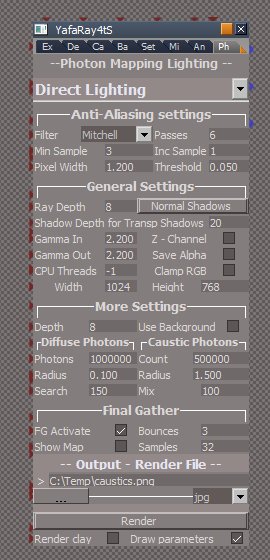
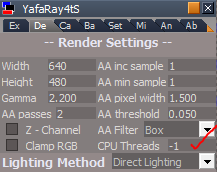
I noticed auto detection of threads is possible by entering -1
@Clinton: Maybe a good default setting?
Capture.PNG
Capture.PNG (9.48 KiB) Viewed 6132 times
Capture2.PNG
Capture2.PNG (3.53 KiB) Viewed 6131 times
User avatar
clintonman
Captain
Posts: 5659
Joined: 21 May 2009, 21:08
Type the number ten into the box: 0
Location: California

Re: YafaRay4tS version 0.7.6 Beta test

Post by clintonman »

trueBlue wrote:I noticed auto detection of threads is possible by entering -1
@Clinton: Maybe a good default setting?
Capture.PNG
Capture2.PNG
Maybe. Does it work with yaf 1.1 as well? The xml docs, http://www.yafaray.org/development/docu ... parameters" , say it has to be greater than zero.
Clinton Reese

http://clintons3d.com
User avatar
trueBlue
Captain
Posts: 5548
Joined: 06 Jul 2009, 22:50
Type the number ten into the box: 10

Re: YafaRay4tS version 0.7.6 Beta test

Post by trueBlue »

Only tested in...
Capture.PNG
Capture.PNG (1.25 KiB) Viewed 6118 times
and...
Capture2.PNG
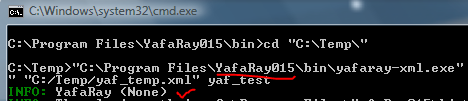
Notice there is no version info?
No doubt an YafaRay015 issue.
User avatar
trueBlue
Captain
Posts: 5548
Joined: 06 Jul 2009, 22:50
Type the number ten into the box: 10

Re: YafaRay4tS version 0.7.6 Beta test

Post by trueBlue »

Just to let you know I am testing YafaRay4tS075 scenes in YafaRay015 and YafaRay012-Beta2 until further notice. Sofar just the caustics scene. Have not had any backwards compatibility issues sofar.
Question? Has any code changed besides replacing the MeshFnSet?

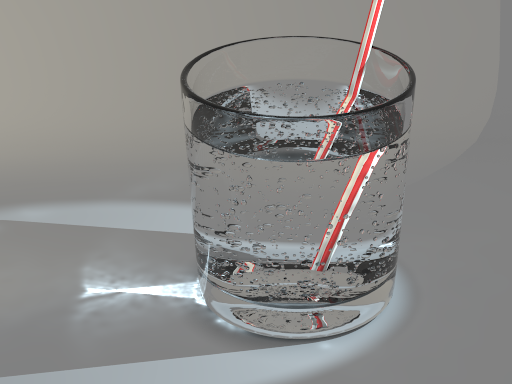
Do you know where to get this version of the caustic scene with bubbles?
http://www.yafaray.org/node/462"
spotlights.png
User avatar
clintonman
Captain
Posts: 5659
Joined: 21 May 2009, 21:08
Type the number ten into the box: 0
Location: California

Re: YafaRay4tS version 0.7.6 Beta test

Post by clintonman »

trueBlue wrote:Just to let you know I am testing YafaRay4tS075 scenes in YafaRay015 and YafaRay012-Beta2 until further notice. Sofar just the caustics scene. Have not had any backwards compatibility issues sofar.
Question? Has any code changed besides replacing the MeshFnSet?
No other changes. The smoothing problem is the only problem I've found so far. I have yaf 1.1 and 1.5 and just installed the old blender to compare renders and maybe tweak some defaults for yaf4ts.
Clinton Reese

http://clintons3d.com
User avatar
trueBlue
Captain
Posts: 5548
Joined: 06 Jul 2009, 22:50
Type the number ten into the box: 10

Re: YafaRay4tS version 0.7.6 Beta test

Post by trueBlue »

clintonman wrote:
trueBlue wrote:Just to let you know I am testing YafaRay4tS075 scenes in YafaRay015 and YafaRay012-Beta2 until further notice. Sofar just the caustics scene. Have not had any backwards compatibility issues sofar.
Question? Has any code changed besides replacing the MeshFnSet?
No other changes. The smoothing problem is the only problem I've found so far. I have yaf 1.1 and 1.5 and just installed the old blender to compare renders and maybe tweak some defaults for yaf4ts.
So with regards to install instructions noted in the first post in this thread, would I be correct in saying that you can use the YafaRay4tS075 install with the Scene Update and Reg scripts?
Meaning it is not necessary to have the YafaRay4tS076 folder?
User avatar
clintonman
Captain
Posts: 5659
Joined: 21 May 2009, 21:08
Type the number ten into the box: 0
Location: California

Re: YafaRay4tS version 0.7.6 Beta test

Post by clintonman »

trueBlue wrote:
clintonman wrote:
trueBlue wrote:Just to let you know I am testing YafaRay4tS075 scenes in YafaRay015 and YafaRay012-Beta2 until further notice. Sofar just the caustics scene. Have not had any backwards compatibility issues sofar.
Question? Has any code changed besides replacing the MeshFnSet?
No other changes. The smoothing problem is the only problem I've found so far. I have yaf 1.1 and 1.5 and just installed the old blender to compare renders and maybe tweak some defaults for yaf4ts.
So with regards to install instructions noted in the first post in this thread, would I be correct in saying that you can use the YafaRay4tS075 install with the Scene Update and Reg scripts?
Meaning it is not necessary to have the YafaRay4tS076 folder?
Yes, that's true. As far as the scene with the bubbles you can get the blender file here http://web.archive.org/web/*/http://sta ... ftests.zip" . I think it uses the particle system.
Clinton Reese

http://clintons3d.com
User avatar
trueBlue
Captain
Posts: 5548
Joined: 06 Jul 2009, 22:50
Type the number ten into the box: 10

Re: YafaRay4tS version 0.7.6 Beta test

Post by trueBlue »

I have uploaded a modified YafaRay4tS Installer in the first post in this thread.

It has the updated YafaRay4tS panel with the new MeshFnSet.
Added the "Update Yafaray Scene" and "Create reg file" scripts into the YafaRay4tS Setup library.
Added a command that adds the YafaRay4tS Lights to the current scene.
Changed the YafaRay4tS version to 0.7.6 in the AboutBitmap and the About context.
Added an Alert for the final setup step:
"Enter your YafaRay installation path to the yafaray-xml.exe file in the YafaRay4tS/YafaRay Install Path and select the Save Settings button"
Changed the default "Yafaray Install Path" to C:\Program Files\YafaRay015\bin\yafaray-xml.exe
User avatar
clintonman
Captain
Posts: 5659
Joined: 21 May 2009, 21:08
Type the number ten into the box: 0
Location: California

Re: YafaRay4tS version 0.7.6 Beta test

Post by clintonman »

More changes are needed. I was testing the glossyasdiffuse scene and found one of the material settings didn't match the original Blender settings. When I fixed it the render went bad. Result is I discovered some other changes in the xml file format will be needed. Stay tuned for the latest. Also these changes will require a change to the ui. 0.7.6 beta will have slightly different options.
Clinton Reese

http://clintons3d.com
User avatar
trueBlue
Captain
Posts: 5548
Joined: 06 Jul 2009, 22:50
Type the number ten into the box: 10

Re: YafaRay4tS version 0.7.6 Beta test

Post by trueBlue »

Bummer! Hope it is not to much work.
The link to the examples is dead, both at Wayback and Yafaray.
Can you test this on your end?

Code: Select all

Node.Value(Space.CurrentScene() + "/YafaRay4tS", "Yaf_Path") = "C:\Program Files\YafaRay015\bin\yafaray-xml.exe"
Capture.PNG
Capture.PNG (4.93 KiB) Viewed 5625 times
Looks like part of the \bin\ is replaced with a graphic or symbol.
User avatar
clintonman
Captain
Posts: 5659
Joined: 21 May 2009, 21:08
Type the number ten into the box: 0
Location: California

Re: YafaRay4tS version 0.7.6 Beta test

Post by clintonman »

trueBlue wrote:Bummer! Hope it is not to much work.
The link to the examples is dead, both at Wayback and Yafaray.
Can you test this on your end?

Code: Select all

Node.Value(Space.CurrentScene() + "/YafaRay4tS", "Yaf_Path") = "C:\Program Files\YafaRay015\bin\yafaray-xml.exe"
Capture.PNG
Looks like part of the \bin\ is replaced with a graphic or symbol.
All the backslashes are gone too. You need "\\" if you want a "\". What you're getting is "\b" symbol, like "\n" is newline.

Looks like the wayback link defaults to 2013. Just change to 2012 and those links work.
Clinton Reese

http://clintons3d.com
User avatar
clintonman
Captain
Posts: 5659
Joined: 21 May 2009, 21:08
Type the number ten into the box: 0
Location: California

Re: YafaRay4tS version 0.7.6 Beta test

Post by clintonman »

I have a to do list.

The SPPM lighting isn't writing any of the parameters to the xml file, so need to add that.

2 new items caustic photons and caustic radius need to be added to Photon Mapping.

General render settings will add transparent background, materials refract background as transparent and while I'm at it will add clay render and draw parameters.
Clinton Reese

http://clintons3d.com
User avatar
trueBlue
Captain
Posts: 5548
Joined: 06 Jul 2009, 22:50
Type the number ten into the box: 10

Re: YafaRay4tS version 0.7.6 Beta test

Post by trueBlue »

clintonman wrote:

Code: Select all

Node.Value(Space.CurrentScene() + "/YafaRay4tS", "Yaf_Path") = "C:\Program Files\YafaRay015\bin\yafaray-xml.exe"
Looks like part of the \bin\ is replaced with a graphic or symbol.
All the backslashes are gone too. You need "\\" if you want a "\". What you're getting is "\b" symbol, like "\n" is newline.
Hummm... that command was captured using the jScript recorder. Fairly certain I have been successful using this method before. I'll try your method nevertheless, thanks!
User avatar
clintonman
Captain
Posts: 5659
Joined: 21 May 2009, 21:08
Type the number ten into the box: 0
Location: California

Re: YafaRay4tS version 0.7.6 Beta test

Post by clintonman »

Here's the rough untested render node for yaf 1.5 so far.
It has previous fix for smoothing, clay render, transp background, materials trans refraction, photon mapping fixes and draw params. Nothing yet for SPPM renders and the ui isn't pretty. Oh, and did I mention it's completely untested :!:
Attachments
YafaRay4tSd6a5.zip
(111.04 KiB) Downloaded 284 times
Clinton Reese

http://clintons3d.com
User avatar
trueBlue
Captain
Posts: 5548
Joined: 06 Jul 2009, 22:50
Type the number ten into the box: 10

Re: YafaRay4tS version 0.7.6 Beta test

Post by trueBlue »

Testing your recently uploaded Y4tS76. I am noticing two YafaRay4tS panels in the Stack/Panels when switching the Lighting Method.
At some point it stops. I dunno why.
User avatar
trueBlue
Captain
Posts: 5548
Joined: 06 Jul 2009, 22:50
Type the number ten into the box: 10

Re: YafaRay4tS version 0.7.6 Beta test

Post by trueBlue »

While testing this Clay render:
http://www.yafaray.org/documentation/tu ... clayrender"
It seem to be working while I was adjusting the view to match.
When I changed the file type from jpg to png, it started rendering 0 Bytes to the images.
Capture.PNG
Capture.PNG (2.53 KiB) Viewed 5626 times
I am stuck with this error. Unchecking Yaf Clay and render does not remove this error from the console.
Clay Render Test.RsRcd
Attachments
Clay Render Test.zip
(1.59 MiB) Downloaded 275 times
User avatar
clintonman
Captain
Posts: 5659
Joined: 21 May 2009, 21:08
Type the number ten into the box: 0
Location: California

Re: YafaRay4tS version 0.7.6 Beta test

Post by clintonman »

It doesn't like the name "clay render.jpg" works with "clayrender.jpg".

Script won't handle file names with spaces.

Edit: was an easy fix. Will upload with next version that does SPPM renders.
Clinton Reese

http://clintons3d.com
User avatar
clintonman
Captain
Posts: 5659
Joined: 21 May 2009, 21:08
Type the number ten into the box: 0
Location: California

Re: YafaRay4tS version 0.7.6 Beta test

Post by clintonman »

Got it all coded up. Still ugly though.

SPPM lighting fixed
Removed automatic 45 degree smoothing
Darksky background added night, altitude, diffuse and caustic check boxes, exposure, brightness and color space
Background transparent background check and material transp refraction check
Small adjustment to the area light size in the xml file
Added caustic photons and caustic radius to have both sets, the other being diffuse photons and diffuse radius
Fixed so output file name can have spaces
I think render clay and draw parameters was already in the previous release
Attachments
YafaRay4tS1da7.zip
(112.91 KiB) Downloaded 317 times
Clinton Reese

http://clintons3d.com
User avatar
clintonman
Captain
Posts: 5659
Joined: 21 May 2009, 21:08
Type the number ten into the box: 0
Location: California

Re: YafaRay4tS version 0.7.6 Beta test

Post by clintonman »

Here are my test scenes. They each have different revisions of the yafaray4ts node. Most turned out ok, but the max3d_kuchnia scene has a lot of noise in the render that I wasn't able to solve. I wasn't even able to compare it to blender + yaf 1.5 because the old blender yafaray file would not update itself to the new version.
Attachments
yaf15.zip
(3.93 MiB) Downloaded 287 times
Clinton Reese

http://clintons3d.com
User avatar
trueBlue
Captain
Posts: 5548
Joined: 06 Jul 2009, 22:50
Type the number ten into the box: 10

Re: YafaRay4tS version 0.7.6 Beta test

Post by trueBlue »

clintonman wrote: Removed automatic 45 degree smoothing
Is this different from Normals Smoothing?
Attachments
Capture.PNG
Capture.PNG (3.88 KiB) Viewed 6383 times
User avatar
clintonman
Captain
Posts: 5659
Joined: 21 May 2009, 21:08
Type the number ten into the box: 0
Location: California

Re: YafaRay4tS version 0.7.6 Beta test

Post by clintonman »

trueBlue wrote:
clintonman wrote: Removed automatic 45 degree smoothing
Is this different from Normals Smoothing?
Is the same thing. When this isn't applied to the mesh the code was giving it 45 degree in the xml file and that was causing problems.
Clinton Reese

http://clintons3d.com
User avatar
trueBlue
Captain
Posts: 5548
Joined: 06 Jul 2009, 22:50
Type the number ten into the box: 10

Re: YafaRay4tS version 0.7.6 Beta test

Post by trueBlue »

Wow! Caustic scene is much better in Yaf015 vs Yaf012B2
Thanks Clinton!

Glass scene causes Yaf012B2 to crash but not Yaf015
Edit: Applying Smooth Normals fixes crash
Yaf012B2 is better than Yaf015

Edit2: DarkTides SunSky caused Yaf012B2 to crash

Edit3: Image caused Yaf012B2 to crash

Edit4: Sun Sky w/ Use Sun Checked caused Yaf012B2 to crash
Me thinks that Y4tS076 should be released without backwards compatibilty.
User avatar
FHembree
Master Chief Petty Officer
Posts: 337
Joined: 21 Feb 2011, 17:43
Type the number ten into the box: 9

Re: YafaRay4tS version 0.7.6 Beta test

Post by FHembree »

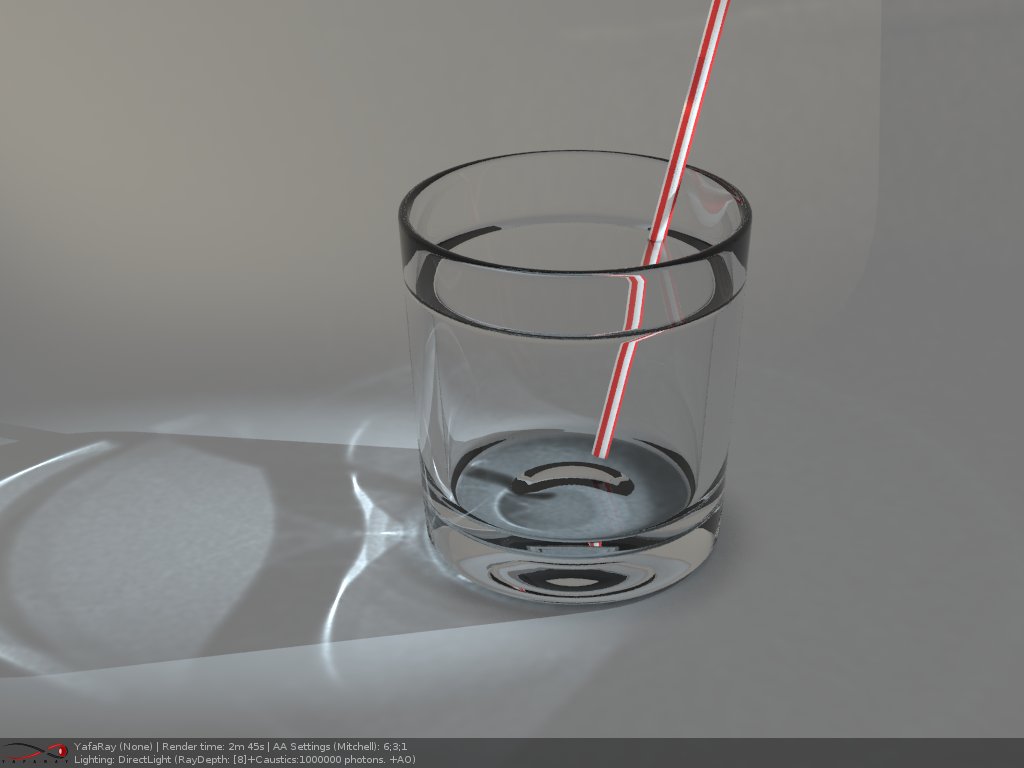
Learn something new all the time. After rendering some of the sample scenes I found the setting for draw parameters that rendering the yafaray setting
as part of the rendering. Very helpful.
Attachments
drawparameters.jpg
caustics.jpg
User avatar
clintonman
Captain
Posts: 5659
Joined: 21 May 2009, 21:08
Type the number ten into the box: 0
Location: California

Re: YafaRay4tS version 0.7.6 Beta test

Post by clintonman »

trueBlue wrote:...
Me thinks that Y4tS076 should be released without backwards compatibilty.
I'd first like to see if we can keep the compatibility. Some of the changes can be applied for yaf 1.1, clay render, draw parameters and more.
Clinton Reese

http://clintons3d.com
User avatar
trueBlue
Captain
Posts: 5548
Joined: 06 Jul 2009, 22:50
Type the number ten into the box: 10

Re: YafaRay4tS version 0.7.6 Beta test

Post by trueBlue »

Okay cool!
Made some additions to the installer.
First you add the path to the Yafaray-xml.exe to the popup panel.
Select the Install button which runs the installation then runs your "Create registration file" script and then runs another script that Merges the file. Adds the path to the Y4tS too!
User avatar
clintonman
Captain
Posts: 5659
Joined: 21 May 2009, 21:08
Type the number ten into the box: 0
Location: California

Re: YafaRay4tS version 0.7.6 Beta test

Post by clintonman »

trueBlue wrote:Okay cool!
Made some additions to the installer.
First you add the path to the Yafaray-xml.exe to the popup panel.
Select the Install button which runs the installation then runs your "Create registration file" script and then runs another script that Merges the file. Adds the path to the Y4tS too!
Very nice!
Clinton Reese

http://clintons3d.com
User avatar
trueBlue
Captain
Posts: 5548
Joined: 06 Jul 2009, 22:50
Type the number ten into the box: 10

Re: YafaRay4tS version 0.7.6 Beta test

Post by trueBlue »

Sometimes I am getting a bogus error on line 12, "Access Denied".

Code: Select all

var tS = System.GetMainDir() + '\\'
fso1 = new ActiveXObject("Scripting.FileSystemObject");
if(fso1.FolderExists(tS + 'Rs Main Libraries\\YafaRay4tS Setup')){
fso1.DeleteFolder(tS +'Rs Main Libraries\\YafaRay4tS Setup') <-------------------------------------Line 12
 fso1.CopyFolder (YafaRay4tSv075 +'\\YafaRay4tS Setup', tS + 'Rs Main Libraries\\', true)
}else{
fso1.CopyFolder (YafaRay4tSv075 +'\\YafaRay4tS Setup', tS + 'Rs Main Libraries\\', true) }
Nevertheless it deletes the folder but stops the script from running. Running it again is successful.
I am trying to emcompass the script with a try/catch error, but I am not having any success appling it correctly. Perhaps you can take a look when it is all said and done?
User avatar
clintonman
Captain
Posts: 5659
Joined: 21 May 2009, 21:08
Type the number ten into the box: 0
Location: California

Re: YafaRay4tS version 0.7.6 Beta test

Post by clintonman »

trueBlue wrote:Sometimes I am getting a bogus error on line 12, "Access Denied".

Code: Select all

var tS = System.GetMainDir() + '\\'
fso1 = new ActiveXObject("Scripting.FileSystemObject");
if(fso1.FolderExists(tS + 'Rs Main Libraries\\YafaRay4tS Setup')){
fso1.DeleteFolder(tS +'Rs Main Libraries\\YafaRay4tS Setup') <-------------------------------------Line 12
 fso1.CopyFolder (YafaRay4tSv075 +'\\YafaRay4tS Setup', tS + 'Rs Main Libraries\\', true)
}else{
fso1.CopyFolder (YafaRay4tSv075 +'\\YafaRay4tS Setup', tS + 'Rs Main Libraries\\', true) }
Nevertheless it deletes the folder but stops the script from running. Running it again is successful.
I am trying to emcompass the script with a try/catch error, but I am not having any success appling it correctly. Perhaps you can take a look when it is all said and done?
Sure. Could the delete be failing because the folder is open in explorer, just a stab in the dark.
Also lines 13 and 15 look the same so you can remove the else portion and move line 13 outside the braces.
Clinton Reese

http://clintons3d.com
User avatar
trueBlue
Captain
Posts: 5548
Joined: 06 Jul 2009, 22:50
Type the number ten into the box: 10

Re: YafaRay4tS version 0.7.6 Beta test

Post by trueBlue »

I will check that out, Thanks!
Edit: looks like if the library is modified in any way triggers the error.

Here is a script I created that transfers over 120 settings from Y4tS075 to Y4tS076. Everything except the paths. Have not figured that out yet but also thinks it might not be necessary.
Attachments
Transfer YafaRay4tS settings.zip
(37.07 KiB) Downloaded 315 times
User avatar
clintonman
Captain
Posts: 5659
Joined: 21 May 2009, 21:08
Type the number ten into the box: 0
Location: California

Re: YafaRay4tS version 0.7.6 Beta test

Post by clintonman »

trueBlue wrote:I will check that out, Thanks!
Edit: looks like if the library is modified in any way triggers the error.

Here is a script I created that transfers over 120 settings from Y4tS075 to Y4tS076. Everything except the paths. Have not figured that out yet but also thinks it might not be necessary.
120! Wow, someones been busy :bananatyping: . I didn't even know there were so many settings.
Another stab in the dark - is the folder open in the truespace library view? Maybe there's some library command that can delete it.
Clinton Reese

http://clintons3d.com
User avatar
trueBlue
Captain
Posts: 5548
Joined: 06 Jul 2009, 22:50
Type the number ten into the box: 10

Re: YafaRay4tS version 0.7.6 Beta test

Post by trueBlue »

clintonman wrote:120! Wow, someones been busy :bananatyping: . I didn't even know there were so many settings.
LOL...yes you have been! You keep adding and adding.

Does not matter if it is open or close, even closed and reboot tS. If you modify the library in any way it'll throw an error. Atleast here in my test.
User avatar
clintonman
Captain
Posts: 5659
Joined: 21 May 2009, 21:08
Type the number ten into the box: 0
Location: California

Re: YafaRay4tS version 0.7.6 Beta test

Post by clintonman »

Here is a new version of the render node. I think this one will work with all versions of Yafaray. (Need to test yaf 0.1.2beta)

gives each mesh an id number - worked without it but was not the correct way to do it

checks the yafaray version number by running yafaray to get the version before writing the xml file, removed the beta0.12 checkbox

defaults to a tga file extension if there is none
checks v1.1 for tga or exr file extensions

clean the UI
Attachments
YafaRay4tS7849.zip
(114.75 KiB) Downloaded 282 times
Clinton Reese

http://clintons3d.com
User avatar
FHembree
Master Chief Petty Officer
Posts: 337
Joined: 21 Feb 2011, 17:43
Type the number ten into the box: 9

Re: YafaRay4tS version 0.7.6 Beta test

Post by FHembree »

clintonman wrote:Here is a new version of the render node. I think this one will work with all versions of Yafaray. (Need to test yaf 0.1.2beta)

gives each mesh an id number - worked without it but was not the correct way to do it

checks the yafaray version number by running yafaray to get the version before writing the xml file, removed the beta0.12 checkbox

defaults to a tga file extension if there is none
checks v1.1 for tga or exr file extensions

clean the UI
I have tried this on a couple of files and only problem I see is objects come out faceted instead of smooth. I load the object to update scene for yafaray ver 1.5 but the problem is still there?

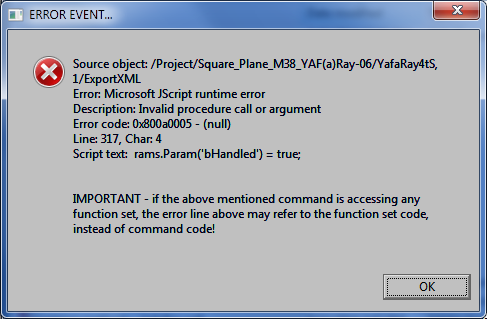
Also getting this error on one of my older files. See image
Attachments
Error.png
User avatar
clintonman
Captain
Posts: 5659
Joined: 21 May 2009, 21:08
Type the number ten into the box: 0
Location: California

Re: YafaRay4tS version 0.7.6 Beta test

Post by clintonman »

FHembree wrote:...

I have tried this on a couple of files and only problem I see is objects come out faceted instead of smooth. I load the object to update scene for yafaray ver 1.5 but the problem is still there?

Also getting this error on one of my older files. See image
Can you share the problem file?

That faceting is a problem. Blender seems to store the smoothing angle in the mesh. In truespace you might press the auto facet normals button, but it changes the normals instead of saving a smoothing value inside the mesh. So maybe I should add an option to apply smoothing to everything at render time with an angle from the normals smoothing from the Misc tab. It should probably have an angle of 30 degrees to match the default truespace auto facet normals.

I'm open to suggestions and I'll see what I can find out about how Blender handles the smoothing.
Clinton Reese

http://clintons3d.com
User avatar
trueBlue
Captain
Posts: 5548
Joined: 06 Jul 2009, 22:50
Type the number ten into the box: 10

Re: YafaRay4tS version 0.7.6 Beta test

Post by trueBlue »

I thought you had to apply smoothing?
Attachments
Capture.PNG
User avatar
clintonman
Captain
Posts: 5659
Joined: 21 May 2009, 21:08
Type the number ten into the box: 0
Location: California

Re: YafaRay4tS version 0.7.6 Beta test

Post by clintonman »

trueBlue wrote:I thought you had to apply smoothing?
Yep, I was thinking there might be a better way, but it's a limitation of Yafaray to use smoothing instead of normals. I checked out Blender and if you set any smoothing on any of the faces then Yafaray sees the entire mesh as smooth with angle of 181 degrees. In each mesh there is an option for autosmooth angle. If it's active and smoothing is applied to any part of the mesh then the entire mesh will be smoothed with the autosmooth angle. So bottom line is it doesn't seem to work any better in Blender. The YafaRay4ts apply smoothing is equivalent to Blender auto smooth and you have to set smoothing on each object as needed.
Clinton Reese

http://clintons3d.com
User avatar
FHembree
Master Chief Petty Officer
Posts: 337
Joined: 21 Feb 2011, 17:43
Type the number ten into the box: 9

Re: YafaRay4tS version 0.7.6 Beta test

Post by FHembree »

clintonman wrote:
FHembree wrote:...

I have tried this on a couple of files and only problem I see is objects come out faceted instead of smooth. I load the object to update scene for yafaray ver 1.5 but the problem is still there?

Also getting this error on one of my older files. See image
Can you share the problem file?

That faceting is a problem. Blender seems to store the smoothing angle in the mesh. In truespace you might press the auto facet normals button, but it changes the normals instead of saving a smoothing value inside the mesh. So maybe I should add an option to apply smoothing to everything at render time with an angle from the normals smoothing from the Misc tab. It should probably have an angle of 30 degrees to match the default truespace auto facet normals.

I'm open to suggestions and I'll see what I can find out about how Blender handles the smoothing.

Sure, attached is problem file. I have also included image textures.
Attachments
M38.zip
(1.56 MiB) Downloaded 281 times
User avatar
FHembree
Master Chief Petty Officer
Posts: 337
Joined: 21 Feb 2011, 17:43
Type the number ten into the box: 9

Re: YafaRay4tS version 0.7.6 Beta test

Post by FHembree »

trueBlue wrote:I thought you had to apply smoothing?
That works easy enought for me. Just click on the faceted objects and click apply. 8-)
User avatar
trueBlue
Captain
Posts: 5548
Joined: 06 Jul 2009, 22:50
Type the number ten into the box: 10

Re: YafaRay4tS version 0.7.6 Beta test

Post by trueBlue »

I took you scene for a spin. I replaced your Y4tS061 panel for the just released one by Clinton. You can find the script in this thread that transfers the old values to the new panel.
I get the same error as you. Odd that it gets stuck on line 341 as that is just a default value.
Nevertheless since Clinton updated the YafaRay4tS project Y4tS070, all of the Yafaray Materials and Lights were changed as well. So I reapplied the new materials to your objects and it renders fine without errors. HTH
User avatar
clintonman
Captain
Posts: 5659
Joined: 21 May 2009, 21:08
Type the number ten into the box: 0
Location: California

Re: YafaRay4tS version 0.7.6 Beta test

Post by clintonman »

trueBlue wrote:I took you scene for a spin. I replaced your Y4tS061 panel for the just released one by Clinton. You can find the script in this thread that transfers the old values to the new panel.
I get the same error as you. Odd that it gets stuck on line 341 as that is just a default value.
Nevertheless since Clinton updated the YafaRay4tS project Y4tS070, all of the Yafaray Materials and Lights were changed as well. So I reapplied the new materials to your objects and it renders fine without errors. HTH
Yep, old materials aren't compatible with the later releases.

The error is indicated in a strange spot because of the function set nodes. They're good for breaking up code but bad for debugging. Their errors get reported in weird (and useless) ways.
Clinton Reese

http://clintons3d.com
User avatar
trueBlue
Captain
Posts: 5548
Joined: 06 Jul 2009, 22:50
Type the number ten into the box: 10

Re: YafaRay4tS version 0.7.6 Beta test

Post by trueBlue »

@ Clinton: Been working out of town in Napa, so I have not done any testing. Should be able to help this weekend. Can you list the areas needed to test and with what versions? Need help with the default values for the new attributes? And or?
Maybe there needs to be a smooth/facet script?
User avatar
clintonman
Captain
Posts: 5659
Joined: 21 May 2009, 21:08
Type the number ten into the box: 0
Location: California

Re: YafaRay4tS version 0.7.6 Beta test

Post by clintonman »

trueBlue wrote:@ Clinton: Been working out of town in Napa, so I have not done any testing. Should be able to help this weekend. Can you list the areas needed to test and with what versions? Need help with the default values for the new attributes? And or?
Maybe there needs to be a smooth/facet script?
I don't have any kind of list for testing. Only a couple of new features were added as far as the ui. I've tried it with Yaf 1.1, 1.2beta and 1.5 and it seems to work, so any testing that might break it is what's needed.
A smoothing script should be pretty easy. Just call trueSpace smoothing when using the Yaf set smoothing angle and adjust values that make the render smoothing look like the viewport smoothing.
Clinton Reese

http://clintons3d.com
User avatar
trueBlue
Captain
Posts: 5548
Joined: 06 Jul 2009, 22:50
Type the number ten into the box: 10

Re: YafaRay4tS version 0.7.6 Beta test

Post by trueBlue »

Okay will do!
As I understand the way Smoothing is handled, there is a node added to any selected object(s). I was thinking if a user did add smoothing and then changed their mind and wanted to have no smoothing/facet, then you would need to remove the smoothing node?
User avatar
clintonman
Captain
Posts: 5659
Joined: 21 May 2009, 21:08
Type the number ten into the box: 0
Location: California

Re: YafaRay4tS version 0.7.6 Beta test

Post by clintonman »

trueBlue wrote:Okay will do!
As I understand the way Smoothing is handled, there is a node added to any selected object(s). I was thinking if a user did add smoothing and then changed their mind and wanted to have no smoothing/facet, then you would need to remove the smoothing node?
I was thinking more about Auto Facet Normals tool as opposed to the SDS smoothing, but I see your point. An SDS object will need the Yafaray smoothing. Maybe setting the angle to something like -1 could make it remove the Yaf smooth node.

Edit: Now that I think of it an SDS mesh should add the smoothing in code instead of adding the Yaf smoothing node.
Clinton Reese

http://clintons3d.com
User avatar
clintonman
Captain
Posts: 5659
Joined: 21 May 2009, 21:08
Type the number ten into the box: 0
Location: California

Re: YafaRay4tS version 0.7.6 Beta test

Post by clintonman »

Here's the latest.

When you apply Normals smoothing the mesh will get truespace Autofacets set to the same value up to 90 degrees.

When SDS is applied to the mesh it gets automatic Normals smoothing of 181 degrees during the render.

If Normals smoothing is set to a value of less than 0 then the Yafaray normals smoothing node is removed from the mesh and the default truespace autofacets of 30 degrees is applied to the mesh.

Changed defaults:

smoothing angle 45 -> 30
filter box -> mitchell
final gather off -> on

Edit: Found error in code for background transparency refraction. It was writing the background transparency option twice.

I did some tests on the absorption scatter scene and it looks like volumetrics don't work for yafaray 0.1.1 I also exported an xml from blender and it still didn't render. Works for 0.1.2 and 0.1.5
The exr file format doesn't work for Yafaray 0.1.5 Yafaray crashes. It works for 0.1.2 and 0.1.1
Attachments
YafaRay4tS178e.zip
(113.67 KiB) Downloaded 298 times
Clinton Reese

http://clintons3d.com
User avatar
trueBlue
Captain
Posts: 5548
Joined: 06 Jul 2009, 22:50
Type the number ten into the box: 10

Re: YafaRay4tS version 0.7.6 Beta test

Post by trueBlue »

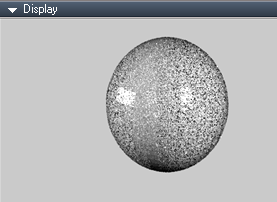
This screen shot is a simple sphere (Y4tS Coated Glossy) with the default Y4tS light setup, using your most recent YafaRay4tS.RsObj panel. Should you reset the Default settings? Perhaps there should be some info added to the Misc. tab, "Setting the Angle to 0 = No Smoothing"? Also you could Export the Yafaray Settings panel so when a user selected an object that had smoothing applied it would show in the Stack/Panel?
Attachments
Capture.PNG
Capture.PNG (24.01 KiB) Viewed 6420 times
User avatar
clintonman
Captain
Posts: 5659
Joined: 21 May 2009, 21:08
Type the number ten into the box: 0
Location: California

Re: YafaRay4tS version 0.7.6 Beta test

Post by clintonman »

trueBlue wrote:This screen shot is a simple sphere (Y4tS Coated Glossy) with the default Y4tS light setup, using your most recent YafaRay4tS.RsObj panel. Should you reset the Default settings? Perhaps there should be some info added to the Misc. tab, "Setting the Angle to 0 = No Smoothing"? Also you could Export the Yafaray Settings panel so when a user selected an object that had smoothing applied it would show in the Stack/Panel?
For some reason I can't see the image here clearly.
Are you saying the latest panel has the wrong default values?
The smooth setting should behave the same as the autofacet normals setting. Do you mean -1 is no yafaray smoothing should have a note?
Export the smooth setting sounds like a good idea to me. It will need a name change so it has more meaning, something like YafarayAngle or YafaraySmooth.
Clinton Reese

http://clintons3d.com
User avatar
trueBlue
Captain
Posts: 5548
Joined: 06 Jul 2009, 22:50
Type the number ten into the box: 10

Re: YafaRay4tS version 0.7.6 Beta test

Post by trueBlue »

clintonman wrote: For some reason I can't see the image here clearly.
Are you saying the latest panel has the wrong default values?
No they just need to be restored by resetting them by selecting the Restore All Defaults button in the Misc tab.
clintonman wrote: The smooth setting should behave the same as the autofacet normals setting. Do you mean -1 is no yafaray smoothing should have a note?
Yes
clintonman wrote: Export the smooth setting sounds like a good idea to me. It will need a name change so it has more meaning, something like YafarayAngle or YafaraySmooth.
How about adding a title and change the width to 216?
Keeping with the Misc tab, "Normals Smoothing"
Attachments
Capture.PNG
User avatar
clintonman
Captain
Posts: 5659
Joined: 21 May 2009, 21:08
Type the number ten into the box: 0
Location: California

Re: YafaRay4tS version 0.7.6 Beta test

Post by clintonman »

Here's the latest. Smoothing value displays with the mesh and a note was added to say -1 is remove smoothing.
Attachments
YafaRay4tSb648.zip
(113.17 KiB) Downloaded 312 times
Clinton Reese

http://clintons3d.com

Return to “Rendering”