Issue 0, Wireframe clearly being displayed wrong...

Jill
Petty Officer Second Class
Posts: 26
Joined: 06 Dec 2011, 20:37
Type the number ten into the box: 9

Issue 0, Wireframe clearly being displayed wrong...

Post by Jill »

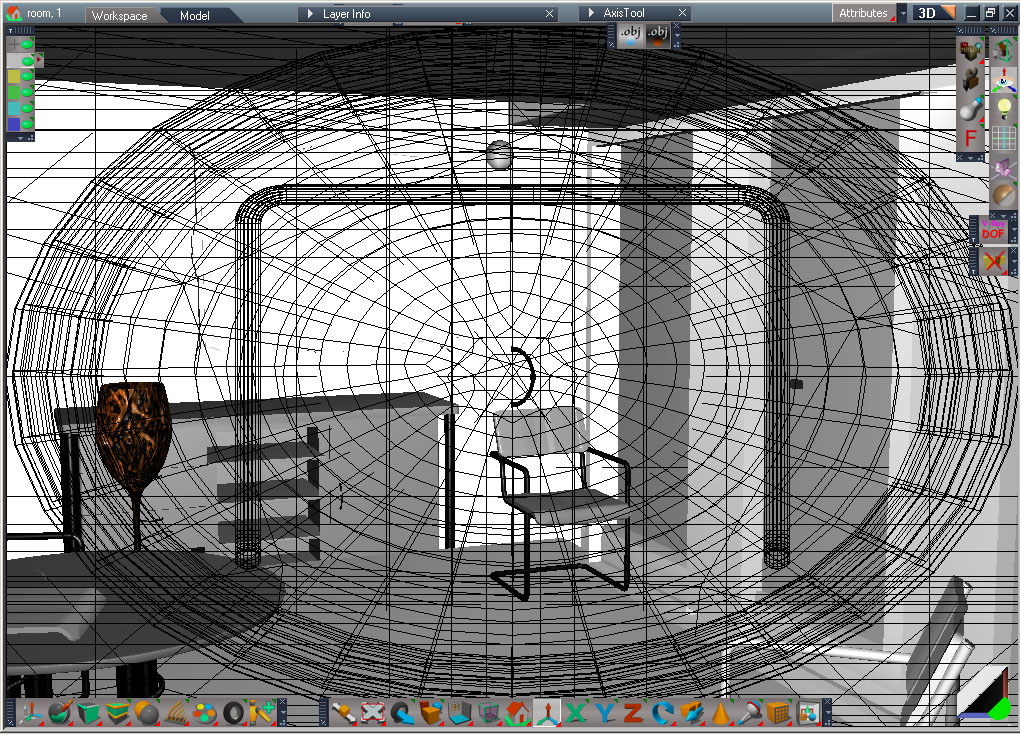
The 1st issue I have is that when any wireframe is displayed it is always in some odd and somewhat orthogonal way...

In the 1st picture notice the wireframe is all screwed up on orientation with the solid model so you don't know exactly where the lines are on the 3D model.
FUBAR Wireframe.PNG
This makes it about impossible to work on the model especially when working with selected components.

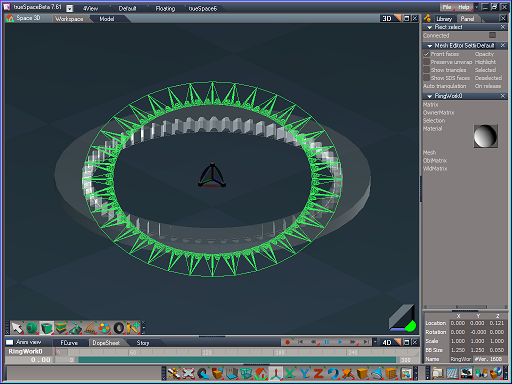
In the 2nd picture notice the wireframe mode for the working ground plane is clearly just being drawn as a 2D overly on the view.
FUBAR Wireframe grid.PNG
Any ideas how to fix this? :?:
-Jill-

Helped w/a riddle: "If one is specifically clever, and the only witness of it was an idiot, was the cleverness a wasted effort?"
The 1st clue is in the use of the word 'witness',..
The 2nd is in the fact that you conveyed it to ME. :lol:
stan
Master Chief Petty Officer
Posts: 584
Joined: 21 May 2009, 17:20

Re: Issue 0, Wireframe clearly being displayed wrong...

Post by stan »

could be your graphics card..
Attachments
here is my view using an old graphics card..truespace works bad with it.I need a dx 9c compatable card to replace my broken one..
froo
Captain
Posts: 2554
Joined: 22 May 2009, 12:13

Re: Issue 0, Wireframe clearly being displayed wrong...

Post by froo »

Stan has a point Jill.
Could you list your system specs?
OS, video card, directx version?

And welcome to the forums! :bananacheers:
User avatar
Draise
Captain
Posts: 3200
Joined: 21 Sep 2009, 19:33
Type the number ten into the box: 0
Location: Bogota, Colombia

Re: Issue 0, Wireframe clearly being displayed wrong...

Post by Draise »

wtf!??! what vid card are you using!?

........ did you install DirectX9 to your windows before using TS? If you can, try install DirectX10! :P

OH AND WELCOME TO THE FORUMS!!!!! :D :D :D :D We are a good bunch of people here. :) ;) =)
User avatar
spacekdet
Captain
Posts: 1810
Joined: 27 May 2009, 15:00
Type the number ten into the box: 10
Location: On the day shift at the Utility Muffin Research Kitchen

Re: Issue 0, Wireframe clearly being displayed wrong...

Post by spacekdet »

Clearly, the eye Of Sauron has infested your computer.

Image

Don't look at it, or let it see you, but update your DX and vid card drivers BEFORE IT'S TOO LATE!
User avatar
Draise
Captain
Posts: 3200
Joined: 21 Sep 2009, 19:33
Type the number ten into the box: 0
Location: Bogota, Colombia

Re: Issue 0, Wireframe clearly being displayed wrong...

Post by Draise »

LMAO!!! CLASSIC!!!! :lol: :lol: :lol: :lol: :lol: :lol:
User avatar
ranger0101
Master Chief Petty Officer
Posts: 363
Joined: 22 May 2009, 13:15
Type the number ten into the box: 0
Location: Orrville Ohio U.S.A.

Re: Issue 0, Wireframe clearly being displayed wrong...

Post by ranger0101 »

It looks to me like you are
displaying a U/V editor wire frame
display on top of TrueSpace.
In order to Create Art... You must first learn to See...
My Website http://www.theartoftimkoons.yolasite.com
User avatar
Finis
Captain
Posts: 5410
Joined: 21 May 2009, 18:26
Type the number ten into the box: 0
Location: America!

Re: Issue 0, Wireframe clearly being displayed wrong...

Post by Finis »

Workspace is very sensitive to video cards, drivers, and such. As the tech advances it will be left behind. Model side, and old TS versions, can use DX and OpenGL but don't need it. Of course, with no future development, all of TS will eventually be obsolete unless you keep an old machine/system for it.
I prefer dangerous freedom over peaceful servitude. -- Thomas Jefferson/Jean Jacques Rousseau
User avatar
trueBlue
Captain
Posts: 5548
Joined: 06 Jul 2009, 22:50
Type the number ten into the box: 10

Re: Issue 0, Wireframe clearly being displayed wrong...

Post by trueBlue »

I can see two View Widgets too, in your screen capture! One of the issue that the Unofficial Update solves. BTW: tS7 was built upon DX9c.
User avatar
Steinie
Captain
Posts: 2958
Joined: 21 May 2009, 17:38
Type the number ten into the box: 10

Re: Issue 0, Wireframe clearly being displayed wrong...

Post by Steinie »

trueBlue wrote:I can see two View Widgets too! One of the issue that the Unofficial Update solves. BTW: tS7 was built upon DX8

I remember DirectX9C being a requirement. "C" being important too.

• Windows Vista, XP or XP Pro.
• Pentium 3 or equivalent AMD Athlon (Pentium4 or equivalent AMD Athlon recommended)
• 512 MB RAM (1 GB or more recommended)
• 460 MB free hard disk space
• 3D video card with at least 64MB of video memory (DirectX9, full Pixel Shader 2.0 support, and 128MB or more video memory highly recommended)
User avatar
trueBlue
Captain
Posts: 5548
Joined: 06 Jul 2009, 22:50
Type the number ten into the box: 10

Re: Issue 0, Wireframe clearly being displayed wrong...

Post by trueBlue »

Fixed the typo. Thanks!
Jill
Petty Officer Second Class
Posts: 26
Joined: 06 Dec 2011, 20:37
Type the number ten into the box: 9

Re: Issue 0, Wireframe clearly being displayed wrong...

Post by Jill »

My laptop has DX9c on it and the drivers are as up to date as they can be... it is a compaq presario R3000, so it is not new.
I discovered that it is VERY sensitive as I put tS on a memory card and x-fered it to my best xp desktop which has an nvidia card [and is not on the net or new] and it all works fine [doesn't have either of the issues], but on my laptop it just behaves badly, which is not surprising considering it has an ati chip on it and ati's are cheap for a reason as they are notorious for not being fully compatible and having issues.

Thank you all for your efforts.
-Jill-

Helped w/a riddle: "If one is specifically clever, and the only witness of it was an idiot, was the cleverness a wasted effort?"
The 1st clue is in the use of the word 'witness',..
The 2nd is in the fact that you conveyed it to ME. :lol:

Return to “Bugs and Workarounds”