This script will convert a 3D group of meshes into a single polygon mesh.
Will convert a selection of 3D meshes into a single polygon mesh.
https://clintons3d.com/plugins/truespac ... olycombine
Poly Combine Script
-
clintonman

- Captain
- Posts: 5659
- Joined: 21 May 2009, 21:08
- Type the number ten into the box: 0
- Location: California
Poly Combine Script
-
clintonman
- Captain
- Posts: 5659
- Joined: 21 May 2009, 21:08
- Type the number ten into the box: 0
- Location: California
Re: Poly Combine Script
Update:
fixed minor bug in the installer
fixed overly aggressive Dialog settings clear checkbox
add new boolean operations Merge and Union, Add is the default choice
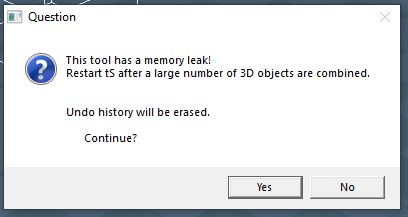
discovered memory leak and adjusted the warning message to indicate it
fixed minor bug in the installer
fixed overly aggressive Dialog settings clear checkbox
add new boolean operations Merge and Union, Add is the default choice
discovered memory leak and adjusted the warning message to indicate it
-
Saul
- Senior Chief Petty Officer
- Posts: 308
- Joined: 22 May 2009, 16:50
Re: Poly Combine Script
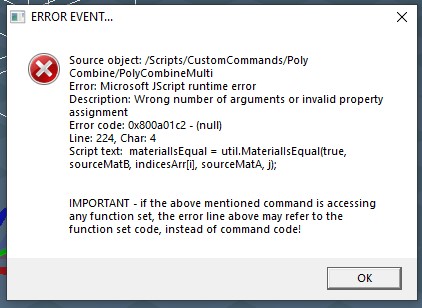
Cant get this to work:
2 Cubes, 3D encapsulate, press button
2 Cubes, 3D encapsulate, press button
- Attachments
-
-
-
clintonman
- Captain
- Posts: 5659
- Joined: 21 May 2009, 21:08
- Type the number ten into the box: 0
- Location: California
Re: Poly Combine Script
Do you have the latest rsx plugin v1638457 ?Saul wrote: 09 Sep 2024, 21:10 Cant get this to work:
2 Cubes, 3D encapsulate, press button
-
Saul
- Senior Chief Petty Officer
- Posts: 308
- Joined: 22 May 2009, 16:50
Re: Poly Combine Script
Ahhhh, nope, i got 1638456
- Attachments
-

-
trueBlue

- Captain
- Posts: 5548
- Joined: 06 Jul 2009, 22:50
- Type the number ten into the box: 10
Re: Poly Combine Script
viewtopic.php?p=66906#p66906Saul wrote: 09 Sep 2024, 21:45 Ahhhh, nope, i got 1638456
Clintons3dPlugin.dll v.1638457 - Author Clinton Reese
-
Saul
- Senior Chief Petty Officer
- Posts: 308
- Joined: 22 May 2009, 16:50
Re: Poly Combine Script
OK Thanks, missed an update, missed an update, missed an update............
-
clintonman
- Captain
- Posts: 5659
- Joined: 21 May 2009, 21:08
- Type the number ten into the box: 0
- Location: California
Re: Poly Combine Script
Update Sep 10
fixed strange inconsistent quad mode by adding an option and setting it explicitly
group 3d combined arrange in the LE
open panel instead of direct run
restore flatten question state instead of setting to On
fixed strange inconsistent quad mode by adding an option and setting it explicitly
group 3d combined arrange in the LE
open panel instead of direct run
restore flatten question state instead of setting to On
-
clintonman
- Captain
- Posts: 5659
- Joined: 21 May 2009, 21:08
- Type the number ten into the box: 0
- Location: California
Re: Poly Combine Script
Update Sept 11
fixed press "No" on Construction history dialog giving actual error or bogus error
new flatten final result option - uncheck to keep boolean history, atypical use case
new pre-process to setup the Dialog settings for flattening without asking for each mesh object
typical use text hints from trueblue - "Yes and check it"
remove memory leak warning - no leak after all
lose your undos warning only shows one time, so if errors it will not show again until after a successful run
fixed press "No" on Construction history dialog giving actual error or bogus error
new flatten final result option - uncheck to keep boolean history, atypical use case
new pre-process to setup the Dialog settings for flattening without asking for each mesh object
typical use text hints from trueblue - "Yes and check it"
remove memory leak warning - no leak after all
lose your undos warning only shows one time, so if errors it will not show again until after a successful run
-
trueBlue
- Captain
- Posts: 5548
- Joined: 06 Jul 2009, 22:50
- Type the number ten into the box: 10
Re: Poly Combine Script
Here is a PolyCombine object that was processed with Flatten Final Result unchecked
- Attachments
-
- PolyCombine.RsObj
- (30.92 KiB) Downloaded 48 times
-
clintonman
- Captain
- Posts: 5659
- Joined: 21 May 2009, 21:08
- Type the number ten into the box: 0
- Location: California
Re: Poly Combine Script
I took the cubes and moved them closer together so you can see the effects of the boolean operations.
The only case where it disappears is when both Csg operation nodes operation are set to intersection. To make it "reappear" just move the cubes even closer together so each cube intersects the other 2.
You can also checkout manual chapter 3.7 Boolean Tools
The only case where it disappears is when both Csg operation nodes operation are set to intersection. To make it "reappear" just move the cubes even closer together so each cube intersects the other 2.
You can also checkout manual chapter 3.7 Boolean Tools
- Attachments
-
- PolyCombineCloser.RsObj
- (33.51 KiB) Downloaded 39 times
-
clintonman
- Captain
- Posts: 5659
- Joined: 21 May 2009, 21:08
- Type the number ten into the box: 0
- Location: California
Re: Poly Combine Script
Update Sept 12
changed order of flatten error construction history setup message
bug, error states resetting dialog settings - fixed
added show and hide buttons
on success if flatten warning was active before the run give alert "press [Hide]..." - useful if you plan to run the Poly Combine several times
changed order of flatten error construction history setup message
bug, error states resetting dialog settings - fixed
added show and hide buttons
on success if flatten warning was active before the run give alert "press [Hide]..." - useful if you plan to run the Poly Combine several times
-
trueBlue
- Captain
- Posts: 5548
- Joined: 06 Jul 2009, 22:50
- Type the number ten into the box: 10
Re: Poly Combine Script
3D Group with ORA
- Attachments
-
- 3D Groupd5a4.RsObj
- (49.12 KiB) Downloaded 40 times
-
clintonman
- Captain
- Posts: 5659
- Joined: 21 May 2009, 21:08
- Type the number ten into the box: 0
- Location: California
Re: Poly Combine Script
Yep, it is differenttrueBlue wrote: 13 Sep 2024, 01:45 3D Group with ORA
When I press the Show Object Attribs button it creates individual ORAs inside each primitive instead of one master ORA in the group
-
trueBlue
- Captain
- Posts: 5548
- Joined: 06 Jul 2009, 22:50
- Type the number ten into the box: 10
Re: Poly Combine Script
It is not supposed to do that
The object I uploaded only has one ORA panel and the children have a RenderAttributes node connected to it
The object I uploaded only has one ORA panel and the children have a RenderAttributes node connected to it
-
clintonman
- Captain
- Posts: 5659
- Joined: 21 May 2009, 21:08
- Type the number ten into the box: 0
- Location: California
Re: Poly Combine Script
2nd Update Sept 12
StartMulti - test for renderable was too late, Invalid procedure call or argument Error - fixed
fixed Start Group IsNotPure3D function to check for ORA node
clear undo history on errors
StartMulti - test for renderable was too late, Invalid procedure call or argument Error - fixed
fixed Start Group IsNotPure3D function to check for ORA node
clear undo history on errors
-
clintonman
- Captain
- Posts: 5659
- Joined: 21 May 2009, 21:08
- Type the number ten into the box: 0
- Location: California
Re: Poly Combine Script
tested on the latest UU and it behaves as it should, so issue was with older UU version or the uu4clinton installtrueBlue wrote: 13 Sep 2024, 02:37 It is not supposed to do that
The object I uploaded only has one ORA panel and the children have a RenderAttributes node connected to it
-
trueBlue
- Captain
- Posts: 5548
- Joined: 06 Jul 2009, 22:50
- Type the number ten into the box: 10
Re: Poly Combine Script
The current UU and previous updates do not have the latest Mesh Originclintonman wrote: 13 Sep 2024, 19:24tested on the latest UU and it behaves as it should, so issue was with older UU version or the uu4clinton installtrueBlue wrote: 13 Sep 2024, 02:37 It is not supposed to do that
The object I uploaded only has one ORA panel and the children have a RenderAttributes node connected to it
-
clintonman
- Captain
- Posts: 5659
- Joined: 21 May 2009, 21:08
- Type the number ten into the box: 0
- Location: California
Re: Poly Combine Script
I'm talking about the Show Object Attribs button. On my current setup (older UU plus uu4clinton) the ORA goes into each individual mesh object in the group. On the last UU it behaves as expected, with ORA going into the group and the other node going into the individual mesh objects. Either the old UU caused the issue or the uu4clinton install caused the issue.trueBlue wrote: 13 Sep 2024, 20:53The current UU and previous updates do not have the latest Mesh Originclintonman wrote: 13 Sep 2024, 19:24tested on the latest UU and it behaves as it should, so issue was with older UU version or the uu4clinton installtrueBlue wrote: 13 Sep 2024, 02:37 It is not supposed to do that
The object I uploaded only has one ORA panel and the children have a RenderAttributes node connected to it