I have a sphere with a glass material it is transparent and then I put omni light inside the sphere but it seems it does not light like a light bulb and the omni light still light the whole scene.
thanks in advance
DS
simulate a light bulb (workspace)
-
DarkScythe
- Senior Chief Petty Officer
- Posts: 243
- Joined: 23 Sep 2009, 08:57
simulate a light bulb (workspace)
-
Karthogen
- Master Chief Petty Officer
- Posts: 454
- Joined: 03 Jun 2009, 14:12
Re: simulate a light bulb (workspace)
HAve you tried translucency instead of complete transparency?
-
trueBlue

- Captain
- Posts: 5548
- Joined: 06 Jul 2009, 22:50
- Type the number ten into the box: 10
Re: simulate a light bulb (workspace)
Try setting the Linear to the falloff that you want.
As an example:
Constant = 1.000
Linear = 0.900
Quadratic = 0.00
Threshold = 0.050
Constant = No falloff with distance
Linear = Falloff with distance
Quadratic = Squared falloff with distance.
From the Manual:
Chapter3 Lighting and Rendering
Color – Controls the color (and intensity) of the light.
AttConstant – Constant attenuation does not depend on distance. Values greater than 1.0 will make the light darker (2.0 means half intensity), and values in the range 0..1 will make the light brighter (0.5 means double intensity).
AttLinear – Specifies a linear attenuation coefficient. The light grows less intense with distance, with a linear relationship between distance and intensity.
AttQuadratic – Specifies a quadratic attenuation coefficient. The light grows less intense with distance, with a relationship to the square of the distance (light will grow less intense more rapidly than with a linear attenuation).
ThresholdAttenuation – This specifies a final light intensity that is considered as zero – any pixel in an area with intensity of less than this value is considered “not lit”. This parameter acts to speed up the processing of the light (a higher value will class more points as unlit, and so reduce processing).
As an example:
Constant = 1.000
Linear = 0.900
Quadratic = 0.00
Threshold = 0.050
Constant = No falloff with distance
Linear = Falloff with distance
Quadratic = Squared falloff with distance.
From the Manual:
Chapter3 Lighting and Rendering
Color – Controls the color (and intensity) of the light.
AttConstant – Constant attenuation does not depend on distance. Values greater than 1.0 will make the light darker (2.0 means half intensity), and values in the range 0..1 will make the light brighter (0.5 means double intensity).
AttLinear – Specifies a linear attenuation coefficient. The light grows less intense with distance, with a linear relationship between distance and intensity.
AttQuadratic – Specifies a quadratic attenuation coefficient. The light grows less intense with distance, with a relationship to the square of the distance (light will grow less intense more rapidly than with a linear attenuation).
ThresholdAttenuation – This specifies a final light intensity that is considered as zero – any pixel in an area with intensity of less than this value is considered “not lit”. This parameter acts to speed up the processing of the light (a higher value will class more points as unlit, and so reduce processing).
-
DarkScythe
- Senior Chief Petty Officer
- Posts: 243
- Joined: 23 Sep 2009, 08:57
Re: simulate a light bulb (workspace)
thanks for the reply, Gonna try it now.
DS
DS
-
DarkScythe
- Senior Chief Petty Officer
- Posts: 243
- Joined: 23 Sep 2009, 08:57
Re: simulate a light bulb (workspace)
I try trueblue suggestion but it still doesn't look like a light bulb, the omni light still lights the whole scene.
Can anyone can show a technique on this, very much appreciated for your help.
(I look at the LE of the omni light and it seems it can achieve in this way but the light of the omni light doesn't come from the center so that it is bright but it seems this is the way of it.)
Thanks
DS
Can anyone can show a technique on this, very much appreciated for your help.
(I look at the LE of the omni light and it seems it can achieve in this way but the light of the omni light doesn't come from the center so that it is bright but it seems this is the way of it.)
Thanks
DS
-
spacekdet

- Captain
- Posts: 1810
- Joined: 27 May 2009, 15:00
- Type the number ten into the box: 10
- Location: On the day shift at the Utility Muffin Research Kitchen
Re: simulate a light bulb (workspace)
Are you sure that your omni is the only light in the scene?
Use the LE to check for other types such as directional, infinite, etc and delete them.
Use the LE to check for other types such as directional, infinite, etc and delete them.
-
DarkScythe
- Senior Chief Petty Officer
- Posts: 243
- Joined: 23 Sep 2009, 08:57
Re: simulate a light bulb (workspace)
Tried it also but it doesn't really works.
even in morning or daylight when you turn on the light bulb there is still intense light to it, but I cannot simulate it in truespace.
maybe I have to turn my object into a light via LE so that i dont need to put a omni light to it but looking at the bricks of the omni light I don't know how to make the light rays coming from object.
Another example what I am after is like the lights in the keyboard.
Thanks
DS
even in morning or daylight when you turn on the light bulb there is still intense light to it, but I cannot simulate it in truespace.
maybe I have to turn my object into a light via LE so that i dont need to put a omni light to it but looking at the bricks of the omni light I don't know how to make the light rays coming from object.
Another example what I am after is like the lights in the keyboard.
Thanks
DS
-
trueBlue
- Captain
- Posts: 5548
- Joined: 06 Jul 2009, 22:50
- Type the number ten into the box: 10
Re: simulate a light bulb (workspace)
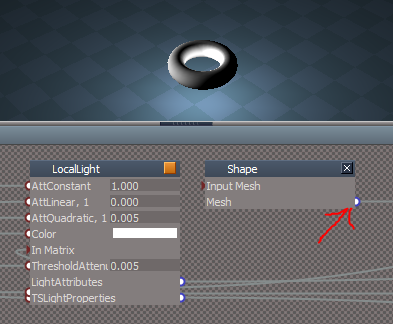
You can turn your Object into a Omini light in Workspace by replacing the Sphere in the Omini with your Object's Shape and then hook up the exported wire. In this example I used a Torus. You can Crtrl + Drag a copy of your shape from another LE window.
- Attachments
-
- Capture.PNG (44.63 KiB) Viewed 4905 times