I've started to update the modelside(truespace6) NURBS plugins. The first one is an update to the NURBSInfo plugin and combines 2 other plugins into it. This plugin is meant to be used with the weld patch and weld curve plugins. It might also be useful for texture mapping since the uv of the NURBS matches the uv of the texture space.
Changes:
New indicator for the V direction
U and V directions are color coded and uses widgets instead of scene objects
Works in the 4 view mode
Click the red widget to flip the U direction
Click the green to flip in the V direction
Click the blue to swap the U and V directions
get it here(source code also available):
http://www.clintons3d.com/plugins/trues ... index.html"
other NURBS tools here
http://www.clintons3d.com/truespace/nurbs/nurbs.html"
Next I plan to make the weld NURBS tools easier to use.
Update for NURBSInfo tsx
-
clintonman
- Captain
- Posts: 5659
- Joined: 21 May 2009, 21:08
- Type the number ten into the box: 0
- Location: California
Update for NURBSInfo tsx
-
Emmanuel
- Chief Warrant Officer
- Posts: 670
- Joined: 14 Jun 2009, 06:47
Re: Update for NURBSInfo tsx
Thank you Clinton
It is great to have you back on the NURBS tools !
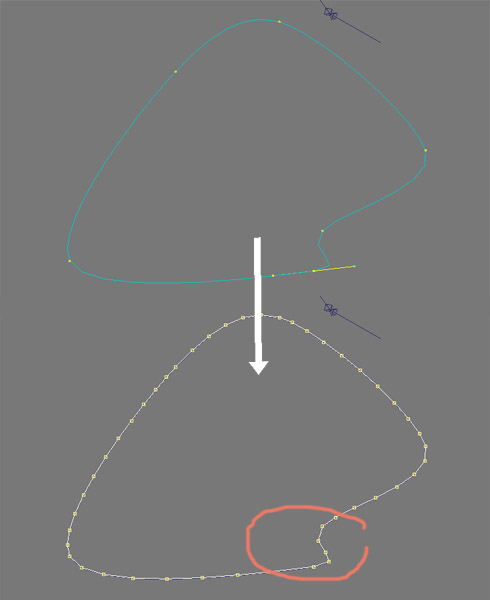
Talking about Nurbs, I wonder if there is a way to increase the "resolution" of a Nurbs curve converted into polyhedron.
In the example below, I am trying to get a soft curve on the polyhedron, closer to what a Nurbs can render. But the Patch Options panel of the Convert Patch To Polyhedron tool doesn't seem to really increase the level of details. All I get is a few points, that makes sharp angles rather than soft curves.
Do you have, by chance, a trick to improve the conversion ?
It is great to have you back on the NURBS tools !
Talking about Nurbs, I wonder if there is a way to increase the "resolution" of a Nurbs curve converted into polyhedron.
In the example below, I am trying to get a soft curve on the polyhedron, closer to what a Nurbs can render. But the Patch Options panel of the Convert Patch To Polyhedron tool doesn't seem to really increase the level of details. All I get is a few points, that makes sharp angles rather than soft curves.
Do you have, by chance, a trick to improve the conversion ?
-
clintonman
- Captain
- Posts: 5659
- Joined: 21 May 2009, 21:08
- Type the number ten into the box: 0
- Location: California
Re: Update for NURBSInfo tsx
You can try the rebuild curve plugin and give it a large number like 48 and then do the conversion to a polyhedron.Emmanuel wrote:Thank you Clinton![]()
It is great to have you back on the NURBS tools !
Talking about Nurbs, I wonder if there is a way to increase the "resolution" of a Nurbs curve converted into polyhedron.
In the example below, I am trying to get a soft curve on the polyhedron, closer to what a Nurbs can render. But the Patch Options panel of the Convert Patch To Polyhedron tool doesn't seem to really increase the level of details. All I get is a few points, that makes sharp angles rather than soft curves.
Do you have, by chance, a trick to improve the conversion ?
-
Emmanuel
- Chief Warrant Officer
- Posts: 670
- Joined: 14 Jun 2009, 06:47
Re: Update for NURBSInfo tsx
YESSS!clintonman wrote: You can try the rebuild curve plugin and give it a large number like 48 and then do the conversion to a polyhedron.
Your RebuildCurve.tsx does the job
Thank you Clinton !