hey all,
I've been working on a ground plane for a scene I'm doing and need to make hills and such but when I use the sculpt surface tool I notice it only raises or lowers small areas. I can't seem to find out how to manipulate larger areas. I've tried to stretch out the other cross bars but it only seems to push or pull the area horizontally from right to left, etc. Is there a way to manipulate more area? oh, I'm using my registered 5.1 sp2. thanks.
sculpt surface problem. help please =)
-
horusra

- Petty Officer First Class
- Posts: 70
- Joined: 02 Feb 2010, 13:09
- Type the number ten into the box: 0
- Location: Appleton, Wisconsin. U.S.A.
sculpt surface problem. help please =)
-
Finis

- Captain
- Posts: 5410
- Joined: 21 May 2009, 18:26
- Type the number ten into the box: 0
- Location: America!
Re: sculpt surface problem. help please =)
Hi Horusra.
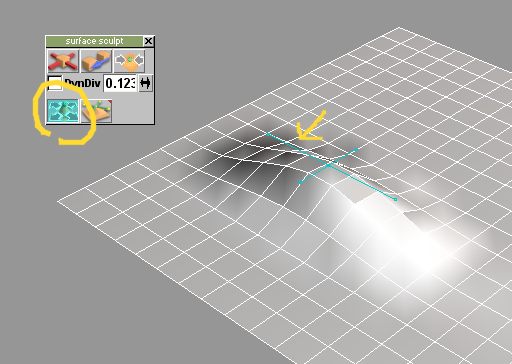
To change the scale, rotation, or position of a sculpt deformation in TS 5 click the button circled in the image.Then the cross bar should work as follows;
Center dot: move the deformation. Highly recommend you do that in a top view.
Bars between dots: scale the deformation. This can be done on two axes.
End dots: rotate the deformation.
To change the scale, rotation, or position of a sculpt deformation in TS 5 click the button circled in the image.Then the cross bar should work as follows;
Center dot: move the deformation. Highly recommend you do that in a top view.
Bars between dots: scale the deformation. This can be done on two axes.
End dots: rotate the deformation.
- Attachments
-
I prefer dangerous freedom over peaceful servitude. -- Thomas Jefferson/Jean Jacques Rousseau
-
horusra
- Petty Officer First Class
- Posts: 70
- Joined: 02 Feb 2010, 13:09
- Type the number ten into the box: 0
- Location: Appleton, Wisconsin. U.S.A.
Re: sculpt surface problem. help please =)
Thank you soooo much. I feel dumb though because I actually read the entry in the Manual about that tool but I didnt think thats what it did. This has been a little bit of a burning question for a number of years that I have never resolved. Thanks again. 
Rob
Rob
-
Finis
- Captain
- Posts: 5410
- Joined: 21 May 2009, 18:26
- Type the number ten into the box: 0
- Location: America!
Re: sculpt surface problem. help please =)
Happy to help.
If you need realistic terrain you could try Bryce, http://www.daz3d.com/products/bryce/bryce-what-is-bryce, which is probably still free. TerraGen used to have a free version too. Of course there's Vue for money. Don't know if commercial use is ok with those free ones in case you need that. Bryce is easy to use to make a terrain and it can export to a .cob file for trueSpace.
Also, various plugins, including Cool Powers 2, can do height mapped terrain.
If you need realistic terrain you could try Bryce, http://www.daz3d.com/products/bryce/bryce-what-is-bryce, which is probably still free. TerraGen used to have a free version too. Of course there's Vue for money. Don't know if commercial use is ok with those free ones in case you need that. Bryce is easy to use to make a terrain and it can export to a .cob file for trueSpace.
Also, various plugins, including Cool Powers 2, can do height mapped terrain.
I prefer dangerous freedom over peaceful servitude. -- Thomas Jefferson/Jean Jacques Rousseau