Scene View 2

User avatar
clintonman
Captain
Posts: 5659
Joined: 21 May 2009, 21:08
Type the number ten into the box: 0
Location: California

Scene View 2

Post by clintonman »

SceneViewReplacement01.jpg

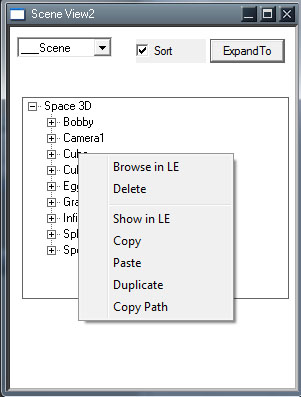
The Scene view has some issues. If you open model space python editor all of trueSpace slows down when the Scene View window is open. This happens on win10 machines. I plan to test on a winXP machine to see if the problem was always there or if it came from windows updates over the years.

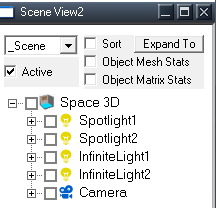
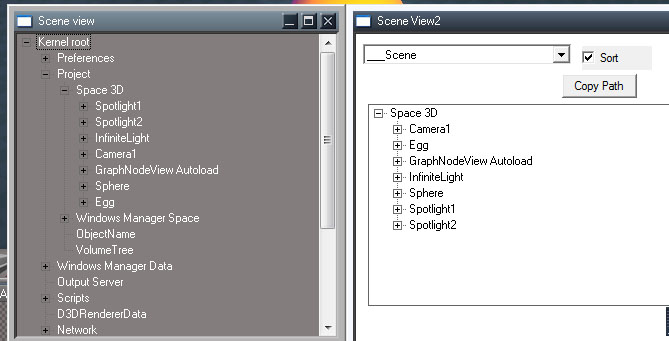
Right now it has the same functionality as the original scene view, including the right click context menu with browse and delete options. It has the added ability to sort the view alphabetically and it can start the tree from the "Kernel root" or the current scene level. I might add some more options to the context menu before it's done. The scene/root dropdown will be a checkbox option.

Now for the oddities. It won't select with a single click, double click is needed. Weird, but still better than tS slowing down and becoming unstable. It's ugly, and I might not be able to give it a decent look to match the rest of the tS interface.
Clinton Reese

http://clintons3d.com
User avatar
clintonman
Captain
Posts: 5659
Joined: 21 May 2009, 21:08
Type the number ten into the box: 0
Location: California

Re: Scene View 2

Post by clintonman »

SceneViewReplacement02.jpg
SceneViewReplacementContext02.jpg
SceneViewReplacementContext02.jpg (44.44 KiB) Viewed 3118 times

It's starting to come together.
Normal LMB select is working.
It can expand to the selected node using the "Expand To" button.
The extra items for the context menu are in place.

TODOs:

try to make the selected item highlight in the list
size the view to the window interactively (must do), already sizes horizontally, need it in vertical as well
try to maintain the scroll position when updating the scene - it scrolls to the top now
maybe add icons for the different item types
write the script functions for the context menu (must do)
expand to function needs to scroll to the selected item after expanding

I tested the trueSpace Scene view on winXP and it didn't have the slowdown problem. I also retested on win10 and the slowdown was almost imperceptible. Both tests where using unmodified stock tS, so there is something in the unofficial updates causing the slowdown. It's going to take a lot of testing to find the cause. In the short run this new custom Scene view will be the fix.
Clinton Reese

http://clintons3d.com
User avatar
clintonman
Captain
Posts: 5659
Joined: 21 May 2009, 21:08
Type the number ten into the box: 0
Location: California

Re: Scene View 2

Post by clintonman »

SceneViewReplacement03.jpg

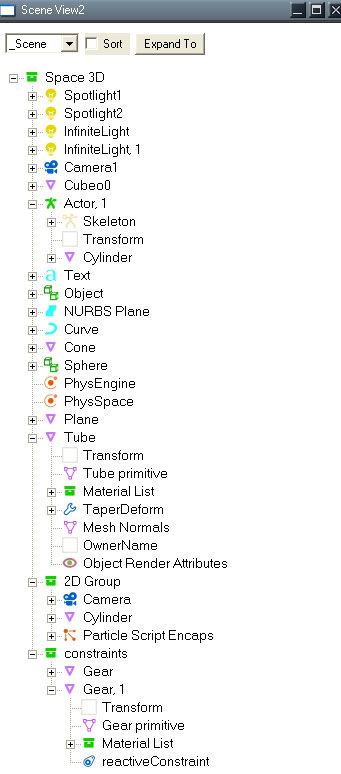
Started adding icons.

TODO

finish adding icons
try bigger font
try to find way to control color of the UI - background and font
write script portion of the tools
Clinton Reese

http://clintons3d.com
User avatar
clintonman
Captain
Posts: 5659
Joined: 21 May 2009, 21:08
Type the number ten into the box: 0
Location: California

Re: Scene View 2

Post by clintonman »

SceneView2Icons.jpg

Bigger font and the icons are all done. All are shown above except for the joints, bones, ik handles and ik locks.
Final task is to write some scripts and make sure the 3 parts of the plugin don't interfere with each other. The 3 parts are the Scene View 2, Webserver and an old part for a Node List View.
Clinton Reese

http://clintons3d.com
User avatar
clintonman
Captain
Posts: 5659
Joined: 21 May 2009, 21:08
Type the number ten into the box: 0
Location: California

Re: Scene View 2

Post by clintonman »

ObjectStats01.JPG

Added "Enable Statistics" checkbox to each of the 3 windows, Scene View 2, Web Server and Node View. When enabled the Object Statistics node values will update on selection and point edit changes. All 3 windows can be open with the stats enabled, but it's probably better to only enable one of them.

Additionally fixed the face counts and edge counts for the Object Statistics. The only count that is not good is point edit edge selection count.

This project is almost done. Just have to write some scripts and make a new installer.
Clinton Reese

http://clintons3d.com
User avatar
Emmanuel
Chief Warrant Officer
Posts: 670
Joined: 14 Jun 2009, 06:47

Re: Scene View 2

Post by Emmanuel »

I am using a LOT a plugin called SceneExplorer. It is fast, pretty, with handy options, and it works in Modeler !!!
I don't remember who made it. Any idea someone ? Was it Thomas (DesignDevil), Riccardo Scanu, someone else ? Ahhh, memory is failing. :cry:

The only feature I miss is the ability to select several objects at one, using CTRL and/or MAJ keys.
Too bad this pluging is abandoned.

Do you plan to add that option in your scene view tool Clinton ?

SceneExplorer.jpg
Attachments
SceneExplorer_original.tsx
(80.5 KiB) Downloaded 137 times
User avatar
clintonman
Captain
Posts: 5659
Joined: 21 May 2009, 21:08
Type the number ten into the box: 0
Location: California

Re: Scene View 2

Post by clintonman »

Emmanuel wrote: 17 Mar 2023, 17:24 I am using a LOT a plugin called SceneExplorer. It is fast, pretty, with handy options, and it works in Modeler !!!
I don't remember who made it. Any idea someone ? Was it Thomas (DesignDevil), Riccardo Scanu, someone else ? Ahhh, memory is failing. :cry:

The only feature I miss is the ability to select several objects at one, using CTRL and/or MAJ keys.
Too bad this pluging is abandoned.

Do you plan to add that option in your scene view tool Clinton ?


SceneExplorer.jpg
That looks real nice.
I would love to have multiple selections. That was the original plan along with some drag and drop options. I'm not able to use the tree control in the way it was meant to be used. The tree works through messages and notifications. Mostly through notifications and that's the part that would make it possible and is the part I don't have access to.
Clinton Reese

http://clintons3d.com
User avatar
clintonman
Captain
Posts: 5659
Joined: 21 May 2009, 21:08
Type the number ten into the box: 0
Location: California

Re: Scene View 2

Post by clintonman »

SceneViewReplacementCheckboxes.jpg

Spent some time fixing some bugs in the code and added a few things along the way.

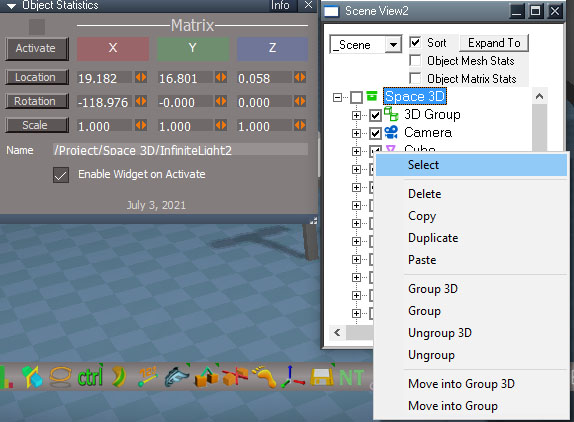
Renames "Enable Statistics" to "Object Mesh Stats"
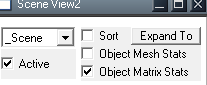
Added a new checkbox "Object Matrix Stats" which is used to drive the matrix aspect of the Object Statistics. Before this was driven by a modified version of the autokey script.

Added checkboxes and a separate context menu to use them.

I don't see anymore bugs or issues with the c++ plugin code.

TODO: write script code for the new context menu, which will be easy compared to the plugin code.
Clinton Reese

http://clintons3d.com
User avatar
clintonman
Captain
Posts: 5659
Joined: 21 May 2009, 21:08
Type the number ten into the box: 0
Location: California

Re: Scene View 2

Post by clintonman »

SceneViewReplacementActive.jpg

All the scripts are written and tested. One of the problems I ran into during testing is that some commands cause the entire tree to rebuild. This can be time consuming so I spent some time optimizing the code to only update the tree portion that changed. Some of the paste and duplicate commands are causing the full tree rebuild so need one more time around with the c code to fix that.

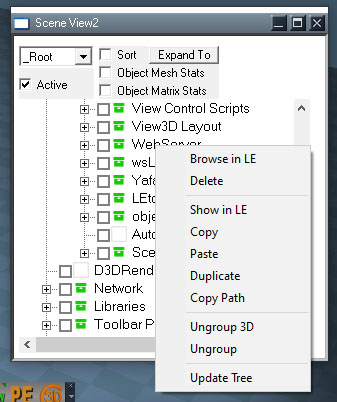
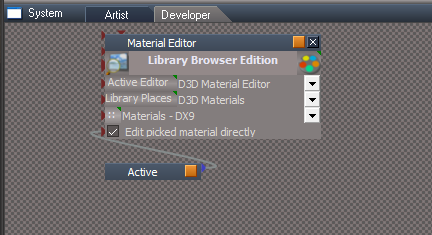
Some tree rebuilds are unavoidable. I found that assigning a material will cause the whole tree to rebuild. The "Active" checkbox is used in that case. It will stop the tree from updating when unchecked. A new status message will display when the tree is rebuilt to show tS isn't frozen.

Also found that some things will not update the tree no matter what, so added the "Update Tree" context menu option to rebuild the portion of the tree clicked on.
Clinton Reese

http://clintons3d.com
User avatar
clintonman
Captain
Posts: 5659
Joined: 21 May 2009, 21:08
Type the number ten into the box: 0
Location: California

Re: Scene View 2

Post by clintonman »

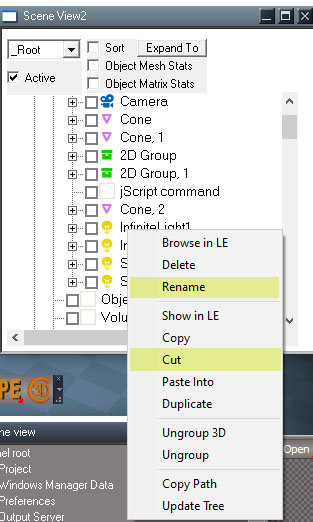
SceneViewReplacementRenameCut.jpg


I got the excess tree rebuilds fixed except for the Ungroup3D function still causes it.

Added a Rename option to the context menu
Added a Cut option to the context menus - I had copy,paste and duplicate, but still somehow forgot the cut
Changed the wording of "Paste" to "Paste Into"
All c++ coding is complete, at least I hope it is...

TODO:

write 2 "cut" scripts
try fix the ungroup3d to not cause extra full tree builds
update the object statistics script to be compatible with the new c++ code
Clinton Reese

http://clintons3d.com
User avatar
clintonman
Captain
Posts: 5659
Joined: 21 May 2009, 21:08
Type the number ten into the box: 0
Location: California

Re: Scene View 2

Post by clintonman »

Finally, a preview installation is available for testing. Everything works it's just not thoroughly tested.

It only has install instructions for the UU9 version of trueSpace.

http://clintons3d.com/plugins/truespace ... view2.html

One little note I just discovered, when switching to model space the tree may need to be rebuilt because model may change the names of some items.

This whole project was meant as a temporary replacement for the built in tS Scene view window, but the scene view 2 has too many limitations to be a full replacement for it. It can do a lot of things the original scene view cannot, so it was still a worth while project.
Clinton Reese

http://clintons3d.com
User avatar
trueBlue
Captain
Posts: 5548
Joined: 06 Jul 2009, 22:50
Type the number ten into the box: 10

Re: Scene View 2

Post by trueBlue »

Looking great! :bananathumb:
On your website:
Usage:
Click the toolbar button, www, to start the server and open the options panel.
Select Scene View 2 radio button
Press the corresponding Open button to open the default web browser to the Scene View page
Your Scene View 2 toolbar button opens this new Scene View 2 fine without the Webserver running
Looks like the above instructions are for the Web version Scene View 2
The Expand To button is not working for me
I have seen it (once) push in when I click on it but mostly it does not push in when I press it
I had a Camera selected, pressed the Expand To button and the Scene gets selected
Pressing the + buttons do expand, so I not understanding what the Expand To button is for when and if it works

The path for the icons seems limited in that you would have to create that directory (\tS\Scripts\UI\images\) in the Standalone version
Couldn't the icons reside in the web folder?

The Delete functions using the tS Delete command does not seem like a very good idea in that a user could Delete important tS Nodes :o

I do not see any slowdown in the Workspace when using Model's Script Manager and your new Scene View 2
Did not trying running any py scripts yet
User avatar
clintonman
Captain
Posts: 5659
Joined: 21 May 2009, 21:08
Type the number ten into the box: 0
Location: California

Re: Scene View 2

Post by clintonman »

trueBlue wrote: 23 Mar 2023, 15:09 Looking great! :bananathumb:
On your website:
Usage:
Click the toolbar button, www, to start the server and open the options panel.
Select Scene View 2 radio button
Press the corresponding Open button to open the default web browser to the Scene View page
Your Scene View 2 toolbar button opens this new Scene View 2 fine without the Webserver running
Looks like the above instructions are for the Web version Scene View 2
The Expand To button is not working for me
I have seen it (once) push in when I click on it but mostly it does not push in when I press it
I had a Camera selected, pressed the Expand To button and the Scene gets selected
Pressing the + buttons do expand, so I not understanding what the Expand To button is for when and if it works

The path for the icons seems limited in that you would have to create that directory (\tS\Scripts\UI\images\) in the Standalone version
Couldn't the icons reside in the web folder?

The Delete functions using the tS Delete command does not seem like a very good idea in that a user could Delete important tS Nodes :o

I do not see any slowdown in the Workspace when using Model's Script Manager and your new Scene View 2
Did not trying running any py scripts yet
I removed the old usage text

Expand To - wont do anything at the scene level since it's already open to it. Go deeper like inside the camera then press Expand To. Not a great example since it would only go down 1 level which the + button already does. Good if you're deep in a hierarchy then the Expand To will take you to the selected node level.

Updated the text, changed "tS install folder '.....\tS\Scripts\UI\images\'" to "tS main folder '.....\Scripts\UI\images\'"

I'm sure some options can be added as rmb panel for protections etc. The scene view opens into the scene by default, so a casual user would have to go out of there way to activate the root level and then start messing around outside of the scene. I would think someone messing around in the root would have the good sense to know what can and can't be deleted. Then again people are capable of anything. It can also be setup to run the UU version of commands.
Clinton Reese

http://clintons3d.com
User avatar
trueBlue
Captain
Posts: 5548
Joined: 06 Jul 2009, 22:50
Type the number ten into the box: 10

Re: Scene View 2

Post by trueBlue »

clintonman wrote: 23 Mar 2023, 03:19 This whole project was meant as a temporary replacement for the built in tS Scene view window, but the scene view 2 has too many limitations to be a full replacement for it. It can do a lot of things the original scene view cannot, so it was still a worth while project.
Curious why you say this :|
The only thing the tS Scene View can do is Browse in the LE and Delete scene items
Your Scene View does the above without any limitations and more!
The only thing I would caution would be the Delete functions that can Delete non scene items
User avatar
trueBlue
Captain
Posts: 5548
Joined: 06 Jul 2009, 22:50
Type the number ten into the box: 10

Re: Scene View 2

Post by trueBlue »

clintonman wrote: 23 Mar 2023, 15:39 I'm sure some options can be added as rmb panel for protections etc. The scene view opens into the scene by default, so a casual user would have to go out of there way to activate the root level and then start messing around outside of the scene. I would think someone messing around in the root would have the good sense to know what can and can't be deleted. Then again people are capable of anything. It can also be setup to run the UU version of commands.
Forgot to mention, changing from Scene to Root does not always work for me
Seems I have to close and re open it to get it to work
User avatar
clintonman
Captain
Posts: 5659
Joined: 21 May 2009, 21:08
Type the number ten into the box: 0
Location: California

Re: Scene View 2

Post by clintonman »

trueBlue wrote: 23 Mar 2023, 15:55
clintonman wrote: 23 Mar 2023, 15:39 I'm sure some options can be added as rmb panel for protections etc. The scene view opens into the scene by default, so a casual user would have to go out of there way to activate the root level and then start messing around outside of the scene. I would think someone messing around in the root would have the good sense to know what can and can't be deleted. Then again people are capable of anything. It can also be setup to run the UU version of commands.
Forgot to mention, changing from Scene to Root does not always work for me
Seems I have to close and re open it to get it to work
If something doesn't work just try it again.
"tree controls can be non-responsive on first run - clears up after some use"
Clinton Reese

http://clintons3d.com
User avatar
clintonman
Captain
Posts: 5659
Joined: 21 May 2009, 21:08
Type the number ten into the box: 0
Location: California

Re: Scene View 2

Post by clintonman »

trueBlue wrote: 23 Mar 2023, 15:52
clintonman wrote: 23 Mar 2023, 03:19 This whole project was meant as a temporary replacement for the built in tS Scene view window, but the scene view 2 has too many limitations to be a full replacement for it. It can do a lot of things the original scene view cannot, so it was still a worth while project.
Curious why you say this :|
The only thing the tS Scene View can do is Browse in the LE and Delete scene items
Your Scene View does the above without any limitations and more!
The only thing I would caution would be the Delete functions that can Delete non scene items
2 reasons:

If a scene has a large number of items the scene view 2 will slow down. You can see some of the slowdown by opening the _Root level and then apply a material to something in the scene. This slowdown will also happen in some other cases.
Second reason is the tree does not update with all scene changes and it has to be manually updated.
Clinton Reese

http://clintons3d.com
User avatar
trueBlue
Captain
Posts: 5548
Joined: 06 Jul 2009, 22:50
Type the number ten into the box: 10

Re: Scene View 2

Post by trueBlue »

I changed the scene16.bmp from a Perspective View icon to a New Scene icon
SceneView2NewScenIcon.png
SceneView2NewScenIcon.png (7.51 KiB) Viewed 1995 times
Attachments
scene16.zip
(743 Bytes) Downloaded 115 times
User avatar
clintonman
Captain
Posts: 5659
Joined: 21 May 2009, 21:08
Type the number ten into the box: 0
Location: California

Re: Scene View 2

Post by clintonman »

trueBlue wrote: 23 Mar 2023, 16:31 I changed the scene16.bmp from a Perspective View icon to a New Scene icon
SceneView2NewScenIcon.png
Good idea.
Did you have to zip it, did I forget to add bmp files to the forum upload options?
Clinton Reese

http://clintons3d.com
User avatar
trueBlue
Captain
Posts: 5548
Joined: 06 Jul 2009, 22:50
Type the number ten into the box: 10

Re: Scene View 2

Post by trueBlue »

clintonman wrote: 23 Mar 2023, 16:35
trueBlue wrote: 23 Mar 2023, 16:31 I changed the scene16.bmp from a Perspective View icon to a New Scene icon
SceneView2NewScenIcon.png
Good idea.
Did you have to zip it, did I forget to add bmp files to the forum upload options?
Yes, I had to zip the bmp

I would like to use:
var UUFS = Node.AccessFnSet('Scripts/UUCommands/UUFunctionSet');UUFS.Delete();
in your Clintons3dView Function Set for the UU9
Not sure where and where not to put it as there a lot of Node.Delete commands
User avatar
clintonman
Captain
Posts: 5659
Joined: 21 May 2009, 21:08
Type the number ten into the box: 0
Location: California

Re: Scene View 2

Post by clintonman »

trueBlue wrote: 23 Mar 2023, 16:57
clintonman wrote: 23 Mar 2023, 16:35
trueBlue wrote: 23 Mar 2023, 16:31 I changed the scene16.bmp from a Perspective View icon to a New Scene icon
SceneView2NewScenIcon.png
Good idea.
Did you have to zip it, did I forget to add bmp files to the forum upload options?
Yes, I had to zip the bmp

I would like to use:
var UUFS = Node.AccessFnSet('Scripts/UUCommands/UUFunctionSet');UUFS.Delete();
in your Clintons3dView Function Set for the UU9
Not sure where and where not to put it as there a lot of Node.Delete commands
The function set has 3 sections: Node List, Scene View and checkbox context
These are the changes you would make for UUFS.Delete()

change openSceneView2, add the if statement before the return:

Code: Select all

	//clear the store

	var store = "/Scripts/CustomCommands/SceneView/Store";

	var subObjCount = Node.SubObjectCount(store);

	if(subObjCount > 0) {
		for(var i=subObjCount-1; i>=0; i--) {
			Node.Delete(store + "/"+ Node.SubObject(store,i));
		}
	}


	//will start blank if nothing is selected - select first scene item
	if(Node.SelectedCount() == 0) {
		var scene = Space.CurrentScene();
		Space.Select(scene + "/" + Node.SubObject(scene, 0));
	}


	//WindowsManager.CreateWindowFromCLSID('{DD2E0D6B-ED84-4b80-A624-757525B8A591}', '', '', '', 1);//node view window

	WindowsManager.CreateWindowFromCLSID('{E9C4FE3C-C3C9-4dfd-8C85-E7F0F81029B4}', '', '', '', 1);//scene view 2 

	if(Node.Exists('Scripts/UUCommands/UUFunctionSet')) {
		var sceneViewFS = "/Scripts/CustomCommands/SceneView/Clintons3dView Function Set";
		var UUFS = Node.AccessFnSet('Scripts/UUCommands/UUFunctionSet');
		sceneViewFS.UUFS = UUFS;
	}

return;
change Clintons3dView Function Set, top section, add var UUFS:

Code: Select all

// This is a jScript Function Set
// Put usefull functions, constants, enumerators here and share them across your project
// Use Node.AccessFnSet / Node.AccessNearFnSet to get access here from your script commands
// Hint: do not use commands like System.ThisOwner, System.ThisName or Node.NearValue here, as they reffer to caller's command location

var UUFS;
change Clintons3dView Function Set, Scene View section

Code: Select all

function SceneView_Delete(theselection)
{
	if(Node.Exists('Scripts/UUCommands/UUFunctionSet')) {
		Space.Select(theselection);
		UUFS.Delete();
		return;
	}

	Node.Delete(theselection);
}

change Clintons3dView Function Set, checkbox section:

Code: Select all

function SceneView_Delete_Ctx(thenodes)
{
	var selArr = thenodes.split(";");
	if(selArr[1] == "") return;//nothing checked

	if(Node.Exists('Scripts/UUCommands/UUFunctionSet')) {
		selArr.shift();
		var selStr = selArr.join(";");
		Space.Select(selStr);
		UUFS.Delete();
		return;
	}

	cmd = 'thenodes = "' + thenodes + '";'
	cmd += 'var selArr = thenodes.split(";");'
	cmd += 'selArr.shift();'
	cmd += 'while(delnode = selArr.pop()) {'
	cmd += '	Node.Delete(delnode);'
	cmd += '}'
	cmd += 'Space.Unselect();'

	RsApp.RunScriptBuffer(cmd);

//
	//var selArr = thenodes.split(";");
	//if(selArr[1] == "") return;//nothing checked

	//remove first item - the rmb clicked on item
	//selArr.shift();

	//TODO single delete form
	//while(delnode = selArr.pop()) {
	//	Node.Delete(delnode);
	//}

	//Space.Unselect();//cleanup for script selection reads
}
Clinton Reese

http://clintons3d.com
Saul
Senior Chief Petty Officer
Posts: 308
Joined: 22 May 2009, 16:50

Re: Scene View 2

Post by Saul »

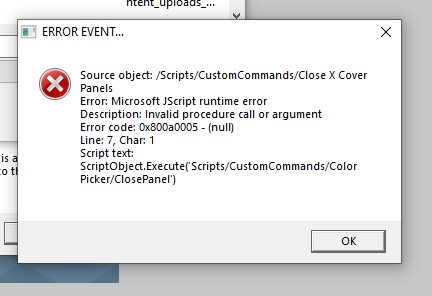
Following install instructions, rename .rsx to .dll etc. Upon opening tS i get the following:
Screenshot 2023-03-23 180001.jpg
Then this:
Screenshot 2023-03-23 180022.jpg
How to find the install file?
User avatar
clintonman
Captain
Posts: 5659
Joined: 21 May 2009, 21:08
Type the number ten into the box: 0
Location: California

Re: Scene View 2

Post by clintonman »

Saul wrote: 23 Mar 2023, 18:37 Following install instructions, rename .rsx to .dll etc. Upon opening tS i get the following:
Screenshot 2023-03-23 180001.jpg
Then this:
Screenshot 2023-03-23 180022.jpg

How to find the install file?
Need more information. List the actual steps you took. Maybe a screenshot of the folder with the files you renamed to dll, so can see if they are in the correct location. Did you delete or rename the original dll files?
There are a lot of scenarios, need more information to figure out what went wrong.

@trueBlue: are those the sort of errors that happen when the dll files are bad?
Clinton Reese

http://clintons3d.com
User avatar
trueBlue
Captain
Posts: 5548
Joined: 06 Jul 2009, 22:50
Type the number ten into the box: 10

Re: Scene View 2

Post by trueBlue »

I have not seen these errors
I just manually ran both of these scripts and no errors

Instructions on your website:
Copy the 2 rsx files into the tS install folder - and change the file extension from 'rsx' to 'dll'

Maybe Saul put the plugin(s) in the tS folder?
Should be in the main folder"
Examples:
C:\trueSpace761
C:\trueSpace761Std
User avatar
trueBlue
Captain
Posts: 5548
Joined: 06 Jul 2009, 22:50
Type the number ten into the box: 10

Re: Scene View 2

Post by trueBlue »

clintonman wrote: 23 Mar 2023, 18:09
trueBlue wrote: 23 Mar 2023, 16:57
clintonman wrote: 23 Mar 2023, 16:35

Good idea.
Did you have to zip it, did I forget to add bmp files to the forum upload options?
Yes, I had to zip the bmp

I would like to use:
var UUFS = Node.AccessFnSet('Scripts/UUCommands/UUFunctionSet');UUFS.Delete();
in your Clintons3dView Function Set for the UU9
Not sure where and where not to put it as there a lot of Node.Delete commands
The function set has 3 sections: Node List, Scene View and checkbox context
These are the changes you would make for UUFS.Delete()

change openSceneView2, add the if statement before the return:

Code: Select all

	//clear the store

	var store = "/Scripts/CustomCommands/SceneView/Store";

	var subObjCount = Node.SubObjectCount(store);

	if(subObjCount > 0) {
		for(var i=subObjCount-1; i>=0; i--) {
			Node.Delete(store + "/"+ Node.SubObject(store,i));
		}
	}


	//will start blank if nothing is selected - select first scene item
	if(Node.SelectedCount() == 0) {
		var scene = Space.CurrentScene();
		Space.Select(scene + "/" + Node.SubObject(scene, 0));
	}


	//WindowsManager.CreateWindowFromCLSID('{DD2E0D6B-ED84-4b80-A624-757525B8A591}', '', '', '', 1);//node view window

	WindowsManager.CreateWindowFromCLSID('{E9C4FE3C-C3C9-4dfd-8C85-E7F0F81029B4}', '', '', '', 1);//scene view 2 

	if(Node.Exists('Scripts/UUCommands/UUFunctionSet')) {
		var sceneViewFS = "/Scripts/CustomCommands/SceneView/Clintons3dView Function Set";
		var UUFS = Node.AccessFnSet('Scripts/UUCommands/UUFunctionSet');
		sceneViewFS.UUFS = UUFS;
	}

return;
change Clintons3dView Function Set, top section, add var UUFS:

Code: Select all

// This is a jScript Function Set
// Put usefull functions, constants, enumerators here and share them across your project
// Use Node.AccessFnSet / Node.AccessNearFnSet to get access here from your script commands
// Hint: do not use commands like System.ThisOwner, System.ThisName or Node.NearValue here, as they reffer to caller's command location

var UUFS;
change Clintons3dView Function Set, Scene View section

Code: Select all

function SceneView_Delete(theselection)
{
	if(Node.Exists('Scripts/UUCommands/UUFunctionSet')) {
		Space.Select(theselection);
		UUFS.Delete();
		return;
	}

	Node.Delete(theselection);
}

change Clintons3dView Function Set, checkbox section:

Code: Select all

function SceneView_Delete_Ctx(thenodes)
{
	var selArr = thenodes.split(";");
	if(selArr[1] == "") return;//nothing checked

	if(Node.Exists('Scripts/UUCommands/UUFunctionSet')) {
		selArr.shift();
		var selStr = selArr.join(";");
		Space.Select(selStr);
		UUFS.Delete();
		return;
	}

	cmd = 'thenodes = "' + thenodes + '";'
	cmd += 'var selArr = thenodes.split(";");'
	cmd += 'selArr.shift();'
	cmd += 'while(delnode = selArr.pop()) {'
	cmd += '	Node.Delete(delnode);'
	cmd += '}'
	cmd += 'Space.Unselect();'

	RsApp.RunScriptBuffer(cmd);

//
	//var selArr = thenodes.split(";");
	//if(selArr[1] == "") return;//nothing checked

	//remove first item - the rmb clicked on item
	//selArr.shift();

	//TODO single delete form
	//while(delnode = selArr.pop()) {
	//	Node.Delete(delnode);
	//}

	//Space.Unselect();//cleanup for script selection reads
}
Unfortunately, this is not going to Work
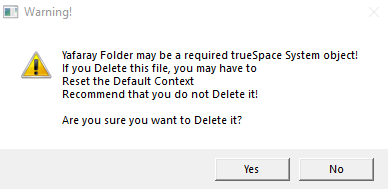
Tried Deleting the MaterialEditor and Yafaray Folder
Did not get the warning
Delete warning.png
Delete warning.png (19.43 KiB) Viewed 2811 times
The item was removed from the Scene View 2 panel, but was not deleted
Tried deleting a scene item
The item was removed from the Scene View 2 panel, but was not deleted
User avatar
clintonman
Captain
Posts: 5659
Joined: 21 May 2009, 21:08
Type the number ten into the box: 0
Location: California

Re: Scene View 2

Post by clintonman »

trueBlue wrote: 23 Mar 2023, 19:24
clintonman wrote: 23 Mar 2023, 18:09
trueBlue wrote: 23 Mar 2023, 16:57
Yes, I had to zip the bmp

I would like to use:
var UUFS = Node.AccessFnSet('Scripts/UUCommands/UUFunctionSet');UUFS.Delete();
in your Clintons3dView Function Set for the UU9
Not sure where and where not to put it as there a lot of Node.Delete commands
The function set has 3 sections: Node List, Scene View and checkbox context
These are the changes you would make for UUFS.Delete()

change openSceneView2, add the if statement before the return:

Code: Select all

	//clear the store

	var store = "/Scripts/CustomCommands/SceneView/Store";

	var subObjCount = Node.SubObjectCount(store);

	if(subObjCount > 0) {
		for(var i=subObjCount-1; i>=0; i--) {
			Node.Delete(store + "/"+ Node.SubObject(store,i));
		}
	}


	//will start blank if nothing is selected - select first scene item
	if(Node.SelectedCount() == 0) {
		var scene = Space.CurrentScene();
		Space.Select(scene + "/" + Node.SubObject(scene, 0));
	}


	//WindowsManager.CreateWindowFromCLSID('{DD2E0D6B-ED84-4b80-A624-757525B8A591}', '', '', '', 1);//node view window

	WindowsManager.CreateWindowFromCLSID('{E9C4FE3C-C3C9-4dfd-8C85-E7F0F81029B4}', '', '', '', 1);//scene view 2 

	if(Node.Exists('Scripts/UUCommands/UUFunctionSet')) {
		var sceneViewFS = "/Scripts/CustomCommands/SceneView/Clintons3dView Function Set";
		var UUFS = Node.AccessFnSet('Scripts/UUCommands/UUFunctionSet');
		sceneViewFS.UUFS = UUFS;
	}

return;
change Clintons3dView Function Set, top section, add var UUFS:

Code: Select all

// This is a jScript Function Set
// Put usefull functions, constants, enumerators here and share them across your project
// Use Node.AccessFnSet / Node.AccessNearFnSet to get access here from your script commands
// Hint: do not use commands like System.ThisOwner, System.ThisName or Node.NearValue here, as they reffer to caller's command location

var UUFS;
change Clintons3dView Function Set, Scene View section

Code: Select all

function SceneView_Delete(theselection)
{
	if(Node.Exists('Scripts/UUCommands/UUFunctionSet')) {
		Space.Select(theselection);
		UUFS.Delete();
		return;
	}

	Node.Delete(theselection);
}

change Clintons3dView Function Set, checkbox section:

Code: Select all

function SceneView_Delete_Ctx(thenodes)
{
	var selArr = thenodes.split(";");
	if(selArr[1] == "") return;//nothing checked

	if(Node.Exists('Scripts/UUCommands/UUFunctionSet')) {
		selArr.shift();
		var selStr = selArr.join(";");
		Space.Select(selStr);
		UUFS.Delete();
		return;
	}

	cmd = 'thenodes = "' + thenodes + '";'
	cmd += 'var selArr = thenodes.split(";");'
	cmd += 'selArr.shift();'
	cmd += 'while(delnode = selArr.pop()) {'
	cmd += '	Node.Delete(delnode);'
	cmd += '}'
	cmd += 'Space.Unselect();'

	RsApp.RunScriptBuffer(cmd);

//
	//var selArr = thenodes.split(";");
	//if(selArr[1] == "") return;//nothing checked

	//remove first item - the rmb clicked on item
	//selArr.shift();

	//TODO single delete form
	//while(delnode = selArr.pop()) {
	//	Node.Delete(delnode);
	//}

	//Space.Unselect();//cleanup for script selection reads
}
Unfortunately, this is not going to Work
Tried Deleting the MaterialEditor and Yafaray Folder
Did not get the warning
Delete warning.png
The item was removed from the Scene View 2 panel, but was not deleted
Tried deleting a scene item
The item was removed from the Scene View 2 panel, but was not deleted
Oops,

openSceneView2

Had var sceneViewFS = "/Scripts/CustomCommands/SceneView/Clintons3dView Function Set";
should have been var sceneViewFS = Node.AccessFnSet("/Scripts/CustomCommands/SceneView/Clintons3dView Function Set");

Code: Select all

	//clear the store

	var store = "/Scripts/CustomCommands/SceneView/Store";

	var subObjCount = Node.SubObjectCount(store);

	if(subObjCount > 0) {
		for(var i=subObjCount-1; i>=0; i--) {
			Node.Delete(store + "/"+ Node.SubObject(store,i));
		}
	}


	//will start blank if nothing is selected - select first scene item
	if(Node.SelectedCount() == 0) {
		var scene = Space.CurrentScene();
		Space.Select(scene + "/" + Node.SubObject(scene, 0));
	}


	WindowsManager.CreateWindowFromCLSID('{E9C4FE3C-C3C9-4dfd-8C85-E7F0F81029B4}', '', '', '', 1);//scene view 2 

	if(Node.Exists('Scripts/UUCommands/UUFunctionSet')) {
		var sceneViewFS = Node.AccessFnSet("/Scripts/CustomCommands/SceneView/Clintons3dView Function Set");
		var UUFS = Node.AccessFnSet('/Scripts/UUCommands/UUFunctionSet');
		sceneViewFS.UUFS = UUFS;
	}

return;
If you choose delete from the scene view and then don't delete it will disappear from the scene view no matter what. So have to click an icon to rebuild the tree or reselect _Scene in the drop down list or rmb context Rebuild Branch.
Clinton Reese

http://clintons3d.com
User avatar
trueBlue
Captain
Posts: 5548
Joined: 06 Jul 2009, 22:50
Type the number ten into the box: 10

Re: Scene View 2

Post by trueBlue »

Thats bizarre!
It works now, but why the change to opening Scene View 2 corrects it is really bizarre!

Just noticed that when using Browse in LE makes the Orange Triangle not work
I selected the Material Editor, right click Browse in the LE
It navigates to inside the Material Editor
User avatar
clintonman
Captain
Posts: 5659
Joined: 21 May 2009, 21:08
Type the number ten into the box: 0
Location: California

Re: Scene View 2

Post by clintonman »

trueBlue wrote: 23 Mar 2023, 20:04 Thats bizarre!
It works now, but why the change to opening Scene View 2 corrects it is really bizarre!

Just noticed that when using Browse in LE makes the Orange Triangle not work
I selected the Material Editor, right click Browse in the LE
It navigates to inside the Material Editor
You can't use Node.AccessFnSet inside of a function set, so you have run it before and copy it in.

Browse in LE opens inside the node, Show in LE shows the node in the LE

I don't see any broken orange triangles, they all seem to work.
Clinton Reese

http://clintons3d.com
User avatar
trueBlue
Captain
Posts: 5548
Joined: 06 Jul 2009, 22:50
Type the number ten into the box: 10

Re: Scene View 2

Post by trueBlue »

clintonman wrote: 23 Mar 2023, 20:26
trueBlue wrote: 23 Mar 2023, 20:04 Thats bizarre!
It works now, but why the change to opening Scene View 2 corrects it is really bizarre!

Just noticed that when using Browse in LE makes the Orange Triangle not work
I selected the Material Editor, right click Browse in the LE
It navigates to inside the Material Editor
You can't use Node.AccessFnSet inside of a function set, so you have run it before and copy it in.

Browse in LE opens inside the node, Show in LE shows the node in the LE

I don't see any broken orange triangles, they all seem to work.
It happens for me when using Root not Scene
User avatar
clintonman
Captain
Posts: 5659
Joined: 21 May 2009, 21:08
Type the number ten into the box: 0
Location: California

Re: Scene View 2

Post by clintonman »

trueBlue wrote: 23 Mar 2023, 20:31
clintonman wrote: 23 Mar 2023, 20:26
trueBlue wrote: 23 Mar 2023, 20:04 Thats bizarre!
It works now, but why the change to opening Scene View 2 corrects it is really bizarre!

Just noticed that when using Browse in LE makes the Orange Triangle not work
I selected the Material Editor, right click Browse in the LE
It navigates to inside the Material Editor
You can't use Node.AccessFnSet inside of a function set, so you have run it before and copy it in.

Browse in LE opens inside the node, Show in LE shows the node in the LE

I don't see any broken orange triangles, they all seem to work.
It happens for me when using Root not Scene
You can't get to the material editor without first going to _Root, so like I said I don't see any broken triangles.
Clinton Reese

http://clintons3d.com
User avatar
clintonman
Captain
Posts: 5659
Joined: 21 May 2009, 21:08
Type the number ten into the box: 0
Location: California

Re: Scene View 2

Post by clintonman »

Maybe we're talking about 2 different things.

For me this is an odd statement.

"I selected the Material Editor, right click Browse in the LE
It navigates to inside the Material Editor "

because that is exactly what happens when I use the built in scene view browse in le. What happens when you use it? Does it not go inside?
Clinton Reese

http://clintons3d.com
User avatar
trueBlue
Captain
Posts: 5548
Joined: 06 Jul 2009, 22:50
Type the number ten into the box: 10

Re: Scene View 2

Post by trueBlue »

clintonman wrote: 23 Mar 2023, 20:41 Maybe we're talking about 2 different things.

For me this is an odd statement.

"I selected the Material Editor, right click Browse in the LE
It navigates to inside the Material Editor "

because that is exactly what happens when I use the built in scene view browse in le. What happens when you use it? Does it not go inside?
Correct, that is what happens when using Scene View 2 and Scene View
The problem for me is the Orange triangle no longer works when I use Browse in LE
Note where the Link Editor is in the top left in the following pictures:
Scene View
Scene View.png
Scene View.png (18.04 KiB) Viewed 2663 times
Scene View 2
Scene View 2.png
As you can see using Scene View 2, the location is System not Material Editor
User avatar
clintonman
Captain
Posts: 5659
Joined: 21 May 2009, 21:08
Type the number ten into the box: 0
Location: California

Re: Scene View 2

Post by clintonman »

trueBlue wrote: 23 Mar 2023, 20:50
clintonman wrote: 23 Mar 2023, 20:41 Maybe we're talking about 2 different things.

For me this is an odd statement.

"I selected the Material Editor, right click Browse in the LE
It navigates to inside the Material Editor "

because that is exactly what happens when I use the built in scene view browse in le. What happens when you use it? Does it not go inside?
Correct, that is what happens when using Scene View 2 and Scene View
The problem for me is the Orange triangle no longer works when I use Browse in LE
Note where the Link Editor is in the top left in the following pictures:
Scene View
Scene View.png
Scene View 2
Scene View 2.png
As you can see using Scene View 2, the location is System not Material Editor
That is interesting, but all the orange triangles still work. I'll see if it's possible to make it consistent, but I won't be able to fix broken triangles if I can't see them.
Clinton Reese

http://clintons3d.com
User avatar
trueBlue
Captain
Posts: 5548
Joined: 06 Jul 2009, 22:50
Type the number ten into the box: 10

Re: Scene View 2

Post by trueBlue »

clintonman wrote: 23 Mar 2023, 21:05
trueBlue wrote: 23 Mar 2023, 20:50
clintonman wrote: 23 Mar 2023, 20:41 Maybe we're talking about 2 different things.

For me this is an odd statement.

"I selected the Material Editor, right click Browse in the LE
It navigates to inside the Material Editor "

because that is exactly what happens when I use the built in scene view browse in le. What happens when you use it? Does it not go inside?
Correct, that is what happens when using Scene View 2 and Scene View
The problem for me is the Orange triangle no longer works when I use Browse in LE
Note where the Link Editor is in the top left in the following pictures:
Scene View
Scene View.png
Scene View 2
Scene View 2.png
As you can see using Scene View 2, the location is System not Material Editor
That is interesting, but all the orange triangles still work. I'll see if it's possible to make it consistent, but I won't be able to fix broken triangles if I can't see them.
I just changed all of the commands to:
LE.OpenLocation(Node.FirstSelected())

This seems to work
User avatar
trueBlue
Captain
Posts: 5548
Joined: 06 Jul 2009, 22:50
Type the number ten into the box: 10

Re: Scene View 2

Post by trueBlue »

This is not working right in Show in LE and I am not sure which function that is
As said, I changed all of the commands
User avatar
trueBlue
Captain
Posts: 5548
Joined: 06 Jul 2009, 22:50
Type the number ten into the box: 10

Re: Scene View 2

Post by trueBlue »

Update
For Show in LE, I am using:
LE.OpenLocation(Node.Owner(Node.FirstSelected()))
User avatar
clintonman
Captain
Posts: 5659
Joined: 21 May 2009, 21:08
Type the number ten into the box: 0
Location: California

Re: Scene View 2

Post by clintonman »

trueBlue wrote: 23 Mar 2023, 20:04 Thats bizarre!
It works now, but why the change to opening Scene View 2 corrects it is really bizarre!

Just noticed that when using Browse in LE makes the Orange Triangle not work
I selected the Material Editor, right click Browse in the LE
It navigates to inside the Material Editor
I see it now. I was clicking on the orange "squares" on the nodes while testing and that masked the problem. You have to immediately press the orange triangle to see it broken.
Clinton Reese

http://clintons3d.com
User avatar
clintonman
Captain
Posts: 5659
Joined: 21 May 2009, 21:08
Type the number ten into the box: 0
Location: California

Re: Scene View 2

Post by clintonman »

heres the fix for broken triangle
change is on second to last line ["/" + theselection], it needed the "/" prefix to the path

Code: Select all

function SceneView_OpenLE(theselection)
{
	// *** Browse in LE

	if(theselection == "") thenode = "/";

	if(Node.SubObjectCount(theselection) == 0) {
		var owner = Node.Owner(theselection);
		var thenode = Node.ShortName(theselection);

		LE.OpenLocation2(owner, thenode);
	} else {
		LE.OpenLocation("/" + theselection);
	}
}
Clinton Reese

http://clintons3d.com
User avatar
trueBlue
Captain
Posts: 5548
Joined: 06 Jul 2009, 22:50
Type the number ten into the box: 10

Re: Scene View 2

Post by trueBlue »

clintonman wrote: 24 Mar 2023, 20:30 heres the fix for broken triangle
change is on second to last line ["/" + theselection], it needed the "/" prefix to the path

Code: Select all

function SceneView_OpenLE(theselection)
{
	// *** Browse in LE

	if(theselection == "") thenode = "/";

	if(Node.SubObjectCount(theselection) == 0) {
		var owner = Node.Owner(theselection);
		var thenode = Node.ShortName(theselection);

		LE.OpenLocation2(owner, thenode);
	} else {
		LE.OpenLocation("/" + theselection);
	}
}
I will try your fix
openSceneView2
Can you add Space.Unselect() ?

Code: Select all

	//will start blank if nothing is selected - select first scene item
	if(Node.SelectedCount() == 0) {
		var scene = Space.CurrentScene();
		Space.Select(scene + "/" + Node.SubObject(scene, 0));
Space.Unselect()
	}
OBJ Matrix Stats.png
OBJ Matrix Stats.png (3.36 KiB) Viewed 2647 times
Object Matrix Stats does not update the Object Statistics - pivot matrix aspect, it updates the Info aspect
User avatar
clintonman
Captain
Posts: 5659
Joined: 21 May 2009, 21:08
Type the number ten into the box: 0
Location: California

Re: Scene View 2

Post by clintonman »

trueBlue wrote: 24 Mar 2023, 20:48
clintonman wrote: 24 Mar 2023, 20:30 heres the fix for broken triangle
change is on second to last line ["/" + theselection], it needed the "/" prefix to the path

Code: Select all

function SceneView_OpenLE(theselection)
{
	// *** Browse in LE

	if(theselection == "") thenode = "/";

	if(Node.SubObjectCount(theselection) == 0) {
		var owner = Node.Owner(theselection);
		var thenode = Node.ShortName(theselection);

		LE.OpenLocation2(owner, thenode);
	} else {
		LE.OpenLocation("/" + theselection);
	}
}
I will try your fix
openSceneView2
Can you add Space.Unselect() ?

Code: Select all

	//will start blank if nothing is selected - select first scene item
	if(Node.SelectedCount() == 0) {
		var scene = Space.CurrentScene();
		Space.Select(scene + "/" + Node.SubObject(scene, 0));
Space.Unselect()
	}
OBJ Matrix Stats.png
Object Matrix Stats does not update the Object Statistics - pivot matrix aspect, it updates the Info aspect
If the tree still populates when nothing is selected, then adding Space.Unselect at that location seems like a good idea.

http://clintons3d.com/plugins/truespace ... stics.html
not clearly written but
"choose the pivot mat tab to display the matrix aspect
the matrices require the Update button to refresh the information"
Clinton Reese

http://clintons3d.com
User avatar
trueBlue
Captain
Posts: 5548
Joined: 06 Jul 2009, 22:50
Type the number ten into the box: 10

Re: Scene View 2

Post by trueBlue »

Just noticed if something is selected and you open the Scene Graph Utilities, it does not populate.
User avatar
clintonman
Captain
Posts: 5659
Joined: 21 May 2009, 21:08
Type the number ten into the box: 0
Location: California

Re: Scene View 2

Post by clintonman »

trueBlue wrote: 24 Mar 2023, 21:16 Just noticed if something is selected and you open the Scene Graph Utilities, it does not populate.
Ha, so it's the opposite of the Scene View. Noted...
Clinton Reese

http://clintons3d.com
User avatar
trueBlue
Captain
Posts: 5548
Joined: 06 Jul 2009, 22:50
Type the number ten into the box: 10

Re: Scene View 2

Post by trueBlue »

clintonman wrote: 24 Mar 2023, 21:20
trueBlue wrote: 24 Mar 2023, 21:16 Just noticed if something is selected and you open the Scene Graph Utilities, it does not populate.
Ha, so it's the opposite of the Scene View. Noted...
This works

Code: Select all

Space.Unselect()
	//will start blank if nothing is selected
	if(Node.SelectedCount() == 0) {
		var scene = Space.CurrentScene();
		Space.Select(scene + "/" + Node.SubObject(scene, 0));
}

	WindowsManager.CreateWindowFromCLSID('{DD2E0D6B-ED84-4b80-A624-757525B8A591}', '', '', '', 1);//node view window

	//WindowsManager.CreateWindowFromCLSID('{E9C4FE3C-C3C9-4dfd-8C85-E7F0F81029B4}', '', '', '', 1);//scene view 2 
Space.Unselect()
	return;
Edit: On further testing, the second/last Space.Unselect() does not work
User avatar
trueBlue
Captain
Posts: 5548
Joined: 06 Jul 2009, 22:50
Type the number ten into the box: 10

Re: Scene View 2

Post by trueBlue »

Ended up doing this:
Node Graph.png
Node Graph.png (11.55 KiB) Viewed 3066 times
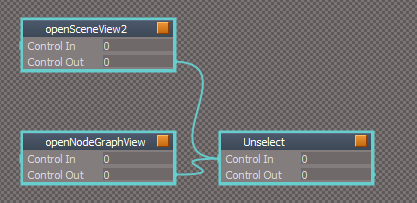
The openNodeGraphView script still needs Space.Unselect() at the beginning of the script
After the open scripts run they run the Unselect script
User avatar
clintonman
Captain
Posts: 5659
Joined: 21 May 2009, 21:08
Type the number ten into the box: 0
Location: California

Re: Scene View 2

Post by clintonman »

The openNodeGraphView will populate as soon as you make a selection. This one is more random in whether it populates or not. but it's better to just select something than remove a selection without permission.


Here is a modified openSceneView2 that does not remove the users selection. It works the same as before by selecting a scene item and opening the scene view, the new last step is removing the selection, then any mouse movement in the 3D view fills the tree.

Code: Select all

// Execute 
// Called to execute the command 
function Execute(params)
{
	//clear the store

	var store = "/Scripts/CustomCommands/SceneView/Store";

	var subObjCount = Node.SubObjectCount(store);

	if(subObjCount > 0) {
		for(var i=subObjCount-1; i>=0; i--) {
			Node.Delete(store + "/"+ Node.SubObject(store,i));
		}
	}

	var selCount = Node.SelectedCount();

	//will start blank if nothing is selected - select first scene item
	if(selCount == 0) {
		var scene = Space.CurrentScene();
		Space.Select(scene + "/" + Node.SubObject(scene, 0));
	}

	WindowsManager.CreateWindowFromCLSID('{E9C4FE3C-C3C9-4dfd-8C85-E7F0F81029B4}', '', '', '', 1);//scene view 2 

	if(selCount == 0) {
		Space.Unselect();
	}

}
Clinton Reese

http://clintons3d.com
User avatar
trueBlue
Captain
Posts: 5548
Joined: 06 Jul 2009, 22:50
Type the number ten into the box: 10

Re: Scene View 2

Post by trueBlue »

clintonman wrote: 24 Mar 2023, 22:13 The openNodeGraphView will populate as soon as you make a selection. This one is more random in whether it populates or not. but it's better to just select something than remove a selection without permission.


Here is a modified openSceneView2 that does not remove the users selection. It works the same as before by selecting a scene item and opening the scene view, the new last step is removing the selection, then any mouse movement in the 3D view fills the tree.

Code: Select all

// Execute 
// Called to execute the command 
function Execute(params)
{
	//clear the store

	var store = "/Scripts/CustomCommands/SceneView/Store";

	var subObjCount = Node.SubObjectCount(store);

	if(subObjCount > 0) {
		for(var i=subObjCount-1; i>=0; i--) {
			Node.Delete(store + "/"+ Node.SubObject(store,i));
		}
	}

	var selCount = Node.SelectedCount();

	//will start blank if nothing is selected - select first scene item
	if(selCount == 0) {
		var scene = Space.CurrentScene();
		Space.Select(scene + "/" + Node.SubObject(scene, 0));
	}

	WindowsManager.CreateWindowFromCLSID('{E9C4FE3C-C3C9-4dfd-8C85-E7F0F81029B4}', '', '', '', 1);//scene view 2 

	if(selCount == 0) {
		Space.Unselect();
	}

}
That works great!
Can you do something for the openNodeGraphView script?
User avatar
clintonman
Captain
Posts: 5659
Joined: 21 May 2009, 21:08
Type the number ten into the box: 0
Location: California

Re: Scene View 2

Post by clintonman »

trueBlue wrote: 24 Mar 2023, 22:32
clintonman wrote: 24 Mar 2023, 22:13 The openNodeGraphView will populate as soon as you make a selection. This one is more random in whether it populates or not. but it's better to just select something than remove a selection without permission.


Here is a modified openSceneView2 that does not remove the users selection. It works the same as before by selecting a scene item and opening the scene view, the new last step is removing the selection, then any mouse movement in the 3D view fills the tree.

Code: Select all

// Execute 
// Called to execute the command 
function Execute(params)
{
	//clear the store

	var store = "/Scripts/CustomCommands/SceneView/Store";

	var subObjCount = Node.SubObjectCount(store);

	if(subObjCount > 0) {
		for(var i=subObjCount-1; i>=0; i--) {
			Node.Delete(store + "/"+ Node.SubObject(store,i));
		}
	}

	var selCount = Node.SelectedCount();

	//will start blank if nothing is selected - select first scene item
	if(selCount == 0) {
		var scene = Space.CurrentScene();
		Space.Select(scene + "/" + Node.SubObject(scene, 0));
	}

	WindowsManager.CreateWindowFromCLSID('{E9C4FE3C-C3C9-4dfd-8C85-E7F0F81029B4}', '', '', '', 1);//scene view 2 

	if(selCount == 0) {
		Space.Unselect();
	}

}
That works great!
Can you do something for the openNodeGraphView script?
Can't think of anything because it's unpredictable. If something is selected it will populate, if nothing is selected it will populate, if something is selected this time it won't populate, same for nothing selected.
Most of the time it works, so only way to fix it would be to come up with a set of steps that makes it fail consistently.
Clinton Reese

http://clintons3d.com
Saul
Senior Chief Petty Officer
Posts: 308
Joined: 22 May 2009, 16:50

Re: Scene View 2

Post by Saul »

Install instructions followed and successfull up to:
'6.start tS and drag the installer into the link editor and press the install button'
Where is the 'installer'?
User avatar
clintonman
Captain
Posts: 5659
Joined: 21 May 2009, 21:08
Type the number ten into the box: 0
Location: California

Re: Scene View 2

Post by clintonman »

Saul wrote: 25 Mar 2023, 12:56 Install instructions followed and successfull up to:
'6.start tS and drag the installer into the link editor and press the install button'
Where is the 'installer'?
Click on the title to get the installer.


ClickHere.jpg
Clinton Reese

http://clintons3d.com
User avatar
clintonman
Captain
Posts: 5659
Joined: 21 May 2009, 21:08
Type the number ten into the box: 0
Location: California

Re: Scene View 2

Post by clintonman »

Updates/Fixes

fixed a browse in link editor bug
added support for UU deletes
removed alert from the installer
new rsx plugin version 1638412

http://clintons3d.com/plugins/truespace ... view2.html


statistics updated to work with the scene view 2
statistics gives object counts, mesh element counts and alternate views into the matrix transforms for scene objects

added matrix shear
fixed face selection buttons
removed update button used for manual updates - it did not give good counts
removed triangle selected count - tS gives bad info for this value

http://clintons3d.com/plugins/truespace ... stics.html
Clinton Reese

http://clintons3d.com
User avatar
clintonman
Captain
Posts: 5659
Joined: 21 May 2009, 21:08
Type the number ten into the box: 0
Location: California

Re: Scene View 2

Post by clintonman »

Bug Fix

I found that the rename was limiting the number of characters that could be typed in.

A link to the updated Clintons3dRsView.rsx near the top of this page:

http://clintons3d.com/plugins/truespace ... view2.html

no other changes, only the plugin changed.
Clinton Reese

http://clintons3d.com
User avatar
clintonman
Captain
Posts: 5659
Joined: 21 May 2009, 21:08
Type the number ten into the box: 0
Location: California

Re: Scene View 2

Post by clintonman »

Update Dec 22 2023

Added icons for nulls and fixed the "D3D Render Target" has a bone icon bug.
New rsx plugin version 1638415
no script changes only rsx plugin and 2 more icon files
Clinton Reese

http://clintons3d.com
User avatar
trueBlue
Captain
Posts: 5548
Joined: 06 Jul 2009, 22:50
Type the number ten into the box: 10

Re: Scene View 2

Post by trueBlue »

Trying to stop opening duplicate Scene View2 windows
Why does this not work?

Code: Select all

// Clintons3d TemplateView Node
// Clintons3d SceneView Node 
function Execute(params)
{

if(!SceneView2("Project/Windows Manager Space")) {
	WindowsManager.CreateWindowFromCLSID('{E9C4FE3C-C3C9-4dfd-8C85-E7F0F81029B4}', '', '', '', 1)
}


}

function SceneView2()
{
	var WMS = "Project/Windows Manager Space";
	var numwindows = Node.SubObjectCount(WMS);

	for(var winIndex=0; winIndex < numwindows; winIndex++)
	{
		var currentWindow = NodeSubObject(WMS, winIndex);
		if(Node.SubObjectCount(currentWindow) < 1)
			continue;

		var shortname = Node.ShortName(NodeSubObject(currentWindow, 0));
		if( shortname == "SceneView Node")
			return true;
	}
	return false;
}

function NodeSubObject(root, index)
{
	return root + "/" + Node.SubObject(root, index);
}
User avatar
trueBlue
Captain
Posts: 5548
Joined: 06 Jul 2009, 22:50
Type the number ten into the box: 10

Re: Scene View 2

Post by trueBlue »

If Scene View 2 and Scene Graph Utilities windows are both open at the same time, Scene Graph Utilities flickers when moving your mouse, IF NOTHING IS SELECTED
Same for the Scene View 2 window
User avatar
clintonman
Captain
Posts: 5659
Joined: 21 May 2009, 21:08
Type the number ten into the box: 0
Location: California

Re: Scene View 2

Post by clintonman »

trueBlue wrote: 24 Dec 2023, 00:29 Trying to stop opening duplicate Scene View2 windows
Why does this not work?

Code: Select all

// Clintons3d TemplateView Node
// Clintons3d SceneView Node 
function Execute(params)
{

if(!SceneView2("Project/Windows Manager Space")) {
	WindowsManager.CreateWindowFromCLSID('{E9C4FE3C-C3C9-4dfd-8C85-E7F0F81029B4}', '', '', '', 1)
}


}

function SceneView2()
{
	var WMS = "Project/Windows Manager Space";
	var numwindows = Node.SubObjectCount(WMS);

	for(var winIndex=0; winIndex < numwindows; winIndex++)
	{
		var currentWindow = NodeSubObject(WMS, winIndex);
		if(Node.SubObjectCount(currentWindow) < 1)
			continue;

		var shortname = Node.ShortName(NodeSubObject(currentWindow, 0));
		if( shortname == "SceneView Node")
			return true;
	}
	return false;
}

function NodeSubObject(root, index)
{
	return root + "/" + Node.SubObject(root, index);
}
Don't know why you'd want to do that but when I open a scene view the node short name is "Clintons3d SceneView Node" not "SceneView Node"
You can also check the Def1D of the frame window, currentWindow, for the id it uses to create the window, "{E9C4FE3C-C3C9-4dfd-8C85-E7F0F81029B4}"
One more thing if you dock the window it won't find it directly inside "Project/Windows Manager Space"

Cross post, you must have been reading my mind when I said , "Don't know why you'd want to do that..."
Clinton Reese

http://clintons3d.com
User avatar
clintonman
Captain
Posts: 5659
Joined: 21 May 2009, 21:08
Type the number ten into the box: 0
Location: California

Re: Scene View 2

Post by clintonman »

trueBlue wrote: 24 Dec 2023, 01:02 If Scene View 2 and Scene Graph Utilities windows are both open at the same time, Scene Graph Utilities flickers when moving your mouse, IF NOTHING IS SELECTED
Same for the Scene View 2 window
You could just select something. Can't do much with nothing selected.
Clinton Reese

http://clintons3d.com
User avatar
trueBlue
Captain
Posts: 5548
Joined: 06 Jul 2009, 22:50
Type the number ten into the box: 10

Re: Scene View 2

Post by trueBlue »

Always have something selected so it does not flicker? :o
My thought is, Scene View 2 seems to be far superior to Scene Graph Utilities, so why have Scene Graph Utilities?
User avatar
clintonman
Captain
Posts: 5659
Joined: 21 May 2009, 21:08
Type the number ten into the box: 0
Location: California

Re: Scene View 2

Post by clintonman »

trueBlue wrote: 24 Dec 2023, 01:18 Always have something selected so it does not flicker? :o
My thought is, Scene View 2 seems to be far superior to Scene Graph Utilities, so why have Scene Graph Utilities?
No idea how having nothing selected is useful.

I think you have Scene Graph Utilities setup on the rmb, so just remove the rmb command from the toolbar button.
Clinton Reese

http://clintons3d.com
User avatar
trueBlue
Captain
Posts: 5548
Joined: 06 Jul 2009, 22:50
Type the number ten into the box: 10

Re: Scene View 2

Post by trueBlue »

I mean no disrespect!
I can have one open at a time and there does not seem to be any issues
Just need to figure out how not to open in duplicate and one at a time
User avatar
clintonman
Captain
Posts: 5659
Joined: 21 May 2009, 21:08
Type the number ten into the box: 0
Location: California

Re: Scene View 2

Post by clintonman »

trueBlue wrote: 24 Dec 2023, 01:45 I mean no disrespect!
I can have one open at a time and there does not seem to be any issues
Just need to figure out how not to open in duplicate and one at a time
No disrespect taken. I haven't even used the Scene Graph Utilities in a long time. I don't really know how useful it really is. The Scene View 2 is superior in my opinion as well. All I'm saying is if you want to get rid of it, go ahead and do it. Not expressing hurt feelings here. You asked why have it and I told you it would be easy to remove it.
Clinton Reese

http://clintons3d.com
User avatar
trueBlue
Captain
Posts: 5548
Joined: 06 Jul 2009, 22:50
Type the number ten into the box: 10

Re: Scene View 2

Post by trueBlue »

Okay will do
Would like your help stopping Scene View 2 from opening infinite instances though
Fixed my mistake with the previous script, but still no go :(
Crashes tS too!
User avatar
trueBlue
Captain
Posts: 5548
Joined: 06 Jul 2009, 22:50
Type the number ten into the box: 10

Re: Scene View 2

Post by trueBlue »

I came up with the following:
openSceneView2 script

Code: Select all

	util = System.CreateDO("Clintons3D Package/Utility functions")

//Clear the Store
	var store = "/Scripts/CustomCommands/SceneView/Store";
	var subObjCount = Node.SubObjectCount(store);

	if(subObjCount > 0) {
		for(var i=subObjCount-1; i>=0; i--) {
			util.Delete(store + "/"+ Node.SubObject(store,i));
		}
	}

	Frame = WindowsManager.GetWindowsManagerNodeName();

	if(Node.Exists('/Project/Windows Manager Space/SceneGraphFrame')) {
		WindowsManager.CloseWindow('/Project/Windows Manager Space/SceneGraphFrame')
	}

	if(Node.Exists('/Project/Windows Manager Space/SceneViewFrame')) {
		WindowsManager.CloseWindow('/Project/Windows Manager Space/SceneViewFrame')
	}

//Open Scene View2
	if(!Node.Exists('/Project/Windows Manager Space/SceneViewFrame')) {
		WindowsManager.CreateWindowFromCLSID('{E9C4FE3C-C3C9-4dfd-8C85-E7F0F81029B4}', '', '', '', 1)
	}

	util.Rename(Frame + '/' + Node.SubObject(Frame, Node.SubObjectCount(Frame) - 1), 'SceneViewFrame')

	WindowsManager.SetFrameOwnerFrame(Frame + '/SceneViewFrame', WindowsManager.GetWorkWindow())
openSceneView2 script

Code: Select all

	util = System.CreateDO("Clintons3D Package/Utility functions")

	Frame = WindowsManager.GetWindowsManagerNodeName();

	if(Node.Exists('/Project/Windows Manager Space/SceneViewFrame')) {
		WindowsManager.CloseWindow('/Project/Windows Manager Space/SceneViewFrame')
	}

	if(Node.Exists('/Project/Windows Manager Space/SceneGraphFrame')) {
		WindowsManager.CloseWindow('/Project/Windows Manager Space/SceneGraphFrame')
	}

//will start empty if nothing is selected
	Space.Select(Space.CurrentScene() + "/" + Node.SubObject(Space.CurrentScene(), 0))
//SubObject 0 may be Vray and is not a good choice, so try a Cmaera
	if(Node.Exists(Space.CurrentScene() + "/Camera")) {
		Space.Select(Space.CurrentScene() + "/Camera")
	}

//Open Scene Graph Utilities
	if(!Node.Exists('/Project/Windows Manager Space/SceneGraphFrame')) {
		WindowsManager.CreateWindowFromCLSID('{DD2E0D6B-ED84-4b80-A624-757525B8A591}', '', '', '', 1)
	}

	util.Rename(Frame + '/' + Node.SubObject(Frame, Node.SubObjectCount(Frame) - 1), 'SceneGraphFrame')

	WindowsManager.SetFrameOwnerFrame(Frame + '/SceneGraphFrame', WindowsManager.GetWorkWindow())
User avatar
clintonman
Captain
Posts: 5659
Joined: 21 May 2009, 21:08
Type the number ten into the box: 0
Location: California

Re: Scene View 2

Post by clintonman »

Update Feb 8 2024

fixed unofficial update delete not working
adds fewer entries to the command history

differences from current UU version:
prevents opening more than 1 scene view, but does not close and reopen the scene view, same for the node graph view
allows 1 each of scene view and node graph view, uu allows one or the other
does not use the SetFrameOwnerFrame command since it made the window undockable, window did not behave like other tS window frames
searches the entire windows manager space to see if the window is open, not just the top level

openSceneView2

Code: Select all

// Execute 
// Called to execute the command 
function Execute(params)
{
	//set uufs
	if(Node.Exists("Scripts/UUCommands/UUFunctionSet")) {
		var sceneViewFS = Node.AccessNearFnSet("Clintons3dView Function Set");
		sceneViewFS.UUFS = Node.AccessFnSet("Scripts/UUCommands/UUFunctionSet");
	}

	var util = System.CreateDO("Clintons3D Package/Utility functions")
	
	//clear the store

	var store = "/Scripts/CustomCommands/SceneView/Store";

	var subObjCount = Node.SubObjectCount(store);

	if(subObjCount > 0) {
		for(var i=subObjCount-1; i>=0; i--) {
			util.Delete(store + "/"+ Node.SubObject(store,i));
		}
	}

	var selCount = Node.SelectedCount();


	//will start blank if nothing is selected - select first scene item
	if(Node.SelectedCount() == 0) {
		var scene = Space.CurrentScene();
		Space.Select(scene + "/" + Node.SubObject(scene, 0));
	}

	var WMS = WindowsManager.GetWindowsManagerNodeName();

	var sceneViewNode = FindNodeByName(WMS, "Clintons3d SceneView Node");

	if(sceneViewNode) return;

	WindowsManager.CreateWindowFromCLSID('{E9C4FE3C-C3C9-4dfd-8C85-E7F0F81029B4}', '', '', '', 1);//scene view 2 

	//SetFrameOwnerFrame prevents docking and normal window behavior

	//var sceneview2 = WMS + '/' + Node.SubObject(WMS, Node.SubObjectCount(WMS) - 1)

	//WindowsManager.SetFrameOwnerFrame(sceneview2, WindowsManager.GetWorkWindow())

	if(selCount == 0) {
		Space.Unselect();
	}

}

function FindNodeByName(currentNode, searchName)
{
	if(Node.ShortName(currentNode) == searchName) {
		return currentNode;
	}

	var numsubobj = Node.SubObjectCount(currentNode);

	if(numsubobj == 0) return;

	for(var i=0;i<numsubobj;i++) {
		var subobj = currentNode + "/" + Node.SubObject(currentNode, i);
		var thenode = FindNodeByName(subobj, searchName);
		if(thenode) {
			return thenode;
		}
	}
}

openNodeGraphView

Code: Select all

// Execute 
// Called to execute the command 
function Execute(params)
{
	//set uufs
	if(Node.Exists("Scripts/UUCommands/UUFunctionSet")) {
		var sceneViewFS = Node.AccessNearFnSet("Clintons3dView Function Set");
		sceneViewFS.UUFS = Node.AccessFnSet("Scripts/UUCommands/UUFunctionSet");
	}

	var selCount = Node.SelectedCount();

	//will start blank if nothing is selected
	if(Node.SelectedCount() == 0) {
		var scene = Space.CurrentScene();
		Space.Select(scene + "/" + Node.SubObject(scene, 0));
	}

	var WMS = WindowsManager.GetWindowsManagerNodeName();

	var graphViewNode = FindNodeByName(WMS, "Clintons3d TemplateView Node");

	if(graphViewNode) return;

	WindowsManager.CreateWindowFromCLSID('{DD2E0D6B-ED84-4b80-A624-757525B8A591}', '', '', '', 1);//node view window

	//SetFrameOwnerFrame prevents docking and normal window behavior

	//var nodeview = WMS + '/' + Node.SubObject(WMS, Node.SubObjectCount(WMS) - 1)

	//WindowsManager.SetFrameOwnerFrame(nodeview, WindowsManager.GetWorkWindow())

	if(selCount == 0) {
		Space.Unselect();
	}

}

function FindNodeByName(currentNode, searchName)
{
	if(Node.ShortName(currentNode) == searchName) {
		return currentNode;
	}

	var numsubobj = Node.SubObjectCount(currentNode);

	if(numsubobj == 0) return;

	for(var i=0;i<numsubobj;i++) {
		var subobj = currentNode + "/" + Node.SubObject(currentNode, i);
		var thenode = FindNodeByName(subobj, searchName);
		if(thenode) {
			return thenode;
		}
	}
}
Clinton Reese

http://clintons3d.com
User avatar
trueBlue
Captain
Posts: 5548
Joined: 06 Jul 2009, 22:50
Type the number ten into the box: 10

Re: Scene View 2

Post by trueBlue »

I updated your scripts, but having both open has issues!
The last opened and or one or the other Scene View flickers when your mouse is over the 3D View
Sometimes nether flickers, so it is intermittent
Edit: Just read previous post
Looks like it happens when nothing is selected
Further review, the Scene Graph Utilities seems to be the most prone with the flickering issue
User avatar
clintonman
Captain
Posts: 5659
Joined: 21 May 2009, 21:08
Type the number ten into the box: 0
Location: California

Re: Scene View 2

Post by clintonman »

Update:
Previous fix did not work after restarting tS, so new fix released.

openSceneView2 and openNodeGraphView can have the top lines removed.

Code: Select all

	//set uufs
	if(Node.Exists("Scripts/UUCommands/UUFunctionSet")) {
		var sceneViewFS = Node.AccessNearFnSet("Clintons3dView Function Set");
		sceneViewFS.UUFS = Node.AccessFnSet("Scripts/UUCommands/UUFunctionSet");
	}
changes to Clintons3dView Function Set
comment out the top line

Code: Select all

//var UUFS;
and replace UUFS in the 2 delete functions

Code: Select all

		//UUFS.Delete();
		Node.AccessFnSet("Scripts/UUCommands/UUFunctionSet").Delete();
Clinton Reese

http://clintons3d.com

Return to “Workspace Side”