HI Guys,
I'm kinda new to Truespace. I was wondering if I can import sketchup model or object to Truespace. I notice sketchup file can be saved as .skp and export file is .dae.
I believed Truespace don't read these files?
So, how do I do it? any help is much appreciated.
Cheers!
How to import Sketchup model/ object in Truespace
-
roltancc
- Petty Officer Third Class
- Posts: 10
- Joined: 19 May 2010, 07:16
How to import Sketchup model/ object in Truespace
-
fahembree
- Chief Petty Officer
- Posts: 108
- Joined: 22 May 2009, 02:28
Re: How to import Sketchup model/ object in Truespace
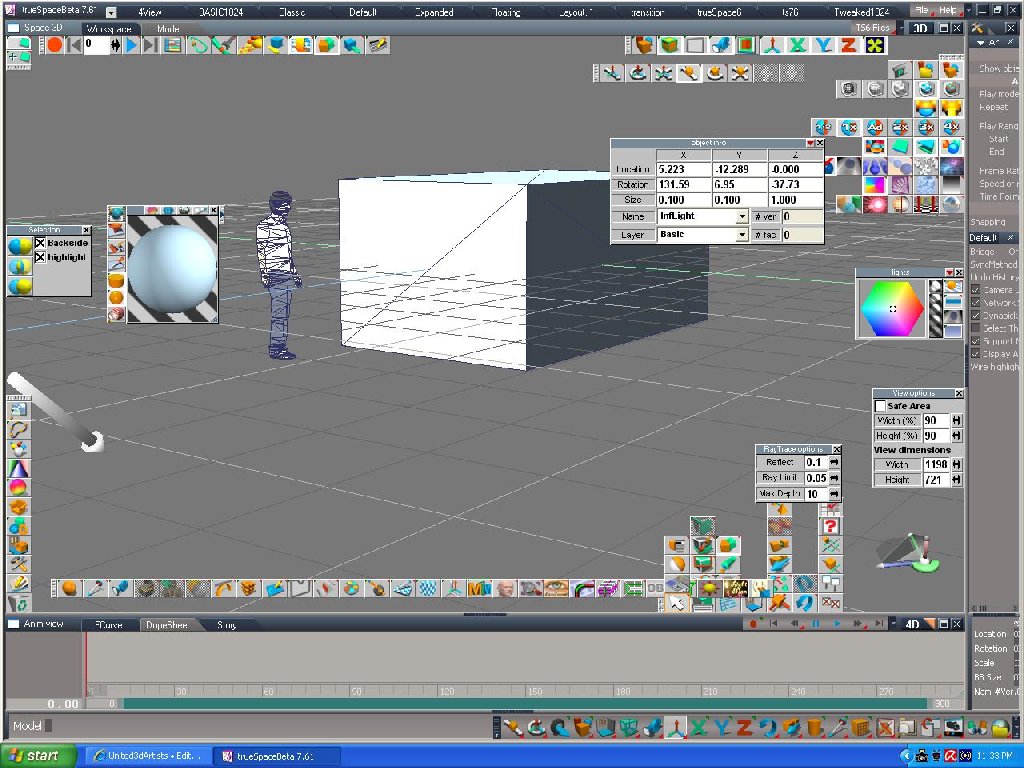
If you have the pro version of sketchup you can export to 3ds file as truespace can import 3ds files. I think the materiials may also export corrrectly. You use import object command in ts and select the 3ds file. You will probably need to add a infinite light the ts scene to see materials.
- Attachments
-
-
v3rd3
- Lieutenant Commander
- Posts: 1191
- Joined: 21 May 2009, 20:04
Re: How to import Sketchup model/ object in Truespace
You need Clinton's Collada Importer ... you can get it here
http://www.clintons3d.com/plugins/trues ... index.html
http://www.clintons3d.com/plugins/trues ... index.html
-
nigec

- Master Chief Petty Officer
- Posts: 561
- Joined: 21 May 2009, 18:46
Re: How to import Sketchup model/ object in Truespace
there's a free obj exporter plugin that works with the free Sketchup
http://sketchuptips.blogspot.com/2009/0 ... rials.html"
Never used it myself as I export to a renderer but I'm told it works fine
http://sketchuptips.blogspot.com/2009/0 ... rials.html"
Never used it myself as I export to a renderer but I'm told it works fine
-
compPanda
- Senior Chief Petty Officer
- Posts: 275
- Joined: 21 May 2009, 21:15
- Type the number ten into the box: 0
Re: How to import Sketchup model/ object in Truespace
I tried this one with a Sketchup house and it fails to import in Truespace 6.6nigec wrote:there's a free obj exporter plugin that works with the free Sketchup
http://sketchuptips.blogspot.com/2009/0 ... rials.html"
Never used it myself as I export to a renderer but I'm told it works fine
Any precautions you need to take before using this one?
-
roltancc
- Petty Officer Third Class
- Posts: 10
- Joined: 19 May 2010, 07:16
Re: How to import Sketchup model/ object in Truespace
Thanks Guys! I'll check out all these links !
Cheers!
Cheers!
-
compPanda
- Senior Chief Petty Officer
- Posts: 275
- Joined: 21 May 2009, 21:15
- Type the number ten into the box: 0
Re: How to import Sketchup model/ object in Truespace
Have anyone tried this and got it to work? I have tried with several different settings and a simple cube as an object to export but I only get "read error" when I try to import it in TS 6.6nigec wrote:there's a free obj exporter plugin that works with the free Sketchup
http://sketchuptips.blogspot.com/2009/0 ... rials.html"
Never used it myself as I export to a renderer but I'm told it works fine
Suggestions???
-
compPanda
- Senior Chief Petty Officer
- Posts: 275
- Joined: 21 May 2009, 21:15
- Type the number ten into the box: 0
Re: How to import Sketchup model/ object in Truespace
Now I try Clintons importer but it gives me a dialog box that saysv3rd3 wrote:You need Clinton's Collada Importer ... you can get it here
http://www.clintons3d.com/plugins/trues ... index.html
---------------------------
ERROR EVENT...
---------------------------
LoadNode: Failed to load install Collada Import Button v1.0
---------------------------
OK
---------------------------
I have the RSX loaded and it shows in the package manager. I am trying this in TS 7.61
-
clintonman

- Captain
- Posts: 5659
- Joined: 21 May 2009, 21:08
- Type the number ten into the box: 0
- Location: California
Re: How to import Sketchup model/ object in Truespace
I've never seen that error before. Does it say "Error Event..." or is the "..." short for something? Can you describe the steps leading up to the error?spyfrog wrote:Now I try Clintons importer but it gives me a dialog box that saysv3rd3 wrote:You need Clinton's Collada Importer ... you can get it here
http://www.clintons3d.com/plugins/trues ... index.html
---------------------------
ERROR EVENT...
---------------------------
LoadNode: Failed to load install Collada Import Button v1.0
---------------------------
OK
---------------------------
I have the RSX loaded and it shows in the package manager. I am trying this in TS 7.61
-
compPanda
- Senior Chief Petty Officer
- Posts: 275
- Joined: 21 May 2009, 21:15
- Type the number ten into the box: 0
Re: How to import Sketchup model/ object in Truespace
Sure. I have installed the RSX file and loaded it in package manager. I have opened the library that is available and when I double click on the icon to load the importer in the library, this error message pop-up. I have copied the text from the error message so it should be the correct text of the error message. I have also tried to restart TS before clicking the icon in the library but the same error message happens. TS doesn't appear to want to load the script that is supposed to be loaded with the icon click. The icon I click on when it fails is the "install Collada Import Button v1.0" icon in the library.clintonman wrote:I've never seen that error before. Does it say "Error Event..." or is the "..." short for something? Can you describe the steps leading up to the error?spyfrog wrote:Now I try Clintons importer but it gives me a dialog box that saysv3rd3 wrote:You need Clinton's Collada Importer ... you can get it here
http://www.clintons3d.com/plugins/trues ... index.html
---------------------------
ERROR EVENT...
---------------------------
LoadNode: Failed to load install Collada Import Button v1.0
---------------------------
OK
---------------------------
I have the RSX loaded and it shows in the package manager. I am trying this in TS 7.61
-
clintonman
- Captain
- Posts: 5659
- Joined: 21 May 2009, 21:08
- Type the number ten into the box: 0
- Location: California
Re: How to import Sketchup model/ object in Truespace
I wonder if the file got corrupted. I'll try downloading and installing to see if it happens to me. I'll let you know what I find, but if it works for me I recommend re-downloading a fresh copy in case it may have gotten corrupt on your end.Sure. I have installed the RSX file and loaded it in package manager. I have opened the library that is available and when I double click on the icon to load the importer in the library, this error message pop-up. I have copied the text from the error message so it should be the correct text of the error message. I have also tried to restart TS before clicking the icon in the library but the same error message happens. TS doesn't appear to want to load the script that is supposed to be loaded with the icon click. The icon I click on when it fails is the "install Collada Import Button v1.0" icon in the library.
Edit:
I downloaded and installed fresh and it worked so the files on the web server are ok. Try downloading a fresh copy and see if that helps.
-
nigec
- Master Chief Petty Officer
- Posts: 561
- Joined: 21 May 2009, 18:46
Re: How to import Sketchup model/ object in Truespace
Wizard is using that plugin (obj) and as far as I know its working fine, I've just tried modeling a room, and it exported ok and imported into 6.6 and 7.6, do you have the lines turned off? are you using LUUV plugin in TS..
Just tried if you just use "import object" from the file menu it does fail, use the LUUV plugin found in 6.6's TSX folder
Just tried if you just use "import object" from the file menu it does fail, use the LUUV plugin found in 6.6's TSX folder
-
compPanda
- Senior Chief Petty Officer
- Posts: 275
- Joined: 21 May 2009, 21:15
- Type the number ten into the box: 0
Re: How to import Sketchup model/ object in Truespace
Hi again Clinton and thanks for your effort to help me.clintonman wrote:I wonder if the file got corrupted. I'll try downloading and installing to see if it happens to me. I'll let you know what I find, but if it works for me I recommend re-downloading a fresh copy in case it may have gotten corrupt on your end.Sure. I have installed the RSX file and loaded it in package manager. I have opened the library that is available and when I double click on the icon to load the importer in the library, this error message pop-up. I have copied the text from the error message so it should be the correct text of the error message. I have also tried to restart TS before clicking the icon in the library but the same error message happens. TS doesn't appear to want to load the script that is supposed to be loaded with the icon click. The icon I click on when it fails is the "install Collada Import Button v1.0" icon in the library.
Edit:
I downloaded and installed fresh and it worked so the files on the web server are ok. Try downloading a fresh copy and see if that helps.
I tried to re-download the RSX file and the ZIP file with the library. I copied the RSX file to the C:\trueSpace761\tS and installed it and loaded it from there with the package manager.
Then I copied the folder in the ZIP file to C:\trueSpace761\tS\Rs Main Libraries and opened it with the Library browser.
Unfortunately I still have the same error. I downloaded the file with Firefox 3.5
I use Win XP 64 - might this be a problem?
The TS I try to use it in is the TS 7.61 with patch for Vray use. The EXE file ts7.exe claims to be of version 7.6.3.8 when you look at the properties.
-
compPanda
- Senior Chief Petty Officer
- Posts: 275
- Joined: 21 May 2009, 21:15
- Type the number ten into the box: 0
Re: How to import Sketchup model/ object in Truespace
This is very strange. I have both TS 7.6 installed and TS 7.61
Both versions does however seam to use the same settings and no one can load the Collada file.
I thought you could simply install them in different folder but it doesn't work since they mix up the settings.... Can this be the problem behind that the Collada importer doesn't work for me?
Both versions does however seam to use the same settings and no one can load the Collada file.
I thought you could simply install them in different folder but it doesn't work since they mix up the settings.... Can this be the problem behind that the Collada importer doesn't work for me?
-
compPanda
- Senior Chief Petty Officer
- Posts: 275
- Joined: 21 May 2009, 21:15
- Type the number ten into the box: 0
Re: How to import Sketchup model/ object in Truespace
Thanks nigec!nigec wrote:Wizard is using that plugin (obj) and as far as I know its working fine, I've just tried modeling a room, and it exported ok and imported into 6.6 and 7.6, do you have the lines turned off? are you using LUUV plugin in TS..
Just tried if you just use "import object" from the file menu it does fail, use the LUUV plugin found in 6.6's TSX folder
I was trying to use the import menu and it didn't work.
With the plugin it works. Thanks for this advice.
-
compPanda
- Senior Chief Petty Officer
- Posts: 275
- Joined: 21 May 2009, 21:15
- Type the number ten into the box: 0
Re: How to import Sketchup model/ object in Truespace
One strange thing however - the OBJ importer or exporter mirrored the object. Very strange.spyfrog wrote:Thanks nigec!nigec wrote:Wizard is using that plugin (obj) and as far as I know its working fine, I've just tried modeling a room, and it exported ok and imported into 6.6 and 7.6, do you have the lines turned off? are you using LUUV plugin in TS..
Just tried if you just use "import object" from the file menu it does fail, use the LUUV plugin found in 6.6's TSX folder
I was trying to use the import menu and it didn't work.
With the plugin it works. Thanks for this advice.
Any suggestions about this?
-
RAYMAN

- Captain
- Posts: 2547
- Joined: 21 May 2009, 18:56
Re: How to import Sketchup model/ object in Truespace
I´ve seen that behaviour on the workspace side of Truespace pretty often not only with Sketchup but also with Moi3d.spyfrog wrote:One strange thing however - the OBJ importer or exporter mirrored the object. Very strange.spyfrog wrote:Thanks nigec!nigec wrote:Wizard is using that plugin (obj) and as far as I know its working fine, I've just tried modeling a room, and it exported ok and imported into 6.6 and 7.6, do you have the lines turned off? are you using LUUV plugin in TS..
Just tried if you just use "import object" from the file menu it does fail, use the LUUV plugin found in 6.6's TSX folder
I was trying to use the import menu and it didn't work.
With the plugin it works. Thanks for this advice.
Any suggestions about this?
Its not a common problem of the programs its related to a bug in TS.
The only thing you can do is mirror it and delete what you dont need.
But I´ve done some work with Sketchup and so I eventually got the pro version.
With Vue there´s no problem whatsoever and with Thea you can even import parts of a building as instances so that you can
import whole complexes with very low memory useage.....
Truespace is no longer the final endpoint for my projects. I still use Ts for modeling and
animating and physics though.....
But thats my workflow..
The pro version of Sketchup is not necessarily needed but if you can get Vue it makes your life and imports of Collada a lot easier..
Even with the esprit version..
Peter
-
RAYMAN
- Captain
- Posts: 2547
- Joined: 21 May 2009, 18:56
Re: How to import Sketchup model/ object in Truespace
6880 instances of a building with 104000 polygons (all windows modeled) came into Vue8 in less then 10 seconds. !
No bugs .No mirroring.......
From free Sketchup and Google earth (Collada) file... !
No bugs .No mirroring.......
From free Sketchup and Google earth (Collada) file... !
- Attachments
-

-
clintonman
- Captain
- Posts: 5659
- Joined: 21 May 2009, 21:08
- Type the number ten into the box: 0
- Location: California
Re: How to import Sketchup model/ object in Truespace
I'm completely stumped. Do other downloaded scripts work?spyfrog wrote:
Hi again Clinton and thanks for your effort to help me.
I tried to re-download the RSX file and the ZIP file with the library. I copied the RSX file to the C:\trueSpace761\tS and installed it and loaded it from there with the package manager.
Then I copied the folder in the ZIP file to C:\trueSpace761\tS\Rs Main Libraries and opened it with the Library browser.
Unfortunately I still have the same error. I downloaded the file with Firefox 3.5
I use Win XP 64 - might this be a problem?
The TS I try to use it in is the TS 7.61 with patch for Vray use. The EXE file ts7.exe claims to be of version 7.6.3.8 when you look at the properties.
Anyway, it's good to hear you got the obj import working.
-
compPanda
- Senior Chief Petty Officer
- Posts: 275
- Joined: 21 May 2009, 21:15
- Type the number ten into the box: 0
Re: How to import Sketchup model/ object in Truespace
I tried to install your Collada import in a Windows Vista computer that I have as a portable computer and it works good there. Perhaps there is an issue with WinXP 64 or my Truespace install on my XP 64 computer is corrupt.clintonman wrote: I'm completely stumped. Do other downloaded scripts work?
Anyway, it's good to hear you got the obj import working.
Anyhow, it works perfect under Vista 32bit for me. Thanks.