I'm trying to learn about UV mapping. I tried the 7.6 model side tools but I don't understand the purpose of uv unwrap or what to do with the results.
Question 1: What do you do with the image produced by uv unwrapping?
The distorted human faces, for example, wrap around a head model like a flat map projection wraps around a globe but in a more complicated way. I under stand that from a math point of view but what would anyone do with that image? I could imagine exporting the unwrapped uv image and painting on it in Paint Shop but it would be hard to add a scar to human face that way because of the distortion.
Question 2: Why does 7.6 model side's unwrapper make something so different in the uv editor that the sensible mapping before unwrap is applied?
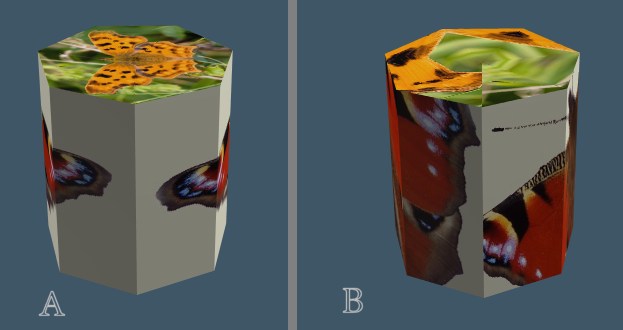
I tried the model side uv tools as noted and got the results shown. I made a 7 sided cylinder and applied the cylindrical mapping to it. Then I applied planar mapping to the ends and three textures. One for each end and one around the cylinder. This looks like A. After uv unwrap it looks like B.
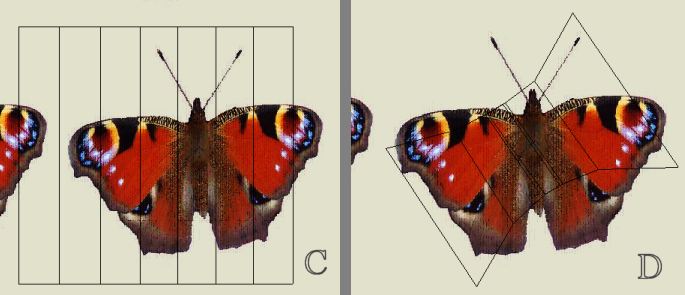
I sliced the uv and started the uv editor before unwrap and it looked like C. This makes sense. You could draw on that and change the moth. After unwrap it looked like D.
Explain UV unwrap?
-
Finis

- Captain
- Posts: 5410
- Joined: 21 May 2009, 18:26
- Type the number ten into the box: 0
- Location: America!
Explain UV unwrap?
- Attachments
-
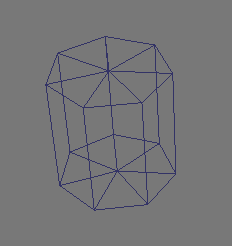
- Wireframe.gif (1.79 KiB) Viewed 5183 times
-
-
I prefer dangerous freedom over peaceful servitude. -- Thomas Jefferson/Jean Jacques Rousseau
-
spacekdet

- Captain
- Posts: 1810
- Joined: 27 May 2009, 15:00
- Type the number ten into the box: 10
- Location: On the day shift at the Utility Muffin Research Kitchen
Re: Explain UV unwrap?
You've most likely already seen these but just in case...
Tiles has a UV unwrapping/mapping tutorial here.
Graysho has one here.
I don't have one because I make simple stupid objects that rarely need anything more than default mapping.
Tiles has a UV unwrapping/mapping tutorial here.
Graysho has one here.
I don't have one because I make simple stupid objects that rarely need anything more than default mapping.
-
Math Path

- Chief Petty Officer
- Posts: 92
- Joined: 22 May 2009, 18:06
- Type the number ten into the box: 0
- Location: Germany
Re: Explain UV unwrap?
Hey Finis,Finis wrote: What do you do with the image produced by uv unwrapping?
...
I could imagine exporting the unwrapped uv image and painting on it in Paint Shop but it would be hard to add a scar to human face that way because of the distortion.
I understand your concern about adding of a simply but realistic details like scars etc to human faces or even more subtle mimic effects or details using 2D programs for painting. The main issue which they are not able to avoid is that graphics applications designed for 2D do not take into account your scene's lighting. The scare or smile or anything else of this sort are just not only the matter of muscle mechanics, but even more how we can see their lit appearance in the real world and lighting.
Unfortunately TrueSpace does provide only limited tools to supprt us at this point. The most of us can't simply afford tools like MAXON BodyPaint either http://www.maxon.net/products/bodypaint-3d.html At least without any good reason to buy it ($1000
 )
)I found very helpful way to get a guideline from exported texture template to painted texture itself, using low cost tool UU3D. The both images below came from a very good tutorial provided at unwrap3d.com http://www.unwrap3d.com/u3d/quicktip_shade.aspx


-
nigec

- Master Chief Petty Officer
- Posts: 561
- Joined: 21 May 2009, 18:46
Re: Explain UV unwrap?
Blender has great uv unwrap features, also I use a free one called LithUnwrap http://www.sharecg.com/v/5169/Software- ... or-Windows"
-
Finis
- Captain
- Posts: 5410
- Joined: 21 May 2009, 18:26
- Type the number ten into the box: 0
- Location: America!
Re: Explain UV unwrap?
Thanks Spacekdet, Math Path, and Nigec. I can use all the tutorials I can get. I have Lithunwrap and I'll learn it when I have time.
This is really more of a conceptual issue than how to use mappers/unwrappers. What is the purpose of the unwrapped images of textures?
The UU3D quick tip says, "Typically, when you are done unwrapping a model, the UV map is exported as a wireframe bitmap for painting." So that tells me that people do paint on the unwrapped image.
I'm thinking of what I need to include with models I want to sell on Turbo squid etc. Do I need to include an unwrapped texture image? I think I do so that buyers can see how to customize the texture or use their own.
This is really more of a conceptual issue than how to use mappers/unwrappers. What is the purpose of the unwrapped images of textures?
The UU3D quick tip says, "Typically, when you are done unwrapping a model, the UV map is exported as a wireframe bitmap for painting." So that tells me that people do paint on the unwrapped image.
I'm thinking of what I need to include with models I want to sell on Turbo squid etc. Do I need to include an unwrapped texture image? I think I do so that buyers can see how to customize the texture or use their own.
I prefer dangerous freedom over peaceful servitude. -- Thomas Jefferson/Jean Jacques Rousseau
-
nigec
- Master Chief Petty Officer
- Posts: 561
- Joined: 21 May 2009, 18:46
Re: Explain UV unwrap?
A bare uv image would be a good idea, I've seen it done with some bike models I've downloaded its great if you want to do your own mapping
Its very rare to get models off Turbsquid with any maps, well the free stuff anyway
Its very rare to get models off Turbsquid with any maps, well the free stuff anyway
-
Math Path
- Chief Petty Officer
- Posts: 92
- Joined: 22 May 2009, 18:06
- Type the number ten into the box: 0
- Location: Germany
Re: Explain UV unwrap?
Yes, providing the the UV map as exported wireframe bitmap is not the common practice, since it's rather thought to be template for texturing the model first time. Anyway a nice service though.
One thought left about LithUnwrap. This software is the grandmother of the UU3d Pro. The last known release was version 1.3 ( dated 2002 ) and was the last freeware version released. A couple of years ago LithUnwrap has gone commercial as Ultimate Unwrap 3D.
Beside the license form, some things have been changed under the hood. LSCM UVs (Least Squares Conformal Maps) were introduced for reducing texture distortion, as well as UV Locking for LSCM. The example of the head in the quick tip uses exactly this technique. Neither LSCM nor blending of the vertex shading into the exported template is available in LithUnwrap AFAIK.
One thought left about LithUnwrap. This software is the grandmother of the UU3d Pro. The last known release was version 1.3 ( dated 2002 ) and was the last freeware version released. A couple of years ago LithUnwrap has gone commercial as Ultimate Unwrap 3D.
Beside the license form, some things have been changed under the hood. LSCM UVs (Least Squares Conformal Maps) were introduced for reducing texture distortion, as well as UV Locking for LSCM. The example of the head in the quick tip uses exactly this technique. Neither LSCM nor blending of the vertex shading into the exported template is available in LithUnwrap AFAIK.
-
RAYMAN

- Captain
- Posts: 2547
- Joined: 21 May 2009, 18:56
Re: Explain UV unwrap?
.... lots of what you they in games and films etc. is not Uv mapped its painted with a paint programm......
i´ve always avoided uv mapping when possible in favour of painting because its not only easier its more precise.
Bodypaint is the most expensive but you get very good results with 3d Coat and some even use Blacksmith which is eaven cheaper.
Whenyou make buildings or block typ models and interiors try out Sketchup... its the easiest and fastest way of texturing your models.
Its just a question of picking up a sample texture and uv with the eyedropper and painting th rest just by pointing at the faces.
Even with the free version.
You can export with the free version with Collada..see the other links in this site.
i´ve always avoided uv mapping when possible in favour of painting because its not only easier its more precise.
Bodypaint is the most expensive but you get very good results with 3d Coat and some even use Blacksmith which is eaven cheaper.
Whenyou make buildings or block typ models and interiors try out Sketchup... its the easiest and fastest way of texturing your models.
Its just a question of picking up a sample texture and uv with the eyedropper and painting th rest just by pointing at the faces.
Even with the free version.
You can export with the free version with Collada..see the other links in this site.