Thanks for the comments guys.
To try and answer some of your questions:
Yep the clouds are motion blurred. I initially had them masked out but something didn't look quite right so I blurred the whole lot. Mind you, it was the middle of the night so perhaps it was my eyes that were not quite right. I might give that another bash.
The trouble with having the dark clouds in the backplate is you then have to try and get your scene to match those same lighting conditions. Which tends to darken the car quite a lot and all the detailng such as the bow tie and weapon rack tends to get lost in the gloom. if I were more skilled, I could probably add more light sources such as headlamps and stuff but getting that to a reasonable standard is beyond my ability at the moment.
The figure is the standard male from poser. I made a copy of the Aston Martins driver seat and steering wheel, joined them together and imported them into poser as a prop. Then searching through the pre-installed poses I found a default driving pose, got the figure roughly sitting in the seat and then fine tuned the pose with Poser's excellent dial-like control sliders to position his hands on the steering wheel. Once I was happy with the figure's pose, I entered the export menu, deselected all the body parts from the waist down (the poly count can be quite terrific if you keep all the toes and stuff) and exported as an .obj file. Then imported into tS using the LUUV plug-in. HTH.
James Bond Car Chase
-
Breech Block

- Master Chief Petty Officer
- Posts: 482
- Joined: 13 Jun 2009, 20:31
Re: James Bond Car Chase

-
Breech Block
- Master Chief Petty Officer
- Posts: 482
- Joined: 13 Jun 2009, 20:31
Re: James Bond Car Chase
Having pondered long and hard as to exactly what it will be chasing Mr Bond, after numerous test renders of cars and motorbikes, I have decided on a helicopter. Below you can see a rough concept made with a heli image I found on the net that has a similair angle to what I'm aiming for. The only trouble is, having browsed through my model library, I don't really have anything that will suit. I do not want a military looking heli as that would be a bit too far fetched, more of a very high tech corporate job, tricked out with a few gadgets to match Bond's Aston Martin. Ahh well, best start pushing some more polys about I suppose, sigh. Anyhow, hope you likes.

-
tahnoak

- Master Chief Petty Officer
- Posts: 339
- Joined: 02 Sep 2009, 01:31
Re: James Bond Car Chase
Very nice work Breech.
One little item. The helicopter seems kind of small compared to the car but that could just be because of the angle.
One little item. The helicopter seems kind of small compared to the car but that could just be because of the angle.
-
Breech Block
- Master Chief Petty Officer
- Posts: 482
- Joined: 13 Jun 2009, 20:31
Re: James Bond Car Chase
Thanks tahnoak. Yeah I have probably left myself open to a bit of a nightmare when it comes to positioning and scaling. Shoulda stuck to one of my earlier ideas about a remote drone.
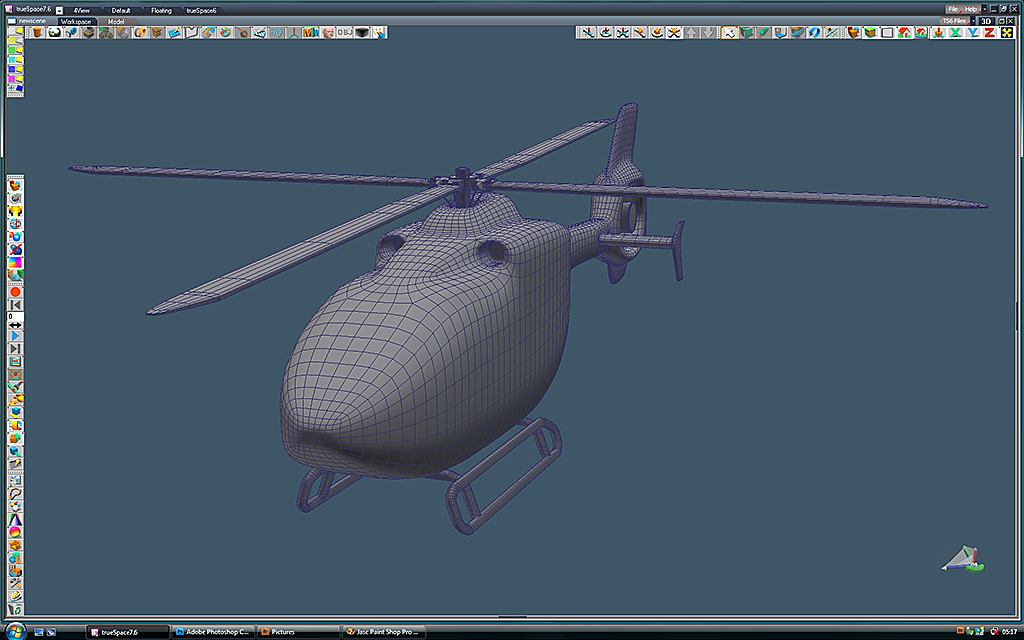
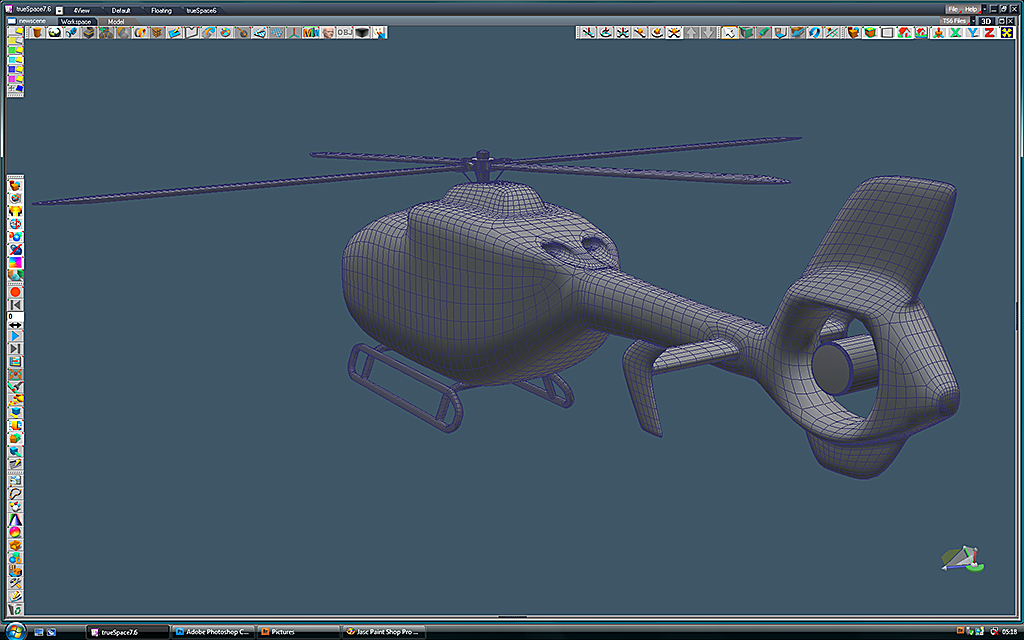
Anyhows, here is a WIP shot of the helicopter I'm working on:
Anyhows, here is a WIP shot of the helicopter I'm working on:
-
LeonRegis

- Captain
- Posts: 1946
- Joined: 18 Aug 2009, 17:36
- Type the number ten into the box: 0
- Location: Brazil/Earth/Orion Arm/Milky Way/4th Dimension/This Universe/Multiverse???/Singularity???
Re: James Bond Car Chase
You already start with an awesome work, I can't imagine how awesome will be the final version!
Be the change you want to see in the world. - Mohandas Gandhi
-
Musikman
- Chief Petty Officer
- Posts: 104
- Joined: 21 May 2009, 18:31
- Type the number ten into the box: 0
- Location: USA
Re: James Bond Car Chase
Great idea BB, a chopper after a car adds lots more action to the scene. Imo, the angle of the chopper is great, looks like it is having a tough time keeping up with the car as it's making the turn, similar to what a car would look like when skidding while trying to make a corner at high speed, & that makes the car look like it's going even faster. Don't know how you churn out your models so quickly, I wouldn't even know where to begin constructing a heli. Nice work, look forward to seeing the finished product! 
As far as the lighting/sky, etc...had you considered a setting sun, perhaps half hidden by the mountain? I don't have enough knowledge to discern whether that would be feasable or not, just something I was envisioning at the moment as a different twist on the environment, and to possibly add some pronounced shadows, like the shadow of the heli on the ground below it. Or maybe the light somehow refracting through the blades. (I'm probably talking an enormous amount of work, but as I said, I'm only using my imagination, not necessarily accompanied by the knowledge of how to do it!)
As far as the lighting/sky, etc...had you considered a setting sun, perhaps half hidden by the mountain? I don't have enough knowledge to discern whether that would be feasable or not, just something I was envisioning at the moment as a different twist on the environment, and to possibly add some pronounced shadows, like the shadow of the heli on the ground below it. Or maybe the light somehow refracting through the blades. (I'm probably talking an enormous amount of work, but as I said, I'm only using my imagination, not necessarily accompanied by the knowledge of how to do it!)

-
Breech Block
- Master Chief Petty Officer
- Posts: 482
- Joined: 13 Jun 2009, 20:31
Re: James Bond Car Chase
Thanks Musikman, glad you likes. There are some good ideas/sugesstions in your post. But I have been at this for a while now and can feel a growing need to move on another project. You know how it is.
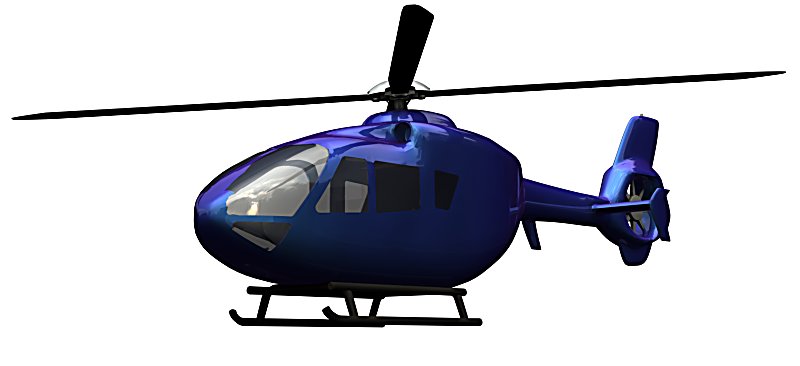
Here is an update on the heli, stills tons to do yet but it's getting there slowly.
Here is an update on the heli, stills tons to do yet but it's getting there slowly.
-
tahnoak
- Master Chief Petty Officer
- Posts: 339
- Joined: 02 Sep 2009, 01:31
Re: James Bond Car Chase
Beautiful job on the heli...
-
Breech Block
- Master Chief Petty Officer
- Posts: 482
- Joined: 13 Jun 2009, 20:31
Re: James Bond Car Chase
Thanks tahnoak. Thanks leonregis.
Here is a small update. After spending hours making sure the heli was really sleek and streamlined I'm now starting to undo a lot of that work by putting all kinds of junk on the fuselage such as door and grab handles, wiper blades and radio antennas. In addition, I've started adding some interior detail to the model. Not sure how much of the details you will actually see in the final render, but I didn't want to go down the easy road of just making the cockpit canopy really dark and reflective. Hopefully some of it will come across and that should enhance the final image.
Here is a small update. After spending hours making sure the heli was really sleek and streamlined I'm now starting to undo a lot of that work by putting all kinds of junk on the fuselage such as door and grab handles, wiper blades and radio antennas. In addition, I've started adding some interior detail to the model. Not sure how much of the details you will actually see in the final render, but I didn't want to go down the easy road of just making the cockpit canopy really dark and reflective. Hopefully some of it will come across and that should enhance the final image.
- Attachments
-

-
Musikman
- Chief Petty Officer
- Posts: 104
- Joined: 21 May 2009, 18:31
- Type the number ten into the box: 0
- Location: USA
Re: James Bond Car Chase
Super job BB! Coming along quite well. I think the attention to the detail "inside" will be well worth the effort, you may need a heli sometime down the line that will need to show the inside, and you'll have one all ready to go! Are you using the mirror tool, or is that just a cutaway to show the inside? Keep up the great work!
-
tahnoak
- Master Chief Petty Officer
- Posts: 339
- Joined: 02 Sep 2009, 01:31
Re: James Bond Car Chase
To quote you..."crikey" 
Great job on the detail. I would have taken the easy way out and just darkened the canopy but that's me
Great job on the detail. I would have taken the easy way out and just darkened the canopy but that's me
-
Breech Block
- Master Chief Petty Officer
- Posts: 482
- Joined: 13 Jun 2009, 20:31
Re: James Bond Car Chase
Thanks, tahnoak, thanks Musikman. Your comments are much appreciated.
With rgards to:
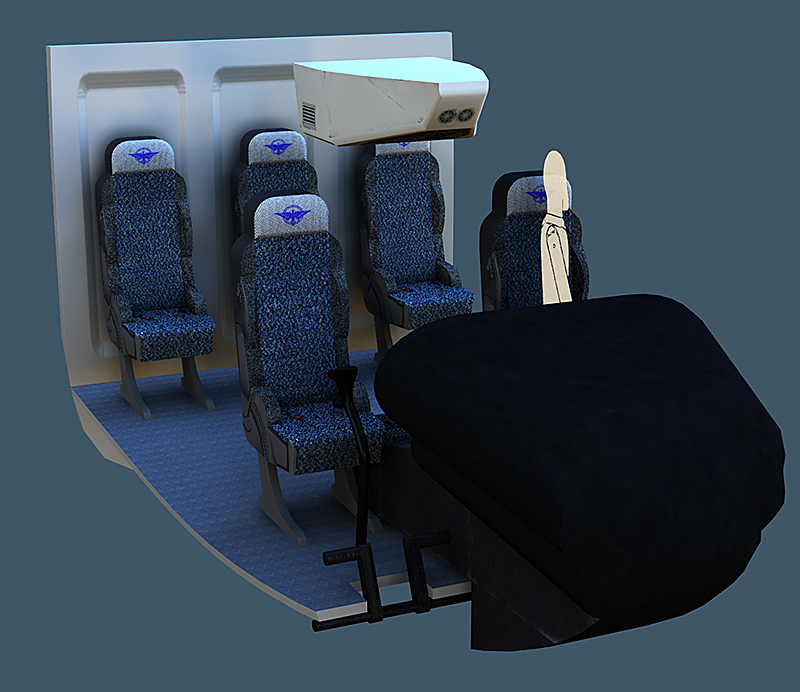
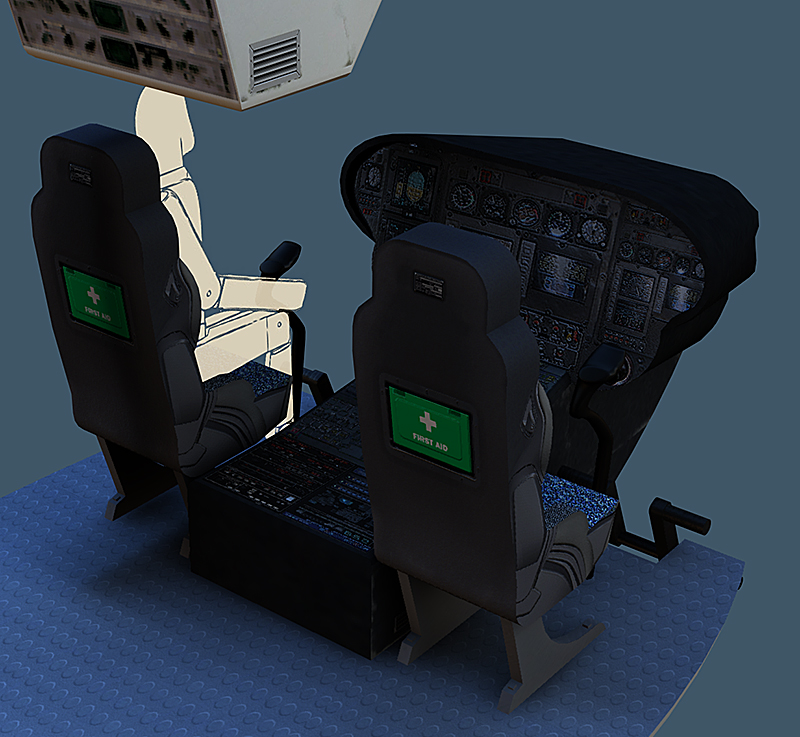
Anyhow, here's the latest on the cockpit interior. Still a lot of tidying up to do and may change the odd texture depending how the model gets posed in relation to the final image.
With rgards to:
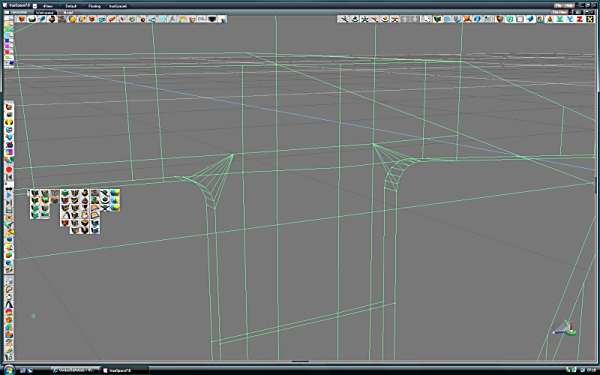
Yep, I am using the Mirroring Tool, but only because I am going around all the window edges and tidying them up in preperation for exporting the model to another format. Its painful, meticulous work and tS tends to crash quite easily if you accidentally add an edge to somewhere you shouldn't. So whilst I never used the tool to create the original model, I'm using it now to try a save a lot of grief in the export preparation process.Musikman wrote:Are you using the mirror tool, or is that just a cutaway to show the inside?
-
Musikman
- Chief Petty Officer
- Posts: 104
- Joined: 21 May 2009, 18:31
- Type the number ten into the box: 0
- Location: USA
Re: James Bond Car Chase
Wow! Looking mighty good there amigo! Love the texturing & materials, the seats look especially comfortable, and the control panel detail looks great too, very high tech these villans are! Great work BB, top notch quality.
Great work BB, top notch quality.-
Steinie

- Captain
- Posts: 2958
- Joined: 21 May 2009, 17:38
- Type the number ten into the box: 10
Re: James Bond Car Chase
Hahahaha you made a huge mistake... the fuel gauge says "Empty"...hahahaha
Just kidding.
Just shows the amount of detail you have put into this project! All those little gauges, first aide pockets, barf bags...
I love the detail work you are doing.
At some point you should try modeling on the workSpace side. The program crashing is much less
likely.
Just kidding.
Just shows the amount of detail you have put into this project! All those little gauges, first aide pockets, barf bags...
I love the detail work you are doing.
At some point you should try modeling on the workSpace side. The program crashing is much less
likely.
-
Steve

- Master Chief Petty Officer
- Posts: 394
- Joined: 29 Jun 2009, 10:20
- Type the number ten into the box: 0
- Location: Hiding (Like a ninja)
Re: James Bond Car Chase
Just thuoght I'd jump in here, nice work on the interior, really great lightingBreech Block wrote:Thanks, tahnoak, thanks Musikman. Your comments are much appreciated.
With rgards to:
Yep, I am using the Mirroring Tool, but only because I am going around all the window edges and tidying them up in preperation for exporting the model to another format. Its painful, meticulous work and tS tends to crash quite easily if you accidentally add an edge to somewhere you shouldn't. So whilst I never used the tool to create the original model, I'm using it now to try a save a lot of grief in the export preparation process.Musikman wrote:Are you using the mirror tool, or is that just a cutaway to show the inside?
IF you're on about when you add edges in the wrong place and make an "impossible" polygon, where it's going past a whole load of other polys...DON'T hit undo, that's when Truespace throws a banana at you, just hit space to cancel out of the point edit tool and Truespace removes any impossible edges, looks a bit scarred if you've got SubD added, to fix that extract control mesh, then re-apply the SubD and problem solved
-
tahnoak
- Master Chief Petty Officer
- Posts: 339
- Joined: 02 Sep 2009, 01:31
Re: James Bond Car Chase
Thanks for the tip Weevil. I make that mistake all the time..
Breech, great detail on the interior.
Breech, great detail on the interior.
-
Breech Block
- Master Chief Petty Officer
- Posts: 482
- Joined: 13 Jun 2009, 20:31
Re: James Bond Car Chase
Thanks again for all the comments guys.

Great tip Weevil, thanks I'll bear that in mind for future work. Much appreciated.
LOL Nice one Steinie...actually, I'm waiting to get the fluid importer plug-in so I can model the fuel flow correctly.Steinie wrote:Hahahaha you made a huge mistake... the fuel gauge says "Empty"...hahahaha
Great tip Weevil, thanks I'll bear that in mind for future work. Much appreciated.
-
Steinie
- Captain
- Posts: 2958
- Joined: 21 May 2009, 17:38
- Type the number ten into the box: 10
Re: James Bond Car Chase
Hey Breech what happened to this project?!
This project like your others were turning out great.
I hope you didn't catch the bored flu!
This project like your others were turning out great.
I hope you didn't catch the bored flu!
-
Breech Block
- Master Chief Petty Officer
- Posts: 482
- Joined: 13 Jun 2009, 20:31
Re: James Bond Car Chase
Wow! Can't believe this thread has surpassed the 1,000 views mark. Thanks everyone for all the support, it really helps out when things get tough.
Thanks for your latest post too Bob and rest assured I am still very keen to finish this one. It is just that over the last few weeks I have been giving some private tuition to a couple of forum members so finding time to work on my own projects has been kinda scarce.
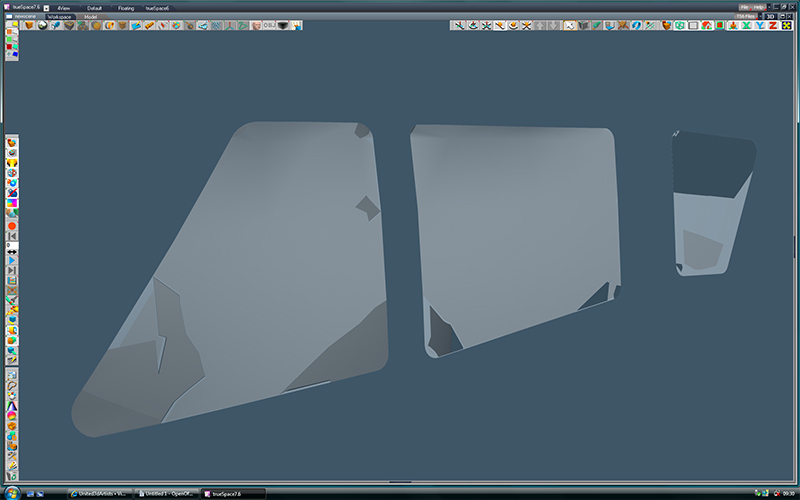
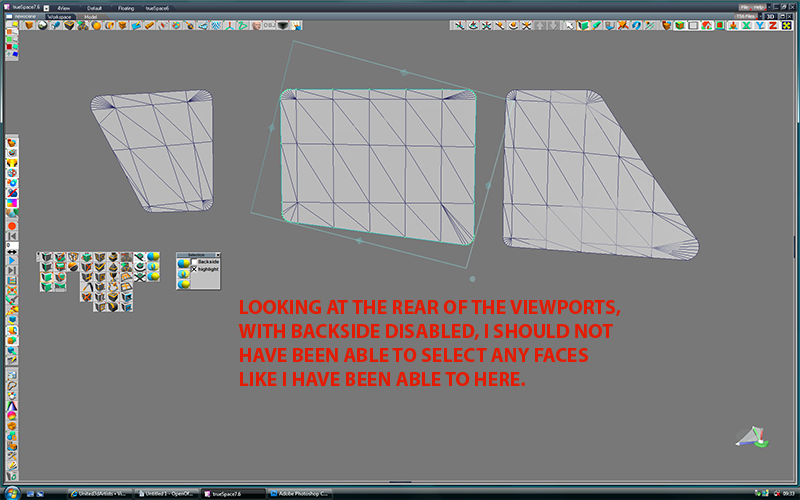
In addition, when I have found the time, I have been battling away at some really tough-to-crack issues with the helicopter model. I have some flipped normals, courtesy of Boolean subtracting the interior, that until recently just didn't seem to want to go away and I also had some really weird effect going on with the side viewports every time I did a test render. I tried a whole ton of things to try and cure it and it was really driving me up the wall when I stumbled upon the fact that the reason for the effect was that somehow, the rear of the curved window had acquired a face. One simple click on the delete face tool in PE mode ended my weeks of frustration.
So the helicopter fuselage is now in the process of being UV mapped and textured and hopefully I will be posting an updated piccie of that sometime over the coming weekend.
Thanks for your latest post too Bob and rest assured I am still very keen to finish this one. It is just that over the last few weeks I have been giving some private tuition to a couple of forum members so finding time to work on my own projects has been kinda scarce.
In addition, when I have found the time, I have been battling away at some really tough-to-crack issues with the helicopter model. I have some flipped normals, courtesy of Boolean subtracting the interior, that until recently just didn't seem to want to go away and I also had some really weird effect going on with the side viewports every time I did a test render. I tried a whole ton of things to try and cure it and it was really driving me up the wall when I stumbled upon the fact that the reason for the effect was that somehow, the rear of the curved window had acquired a face. One simple click on the delete face tool in PE mode ended my weeks of frustration.
So the helicopter fuselage is now in the process of being UV mapped and textured and hopefully I will be posting an updated piccie of that sometime over the coming weekend.
-
pugman 1
- Captain
- Posts: 1555
- Joined: 21 May 2009, 19:26
- Type the number ten into the box: 0
- Location: Germany
Re: James Bond Car Chase
Hi looking great dude ,i have not the patience for
all that detail inside especialy when it wont be seen.
looking forward to the end product
all that detail inside especialy when it wont be seen.
looking forward to the end product
-
RAYMAN

- Captain
- Posts: 2547
- Joined: 21 May 2009, 18:56
Re: James Bond Car Chase
Your modeling is awsome that heli will be great !
Peter
Peter
-
tahnoak
- Master Chief Petty Officer
- Posts: 339
- Joined: 02 Sep 2009, 01:31
Re: James Bond Car Chase
pugman 1 wrote:Hi looking great dude ,i have not the patience for
all that detail inside especialy when it wont be seen.
looking forward to the end product
right there with ya pugman....
-
Breech Block
- Master Chief Petty Officer
- Posts: 482
- Joined: 13 Jun 2009, 20:31
Re: James Bond Car Chase
Thanks for the kind words Pugman, Peter and Tahnoak. Very much appreciated.
Unfortunately I have hit a small snag. Now I will be the first to admit my texturing skills are pretty ropey at best, but this can't be right surely. I'm trying to paint some kind of panel line on the fuselage to give the impression of doors, but for the life of me I can't get it to look like anything else other than it's made from lego Lego blocks. I have tried all sorts to get rid of the jaggies. Reducing the scale of the model, increasing the res of the texture, increasing the PPI of the texture, increasing the AA of the render, all of which only seem to have a marginal effect and certainly haven't produced anything I would regard as satisfactory. So any pointers from anyone on producing nice, rounded panel lines would be gratefully accepted.
BTW, the texture size in the renders below was 2048
Unfortunately I have hit a small snag. Now I will be the first to admit my texturing skills are pretty ropey at best, but this can't be right surely. I'm trying to paint some kind of panel line on the fuselage to give the impression of doors, but for the life of me I can't get it to look like anything else other than it's made from lego Lego blocks. I have tried all sorts to get rid of the jaggies. Reducing the scale of the model, increasing the res of the texture, increasing the PPI of the texture, increasing the AA of the render, all of which only seem to have a marginal effect and certainly haven't produced anything I would regard as satisfactory. So any pointers from anyone on producing nice, rounded panel lines would be gratefully accepted.
BTW, the texture size in the renders below was 2048


-
Steinie
- Captain
- Posts: 2958
- Joined: 21 May 2009, 17:38
- Type the number ten into the box: 10
Re: James Bond Car Chase
If I had to guess what is causing your zaggy lines it would be the UVMap. The lines appear normal on the flat surface of the heli however as the body curves away from vertical the line breaks apart. Did you try applying a flat UV map to just one door or adjusting the uv in realtime watching the effects on the model as you do it? Try to keep the UV planer map perpendicular to the door and not the body of the helicopter.
Your model looks fantastic by the way. (This is a recording...) 
Your model looks fantastic by the way. (This is a recording...)
-
RAYMAN
- Captain
- Posts: 2547
- Joined: 21 May 2009, 18:56
Re: James Bond Car Chase
your running into the problem of UV stretch there ! Its not impossible to get te texture there right but usually its not easy.
A 2048x2048 map can hold pretty much detail like you see in my trial i did for you. You actually see jpeg artefacts of the map earlier then
jagged lines. The best way to avoid problems of these kinds is to paint your object and if you dont want to invest into a paint program
Blender can do it for free. Of any discipline that i try to avoid most in 3d ....UV mapping is right on top.
in most of the games that you get and almost all cinematography releases these kind of headache causing maps are painted....
I used 3d Coat for the example...... on a 2048x2048 map for the whole body....
A 2048x2048 map can hold pretty much detail like you see in my trial i did for you. You actually see jpeg artefacts of the map earlier then
jagged lines. The best way to avoid problems of these kinds is to paint your object and if you dont want to invest into a paint program
Blender can do it for free. Of any discipline that i try to avoid most in 3d ....UV mapping is right on top.
in most of the games that you get and almost all cinematography releases these kind of headache causing maps are painted....
I used 3d Coat for the example...... on a 2048x2048 map for the whole body....
- Attachments
-
-

-
marcel

- Captain
- Posts: 2247
- Joined: 21 May 2009, 19:52
- Type the number ten into the box: 0
- Location: paris - France
Re: James Bond Car Chase
two thing:
-do you use the filtering option for the texture to avoid the "lego"?
-the line on the image that you use for the texture can be more smooth. It seem this line have no anti aliasing and TS show what you done.
You can see here how the quality of the texture can change the result when you zoom it:
-do you use the filtering option for the texture to avoid the "lego"?
-the line on the image that you use for the texture can be more smooth. It seem this line have no anti aliasing and TS show what you done.
You can see here how the quality of the texture can change the result when you zoom it:
- Attachments
-

- line.jpg (6.93 KiB) Viewed 5713 times
Design - illustration - Animation
http://www.crea-vision.fr
http://www.crea-vision.fr
-
Musikman
- Chief Petty Officer
- Posts: 104
- Joined: 21 May 2009, 18:31
- Type the number ten into the box: 0
- Location: USA
Re: James Bond Car Chase
All these techniques you guys are talking about are unfortunately beyond my current knowledge of TS, but did want to jump in and say the heli looks great! The glass turned out really good, I've had my share of troubles trying to create realistic glass in TS, what did you use to get it looking so sharp?
Hope you manage to solve the jaggies.
The glass turned out really good, I've had my share of troubles trying to create realistic glass in TS, what did you use to get it looking so sharp?Hope you manage to solve the jaggies.
-
Breech Block
- Master Chief Petty Officer
- Posts: 482
- Joined: 13 Jun 2009, 20:31
Re: James Bond Car Chase
Thanks for all the great feedback guys, it's very much appreciated.
Steinie – Cheers for the kind words. Ref the UV mapping, that's what I was fearing the most as the mapping on this one is a bit of a pig's ear because it has an interior as well. Ref the recorded message, LOL, I just hope it doesn't self destruct in 5 seconds.
Marcel – I normally avoid using the filtering option on my textures and as such never gave it much thought. But perhaps this is an occasion where it might serve well. Thanks for the pointer and piccie.
Rayman – I really appreciate the time and effort you put in to showing and explaining to me where the problem lies Peter. And the probable soloution. This heli model is more organic than my usual output so I guess the issue has never really raised itself before. I can see I'm gonna have to expand my tool set if I really wanna try and push my work to the next level.
Musikman – Again, thanks for the kind words. As for the heli's canopy, I just used the default tS glass shader. The key to getting glass to look good, as with most things in 3D, is getting the lighting just right, In addition, when it comes to rendering glass, always give it something to reflect. HTH.
Steinie – Cheers for the kind words. Ref the UV mapping, that's what I was fearing the most as the mapping on this one is a bit of a pig's ear because it has an interior as well. Ref the recorded message, LOL, I just hope it doesn't self destruct in 5 seconds.
Marcel – I normally avoid using the filtering option on my textures and as such never gave it much thought. But perhaps this is an occasion where it might serve well. Thanks for the pointer and piccie.
Rayman – I really appreciate the time and effort you put in to showing and explaining to me where the problem lies Peter. And the probable soloution. This heli model is more organic than my usual output so I guess the issue has never really raised itself before. I can see I'm gonna have to expand my tool set if I really wanna try and push my work to the next level.
Musikman – Again, thanks for the kind words. As for the heli's canopy, I just used the default tS glass shader. The key to getting glass to look good, as with most things in 3D, is getting the lighting just right, In addition, when it comes to rendering glass, always give it something to reflect. HTH.
-
Breech Block
- Master Chief Petty Officer
- Posts: 482
- Joined: 13 Jun 2009, 20:31
Re: James Bond Car Chase
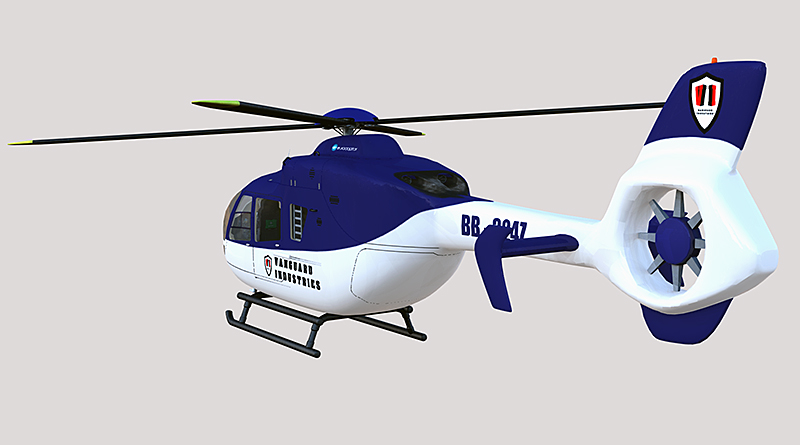
This is the helicopter model that will be in pursuit of our Mr Bond. Not entirely sure how much of it will be seen in the final image so I did have some reservations about exactly how much detail I should go in to. Hopefully it is just about right although there are probably about a hundred rivets and divets that no-one will ever see except me. Still not happy with the panel line of the doors. It looks waaaaaaaay too sharp and painted on, which of course it is.
However, when I altered the layers opacity setting on which that panel line sits on in the texture map, the resulting test renders just made the line look like a dirty smear and thus were not really any better.
Apart from the doors, the trouble I have now, is I'm not too sure the model is entirely suitable for the image. Let me explain. When I first came up with the concept of it being a helicopter that would be chasing 007, I made a deliberate choice to stay away from any kind of military variant. The reality being, if you sent an Apache to take out an Aston Martin, our Mr Bond would end up being a big red stain on the highway. In figuring out what to use, I surmised that Bond's nemesis would have dispatched his minions to take care of the troublesome agent using the fastest available local transport... in other words his evil corporation's helicopters. This in turn led me to thinking the variant that they would use would be a modern-looking, mid-range job, the corporate workhorse if you will. After all, your not going to trust your henchmen with your own personal top of the range model are you? So I elected to model a Eurocopter EC-135 as that particular manufacturer has an affiliation with the Bond franchise (Goldeneye). Now the potential problem as I see it is, I have focused my entire attention on trying to produce an accurate 3D model of a corporate helicopter. And in that department, I do think the model succeeds in representing that. However, whether it succeeds as a model of a helicopter that should be chasing a fully armed and lethally equipped car being driven by the best trained assassin MI6 can muster is another story. I mean, it's not exactly a fair fight is it? I suppose the easy answer would be to strap a couple of rocket launchers to the side of the heli, but I can't help but feel that would be a bit of a cop-out.
So I would be very grateful for any and all community feedback on this quandary.
Anyhow, please enjoy the pics and there is another stand-based, multi-angle beauty render over on my 3D Artist Gallery if you care to take a peek.
(Edit - Thanks very much for posting a comment over there Bob, very much appreciated)
However, when I altered the layers opacity setting on which that panel line sits on in the texture map, the resulting test renders just made the line look like a dirty smear and thus were not really any better.
Apart from the doors, the trouble I have now, is I'm not too sure the model is entirely suitable for the image. Let me explain. When I first came up with the concept of it being a helicopter that would be chasing 007, I made a deliberate choice to stay away from any kind of military variant. The reality being, if you sent an Apache to take out an Aston Martin, our Mr Bond would end up being a big red stain on the highway. In figuring out what to use, I surmised that Bond's nemesis would have dispatched his minions to take care of the troublesome agent using the fastest available local transport... in other words his evil corporation's helicopters. This in turn led me to thinking the variant that they would use would be a modern-looking, mid-range job, the corporate workhorse if you will. After all, your not going to trust your henchmen with your own personal top of the range model are you? So I elected to model a Eurocopter EC-135 as that particular manufacturer has an affiliation with the Bond franchise (Goldeneye). Now the potential problem as I see it is, I have focused my entire attention on trying to produce an accurate 3D model of a corporate helicopter. And in that department, I do think the model succeeds in representing that. However, whether it succeeds as a model of a helicopter that should be chasing a fully armed and lethally equipped car being driven by the best trained assassin MI6 can muster is another story. I mean, it's not exactly a fair fight is it? I suppose the easy answer would be to strap a couple of rocket launchers to the side of the heli, but I can't help but feel that would be a bit of a cop-out.
So I would be very grateful for any and all community feedback on this quandary.
Anyhow, please enjoy the pics and there is another stand-based, multi-angle beauty render over on my 3D Artist Gallery if you care to take a peek.
(Edit - Thanks very much for posting a comment over there Bob, very much appreciated)


-
DesignDevil

- Master Chief Petty Officer
- Posts: 500
- Joined: 22 May 2009, 08:52
- Type the number ten into the box: 0
- Location: Neuruppin, Germany, Earth.
Re: James Bond Car Chase
WOW, that looks amazing - really.
Is this made out of polygones or nurbs? Could you show a wireframe image, please?
Really cool a big thumbs up.
Is this made out of polygones or nurbs? Could you show a wireframe image, please?
Really cool a big thumbs up.
I still use TrueSpace 6.6
Link: My Youtube Channel
Link: www.DesignDevil.de - Plugins, Tutorials and more about TrueSpace 6.6
Link: My Youtube Channel
Link: www.DesignDevil.de - Plugins, Tutorials and more about TrueSpace 6.6
-
RAYMAN
- Captain
- Posts: 2547
- Joined: 21 May 2009, 18:56
Re: James Bond Car Chase
Great the texture is now coming out nicely as well too !
Peter
Peter
-
marcel
- Captain
- Posts: 2247
- Joined: 21 May 2009, 19:52
- Type the number ten into the box: 0
- Location: paris - France
Re: James Bond Car Chase
great work breech! It is alway interesting to see yours wip.
Design - illustration - Animation
http://www.crea-vision.fr
http://www.crea-vision.fr
-
Musikman
- Chief Petty Officer
- Posts: 104
- Joined: 21 May 2009, 18:31
- Type the number ten into the box: 0
- Location: USA
Re: James Bond Car Chase
Wow! Simply amazing! Congratulations! You've obviously put a great deal of thought and hard work into this, top notch quality! I agree that the "corporate" version makes more sense in the grand scheme of things, as opposed to a military style. I would also be curious to see what a mesh shot would look like. Three thumbs up (......err....that is possible if you're an alien like me! )
Three thumbs up (......err....that is possible if you're an alien like me! )-
Breech Block
- Master Chief Petty Officer
- Posts: 482
- Joined: 13 Jun 2009, 20:31
Re: James Bond Car Chase
Thanks for all the comments guys! And any 3 thumbed aliens that happen to be browsing through.
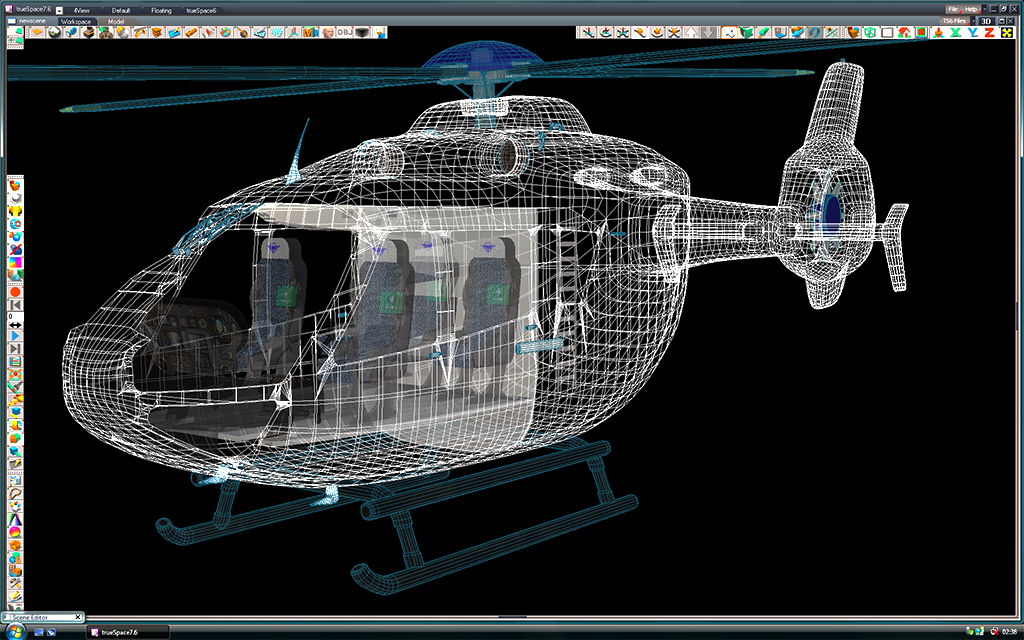
Well, as per the requests, I tried screen-grabing a couple wireframe shots but tbh, the mesh is so complicated by the time I had reduced them in size you couldn't really make anything out. It hasn't helped that the mesh has been prepped for export/conversion from the get go that means there is quite a bt of extra geometry around all the window edges. This is the best shot I have been able to manage. if you want to know/see anything more specific, then just ask and I'll see what I can do. HTH.
Well, as per the requests, I tried screen-grabing a couple wireframe shots but tbh, the mesh is so complicated by the time I had reduced them in size you couldn't really make anything out. It hasn't helped that the mesh has been prepped for export/conversion from the get go that means there is quite a bt of extra geometry around all the window edges. This is the best shot I have been able to manage. if you want to know/see anything more specific, then just ask and I'll see what I can do. HTH.
- Attachments
-
-
Musikman
- Chief Petty Officer
- Posts: 104
- Joined: 21 May 2009, 18:31
- Type the number ten into the box: 0
- Location: USA
Re: James Bond Car Chase
Thanks for posting the pic BB, that's one heckuva mesh! Very interesting how it is constructed, I'm sure there was alot of planning prior to beginning the modeling phase. A rookie question here, did you use sds, if so, how much and was it just on the exterior body of the heli, or was it applied elsewhere as well? Also, once you finished modeling each section, did you boolean join everything, or were some of the pieces kept separate for any reason,....texturing, etc..?
-
Breech Block
- Master Chief Petty Officer
- Posts: 482
- Joined: 13 Jun 2009, 20:31
Re: James Bond Car Chase
SDS was used on the fuselage, main rotor blades, flightsticks, grab handles, door handles, air sensors and radio antenna. All other elements were formed by point editing single cubes or cylinders, even the wiper blades which were probably the trickiest part. The only exception to this was the skids. This was also the only element that was Boolean Joined and that's because they were constructed from several separate cylinders.
A lot of the elements were kept apart for animation and texturing purposes. Obviously both sets of rotor blades needed to be able to...err...rotate , while other elements needed separating because they needed entirely different materials to be applied. For example the fuselage needed to have a nice glossy shine to it whilst the skids needed to be dull and worn.
In addition the entire cabin was deliberately modelled as a separate entity so that it could be easily extracted, either to reduce rendering times in long-distance shots, or for easy access to film interior scenes.
HTH.
A lot of the elements were kept apart for animation and texturing purposes. Obviously both sets of rotor blades needed to be able to...err...rotate
, while other elements needed separating because they needed entirely different materials to be applied. For example the fuselage needed to have a nice glossy shine to it whilst the skids needed to be dull and worn.In addition the entire cabin was deliberately modelled as a separate entity so that it could be easily extracted, either to reduce rendering times in long-distance shots, or for easy access to film interior scenes.
HTH.
-
Musikman
- Chief Petty Officer
- Posts: 104
- Joined: 21 May 2009, 18:31
- Type the number ten into the box: 0
- Location: USA
Re: James Bond Car Chase
Thanks for the explanation, very interesting BB, you must have put alot of forethought into this model. Surprised to learn that the wiper blades were one of the trickiest parts to model, I thought the cockpit would be the hardest part with all the detail involved. Makes sense that some of the parts were kept separate for texturing and rendering purposes, but I had not considered the animation part of it. I suppose if the rotor blades were booleaned to the rest of the heli, then animating them would in turn spin the whole heli around at high speed and probably get the pilots quite dizzy!
-
Breech Block
- Master Chief Petty Officer
- Posts: 482
- Joined: 13 Jun 2009, 20:31
Re: James Bond Car Chase
I challenged myself to make the wiper blade out of a single cube. As you can see in the piccie it is quite detailed. Getting the blade's support arms symmetrical and having to match the whole unit to the curvature of the glass canopy didn't help either.Musikman wrote:Surprised to learn that the wiper blades were one of the trickiest parts to model, I thought the cockpit would be the hardest part with all the detail involved.

-
Breech Block
- Master Chief Petty Officer
- Posts: 482
- Joined: 13 Jun 2009, 20:31
Re: James Bond Car Chase
Flipping heck, I just realised this project started way back in September. Where does the time go?
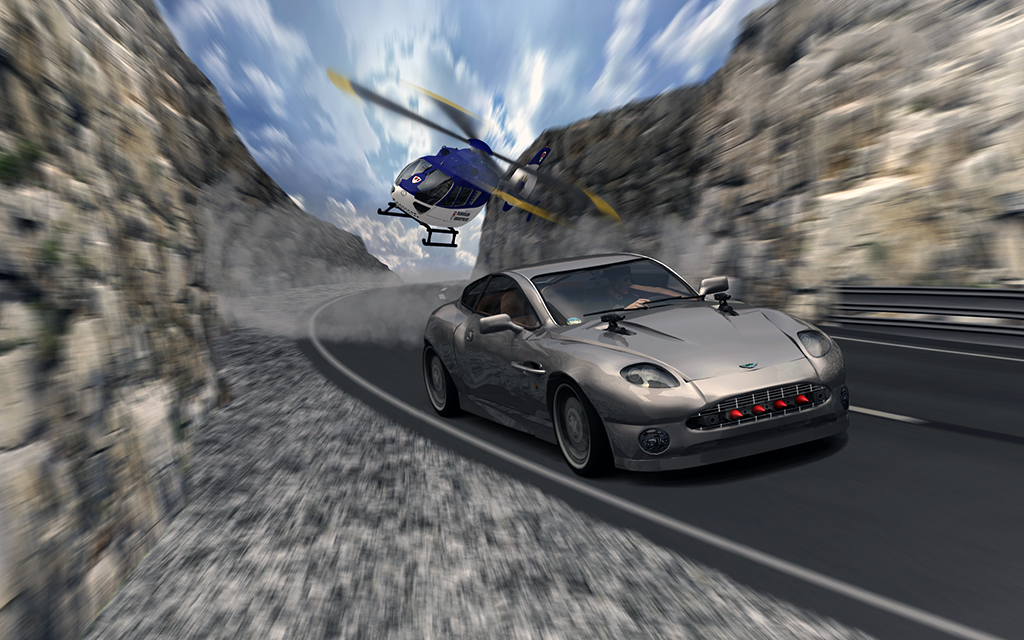
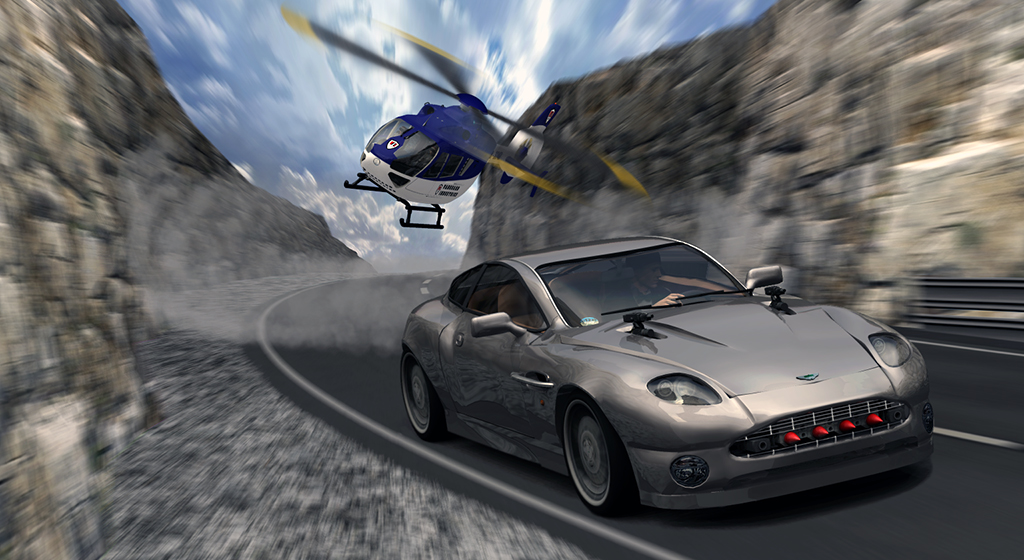
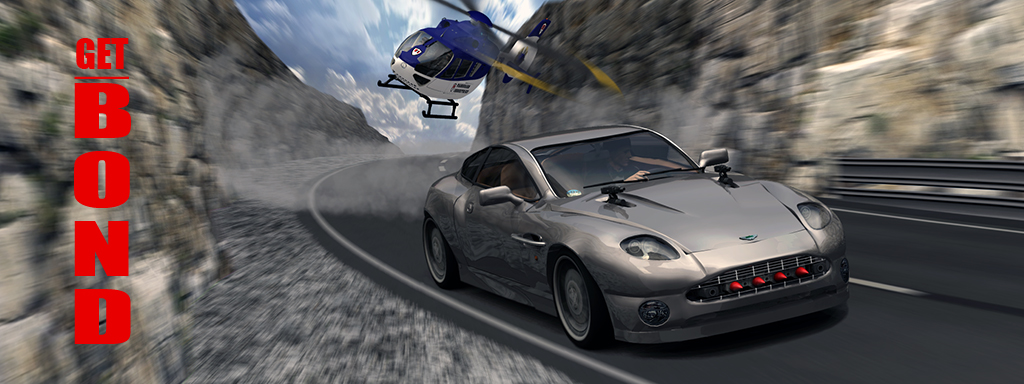
Anyhow, 6 months and over 20 layers in Photoshop later and at long last I think I am just about ready to put this image to bed.
I have come up with a couple of size variations for when it comes to deciding on a final presentation and would be interested in which one the community thinks conveys the action best.
And as ever if you can think of any improvements, all C & C is most welcome.
Anyhow, 6 months and over 20 layers in Photoshop later and at long last I think I am just about ready to put this image to bed.
I have come up with a couple of size variations for when it comes to deciding on a final presentation and would be interested in which one the community thinks conveys the action best.
And as ever if you can think of any improvements, all C & C is most welcome.
-
Finis

- Captain
- Posts: 5410
- Joined: 21 May 2009, 18:26
- Type the number ten into the box: 0
- Location: America!
Re: James Bond Car Chase
I like test 2 best.
The road in front of the car in test 1 gives me more of an impression of speed but I still like test 2 best.
The road in front of the car in test 1 gives me more of an impression of speed but I still like test 2 best.
I prefer dangerous freedom over peaceful servitude. -- Thomas Jefferson/Jean Jacques Rousseau
-
xtetra

- Petty Officer Second Class
- Posts: 34
- Joined: 22 May 2009, 05:35
Re: James Bond Car Chase
This is super stuff!
Sorry if this is a repeat question, I clicked through the whole thread quickly looking for the answer but I didn't see it discussed; Did you use a UV Mapping program to texture the road, rocks, heli etc or did you use the standard TS uv tools? Also, is there a clever trick for making your road texture follow the road properly w/o making a large UV map?
Thanks for all the updates, I learn a lot from threads like this.
Sorry if this is a repeat question, I clicked through the whole thread quickly looking for the answer but I didn't see it discussed; Did you use a UV Mapping program to texture the road, rocks, heli etc or did you use the standard TS uv tools? Also, is there a clever trick for making your road texture follow the road properly w/o making a large UV map?
Thanks for all the updates, I learn a lot from threads like this.
-
Breech Block
- Master Chief Petty Officer
- Posts: 482
- Joined: 13 Jun 2009, 20:31
Re: James Bond Car Chase
Thanks Finis, I think I am slowly edging towards 2 as well although 3's cinematic widescreen look is also a powerful draw to me.Finis wrote:I like test 2 best. The road in front of the car in test 1 gives me more of an impression of speed but I still like test 2 best.
Thanks for the very kind words xtetra, but in this particular case I don't really feel they're warranted. There are still at least 5 major faults/omissions with the image, although luckily no one seems to have spotted them yet. But they are there and are quite obvious if you look for them. However, after working on the image for 6 months, I am definitely feeling the need to move on. As for taking the time to answer all of your technical queries, well you could have at least taken the time to answer my simple one first.xtetra wrote:this is super stuff!

-
xtetra
- Petty Officer Second Class
- Posts: 34
- Joined: 22 May 2009, 05:35
Re: James Bond Car Chase
Sorry, didn't intend to be rude. 
From your pics posted on 2/15, I like the top one the best. Adding the rotor wash to the road helps with the sense of action. You might try using the liquify tool in photoshop to create the effect of hot exhaust coming out the back of the heli.
Looking forward to seeing what you do next.
From your pics posted on 2/15, I like the top one the best. Adding the rotor wash to the road helps with the sense of action. You might try using the liquify tool in photoshop to create the effect of hot exhaust coming out the back of the heli.
Looking forward to seeing what you do next.
-
LeonRegis
- Captain
- Posts: 1946
- Joined: 18 Aug 2009, 17:36
- Type the number ten into the box: 0
- Location: Brazil/Earth/Orion Arm/Milky Way/4th Dimension/This Universe/Multiverse???/Singularity???
Re: James Bond Car Chase
Great progress lately! I liked the second one best, but the first has somethings I also like, as well the third. Maybe a mix of all... 
xtetra: Leonregis - Nicely Done Breech! How do you create the texture?
Thanks – in a nutshell, 2 tarmac textures downloaded of the net and blended together 50/50 in Photoshop. Then added the yellow lines in on a new layer using a brush with the Hardness and Density values set to 75%. HTH.
Hope it helps
xtetra: Leonregis - Nicely Done Breech! How do you create the texture?
Thanks – in a nutshell, 2 tarmac textures downloaded of the net and blended together 50/50 in Photoshop. Then added the yellow lines in on a new layer using a brush with the Hardness and Density values set to 75%. HTH.
Hope it helps
Be the change you want to see in the world. - Mohandas Gandhi
-
Breech Block
- Master Chief Petty Officer
- Posts: 482
- Joined: 13 Jun 2009, 20:31
Re: James Bond Car Chase
extetra - Thanks, and don't worry its not a problem, its just that I'm pretty desperate for feedback on this one as after working on the image for so long I think I have lost all my objectivity. BTW, thanks for the Photoshop tip, I'll give that a try tonight.xtetra wrote:Sorry, didn't intend to be rude.
As for how I UV mapped everything on this project, it was really a mixture of everything. Basic stuff like the road, crash barrier and posts I just used standard Cubic projection. For the Autoshotgun I painted a lot of the faces directly and the Aston Martin and Eurocopter were converted to the .obj format and exported/imported to a trial version of modo and UV mapped there. The inside of the Eurocopter, all the seats and consoles etc. were mapped using tS's own UV tools. And as for "is there a secret to getting the texture map to follow the road", yes there is. Originally, I did it all by hand with a giant UV map and hours of painful editing in Photoshop. Only to discover that I wanted to adjust the model's curvature a couple of days later. So, after another long Photoshop session to correct the texture to the new UV map, you can imagine how peeved I was when a couple days later I found I needed to re-model the curvature or the road yet again. Then I had one of my rare brainstorms and I applied the texture to a straight road and used the Bend tool to adjust the models curvature, which automatically curved the texture for me. Job Done!
leonregis – Thanks. Guess it's not just me who can't make their minds up on this one.
-
Tommy

- Master Chief Petty Officer
- Posts: 403
- Joined: 28 Jun 2009, 14:05
- Type the number ten into the box: 0
- Location: Sweden, Göteborg
Re: James Bond Car Chase
Thanks a lot for showing your project.
I have followed your progress with the Bond chase. And the only thing I have to say is that I'm a long way behind you. Even if I don't have given so many comments on your project i have learned a lot. Maybee I should.
About the images I like the third one. The picture puts the emphasis on the car. James Bond is the head character and I think you don't need everything to be seen as part of your excellent helicopter. I also like the wide format of the picture. I often use wide pictures when rendering and for me it looks more natural.
I have followed your progress with the Bond chase. And the only thing I have to say is that I'm a long way behind you. Even if I don't have given so many comments on your project i have learned a lot. Maybee I should.
About the images I like the third one. The picture puts the emphasis on the car. James Bond is the head character and I think you don't need everything to be seen as part of your excellent helicopter. I also like the wide format of the picture. I often use wide pictures when rendering and for me it looks more natural.
"Carpe diem"
-
Musikman
- Chief Petty Officer
- Posts: 104
- Joined: 21 May 2009, 18:31
- Type the number ten into the box: 0
- Location: USA
Re: James Bond Car Chase
Thanks for spending the time to explain your methods and posting pics, it really is an education for me, as I'm sure it is for others here as well, much appreciated.
You really did a beautiful job on this project, top notch quality as always! (three alien thumbs up!)
I like the first pic best, mostly because the heli being a bit further away imo gives it a more realisic look as far as it turning the corner.
You really did a beautiful job on this project, top notch quality as always!
(three alien thumbs up!)I like the first pic best, mostly because the heli being a bit further away imo gives it a more realisic look as far as it turning the corner.
-
Steinie
- Captain
- Posts: 2958
- Joined: 21 May 2009, 17:38
- Type the number ten into the box: 10
Re: James Bond Car Chase
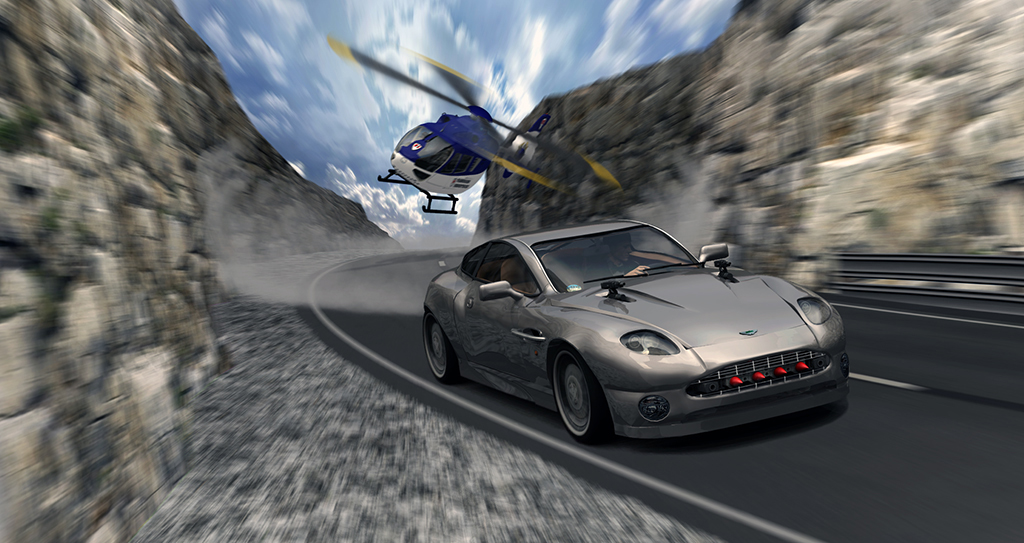
Well my preference would be the second rendering. With the vehicle closer to the front the viewer unknowingly becomes part of the action. Like Bond we too are looking behind the vehicle at the challenges and problems that follow.
-
noko
- Senior Chief Petty Officer
- Posts: 170
- Joined: 24 May 2009, 04:16
Re: James Bond Car Chase
Looks great, all three. Some thoughts which you might want to explore:
1. Maybe place some small to medium rocks laying on the side of the road or even on the road, with some overspray of dirt/pebbles
2. The rock line on top could be made more jagged.
3. Maybe a few pot holes in the road.
4. The shoulder roughed up as in uneven heights from the road.
Not sure how many polygons you are up to at this point which cripples tS model side at 1 million and WS side memory requirements ballon after 1 million polys. Car I take it is the worst culprit here. A two step process of rendering the car with black background which later can be intergrated into scene maybe a possibility if you are reaching tS limitations there, clevit is cars reflect environment which could be simulated with HDRI in this case and look good.
Love to see this project animated, if you decide to go that route one can really speed up the rendering with HDRI by using regular lights and shadows. Talking about 30-50 fold increase in rendering speed for an example. You still will have HDRI lighting and environment for reflections and the regular lights will do the shadowing, you do not have to light up your scene unless you want to with the regular lights. Basically using a regular light with shadows turned on, a duplicate of that light in same space with shadows turned off but also giving the light a negative value opposite of the orginal. This will make the two light system (positive and negative) a shadow casting object only with no light output. I've found this to be an easier way to get better shadows and speed up HDRI rendering for complex scenes.
In any case this looks to be a tS classic!
1. Maybe place some small to medium rocks laying on the side of the road or even on the road, with some overspray of dirt/pebbles
2. The rock line on top could be made more jagged.
3. Maybe a few pot holes in the road
.4. The shoulder roughed up as in uneven heights from the road.
Not sure how many polygons you are up to at this point which cripples tS model side at 1 million and WS side memory requirements ballon after 1 million polys. Car I take it is the worst culprit here. A two step process of rendering the car with black background which later can be intergrated into scene maybe a possibility if you are reaching tS limitations there, clevit is cars reflect environment which could be simulated with HDRI in this case and look good.
Love to see this project animated, if you decide to go that route one can really speed up the rendering with HDRI by using regular lights and shadows. Talking about 30-50 fold increase in rendering speed for an example. You still will have HDRI lighting and environment for reflections and the regular lights will do the shadowing, you do not have to light up your scene unless you want to with the regular lights. Basically using a regular light with shadows turned on, a duplicate of that light in same space with shadows turned off but also giving the light a negative value opposite of the orginal. This will make the two light system (positive and negative) a shadow casting object only with no light output. I've found this to be an easier way to get better shadows and speed up HDRI rendering for complex scenes.
In any case this looks to be a tS classic!
-
Breech Block
- Master Chief Petty Officer
- Posts: 482
- Joined: 13 Jun 2009, 20:31
Re: James Bond Car Chase
Thanks very much everyone for the kind words. They actually inspired me to have one more session with the image and I corrected quite a few of the errors that were there such as smoothing out some of the panel lines on the car, adding a shadow for the heli and creating a new dust cloud as the scale of the swirls in the previous one didn't really seem to match the scale of the downwash that would be caused by such large rotors. I also introduced some motion blur along the helicopter's fuselage just take off the sharp edges and added a trail of jetwash/heatwave behind the twin exhausts. As for the choice of a final crop, I still change my mind almost everyday. I think that may be due to the fact that the original image is 1920 x 1200 and when I get ready to post an image on the web it is almost half that and thus drastically alters the level of detailing you can make out. With regards to making the roads/verge a little less even, I invested quite a bit of time making sure they weren't. Same with the edge of the mountains you can see. However, all that disappeared in an instant when I applied the motion blur. And yes, I would also love to see this all animated somehow, but unfortunately, the scene doesn't actually exist as all the elements have been created and rendered separately and only come together to form an image thanks to about 20 layers in Photoshop.
So, in closing, a special thanks to all those who took the time to place a comment on this thread, you really helped to both inspire and push me to complete the task. Now it's job done and time for something new.
So, in closing, a special thanks to all those who took the time to place a comment on this thread, you really helped to both inspire and push me to complete the task. Now it's job done and time for something new.
-
Tommy
- Master Chief Petty Officer
- Posts: 403
- Joined: 28 Jun 2009, 14:05
- Type the number ten into the box: 0
- Location: Sweden, Göteborg
Re: James Bond Car Chase
Excellent work. You don't need to animate the scen. There is lot of animation i the picture despite it's not animated.
I looked at the last picture you have posted and I felt like falling into the screen. Or you can also say: the car and helicopter were coming out of the screen. I still have marks of the cars tyres on my desk and the smell of burnt rubber.
I looked at the last picture you have posted and I felt like falling into the screen. Or you can also say: the car and helicopter were coming out of the screen. I still have marks of the cars tyres on my desk and the smell of burnt rubber.
"Carpe diem"
-
tahnoak
- Master Chief Petty Officer
- Posts: 339
- Joined: 02 Sep 2009, 01:31
Re: James Bond Car Chase
It has been fun watching this develop and evolve. Thanks for sharing not only some of the modeling process but your thought process as well.
-
Breech Block
- Master Chief Petty Officer
- Posts: 482
- Joined: 13 Jun 2009, 20:31
Re: James Bond Car Chase
LOL! Cheers Tommy, that comment has made all the the hard work over last 6 months really worth while.Tommy wrote:I still have marks of the cars tyres on my desk and the smell of burnt rubber.
Tahnoak - Nice to see you back on the forum again and glad you liked the piccie.
-
Steinie
- Captain
- Posts: 2958
- Joined: 21 May 2009, 17:38
- Type the number ten into the box: 10
Re: James Bond Car Chase
I love your attention to detail. What caught my eye when you modeled the helicopter was the wiper blades. (even before anyone mentioned them)
In your first post the average person would have barely noticed them. My impression was NICE going, make it real, the small things add to the overall project.
Your stuff is always at the next level! Great job!
In your first post the average person would have barely noticed them. My impression was NICE going, make it real, the small things add to the overall project.
Your stuff is always at the next level! Great job!
-
CdeB

- Chief Petty Officer
- Posts: 109
- Joined: 21 May 2009, 19:13
- Type the number ten into the box: 0
- Location: Scandinavia!
Re: James Bond Car Chase
I echo all the praise
And with Stenie, its your attention to detail that stands out and making this a real WIP which really helps us learn.
My effort is now going to look like plagarism (but hopefully homage), even though I started my thread and then left it neglected on the Caligari forum more than ayear ago !
I was about to put missiles sticking out of the front of my pursuit vehicles, then I looked again at your Austin Martin and realized where I might have got the image from...will use a cannon instead
And with Stenie, its your attention to detail that stands out and making this a real WIP which really helps us learn.
My effort is now going to look like plagarism (but hopefully homage), even though I started my thread and then left it neglected on the Caligari forum more than ayear ago !
I was about to put missiles sticking out of the front of my pursuit vehicles, then I looked again at your Austin Martin and realized where I might have got the image from...will use a cannon instead
-
Breech Block
- Master Chief Petty Officer
- Posts: 482
- Joined: 13 Jun 2009, 20:31
Re: James Bond Car Chase
Steinie - Thanks Bob, or should that be Hawkeye. Yeah, the detail thing is a bit of a double-edged sword really. My models tend to end up looking quite good, but they just take forever. Just cursed with an eye for detail I guess. Use to drive my old Commander up the wall when I used to pick a 100 wholes in his grand Operational Plans.
CdeB - Thanks man, glad you find the WIP's useful. Hey, if you wanna stick missiles on your model, don't mind me.
Yeah, the detail thing is a bit of a double-edged sword really. My models tend to end up looking quite good, but they just take forever. Just cursed with an eye for detail I guess. Use to drive my old Commander up the wall when I used to pick a 100 wholes in his grand Operational Plans.CdeB - Thanks man, glad you find the WIP's useful. Hey, if you wanna stick missiles on your model, don't mind me.