Yafaray4tS v0.9.0

LightWorks, VRay, Dribble, YafaRay and more..
User avatar
clintonman
Captain
Posts: 5659
Joined: 21 May 2009, 21:08
Type the number ten into the box: 0
Location: California

Re: Yafaray4tS v0.9.0

Post by clintonman »

Some things to fix:

set so opdetector is used by default only if it is installed - purely cosmetic change since code ignores it if it's not installed
YafaRay4tS/ResetToDefaults

Code: Select all

	if(typeof OptDetectors == 'undefined')
		Node.Value(Space.CurrentScene() + "/YafaRay4tS", "useOptDetector") = false;
animation defaults coming from the play range - should not be automatic unless start and end are the same values. this gives more control to the user to set their own range of values. when is automatic defaults should come from the AnimMng node values not the play range
Scripts/CustomCommands/YafarayScripts/RenderAnimation

Code: Select all

	if(Node.Value(Space.CurrentScene()+"/YafaRay4tS", "Start_Frame") == Node.Value(Space.CurrentScene()+"/YafaRay4tS", "End_Frame")) {
		Node.Value(Space.CurrentScene()+"/YafaRay4tS", "Start_Frame") = Node.Value("AnimMng", "AnimStart");
		Node.Value(Space.CurrentScene()+"/YafaRay4tS", "End_Frame") = Node.Value("AnimMng", "AnimEnd");
	}
Clinton Reese

http://clintons3d.com
User avatar
clintonman
Captain
Posts: 5659
Joined: 21 May 2009, 21:08
Type the number ten into the box: 0
Location: California

Re: Yafaray4tS v0.9.0

Post by clintonman »

trueBlue wrote: 12 Jul 2018, 15:14 Oh good. Moral of the Story...must not post in the dark.
First time trying iOptDetectors with Rosetta without Update and RC - 12
YafaRay4tS does not display the iOptDectector window, and status line shows Rendering...
If I go inside the tSDisplay, I can select Show Display and the last rendered image shows in the iOptDectector window. If I select the Open Bitmap View the iOptDectector window shows a White background even though you can see that the Bitmap in the BMPViewTransmitter is the last rendered image.
Capture.PNG
I have confirmed that the iOptDectector plugin and the BMPViewTransmitter are working outside of YafaRay4tS.


YafaRay4tS Animation is not working using Rosetta's Render Animation button.
When I select that icon the End Frame(13) is reset to the tS Timeline(126) in the Anim aspect.
And the Status Line shows Rendering...
Nothing is rendered
As mentioned the Render Animation button on the Anim aspect works.
Tried optdetector rosetta unpatched and it all works here. Opt window opens, shows each animation frame as it is rendered.
If you share your scene maybe I see if something else is happening.
Clinton Reese

http://clintons3d.com
User avatar
trueBlue
Captain
Posts: 5548
Joined: 06 Jul 2009, 22:50
Type the number ten into the box: 10

Re: Yafaray4tS v0.9.0

Post by trueBlue »

Oh good. Moral of the Story...must not post in the dark.
First time trying iOptDetectors with Rosetta without Update and RC - 12
YafaRay4tS does not display the iOptDectector window, and status line shows Rendering...
If I go inside the tSDisplay, I can select Show Display and the last rendered image shows in the iOptDectector window. If I select the Open Bitmap View the iOptDectector window shows a White background even though you can see that the Bitmap in the BMPViewTransmitter is the last rendered image.
Capture.PNG
I have confirmed that the iOptDectector plugin and the BMPViewTransmitter are working outside of YafaRay4tS.


YafaRay4tS Animation is not working using Rosetta's Render Animation button.
When I select that icon the End Frame(13) is reset to the tS Timeline(126) in the Anim aspect.
And the Status Line shows Rendering...
Nothing is rendered
As mentioned the Render Animation button on the Anim aspect works.
User avatar
clintonman
Captain
Posts: 5659
Joined: 21 May 2009, 21:08
Type the number ten into the box: 0
Location: California

Re: Yafaray4tS v0.9.0

Post by clintonman »

trueBlue wrote: 12 Jul 2018, 07:41 Okay installed Rosetta without the Update, C3D persistent v2, Clintons3D Package, and YafaRay4tS.
These LMB commands work except the RenderAnimation but neither does Rosetta's RenderAnimation icon.
Render Animation buttons on the R2F and Anim aspect work.

Code: Select all

OfflineRender.OpenView('',0,0);if (Node.Exists('/Scripts/Commands/RenderScene')){Activity.Run('/Scripts/Commands/RenderScene');}if (!Node.Exists('/Scripts/Commands/RenderScene')){OfflineRender.RenderScene('')}
OfflineRender.OpenView('',0,0);if (Node.Exists('/Scripts/Commands/RenderObject')){Activity.Run('/Scripts/Commands/RenderObject');}if (!Node.Exists('/Scripts/Commands/RenderrObject')){OfflineRender.RenderRenderObject('')}
OfflineRender.OpenView('',0,0);if (Node.Exists('/Scripts/Commands/RenderAnimation')){Activity.Run('/Scripts/Commands/RenderAnimation');}if (!Node.Exists('/Scripts/Commands/RenderAnimation')){OfflineRender.RenderAnimation('')}

OfflineRender.OpenView('',0,0);OfflineRender.RenderAnimation('')
You have a "2 renders" typo in object, ...OfflineRender.RenderRenderObject...
All other buttons including animation work in unpatch full truespace.
I will test unpatched rosetta now.
Tested same in unpatched rosetta, must have got animation and object button code mixed up in your testing.
Other than the typo it looks good to me.
Clinton Reese

http://clintons3d.com
User avatar
trueBlue
Captain
Posts: 5548
Joined: 06 Jul 2009, 22:50
Type the number ten into the box: 10

Re: Yafaray4tS v0.9.0

Post by trueBlue »

Okay installed Rosetta without the Update, C3D persistent v2, Clintons3D Package, and YafaRay4tS.
These LMB commands work except the RenderAnimation but neither does Rosetta's RenderAnimation icon.
Render Animation buttons on the R2F and Anim aspect work.

Code: Select all

OfflineRender.OpenView('',0,0);if (Node.Exists('/Scripts/Commands/RenderScene')){Activity.Run('/Scripts/Commands/RenderScene');}if (!Node.Exists('/Scripts/Commands/RenderScene')){OfflineRender.RenderScene('')}
OfflineRender.OpenView('',0,0);if (Node.Exists('/Scripts/Commands/RenderObject')){Activity.Run('/Scripts/Commands/RenderObject');}if (!Node.Exists('/Scripts/Commands/RenderrObject')){OfflineRender.RenderRenderObject('')}
OfflineRender.OpenView('',0,0);if (Node.Exists('/Scripts/Commands/RenderAnimation')){Activity.Run('/Scripts/Commands/RenderAnimation');}if (!Node.Exists('/Scripts/Commands/RenderAnimation')){OfflineRender.RenderAnimation('')}

OfflineRender.OpenView('',0,0);OfflineRender.RenderAnimation('')
User avatar
clintonman
Captain
Posts: 5659
Joined: 21 May 2009, 21:08
Type the number ten into the box: 0
Location: California

Re: Yafaray4tS v0.9.0

Post by clintonman »

trueBlue wrote: 12 Jul 2018, 02:56
clintonman wrote: 12 Jul 2018, 02:46
trueBlue wrote: 12 Jul 2018, 02:15 I am getting lost after your last two code changes
...
You can quote the confusing parts and I can try to answer.
Wasn't sure which script you were referring too.
It's all good since you uploaded all the changes.
With regards to the yaf render buttons. Does these changes look right to you? Can you try them in the unpatched version?

Code: Select all

//WorkspaceMain Update 2
OfflineRender.OpenView('',0,0);OfflineRender.RenderScene('');Activity.Run('/Scripts/Commands/RenderScene')
OfflineRender.OpenView('',0,0);Activity.Run('/Scripts/Commands/RenderObject')
OfflineRender.OpenView('',0,0);Activity.Run('/Scripts/Commands/RenderAnimation');
RsTool.AddPrimitive('/Widgets/Tools/Primitives/Primitive tool','{B1D12AD1-47D4-4e6c-8227-DC80FF55D7BB}{A46795D3-0DE2-4ed8-9FB6-91D84FB9F1EB}(/Preferences/Cameras/Factory preferences){/Preferences/Lights/Preferences}','/Preferences/Cameras/Camera');

//WorkspaceMain2 Update 3 to present
OfflineRender.OpenView('',0,0);Activity.Run('/Scripts/Commands/RenderScene');
OfflineRender.OpenView('',0,0);Activity.Run('/Scripts/Commands/RenderObject');
OfflineRender.OpenView('',0,0);Activity.Run('/Scripts/Commands/RenderAnimation');
RsTool.AddPrimitive('/Widgets/Tools/Primitives/Primitive tool','{B1D12AD1-47D4-4e6c-8227-DC80FF55D7BB}{A46795D3-0DE2-4ed8-9FB6-91D84FB9F1EB}(/Preferences/Cameras/Factory preferences){/Preferences/Lights/Preferences}','/Preferences/Cameras/Camera');

//Yafaray toolbar
OfflineRender.OpenView('',0,0);if (Node.Exists('/Scripts/Commands/RenderScene')){Activity.Run('/Scripts/Commands/RenderScene');}if (!Node.Exists('/Scripts/Commands/RenderScene')){OfflineRender.RenderScene('');Activity.Run('/Scripts/Commands/RenderScene');}
OfflineRender.OpenView('',0,0);if (Node.Exists('/Scripts/Commands/RenderObject')){Activity.Run('/Scripts/Commands/RenderObject');}
OfflineRender.OpenView('',0,0);if (Node.Exists('/Scripts/Commands/RenderAnimation')){Activity.Run('/Scripts/Commands/RenderAnimation');}
Especially the yaf render scene. If they do not work, can you copy the original commands?
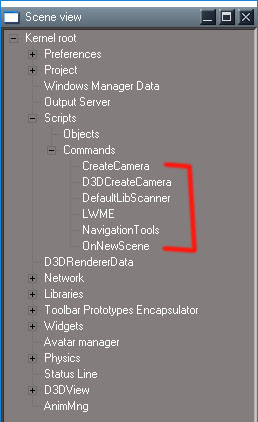
ScriptsCommands.jpg
None of those will work, there is no '/Scripts/Commands/RenderScene' or any of the others.

unpatched render buttons:

Code: Select all

OfflineRender.OpenView('',0,0);OfflineRender.RenderScene('')

Widgets.ReplaceWidget('{88839603-7F98-41f0-96AC-BE94E801CFF3}','/Widgets/Tools/Offline render/Area scene render','Default','','dummy')

OfflineRender.OpenView('',0,0);OfflineRender.RenderObject('')

OfflineRender.OpenView('',0,0);OfflineRender.RenderAnimation('')
Clinton Reese

http://clintons3d.com
User avatar
trueBlue
Captain
Posts: 5548
Joined: 06 Jul 2009, 22:50
Type the number ten into the box: 10

Re: Yafaray4tS v0.9.0

Post by trueBlue »

clintonman wrote: 12 Jul 2018, 02:46
trueBlue wrote: 12 Jul 2018, 02:15 I am getting lost after your last two code changes
...
You can quote the confusing parts and I can try to answer.
Wasn't sure which script you were referring too.
It's all good since you uploaded all the changes.
With regards to the yaf render buttons. Does these changes look right to you? Can you try them in the unpatched version?

Code: Select all

//WorkspaceMain Update 2
OfflineRender.OpenView('',0,0);OfflineRender.RenderScene('');Activity.Run('/Scripts/Commands/RenderScene')
OfflineRender.OpenView('',0,0);Activity.Run('/Scripts/Commands/RenderObject')
OfflineRender.OpenView('',0,0);Activity.Run('/Scripts/Commands/RenderAnimation');
RsTool.AddPrimitive('/Widgets/Tools/Primitives/Primitive tool','{B1D12AD1-47D4-4e6c-8227-DC80FF55D7BB}{A46795D3-0DE2-4ed8-9FB6-91D84FB9F1EB}(/Preferences/Cameras/Factory preferences){/Preferences/Lights/Preferences}','/Preferences/Cameras/Camera');

//WorkspaceMain2 Update 3 to present
OfflineRender.OpenView('',0,0);Activity.Run('/Scripts/Commands/RenderScene');
OfflineRender.OpenView('',0,0);Activity.Run('/Scripts/Commands/RenderObject');
OfflineRender.OpenView('',0,0);Activity.Run('/Scripts/Commands/RenderAnimation');
RsTool.AddPrimitive('/Widgets/Tools/Primitives/Primitive tool','{B1D12AD1-47D4-4e6c-8227-DC80FF55D7BB}{A46795D3-0DE2-4ed8-9FB6-91D84FB9F1EB}(/Preferences/Cameras/Factory preferences){/Preferences/Lights/Preferences}','/Preferences/Cameras/Camera');

//Yafaray toolbar
OfflineRender.OpenView('',0,0);if (Node.Exists('/Scripts/Commands/RenderScene')){Activity.Run('/Scripts/Commands/RenderScene');}if (!Node.Exists('/Scripts/Commands/RenderScene')){OfflineRender.RenderScene('');Activity.Run('/Scripts/Commands/RenderScene');}
OfflineRender.OpenView('',0,0);if (Node.Exists('/Scripts/Commands/RenderObject')){Activity.Run('/Scripts/Commands/RenderObject');}
OfflineRender.OpenView('',0,0);if (Node.Exists('/Scripts/Commands/RenderAnimation')){Activity.Run('/Scripts/Commands/RenderAnimation');}
Especially the yaf render scene. If they do not work, can you copy the original commands?
User avatar
clintonman
Captain
Posts: 5659
Joined: 21 May 2009, 21:08
Type the number ten into the box: 0
Location: California

Re: Yafaray4tS v0.9.0

Post by clintonman »

trueBlue wrote: 12 Jul 2018, 02:15 I am getting lost after your last two code changes
...
You can quote the confusing parts and I can try to answer.
Clinton Reese

http://clintons3d.com
User avatar
trueBlue
Captain
Posts: 5548
Joined: 06 Jul 2009, 22:50
Type the number ten into the box: 10

Re: Yafaray4tS v0.9.0

Post by trueBlue »

I am getting lost after your last two code changes
I did find a typo with the camera in the install script

Code: Select all

//RsFileIO.LoadObject(tS + '\\Rs Main Libraries\\YafaRay4tS Setup\\YafaRay Camera.RsObj', "/Preferences/Cameras")
   RsFileIO.LoadObject(tS + '\\Rs Main Libraries\\YafaRay4tS Setup\\Yafaray Camera.RsObj', "/Preferences/Cameras")
//Add next line   		
   RsFileIO.SaveObject("/Preferences/Cameras", tS + '\\preobjects\\Cameras.RsObj')
  
Edit: Cross post
I'll fix the buttons
User avatar
clintonman
Captain
Posts: 5659
Joined: 21 May 2009, 21:08
Type the number ten into the box: 0
Location: California

Re: Yafaray4tS v0.9.0

Post by clintonman »

RC12 - works with unpatched truespace, render buttons in yafaray toolbar still broken
Requirements - plugin file, c3d persistent installed and a reset to default context has to be run before the installer will run. The reset default context creates the reset.js file, fresh install does not have that file.

TODO: test with patched/unofficial updated version
Attachments
YafaRay4tSv090-RC-12.zip
(6.82 MiB) Downloaded 161 times
Clinton Reese

http://clintons3d.com
User avatar
clintonman
Captain
Posts: 5659
Joined: 21 May 2009, 21:08
Type the number ten into the box: 0
Location: California

Re: Yafaray4tS v0.9.0

Post by clintonman »

Last set of changes

delete line added for camera to be like the lights load

Code: Select all

		Node.Delete("/Preferences/Cameras/Yafaray Camera")
		RsFileIO.LoadObject(tS + '\\Rs Main Libraries\\YafaRay4tS Setup\\Yafaray Camera.RsObj', "/Preferences/Cameras")
backup files for safety

Code: Select all

if(!fso.FileExists(System.GetMainDir() + "\\Scripts\\preobjects\\LightsORIGINAL.rsobj")) {
			fso.CopyFile(System.GetMainDir() + "\\Scripts\\preobjects\\Lights.rsobj", System.GetMainDir() + "\\Scripts\\preobjects\\LightsORIGINAL.rsobj", true);
		}
		if(!fso.FileExists(System.GetMainDir() + "\\Scripts\\preobjects\\CamerasORIGINAL.RsObj")) {
			fso.CopyFile(System.GetMainDir() + "\\Scripts\\preobjects\\Cameras.RsObj", System.GetMainDir() + "\\Scripts\\preobjects\\CamerasORIGINAL.RsObj", true);
		}
added to uninstall

Code: Select all

		Node.Delete("/Preferences/Cameras/Yafaray Camera")
		RsFileIO.SaveObject(tS + '\\Scripts\\preobjects\\Cameras.RsObj', "/Preferences/Cameras")
Clinton Reese

http://clintons3d.com
User avatar
trueBlue
Captain
Posts: 5548
Joined: 06 Jul 2009, 22:50
Type the number ten into the box: 10

Re: Yafaray4tS v0.9.0

Post by trueBlue »

clintonman wrote: 12 Jul 2018, 01:19
trueBlue wrote: 12 Jul 2018, 01:14
clintonman wrote: 12 Jul 2018, 00:51 bugs Yafaray toolbar buttons:
Render scene, Render animation and Render object buttons do not work with unpatched truespace

camera button does not work - checking earlier posts now, thought that was fixed already

Edit: more info
/Scripts/Commands/RenderScene does not exists in unpatched truespace, same for /Scripts/Commands/RenderObject
animation button is set to run RenderObject instead of RenderAnimation

Code: Select all

OfflineRender.OpenView('',0,0);Activity.Run('/Scripts/Commands/RenderScene');

OfflineRender.OpenView('',0,0);Activity.Run('/Scripts/Commands/RenderObject');

OfflineRender.OpenView('',0,0);Activity.Run('/Scripts/Commands/RenderObject');
I'll put a if node exist for the Activity.Run for those and fix the RenderAnimation

Not sure what to do with the Yaf Camera widget
Found problem with camera
name of file has lower case R - "YafaRay Camera" vs "Yafaray Camera"

Code: Select all

RsFileIO.LoadObject(tS + '\\Rs Main Libraries\\YafaRay4tS Setup\\YafaRay Camera.RsObj', "/Preferences/Cameras")
Edit: nope, that wasn't it. Truespace is being weird.

Edit: OK, think I found the real reason. Saved camera to preobjects - now survives context reset

Code: Select all

RsFileIO.SaveObject(tS + "\\Scripts\\preobjects\\Cameras.RsObj", "/Preferences/Cameras")

Code: Select all

//WorkspaceMain
OfflineRender.OpenView('',0,0);OfflineRender.RenderScene('');Activity.Run('/Scripts/Commands/RenderScene')
OfflineRender.OpenView('',0,0);Activity.Run('/Scripts/Commands/RenderObject')
OfflineRender.OpenView('',0,0);Activity.Run('/Scripts/Commands/RenderAnimation');
RsTool.AddPrimitive('/Widgets/Tools/Primitives/Primitive tool','{B1D12AD1-47D4-4e6c-8227-DC80FF55D7BB}{A46795D3-0DE2-4ed8-9FB6-91D84FB9F1EB}(/Preferences/Cameras/Factory preferences){/Preferences/Lights/Preferences}','/Preferences/Cameras/Camera');
RsTool.AddPrimitive('/Widgets/Tools/Primitives/Primitive tool','{B1D12AD1-47D4-4e6c-8227-DC80FF55D7BB}{A46795D3-0DE2-4ed8-9FB6-91D84FB9F1EB}(/Preferences/Cameras/Factory preferences){/Preferences/Lights/Preferences}','/Preferences/Cameras/EntryPoint');

//WorkspaceMain2
OfflineRender.OpenView('',0,0);Activity.Run('/Scripts/Commands/RenderScene');
OfflineRender.OpenView('',0,0);Activity.Run('/Scripts/Commands/RenderObject');
OfflineRender.OpenView('',0,0);Activity.Run('/Scripts/Commands/RenderAnimation');
RsTool.AddPrimitive('/Widgets/Tools/Primitives/Primitive tool','{B1D12AD1-47D4-4e6c-8227-DC80FF55D7BB}{A46795D3-0DE2-4ed8-9FB6-91D84FB9F1EB}(/Preferences/Cameras/Factory preferences){/Preferences/Lights/Preferences}','/Preferences/Cameras/Camera');

//Yafaray toolbar
OfflineRender.OpenView('',0,0);if (Node.Exists('/Scripts/Commands/RenderScene')){OfflineRender.RenderScene('');Activity.Run('/Scripts/Commands/RenderScene');}
OfflineRender.OpenView('',0,0);if (Node.Exists('/Scripts/Commands/RenderObject')){Activity.Run('/Scripts/Commands/RenderObject');}
OfflineRender.OpenView('',0,0);if (Node.Exists('/Scripts/Commands/RenderAnimation')){Activity.Run('/Scripts/Commands/RenderAnimation');}
RsTool.AddPrimitive('/Widgets/Tools/Primitives/Primitive tool','{B1D12AD1-47D4-4e6c-8227-DC80FF55D7BB}{A46795D3-0DE2-4ed8-9FB6-91D84FB9F1EB}(/Preferences/Cameras/Factory preferences){/Preferences/Lights/Preferences}','/Preferences/Cameras/Yafaray Camera');
No change with the Yaf cam
User avatar
clintonman
Captain
Posts: 5659
Joined: 21 May 2009, 21:08
Type the number ten into the box: 0
Location: California

Re: Yafaray4tS v0.9.0

Post by clintonman »

trueBlue wrote: 12 Jul 2018, 01:14
clintonman wrote: 12 Jul 2018, 00:51 bugs Yafaray toolbar buttons:
Render scene, Render animation and Render object buttons do not work with unpatched truespace

camera button does not work - checking earlier posts now, thought that was fixed already

Edit: more info
/Scripts/Commands/RenderScene does not exists in unpatched truespace, same for /Scripts/Commands/RenderObject
animation button is set to run RenderObject instead of RenderAnimation

Code: Select all

OfflineRender.OpenView('',0,0);Activity.Run('/Scripts/Commands/RenderScene');

OfflineRender.OpenView('',0,0);Activity.Run('/Scripts/Commands/RenderObject');

OfflineRender.OpenView('',0,0);Activity.Run('/Scripts/Commands/RenderObject');
I'll put a if node exist for the Activity.Run for those and fix the RenderAnimation

Not sure what to do with the Yaf Camera widget
Found problem with camera
name of file has lower case R - "YafaRay Camera" vs "Yafaray Camera"

Code: Select all

RsFileIO.LoadObject(tS + '\\Rs Main Libraries\\YafaRay4tS Setup\\YafaRay Camera.RsObj', "/Preferences/Cameras")
Edit: nope, that wasn't it. Truespace is being weird.

Edit: OK, think I found the real reason. Saved camera to preobjects - now survives context reset

Code: Select all

RsFileIO.SaveObject(tS + "\\Scripts\\preobjects\\Cameras.RsObj", "/Preferences/Cameras")
Clinton Reese

http://clintons3d.com
User avatar
trueBlue
Captain
Posts: 5548
Joined: 06 Jul 2009, 22:50
Type the number ten into the box: 10

Re: Yafaray4tS v0.9.0

Post by trueBlue »

clintonman wrote: 12 Jul 2018, 00:51 bugs Yafaray toolbar buttons:
Render scene, Render animation and Render object buttons do not work with unpatched truespace

camera button does not work - checking earlier posts now, thought that was fixed already

Edit: more info
/Scripts/Commands/RenderScene does not exists in unpatched truespace, same for /Scripts/Commands/RenderObject
animation button is set to run RenderObject instead of RenderAnimation

Code: Select all

OfflineRender.OpenView('',0,0);Activity.Run('/Scripts/Commands/RenderScene');

OfflineRender.OpenView('',0,0);Activity.Run('/Scripts/Commands/RenderObject');

OfflineRender.OpenView('',0,0);Activity.Run('/Scripts/Commands/RenderObject');
I'll put a if node exist for the Activity.Run for those and fix the RenderAnimation

Not sure what to do with the Yaf Camera widget
User avatar
clintonman
Captain
Posts: 5659
Joined: 21 May 2009, 21:08
Type the number ten into the box: 0
Location: California

Re: Yafaray4tS v0.9.0

Post by clintonman »

bugs Yafaray toolbar buttons:
Render scene, Render animation and Render object buttons do not work with unpatched truespace

camera button does not work - checking earlier posts now, thought that was fixed already

Edit: more info
/Scripts/Commands/RenderScene does not exists in unpatched truespace, same for /Scripts/Commands/RenderObject
animation button is set to run RenderObject instead of RenderAnimation

Code: Select all

OfflineRender.OpenView('',0,0);Activity.Run('/Scripts/Commands/RenderScene');

OfflineRender.OpenView('',0,0);Activity.Run('/Scripts/Commands/RenderObject');

OfflineRender.OpenView('',0,0);Activity.Run('/Scripts/Commands/RenderObject');
Clinton Reese

http://clintons3d.com
User avatar
clintonman
Captain
Posts: 5659
Joined: 21 May 2009, 21:08
Type the number ten into the box: 0
Location: California

Re: Yafaray4tS v0.9.0

Post by clintonman »

line 56 added call to alter reset.js file so unpatched tS can recover from a context reset, uses the C3DReset

Code: Select all

		UpdateResetFile();
and at the end

Code: Select all

function UpdateResetFile()
{
	//trim polyfill
	if (!String.prototype.trim) {
  		String.prototype.trim = function () {
    		return this.replace(/^[\s\uFEFF\xA0]+|[\s\uFEFF\xA0]+$/g, '');
  		};
	}

	//RsFileIO.SaveObject(System.GetMainDir()+ '\\Scripts\\preobjects\\PostReset.RsObj', System.ThisOwner() + "/PostReset")

	var fso = new ActiveXObject("Scripting.FileSystemObject");

	//
	//edit reset.js file to call PostReset
	//
	var forReading = 1, forWriting = 2, forAppending = 8;
	var TristateUseDefault = -2, TristateTrue = -1, TristateFalse = 0; 

	if(postResetIsAlreadyDone()) {
		System.Trace("reset.js file already set for Context Reset processing. no changes made.");
		//Node.Delete(System.ThisOwner())
		return;
	}

	if(!fso.FileExists(System.GetMainDir() + "\\Scripts\\resetORIGINAL.js")) {
		fso.CopyFile(System.GetMainDir() + "\\Scripts\\reset.js", System.GetMainDir() + "\\Scripts\\resetORIGINAL.js", true);
	}

	var f = fso.GetFile(System.GetMainDir() + "\\Scripts\\reset.js");
	var connToFile = f.OpenAsTextStream( forReading, TristateUseDefault );
	var filecontents = connToFile.ReadAll();
	connToFile.Close();

	var fileArray = filecontents.split("\n");
	var execpostFound = false;

	//replace ScriptObject.Execute with Activity.Run because if it deletes itself it blocks others

	var reC3D = /ScriptObject\.Execute\("Project\/Space 3D\/C3DReset"\);/;
	var rePost = /ScriptObject\.Execute\("\/PostReset"\);/;

	for (var i = 0; i< fileArray.length;i++) {
		if(fileArray[i].match(rePost)) {
			System.Trace(fileArray[i]);
			fileArray[i] = 'Activity.Run("/PostReset");';
			execpostFound = true;
		}
		if(fileArray[i].match(reC3D)) {
			System.Trace(fileArray[i]);
			fileArray[i] = 'Activity.Run("Project/Space 3D/C3DReset");';
		}
	}

	connToFile = f.OpenAsTextStream( forWriting, TristateUseDefault );
	for(var j=0; j<fileArray.length; j++) {
		connToFile.WriteLine(fileArray[j].trim());
	}

	connToFile.Close();

	//if PostReset entry not found add it at the end of the file

	if(!execpostFound) {
		connToFile = f.OpenAsTextStream( forAppending, TristateUseDefault );
		connToFile.WriteLine("RsFileIO.LoadObject( rosDir + '\\\\scripts\\\\preObjects\\\\C3DReset.RsObj', '/');");
		connToFile.WriteLine('Activity.Run("/C3DReset");');
	}

	connToFile.Close();
	System.Trace("reset.js now set for Context Reset processing");
}

function postResetIsAlreadyDone()
{
	var fso = new ActiveXObject("Scripting.FileSystemObject");

	var forReading = 1, forWriting = 2, forAppending = 8;
	var TristateUseDefault = -2, TristateTrue = -1, TristateFalse = 0; 

	if(!fso.FileExists(System.GetMainDir()+ "\\Scripts\\reset.js"))
		return true;

	var f = fso.GetFile(System.GetMainDir() + "\\Scripts\\reset.js");

	if(!f) return true;

	var lines = [];

	var connToFile = f.OpenAsTextStream( forReading, TristateUseDefault );

	//var re = 'ScriptObject.Execute("/PostReset");';
	var re = 'Activity.Run("/C3DReset");';

	while (!connToFile.AtEndOfStream) {

		var curline = connToFile.ReadLine();
		if(curline == re) {
			connToFile.Close();
			return true;
		}
	}

	connToFile.Close();
	return false;
}
Clinton Reese

http://clintons3d.com
User avatar
clintonman
Captain
Posts: 5659
Joined: 21 May 2009, 21:08
Type the number ten into the box: 0
Location: California

Re: Yafaray4tS v0.9.0

Post by clintonman »

Changed C3DReset - was setting improper default values
YafaRay4tS_Installer/C3DReset

Code: Select all

		//Node.Value("/Yafaray Folder/YafaRay4tS", "useRenderToFile") = 0
		//Node.Value("/Yafaray Folder/YafaRay4tS", "useOptDetector") = 0
Removed same from the Yafaray4tS nodes reset button
Clinton Reese

http://clintons3d.com
User avatar
clintonman
Captain
Posts: 5659
Joined: 21 May 2009, 21:08
Type the number ten into the box: 0
Location: California

Re: Yafaray4tS v0.9.0

Post by clintonman »

Added a "Pre-install" node between "Reset Toolbars Install" and "Install YafaRay4tSv0.9.0" to be sure Scripts/CustomCommands exists.

Code: Select all

	mainDir = System.GetMainDir();

	var fso = new ActiveXObject("Scripting.FileSystemObject");
	if(!fso.FolderExists(mainDir + "\\Scripts\\clintonobjects"))
		return;

	if(Node.Exists("Scripts/ReloadCustomScripts"))
		Node.Delete("Scripts/ReloadCustomScripts");

	RsFileIO.LoadObject(System.GetMainDir() + '\\Scripts\\clintonobjects\\ReloadCustomScripts.RsObj', "Scripts");
	Activity.Run("Scripts/ReloadCustomScripts");
Clinton Reese

http://clintons3d.com
User avatar
trueBlue
Captain
Posts: 5548
Joined: 06 Jul 2009, 22:50
Type the number ten into the box: 10

Re: Yafaray4tS v0.9.0

Post by trueBlue »

I was getting an error.
Fixed it by adding a Var fso
putting a period between !fso FileExists
and changing System.GetMainDir() to mainDir

Code: Select all

	owner = System.ThisOwner();
	mainDir = System.GetMainDir();

	try {
		var util = System.CreateDO("Clintons3D Package/Utility functions");
	} catch(e) {
		System.Alert("Error: Clintons3D Package must be installed and loaded first.");
		return;
	}
	var fso = new ActiveXObject("Scripting.FileSystemObject");
	if(!fso.FileExists(mainDir + "\\Scripts\\reset.js")) {
		System.Alert("Error: trueSpace must be restarted via context reset at least once before installation.");
		return;
	}

I did not have a //Node.Delete(System.ThisOwner()) in the "Integrated Button Install script
User avatar
clintonman
Captain
Posts: 5659
Joined: 21 May 2009, 21:08
Type the number ten into the box: 0
Location: California

Re: Yafaray4tS v0.9.0

Post by clintonman »

More checks before installation: make sure the plugin is installed, require that truespace has been reset at least one time in the past before installation.
top of YafaRay4tS_Installer/Install YafaRay4tSv0.9.0

Code: Select all

	try {
		var util = System.CreateDO("Clintons3D Package/Utility functions");
	} catch(e) {
		System.Alert("Error: Clintons3D Package must be installed and loaded first.");
		return;
	}

	if(!fsoFileExists(System.GetMainDir() + "\\Scripts\\reset.js")) {
		System.Alert("Error: Truespace must be restarted via context reset at least once before installation.");
		return;
	}
remove node delete near bottom which prevents "Integrated Button Install" from running

Code: Select all

		//Node.Delete(System.ThisOwner())
moved to the bottom of YafaRay4tS_Installer/Integrated Button Install

Code: Select all

	Node.Delete(System.ThisOwner());
Last edited by clintonman on 12 Jul 2018, 00:39, edited 1 time in total.
Clinton Reese

http://clintons3d.com
User avatar
trueBlue
Captain
Posts: 5548
Joined: 06 Jul 2009, 22:50
Type the number ten into the box: 10

Re: Yafaray4tS v0.9.0

Post by trueBlue »

Okay here it is:
When testing RC -9 with Vray Loaded I discovered several issues.
I committed most of the changes and if you have any questions by all means ask.
I have used your PostReset code with some additional code and renamed it C3DReset
The ReadMe has been updated with new instructions, Prerequisites, additions, and renamed to YafaRay4tSv090 Installation Instructions.txt
I have included a WIP new YafaRay4tS Help.chm mostly adding the installation.htm and history.htm which is simular to the YafaRay4tSv090 Installation Instructions.txt
I think you will be able to figure out why some of the changes were neccessary by reading the instructions.
If you test this with Vray Loaded you will notice that Yafaray does not come in as the Offline Renderer.
That is because tS loads in alphabetical order. So to switch to Yafaray you need to change the Renderer and right click any of the Offline Render icons or the YafaRay Settings icon.
The YafaRay Export and Render icon was removed.
The YafaRay Settings icon's LMB does not do anything (Load the YafaRay4tS) if Vray is the Renderer until you change the Renderer to Yafaray. The RMB switches to Yafaray.
I changed the way the YafaRay toolbar loads by calling it from the library.

You mentioned that the YafarayScripts should be removed from the CustomStore with the Uninstall, that did not work out and causes problems with the C3DReset and Update 4. I did remove it from CustomCommands though.
Removed due to update
User avatar
clintonman
Captain
Posts: 5659
Joined: 21 May 2009, 21:08
Type the number ten into the box: 0
Location: California

Re: Yafaray4tS v0.9.0

Post by clintonman »

trueBlue wrote: 11 Jul 2018, 18:43 No it's just cropped out.
Do we need to add a 'Set from Keyframe' button to the Anim aspect?
And or anything else?

Is it something I can do, or do you want what I have presently?
Replace the "Set Timeline Range" button with the 2 buttons "Set from Timeline" and "Set from Keyframes".
I don't like the "Set Timeline Range" button because it changes truespace animation preferences when it should only be changing render preferences.
Clinton Reese

http://clintons3d.com
User avatar
trueBlue
Captain
Posts: 5548
Joined: 06 Jul 2009, 22:50
Type the number ten into the box: 10

Re: Yafaray4tS v0.9.0

Post by trueBlue »

No it's just cropped out.
Do we need to add a 'Set from Keyframe' button to the Anim aspect?
And or anything else?

Is it something I can do, or do you want what I have presently?
User avatar
clintonman
Captain
Posts: 5659
Joined: 21 May 2009, 21:08
Type the number ten into the box: 0
Location: California

Re: Yafaray4tS v0.9.0

Post by clintonman »

trueBlue wrote: 11 Jul 2018, 17:52 Almost finished with the installer.
I have incorporated your last two updates.
What needs to be done with the Anim aspect?
Buttons?
Anim aspect.PNG
Yep, I guess so. I don't see the sequence player, is it being dropped?
Clinton Reese

http://clintons3d.com
User avatar
trueBlue
Captain
Posts: 5548
Joined: 06 Jul 2009, 22:50
Type the number ten into the box: 10

Re: Yafaray4tS v0.9.0

Post by trueBlue »

Almost finished with the installer.
I have incorporated your last two updates.
What needs to be done with the Anim aspect?
Buttons?
Anim aspect.PNG
User avatar
clintonman
Captain
Posts: 5659
Joined: 21 May 2009, 21:08
Type the number ten into the box: 0
Location: California

Re: Yafaray4tS v0.9.0

Post by clintonman »

trueBlue wrote: 11 Jul 2018, 15:38 Camera aspect
Set Camera button

Code: Select all

Path = Node.Selected(0);

if (Node.isCamera(Path)) {
  scene = Space.CurrentScene();
  scenelen = scene.length;
  relpath = Path.substring(scenelen)
  Node.Value("%THIS_NAME%" + "/Cam Name", "CamPath") = relpath;
  Activity.Run("%THIS_NAME%" + "/Cam Name")
  Node.Value("%THIS_NAME%", "Yaf_CamChoice") = "1"
}
else
  System.Alert("The current selected object is not a camera.  Please select a camera.");
if (!Node.isCamera(Path)) {
  Node.Value("%THIS_NAME%", "Yaf_CamChoice") = "0"
}
Nothing selected error
Check for existence of a selection Path && ...

Code: Select all

Path = Node.FirstSelected();

if (Path && Node.isCamera(Path)) {
  scene = Space.CurrentScene();
  scenelen = scene.length;
  relpath = Path.substring(scenelen)
  Node.Value("%THIS_NAME%" + "/Cam Name", "CamPath") = relpath;
  Activity.Run("%THIS_NAME%" + "/Cam Name")
  Node.Value("%THIS_NAME%", "Yaf_CamChoice") = "1"
}
else
  System.Alert("The current selected object is not a camera.  Please select a camera.");
if (!Node.isCamera(Path)) {
  Node.Value("%THIS_NAME%", "Yaf_CamChoice") = "0"
}
Clinton Reese

http://clintons3d.com
User avatar
trueBlue
Captain
Posts: 5548
Joined: 06 Jul 2009, 22:50
Type the number ten into the box: 10

Re: Yafaray4tS v0.9.0

Post by trueBlue »

Camera aspect
Set Camera button

Code: Select all

Path = Node.Selected(0);

if (Node.isCamera(Path)) {
  scene = Space.CurrentScene();
  scenelen = scene.length;
  relpath = Path.substring(scenelen)
  Node.Value("%THIS_NAME%" + "/Cam Name", "CamPath") = relpath;
  Activity.Run("%THIS_NAME%" + "/Cam Name")
  Node.Value("%THIS_NAME%", "Yaf_CamChoice") = "1"
}
else
  System.Alert("The current selected object is not a camera.  Please select a camera.");
if (!Node.isCamera(Path)) {
  Node.Value("%THIS_NAME%", "Yaf_CamChoice") = "0"
}
Nothing selected error
Attachments
Select Camera error when nothing selected.PNG
Select Camera error when nothing selected.PNG (9.09 KiB) Viewed 4106 times
User avatar
trueBlue
Captain
Posts: 5548
Joined: 06 Jul 2009, 22:50
Type the number ten into the box: 10

Re: Yafaray4tS v0.9.0

Post by trueBlue »

clintonman wrote: 11 Jul 2018, 01:17
trueBlue wrote: 10 Jul 2018, 18:28 ...
I did notice though when both Vray and Clintons3D Package are not Loaded, the YafaRay4tS Render and Export icon shows the Display, opens the Offline renderers with Yafaray loaded, even though it is disabled. And the Render Scene icon displays the trueSpace Warning that no renderer is installed. So that is misleading.
...
Having a hard time following the flow here, but I think you have to restart truespace to really unload a plugin. Also both Yafaray and vray show in the list of offline renderers after both Vray and Clintons3D Package are unloaded, so that's just the way it behaves I guess.
Yep always reboot tS after making changes in the Package Manager.
Even though they are listed they are disabled. Look inside and you will see that they are red.
User avatar
clintonman
Captain
Posts: 5659
Joined: 21 May 2009, 21:08
Type the number ten into the box: 0
Location: California

Re: Yafaray4tS v0.9.0

Post by clintonman »

trueBlue wrote: 11 Jul 2018, 01:03 Was NOT me, but Yay!
I am getting closer, it works from a script but not a button. OMG

Code: Select all

var strEnum = System.CreateDO("Common Data Package/String Enum Data");try {strEnum = Node.Value("/Offline renderers", "Renderer");} catch(e) {}var selString = strEnum.GetSelectedString();if(selString == "Vray photo renderer")  {return;}if (Node.Exists(Space.CurrentScene()+"/YafaRay4tS")){} else {if(Node.Exists("/Yafaray Folder")){Node.Copy("/Yafaray Folder/YafaRay4tS", Space.CurrentScene());}};Activity.Run(Space.CurrentScene() + "/YafaRay4tS/Lighting Method Switch");Activity.Run("/Yafaray Folder/YafaRay4tS/Switch2Yafaray");OfflineRender.OpenPreferencesPanel()
You could always just call command nodes instead of stuffing it all into the buttons.
Possible problem with the code

Code: Select all

var strEnum = System.CreateDO("Common Data Package/String Enum Data");try {strEnum = Node.Value("/Offline renderers", "Renderer");} catch(e) {}var selString = strEnum.GetSelectedString();...
Possible problem with the code, when you read the string it may be invalid and cause an error. For safety I would put a return inside the catch block instead of leaving it empty.
Clinton Reese

http://clintons3d.com
User avatar
clintonman
Captain
Posts: 5659
Joined: 21 May 2009, 21:08
Type the number ten into the box: 0
Location: California

Re: Yafaray4tS v0.9.0

Post by clintonman »

trueBlue wrote: 10 Jul 2018, 18:28 ...
I did notice though when both Vray and Clintons3D Package are not Loaded, the YafaRay4tS Render and Export icon shows the Display, opens the Offline renderers with Yafaray loaded, even though it is disabled. And the Render Scene icon displays the trueSpace Warning that no renderer is installed. So that is misleading.
...
Having a hard time following the flow here, but I think you have to restart truespace to really unload a plugin. Also both Yafaray and vray show in the list of offline renderers after both Vray and Clintons3D Package are unloaded, so that's just the way it behaves I guess.
Clinton Reese

http://clintons3d.com
User avatar
trueBlue
Captain
Posts: 5548
Joined: 06 Jul 2009, 22:50
Type the number ten into the box: 10

Re: Yafaray4tS v0.9.0

Post by trueBlue »

Was NOT me, but Yay!
I am getting closer, it works from a script but not a button. OMG

Code: Select all

var strEnum = System.CreateDO("Common Data Package/String Enum Data");try {strEnum = Node.Value("/Offline renderers", "Renderer");} catch(e) {}var selString = strEnum.GetSelectedString();if(selString == "Vray photo renderer")  {return;}if (Node.Exists(Space.CurrentScene()+"/YafaRay4tS")){} else {if(Node.Exists("/Yafaray Folder")){Node.Copy("/Yafaray Folder/YafaRay4tS", Space.CurrentScene());}};Activity.Run(Space.CurrentScene() + "/YafaRay4tS/Lighting Method Switch");Activity.Run("/Yafaray Folder/YafaRay4tS/Switch2Yafaray");OfflineRender.OpenPreferencesPanel()
User avatar
clintonman
Captain
Posts: 5659
Joined: 21 May 2009, 21:08
Type the number ten into the box: 0
Location: California

Re: Yafaray4tS v0.9.0

Post by clintonman »

because somebody who will remain nameless decided to call me out on my laziness. :P
full check of selected objects keyframe range

YafaRay4tS/SetFromKeyframes

Code: Select all

// Execute 
// Called to execute the command 
function Execute(params)
{
	var owner = System.ThisOwner();
	var objectRenderMode = Node.Value(owner, 'objectRenderMode');
	var selectedNode = Node.FirstSelected();

	//save playrange
	var playRangeStart = RsAnimPref.PlayRangeStart;
	var playRangeEnd = RsAnimPref.PlayRangeEnd;

	//scene mode not object mode
	if ((objectRenderMode & 1) == 0) {
		selectedNode = "";
	}

	var animClip = FindAnimClip(selectedNode)

	if(animClip.length > 0) {
		animStart = animClip[0];
		animEnd = animClip[1];
	} else {
		//alters the play range anim pref values"
		try {
			animStart = RsTime.EvalAnimStart('');
			animEnd = RsTime.EvalAnimEnd('');
		} catch(e) {
			animStart = 0;
			animEnd = 0;
		}
	}

	Node.Value(owner, "Start_Frame") = animStart;
	Node.Value(owner, "Number_Start") = animStart;
	Node.Value(owner, "End_Frame") = animEnd;

	//restore anim pref values
	RsAnimPref.PlayRangeStart = playRangeStart;
	RsAnimPref.PlayRangeEnd = playRangeEnd;

	//NOTE
	//RsTime.EvalAnimStart and RsTime.EvalAnimEnd seem to ignore all arguments
	// and only operate on the entire scene animation
}

function FindAnimClip(selectedNode)
{
	var clipstart=99999, clipend=-99999;
	if(selectedNode == "" || !Node.Exists(selectedNode))
		return [];

	var numChildren = Node.SubObjectCount(selectedNode);
	for(var i=0;i<numChildren;i++) {
		var childNode = selectedNode + "/" + Node.SubObject(selectedNode, i);
		if(Node.ConExists(childNode, "AnimData") && Node.ConExists(childNode, "AnimTrack")) {

			if(Node.Value(childNode, "ClipDisabled"))
				continue;

			if(clipstart > Node.Value(childNode, "ClipStart"))
				clipstart = Node.Value(childNode, "ClipStart");

			if(clipend < Node.Value(childNode, "ClipEnd"))
				clipend = Node.Value(childNode, "ClipEnd");

		}
	}

	if(clipstart==99999 && clipend ==-99999)
		return [];

	return [clipstart, clipend];
}
Clinton Reese

http://clintons3d.com
User avatar
clintonman
Captain
Posts: 5659
Joined: 21 May 2009, 21:08
Type the number ten into the box: 0
Location: California

Re: Yafaray4tS v0.9.0

Post by clintonman »

trueBlue wrote: 11 Jul 2018, 00:23 Snippets? Bet you have a awesome collection! How much do you want that tSBible?
I did not want clear it though. I was wanting a script that does nothing (return) if the Vray photo render is selected in that ComboCtrl.
It just clears invalid value in the script. If you don't want the clear write it the way you like. Just don't try to read the value if it goes to the catch portion.
Clinton Reese

http://clintons3d.com
User avatar
trueBlue
Captain
Posts: 5548
Joined: 06 Jul 2009, 22:50
Type the number ten into the box: 10

Re: Yafaray4tS v0.9.0

Post by trueBlue »

Snippets? Bet you have a awesome collection! How much do you want that tSBible?
I did not want clear it though. I was wanting a script that does nothing (return) if the Vray photo render is selected in that ComboCtrl.
User avatar
clintonman
Captain
Posts: 5659
Joined: 21 May 2009, 21:08
Type the number ten into the box: 0
Location: California

Re: Yafaray4tS v0.9.0

Post by clintonman »

trueBlue wrote: 10 Jul 2018, 22:30 Clinton,
I have been working on the installer (I found a few problems with the PostReset script) and I have everything done except a button command.
How would you create a button command that checks to see if
Node.Value("/Offline renderers", "Renderer") = Vray photo renderer
return


I so hate ComboCtrls !!! :evil:
Good timing, just last night I started gathering code snippets for tS scripting. TryCatch is needed for when the connector is in an unstable state.

Code: Select all

	var strEnum = System.CreateDO("Common Data Package/String Enum Data");
	try {
		strEnum = Node.Value("/Offline renderers", "Renderer");
	} catch(e) {
		strEnum.Clear();
	}
	var selString = strEnum.GetSelectedString();
	System.Alert(selString);
Clinton Reese

http://clintons3d.com
User avatar
trueBlue
Captain
Posts: 5548
Joined: 06 Jul 2009, 22:50
Type the number ten into the box: 10

Re: Yafaray4tS v0.9.0

Post by trueBlue »

Clinton,
I have been working on the installer (I found a few problems with the PostReset script) and I have everything done except a button command.
How would you create a button command that checks to see if
Node.Value("/Offline renderers", "Renderer") = Vray photo renderer
return


I so hate ComboCtrls !!! :evil:
User avatar
trueBlue
Captain
Posts: 5548
Joined: 06 Jul 2009, 22:50
Type the number ten into the box: 10

Re: Yafaray4tS v0.9.0

Post by trueBlue »

Oh good! As said I have not tested that yet.

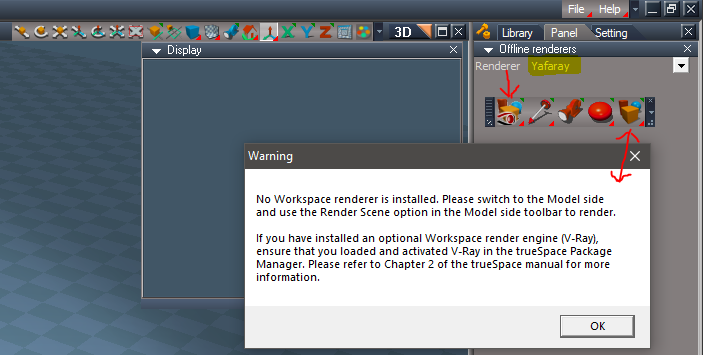
I just installed Vray and it seems to work as expected with both Renderers with the YafaRay4tS toolbar's Render icon's LMB being the same as tS Render icons. As said I did not test without the Update 4, so I do not know what was wrong there. Also could not tell what your change was. It looked the same to me.
I did notice though when both Vray and Clintons3D Package are not Loaded, the YafaRay4tS Render and Export icon shows the Display, opens the Offline renderers with Yafaray loaded, even though it is disabled. And the Render Scene icon displays the trueSpace Warning that no renderer is installed. So that is misleading.
No Plugins Loaded.PNG
Since you have adopted using tS Offline Render icons, I suggest that you remove the Render and Export icon.
Seems the easiest solution unless you have a better idea.
So to be clear:
1.) LMB commands is the same as tS
2.) Remove the Render and Export

3.) Yafaray Settings icon's LMB and RMB commands, you could add if the Offline renderers = Vray photo render -> return
So that you could stop the YafaRay4tS node from loading into the scene.
User avatar
clintonman
Captain
Posts: 5659
Joined: 21 May 2009, 21:08
Type the number ten into the box: 0
Location: California

Re: Yafaray4tS v0.9.0

Post by clintonman »

trueBlue wrote: 10 Jul 2018, 14:57 ...

Reading your new scripts ( I have not tested these yet) it looks like you are running two scripts at one time during a Reset. Also some of the code is duplicated in the C3DReset. This does not seem like a very good idea! Since you are making YafaRay4tS a persistent install, why can't the two scripts be combined into one C3DReset script? :idea: DRY
Also in IMMHO I strongly suggest that the trueSpace Reset to Default Context resets trueSpace, they way it originally does. No 3rd party toolbars opening after a reset. Vray does not do this. I think we should respect that a user may or may not want to install any 3rd party toolbars or plugins.
If you insist on wanting these to open after a reset, it is very easy to make that happen.
After a reset the default_layout.rsl is loaded. You simply open/place whatever toolbars you want, make any other changes, and save that layout to C:\trueSpace761\tS\default_layout.rsl.
read more closely, "if(false)" prevents that part from running, there is no toolbar opening.
Clinton Reese

http://clintons3d.com
User avatar
clintonman
Captain
Posts: 5659
Joined: 21 May 2009, 21:08
Type the number ten into the box: 0
Location: California

Re: Yafaray4tS v0.9.0

Post by clintonman »

trueBlue wrote: 10 Jul 2018, 14:57 Assuming that you fixed the YafaRay4tS toolbar's Render icons in RC 9, I think that we should make all of the LMB commands for the YafaRay toolbar's Render icons the same as the tS Render icons.
Render Scene:

Code: Select all

OfflineRender.OpenView('',0,0);Activity.Run('/Scripts/Commands/RenderScene')
I know, my bad for putting the if YafaRay4tS exist in there, but I did some more testing and I (Think) it is not needed.
I did not test this without the Update 4 like you did and I did not test this with Vray either.
...
So does that mean you're ok with the buttons running vray as well?
Clinton Reese

http://clintons3d.com
User avatar
trueBlue
Captain
Posts: 5548
Joined: 06 Jul 2009, 22:50
Type the number ten into the box: 10

Re: Yafaray4tS v0.9.0

Post by trueBlue »

Assuming that you fixed the YafaRay4tS toolbar's Render icons in RC 9, I think that we should make all of the LMB commands for the YafaRay toolbar's Render icons the same as the tS Render icons.
Render Scene:

Code: Select all

OfflineRender.OpenView('',0,0);Activity.Run('/Scripts/Commands/RenderScene')
I know, my bad for putting the if YafaRay4tS exist in there, but I did some more testing and I (Think) it is not needed.
I did not test this without the Update 4 like you did and I did not test this with Vray either.
As a test, try the YafaRay4tS toolbar's Render icons in there present RC 9 state verses the tS Render icons, with your plugin Loaded and Unloaded. Don't forget to reboot tS after Loading/Unloading your plugin.
My only goal for adding these render icons was to make it easier to open the YafaRay4tS aspects with the RMB commands.


Reading your new scripts ( I have not tested these yet) it looks like you are running two scripts at one time during a Reset. Also some of the code is duplicated in the C3DReset. This does not seem like a very good idea! Since you are making YafaRay4tS a persistent install, why can't the two scripts be combined into one C3DReset script? :idea: DRY
Also in IMMHO I strongly suggest that the trueSpace Reset to Default Context resets trueSpace, they way it originally does. No 3rd party toolbars opening after a reset. Vray does not do this. I think we should respect that a user may or may not want to install any 3rd party toolbars or plugins.
If you insist on wanting these to open after a reset, it is very easy to make that happen.
After a reset the default_layout.rsl is loaded. You simply open/place whatever toolbars you want, make any other changes, and save that layout to C:\trueSpace761\tS\default_layout.rsl.
User avatar
clintonman
Captain
Posts: 5659
Joined: 21 May 2009, 21:08
Type the number ten into the box: 0
Location: California

Re: Yafaray4tS v0.9.0

Post by clintonman »

trueBlue wrote: 10 Jul 2018, 13:58
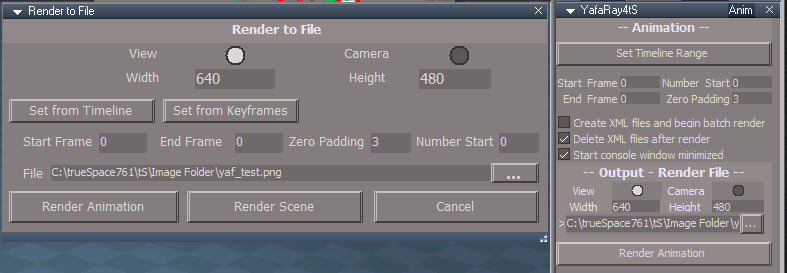
clintonman wrote: 09 Jul 2018, 07:05 RednerToFile2butts.jpg
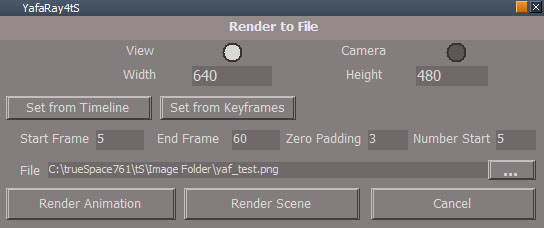
Changed the Set Timeline Range button behavior. It was changing the animation preference values and it should only be changing the rendering parameters. So split into 2 buttons

Set from Timeline button - sets the render frame range from the animation time - behaves like D3D Render to File dialog reset button

Code: Select all

Node.Value("%THIS_NAME%" , "Start_Frame") = Node.Value("AnimMng", "AnimStart");
Node.Value("%THIS_NAME%", "Number_Start") = Node.Value("AnimMng", "AnimStart");
Node.Value("%THIS_NAME%", "End_Frame") = Node.Value("AnimMng", "AnimEnd");


Set from Keyframes button - sets the render range from the scene min and max keyframe times
code moved from button into a command node
if object render will try to read range from the selected objects animation clip
otherwise it tries to read keyframe range for the whole scene

YafaRay4tS/SetFromKeyframes

Code: Select all

// Execute 
// Called to execute the command 
function Execute(params)
{
	var owner = System.ThisOwner();
	var objectRenderMode = Node.Value(owner, 'objectRenderMode');
	var selectedNode = Node.FirstSelected();

	//save playrange
	var playRangeStart = RsAnimPref.PlayRangeStart;
	var playRangeEnd = RsAnimPref.PlayRangeEnd;

	//scene mode not object mode
	if ((objectRenderMode & 1) == 0) {
		selectedNode = "";
	}

	if(selectedNode != "" && Node.Exists(selectedNode + "/AnimClip")) {
		animStart = Node.Value(selectedNode + "/AnimClip", "ClipStart");
		animEnd = Node.Value(selectedNode + "/AnimClip", "ClipEnd");
	} else {
		//alters the play range anim pref values"
		try {
			animStart = RsTime.EvalAnimStart('')
			animEnd = RsTime.EvalAnimEnd('')
		} catch(e) {
			animStart = 0;
			animEnd = 0;
		}
	}

	Node.Value(owner, "Start_Frame") = animStart;
	Node.Value(owner, "Number_Start") = animStart;
	Node.Value(owner, "End_Frame") = animEnd;

	//restore anim pref values
	RsAnimPref.PlayRangeStart = playRangeStart;
	RsAnimPref.PlayRangeEnd = playRangeEnd;

	//NOTE
	//RsTime.EvalAnimStart and RsTime.EvalAnimEnd seem to ignore all arguments
	// and only operate on the entire scene animation
}
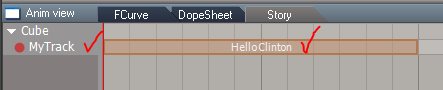
Hummm, you do know a user can rename the Track and AnimClip, right?
Rename AnimClip and Track.PNG
Yep, I was being lazy.
Clinton Reese

http://clintons3d.com
User avatar
trueBlue
Captain
Posts: 5548
Joined: 06 Jul 2009, 22:50
Type the number ten into the box: 10

Re: Yafaray4tS v0.9.0

Post by trueBlue »

clintonman wrote: 09 Jul 2018, 07:05 RednerToFile2butts.jpg
Changed the Set Timeline Range button behavior. It was changing the animation preference values and it should only be changing the rendering parameters. So split into 2 buttons

Set from Timeline button - sets the render frame range from the animation time - behaves like D3D Render to File dialog reset button

Code: Select all

Node.Value("%THIS_NAME%" , "Start_Frame") = Node.Value("AnimMng", "AnimStart");
Node.Value("%THIS_NAME%", "Number_Start") = Node.Value("AnimMng", "AnimStart");
Node.Value("%THIS_NAME%", "End_Frame") = Node.Value("AnimMng", "AnimEnd");


Set from Keyframes button - sets the render range from the scene min and max keyframe times
code moved from button into a command node
if object render will try to read range from the selected objects animation clip
otherwise it tries to read keyframe range for the whole scene

YafaRay4tS/SetFromKeyframes

Code: Select all

// Execute 
// Called to execute the command 
function Execute(params)
{
	var owner = System.ThisOwner();
	var objectRenderMode = Node.Value(owner, 'objectRenderMode');
	var selectedNode = Node.FirstSelected();

	//save playrange
	var playRangeStart = RsAnimPref.PlayRangeStart;
	var playRangeEnd = RsAnimPref.PlayRangeEnd;

	//scene mode not object mode
	if ((objectRenderMode & 1) == 0) {
		selectedNode = "";
	}

	if(selectedNode != "" && Node.Exists(selectedNode + "/AnimClip")) {
		animStart = Node.Value(selectedNode + "/AnimClip", "ClipStart");
		animEnd = Node.Value(selectedNode + "/AnimClip", "ClipEnd");
	} else {
		//alters the play range anim pref values"
		try {
			animStart = RsTime.EvalAnimStart('')
			animEnd = RsTime.EvalAnimEnd('')
		} catch(e) {
			animStart = 0;
			animEnd = 0;
		}
	}

	Node.Value(owner, "Start_Frame") = animStart;
	Node.Value(owner, "Number_Start") = animStart;
	Node.Value(owner, "End_Frame") = animEnd;

	//restore anim pref values
	RsAnimPref.PlayRangeStart = playRangeStart;
	RsAnimPref.PlayRangeEnd = playRangeEnd;

	//NOTE
	//RsTime.EvalAnimStart and RsTime.EvalAnimEnd seem to ignore all arguments
	// and only operate on the entire scene animation
}
Hummm, you do know a user can rename the Track and AnimClip, right?
Rename AnimClip and Track.PNG
Rename AnimClip and Track.PNG (4.7 KiB) Viewed 4474 times
User avatar
clintonman
Captain
Posts: 5659
Joined: 21 May 2009, 21:08
Type the number ten into the box: 0
Location: California

Re: Yafaray4tS v0.9.0

Post by clintonman »

trueBlue wrote: 10 Jul 2018, 03:39 Cool Thanks!
Error with RC-9
How about we share the same reset.js file, include it with your installer, and copy it to the Scripts folder?
Also the C3DReset script is already loading the Offline renderers.RsObj
Rc9 error.PNG

Also notice an yaf_temp.xml in the preobjects folder dated 7/8/2018 8:12 PM
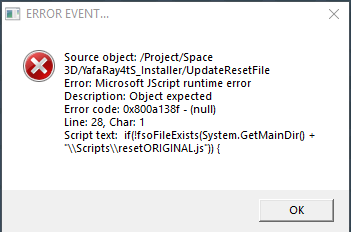
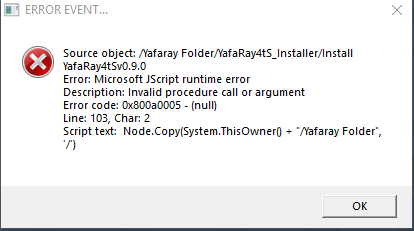
Noted error, typo in line 28 of YafaRay4tS_Installer/UpdateResetFile change fsoFileExists to fso.FileExists
No yaf_temp.xml in my preobjects.
There isn't much to share as far as the reset.js file, only 4 lines of code.

Code: Select all

RsFileIO.LoadObject( rosDir + '\\scripts\\preObjects\\C3DReset.RsObj', scene);
Activity.Run("Project/Space 3D/C3DReset");
RsFileIO.LoadObject( rosDir + '\\scripts\\preObjects\\PostReset.RsObj', '/');
Activity.Run("/PostReset");
Clinton Reese

http://clintons3d.com
User avatar
trueBlue
Captain
Posts: 5548
Joined: 06 Jul 2009, 22:50
Type the number ten into the box: 10

Re: Yafaray4tS v0.9.0

Post by trueBlue »

Cool Thanks!
Error with RC-9
How about we share the same reset.js file, include it with your installer, and copy it to the Scripts folder?
Also the C3DReset script is already loading the Offline renderers.RsObj
Rc9 error.PNG
Rc9 error.PNG (11.03 KiB) Viewed 4502 times
Also notice an yaf_temp.xml in the preobjects folder dated 7/8/2018 8:12 PM
User avatar
clintonman
Captain
Posts: 5659
Joined: 21 May 2009, 21:08
Type the number ten into the box: 0
Location: California

Re: Yafaray4tS v0.9.0

Post by clintonman »

Notes for docs:

YafaRay4tSv090 was created to work in trueSpace7.61 'Workspace'
It does not work in trueSpace7.61 'Model'
Tested with YafaRay v3.3.0

YafaRay Installation

1.) Download the YafaRay v3.3.0 render engine from one of these sites:
https://github.com/YafaRay/Blender-Exporter/releases
https://github.com/YafaRay/Core/releases

Unzip the file and copy the 'yafaray_v3' folder to trueSpace folder
Example: C:\trueSpace761\tS\yafaray_v3
Example: C:\trueSpace761Std\yafaray_v3

or Program Files
Example: C:\Program Files\yafaray_v3
or see Blender instructions below

//////////////////////////////////////////////////////////////////////////////////////////////////////////////////
Prerequisites:
Clinton3dPlugin.rxs plugin installed
C3DPersistent installed


YafaRay4tS Installation

Next if you have previously installed YafaRay4tS before, Uninstall YafaRay4tS from the Add & Remove program in the Windows Control Panel first!

2.) Extract All the files from the YafaRay4tSv090.zip. into a folder named YafaRay4tSv090
Example: C:\trueSpace761\YafaRay4tSv090 I would recommend unzipping anywhere else since it is an installer and not a part of trueSpace

3.) Open trueSpace7.61 and from the Workspace's File menu, Load the YafaRay4tS_Installer.RsObj from where you extracted the files.
WARNING: Do not Drag and Drop, use the File menu!

4.) From the YafaRay4tS Installer panel select the 'Install' button.

You should see a tS761 Question message asking:
"Your existing YafaRay4tS Libraries will be deleted and replaced with updated versions."
"Would you like to continue?"

If not select your keyboard keys Alt + Tab to bring the message forward. Selecting "Yes" will start the installation and selecting "No" will Cancel the installation.

WARNING: If you have any content saved in any of these three libraries, they will be deleted, so save anything you want into a different library.

5.) From Workspace in the Stack/Panel - YafaRay4tS/Setup aspect
Set the 'YafaRay Installation Path' to the yafaray-xml.exe file where you have installed YafaRay v3.3.0.
Example: C:\Program Files\yafaray_v3\bin\yafaray-xml.exe
If copied to the example link above it will be found automatically. Also automatic if copied to the trueSpace folder C:\trueSpace761\tS\yafaray_v3 or C:\trueSpace761Std\yafaray_v3 or Blender 2.79 addons or BforArtists 1.0 addons folders. If copied to the truespace folder any folder with “yafaray” in the name will be found so it’s not limited to “yafaray_v3” specifically.

6.) Set the 'Output - Render File' to where you want to render an image or images.
Example: C:\Temp\yaf_test.png

7.) Select the 'Save Settings' button to save your directories into the default YafaRay4tS object.

8.) Position the YafaRay4tS toolbar and save your Layout.

9.) From Workspace in the Package Manager, Install and Load the Clintons3dPlugin, and Reboot trueSpace7.61.

Congratulations you've finished your YafaRay4tS setup!

//////////////////////////////////////////////////////////////////////////////////////////////////////////////////

YafaRay4tS Uninstall

1.) Open trueSpace7.61 and from the Workspace's File menu, Load the YafaRay4tS_Installer.RsObj from where you extracted the YafaRay4tSv090 files

2.) Select the 'Uninstall' button.
You should see a tS761 Question message asking:
"Your existing YafaRay4tS Libraries will be deleted."
"Would you like to continue?"

If not Select your keyboard keys Alt + Tab to bring the message forward. Selecting "Yes" will Uninstall the installation and selecting "No" will Cancel the installation.

WARNING: If you have any content saved in any of these three libraries, they will be deleted, so save anything you want into a different library.


//////////////////////////////////////////////////////////////////////////////////////////////////////////////////

Developer notes:

If you Reset the Default Context in trueSpace761 you will not have to install YafaRay4tS again.

The 'Update YafaRay Render Node' script found in the 'YafaRay4tS Setup' library can be used to update an existing scene. It will not update the materials.

YafaRay sample scenes for trueSpace7.61
http://clintons3d.com/plugins/truespace ... faray.html

//////////////////////////////////////////////////////////////////////////////////////////////////////////////////

YafaRay4tSv090
uses YafaRay v3.3.0
updated D3D preview to more closely match the rendered result
new integrated render buttons
updated materials with texture maps for all compatible attributes
added blend values for texture maps
updated draw parameters
new blend material
new procedural texture maps - clouds, marble,voronoi and wood
new yafaray camera
updated ies lights
new works with standard tS lights
enhanced light color picker
new toolbar buttons for yafaray camera, smoothing, volume primitive
sphere light exports scale instead of the size attributes
constant default color matches tS default background color
new support for resizable optdisplay window not limited by resolution or image aspect ratio
new animation preview system
new option to turn off caustic photons and diffuse photons for each light source.
new background cast shadows option and background sun shadow option.
New smart blur value for image based lighting
new photon map saving and loading
Additional rays on materials
Russian roulette for path tracing
new denoise option


YafaRay4tSv080
partial save timer - save file while rendering to see progress
Tile rendering options - linear or random for bucket style renders

custom text for the Draw Params option

New material options are at the bottom of the materials
Pass ID is used with the render passes
Visibility can be set to normal, shadow only, no shadows, invisible
Receive Shadows uncheck so material does not get shadows

threads default to -1

Render Passes
Check "enable" to turn on render passes
Use the dropdown to select render passes
RenderPassList.txt contains a list of all possible passes that can be typed into any slot. The channel isn't limited to the dropdown list selections.

The MultiLayer option at the bottom only applies to the exr file format.

YafaRay4tSv075
TrueSpace 7.61 version required and is not backwards compatible.
Improved skeletal meshes/Actors with animation support.
Skeletal meshes and Characters, will export if you apply SDS to the mesh. The first Level of SDS is the preferred method unless the mesh is already subdivided.
Skeletal meshes will also export if you apply a morph to the character. Apply morph then right click to immediately exit the tool.
Support for multiple materials on one mesh.
Fixed mesh normals for better glass objects.
Spotlight and omni light power exports the same as Blender with a export power = power*power/2.
Area and Sphere lights have a render option to make them visible.
Area light has a new mesh so when the mesh is at (0,0,0) the resulting light is also at (0,0,0).
Adjusted light attenuation parameters to make the preview more closely match the render.
Does not lose camera selection if the scene name changes.
Glass material absorption value was not connected so value was never used.
Added a strength control to the glass material to control the D3D transparency preview(no effect on the final render).
Bumpmap preview for materials.
Changed the default render parameters to match Blender's UI values.
YafaRay4tS materials default to the corresponding Blender material default values.
Added a global input gamma that is applied to colors, lights and textures to translate them to linear color space used by YafaRay.
Gamma value does not effect the display in trueSpace 3D viewport.
Added DarkTide's sun sky background option.
Added support for rendering to the OpenEXR file format(exr).
New aspects for each Lighting Method.
YafaRay4tS Settings button shows the YafaRa4tS panel's presently used Lighting Method aspect in the Stack.
YafaRay4tS Export and Render button no longer shows the YafaRa4tS panel in the Stack with the LMB.
YafaRay4tS Export and Render button shows the YafaRa4tS panel's presently used Lighting Method aspect in the Stack with the RMB.
Diffuse Reflect Map fixed in new improved Yaf Coated Glossy and Yaf Glossy materials.
New improved YafaRay4tS Spot light with Hotspot generator.
Updated YafaRay4tS Help file.
New tS7.61 YafaRay4tS Installer script.

Yafaray 0.1.2 Beta support:

Requires Yafaray version 0.1.2 beta to be setup with YafaRay4tSv0.7.5 and the Yafaray 0.1.2 xml format - beta checkbox enabled, located in the Setup aspect. Only one version of Yafaray can be installed at one time.

New file formats hdr, jpg, png and tif.
Save Alpha located in the Lighting Method aspects. - Exports an alpha file in addition to the rgb output file.
Z - Channel option works.
New Volume Region mesh: Uniform and Height Fog work with the YafarayVolume.RsObj
Support for normalmap textures.
Rough Glass material.
Photon only and soft shadow parameters for the Spot light.
IES Light with preview.
SPPM lighting method(not working at this time for the xml renderer, YafaRay version 0.1.2-Beta2).

//////////////////////////////////////////////////////////////////////////////////////////////////////////////////

YafaRay4tSv070
Hair takes on the same Material as the base mesh it grows from.
There are 2 options for preparing an Character or a Skeletal mesh for rendering with Yafaray:
1. Apply a Morph then right click to immediately exit the tool.
2. Apply SDS to the mesh. The first SDS (Level 1) is the preferred method unless the mesh is already subdivided.
The material texture map X Scale and Y Scale only works well for odd whole number values.

//////////////////////////////////////////////////////////////////////////////////////////////////////////////////

Blender:

1.) To install for Blender copy the "yafaray" folder into the AddOns folder inside blender
2.) Start Blender
3.) File > User Preferences
4.) Add-ons
5.) find and activate yafaray via checkbox
6.) press the Save User Settings button

The official pages say YafaRay is no longer compatible with WindowsXP, but it does work in trueSpace. They must be referring to running with Blender on WindowsXP.

OptDisplay:
download http://rs.siprogs.sk/p/iOptDetectorsPage
Clinton Reese

http://clintons3d.com
User avatar
clintonman
Captain
Posts: 5659
Joined: 21 May 2009, 21:08
Type the number ten into the box: 0
Location: California

Re: Yafaray4tS v0.9.0

Post by clintonman »

trueBlue wrote: 10 Jul 2018, 01:44 When you uninstall YafaRay4tS, the YafarayScripts and the Offline renderers/Yafaray node are still present.
Not sure if you should delete them or add the following to the YafarayScripts/render scripts.

Code: Select all

if(!Node.Exists("/Yafaray Folder")){
return;
}
So they will not through an error.
If Yaf is uninstalled.PNG
Uninstaller should delete them and it needs to be removed the YafarayScripts file from the ...\Scripts\clintonobjects\CustomScriptsStore folder
Clinton Reese

http://clintons3d.com
User avatar
trueBlue
Captain
Posts: 5548
Joined: 06 Jul 2009, 22:50
Type the number ten into the box: 10

Re: Yafaray4tS v0.9.0

Post by trueBlue »

Just notice a mistake with the Uninstall script.
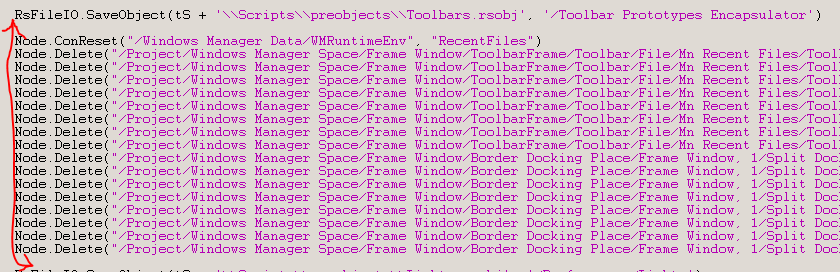
Save toolbars should be below all of these lines.

All the resetting toolbars from the uninstaller seems like a waste! It's only for the way old Yaf(a)Ray4tS v 0.6.0 toolbar.
Attachments
Uninstall.PNG
User avatar
clintonman
Captain
Posts: 5659
Joined: 21 May 2009, 21:08
Type the number ten into the box: 0
Location: California

Re: Yafaray4tS v0.9.0

Post by clintonman »

latest here now
RC 9
fixed no 3d view problem
YafarayScripts/...moved code to top of each

Code: Select all

	if (Node.Exists(Space.CurrentScene()+"/YafaRay4tS")){
	} else {
		if(Node.Exists("/Yafaray Folder")){
			Node.Copy("/Yafaray Folder/YafaRay4tS", Space.CurrentScene());
		}
	};
persistent install complete - when opening render options panel the toolbar will open if it is closed, also altered the reset.js file custom commands used for context reset, change ScriptObject.Execute to Activity.Run because when a script deletes itself it stops all other potential scripts

fixed - render buttons did not work for unpatched tS
Attachments
YafaRay4tSv090-rc-9.zip
(6.69 MiB) Downloaded 196 times
Clinton Reese

http://clintons3d.com
User avatar
clintonman
Captain
Posts: 5659
Joined: 21 May 2009, 21:08
Type the number ten into the box: 0
Location: California

Re: Yafaray4tS v0.9.0

Post by clintonman »

trueBlue wrote: 10 Jul 2018, 01:44 When you uninstall YafaRay4tS, the YafarayScripts and the Offline renderers/Yafaray node are still present.
Not sure if you should delete them or add the following to the YafarayScripts/render scripts.

Code: Select all

if(!Node.Exists("/Yafaray Folder")){
return;
}
So they will not through an error.
If Yaf is uninstalled.PNG
Already fixed. Issue is it was trying to use a value before reading it.
Clinton Reese

http://clintons3d.com
User avatar
trueBlue
Captain
Posts: 5548
Joined: 06 Jul 2009, 22:50
Type the number ten into the box: 10

Re: Yafaray4tS v0.9.0

Post by trueBlue »

When you uninstall YafaRay4tS, the YafarayScripts and the Offline renderers/Yafaray node are still present.
Not sure if you should delete them or add the following to the YafarayScripts/render scripts.

Code: Select all

if(!Node.Exists("/Yafaray Folder")){
return;
}
So they will not through an error.
If Yaf is uninstalled.PNG
If Yaf is uninstalled.PNG (10.95 KiB) Viewed 4490 times
User avatar
trueBlue
Captain
Posts: 5548
Joined: 06 Jul 2009, 22:50
Type the number ten into the box: 10

Re: Yafaray4tS v0.9.0

Post by trueBlue »

Interesting development.
I got this error:
No 3D View opened.PNG
No 3D View opened.PNG (4.83 KiB) Viewed 4496 times
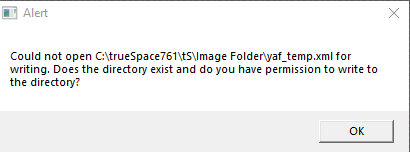
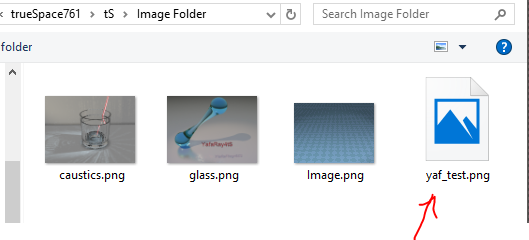
I browse to the tS/Image Folder and the Yaf_test.png is zero bytes.
The yaf_temp.xml is there as well.
Image changed to 0 bytes.PNG
I replace it, and from the Output Render File, select it again, then render.
I get the error again and the Yaf_test.png is zero bytes again.
Repeated three times.
When this started I rendered with no 3D View opened.
I have mentioned this before but I suspect this has to do with using ActiveX doing some weird things with files.
Remember I had the invisible image and RsObj awhile back?

The above incident was to again bring up this error when trying to render with no 3D View opened.
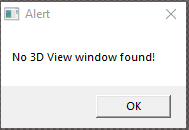
No 3D Window.PNG
No 3D Window.PNG (2.7 KiB) Viewed 4492 times
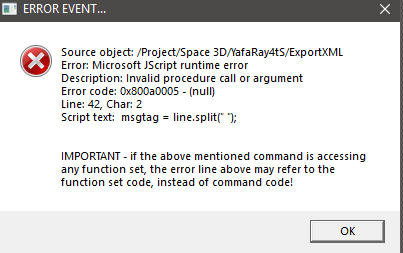
No 3D Window error.PNG
Could it be that if you get an error when writing to the xml file that it could become corrupted and cause the above problem. Spent several minutes looking for that No 3D View alert to no avail, wondering why, after the alert it was not being returned to sender. ;)
User avatar
clintonman
Captain
Posts: 5659
Joined: 21 May 2009, 21:08
Type the number ten into the box: 0
Location: California

Re: Yafaray4tS v0.9.0

Post by clintonman »

Thanks, got it.
Clinton Reese

http://clintons3d.com
User avatar
trueBlue
Captain
Posts: 5548
Joined: 06 Jul 2009, 22:50
Type the number ten into the box: 10

Re: Yafaray4tS v0.9.0

Post by trueBlue »

The names did not change.
The prototype is the YafaRayBar
And the YafaRay Toolbar Frame is for the Windows Manager Space

From the Install script:

Code: Select all

Node.Copy(System.ThisOwner() + "/YafaRay Toolbar Frame", "/Project/Windows Manager Space")
Node.Copy("/Toolbar Prototypes Encapsulator/YafaRayBar", "/Project/Windows Manager Space/YafaRay Toolbar Frame")
WindowsManager.Activate()
WindowsManager.UpdateWindowsStructure()
User avatar
clintonman
Captain
Posts: 5659
Joined: 21 May 2009, 21:08
Type the number ten into the box: 0
Location: California

Re: Yafaray4tS v0.9.0

Post by clintonman »

trueBlue wrote: 09 Jul 2018, 22:16 Here is the installer I have been working on this morning.
Changes:
Changed YafaRay4tSv075 string to YafaRay4tSv090

Changed the Install script as mentioned earlier:
fso.CopyFolder(YafaRay4tSv090 + '\\YafaRay4tS Setup', tS + 'Rs Main Libraries\\', true)
fso.CopyFolder(YafaRay4tSv090 + '\\YafaRay Materials', tS + 'Rs Main Libraries\\', true)
fso.CopyFolder(YafaRay4tSv090 + '\\YafaRay Lights', tS + 'Rs Main Libraries\\', true)

Changed the Uninstall script by adding true
if (fso.FolderExists(tS + 'Rs Main Libraries\\YafaRay4tS Setup')) {
fso.DeleteFolder(tS + 'Rs Main Libraries\\YafaRay4tS Setup', true)
}
etc...
Got everything merged except for one problem:
What is the proper name for the toolbar?
YafaRay Toolbar Frame?
YafaRayBar?
I need the prottype encapsulator name and the windows manager space name

Edit:

Never mind got it sorted out. My post reset code must have been based on some older version of the installer.
Last edited by clintonman on 09 Jul 2018, 23:05, edited 1 time in total.
Clinton Reese

http://clintons3d.com
User avatar
trueBlue
Captain
Posts: 5548
Joined: 06 Jul 2009, 22:50
Type the number ten into the box: 10

Re: Yafaray4tS v0.9.0

Post by trueBlue »

clintonman wrote: 09 Jul 2018, 22:11 Bug: Render buttons in the YafaRay toolbar only work with the UnOfficial Patched version of truespace. Except for Area Render button.

Code: Select all

//Yaf toolbar Render Scene
if (Node.Exists(Space.CurrentScene()+"/YafaRay4tS")){OfflineRender.OpenView('',0,0);Activity.Run('/Scripts/Commands/RenderScene')};
//tS Render Scene
OfflineRender.OpenView('',0,0);Activity.Run('/Scripts/Commands/RenderScene');
//Yaf toolbar Render Object
if (Node.Exists(Space.CurrentScene()+"/YafaRay4tS")){OfflineRender.OpenView('',0,0);Activity.Run('/Scripts/Commands/RenderObject')};
//tS Render Object
OfflineRender.OpenView('',0,0);Activity.Run('/Scripts/Commands/RenderObject');
//Yaf toolbar Render Animation
if (Node.Exists(Space.CurrentScene()+"/YafaRay4tS")){OfflineRender.OpenView('',0,0);Activity.Run('/Scripts/Commands/RenderAnimation')};
//tS Render Animation
OfflineRender.OpenView('',0,0);Activity.Run('/Scripts/Commands/RenderAnimation');
Why would the first part of the Yaf button command
if (Node.Exists(Space.CurrentScene()+"/YafaRay4tS")){
be a problem?
If I am following your last edit correctly, that is the same way they are presently.
Did you have a YafaRay4tS.RsObj in the scene when you tried them?
I guess it really isn't needed, as I remember I included that command in case a user did not have YafaRay4tS.
User avatar
clintonman
Captain
Posts: 5659
Joined: 21 May 2009, 21:08
Type the number ten into the box: 0
Location: California

Re: Yafaray4tS v0.9.0

Post by clintonman »

trueBlue wrote: 09 Jul 2018, 22:16 Here is the installer I have been working on this morning.
Changes:
Changed YafaRay4tSv075 string to YafaRay4tSv090

Changed the Install script as mentioned earlier:
fso.CopyFolder(YafaRay4tSv090 + '\\YafaRay4tS Setup', tS + 'Rs Main Libraries\\', true)
fso.CopyFolder(YafaRay4tSv090 + '\\YafaRay Materials', tS + 'Rs Main Libraries\\', true)
fso.CopyFolder(YafaRay4tSv090 + '\\YafaRay Lights', tS + 'Rs Main Libraries\\', true)

Changed the Uninstall script by adding true
if (fso.FolderExists(tS + 'Rs Main Libraries\\YafaRay4tS Setup')) {
fso.DeleteFolder(tS + 'Rs Main Libraries\\YafaRay4tS Setup', true)
}
etc...
Roger, I'll add my changes now.
Clinton Reese

http://clintons3d.com
User avatar
trueBlue
Captain
Posts: 5548
Joined: 06 Jul 2009, 22:50
Type the number ten into the box: 10

Re: Yafaray4tS v0.9.0

Post by trueBlue »

Here is the installer I have been working on this morning.
Changes:
Changed YafaRay4tSv075 string to YafaRay4tSv090

Changed the Install script as mentioned earlier:
fso.CopyFolder(YafaRay4tSv090 + '\\YafaRay4tS Setup', tS + 'Rs Main Libraries\\', true)
fso.CopyFolder(YafaRay4tSv090 + '\\YafaRay Materials', tS + 'Rs Main Libraries\\', true)
fso.CopyFolder(YafaRay4tSv090 + '\\YafaRay Lights', tS + 'Rs Main Libraries\\', true)

Changed the Uninstall script by adding true
if (fso.FolderExists(tS + 'Rs Main Libraries\\YafaRay4tS Setup')) {
fso.DeleteFolder(tS + 'Rs Main Libraries\\YafaRay4tS Setup', true)
}
etc...
Removed due to update
User avatar
clintonman
Captain
Posts: 5659
Joined: 21 May 2009, 21:08
Type the number ten into the box: 0
Location: California

Re: Yafaray4tS v0.9.0

Post by clintonman »

Bug: Render buttons in the YafaRay toolbar only work with the UnOfficial Patched version of truespace. Except for Area Render button.

animation button:

Code: Select all

if(Node.Exists(Space.CurrentScene()+"/YafaRay4tS")){
    OfflineRender.OpenView('',0,0);
if(Node.Exists(/Scripts/Commands/RenderAnimation")){
    Activity.Run('/Scripts/Commands/RenderAnimation')
}else{
    OfflineRender.RenderAnimation('')
    }
other buttons also check for existence of their command nodes

Edit: looks like the extra stuff is for VRay so simplify to just

Code: Select all

if(Node.Exists(Space.CurrentScene()+"/YafaRay4tS")){
    OfflineRender.OpenView('',0,0);
    OfflineRender.RenderAnimation('')
    }
Last edited by clintonman on 09 Jul 2018, 22:21, edited 2 times in total.
Clinton Reese

http://clintons3d.com
User avatar
clintonman
Captain
Posts: 5659
Joined: 21 May 2009, 21:08
Type the number ten into the box: 0
Location: California

Re: Yafaray4tS v0.9.0

Post by clintonman »

installer check for c3d installation earlier in the process - c3d persistent install is required
YafaRay4tS_Installer/Install at top

Code: Select all

	owner = System.ThisOwner();
	mainDir = System.GetMainDir();

	var fso = new ActiveXObject("Scripting.FileSystemObject");
	if(!fso.FolderExists(mainDir + "\\Scripts\\clintonobjects\\CustomScriptsStore")) {
		System.Alert("Error: Must install c3dPersistence v2 script first!");
		return;
	}

	if(!Node.Exists("Toolbar Prototypes Encapsulator/WorkspaceNav/C3DButton") && !Node.Exists("Toolbar Prototypes Encapsulator/ClintonToolbar/C3DButton")){
		System.Alert("Error: Must install c3dPersistence v2 script first!");
		return;
	}

	if(!Node.Exists("Toolbar Prototypes Encapsulator/ClintonToolbar/")) {
		System.Alert("Error: Must install c3dPersistence v2 script first!");
		return;
	}
YafaRay4tS_Installer/Integrated Button Install - at bottom call to update the reset file for reset context survival

Code: Select all

	//Node.Delete(System.ThisOwner())
	Activity.Run(System.ThisOwner() + "/UpdateResetFile");
new nodes UpdateResetFile and PostReset - for post context reset survival

YafarayScripts/EnumPropertiesPanels - at end added code to reopen the Yafaray toolbar if needed - handy for layout changes

Code: Select all

		//
		//Open Yafaray toolbar
		//
	if(!Node.Exists(WindowsManager.GetWindowsManagerNodeName() + "/YafaRayBar")) {
		var name=WindowsManager.GetWindowsManagerNodeName();
		if(Node.Exists("Toolbar Prototypes Encapsulator/YafaRayBar"))
			WindowsManager.OpenToolbarFromPrototype("YafaRayBar",32,32,0,0);
		Node.Rename(name+"/"+Node.SubObject(name,Node.SubObjectCount(name)-1),"YafaRayBar");
		WindowsManager.SnapFrameToFrameEx(WindowsManager.GetWorkWindow(),name+"/YafaRayBar",19,10,310,-120);
		WindowsManager.SetFrameOwnerFrame(name+"/YafaRayBar",WindowsManager.GetWorkWindow());
	}
Clinton Reese

http://clintons3d.com
User avatar
trueBlue
Captain
Posts: 5548
Joined: 06 Jul 2009, 22:50
Type the number ten into the box: 10

Re: Yafaray4tS v0.9.0

Post by trueBlue »

This seems to work.

Code: Select all

fso.CopyFolder(YafaRay4tSv075 + '\\YafaRay4tS Setup', tS + 'Rs Main Libraries\\', true)
fso.CopyFolder(YafaRay4tSv075 + '\\YafaRay Materials', tS + 'Rs Main Libraries\\', true)
fso.CopyFolder(YafaRay4tSv075 + '\\YafaRay Lights', tS + 'Rs Main Libraries\\', true)
I was even using the scene in the setup library while installing.
Deleting items in the setup library and then installing replaces them.
Yay!
User avatar
clintonman
Captain
Posts: 5659
Joined: 21 May 2009, 21:08
Type the number ten into the box: 0
Location: California

Re: Yafaray4tS v0.9.0

Post by clintonman »

I didn't find much and I have no way of testing.
My notes:

Yafaray4tS setup is the first folder that is deleted/copied, try changing the order of the files

try adding true as the second argument to the delete folder, true means to force it

try without the delete folder, by default I think copy replaces it anyway
Clinton Reese

http://clintons3d.com
User avatar
trueBlue
Captain
Posts: 5548
Joined: 06 Jul 2009, 22:50
Type the number ten into the box: 10

Re: Yafaray4tS v0.9.0

Post by trueBlue »

Even with using the try and catch error with the setup library, I got two errors again.
The only way I can avoid these errors is to close the libraries and reboot tS before using the installer.

I was reading a couple of sites with regards to access denied errors.
This guy used this

Code: Select all

file = fso.GetFile(FILE_PATH);
file.Delete(true);
Read Only

Code: Select all

file = fso.GetFile(tempWAVPath)
if(file.attributes & 1) {
    file.attributes = file.attributes - 1
So I adapted it and tried this:

Code: Select all

file = fso.GetFolder(tS + 'Rs Main Libraries\\YafaRay4tS Setup')
if(file.attributes & 1) {
    file.attributes = file.attributes - 1;
}
if (fso.FolderExists(file))
	fso.DeleteFolder(file)
	fso.CopyFolder(YafaRay4tSv075 + '\\YafaRay4tS Setup', tS + 'Rs Main Libraries\\', true)
First test was a success! Testing some more...
Well that was short lived. Never mind :oops:
Geeze I just realized this is for a file.
Can you do the same for Folders?
Attachments
New Uninstall Error.PNG
New Uninstall Error.PNG (10.35 KiB) Viewed 4658 times
New Install Error.PNG
New Install Error.PNG (10.93 KiB) Viewed 4658 times
User avatar
trueBlue
Captain
Posts: 5548
Joined: 06 Jul 2009, 22:50
Type the number ten into the box: 10

Re: Yafaray4tS v0.9.0

Post by trueBlue »

Great! Looks like you got it sorted out.

I am trying to update the YafaRay4tS Installer's ReadMe.txt
Please verify that this is correct and if you have any other suggestions.
Add to the Developer's notes?
Is the Blender instructions correct?

YafaRay4tSv090 was created to work in trueSpace7.61 'Workspace'
It does not work in trueSpace7.61 'Model'
Tested with YafaRay v3.3.0

YafaRay Installation

1.) Install the YafaRay v3.3.0 render engine from one of these sites:
https://github.com/YafaRay/Blender-Exporter/releases
https://github.com/YafaRay/Core/releases

Unzip the file and copy the 'yafaray_v3' folder to Program Files
Example: C:\Program Files\yafaray_v3

//////////////////////////////////////////////////////////////////////////////////////////////////////////////////

YafaRay4tS Installation

Next if you have previously installed YafaRay4tS before, Uninstall YafaRay4tS from the Add & Remove program in the Windows Control Panel first!

2.) Extract All the files from the YafaRay4tSv090.zip. into a folder named YafaRay4tSv090
Example: C:\trueSpace761\YafaRay4tSv090

3.) Open trueSpace7.61 and from the Workspace's File menu, Load the YafaRay4tS_Installer.RsObj from where you extracted the files.
WARNING: Do not Drag and Drop, use the File menu!

4.) From the YafaRay4tS Installer panel select the 'Install' button.

You should see a tS761 Question message asking:
"Your existing YafaRay4tS Libraries will be deleted and replaced with updated versions."
"Would you like to continue?"

If not select your keyboard keys Alt + Tab to bring the message forward. Selecting "Yes" will start the installation and selecting "No" will Cancel the installation.

WARNING: If you have any content saved in any of these three libraries, they will be deleted, so save anything you want into a different library.

5.) From Workspace in the Stack/Panel - YafaRay4tS/Setup aspect
Set the 'YafaRay Installation Path' to the yafaray-xml.exe file where you have installed YafaRay v3.3.0.
Example: C:\Program Files\yafaray_v3\bin\yafaray-xml.exe

6.) Set the 'Output - Render File' to where you want to render an image or images.
Example: C:\Temp\yaf_test.png

7.) Select the 'Save Settings' button to save your directories into the default YafaRay4tS object.

8.) Position the YafaRay4tS toolbar and save your Layout.

9.) From Workspace in the Package Manager, Install and Load the Clintons3dPlugin, and Reboot trueSpace7.61.

Congratulations you've finished your YafaRay4tS setup!

//////////////////////////////////////////////////////////////////////////////////////////////////////////////////

YafaRay4tS Uninstall

1.) Open trueSpace7.61 and from the Workspace's File menu, Load the YafaRay4tS_Installer.RsObj from where you extracted the YafaRay4tSv090 files

2.) Select the 'Uninstall' button.
You should see a tS761 Question message asking:
"Your existing YafaRay4tS Libraries will be deleted."
"Would you like to continue?"

If not Select your keyboard keys Alt + Tab to bring the message forward. Selecting "Yes" will Uninstall the installation and selecting "No" will Cancel the installation.

WARNING: If you have any content saved in any of these three libraries, they will be deleted, so save anything you want into a different library.


//////////////////////////////////////////////////////////////////////////////////////////////////////////////////

Developer notes:

If you Reset the Default Context in trueSpace761 you will have to install YafaRay4tS again.

The 'Update YafaRay Render Node' script found in the 'YafaRay4tS Setup' library can be used to update an existing scene. It will not update the materials.

YafaRay scenes for trueSpace7.61
http://clintons3d.com/plugins/truespace ... faray.html

//////////////////////////////////////////////////////////////////////////////////////////////////////////////////

YafaRay4tSv080
partial save timer - save file while rendering to see progress
Tile rendering options - linear or random for bucket style renders

custom text for the Draw Params option

New material options are at the bottom of the materials
Pass ID is used with the render passes
Visibility can be set to normal, shadow only, no shadows, invisible
Receive Shadows uncheck so material does not get shadows

threads default to -1

Render Passes
Check "enable" to turn on render passes
Use the dropdown to select render passes
RenderPassList.txt contains a list of all possible passes that can be typed into any slot. The channel isn't limited to the dropdown list selections.

The MultiLayer option at the bottom only applies to the exr file format.

YafaRay4tSv075
TrueSpace 7.61 version required and is not backwards compatible.
Improved skeletal meshes/Actors with animation support.
Skeletal meshes and Characters, will export if you apply SDS to the mesh. The first Level of SDS is the preferred method unless the mesh is already subdivided.
Skeletal meshes will also export if you apply a morph to the character. Apply morph then right click to immediately exit the tool.
Support for multiple materials on one mesh.
Fixed mesh normals for better glass objects.
Spotlight and omni light power exports the same as Blender with a export power = power*power/2.
Area and Sphere lights have a render option to make them visible.
Area light has a new mesh so when the mesh is at (0,0,0) the resulting light is also at (0,0,0).
Adjusted light attenuation parameters to make the preview more closely match the render.
Does not lose camera selection if the scene name changes.
Glass material absorption value was not connected so value was never used.
Added a strength control to the glass material to control the D3D transparency preview(no effect on the final render).
Bumpmap preview for materials.
Changed the default render parameters to match Blender's UI values.
YafaRay4tS materials default to the corresponding Blender material default values.
Added a global input gamma that is applied to colors, lights and textures to translate them to linear color space used by YafaRay.
Gamma value does not effect the display in trueSpace 3D viewport.
Added DarkTide's sun sky background option.
Added support for rendering to the OpenEXR file format(exr).
New aspects for each Lighting Method.
YafaRay4tS Settings button shows the YafaRa4tS panel's presently used Lighting Method aspect in the Stack.
YafaRay4tS Export and Render button no longer shows the YafaRa4tS panel in the Stack with the LMB.
YafaRay4tS Export and Render button shows the YafaRa4tS panel's presently used Lighting Method aspect in the Stack with the RMB.
Diffuse Reflect Map fixed in new improved Yaf Coated Glossy and Yaf Glossy materials.
New improved YafaRay4tS Spot light with Hotspot generator.
Updated YafaRay4tS Help file.
New tS7.61 YafaRay4tS Installer script.

Yafaray 0.1.2 Beta support:

Requires Yafaray version 0.1.2 beta to be setup with YafaRay4tSv0.7.5 and the Yafaray 0.1.2 xml format - beta checkbox enabled, located in the Setup aspect. Only one version of Yafaray can be installed at one time.

New file formats hdr, jpg, png and tif.
Save Alpha located in the Lighting Method aspects. - Exports an alpha file in addition to the rgb output file.
Z - Channel option works.
New Volume Region mesh: Uniform and Height Fog work with the YafarayVolume.RsObj
Support for normalmap textures.
Rough Glass material.
Photon only and soft shadow parameters for the Spot light.
IES Light with preview.
SPPM lighting method(not working at this time for the xml renderer, YafaRay version 0.1.2-Beta2).

//////////////////////////////////////////////////////////////////////////////////////////////////////////////////

YafaRay4tSv070
Hair takes on the same Material as the base mesh it grows from.
There are 2 options for preparing an Character or a Skeletal mesh for rendering with Yafaray:
1. Apply a Morph then right click to immediately exit the tool.
2. Apply SDS to the mesh. The first SDS (Level 1) is the preferred method unless the mesh is already subdivided.
The material texture map X Scale and Y Scale only works well for odd whole number values.

//////////////////////////////////////////////////////////////////////////////////////////////////////////////////

Blender:

1.) To install for Blender copy the "yafaray" folder into the AddOns folder inside blender
2.) Start Blender
3.) File > User Preferences
4.) Add-ons
5.) find and activate yafaray via checkbox
6.) press the Save User Settings button
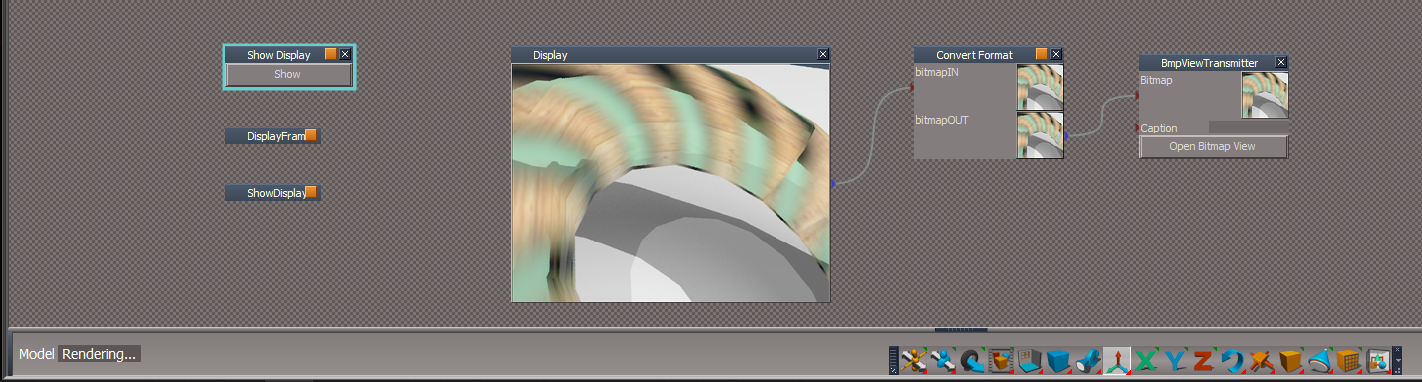
User avatar
clintonman
Captain
Posts: 5659
Joined: 21 May 2009, 21:08
Type the number ten into the box: 0
Location: California

Re: Yafaray4tS v0.9.0

Post by clintonman »

RednerToFile2butts.jpg
Changed the Set Timeline Range button behavior. It was changing the animation preference values and it should only be changing the rendering parameters. So split into 2 buttons

Set from Timeline button - sets the render frame range from the animation time - behaves like D3D Render to File dialog reset button

Code: Select all

Node.Value("%THIS_NAME%" , "Start_Frame") = Node.Value("AnimMng", "AnimStart");
Node.Value("%THIS_NAME%", "Number_Start") = Node.Value("AnimMng", "AnimStart");
Node.Value("%THIS_NAME%", "End_Frame") = Node.Value("AnimMng", "AnimEnd");


Set from Keyframes button - sets the render range from the scene min and max keyframe times
code moved from button into a command node
if object render will try to read range from the selected objects animation clip
otherwise it tries to read keyframe range for the whole scene

YafaRay4tS/SetFromKeyframes

Code: Select all

// Execute 
// Called to execute the command 
function Execute(params)
{
	var owner = System.ThisOwner();
	var objectRenderMode = Node.Value(owner, 'objectRenderMode');
	var selectedNode = Node.FirstSelected();

	//save playrange
	var playRangeStart = RsAnimPref.PlayRangeStart;
	var playRangeEnd = RsAnimPref.PlayRangeEnd;

	//scene mode not object mode
	if ((objectRenderMode & 1) == 0) {
		selectedNode = "";
	}

	if(selectedNode != "" && Node.Exists(selectedNode + "/AnimClip")) {
		animStart = Node.Value(selectedNode + "/AnimClip", "ClipStart");
		animEnd = Node.Value(selectedNode + "/AnimClip", "ClipEnd");
	} else {
		//alters the play range anim pref values"
		try {
			animStart = RsTime.EvalAnimStart('')
			animEnd = RsTime.EvalAnimEnd('')
		} catch(e) {
			animStart = 0;
			animEnd = 0;
		}
	}

	Node.Value(owner, "Start_Frame") = animStart;
	Node.Value(owner, "Number_Start") = animStart;
	Node.Value(owner, "End_Frame") = animEnd;

	//restore anim pref values
	RsAnimPref.PlayRangeStart = playRangeStart;
	RsAnimPref.PlayRangeEnd = playRangeEnd;

	//NOTE
	//RsTime.EvalAnimStart and RsTime.EvalAnimEnd seem to ignore all arguments
	// and only operate on the entire scene animation
}
Clinton Reese

http://clintons3d.com
User avatar
clintonman
Captain
Posts: 5659
Joined: 21 May 2009, 21:08
Type the number ten into the box: 0
Location: California

Re: Yafaray4tS v0.9.0

Post by clintonman »

First default for YafaRay program is now inside the truespace folder c:\trueSpace761\tS or c:\\trueSpace761Std
full path will be something like "c:\trueSpace761\tS\xxxYafarayzzz\bin\yafaray-xml.exe" where xxx and zzz can be any pre or post fix to a case insensitive "yafaray" folder.
if not found it will try looking inside BforArtists, Blender and Program Files for Yafaray v3 specifically.

YafaRay4tS/Render - function is called during reset of the connector

Code: Select all

function GetYafPath()
{
	var fso = new ActiveXObject("Scripting.FileSystemObject");

	var yafpath = tSYafPath();

	if(fso.FileExists(yafpath))
		return yafpath;

	if(fso.FileExists("C:\\Program Files\\Bforartists 1.0.0\\2.79\\scripts\\addons\\yafaray_v3\\bin\\yafaray-xml.exe"))
		yafpath = "C:\\Program Files\\Bforartists 1.0.0\\2.79\\scripts\\addons\\yafaray_v3\\bin\\yafaray-xml.exe";
	else if(fso.FileExists("C:\\Program Files\\Blender Foundation\\Blender\\2.79\\scripts\\addons\\yafaray_v3\\bin\\yafaray-xml.exe"))
		yafpath = "C:\\Program Files\\Blender Foundation\\Blender\\2.79\\scripts\\addons\\yafaray_v3\\bin\\yafaray-xml.exe";
	else if(fso.FileExists("C:\\Program Files\\yafaray_v3\\bin\\yafaray-xml.exe"))
		yafpath = "C:\\Program Files\\yafaray_v3\\bin\\yafaray-xml.exe";

	return yafpath;
}
function tSYafPath()
{
	var fso = new ActiveXObject("Scripting.FileSystemObject");

	var temppath, yafpath = "yafaray-xml.exe";
	var tspath = System.GetMainDir();

	var folder = fso.GetFolder(tspath); 
	var folderEnum = new Enumerator(folder.SubFolders); 
 
	var regexp = /YafaRay/i

	for(;!folderEnum.atEnd(); folderEnum.moveNext()) {
		var cur = folderEnum.item();
		var curArray = (cur+"").split("\\");
		var s = "" + curArray[curArray.length-1];
		if(s.match(regexp)) {
			temppath = fso.BuildPath(cur,"bin");
			temppath = fso.BuildPath(temppath,"yafaray-xml.exe");
			if(fso.FileExists(temppath)) {
				yafpath = temppath;
				break;
			}
		}
	}
	return yafpath;
}
Clinton Reese

http://clintons3d.com
User avatar
clintonman
Captain
Posts: 5659
Joined: 21 May 2009, 21:08
Type the number ten into the box: 0
Location: California

Re: Yafaray4tS v0.9.0

Post by clintonman »

object render valid check

top of YafarayScripts/RenderObject

Code: Select all

if(invalidSelection()) {
    System.Alert("No valid object is currently selected. Render Aborted.")
    return;
}
near top YafarayScripts/RenderObject - set flag back to scene mode
code change did not work and maybe just as well, because possible to render animation of single object

bottom of YafarayScripts/RenderObject

Code: Select all

function invalidSelection()
{
    var firstSel = Node.FirstSelected();
    if(firstSel == "")
        return true;

    if(!Node.IsRenderable(firstSel))
        return true;

    if(Node.IsCamera(firstSel) || Node.IsLight(firstSel))
        return true;

    return false;
}
Clinton Reese

http://clintons3d.com
User avatar
trueBlue
Captain
Posts: 5548
Joined: 06 Jul 2009, 22:50
Type the number ten into the box: 10

Re: Yafaray4tS v0.9.0

Post by trueBlue »

Oh Crap!
Thanks!
Fixed on my end.
User avatar
clintonman
Captain
Posts: 5659
Joined: 21 May 2009, 21:08
Type the number ten into the box: 0
Location: California

Re: Yafaray4tS v0.9.0

Post by clintonman »

trueBlue wrote: 09 Jul 2018, 00:53 Is this better?
Background2.PNG
Went ahead and made all of the Output Render File the same through out.
You do not have to use it but found that I was always switching back and forthlooking for the
Render View or Camera View. It's like where is that again?
Yep, looks good.

Yeah, me too, should be more convenient now.

Looks like the Direct Lighting tab has Camera/View selection messed up - looks like both options are view
Clinton Reese

http://clintons3d.com
User avatar
trueBlue
Captain
Posts: 5548
Joined: 06 Jul 2009, 22:50
Type the number ten into the box: 10

Re: Yafaray4tS v0.9.0

Post by trueBlue »

Is this better?
Background2.PNG
Background2.PNG (5.25 KiB) Viewed 4467 times
Went ahead and made all of the Output Render File the same through out.
You do not have to use it but found that I was always switching back and forthlooking for the
Render View or Camera View. It's like where is that again?
Edit: Removed due to update
User avatar
clintonman
Captain
Posts: 5659
Joined: 21 May 2009, 21:08
Type the number ten into the box: 0
Location: California

Re: Yafaray4tS v0.9.0

Post by clintonman »

My TODO list

object selected check for object render
investigate yafaray install inside ts for one of the defaults
convert the modelspace virtualight cautics scene
"fake reflections" - may not do this at all, uses camera to make cube map and simulate reflections, maybe a lot of work will see
easier blend material collection selection process?
TB post 18 May 18:07 title investigate
TB post 14 Jun 3:23 shrink play range - maybe a separate button, for object render only look at object keyframes
check the material converter
TB post 14 Jul 8 10:36 - installation error - investigate
after object render switch back to scene render so yaf4ts render buttons are predictable

to expand on the shrink play range - I see it as a separate button because of the possibility of animations based on scripts without keyframes or running animations in modelspace but rendered in yafaray workspace
Clinton Reese

http://clintons3d.com
User avatar
clintonman
Captain
Posts: 5659
Joined: 21 May 2009, 21:08
Type the number ten into the box: 0
Location: California

Re: Yafaray4tS v0.9.0

Post by clintonman »

trueBlue wrote: 08 Jul 2018, 19:18 ...
Also been wanting to change the Background attributes as shown
Backround.PNG
Changed the Default and Setup aspect, mostly with the Output Render File, adding the View and Camera.
Would also like to make the Output Render File area the same through out.
...
Looks good.

The background attributes won't work like that since transparent and transparent material refraction are related. They have to be grouped or on the same line to have meaning. In the images below it's difficult to see the difference between enabled and disabled (poor color choice by the Blender guys).
TranspBGdisabled.jpg
transparency off and material refraction disabled
-
-
TranspBGenabled.jpg
transparency on and material refraction enabled
-
-
Don't know why you didn't just make the render section the same, cause I don't see any issues, it looks real good to me.
Clinton Reese

http://clintons3d.com
User avatar
trueBlue
Captain
Posts: 5548
Joined: 06 Jul 2009, 22:50
Type the number ten into the box: 10

Re: Yafaray4tS v0.9.0

Post by trueBlue »

Oh good because I was not understanding if I get the error certainly somebody would as well.
I made the change mentioned in the installer as well as changed the format of the Alerts.
Also been wanting to change the Background attributes as shown
Backround.PNG
Backround.PNG (2.5 KiB) Viewed 4462 times
Changed the Default and Setup aspect, mostly with the Output Render File, adding the View and Camera.
Would also like to make the Output Render File area the same through out.
Setup.PNG
Default.PNG
The new Render Object works good. You can also use tS's Zoom to Selection widget before using it.

Here also is:
tS7.61B8.4_YafaRay4tS9_RC_1.exe 33.3 MB
New Yafaray Folder and YafarayScripts RC-7 - 7/8/2018 with the above changes.
New tS and Yafaray lights with color picker
New YafaRay4tS toolbar and Libraries
Added Yafaray scene images to Texture folder
Add RenderPassList.txt to tS folder
Addded yaf_test.jpg, yaf_test.png, and yaf_test.tga tS/Image Folder

Also have tS761B8Std4 ready with the above additions.
Including adding the SupportFiles folder for the IES Spot light
Removed due to update
User avatar
clintonman
Captain
Posts: 5659
Joined: 21 May 2009, 21:08
Type the number ten into the box: 0
Location: California

Re: Yafaray4tS v0.9.0

Post by clintonman »

trueBlue wrote: 08 Jul 2018, 17:36 I know I am repeating myself but this is a recurring problem for me every time!
For whatever reason this installer produces this error and I have to run it twice.
Does not matter if the libraries is opened or not.
YafaRay4tS Setup folder error.PNG
After this error, I can see that the YafaRay4tS Setup library is deleted in the Library Stack.
Run the Install again and it is successful without error.
It seems to be only the YafaRay4tS Setup library that causes the error.

I have modified the installer (Only the YafaRay4tS Setup library portion) with this and it has worked without an error several times today.

Code: Select all

try {
if (fso.FolderExists(tS + 'Rs Main Libraries\\YafaRay4tS Setup'))
	fso.DeleteFolder(tS + 'Rs Main Libraries\\YafaRay4tS Setup')
	fso.CopyFolder(YafaRay4tSv075 + '\\YafaRay4tS Setup', tS + 'Rs Main Libraries\\', true)
	} catch(err) {
	fso.DeleteFolder(tS + 'Rs Main Libraries\\YafaRay4tS Setup')
	fso.CopyFolder(YafaRay4tSv075 + '\\YafaRay4tS Setup', tS + 'Rs Main Libraries\\', true)
}
I very much prefer that you do repeat yourself. In this case either: You mentioned it so I thought you fixed it or I didn't know what you were talking about the first time or It was changed but the change got lost in the exchanges between us etc. etc.
I'll try to find the reason for the error and failing that will add the changes as shown above. I want to find the reason for the potential case where someone has to run it 3 or 4 times to avoid the error.
Clinton Reese

http://clintons3d.com
User avatar
clintonman
Captain
Posts: 5659
Joined: 21 May 2009, 21:08
Type the number ten into the box: 0
Location: California

Re: Yafaray4tS v0.9.0

Post by clintonman »

trueBlue wrote: 08 Jul 2018, 16:43 ...
Do you notice that Radio buttons do not show as active after you set either or and use it?
Radio buttons.PNG
That's by design. User sets the initial value then the value is controlled by Yaf4tS depending on what button is pressed. Value is 4 or 2. When rendering it changes to 5 or 3 if object render then back to 4 and 2 for scene render.

trueBlue wrote: 08 Jul 2018, 16:43 ...
Don't you already have this in place?
If you notice I added the following...
RenderObject script:

Code: Select all

if (Node.FirstSelected() == "") {return;}if (Node.IsLight('')) {return;}if (Node.IsCamera('')) {return;}if (!Node.ConExists(Node.FirstSelected(), 'ObjMatrix')) {return;}
Saw it, need to change it a little to give user feedback. That line above is in the "zoom and render" portion so I didn't touch it at all.
Clinton Reese

http://clintons3d.com
User avatar
trueBlue
Captain
Posts: 5548
Joined: 06 Jul 2009, 22:50
Type the number ten into the box: 10

Re: Yafaray4tS v0.9.0

Post by trueBlue »

I know I am repeating myself but this is a recurring problem for me every time!
For whatever reason this installer produces this error and I have to run it twice.
Does not matter if the libraries is opened or not.
YafaRay4tS Setup folder error.PNG
YafaRay4tS Setup folder error.PNG (9.96 KiB) Viewed 5016 times
After this error, I can see that the YafaRay4tS Setup library is deleted in the Library Stack.
Run the Install again and it is successful without error.
It seems to be only the YafaRay4tS Setup library that causes the error.

I have modified the installer (Only the YafaRay4tS Setup library portion) with this and it has worked without an error several times today.

Code: Select all

try {
if (fso.FolderExists(tS + 'Rs Main Libraries\\YafaRay4tS Setup'))
	fso.DeleteFolder(tS + 'Rs Main Libraries\\YafaRay4tS Setup')
	fso.CopyFolder(YafaRay4tSv075 + '\\YafaRay4tS Setup', tS + 'Rs Main Libraries\\', true)
	} catch(err) {
	fso.DeleteFolder(tS + 'Rs Main Libraries\\YafaRay4tS Setup')
	fso.CopyFolder(YafaRay4tSv075 + '\\YafaRay4tS Setup', tS + 'Rs Main Libraries\\', true)
}
User avatar
trueBlue
Captain
Posts: 5548
Joined: 06 Jul 2009, 22:50
Type the number ten into the box: 10

Re: Yafaray4tS v0.9.0

Post by trueBlue »

Very nice!
clintonman wrote: 08 Jul 2018, 14:48 RC-6 installer attached below
It works with the Render to File, no extra button
Did not remove the zoom and render yet
object render mode shows as 2 unlabeled radio buttons on the default tab. the value is an integer but user can only set 2 meaningful states: 4=object only, 2=zoom and render
Do you notice that Radio buttons do not show as active after you set either or and use it?
Radio buttons.PNG
Radio buttons.PNG (2.15 KiB) Viewed 5011 times
clintonman wrote: 08 Jul 2018, 14:48 TODO:
make sure valid object selection for object render
Don't you already have this in place?
If you notice I added the following...
RenderObject script:

Code: Select all

if (Node.FirstSelected() == "") {return;}if (Node.IsLight('')) {return;}if (Node.IsCamera('')) {return;}if (!Node.ConExists(Node.FirstSelected(), 'ObjMatrix')) {return;}
User avatar
clintonman
Captain
Posts: 5659
Joined: 21 May 2009, 21:08
Type the number ten into the box: 0
Location: California

Re: Yafaray4tS v0.9.0

Post by clintonman »

RC-6 installer attached below
trueBlue wrote: 08 Jul 2018, 13:04 Great! I knew you could come up with something 100 times better. By all means remove what I did. Do not like the window switching at all!

Could you please send all of the updates so I can try it out?

Does it work with the Render to File?

...
It works with the Render to File, no extra button
Did not remove the zoom and render yet
object render mode shows as 2 unlabeled radio buttons on the default tab. the value is an integer but user can only set 2 meaningful states: 4=object only, 2=zoom and render


TODO:
make sure valid object selection for object render
maybe make a default for yafaray installed inside the truespace folders - current defaults are for Program Files, Blender 2.79 and BForArtists 1.0 and is hard coded for yafaray v3.x
more object modes? - has hooks in place for expansion
Attachments
YafaRay4tSv090-rc-6.zip
(6.69 MiB) Downloaded 229 times
Clinton Reese

http://clintons3d.com
User avatar
trueBlue
Captain
Posts: 5548
Joined: 06 Jul 2009, 22:50
Type the number ten into the box: 10

Re: Yafaray4tS v0.9.0

Post by trueBlue »

Great! I knew you could come up with something 100 times better. By all means remove what I did. Do not like the window switching at all!

Could you please send all of the updates so I can try it out?

Does it work with the Render to File?
R2F.PNG
R2F.PNG (10.45 KiB) Viewed 5023 times
User avatar
clintonman
Captain
Posts: 5659
Joined: 21 May 2009, 21:08
Type the number ten into the box: 0
Location: California

Re: Yafaray4tS v0.9.0

Post by clintonman »

plainObjectMode.jpg
new object render mode - left full image, right object only

Added Object Render Mode, which gives choice between "view zoom and render" and "no camera change with render selected item only". May add some other options later.
YafaRay4tS/ExportXMLFnSet around line 46:

Code: Select all

//plain object render = 4, tB object render = 2, object flag = 1, scene flag = 0
if (Node.IsRenderable(CurrentNode) && objectRenderMode == 5 && selectedNode == CurrentNode) {
    MeshFn.ExportMesh(CurrentNode);
    return false;
}

if (Node.IsRenderable(CurrentNode) && objectRenderMode == 3) {
    MeshFn.ExportMesh(CurrentNode);
    return false;
}

if (Node.IsRenderable(CurrentNode) && (objectRenderMode & 1) == 0) {
    MeshFn.ExportMesh(CurrentNode);
    return false;
}
YafarayScripts/RenderObject where RenderObjectOnly(params) is just a copy of the RenderScene node. This still needs to validate the selection.

Code: Select all

	//update render flag to object mode
	var objectRenderMode = Node.Value(Space.CurrentScene()+"/YafaRay4tS", "objectRenderMode");
	objectRenderMode = objectRenderMode | 1;
	Node.Value(Space.CurrentScene()+"/YafaRay4tS", "objectRenderMode") = objectRenderMode;

	if(objectRenderMode == 5) {
		RenderObjectOnly(params);
		return;
	}
	//if objectRenderMode is 3 then tB approach
YafarayScripts/RenderScene, YafarayScripts/RenderArea, YafarayScripts/RenderAnimation all start with:

Code: Select all

	//update render flag to scene mode
	var objectRenderMode = Node.Value(Space.CurrentScene()+"/YafaRay4tS", "objectRenderMode");
	objectRenderMode = objectRenderMode & 6;
	Node.Value(Space.CurrentScene()+"/YafaRay4tS", "objectRenderMode") = objectRenderMode;
Clinton Reese

http://clintons3d.com
User avatar
trueBlue
Captain
Posts: 5548
Joined: 06 Jul 2009, 22:50
Type the number ten into the box: 10

Re: Yafaray4tS v0.9.0

Post by trueBlue »

Strange how that works! I have been using this for several weeks now with no errors.
I did mention that the Render to file does not work with this version.
Oh well, I tried. :cry:

Return to “Rendering”