Soft shadows
-
rjeff

- Master Chief Petty Officer
- Posts: 462
- Joined: 21 May 2009, 18:26
Soft shadows
Can you have soft shadows with infinite light? If not what is a good replacement for them.
-
RAYMAN

- Captain
- Posts: 2547
- Joined: 21 May 2009, 18:56
Re: Soft shadows
Well that depends on how large lights are compared to the distance.. in general there is nothing like infinite light... it always comes from somewhererjeff wrote:Can you have soft shadows with infinite light? If not what is a good replacement for them.
and the source has a size. If you ask how some software like Truespce do it yes its a harsh shadow but if you fill it from the other side with a reflection
from a wall the shadows become more transparent....!
Peter
-
spacekdet

- Captain
- Posts: 1810
- Joined: 27 May 2009, 15:00
- Type the number ten into the box: 10
- Location: On the day shift at the Utility Muffin Research Kitchen
Re: Soft shadows
You can if you make an array of them, each one at a slightly different angle.
Keep the intensity of each one low as the effect is cumulative and it can quickly add up and become too bright.
Use mapped shadows instead of raytraced ones.
Add a skylight for fill, but be careful if you decide to enable shadows for the skylight.
If you want really accurate soft shadows then area lights can't be beat. Slow, but oh so pretty.
Use raytraced shadows w/ areas.
If shadows are too blocky slowly increase the 'min subdiv.' parameter.
Size matters: bigger is brighter.
Un-check 'render geometry' if you want the light to be invisible.
Color shaders can also be assigned to an area light for variations in color and intensity from one light.
Small IBL with 'show environment' parameter turned off can also be used just like a local light, or else used normally to encompass the entire scene.(make sure the camera is 'inside' the IBL if you use one large one)
With 'show environment' param turned on the light will be visible, with it off it will still light the scene but not be visible in the render.
IBLs usually take a little tweaking to get looking good.
Keep in mind you don't have to assign an image to one but there's no way to remove it once you do.
Gradients and sky maps are good candidates for IBL use if you do decide to use it.
As a general rule, mapped shadows are softer than raytraced, but less 'accurate'.
Keep the intensity of each one low as the effect is cumulative and it can quickly add up and become too bright.
Use mapped shadows instead of raytraced ones.
Add a skylight for fill, but be careful if you decide to enable shadows for the skylight.
If you want really accurate soft shadows then area lights can't be beat. Slow, but oh so pretty.
Use raytraced shadows w/ areas.
If shadows are too blocky slowly increase the 'min subdiv.' parameter.
Size matters: bigger is brighter.
Un-check 'render geometry' if you want the light to be invisible.
Color shaders can also be assigned to an area light for variations in color and intensity from one light.
Small IBL with 'show environment' parameter turned off can also be used just like a local light, or else used normally to encompass the entire scene.(make sure the camera is 'inside' the IBL if you use one large one)
With 'show environment' param turned on the light will be visible, with it off it will still light the scene but not be visible in the render.
IBLs usually take a little tweaking to get looking good.
Keep in mind you don't have to assign an image to one but there's no way to remove it once you do.
Gradients and sky maps are good candidates for IBL use if you do decide to use it.
As a general rule, mapped shadows are softer than raytraced, but less 'accurate'.
-
rjeff
- Master Chief Petty Officer
- Posts: 462
- Joined: 21 May 2009, 18:26
Re: Soft shadows
Thanks guys. Oh and thanks for the help with the texture issue.
-
theuns
- Lieutenant Junior Grade
- Posts: 868
- Joined: 10 Jun 2009, 11:21
- Type the number ten into the box: 0
- Location: South Africa
Re: Soft shadows
rayman and spacekdet summed it up nicely for us, and to add to that, the default light setups in the trueSpace library has some preset configurations for radial light arrangements that should also give nice soft shadows along with the mapped shadow setting... even have different ones for morning, noon, afternoon, even night and full moon that you can just tweak...
theuns - tSer since 2000
. http://theunsfvo.cgarena.com/" onclick="window.open(this.href);return false; |:.
. http://bluestarcreations.wordpress.com/" onclick="window.open(this.href);return false; |:.
.
http://theunsfvo.cgarena.com/" onclick="window.open(this.href);return false; |:..
http://bluestarcreations.wordpress.com/" onclick="window.open(this.href);return false; |:.-
marcel

- Captain
- Posts: 2247
- Joined: 21 May 2009, 19:52
- Type the number ten into the box: 0
- Location: paris - France
Re: Soft shadows
Space is distorted by gravity. The speed of light is not enough to override this constraint. Even if it seems to us irrelevant, light is deviated from its trajectory. Implying that all render engines are false. At least a few billionths of a pixel.
I hope that help you
I hope that help you
Design - illustration - Animation
http://www.crea-vision.fr
http://www.crea-vision.fr
-
spacekdet
- Captain
- Posts: 1810
- Joined: 27 May 2009, 15:00
- Type the number ten into the box: 10
- Location: On the day shift at the Utility Muffin Research Kitchen
Re: Soft shadows
Indeed I am.marcel wrote:Space is distorted by gravity.
-
Buzz

- Chief Petty Officer
- Posts: 150
- Joined: 05 Jul 2009, 12:46
- Type the number ten into the box: 0
- Location: Netherlands
Re: Soft shadows
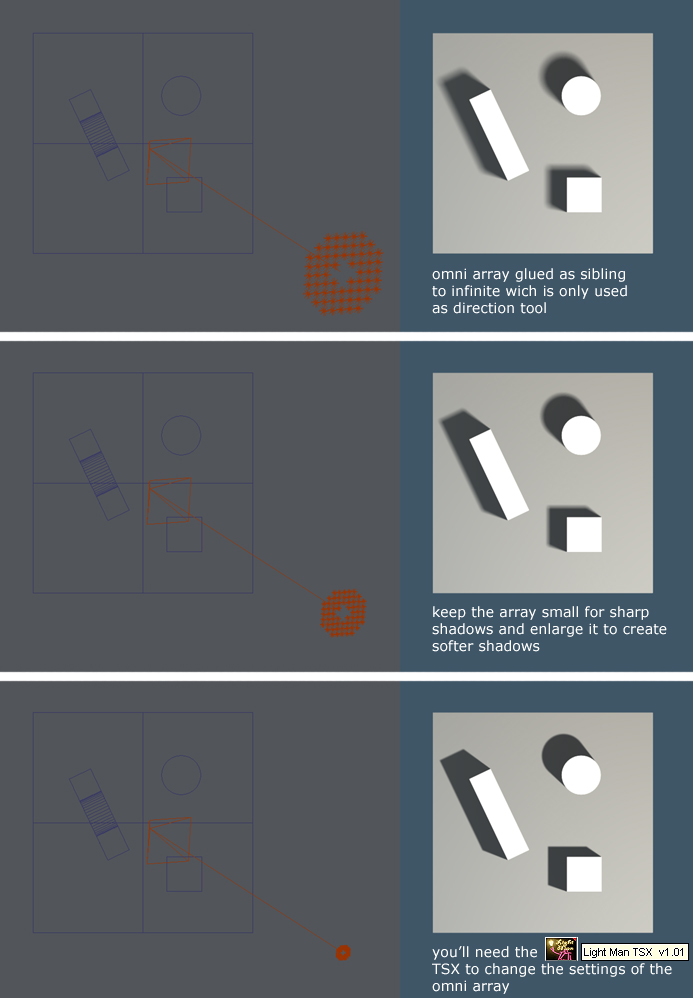
rjeff, hope this will be of any help. I use this kind of setup very often to mimic the sunlight. Works all the time.
The scene is included to do your own testing.
Cheers.
The scene is included to do your own testing.
Cheers.
- Attachments
-
- softshadow.zip
- (10.37 KiB) Downloaded 271 times
-
-
rjeff
- Master Chief Petty Officer
- Posts: 462
- Joined: 21 May 2009, 18:26
Re: Soft shadows
Thanks gys and thanks Buzz. I will load up your scene. Of all my weakness with art, and there are plenty. Lighting is my worst. I can't seem to get a grasp on it. Maybe your scene will help.
-
rjeff
- Master Chief Petty Officer
- Posts: 462
- Joined: 21 May 2009, 18:26
Re: Soft shadows
Ok two questions. One how did you make all those little lights? Did you do them one by one or is there a setting for that. Second how do you group all the lights as an object. I want to import them into my scene, but I can't seem to be able to select them all.
-
RAYMAN
- Captain
- Posts: 2547
- Joined: 21 May 2009, 18:56
Re: Soft shadows
A good place to start are photography lessons there are lots of them in the net here is a very good example with lots of tips and tricksrjeff wrote:Thanks gys and thanks Buzz. I will load up your scene. Of all my weakness with art, and there are plenty. Lighting is my worst. I can't seem to get a grasp on it. Maybe your scene will help.
http://www.photoflexlightingschool.com/"
-
rjeff
- Master Chief Petty Officer
- Posts: 462
- Joined: 21 May 2009, 18:26
Re: Soft shadows
Well Rayman it is not so much seeing the light, it is geting the lights set up in Truespace to look like lights.
-
Finis

- Captain
- Posts: 5410
- Joined: 21 May 2009, 18:26
- Type the number ten into the box: 0
- Location: America!
Re: Soft shadows
Hi RJeff,
I don't know what Rayman did to make his light array but you could try using the array tools on model side. His array looks like a disk so I would use an array tool to make a grid of lights and then delete some. The plugin he mentioned or one like it will save you from having to adjust each light independently.
To select several objects, model side, you can use a selection rectangle. Hold the Ctrl key and the left mouse button down while moving the mouse to use the rectangle. Be sure only the correct items are in the selection. You can then group them by clicking the Glue as Sibling icon.
I don't know what Rayman did to make his light array but you could try using the array tools on model side. His array looks like a disk so I would use an array tool to make a grid of lights and then delete some. The plugin he mentioned or one like it will save you from having to adjust each light independently.
To select several objects, model side, you can use a selection rectangle. Hold the Ctrl key and the left mouse button down while moving the mouse to use the rectangle. Be sure only the correct items are in the selection. You can then group them by clicking the Glue as Sibling icon.
I prefer dangerous freedom over peaceful servitude. -- Thomas Jefferson/Jean Jacques Rousseau
-
RAYMAN
- Captain
- Posts: 2547
- Joined: 21 May 2009, 18:56
Re: Soft shadows
Truespace works like it too you first have to understand the basics about lighting like spot.... area light... infinite light you can thwe advance to the more subtlerjeff wrote:Well Rayman it is not so much seeing the light, it is geting the lights set up in Truespace to look like lights.
like filling in etc......
What you see there is a trick that 3d people use for making soft lights without the penalty of long render times you would get with area lights and also
you can get a global illumination kind of effect. I say kind of because global illumination normally has to be implemented into
the render engine .. something that isnt into lightworks.
You can make these arrays with a tool from designdevils site and there is also a video on his site about it.
Another plugin keeps you in control of these objects.....
When the people dont have arrays or a lot of time for global illumination they sometimes also use the spinning light trick.
They set up a light and animate it realy fast so that it comes out as an area light but the render times are even lower.....
The plugins are called light man for control of the lightarray and the plugin point clone is used to make copies of lights on points of surfaces
the video explaines exactly how....
http://www.designdevil.de/index.php?men ... hEfpeJxA84"
-
rjeff
- Master Chief Petty Officer
- Posts: 462
- Joined: 21 May 2009, 18:26
Re: Soft shadows
Finis I did all already. For some reason I can select some of the lights, but it won't let me select all the lights.
-
trueBlue

- Captain
- Posts: 5548
- Joined: 06 Jul 2009, 22:50
- Type the number ten into the box: 10
Re: Soft shadows
Just select the NoName,4 object. As Buzz mentioned he grouped the array of lights with an infinite light.