Can a macro that is recorded of me changing a cube to red be applied to a button which says "change to red" and then each object I click after that, turns red?
Then, I might record a macro of the cube changing to green and then have a button that says "change to green" and then I click this button and the object changes to green.
Or is it easier just to code it in the link editor?
Recording a macro in truespace....then applying code
-
Rhino169

- Senior Chief Petty Officer
- Posts: 201
- Joined: 29 Nov 2009, 03:15
Recording a macro in truespace....then applying code
-
stan
- Master Chief Petty Officer
- Posts: 584
- Joined: 21 May 2009, 17:20
Re: Recording a macro in truespace....then applying code
this is just a quick example to paint the selected object..
you must have an object selected to paint then run script.
you must have an object selected to paint then run script.
- Attachments
-
- changecolor.zip
- (1.6 KiB) Downloaded 247 times
-
Rhino169
- Senior Chief Petty Officer
- Posts: 201
- Joined: 29 Nov 2009, 03:15
Re: Recording a macro in truespace....then applying code
Stan,
Thanks for the reply...
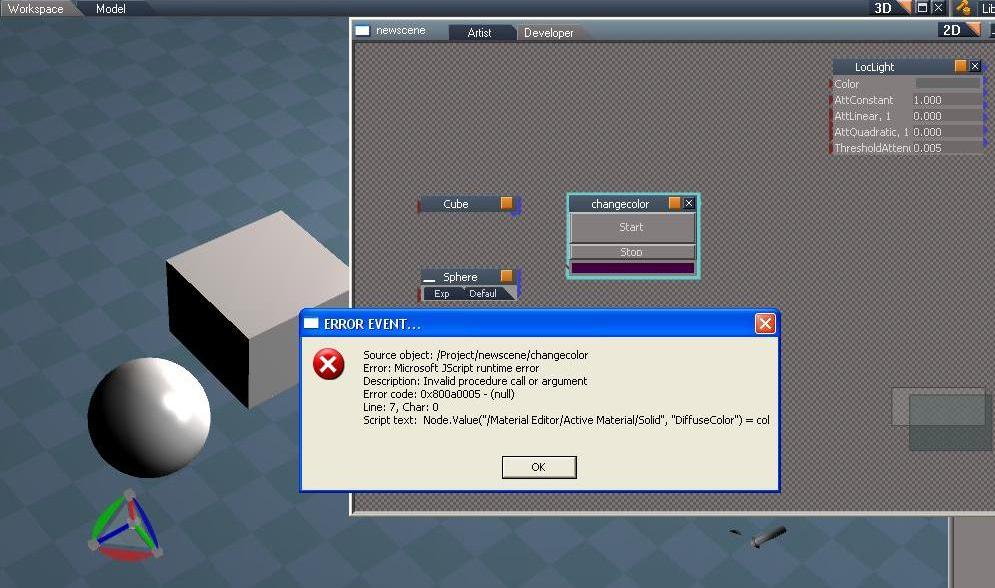
I get an error when I try to run it. I selected an object then clicked the start button. I'm sure I'm doing something wrong...
Thanks for the reply...
I get an error when I try to run it. I selected an object then clicked the start button. I'm sure I'm doing something wrong...
-
trueBlue

- Captain
- Posts: 5548
- Joined: 06 Jul 2009, 22:50
- Type the number ten into the box: 10
Re: Recording a macro in truespace....then applying code
Stan's script works for me without an error.
Here is a slightly different example.
Here is a slightly different example.
- Attachments
-
- New Compressed (zipped) Folder7ec0.zip
- (2.66 KiB) Downloaded 243 times
-
Rhino169
- Senior Chief Petty Officer
- Posts: 201
- Joined: 29 Nov 2009, 03:15
Re: Recording a macro in truespace....then applying code
trueblue...I get the same error only different.
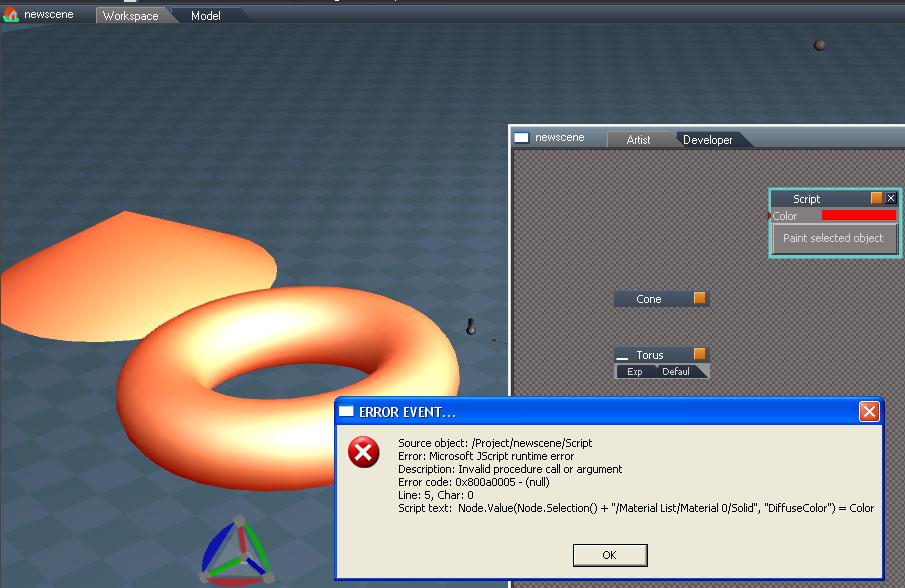
Am I loading it wrong? I drawn 2 objects, then I go to Load and navigate to the folder where the script object is and it appears in the Link Editor. I then select an object and I get the error below. Am I putting it in the proper place in the link editor?...Should it be a level above?
Am I loading it wrong? I drawn 2 objects, then I go to Load and navigate to the folder where the script object is and it appears in the Link Editor. I then select an object and I get the error below. Am I putting it in the proper place in the link editor?...Should it be a level above?
-
trueBlue
- Captain
- Posts: 5548
- Joined: 06 Jul 2009, 22:50
- Type the number ten into the box: 10
Re: Recording a macro in truespace....then applying code
Try using Workspace primitives.
-
Rhino169
- Senior Chief Petty Officer
- Posts: 201
- Joined: 29 Nov 2009, 03:15
Re: Recording a macro in truespace....then applying code
I thought I was...I am in workspace and I'm adding the "orange icon" cubes, spheres, cones, etc....it always gives me an error. 
-
trueBlue
- Captain
- Posts: 5548
- Joined: 06 Jul 2009, 22:50
- Type the number ten into the box: 10
Re: Recording a macro in truespace....then applying code
I saw that the name of your scene was named newscene. That made me think you were using the Model side. Honestly I have no idea why both scripts do not work for you. Except that both errors are most likely a path problem. In your case it is the Node.Value command. Look and compare the path with the script and your objects. I notice that Model uses a node inside the Material List named Material Chunk, 1 and Workspace uses Material 0.
-
Rhino169
- Senior Chief Petty Officer
- Posts: 201
- Joined: 29 Nov 2009, 03:15
Re: Recording a macro in truespace....then applying code
Maybe you could post a working scene to try on my end....if possible?
I will look at the path some more...I haven't had issues with other scripts I've downloaded before...but I am a novice so maybe my luck finally ran out.
I will look at the path some more...I haven't had issues with other scripts I've downloaded before...but I am a novice so maybe my luck finally ran out.
-
trueBlue
- Captain
- Posts: 5548
- Joined: 06 Jul 2009, 22:50
- Type the number ten into the box: 10
Re: Recording a macro in truespace....then applying code
Okay here you go. I tested this scene in tS761 and tPlay2 and this script works in both. You might try Resetting the Default Context.
- Attachments
-
- New Compressed (zipped) Folder1064.zip
- (105.22 KiB) Downloaded 261 times
-
Rhino169
- Senior Chief Petty Officer
- Posts: 201
- Joined: 29 Nov 2009, 03:15
Re: Recording a macro in truespace....then applying code
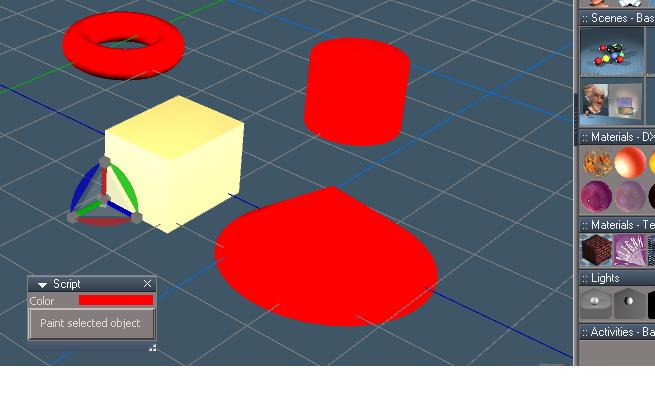
Ok Success! the objects you sent worked fine...but when I added in a new cube ..error! It is the orangish cube in the image below.
It appears I had the color set in the material editor to "Translucent Material D3D Material" so that each object I added, had that material and would give an error. It is the orange ball on the far right in the image below in the materials dx9 library.
What I did was use the eyedropper and changed the color to the red in the material editor then edited that color to a green, then colored my cube with this green diffuse color and then clicked your script color changer and it worked and made that cube red.
So I'm not sure if it is these d3d materials or textures too. Any ideas from what I've described ?
Thanks for your help! I also floated your script by dragging it out of the stack.
It appears I had the color set in the material editor to "Translucent Material D3D Material" so that each object I added, had that material and would give an error. It is the orange ball on the far right in the image below in the materials dx9 library.
What I did was use the eyedropper and changed the color to the red in the material editor then edited that color to a green, then colored my cube with this green diffuse color and then clicked your script color changer and it worked and made that cube red.
So I'm not sure if it is these d3d materials or textures too. Any ideas from what I've described ?
Thanks for your help! I also floated your script by dragging it out of the stack.
-
trueBlue
- Captain
- Posts: 5548
- Joined: 06 Jul 2009, 22:50
- Type the number ten into the box: 10
Re: Recording a macro in truespace....then applying code
The example I gave you is for the default tS761 D3D Material which is a Solid. It will only work for this material and it's DiffuseColor attribute. If you want to use a different material you will have to change the path and attribute in the Node.Value command. Unfortunately the jScript Macro Recorder does not capture everything and changing the color of the DiffuseColor attribute is one of them. Experiment with the jScript Macro Recorder by changing other attributes and study the script that it creates. There is two ways to keep in mind before recording actions. With the object Selected and Not Selected. With the object selected you can apply the script to other SIMILAR objects. Experiment and study the differences.
-
Rhino169
- Senior Chief Petty Officer
- Posts: 201
- Joined: 29 Nov 2009, 03:15
Re: Recording a macro in truespace....then applying code
I will give it a try and record a few macros.
So that is why it would error on that line of code in both scripts....because it was looking for an object that already had a diffuse attribute to begin with.....and it was changing the diffuse attribute setting...and when it found no diffuse attribute to change, it crashed..correct? (Sorry for being so basic..I just want to get my mind around it.)
My next trick will be to add 3 more color settings for the script you sent.
I would like the color selector to not be show and just be a red button. I will try to fashion the isometric view panel you made into a 4 color selector and give you a shout if I run into problems.
I assume also that a toolbar with 4 buttons could be made that activates code in the same way?
thanks for your help..
So that is why it would error on that line of code in both scripts....because it was looking for an object that already had a diffuse attribute to begin with.....and it was changing the diffuse attribute setting...and when it found no diffuse attribute to change, it crashed..correct? (Sorry for being so basic..I just want to get my mind around it.)
My next trick will be to add 3 more color settings for the script you sent.
I would like the color selector to not be show and just be a red button. I will try to fashion the isometric view panel you made into a 4 color selector and give you a shout if I run into problems.
I assume also that a toolbar with 4 buttons could be made that activates code in the same way?
thanks for your help..
-
trueBlue
- Captain
- Posts: 5548
- Joined: 06 Jul 2009, 22:50
- Type the number ten into the box: 10
Re: Recording a macro in truespace....then applying code
Here is the command in my example that gave you an error because you were using it on an object with a different material.
Node.Value(Node.Selection() + "/Material List/Material 0/Solid", "DiffuseColor") = Color
Node. Selection() = Current selected object
Material List/Material 0/Solid = The path to the material in this case the Solid node.
DiffuseColor = The attribute of the Solid node needed to change the color.
Color = The attribute created in the script that holds the color wanted.
Soooooooo if any of the above is incorrect, you will get an error.
Here is another example:
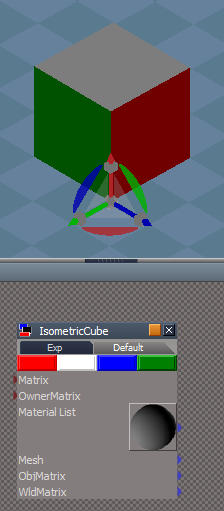
Colored buttons have a script that calls it's script that is included inside this object.
Note: Each color is painted on the Face of the Cube. Red. White, Blue, and Green. The scripts are named accordingly.
Node.Value(Node.Selection() + "/Material List/Material 0/Solid", "DiffuseColor") = Color
Node. Selection() = Current selected object
Material List/Material 0/Solid = The path to the material in this case the Solid node.
DiffuseColor = The attribute of the Solid node needed to change the color.
Color = The attribute created in the script that holds the color wanted.
Soooooooo if any of the above is incorrect, you will get an error.
Here is another example:
Colored buttons have a script that calls it's script that is included inside this object.
Note: Each color is painted on the Face of the Cube. Red. White, Blue, and Green. The scripts are named accordingly.
- Attachments
-
-
- New Compressed (zipped) Folderf565.zip
- (7.34 KiB) Downloaded 281 times
-
clintonman

- Captain
- Posts: 5659
- Joined: 21 May 2009, 21:08
- Type the number ten into the box: 0
- Location: California
Re: Recording a macro in truespace....then applying code
Maybe the problem is the type of material. Try reset the material since the scripts are assuming the "Solid" type color.
Left = blankdx material, Right=reset material
Edit: Oops, never mind. I missed the second page of this thread.

Edit: Oops, never mind. I missed the second page of this thread.
-
Rhino169
- Senior Chief Petty Officer
- Posts: 201
- Joined: 29 Nov 2009, 03:15
Re: Recording a macro in truespace....then applying code
Well that saves me about 100 hrs of tinkering!...thank you so much trueblue!
Oh and thanks clintonman...I was unsure were to go to default for the material as trueblue had mentioned to me previously.
Now one more or 3.....
1. Can this 4 button panel be on top in the workspace?
2. Can the 4 buttons be their own toolbar?
3. Can these 4 buttons appear in the object's info box under the vertice count? (SO that when I right click on an object, the info panel appears and can tell me the object name, coordinates, size, vertice count & add ----> custom attributes and these 4 buttons? So I guess my question is: Is there a way to modify the info box?
Oh and thanks clintonman...I was unsure were to go to default for the material as trueblue had mentioned to me previously.
Now one more or 3.....
1. Can this 4 button panel be on top in the workspace?
2. Can the 4 buttons be their own toolbar?
3. Can these 4 buttons appear in the object's info box under the vertice count? (SO that when I right click on an object, the info panel appears and can tell me the object name, coordinates, size, vertice count & add ----> custom attributes and these 4 buttons? So I guess my question is: Is there a way to modify the info box?
-
Rhino169
- Senior Chief Petty Officer
- Posts: 201
- Joined: 29 Nov 2009, 03:15
Re: Recording a macro in truespace....then applying code
Thanks again for the modified iso script...
I spent about an hour and was going to post an issue I was having with recording the color change I kept trying....but never seeing in the recorded script...and then I re-read your earlier post and saw how color change isn't recorded.....why is that?
I actually wanted the red color buttons to change the color to red, the green button to make the object green, etc... I will keep trying to make it work.
I think I'm having trouble making the red color button have the "color" attribute like the color selector strip does.
I spent about an hour and was going to post an issue I was having with recording the color change I kept trying....but never seeing in the recorded script...and then I re-read your earlier post and saw how color change isn't recorded.....why is that?
I actually wanted the red color buttons to change the color to red, the green button to make the object green, etc... I will keep trying to make it work.
I think I'm having trouble making the red color button have the "color" attribute like the color selector strip does.
-
Rhino169
- Senior Chief Petty Officer
- Posts: 201
- Joined: 29 Nov 2009, 03:15
Re: Recording a macro in truespace....then applying code
I believe I found my color selector here in one of your previous scripts:
vi ... 3276#p3276"
very nice!
vi ... 3276#p3276"
very nice!