I got inspired to to try some box modeling in workspace using the uv editor and some high res color images of this
airplane. Unfortunately I could only find a side color view, so I may need to try and paint my own images
for the wings. I boxed modeled starting with a cylinder shape and overlaid it over the side view and scaled the vertices
to match image. Then applied the texture using same image. A very fast way to model. Not all that pleased with the uv
editing as there are some distortions. Will continue on doing the wings and may later try redoing the uv mapping as I get better at it.
Not sure if there is a way to control size of default uv image in uv-editor, as it is distorted from the image used.
P47 Box Modeling Workspace
-
FHembree

- Master Chief Petty Officer
- Posts: 337
- Joined: 21 Feb 2011, 17:43
- Type the number ten into the box: 9
P47 Box Modeling Workspace
Last edited by FHembree on 01 Apr 2016, 17:34, edited 1 time in total.
-
FHembree
- Master Chief Petty Officer
- Posts: 337
- Joined: 21 Feb 2011, 17:43
- Type the number ten into the box: 9
Re: P47 Box Modeling Workspace
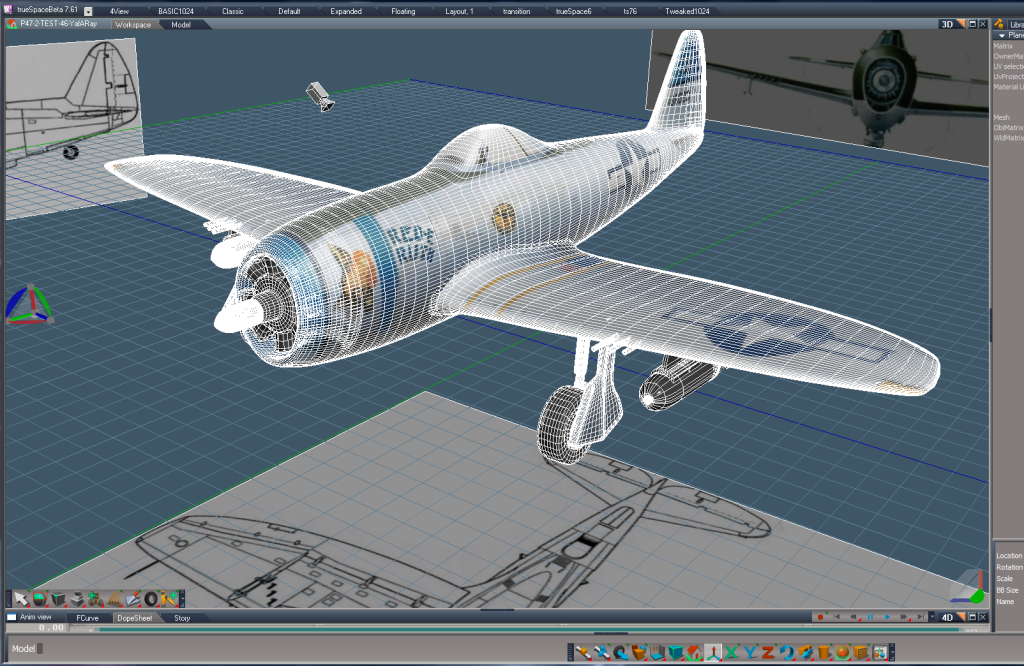
A little more progress plus a screen capture.
- Attachments
-
Last edited by FHembree on 01 Apr 2016, 17:33, edited 1 time in total.
-
FHembree
- Master Chief Petty Officer
- Posts: 337
- Joined: 21 Feb 2011, 17:43
- Type the number ten into the box: 9
Re: P47 Box Modeling Workspace
Made a little more progress by adding propeller. Only had to redo it 3 times  due to strange problems.
Good practice.
due to strange problems.Good practice.
Last edited by FHembree on 01 Apr 2016, 17:34, edited 1 time in total.
-
FHembree
- Master Chief Petty Officer
- Posts: 337
- Joined: 21 Feb 2011, 17:43
- Type the number ten into the box: 9
Re: P47 Box Modeling Workspace
A little more progress, but ran into problem I can't figure out. The left tire on land gear I can not get to be a dark texture. If I delete the tire and copy the
right tire to the left tire then left tire is black (ok), but right tire then changes color to the incorrect silver color. Very strange If I copy right tire then to
the left tire then they switch colors again
May just have to redraw from scratch.
right tire to the left tire then left tire is black (ok), but right tire then changes color to the incorrect silver color. Very strange
If I copy right tire then to the left tire then they switch colors again
May just have to redraw from scratch.
Last edited by FHembree on 01 Apr 2016, 17:34, edited 1 time in total.
-
Draise

- Captain
- Posts: 3200
- Joined: 21 Sep 2009, 19:33
- Type the number ten into the box: 0
- Location: Bogota, Colombia
Re: P47 Box Modeling Workspace
It's got a material glitch. The original may not be properly painted. If you can select the black it might still be ok.
An easy fix is selecting the wheel and repainting it with the same black.you can send it to me of you'd like. I'd take a look.
How are you copying?
Great progress btw!!
An easy fix is selecting the wheel and repainting it with the same black.you can send it to me of you'd like. I'd take a look.
How are you copying?
Great progress btw!!
-
FHembree
- Master Chief Petty Officer
- Posts: 337
- Joined: 21 Feb 2011, 17:43
- Type the number ten into the box: 9
Re: P47 Box Modeling Workspace
Draise wrote:It's got a material glitch. The original may not be properly painted. If you can select the black it might still be ok.
An easy fix is selecting the wheel and repainting it with the same black.you can send it to me of you'd like. I'd take a look.
How are you copying?
Great progress btw!!
Yea, I know it some kind of material glitch. I see the warnings highlighted in yellow when I render. Something about, "sorry material for cylinder 13, 14 and 15
already in use". I think I created the problem when I used encapsulated in 3d (or encapsulate?), when I wanted to connect 2 objects so they could be moved together.
I will just redraw the tire as it not that much work. I just couldn't find a way to undo the encapsulation other than delete and redraw.
-
Draise
- Captain
- Posts: 3200
- Joined: 21 Sep 2009, 19:33
- Type the number ten into the box: 0
- Location: Bogota, Colombia
Re: P47 Box Modeling Workspace
There is an "unencapsulate" button somewhere.
-
FHembree
- Master Chief Petty Officer
- Posts: 337
- Joined: 21 Feb 2011, 17:43
- Type the number ten into the box: 9
Re: P47 Box Modeling Workspace
I think it's called flatten history and I did use it but not sure it it did anything. I thought I could just add a new cylinder object to scene and model a new tire butDraise wrote:There is an "unencapsulate" button somewhere.
that did not work as the new cylinder inherited the same problem. So I thought maybe change to a different material before adding a new cylinder object, but that did not
make any difference. So I added a cube and that worked ok, but its a little difficult modeling a cylinder from a cube. So I ended up just inserting a tire from a different
project and that worked ok.
Anyway I will be sure and to avoid encapsulate in 3d or encapsulate, at least until I have experimented some more.
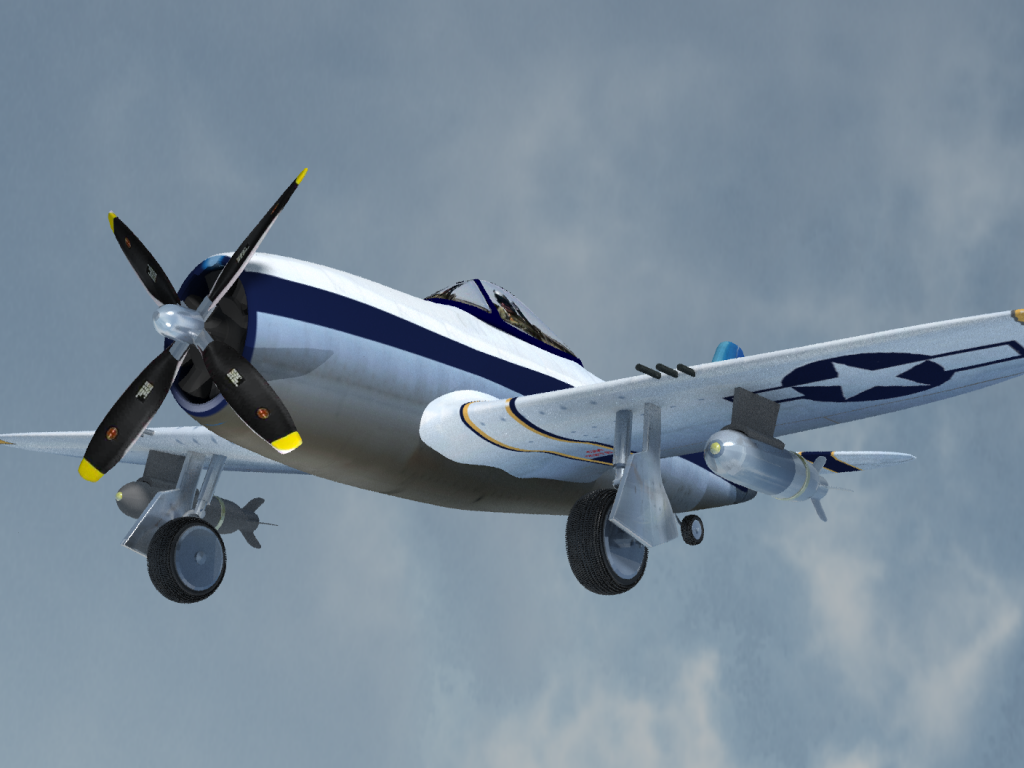
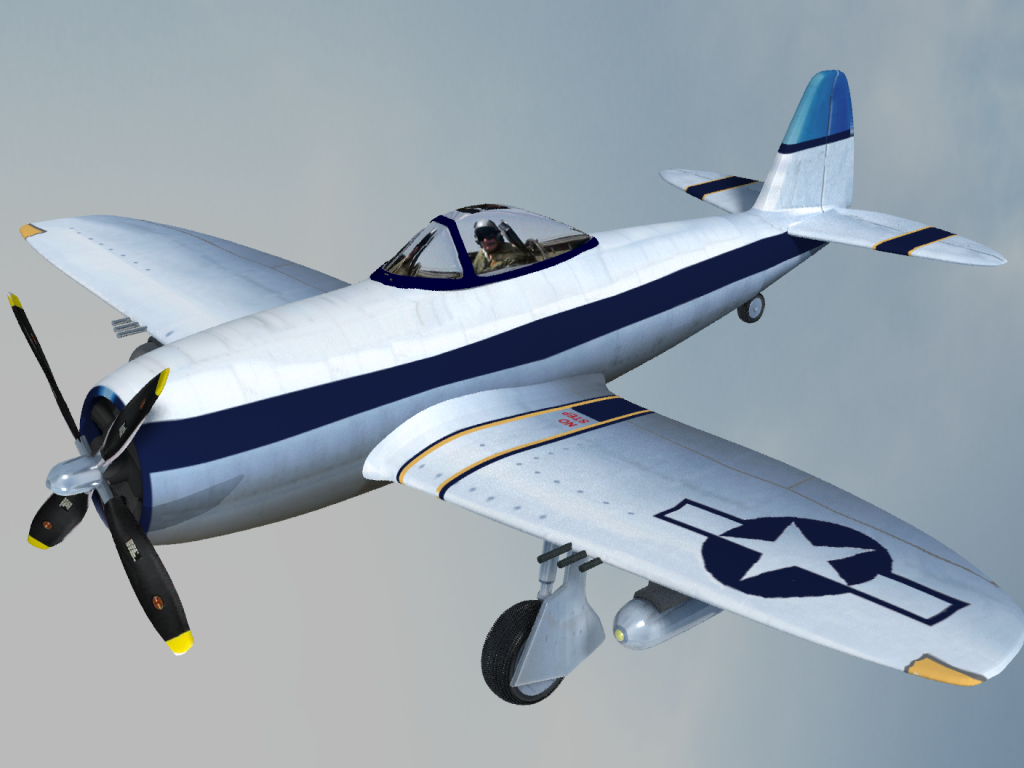
Attached is my finished model. My try to render 1 more view from a different perspective.
For now, will work less enjoyable thing, taxes, if I can find my cd.
- Attachments
-
-
-
FHembree
- Master Chief Petty Officer
- Posts: 337
- Joined: 21 Feb 2011, 17:43
- Type the number ten into the box: 9
Re: P47 Box Modeling Workspace
Yea, I found it. I needed to install the 7.61 update script.RsObjDraise wrote:There is an "unencapsulate" button somewhere.
 object.