Hi.
A question: there was an extension (if I don't remeber wrong) who helped you to create planets in TS (it gave you a quite nice looking texture that you could use).
But if I would like to do a real planet, more exactly our own planet Earth, how do I do? I guess I need a good texture and fit this to a sphere. But where do I find such a texture and how should it look like? I know that when you try to make a map of Earth, you need to use different forms of projections which give you different errors on the map. I guess my problem would be the reverse - I need to have a texture in a suiteble format and wrap it.
Any suggestions for this?
Making Earth?
-
compPanda
- Senior Chief Petty Officer
- Posts: 275
- Joined: 21 May 2009, 21:15
- Type the number ten into the box: 0
Making Earth?
-
marcel

- Captain
- Posts: 2247
- Joined: 21 May 2009, 19:52
- Type the number ten into the box: 0
- Location: paris - France
Re: Making Earth?
First create 2 spheres. one for the earth and one for the cloud (a little more big).
Use earhtmap and earthelevation for the earth and earthclouds for the cloud (for both color and alpha map). you can have a best render if you use the earthmask to create refflect only on the sea. Try earthMapatmos for more natural aspect. Use transparent shadow for the clouds.
All the textures are in the map.zip
hope that help you.
Use earhtmap and earthelevation for the earth and earthclouds for the cloud (for both color and alpha map). you can have a best render if you use the earthmask to create refflect only on the sea. Try earthMapatmos for more natural aspect. Use transparent shadow for the clouds.
All the textures are in the map.zip
hope that help you.
- Attachments
-
-
- map.zip
- (3.51 MiB) Downloaded 268 times

Design - illustration - Animation
http://www.crea-vision.fr
http://www.crea-vision.fr
-
compPanda
- Senior Chief Petty Officer
- Posts: 275
- Joined: 21 May 2009, 21:15
- Type the number ten into the box: 0
Re: Making Earth?
Whow. Thank you so much Marcel.marcel wrote:First create 2 spheres. one for the earth and one for the cloud (a little more big).
Use earhtmap and earthelevation for the earth and earthclouds for the cloud (for both color and alpha map). you can have a best render if you use the earthmask to create refflect only on the sea. Try earthMapatmos for more natural aspect. Use transparent shadow for the clouds.
All the textures are in the map.zip
hope that help you.

I was only hoping for some tip of where to find textures and here I get the whole thing in a package. Thank you very much.
-
compPanda
- Senior Chief Petty Officer
- Posts: 275
- Joined: 21 May 2009, 21:15
- Type the number ten into the box: 0
Re: Making Earth?
An question - how do I set earthmask to only reflect the sea? Which kind of shader do I use for this? Is it the reflectance part of the materiel?marcel wrote:First create 2 spheres. one for the earth and one for the cloud (a little more big).
Use earhtmap and earthelevation for the earth and earthclouds for the cloud (for both color and alpha map). you can have a best render if you use the earthmask to create refflect only on the sea. Try earthMapatmos for more natural aspect. Use transparent shadow for the clouds.
All the textures are in the map.zip
hope that help you.
-
marcel
- Captain
- Posts: 2247
- Joined: 21 May 2009, 19:52
- Type the number ten into the box: 0
- Location: paris - France
Re: Making Earth?
You can create another sphere with alpha map to have only the ocean above (just a very little big than the whole earth but less big than the cloud). Now you can use another shader only for the water more bright . Remember from space, water seem more dark because you see the reflection of the space. To create a realistic image, do your scene to have the reflect of the sun on the water. Here the water will be very clear and it contrast with the dark water. In space you have not global illumination (no atmosphere). The shadow of the earth need to be dark as the space. We don't see an entire circle.spyfrog wrote: An question - how do I set earthmask to only reflect the sea? Which kind of shader do I use for this? Is it the reflectance part of the materiel?
You can find very big texture of earth for free here:
http://visibleearth.nasa.gov/view_set.p ... d=2363&p=1
From 1 megapixel to 233 megapixels for the big format! (21600X10800) but this size is 700 megas ram

You can choose the 5000 pixels size then resize to 4000 for Truespace (max for the texture).
Design - illustration - Animation
http://www.crea-vision.fr
http://www.crea-vision.fr
-
marcel
- Captain
- Posts: 2247
- Joined: 21 May 2009, 19:52
- Type the number ten into the box: 0
- Location: paris - France
Re: Making Earth?
Sorry There is an error: the biggest size is 466 mégapixels for 1400 mega ram
Design - illustration - Animation
http://www.crea-vision.fr
http://www.crea-vision.fr
-
Karthogen
- Master Chief Petty Officer
- Posts: 454
- Joined: 03 Jun 2009, 14:12
Re: Making Earth?
It is amazing how much detail can go into something that seems so simple. when I first started this I would have seen building the planet as a sphere with a good texture. But now, you have 3 to 4 spheres, for texture, specular, clouds etc....
The Nasa Texture Marcel referenced are great. I beleive they have a disclaimer to at least metion where you got them from if used in production, comercially. You can find teh day map and even a city lights night texture.
The Nasa Texture Marcel referenced are great. I beleive they have a disclaimer to at least metion where you got them from if used in production, comercially. You can find teh day map and even a city lights night texture.
-
marcel
- Captain
- Posts: 2247
- Joined: 21 May 2009, 19:52
- Type the number ten into the box: 0
- Location: paris - France
Re: Making Earth?
...and you can use another sphere with a glow shader for the amosphere above the clouds. 
It is easier to create different object for each texture when it is possible. In other case, when object is complex (not here), you can use the separate tool to create several object from one object witch need different textures. Reality is complex even when it seem simple.
It is easier to create different object for each texture when it is possible. In other case, when object is complex (not here), you can use the separate tool to create several object from one object witch need different textures. Reality is complex even when it seem simple.
Design - illustration - Animation
http://www.crea-vision.fr
http://www.crea-vision.fr
-
Finis

- Captain
- Posts: 5410
- Joined: 21 May 2009, 18:26
- Type the number ten into the box: 0
- Location: America!
Re: Making Earth?
I made this picture with those textures some time ago. Similar techniques as above. Not sure if I used several spheres or layered textures.
- Attachments
-

I prefer dangerous freedom over peaceful servitude. -- Thomas Jefferson/Jean Jacques Rousseau
-
marcel
- Captain
- Posts: 2247
- Joined: 21 May 2009, 19:52
- Type the number ten into the box: 0
- Location: paris - France
Re: Making Earth?
Nice image finis but as i said the interest to use different textures in this case are:
-do a reflection on the ocean.
-create clouds separately (useful for anim or when you zoom)
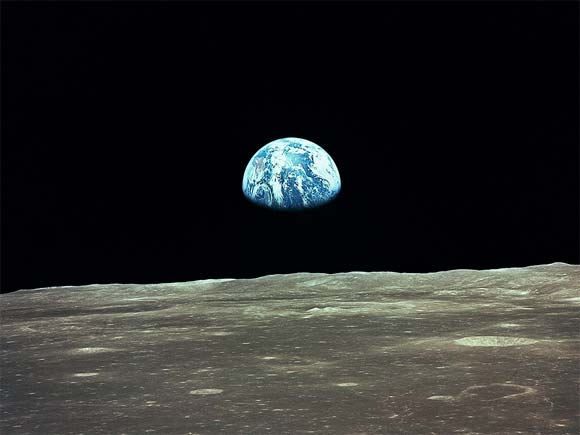
-it is impossible to see the part of the earth in the shadow, we can see only the light of the towns. With computers images we have a false idea of the reality. The only real image of the earth is that one from the moon. see the contrast between light and shadow.
-do a reflection on the ocean.
-create clouds separately (useful for anim or when you zoom)
-it is impossible to see the part of the earth in the shadow, we can see only the light of the towns. With computers images we have a false idea of the reality. The only real image of the earth is that one from the moon. see the contrast between light and shadow.
- Attachments
-
Design - illustration - Animation
http://www.crea-vision.fr
http://www.crea-vision.fr