Hi Everyone
A few months ago I opened a wavefront object in truespace 7.6 / 6 and painted it purple and then rotated it to make it darker
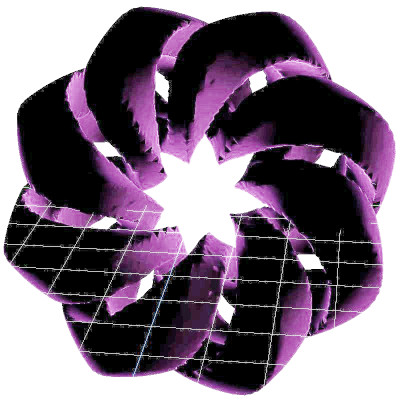
Then I manipulated it and ended up with this
Unfortunately I forgot what I did to get this effect
Please ignore the color change - what I am interested in is the "petal" effect on the manipulated image
Does anyone know what I might have done?
TIA
Truespace 7.6/6 Manipulate wavefront object
-
Unoit
- Seaman
- Posts: 5
- Joined: 04 Jul 2023, 18:58
- Type the number ten into the box: 10
Truespace 7.6/6 Manipulate wavefront object
- Attachments
-

- The manipulaed Image
-
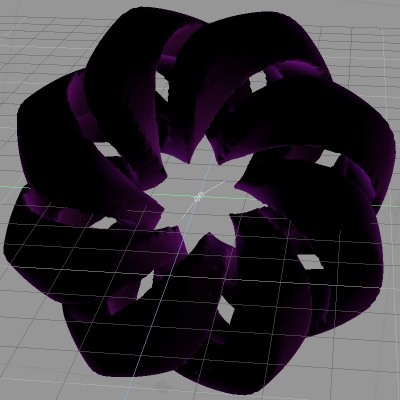
- The original Image


-
trueBlue

- Captain
- Posts: 5548
- Joined: 06 Jul 2009, 22:50
- Type the number ten into the box: 10
Re: Truespace 7.6/6 Manipulate wavefront object
Welcome to United 3D Artist Unoit 
Not sure about Wavefront in trueSpace
From your pictures it looks like maybe there are using different light setup?
Are you importing using the Obj format and if so, does it include a MTL file?
One other thing, using the Bridge from Model to or from Workspace could cause Material corruption.
Not sure about Wavefront in trueSpace
From your pictures it looks like maybe there are using different light setup?
Are you importing using the Obj format and if so, does it include a MTL file?
One other thing, using the Bridge from Model to or from Workspace could cause Material corruption.
-
Unoit
- Seaman
- Posts: 5
- Joined: 04 Jul 2023, 18:58
- Type the number ten into the box: 10
Re: Truespace 7.6/6 Manipulate wavefront object
Thanks for taking the time to reply
The wavefront object originates from MathMod - then I use AccuTrans to create Spherical UV coordinates - I save this a a new wavefront object - I don't use a mtl file - I could save it as a trueSpace COB file as well.
My trueSpace usage is fairly basic:
I use Image Browser, Eye Move, Zoom, Object Move, Object Rotate, Object Scale, Paint Object and UV Projection.
Render to File, Rendering Quality High, Scan Line or RayCast, Adaptive antialising, Multithreading, No Foreground Effects Shader.
In this case I did not use the Image Browser to select a Texture - I just painted it purple.
All I can remember is that the changes I created seemed to occur when I was using the Object Rotate tool - so I must have chosen some other tool along with this - but I have been unable to replicate this effect.
I did save the new wavefron object as a COB file in AccuTrans but it made not difference in trueSpace
I have used different versions of trueSpace off and on for twenty years and this is the only time I have seen this effect.
The wavefront object originates from MathMod - then I use AccuTrans to create Spherical UV coordinates - I save this a a new wavefront object - I don't use a mtl file - I could save it as a trueSpace COB file as well.
My trueSpace usage is fairly basic:
I use Image Browser, Eye Move, Zoom, Object Move, Object Rotate, Object Scale, Paint Object and UV Projection.
Render to File, Rendering Quality High, Scan Line or RayCast, Adaptive antialising, Multithreading, No Foreground Effects Shader.
In this case I did not use the Image Browser to select a Texture - I just painted it purple.
All I can remember is that the changes I created seemed to occur when I was using the Object Rotate tool - so I must have chosen some other tool along with this - but I have been unable to replicate this effect.
I did save the new wavefron object as a COB file in AccuTrans but it made not difference in trueSpace
I have used different versions of trueSpace off and on for twenty years and this is the only time I have seen this effect.
-
borgcone

- Chief Petty Officer
- Posts: 134
- Joined: 06 May 2018, 21:09
- Type the number ten into the box: 10
- Location: Japan, or sometimes behind a borg cube
Re: Truespace 7.6/6 Manipulate wavefront object
- fHelix2_adj1.jpg (62.46 KiB) Viewed 1280 times
There may be important hints in the manual;
Appendix C: File Formats - Wavefront Import
Last edited by borgcone on 08 Jul 2023, 07:19, edited 2 times in total.
borgcone ... or 3DfromNULL at https://biglode.com/ptsxpy
-
Unoit
- Seaman
- Posts: 5
- Joined: 04 Jul 2023, 18:58
- Type the number ten into the box: 10
Re: Truespace 7.6/6 Manipulate wavefront object
Hi
Thank you for taking the time to reply.
I am pretty sure that the wavefront object loaded correctly.
I did a large render with the original object - no problem - then I did the "manipulation" then I rendered that.
What is the max size for an attachment?
The wavefront object is 4.58 MB and the rendered png is 4.14 MB it is 6400 x 6400 Pixels
I uploaded these to mediafire
https://www.mediafire.com/file/fhqwfya1 ... A.obj/file
https://www.mediafire.com/file/jmk7yc8a ... 2.png/file
The wavefront object will need to be rotated and positioned
Thank you for taking the time to reply.
I am pretty sure that the wavefront object loaded correctly.
I did a large render with the original object - no problem - then I did the "manipulation" then I rendered that.
What is the max size for an attachment?
The wavefront object is 4.58 MB and the rendered png is 4.14 MB it is 6400 x 6400 Pixels
I uploaded these to mediafire
https://www.mediafire.com/file/fhqwfya1 ... A.obj/file
https://www.mediafire.com/file/jmk7yc8a ... 2.png/file
The wavefront object will need to be rotated and positioned
-
trueBlue
- Captain
- Posts: 5548
- Joined: 06 Jul 2009, 22:50
- Type the number ten into the box: 10
Re: Truespace 7.6/6 Manipulate wavefront object
Should be able to upload the cob or scn file here
For the obj file, add it to a zip file
For the obj file, add it to a zip file
-
Unoit
- Seaman
- Posts: 5
- Joined: 04 Jul 2023, 18:58
- Type the number ten into the box: 10
Re: Truespace 7.6/6 Manipulate wavefront object
For those that don't want to download from mediafire
Here is the wavefront object Here is the rendered png and here is the cob file
Here is the wavefront object Here is the rendered png and here is the cob file
-
borgcone
- Chief Petty Officer
- Posts: 134
- Joined: 06 May 2018, 21:09
- Type the number ten into the box: 10
- Location: Japan, or sometimes behind a borg cube
Re: Truespace 7.6/6 Manipulate wavefront object
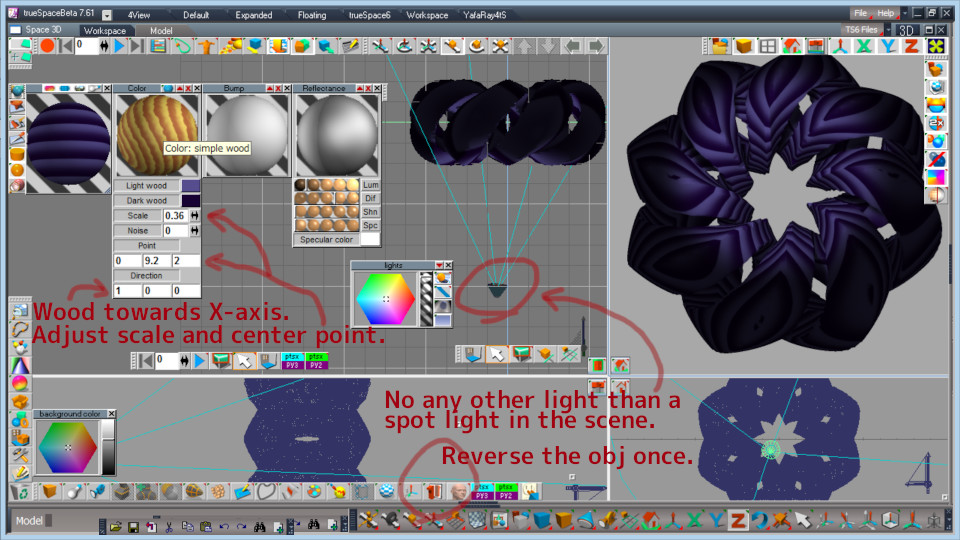
My example using "simple wood" with tS6.6 (Model side of tS7).

borgcone ... or 3DfromNULL at https://biglode.com/ptsxpy
-
Unoit
- Seaman
- Posts: 5
- Joined: 04 Jul 2023, 18:58
- Type the number ten into the box: 10
Re: Truespace 7.6/6 Manipulate wavefront object
@borgcone
Nice work - that looks pretty good - can't wait to try that out.
Thank you
Nice work - that looks pretty good - can't wait to try that out.
Thank you