Why is TS still respected..for its workflow?
Lets look at it closely...!
It had drag and drop libraries..long before the others had them..something Blender is still struggling with! It had heads up display modeling tools..widgets for everything!
A render preview window in the texture tool....list goes on and on!
Fully customisable workspace..and library for the workspaces....!
Just to name a few things!
These make life easier!
Whats it falling short in...well its the render solutions..and its the 32 bit thing that holds it back!
The modeler is still very good..! Booleans are pretty good for the age of the software!
So what would I suggest?
A render or scene setup hub of some kind to get full 64 bit scene management..and instancing...and integration into modern render solutions!
Whats probably the most likely way of doing it...well I suggest creating a hub to Blender 2.8!!!
That way TS would have access to free Prorender....otoy....Cycles..
Renderman....next to everything!
Second.... Blender needs better integration of assets!
I could imagine a hub that can be acessed from both TS and from Blender through drag and drop...!
Workflow..and TS..
-
RAYMAN

- Captain
- Posts: 2547
- Joined: 21 May 2009, 18:56
Workflow..and TS..
-
Emmanuel

- Chief Warrant Officer
- Posts: 670
- Joined: 14 Jun 2009, 06:47
Re: Workflow..and TS..
Totally agree.
Interface and workflow are 50% of the job. Tools are about 30%. Talent does the rest.
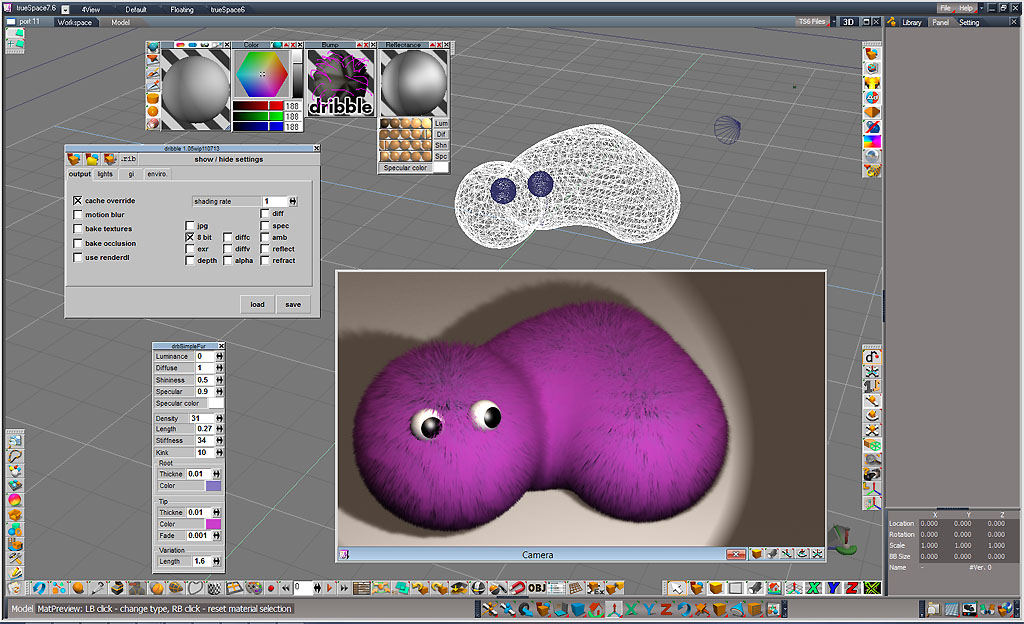
Regarding the rendering features, Simon has made an incredible thing with Dribble that allows 3Delight's 64bits renderer within a trueSpace 3D window. Although I mostly render with V-Ray and Lightworks, I still belive 3Delight is the future of tS. At least for fur, displacement mapping and lightening (soft shadows are great !).
I just installed a fresh new PC configuration, running Windows 8.1 (I don't like Win10). I will install Dribble this week and report the installation steps to make it running.
Interface and workflow are 50% of the job. Tools are about 30%. Talent does the rest.
Regarding the rendering features, Simon has made an incredible thing with Dribble that allows 3Delight's 64bits renderer within a trueSpace 3D window. Although I mostly render with V-Ray and Lightworks, I still belive 3Delight is the future of tS. At least for fur, displacement mapping and lightening (soft shadows are great !).
I just installed a fresh new PC configuration, running Windows 8.1 (I don't like Win10). I will install Dribble this week and report the installation steps to make it running.
-
Steinie

- Captain
- Posts: 2958
- Joined: 21 May 2009, 17:38
- Type the number ten into the box: 10
Re: Workflow..and TS..
I will be watching regarding your install of Dribble because i too love that rendering method.
Yes please post the steps for successful utilization.
Yes please post the steps for successful utilization.
-
bitkar

- Captain
- Posts: 2089
- Joined: 16 Mar 2010, 07:14
- Type the number ten into the box: 0
- Location: Czech Republic
Re: Workflow..and TS..
iam in with this opinion too. We need dribble to be well integrated and functional, like vray is. That would make tS great. Displacement mapping is something very useful and needed. Or the hub or anything... some kind of converter to renderers, anything. Rendering is something that needs to catch up, not the modeler. Thanks god for Vray tho.
Also some hassle-free exporter to unreal would be great. Something that would tranfer whole scene, objects, textures, even animations. So you can make some great animation in realtime if you need something fast.
yup, dreams :) we need dreams.
Also some hassle-free exporter to unreal would be great. Something that would tranfer whole scene, objects, textures, even animations. So you can make some great animation in realtime if you need something fast.
yup, dreams :) we need dreams.
Michal aka bitkar
tS freak since tS2 (1998) and forever (tS7.61 modeler)
tS freak since tS2 (1998) and forever (tS7.61 modeler)
-
RAYMAN
- Captain
- Posts: 2547
- Joined: 21 May 2009, 18:56
Re: Workflow..and TS..
Bitkar I posted that but it costs around 400 $ but its worth every penny!!!!
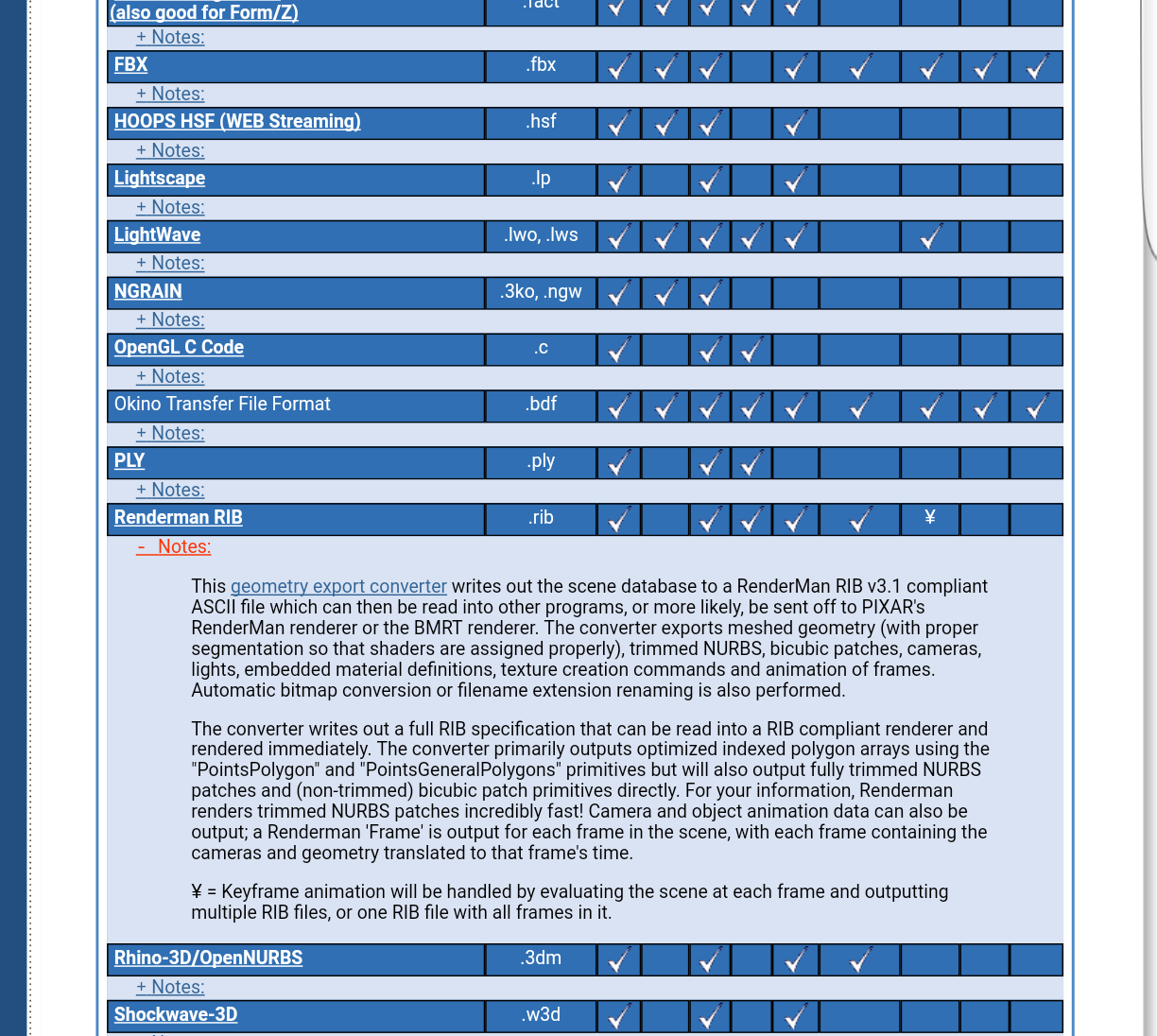
It swallows every format including TS Cob and TS Scn and backwards and exports to next to every common format including..and thats the sensation Alias formats...!Its the only one in the industry that realy works...why.. because its the only company that has the info from the industry and doesnt have to reverse engeneer! Its Okino Nugraf! Or cheaper version Okino polytrans! You can try it out for free...there is a time unlimited trial wirh restrictions..watermarks and drops every 5.poly!!!
But good enough for evaluation!!!!
I have no connection whatsoever to that company..and give me free solutuons..Ill grab them anytime even more if integrated..but I havent seen anything that works! Even the chef of Blender had to admit it..its something that they are not succeeding with because of lack of insight..to the sdk of the file formats...thats the problem...
v ... oly#p51911
https://www.okino.com/products.htm
Okino also exports to rib...which is every Renderman compliant render solution including Pixar ..Bmt or any sibling like Three delight likeDribble does!
It swallows every format including TS Cob and TS Scn and backwards and exports to next to every common format including..and thats the sensation Alias formats...!Its the only one in the industry that realy works...why.. because its the only company that has the info from the industry and doesnt have to reverse engeneer! Its Okino Nugraf! Or cheaper version Okino polytrans! You can try it out for free...there is a time unlimited trial wirh restrictions..watermarks and drops every 5.poly!!!
But good enough for evaluation!!!!
I have no connection whatsoever to that company..and give me free solutuons..Ill grab them anytime even more if integrated..but I havent seen anything that works! Even the chef of Blender had to admit it..its something that they are not succeeding with because of lack of insight..to the sdk of the file formats...thats the problem...
v ... oly#p51911
https://www.okino.com/products.htm
Okino also exports to rib...which is every Renderman compliant render solution including Pixar ..Bmt or any sibling like Three delight likeDribble does!
Last edited by RAYMAN on 20 Nov 2018, 07:49, edited 3 times in total.
-
RAYMAN
- Captain
- Posts: 2547
- Joined: 21 May 2009, 18:56
Re: Workflow..and TS..
-
RAYMAN
- Captain
- Posts: 2547
- Joined: 21 May 2009, 18:56
Re: Workflow..and TS..
This is another one that isnt so expensive..and it works sort of well too I heard but havent had the chance to test on my own!
https://youtu.be/VBZlFLPlYWQ
https://youtu.be/VBZlFLPlYWQ
-
Steinie
- Captain
- Posts: 2958
- Joined: 21 May 2009, 17:38
- Type the number ten into the box: 10
Re: Workflow..and TS..
Free Demo and $60 to purchase. I have not tried this one yet. Is this the same one you were talking about?
http://3doc.i3dconverter.com/
http://3doc.i3dconverter.com/
-
RAYMAN
- Captain
- Posts: 2547
- Joined: 21 May 2009, 18:56
Re: Workflow..and TS..
Yes it has a lot of file formats but I dont know about the quality of the converter! Thats the bummer! File format exchange especially for the advanced formats other then obj is very very problematic to say the least! While we have tons of great free apps like Daz studio..very powerfull etc and Blender etc..in and out of the programs is a pain in the neck!
Everyone who uses Blender knows that..same as Daz!
Thats the field Im testing at the moment!
Thats very very frustrating to say the least! There are no real standards! Even fbx in Blender is partly broken!
Okino is an Industry standard that the studios use like Deep was years ago..but its real big bucks! Im testing it with the trial! It is one of the few left that can read and write TS cob and SCN files with everything including animations nurbs and hierarchys intact!
But Im not through with testing yet! Since the trial is partly disabled its free for testing! I would like to see what others find..when using it with TS! I will post some results! Also going to look into the cheap io converter! Has lots of formats but my hopes for fbx etc is pretty limited!!! To be honest!
Everyone who uses Blender knows that..same as Daz!
Thats the field Im testing at the moment!
Thats very very frustrating to say the least! There are no real standards! Even fbx in Blender is partly broken!
Okino is an Industry standard that the studios use like Deep was years ago..but its real big bucks! Im testing it with the trial! It is one of the few left that can read and write TS cob and SCN files with everything including animations nurbs and hierarchys intact!
But Im not through with testing yet! Since the trial is partly disabled its free for testing! I would like to see what others find..when using it with TS! I will post some results! Also going to look into the cheap io converter! Has lots of formats but my hopes for fbx etc is pretty limited!!! To be honest!
-
bitkar
- Captain
- Posts: 2089
- Joined: 16 Mar 2010, 07:14
- Type the number ten into the box: 0
- Location: Czech Republic
Re: Workflow..and TS..
i barely remember trying it out, or looking at it. I dont remember why i didnt choose it... maybe i will take a look once more. If this really works - i mean it gets an scn with all textures, UVs, objects, lights, settings and converts it to some kind of renderer and the scene will look the same, then its awesome. But i think you always need to readjust the materials and lighting. I need some more time. I will have some vacation in near future, so i will experiment with it.
Michal aka bitkar
tS freak since tS2 (1998) and forever (tS7.61 modeler)
tS freak since tS2 (1998) and forever (tS7.61 modeler)
-
RAYMAN
- Captain
- Posts: 2547
- Joined: 21 May 2009, 18:56
Re: Workflow..and TS..
Okino works! I tried the basics! What I didnt get to work was importing instances into TS the rest is good! The price is the bummer!
-
Emmanuel
- Chief Warrant Officer
- Posts: 670
- Joined: 14 Jun 2009, 06:47
Re: Workflow..and TS..
Does it import scene animations as well (objects, vertex, etc) ?
-
Emmanuel
- Chief Warrant Officer
- Posts: 670
- Joined: 14 Jun 2009, 06:47
Re: Workflow..and TS..
Regarding 3Delight/dribble, I just installed Simon's plugin and Clinton's last update, on a fresh new PC (Windows 8.1).
It works.
Here are the steps to install 3Delight for use with trueSpace :
First, download the package that contains all the installation files you need.
Next, follow the instructions :
1. Run the 3Delight x86 installer file : 3delight-11.0.24-setup.exe
This will install the 3delight engine on your computer.
2. Run the Dribble installer file : Dribble1.04wip080808_setup.exe
This will create a dribble folder in your tS/tsx plugins folder. It will also copy some files in your trueSpace directory but also in 3delight's directory.
3. Open the zip file "Compiled3DelightShaders_Nov2013"
Manually copy all the files into your 3delight/shaders directory. It should be located here : C:\Program Files (x86)\3Delight\shaders
These are special 3delight shaders that work with trueSpace. If you don't copy these files, your objects will be rendered all grey.
3. Copy dribble1.05wip101813_ts6or7.tsx file in your tS/tsx/dribble directory
This file is the latest version of Dribble, made by Clinton.
4. Start trueSpace, clic the add extension icon, go to your tsx/dribble folder and pick up the dribble1.05 tsx.
5. RESTART trueSpace.
Now if you clic the Dribble extension icon, a toolbar will open, with 3 new render icons (Render scene, Render scene to file, Render a portion of the screen), plus an icon to export a .rib file to render your scene with an standalone RIB renderer, and button to show or hide the settings.
Have fun !
It works.
Here are the steps to install 3Delight for use with trueSpace :
First, download the package that contains all the installation files you need.
Next, follow the instructions :
1. Run the 3Delight x86 installer file : 3delight-11.0.24-setup.exe
This will install the 3delight engine on your computer.
2. Run the Dribble installer file : Dribble1.04wip080808_setup.exe
This will create a dribble folder in your tS/tsx plugins folder. It will also copy some files in your trueSpace directory but also in 3delight's directory.
3. Open the zip file "Compiled3DelightShaders_Nov2013"
Manually copy all the files into your 3delight/shaders directory. It should be located here : C:\Program Files (x86)\3Delight\shaders
These are special 3delight shaders that work with trueSpace. If you don't copy these files, your objects will be rendered all grey.
3. Copy dribble1.05wip101813_ts6or7.tsx file in your tS/tsx/dribble directory
This file is the latest version of Dribble, made by Clinton.
4. Start trueSpace, clic the add extension icon, go to your tsx/dribble folder and pick up the dribble1.05 tsx.
5. RESTART trueSpace.
Now if you clic the Dribble extension icon, a toolbar will open, with 3 new render icons (Render scene, Render scene to file, Render a portion of the screen), plus an icon to export a .rib file to render your scene with an standalone RIB renderer, and button to show or hide the settings.
Have fun !

-
Emmanuel
- Chief Warrant Officer
- Posts: 670
- Joined: 14 Jun 2009, 06:47
Re: Workflow..and TS..
I've downloaded the last version of 3Delight from https://www.3delight.com/download and installed it on top of the one from the package linked in the previous post.
It works.
3Delight claims it is faster.
It is still a bit slower than Lightworks (23% slower with same scene settings), but for the time cost you get fur, true displacement mapping, etc...
It works.
3Delight claims it is faster.
It is still a bit slower than Lightworks (23% slower with same scene settings), but for the time cost you get fur, true displacement mapping, etc...
-
bitkar
- Captain
- Posts: 2089
- Joined: 16 Mar 2010, 07:14
- Type the number ten into the box: 0
- Location: Czech Republic
Re: Workflow..and TS..
dont remember... does it support multithreading? I remember it was kinda slow, i think it used to be only single thread.
Michal aka bitkar
tS freak since tS2 (1998) and forever (tS7.61 modeler)
tS freak since tS2 (1998) and forever (tS7.61 modeler)
-
RAYMAN
- Captain
- Posts: 2547
- Joined: 21 May 2009, 18:56
Re: Workflow..and TS..
Good plugin but doesnr solve the 32 bit limit!
I would still suggest 2 things!!!!
First full exporter to and from Blender file format with everything supported including instances etc ..what is possible and how far it makes sense!!! 2. Support of Alembic format.. 3..Support of Collada from the model side..but the full compatible to Blender way!
I would like to also see drag and drop functionality from and to libraries! Why not so much fbx..? Because its more or less hit and miss..and its not open documented! Collada..is also not so easy.. because..there is also no real bullet proof standard..but if we define..that it should open and export to Blender and Daz..thats at least making it more precise and easier that way!
That way we can open TS for the future to all render solutiins and to an always free 64 bit workroom!!!
I would still suggest 2 things!!!!
First full exporter to and from Blender file format with everything supported including instances etc ..what is possible and how far it makes sense!!! 2. Support of Alembic format.. 3..Support of Collada from the model side..but the full compatible to Blender way!
I would like to also see drag and drop functionality from and to libraries! Why not so much fbx..? Because its more or less hit and miss..and its not open documented! Collada..is also not so easy.. because..there is also no real bullet proof standard..but if we define..that it should open and export to Blender and Daz..thats at least making it more precise and easier that way!
That way we can open TS for the future to all render solutiins and to an always free 64 bit workroom!!!
-
bitkar
- Captain
- Posts: 2089
- Joined: 16 Mar 2010, 07:14
- Type the number ten into the box: 0
- Location: Czech Republic
Re: Workflow..and TS..
we just need ANY way to use newer rendering technology, that can handle bigger scenes with more lights. And also displacement mapping is the future! This feature is imho the most important, it can make object look much more complex, realistic than anything with pretty much low costs in rendering time and effort.
Michal aka bitkar
tS freak since tS2 (1998) and forever (tS7.61 modeler)
tS freak since tS2 (1998) and forever (tS7.61 modeler)
-
Emmanuel
- Chief Warrant Officer
- Posts: 670
- Joined: 14 Jun 2009, 06:47
Re: Workflow..and TS..
You are right. TrueSpace cannot handle big scenes as it can't use more than 2Gb of RAM. I've tried the 4Gb patch and it doesn't seem to help.
VRay is multithreading because it operates through the Bridge.
3Delight as a standalone renderer is supposed to be multithreading also, but I don't know if Dribble allows for that. Clinton may know...
If Dribble is a bottleneck, then the RIB export may allow us to use an external renderer.
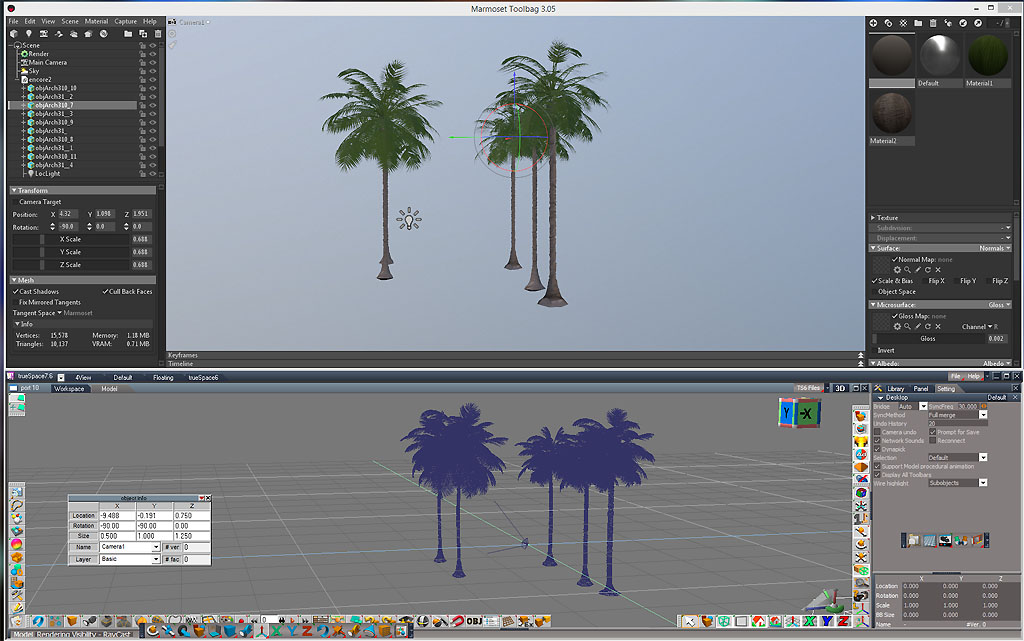
Now regarding other standalone render engines, I like Marmost Toolbag 3 interface very much. It is not expensive (132 $ with Black Friday rebate), it handles large scenes, provides with real-time rendering, offers full control over the camera, lights, etc... In brief, it only does rendering and that's all I need !
It loads OBJ files from trueSpace as Xrefs. It means you can continue to edit your mesh in trueSpace, then save it in OBJ format from time to time, and Marmoset updates the model in real time. OBJ format keeps the location of your object in the 3D space, so you objects loads in Marmoset at the exact same location as they are in trueSpace. There is no 90° flips or so.
It's almost as simple as switching from Model side to Workspace...
The only issue with OBJ is about shaders. You have to edit each shader manually in Marmoset to match what they look like in trueSpace. If your object has textures applied, basically, you have to open the Emissive panel and make sure color is set to white and glow to black.
I've got an old conversion program called Deep Exploration (it's like Polytrans) that loads entire trueSpace scenes (just have to make sure I save my .scn in tS4.3 compatibility mode) and converts it in Collada format.
Marmoset load Collada pretty well. All textures and shaders settings are saved, even lights and cameras locations (there is only a 90° rotation bug for the cameras) !
With an FBX or COLLADA export plugin in Modeler side we could have a seamless Bridge with Marmoset of similar tools...
Clinton, are you reading ?
VRay is multithreading because it operates through the Bridge.
3Delight as a standalone renderer is supposed to be multithreading also, but I don't know if Dribble allows for that. Clinton may know...
If Dribble is a bottleneck, then the RIB export may allow us to use an external renderer.
Now regarding other standalone render engines, I like Marmost Toolbag 3 interface very much. It is not expensive (132 $ with Black Friday rebate), it handles large scenes, provides with real-time rendering, offers full control over the camera, lights, etc... In brief, it only does rendering and that's all I need !
It loads OBJ files from trueSpace as Xrefs. It means you can continue to edit your mesh in trueSpace, then save it in OBJ format from time to time, and Marmoset updates the model in real time. OBJ format keeps the location of your object in the 3D space, so you objects loads in Marmoset at the exact same location as they are in trueSpace. There is no 90° flips or so.
It's almost as simple as switching from Model side to Workspace...
The only issue with OBJ is about shaders. You have to edit each shader manually in Marmoset to match what they look like in trueSpace. If your object has textures applied, basically, you have to open the Emissive panel and make sure color is set to white and glow to black.
I've got an old conversion program called Deep Exploration (it's like Polytrans) that loads entire trueSpace scenes (just have to make sure I save my .scn in tS4.3 compatibility mode) and converts it in Collada format.
Marmoset load Collada pretty well. All textures and shaders settings are saved, even lights and cameras locations (there is only a 90° rotation bug for the cameras) !
With an FBX or COLLADA export plugin in Modeler side we could have a seamless Bridge with Marmoset of similar tools...
Clinton, are you reading ?
-
clintonman

- Captain
- Posts: 5659
- Joined: 21 May 2009, 21:08
- Type the number ten into the box: 0
- Location: California
Re: Workflow..and TS..
Are you sure about that? The new 3delights are 64 bit so it shouldn't work if you installed over the older 32 bit one. I think you have both versions installed and truespace is using the older one.Emmanuel wrote: 21 Nov 2018, 13:23 I've downloaded the last version of 3Delight from https://www.3delight.com/download and installed it on top of the one from the package linked in the previous post.
It works.
...
-
clintonman
- Captain
- Posts: 5659
- Joined: 21 May 2009, 21:08
- Type the number ten into the box: 0
- Location: California
Re: Workflow..and TS..
I think older free version of 3delight was limited to 2 cores, later they expanded it to 4 and the new one looks like they increased it to 12 cores.bitkar wrote: 21 Nov 2018, 14:22 dont remember... does it support multithreading? I remember it was kinda slow, i think it used to be only single thread.
-
Emmanuel
- Chief Warrant Officer
- Posts: 670
- Joined: 14 Jun 2009, 06:47
Re: Workflow..and TS..
You are right. I see two installations of 3Delight : one in Program Files (x86) and one in Program Files, and if I rename 3Delight directory in the (x86) folder, dribble doen(t work.clintonman wrote: 23 Nov 2018, 03:35Are you sure about that? The new 3delights are 64 bit so it shouldn't work if you installed over the older 32 bit one. I think you have both versions installed and truespace is using the older one.Emmanuel wrote: 21 Nov 2018, 13:23 I've downloaded the last version of 3Delight from https://www.3delight.com/download and installed it on top of the one from the package linked in the previous post.
It works.
...
So installing the latest 3Delight version does not work. I mean, it works but Dribble is still using the old version to render
 .
.Do you know a trick to make use of the new version ?
-
clintonman
- Captain
- Posts: 5659
- Joined: 21 May 2009, 21:08
- Type the number ten into the box: 0
- Location: California
Re: Workflow..and TS..
That's too bad.I was hoping you would say it does truly work. I don't know of any way to call 64 bit code from inside a 32 bit application. The only way would be to call as an external renderer which would require a huge rewrite of dribble and it would not be integrated into truespace anymore.Emmanuel wrote: 23 Nov 2018, 08:37You are right. I see two installations of 3Delight : one in Program Files (x86) and one in Program Files, and if I rename 3Delight directory in the (x86) folder, dribble doen(t work.clintonman wrote: 23 Nov 2018, 03:35Are you sure about that? The new 3delights are 64 bit so it shouldn't work if you installed over the older 32 bit one. I think you have both versions installed and truespace is using the older one.Emmanuel wrote: 21 Nov 2018, 13:23 I've downloaded the last version of 3Delight from https://www.3delight.com/download and installed it on top of the one from the package linked in the previous post.
It works.
...
So installing the latest 3Delight version does not work. I mean, it works but Dribble is still using the old version to render
Do you know a trick to make use of the new version ?
-
trueBlue

- Captain
- Posts: 5548
- Joined: 06 Jul 2009, 22:50
- Type the number ten into the box: 10
Re: Workflow..and TS..
Has anyone tried the RIB file generated from Dribble with the 3Delight Standalone 64 bit version?
-
Emmanuel
- Chief Warrant Officer
- Posts: 670
- Joined: 14 Jun 2009, 06:47
Re: Workflow..and TS..
Yeah, it WORKS !trueBlue wrote: 23 Nov 2018, 15:54 Has anyone tried the RIB file generated from Dribble with the 3Delight Standalone 64 bit version?
I thought the i-Display standalone was broken because you can't load RIB files from the program. But the workflow is different. You should not open the standalone renderer first.
To render a RIB file made from Dribble, you just have to right-clic the RIB file in Windows Explorer to open the context-menu and clic the Render with 3delight option !

It is not only fast, it also allows for large texture rendering. I tried to paint an object in trueSpace with a photo from my Lumix G80. In trueSpace, Lightworks renders it all black because it can't handle texture files larger than 2048 pixels. Now with the standalone 3Delight renderer, I can paint with a 5200 x 3419 pixels wide texture and IT RENDERS !
Next, I've made an other test with hi polygon object. Load a cube in the scene, clic Quad Divide tool several times until my cube get 98304 faces.
- Try to render in Dribble inside trueSpace and it crashes because of the 2Gb RAM limit.
- Try to save as RIB and render from the standalone and IT WORKS !

-
trueBlue
- Captain
- Posts: 5548
- Joined: 06 Jul 2009, 22:50
- Type the number ten into the box: 10
Re: Workflow..and TS..
Awesome! Long live trueSpace!
From Clinton's notes:
use renderdl - uses the i-display driver instead of rendering to the trueSpace viewport
From Clinton's notes:
use renderdl - uses the i-display driver instead of rendering to the trueSpace viewport
- Attachments
-

-
Emmanuel
- Chief Warrant Officer
- Posts: 670
- Joined: 14 Jun 2009, 06:47
Re: Workflow..and TS..
Some remarks to save you experiment time with the Standalone 3Delight renderer and Dribble export :
- The standalone renders at the size of the trueSpace window. So if you want to define a specific size, you should open en new 3D window in your Modeler space, set its size with a right-clic on the litte red/white house to open the View options, make sure it is active, then clic the RIB export in Dribble toolbar.
- You don't have to create several RIB files each time you want to render the scene you are working on. Simply use the same file name and, in the i-Display window of 3Delight standalone, select File>Render, or press Ctrl+R and it re-loads the file to render immediatly.
- I tried to render a huge scene (360 Mb) Vray can't even render (I have to render it in two passes, foreground then background with half the objects). No miracles here. 3Delight exits.
- There is no way to render animation because the RIB export only work with current frame. Maybe an update of Dribble options panel could add the option ? Clinton, what do you think ?
- The standalone renders at the size of the trueSpace window. So if you want to define a specific size, you should open en new 3D window in your Modeler space, set its size with a right-clic on the litte red/white house to open the View options, make sure it is active, then clic the RIB export in Dribble toolbar.
- You don't have to create several RIB files each time you want to render the scene you are working on. Simply use the same file name and, in the i-Display window of 3Delight standalone, select File>Render, or press Ctrl+R and it re-loads the file to render immediatly.
- I tried to render a huge scene (360 Mb) Vray can't even render (I have to render it in two passes, foreground then background with half the objects). No miracles here. 3Delight exits.
- There is no way to render animation because the RIB export only work with current frame. Maybe an update of Dribble options panel could add the option ? Clinton, what do you think ?
-
RAYMAN
- Captain
- Posts: 2547
- Joined: 21 May 2009, 18:56
Re: Workflow..and TS..
Yes its possible.. needs one rib per frame !May I also say that Pixar Renderman is free for personal use like rendering for contests etc! Just not for payed work!!!
Instaals in Blender..loads rib and is.. most powerfull of them all!!!
https://renderman.pixar.com/login?redir ... om%2Fintro
Instaals in Blender..loads rib and is.. most powerfull of them all!!!
https://renderman.pixar.com/login?redir ... om%2Fintro
-
splinters
- Chief Warrant Officer
- Posts: 733
- Joined: 21 May 2009, 18:55
- Type the number ten into the box: 0
Re: Workflow..and TS..
Anyone managed to get Dribble working? It installed fine but just get the black screen when rendering.
-
Emmanuel
- Chief Warrant Officer
- Posts: 670
- Joined: 14 Jun 2009, 06:47
Re: Workflow..and TS..
It works for me at leastsplinters wrote: 25 Nov 2018, 21:53 Anyone managed to get Dribble working? It installed fine but just get the black screen when rendering.

Did you follow the instructions step by step Splinter ?
If you have a previous installation of 3Delight, you must uninstall AND delete all remaining files manually BEFORE making a fresh install.
Also, you may have to restart the computer between uninstall/install because I guess 3Delight is a sort of server technology.
-
bitkar
- Captain
- Posts: 2089
- Joined: 16 Mar 2010, 07:14
- Type the number ten into the box: 0
- Location: Czech Republic
Re: Workflow..and TS..
that all sounds great... I tried renderman years ago with no success to load and render RIB from dribble. I wonder if you succeed.
Can dribble be made like Vray? Vray is very well integrated.
Can dribble be made like Vray? Vray is very well integrated.
Only 90000 faces cannot be rendered??? i rendered in tS scenes/objects with more than one milion faces and it worked.Load a cube in the scene, clic Quad Divide tool several times until my cube get 98304 faces.
Michal aka bitkar
tS freak since tS2 (1998) and forever (tS7.61 modeler)
tS freak since tS2 (1998) and forever (tS7.61 modeler)
-
RAYMAN
- Captain
- Posts: 2547
- Joined: 21 May 2009, 18:56
Re: Workflow..and TS..
Renderman from Pixar is very very well integrated into Blender!!!!!
It has so many settings!!!!!
We need a Blender exporter for modelside!!!!
That takes care of all the problems!!!!!!
With scene city it even has a very affordable city generator that works well and is node based!
Even prorender is free for Blender and Otoys Oktane release 4 will be free for 2 cores for Blender not for the big 5!!!
It has so many settings!!!!!
We need a Blender exporter for modelside!!!!
That takes care of all the problems!!!!!!
With scene city it even has a very affordable city generator that works well and is node based!
Even prorender is free for Blender and Otoys Oktane release 4 will be free for 2 cores for Blender not for the big 5!!!
-
trueBlue
- Captain
- Posts: 5548
- Joined: 06 Jul 2009, 22:50
- Type the number ten into the box: 10
Re: Workflow..and TS..
splinters wrote: 25 Nov 2018, 21:53 Anyone managed to get Dribble working? It installed fine but just get the black screen when rendering.
Clinton's website:
http://clintons3d.com/plugins/truespace ... ibble.html
-
clintonman
- Captain
- Posts: 5659
- Joined: 21 May 2009, 21:08
- Type the number ten into the box: 0
- Location: California
Re: Workflow..and TS..
It looks like the "animated" rib files are already there in a none working form. Might get it working but...Emmanuel wrote: 23 Nov 2018, 18:55 ...
- There is no way to render animation because the RIB export only work with current frame. Maybe an update of Dribble options panel could add the option ? Clinton, what do you think ?
One important point is that this won't work with the newest 3Delight version. It seems to be using a new way to define scenes with nsi files so the rib files won't work with it.
-
trueBlue
- Captain
- Posts: 5548
- Joined: 06 Jul 2009, 22:50
- Type the number ten into the box: 10
-
clintonman
- Captain
- Posts: 5659
- Joined: 21 May 2009, 21:08
- Type the number ten into the box: 0
- Location: California
Re: Workflow..and TS..
Yep, that's what I've been reading. Instead of renderman rib and sl files it uses nodal scene nsi and open shading language osl files.trueBlue wrote: 29 Nov 2018, 17:25 @Clinton
https://www.3delight.com/documentation/ ... troduction
https://www.3delight.com/documentation/ ... g+NSI+file
-
RAYMAN
- Captain
- Posts: 2547
- Joined: 21 May 2009, 18:56
Re: Workflow..and TS..
Which again probably sooner then later will be part of a project..for....Blender! Sooner then one gets Dribble2!
-
trueBlue
- Captain
- Posts: 5548
- Joined: 06 Jul 2009, 22:50
- Type the number ten into the box: 10
Re: Workflow..and TS..

Would very awesome if we could export out an image and or a sequence images out of Dribble to a folder, in with which could be rendered using 3Delight 64 bit. Over coming trueSpace 7.61's 2G limit!
I may be way off here
but has anybody tried a Dribble RIB file in Blender?-
RAYMAN
- Captain
- Posts: 2547
- Joined: 21 May 2009, 18:56
Re: Workflow..and TS..
Nope because I didnt have dribble installed anymore..but Pixar Renderman is free for personal and is awsome!
I googled yesterday and found an old python plugin for Blender 2.34 called io exporter that can read and write cob and some others.. and read TS SCN! I will have a try at that one..for starters!
I will also try Dribble but that may take some time
http://scorpius.github.io/blender-plugins.htm
I googled yesterday and found an old python plugin for Blender 2.34 called io exporter that can read and write cob and some others.. and read TS SCN! I will have a try at that one..for starters!
I will also try Dribble but that may take some time
http://scorpius.github.io/blender-plugins.htm
-
Emmanuel
- Chief Warrant Officer
- Posts: 670
- Joined: 14 Jun 2009, 06:47
Re: Workflow..and TS..
I've just downloaded and installed Renderman 22 free version. That's easy : you just have to register to their forum and the ID/password are used to download the installer.
I've created a rib file (test.rib) and saved the file in the Renderman installation forder to follow this tutorial but the command line does nothing. It tells me it can't open my rib file.
Any idea ?
I've created a rib file (test.rib) and saved the file in the Renderman installation forder to follow this tutorial but the command line does nothing. It tells me it can't open my rib file.

-
RAYMAN
- Captain
- Posts: 2547
- Joined: 21 May 2009, 18:56
Re: Workflow..and TS..
Nope not that way!!! Not command line ..you need the renderman plugin for Blender its fully integrated solution like cycles! You can access it through the dropdown below cycles and Blenderrender! It can load rib through a button!!!
https://github.com/prman-pixar/RenderManForBlender
https://github.com/prman-pixar/RenderManForBlender
-
the_ant

- Chief Petty Officer
- Posts: 155
- Joined: 02 Jun 2009, 09:26
- Type the number ten into the box: 0
- Location: Perugia - Italy
Re: Workflow..and TS..
Maybe little offtopic...but want you to know ...
...that i gave a try to many others software for modeling (blender, strata, carrara, freecad, bryce) and "always back" to old "tSpace-modelside" with happiness and comfort...for me unbeatable interface and usability....(snapping elements very usefull and like no-others)....
...that i gave a try to many others software for modeling (blender, strata, carrara, freecad, bryce) and "always back" to old "tSpace-modelside" with happiness and comfort...for me unbeatable interface and usability....(snapping elements very usefull and like no-others)....
-
clintonman
- Captain
- Posts: 5659
- Joined: 21 May 2009, 21:08
- Type the number ten into the box: 0
- Location: California
Re: Workflow..and TS..
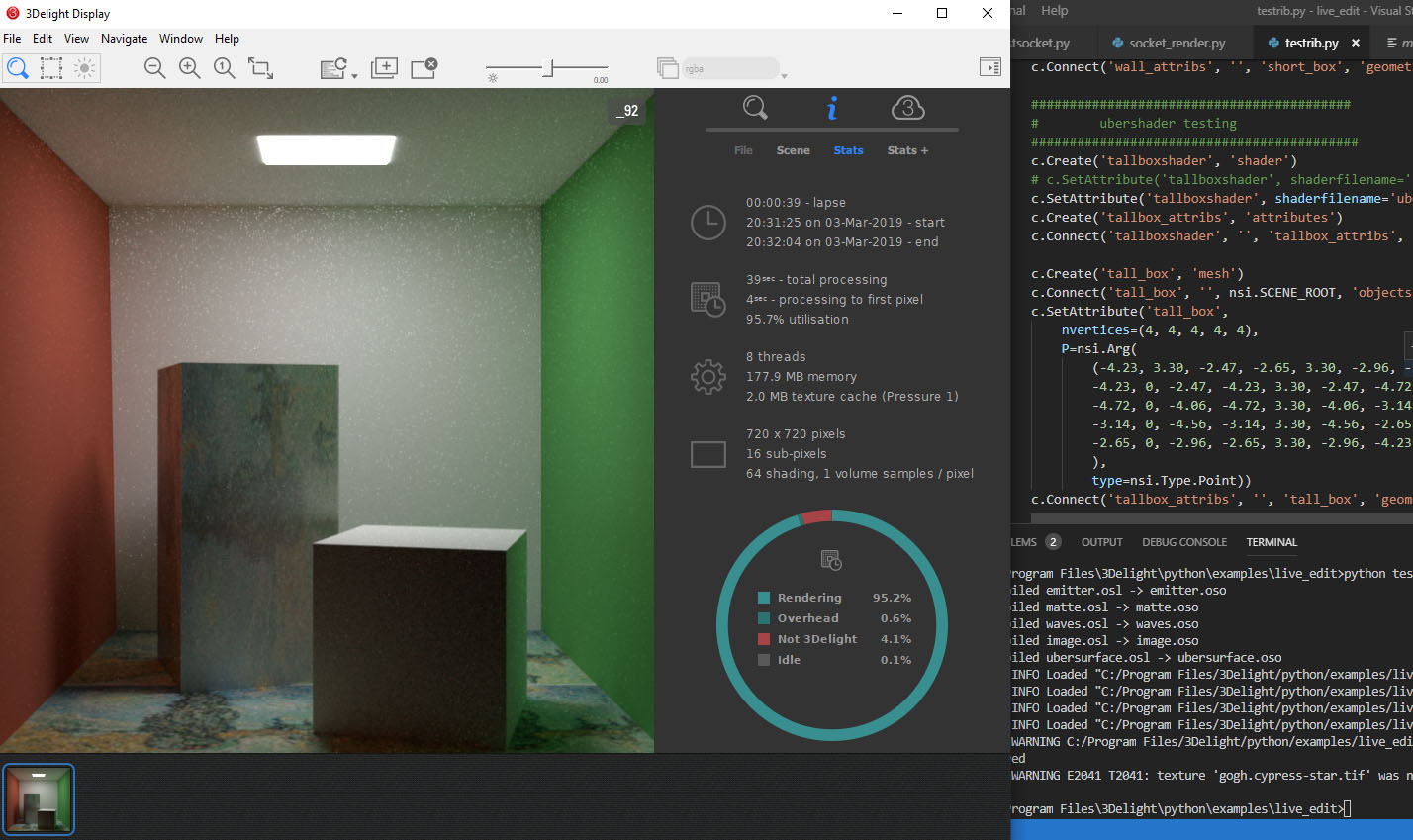
The image shows a RIB file that was manually converted to the NSI python format. Not shown is a proof of concept test I did to render from workspace via network connections called sockets. It takes text from a truespace script and sends it to a waiting python process that runs the text(literally) and renders the scene. 64bit python is needed to work with the new 3delight so it cant be done with any built in truespace python. It's neat because you can have interactive rendering, so you could do something like change the color of something in the scene, push a button and it updates the render.
-
bitkar
- Captain
- Posts: 2089
- Joined: 16 Mar 2010, 07:14
- Type the number ten into the box: 0
- Location: Czech Republic
Re: Workflow..and TS..
i read the entire "report". I dont really feel smart after that :D
Question is: Will we be able to render a scene made in tS modeler in the new 3Dlight using a short simple workflow?
Question is: Will we be able to render a scene made in tS modeler in the new 3Dlight using a short simple workflow?
Michal aka bitkar
tS freak since tS2 (1998) and forever (tS7.61 modeler)
tS freak since tS2 (1998) and forever (tS7.61 modeler)
-
clintonman
- Captain
- Posts: 5659
- Joined: 21 May 2009, 21:08
- Type the number ten into the box: 0
- Location: California
Re: Workflow..and TS..
I don't know how far I will take it, but in theory the only difference would be that it would render in a separate window instead of the truespace 3d view. Also depends on what you mean by "short simple workflow".
-
bitkar
- Captain
- Posts: 2089
- Joined: 16 Mar 2010, 07:14
- Type the number ten into the box: 0
- Location: Czech Republic
Re: Workflow..and TS..
if i save a file and load it to stand alone render app, its simple enough. If i press button, it exports a file and loads into other app which will render and display it, its even better.
If i need to save, redo all the materials for it to work and redo lighting inside other app each time or something, its not simple.
If i need to save, redo all the materials for it to work and redo lighting inside other app each time or something, its not simple.
Michal aka bitkar
tS freak since tS2 (1998) and forever (tS7.61 modeler)
tS freak since tS2 (1998) and forever (tS7.61 modeler)